2015 AUDI S3 SEDAN service indicator
[x] Cancel search: service indicatorPage 91 of 282
....,
N
0 > co
rl I.O
the malfunction corrected. If the indicator light
and the driver message do not turn off, do not
continue dr iv ing. See an authorized Audi dealer
or authorized Audi Service Facility for assistance .
rm Transmission malfunction: you can continue
driving
Drive to an authorized Aud i dealer or authorized
Aud i Service Facility immediately to have the
malfunction corrected.
rm Transmission malfunction: no reverse gear
(you can continue driving)
Drive to an authorized Aud i dealer or authorized
Audi Service Fac ility immediately to have the
malfunction corrected.
rm Transmission malfunction: You can continue
driving in D until engine off
Drive the vehicle away from moving traffic and
park. See an authorized Audi dealer or authorized
Audi Service Fac ility for assistance.
rm Transmission overheating! Please adapt
driving style
Continue driving moderate ly. When the indicator
light turns off, you can continue driving normally.
rm Transmission: Please press brake pedal and
select gear again
If the transmission malfunctions because the
temperature is too high, a message appears
when the transmission is coo led.
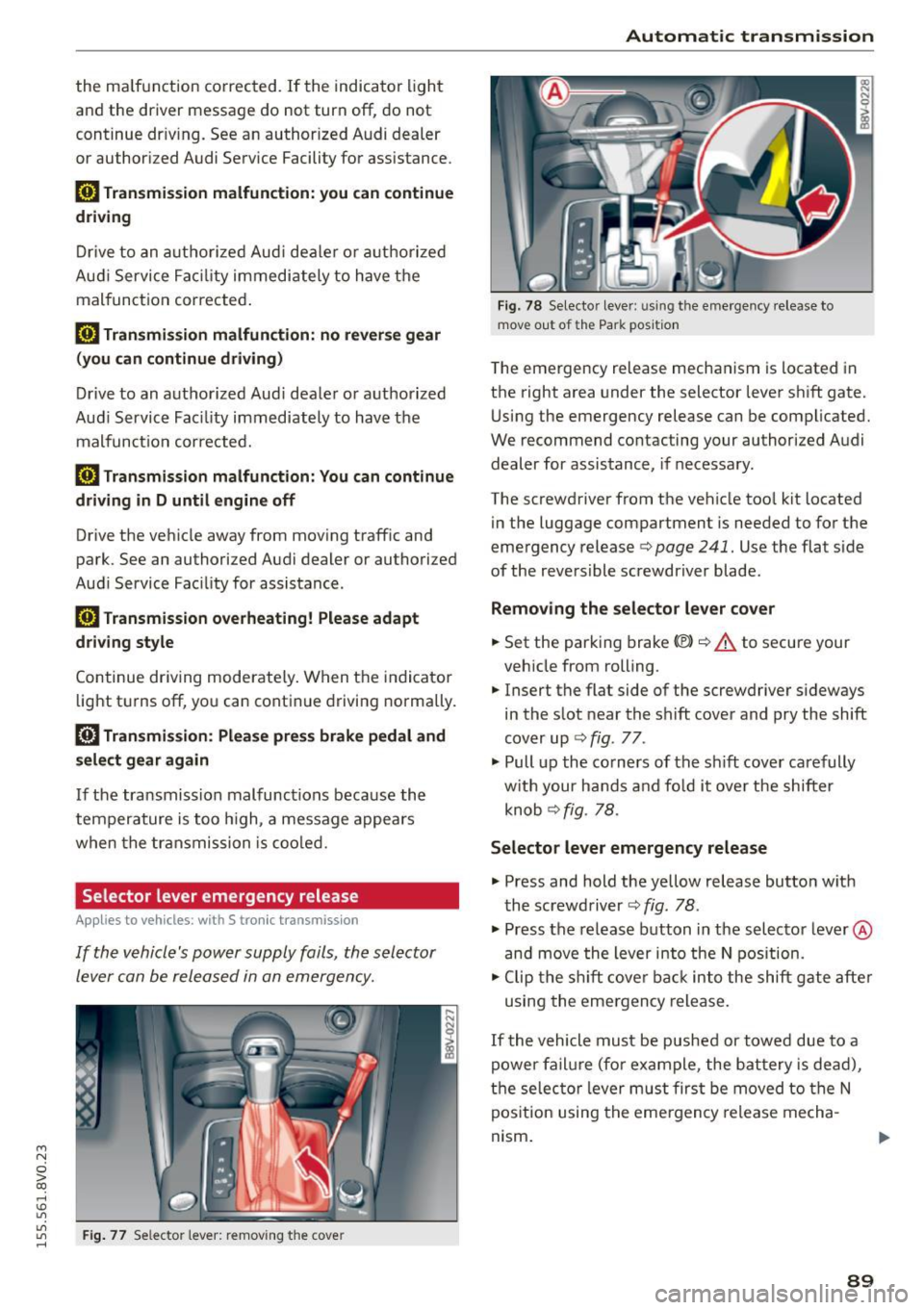
Selector lever emergency re lease
Appl ies to vehicles: with S tronic transm ission
If the vehicle's power supply foils, the selector
lever can be released in an emergency.
"'
"'
"' Fig. 77 Selector lever: removing the cove r rl
Automatic transmission
Fig. 78 Selector lever: u sing the emergency release to
move out of the Park position
The emergency release mechanism is located in
the right area under the selector lever shift gate.
Using the emergency release can be complicated.
We recommend contacting your authorized Audi dealer for assistance, if necessary.
The screwdriver from the vehicle too l kit located
in the luggage compartment is needed to for the
emergency release
c> page 241. Use the flat side
of the reversible screwdriver blade .
Removing the selector lever cover
.. Set the parking brake «Ell c> A to secure your
vehicle from rolling.
.. Insert the flat side of the screwdriver s ideways
in the slot near the shift cover and pry the shift
cover up ¢
fig. 77 .
.. Pull up the co rners of the sh ift cover carefully
with your hands and fo ld it over the shifter
knob ¢
fig. 78.
Selector lever emergency release
.. Press and hold the yellow release button with
the screwdriver ¢
fig. 78.
.. Press the release button in the selector lever ®
and
move the lever into the N position.
.. Clip the shift cover back into the shift gate after
using the emergency release.
If the vehicle must be pushed or towed due to a
power failure (for example, the battery is dead),
the selector lever must first be
moved to the N
position using the emergency release mecha
nism .
89
Page 104 of 282
Ass is t
- Always fo llow applicable traffic laws, use
common sense and select a distance to
vehicles ahead that takes the current traffic, road and weathe r cond itions into account.
(D Tips
Distance 3
is set a utomat ica lly each time you
sw itch the ignition on. It you wou ld like to
have this distance as a basic sett ing, you can
have the
adaptive cruise control menu ex
tended
I e nabled from an authorized Aud i
dea le r or a uthorized Audi Service Facility .
Setting the driving program
Applies to vehicles: with Audi adaptive cruise co ntrol
A adaptive cru ise con trol dr iving pr ogram is ad
justable on veh icles w it h out A udi drive selec t*.
• In the MMI, se lect: the
! MENU ! button> Car >
Sy stem s*
cont ro l bu tton > Driver a ssistance >
Adaptive crui se control > Driving program >
Comfort /Standard/Dynamic .
Selecting the driving mode
Applies to veh icles: w ith Audi adaptive cruise co ntrol
The adap tive c ruise control driv ing program is ad
justable for vehicles with Audi
drive select usi ng
the dr iv ing mode.
• Select the des ired driv ing mode
Comfo rt , Auto ,
Dynamic or Individual *
with the knob
¢page 112 .
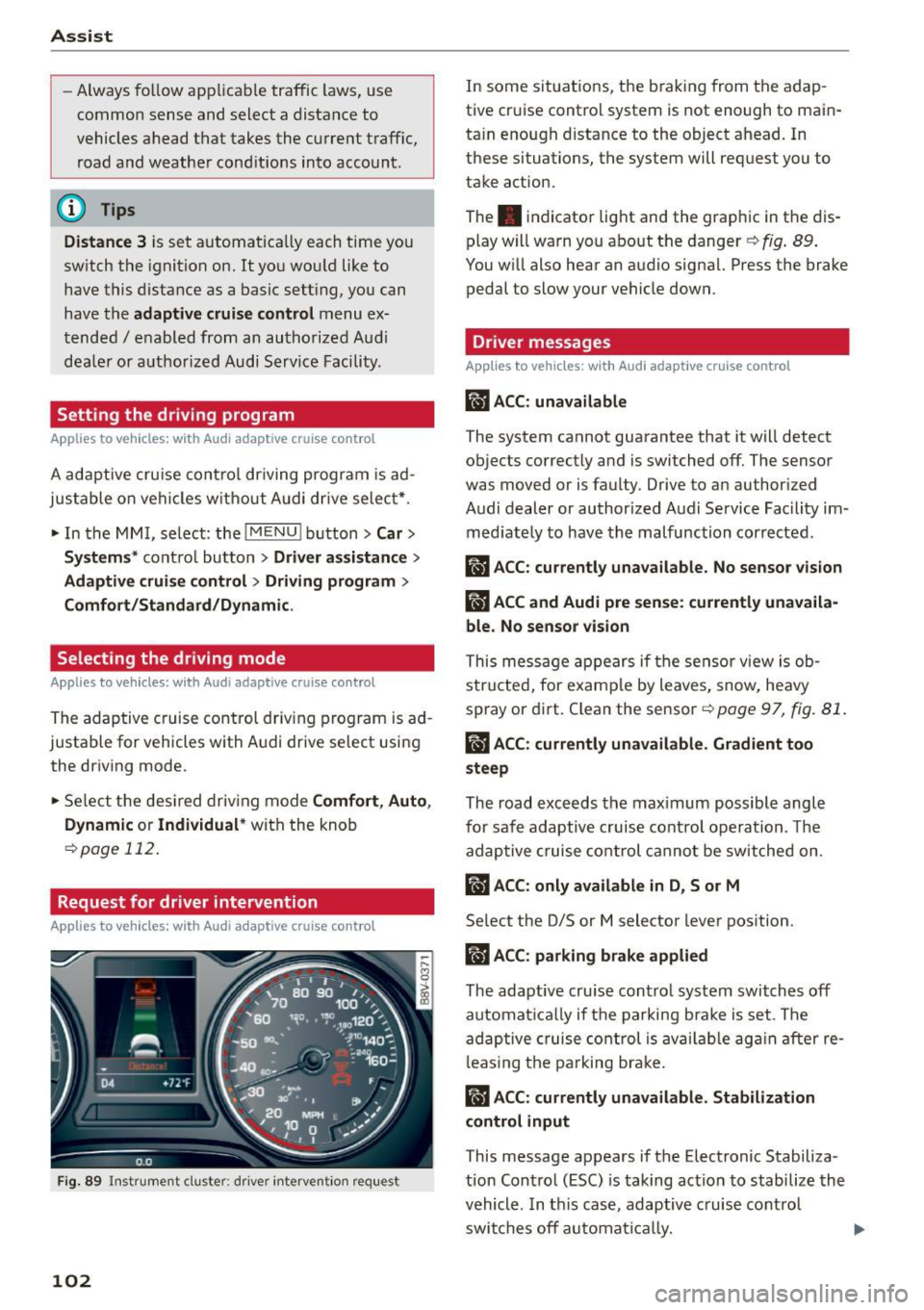
Request for driver intervention
App lies to veh icles: w ith Audi adaptive cruise co ntrol
F ig. 89 Instr ument cluste r: d river intervent ion req uest
102
In some situations, the brak ing from the adap
tive cruise control system is not enough to main
ta in enough d istance to the object ahead. In
these situations, the system will request you to
take action.
The . indicator light and the graph ic in the dis
play w ill warn you abo ut the danger ¢
fig. 89 .
You w ill also hear an audio signa l. Press the brake
pedal to slow your vehicle down.
Driver messages
App lies to vehicles: wit h Aud i adapt ive c ru ise contro l
ill ACC: unavailable
The system cannot guarantee that it will detect
objects correctly and is switched off. The sensor
was
moved or is faulty. Drive to an author ized
Audi dealer or authorized Audi Service Fac ility im
med iate ly to have the malfunction corrected.
ill ACC : currently unava ilable . No sensor vision
IIJ ACC and Audi pre sen se : currently unava ila
ble. No sensor vis ion
This mess age appears if the sensor v iew is ob
str ucted, for e xam ple by leaves, snow, heavy
spray or di rt. C lean the sensor-=>
page 97, fig. 81 .
ill ACC: currently unavailable . Gradient too
steep
The road exceeds the max imum possible angle
for safe adaptive c ruise contro l operation . Th e
adap tive cruise co ntrol cannot be switched on .
ill ACC: only available in D, Sor M
Select the D/S or M selector lever pos ition.
II) ACC: parking brake applied
The adaptive cru ise cont ro l system swi tch es off
automat ically if t he parking b ra ke is set . The
ad aptive cruise co ntrol is av ail ab le ag ain after re
l eas ing t he pa rking br ake.
II ACC : currently unavailable. Stabilization
control input
This message appears if the Electronic Stabiliza
tion Control (ESC) is taking act io n to stabilize the
vehicle . In t his case, adaptive c ruise cont rol
swi tches off automat ically.
Page 110 of 282
Assist Monochrome display
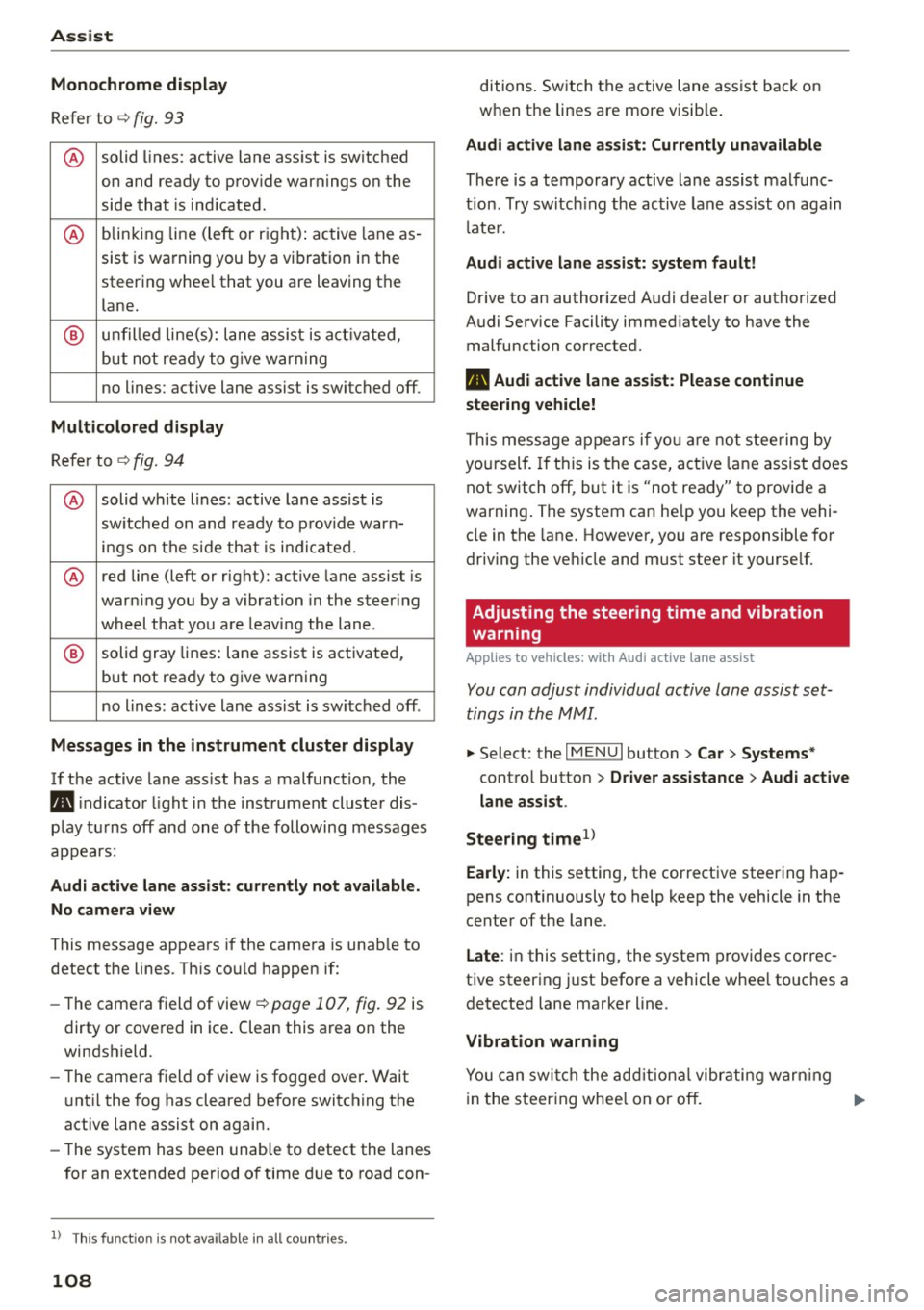
Refer to¢ fig. 93
® solid lines: active lane ass ist is switched
on and ready to provide warnings on the
side that is ind icated.
® blinking line (left or r ight): active lane as -
sist is warning you by a vibration in the
steering whee l that you are leaving the
lane.
® unfilled line(s): lane assist is activated,
but not ready to give warn ing
no lines: active lane assist is switched off .
Multicolored display
Refer to¢ fig. 94
® solid white lines: active lane assist is
switched on and ready to provide warn-
ings on the side that is indic ated.
® red line (left or rig ht): active lane assist is
warn ing you by a v ibration in the steer ing
wheel that you are leaving the lane .
® solid gray lines: lane assist is activated,
but not ready to give warning
no lines: active lane assist is switched off .
Messages in the instrument cluster display
If the active lane ass ist has a malfunction, the
ra, indicator light in the inst rument cluste r dis
play turns off and one of the following messages
appears:
Audi active lane assist: currently not available.
No camera view
This message appears if the camera is unab le to
detect the lines . Th is could happen if:
- The camera field of view ¢
page 107, fig. 92 is
dirty or cove red in ice . Clean this area on the
windshield.
- The came ra f ield of view is fogged over. Wait
u nt il the fog has cleared before switching the
active lane assist on again.
- The system has been unable to detect the lanes
for an extended period of time due to road con-
l) Thi s fun ctio n is not available in all cou ntri es.
108
ditions. Switch the active lane assist back on
when the lines are more visib le.
Audi active lane assist: Currently unavailable
There is a temporary active lane assist malfunc
tion . Try switching the active lane assist on again
l ate r.
Audi active lane assist: system fault!
Drive to an authorized A udi dealer or authorized
Audi Service Facility immed iate ly to have the
malfunction corrected.
ra, Audi active lane assist: Please continue
steering vehicle!
This message appears if you are not steering by
you rself. If this is the case, active lane assist does
not switch off, but it is "not ready" to provide a
warning. The system can he lp you keep the vehi
cle in the lane. However, you are responsible for
driving the veh icle and must steer it yourse lf.
Adjusting the steering time and vibration
warning
Applies to vehicles: with Audi active lane assist
You can adjust individual active lane assist set
tings in the MMI.
.,. Select: the I MENU I button> Car > Systems *
control button > Driver assistance > Audi active
lane assist .
Steering time
1>
Early: in this setting, the corrective steering hap
pens continuously to help keep the vehicle in the
center of the lane.
Late : in this setting, the system provides correc
tive steering just before a vehicle whee l touches a
detected lane marker line .
Vibration warning
You can switch the additional vibrating warning
i n the steer ing whee l on or off.
II>
Page 128 of 282

Intelligent Technology
& WARNING
-New brake pads do not achieve their full
braking effect during the first 250 mi
(400 km). They must be "broken in" first .
However, you can compensate for the slight·
ly reduced braking force by pressing firmly
on the brake pedal. Avoid heavy braking dur·
ing the break-in period.
- Alway apply the brakes for the purpose of
cleaning the brake system when road and
traffic conditions permit. You must not en·
danger other road users. This increases the
risk of an accident.
- On steep slopes , reduce the speed and se
lect a lower gear or lower selector lever po·
sition. Drive as little as possible while press· ing the brake pedal and avoid putting your
left foot on the brake pedal while driving.
This could cause the brakes to overheat and impair the efficiency of the brakes .
- Do not let the brakes "grind" by always
keeping your foot on the brake pedal. This
can cause the brakes to overheat, increase
wear and increase braking distance unneces·
sarily.
- Certain weather and operating conditions
such as driving through water, driving in
heavy rain or driving after washing your
ve·
hide can impair the effectiveness of the
brakes. In the winter, ice may build up on
the brake pads, rotors and drums. Check
these components by braking carefully. Ap·
plying the brakes carefully several times
dries the brakes and removes ice build-up .
- The efficiency of the brakes can also be im·
paired by driving for long stretches on roads
covered with salt without using the brakes.
You can
remove salt deposits from the brake
rotors and pads by carefully applying the
brakes several times.
- If the front spoiler is damaged or you install
another spoiler, make sure the front wheel
brakes are ventilated properly . Otherwise,
the brake system could overheat, which re·
duces their effectiveness.
- Failure of a brake circuit impairs braking
performance, which increases braking dis·
126
tance. Avoid driving the vehicle and have it
towed it to the nearest authorized Audi
dealer or authorized Audi Service Facility .
- Never let the vehicle roll while the engine is
stopped because this increases the risk of an
accident .
-If the brake booster is not working, you will
have to press much harder on the brake ped·
al to compensate for the lack of the booster .
(D Note
-Never let the brakes "rub" by pressing the
pedal lightly when braking is not really nee·
essary. This causes the brakes to overheat
and increases braking distance and causes
wear .
- Before driving on a long stretch with steep
slopes, reduce your speed and shift to the
next lower gear This makes use of the en·
gine braking effect and relieves the brakes .
If you need to brake additionally, brake in
intervals and not continuously.
(D Tips
-If the brake booster is not working, you
must press the brake pedal with much more
force then normal.
- If you retrofit your vehicle with a front spoil·
er, wheel covers or similar items, make sure
that the air flow to the front wheels is not
interrupted. Otherwise the brake system
can become too hot.
Electromechanical
steering
The electromechanical steering supports the
driver's steering movements .
Power steering adapts electronically based on
the vehicle speed.
T he vehicle still has full steering functionality if
the power steering fails or when the engine is
stopped (towing). To steer, you must apply much
more force than usual.
Indicator lights and messages
• Do not drive vehicle: steering defective
Page 129 of 282
M N
0 > co ,...., \!) 1.1'1
1.1'1
1.1'1
,....,
If th is indicator light turns on and stays on and
this message appears, the power steering may have failed .
Do
not continue driving. See an authorized Aud i
dea ler or autho rized Audi Service Facility for as
sistance.
• Do not drive vehicle: steering defective
There is a malfunction in the electron ic steering
l ock. You cannot turn the ignition on .
Do
not tow your vehicle because it cannot be
steered. See an authorized Aud i dealer or author
ized Audi Service Fac ility for assistance .
'-:r,ij Steering malfunction: you can continue driv
ing
If the indicator light turns on, the steering whee l
may be more difficult to move or more sensitive
than usual. The steering wheel may also be at an
angle when dr iving straight.
Drive slow ly to an authorized Audi dealer or au
thor ized Audi Se rvice Facility to have the ma l
function corrected.
!II Steering lock: system fault! Please contact
Service
There is a malfunct ion in the electron ic steering
l oc k.
Drive to an authorized Aud i dealer or authorized
Aud i Service Facility immediately to have the
malfunction corrected.
_& WARNING
-
Have the system malfunction corrected as
soon as possible by an authorized Audi dealer
or authorized Audi Service Faci lity, as th is in
creases the risk of an accident .
(D Tips
If
the . or ,-:r-n indicator light only stays on
for a short time, you may continue driving.
Intelligent Technology
All wheel drive (quattro)
Applies to vehicles: with all w heel drive
In all wheel drive, all four wheels are powered.
General information
In all wheel dr ive, the dr iv in g power is divided be
tween all four whee ls . T his happens automatical
ly depending on your driving behavior as well as
the current road conditions . Refer to¢
page 123,
Electronic stabilization control (ESC).
The all wheel drive concept is designed for high
engine power. Your vehicle is exceptionally pow
erfu l and has excellent driving characteristics
both under normal driving conditions and on
snow and ice. Always read and follow safety pre cautions
q ,& .
Winter tires
By using all wheel drive, your vehicle has good
forward motion with standard tires in winter con
ditions. However, in winter we recommend using
winter or all season tires on
all four wheels, be
cause this will improve the
braking effect .
Snow chains
If
there are snow chain laws, snow chains must
also be used on vehicles with all wheel drive
q page 230, Snow chains.
Replacing tires
For vehicles with all wheel d rive, only wheels wi th
the same rolling circumference should be used.
Avoid wheels with different tread depths
qpage 221.
Offroad vehicle?
Your Audi is not an offroad vehicle -there is not
enough ground clearance. For this reason, avoid
difficult terra in. Refer to¢
page 259.
_& WARNING ~
-Also, in vehicles with a ll wheel drive, adapt
your driving style to the current road and
traffic cond itions . Do not let the increased
safety provided tempt you into taking risks.
- The braking ability of your veh icle is limited
to the tract ion of the wheels. In th is way, it
127
Page 198 of 282

Checking and Fill in g
Ad Blue is the market ing name for Diese l Exhaust
Fl uid (DEF) .
The AdBlue is carried in a separate tank in the ve
h icle. The AdB lue usage acco unts for approxi
mately 0.5% to 1.2% of the diesel fuel that is
used .
When a message about refil ling the Ad Blue ap
pea rs in the instrument cluster disp lay, yo u must
refill the AdBlue yourself or have it refilled by an
authorized Aud i dealer or authorized Audi Se rvice
Facility ¢
page 197 .
A WARNING
Failure to heed Ad Blue refill information in
the instrument cluster can prevent the vehicle
from be ing started and driven. If the veh icle
cannot be driven and an emergency arises,
personal in ju ry can occur.
-Always have the Ad Blue tank refilled well before the tank runs d ry.
(D Tips
-
- The instrument cluster display indicates the
distance remaining that can be driven
¢ page 196. If the AdBlue tank is com
plete ly empty, the engine w ill not start
again after the ig nition is switched off.
- Ad Blue is required by law to operate this ve
hi cle.
Messages in the instrument cluster display
Applies to vehicles: with diesel engine
The display indicates if the Ad Blue level is low or
if there is a system malfunction .
Fig. 1 52 In stru ment cl uste r: ind ic a tor in th e disp la y
196
AdBlue level low
You w ill be informed if the Ad B lue in the tan k
drops below a certa in leve l.
Ad Blue /;, Please refill AdB lue . Range
1500 mi (2400 km )
This message appears when there is only enough
AdBl ue left to d rive the distance ind icated in the
drive r information system. Fill the Ad Blue.
AdBlue /9 Refill AdBlue! No restart in
600 mile s (1000 km )! See owner' s manu al
T his message appears when there is only eno ugh
Ad B lue left to drive the distance ind icated in the
dr iver information sys tem. Fill the Ad Blue. Other
wise the engine w ill not start again if you stop it
once the distance indicated has been driven . As
l ong as the indicator light is on, yo u
can check t he remain ing range in the tr ip com
p uter*.
Refill Ad Blu e! Engine start not po s
sible! See owner 's m anual
This message appears w hen the Ad Blue tank is
empty . Fill the Ad Blue. Otherwise you will not be
able to start the eng ine again once you stop it .
The Ad Blue must be refilled when the amount in
the tank has reached the minimum level
¢ page 197, Filling theAdBlue .
¢4 tncorrect filling /system malfuncti on
A message appears if the Ad Blue ta nk was fi lled
with a f lu id other than Ad Blue and the system
has detected that the tank was filled incorrect ly,
or if there is a system malfunction.
AdBlue ./' AdBlue: System fault! No restart in
600 miles (1000 km ). See owner's manual.
This message appears when it is on ly possible to
drive the distance indicated in the driver informa
tion system . Drive to the nearest authorized Aud i
dealer or author ized A udi Service Facility to have
the malfunct ion corrected. O therwise the engine
will not sta rt again if you stop it once the dis
tance indicated has been d riven .
Ad Blue: system fault . Engine start
not possible! See owner 's manual
Page 204 of 282

Checking and F ill in g
Using the proper engine o il is important for the
functionality and service life of the engine. Your
engine was factory-fi lled w ith a high-quality o il
which can usually be used throughout the ent ire
year.
@) Note
Your L imited New Vehicle Warranty does not
cover damage or malfunctions due to failure
to follow recommended ma intenance and use
requ irements as set forth in the Audi Ow ne r's
Manual and Wa rranty
& Ma intenance booklet .
- Use only a high quality eng ine oil t hat ex-
pressly comp lies w ith the Audi o il quality
standard specified for your vehicle's e ngine .
Using a ny other oil can cause se rious engine
damage.
- Do not mix any lubricants o r othe r addit ives
i nto the engine oil. Doing so can cause en
g ine damage.
(D Tips
If you need to add oil and there is none availa
ble that meets the Audi o il quality standard
y o ur eng ine requires, you m ay add a total of
no more than 0.5 quart/li ter o f a h igh-quali ty
"synthet ic"oil that meets the fo llowing speci
fications .
- V ehicles wi th gasoline engine: AC EA A3 o r
API SM with a viscosity grade of SAE 0W- 30,
SAE SW -30 or SAE SW-40 .
- Vehicles with d iesel engine: ACEA C3 o r
API CF with a viscosity g rade of SAE 0W-30
or SAE SW-30.
- Fo r more information abo ut engine oi l t h at
has been approved for your vehicle, please
contact either your a uthorized Audi dea ler
or Audi Customer Relations at
1 (800) 822-2834 or visit ou r web site at
www.aud iusa.com or www .aud icanada .ca.
Engine oil consumption
The engine in your vehicle depends on an ade
quate amount of oil to lubricate and cool all of
its moving parts .
In order to provide effective lubrication and cool ing of in ternal engine components, all internal
202
combust ion engines consume a certa in amoun t
of oil. Oil consumptio n varies from engine to en
gine and may change sign ificant ly over the li fe of
the engine . Typically, eng ines with a specif ied
break-in period (see
¢ page 70) consume more
o il dur ing the break-in per iod than they consume
after oil consumption has s tabilized .
Under normal cond itions, the rate of oil con
sump tion depends on the quality and viscos ity of
the oil, the RPM (revolutions per minute) at
wh ich the engine is operated, the ambie nt tem
perature and road cond it ions . Furthe r facto rs a re
t h e amo unt of o il di lution from water conde nsa
t ion or fue l residue and the ox idat ion leve l o f the
o il. As any engine is s ubject to wear as mileage
builds up, the oil consumption may increase ove r
time unt il rep lacement of wo rn components may
become necessary.
With a ll these va riab les coming into p lay, no
standard rate of oil consumption can be estab
li shed or spec ified. There is no alte rnative to reg
ul ar and frequent checking o f the oil leve l, see
Note .
If the yellow engine oi l level warning sym bo l Ill
in the instrument cluster lights up, yo u should
check the o il level as soon as possible
¢ page 203. Top off the oil at your earliest con
venience
¢ page 203.
A WARNING
Before you c heck anythi ng in the eng ine com
partment, always read and heed al l WAR N
IN GS ¢page 198.
(D Note
Driving w it h an insufficient o il level is likely to
cause severe damage to the engine.
(D Tips
- The oil pressure warning d isplay. is not
an indicator of the oil level. Do not rely on
it. Instead, check th e oil level in your en
gine at regular intervals, preferably each
time you refuel , and alway s before going
on a long trip.
Page 215 of 282

M N
0 > co ,...., \!) 1.1'1
1.1'1
1.1'1
,....,
Resetting the indicator
Your authorized Audi dealer or authorized Audi
Service Facility will reset the service interval dis
play after performing service.
If you perform an oil change yourself to the Audi
specifications, you must reset the service interval
display.
To reset the display, select the
I MENU I button>
Car > Systems* control button > Service & con
trol
> Service intervals > Reset oil change inter
val.
(1) Note
- Only reset the oil change indicator if the oil
was changed.
- Following the service intervals is critical to
maintaining the service life and value of
your vehicle, especially the engine. Even if
the mileage on the vehicle is low, do not ex
ceed the time for the next service.
- Calculating the time to the next oil change
is interrupted when the vehicle battery is
disconnected. If the vehicle is not driven for
a long period of time, check the mainte
nance schedule so that you can follow the
maintenance intervals.
Checking and Filling
213