2015 AUDI S3 SEDAN cruise control
[x] Cancel search: cruise controlPage 105 of 282

M N
0 > co ,...., \!) ..,.,
..,.,
..,., ,....,
llJ ACC off: manu al cont rol!
This message appea rs if the veh icle rolls back
when sta rting on a slight incline, even tho ugh
ACC is active. Press the brake pedal to prevent
the vehicle from rolling or starting to move.
IIJ ACC : engin e speed
This message appears if the driver has not shifted
up or down in time when the adaptive cruise con
trol is braking or accelerating, causing the vehicle
to exceed or to not reach the permitted eng ine
speed. The adapt ive cr uise control turns off. A
chime sounds as a reminder.
•••
Three wh ite dots appear if a setting cannot be se
lected with the operat ing lever . For example, this
happens if adaptive cruise control cannot be act i
vated when stopped because the dr iver has not
fastened the safety belt.
Doo r op en
Adaptive cruise control cannot be switched on
when the vehicle is stationary and the dr iver's
door is open.
Audi pre sense
Introduction
Applies to vehicles: with Audi pre sense bas ic or Audi pre
sense front
W ith in the limits of the system, p re sense basic
and p re sense fro nt can initiate steps to protect
veh icle o ccupants i n certa in dangerous s itua
tions.
Critical driving situat ions can be recognized by
the pre sense front v ia a network of differe nt ve
h icle systems and can take steps to prepare the
veh icle occ upan ts for a po ten tial coll is ion.
The pre sense front wo rks with a radar sensor and
a video camera*. It also functions within t he lim
i ts of the system when adapt ive cr uise con trol* is
sw itched off.
A ss is t
General information
General information
Applies to vehicles: wit h Audi pre sense front or A udi ada ptive
cruise control
_&. WARNING
A lso follow the gene ral info rmation found on
~ page 9 7, General information.
Audi pre sense basic
Description
App lies to vehicles: wit h Aud i pre sense basic
The function of the pre sense basic is activated at
a speed of 20 mph (30 km/h) or higher .
The following functions can be triggered under certain conditions within the limits of the sys
tem:
- Tensioning of the safety belts (for example,
during heavy braking): the front safety belts
have reversible belt pretensioners. If a col lision
does not occur, the safety belts loosen slightly
and are ready to trigger again .
- Closing the windows and the sunroof* (for ex
ample, when over- or understeering): the w in
dows and the sunroof* close until there is only
a small gap open .
Audi drive select: the deployment time is adapt ed in dynam ic mode.
_&. WARNING ~
The pre sense basic cannot overcome natural
physical laws . It is a system des igned to assist
and it cannot p revent a coll ision. Do not let
the increased safety provided tempt you into
taking r is ks. Thi s co uld inc rease your risk of a
collis ion .
- The system can dep loy incorrectly due to
system-specific limits .
(D Tips
-Certa in p re sense bas ic functions switch off
when ESC is switched off (sport mode) o r
w hen driving in reverse. .,.
103
Page 106 of 282
Ass is t
- The pre sense basic functions may not be
available if there is a malfunction in the ESC
system or the airbag control module.
- Note that with pre sense basic, the reversi·
ble safety belt pretensioner on the front
passenger's side deact ivates when the front
passenger's airbag is deactivated .
Audi pre sense front
Description
Applies to vehicles: with Audi pre sense front or Audi adaptive
cruise control
Pre sense front informs you if the d istance to the
vehicle ahead falls below the safe distance for a n
extended per iod of time.
It c an warn of a possi·
b le co llision and initiate braking maneuvers,
within the limits of the system.
When detected in time, the system can assess
dangerous situations whe re a n object ahead
b rakes s udden ly or if you r own vehicle is traveling
at a high speed and approaching an object t hat is
moving more s lowly . If detection is not possible ,
then pre sense front does not re act .
Warnings
Applies to vehicles: with Audi pre sense front or Audi adaptive
cruise control
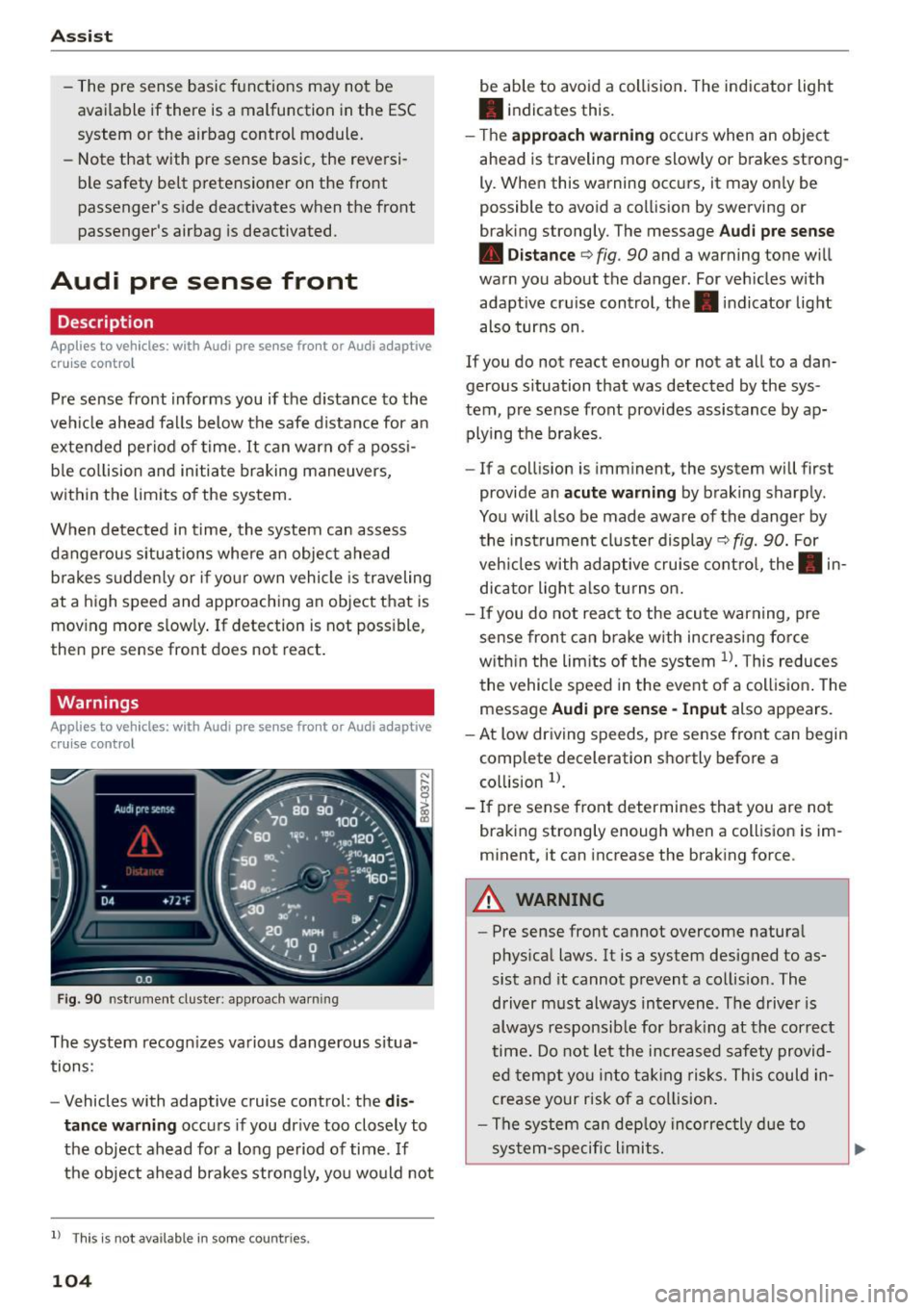
F ig . 90 nst rument clus te r: app roac h warn ing
The system recogn izes va rious dangerous situa
tions:
- Vehicles with adaptive cruise control: the
dis
tanc e warnin g
occurs if you dr ive too closely to
the object ahead for a long period of time .
If
the object ahead brakes strong ly, you would not
l l Thi s is no t ava ilab le i n so me c oun tries .
104
be able to avoid a collision . The indicator light
• indicates th is.
- T he
approach warn ing occurs when an object
ahead is traveling more slowly or brakes strong·
Ly. When this warning occ urs, it may on ly be
possible to avo id a collision by swerving o r
b raking strongly. The me ssage
Audi pre se nse
• Dis tance
q fig. 90 and a warning tone will
warn you about the danger . For veh icles with
adaptive cru ise control, the. indicator light
also turns on.
If you do no t reac t enough or no t at all to a dan
gerous situation that was detected by the sys
tem, p re sense front provides assistance by ap
plying the b rakes .
- If a collision is imm inen t, the system will first
provide a n
acu te warning by braking sharp ly .
You will also be made aware of the danger by the inst rument cluste r display
q fig. 90. For
veh icles with adaptive cru ise cont ro l, the . in
dic ator light a lso tu rns o n.
- If you do not reac t to the acu te warning, pre
sense front ca n brake w ith increasing force
w it hi n the lim its of the system
1> . T his reduces
the vehicle speed in the event o f a collis io n. The
message
Audi pre sense -Input also appears.
- At low driving speeds, pre sense front can begin
complete decelerat ion shortly before a
co llision
l).
- If p re sense front determines that you are not
braki ng strong ly enough when a coll is ion is im·
minent, it can increase the brak ing force .
A WARNING
-
-Pre sense front cannot overcome natura l
phys ica l laws. It is a system designed to as
sist and it cannot prevent a collision. The
driver m ust always intervene . The d river is
always responsib le for brak ing at the correct
time . Do not let the in crea sed safety provid
ed tempt you into ta king risks. This could in
crease your risk of a collision .
- The system can dep loy inco rrec tly d ue to
sys tem-specific l imits.
Page 107 of 282
M N
0 > co ,...., \!) ..,.,
..,.,
..,., ,....,
-Please note that the sensor does not always
detect all objects. This increases the risk of a
collision.
- Pre sense front does not react to people or
animals or objects that are crossing the ve
hicle's path or are difficult to detect
¢ page 97.
-Reflective objects such as guard rails or the
entrance to a tunnel, heavy rain and ice can
affect the funct ion of the radar sensor and
the system's ability to detect a collision risk .
- Lack of attention can lead to collisions, oth
er accidents and serious injuries. pre sense
front is an assistance system and cannot
prevent a collision by itself. The driver must
always intervene . The driver is always re
sponsible for braking at the right time.
- Always pay attention to traffic, even when
pre sense front is switched on . Always be
ready to intervene and take over complete
control of the vehicle whenever it is neces
sary. Always follow traffic laws regarding
maintaining a safe distance between your
vehicle and vehicles ahead.
- pre sense front works within certain limits
and cannot react to situations that are out
side of the system limits, such as when ap
proaching a stationary vehicle or a station
ary obstacle (the end of a traffic jam or ave
hicle that has broken down).
- Always keep in m ind that the radar sensor
for pre sense front only works w ith in de
fined detection zones, which means other
vehicles may not always be detected correct
ly.
- The function and range of the radar sensor
can be impaired by rain, snow and heavy
mist. Vehicles ahead may not be detected
right away, or not detected at a ll.
- Reflective surfaces such as guard rails or en
trances to tunnels may impair the function
of the radar sensor.
(D Note
The sensor can be disp laced by impacts or
damage to the bumper, whee l hous ing and
underbody. The pre sense front sensor can be
damaged by this . Have an authorized Audi
Assist
dealer or authorized Audi Service Facility
check their function.
(D Tips
- You can cancel the braking with increasing
force that is initiated by the system by brak
ing yourself, by acce lerating noticeably or by
swerving .
- For information on driver messages about
pre sense, refer to ¢
page 106.
- Keep in mind that pre sense front can brake
unexpectedly. Always secure any cargo or
objects that you are transporting to reduce
the risk of damage or injury .
- Certain pre sense front functions switch
off
when ESC is switched off (sport mode) or
when driving in reverse.
- The pre sense front functions are not availa
ble if there is a malfunction in the adaptive
cruise control* system
¢page 102 or
¢ page 106.
-Keep in mind that pre sense front can brake
abruptly. Always secure cargo or objects
that you transport to reduce the risk of
damage or injury .
Settings in the Infotainment system
Applies to vehicles : wi th Audi pre sense front or A ud i ada ptive
cruise co ntrol
.,. In the MMI, select: the I MENU I button >C ar>
Systems*
car > Driver assistance > Audi pre
sense .
Switching the system on and off
Audi pre sense (Sys tem): if the system is switch
ed
off, it switches on again automatically once
the ignition is switched on again.
System -Switch Audi pre sense On-Off . With
this, you can switch the prewarning and the brak ing intervention from Audi pre sense on or
off.
Early warning -The distance and approach warn
ings can be switched
On /Off.
(D Tips
-If you restrict or switch off the ESC, the pre
sense also switches itse lf off ¢
page 124 .
105
Page 108 of 282
Ass is t
- Switch the pre sense off when you are load
ing the vehicle onto a vehicle carrier, train,
sh ip or other type of transportation. Th is
can prevent undesired warnings from the pre sense system.
Driver messages
Applies to veh icles: w ith Audi p re se nse or Audi adaptive
cruise control
Audi pr e se nse cu rrently un ava ilable. No sens or
v is ion
This message appea rs if the sensor view is ob
s tructed, for example by leaves, snow, heavy
spray or dirt . Clean the sensor¢
page 97, fig. 81.
Audi pre sense : off
This message appears when the ESC is switched
to sport mode, for example¢
page 124.
Audi p re sen se: sys tem fault!
This message appears when the pre sense func
tion is affected. For example, this cou ld be
caused by a faulty sensor.
If the message stays on, d rive to an au thorized
Aud i dea ler or authorized Audi Service Faci lity to
have the malfunction corrected.
Audi active lane assist
Description
Applies to vehicles : with Audi active lane assist
Active lane ass ist detects lane marker lines with
in the limits of the system using a came ra in the
windshie ld. If you are app roach ing a detected
lane marker line and it appears like ly that you
will leave the lane, the system will warn you with
corrective steering . You can override this steering
at any time. If you pass over a line, the steering
wheel will v ibrate light ly. In order for this warn
ing vibrat ion to occur, it must first be switched
on in the MMI. Active lane assist is operable
when the lane marker line is detected on at least one side of the veh icle.
l) T hi s function is not ava ilable in all cou ntri es.
106
The system will not warn you befo re crossing a
l ane marker line if you have activated the turn
s ignal. In this case, it assumes that you are
changing lanes intentionally.
The system is des igned for driving on express
ways and highways and therefore on ly activates
at speeds above approx imately 40 mph (65 km/
h).
A WARNING
-
- The system warns the driver that the vehicle
is leaving the lane using corrective steering .
The driver is always responsible for keeping
the vehicle within the lane.
- The system can help you keep the vehicle in
the lane, but it does not drive by itself.
Al
ways keep you r hands on the steering
wheel.
- Corrective steer ing may not occur in certa in
situa tions, su ch as during heavy braking.
- There may be cases where the camera does
not recognize all lane ma rker lines. Correc
tive stee ring can only take p lace on the side
of the vehicle where lane marker line5 are
detec ted.
- Othe r road structures or obje cts cou ld possi
b ly be identified un intent ionally as lane
marker l ines . As a result, corrective steering
may be unexpected or may not occur .
- The camera view can be restricted, for ex
ample by vehicles driving ahead or by rain,
snow, heavy spray light shining into the
camera or by d irt on the window. This can
result in active lane ass ist not detecting the
lane marker lines or detecting them incor
rectly.
- In certain situat ions where visibility is low,
the vehicle may switch from "early" to "late"
corrective steering
l l.
- Under certain co nditions such as ruts in the
road, an inclined roadway or crosswinds, the
corrective steering a lone may not be enough
to keep the vehicle in the midd le of the lane.
~
Page 114 of 282

Assist Driver messages
Appl ies to vehicles: with Audi side assist
If the side assist switches off automatically, a
message appears in the instrument cluster dis
p la y.
@j Audi side assist: currently unavailable.
No sensor vision
The radar sensors' vision is affected. Do not cover
the area in front of the sensors with bike wheels,
stickers, dirt or other objects. Clean the area in
front of the sensors, if necessary
r:!> page 110,
fig. 98.
@j Audi side assist: currently unavailable
Side assist cannot be switched on temporarily be
cause there is a ma lfunction (for examp le, the
battery charge level may be too low).
@j Audi side assist: System fault!
The system cannot guarantee that it will detect
veh icles correctly and it is switched off. The sen
sors have been displaced or are faulty. Have the
system checked by an authorized Audi dealer or
authorized Audi Service Facility soon.
Audi drive select (drive
settings)
Introduction
Applies to vehicles: with Audi drive select
Audi drive select makes it possible to experience
different types of vehicle settings in one vehicle.
The driver can select from three
Comfort, Auto
and Dynamic modes using the ~.7l.'i button in the
center console or the MMI to switch between a
sporty and a comfortable driving mode, for ex
ample . In the
individual* mode, the settings can
be adjusted to your personal preferences . This
makes it possib le to combine settings such as a
sporty engine tun ing with light steering .
.,&. WARNING
Using Audi drive select incorrect ly can lead to
collisions, other accidents and serious inju
ries.
112
· Description
Applies to vehicles: with Audi drive se lect
The vehicle setup in each mode depends on the
vehicle's features. However , the eng ine and steer
ing are always affected.
Engine and automatic transmission
Depending on the mode, the engine and auto
matic transmission* respond more qu ickly or in a
more balanced manner to accelerator peda l
movements .
Adaptive dampers (Audi magnetic ride)*
The adaptive dampers use sensors to record in
format ion regarding steer ing movements, brak
ing and acce lerat ion operations by the driver,
road surface, dr iv ing speed, and load. With Audi
drive select you can adjust the adaptive dampers
sporty (dynamic), comfortable (comfort) or bal
anced (auto).
Steering
T he steer ing adapts in terms of steer ing ass is
tance. There a re diffe rent modes
Q page 113.
Indirect steering that moves easily as in comfort
mode is especia lly suited to long drives on a high
way. The dynamic mode provides sporty, direct
steering .
For vehicles with progressive steering* the steer
ing performance is more agi le .
Cornering light*
The cornering light adjusts when driv ing on
curves at speeds between 6 mph (10 km/h) and
68 mph (110 km/h). The pivoting action and the
lig hting are also adapted to the mode.
Adaptive cruise control*
The behavior when accelerating can be adjusted
from comfortable to sporty, depending on the
Audi drive select mode. Adaptive cruise control
also responds to the driving behavior of the vehi
cle ahead in a more conservative or sporty man
ner.
Page 125 of 282
M N
0 > co ,...., \!) 1.1"1
1.1"1
1.1"1
,....,
shared, please see your contract with the
wireless telecommunications provider and the
"About Aud i connect" tab in your vehicle's
MMI: ! MENUI button> Audi connect > About
Audi connect .
Electronic stabilization
control (ESC)
Description
The E lectronic Stabilization Contro l (ESC) reinfor
ces driver safety. It reduces the risk of slipping
and improves driving stability. ESC detects criti
cal s ituations such as the vehicle oversteering
and understeering or the wheels a re spinning.
The vehicle is stabilized by applying the brakes or
reducing engine torque. Once the ESC is activat
ed, the indicator light
DJ blinks in the instru
ment cluster.
The fol low ing systems a re integrated in the ESC:
Anti-lock braking system (ABS)
ABS prevents the wheels from locking when brak
i ng. The vehicle can still be steered even during
hard braking . Apply steady pressure to the brake
pedal. Do not pump the pedal. A pulsing in the
brake pedal ind icates that the system is acting to
stabilize the vehicle .
Brake assist system
The brake assist system can decrease braking d is
tance . It increases braking power when the driver
presses the brake pedal quickly in emergency s it
uations. You must press and hold the brake pedal
unti l the dangerous sit uation is ove r. In vehicles
with adaptive cruise control *, the brake assist
system is more sensit ive if the distance detected
to the vehicle ahead is too small.
Anti-slip regulation (ASR)
ASR reduces engine power when the drive whee ls
begin spinning and adapts the force to the road
conditions. This makes it easier to start, acceler
ate and drive up inclines.
Intelligent Technology
Electronic differential lock (EDL)
The EDL brakes whee ls that are spinning and
trans fers the drive power to the other drive wheel
or whee ls if the vehicle is equipped with all wheel
drive*). This function is not available at higher
speeds.
In extreme cases, EDL automatically switches off
to keep the brake on the braked wheel from over
heating. The vehicle is still working correct ly. EDL
will switch on again automatically when condi
tions have returned to normal.
Steering recommendation
The ESC helps to stabilize the vehicle by changing
the steering torque .
Selective wheel torque control
Selective wheel torque control is used when dr iv
i ng on curves. The front wheel on the inside of
the curve o r both wheels on the inside of the
curve are braked selectively as needed . This al
lows more precise driving in curves .
Automatic post-collision braking system
The "Automat ic post -collision braking system"
can help to reduce the ris k of sliding and of other
collisions after an accident. If the airbag control
module detects a collision above a certain vehicle
speed, the vehicle is braked by the ESC.
T he vehicle does not brake automatically if:
- the driver presses the accelerator pedal, or
- the braking force generated by the pressed
brake pedal is greater than the brak ing force
that would be initiated by the system, or
- the ESC, the brake system or the vehicle electr i
cal system are not funct ion ing .
A WARNING
-The ESC and its integrated systems cannot
overcome the limits posed by natural phys i
cal laws. This is especially important on slip
pery or wet roads .
If the systems begin act
ing to stabilize your vehicle, you should im-
mediately a lter your speed to match the ..,.
123
Page 127 of 282
M N
0 > co ,...., \!) 1.1'1
1.1'1
1.1'1
,....,
A WARNING
You should only switch sport mode on or switch ESC/ASR off if your driving ab ilities and
road condit ions perm it.
- The stabilization function is limited when
sport mode is switched on. The dr iving
wheels could sp in and the veh icle could
swerve, especially on slick or slippery road
surfaces.
- There is no vehicle stabilization when ESC/
ASR are switched off.
(D Tips
- ESC/ASR cannot be switched off or sport
mode cannot be sw itched on if the cru ise
control system* or the adapt ive cruise con
trol* is switched on.
- Malfunctions in the Audi magnetic r ide may
make it impossible to sw itch the ESC/ASR
off or to switch spo rt mode o n.
Brakes
New brake pads
New brake pads do not achieve their full braking
effect during the first 250 mi (400 km). They
must be "broken in" f irst. Howeve r, you can com
pensate for the slightly reduced braking force by
press ing firmly on the b rake pedal. Avoid heavy
braking during the break -in period.
Wear
Brake pad wear is large ly dependent on the way
the veh icle is d riven and on operating co nditions.
This is especially t rue if you are driving frequent ly
in the city and on cu rves or with a sporty driving
style.
Operating noise
Noises may occur when braking depending on the
speed, b rak ing force and o utside conditions s uch
as tempe rat ure and h umid ity.
Effect of water and road s alt
In certain situat ions, for example after driving
throug h wate r, in heavy ra in, after overn ight con
densat ion or afte r wash ing you r car, the braking
In te llig ent T echnolog y
effect can be reduced by moisture or ice on the
brake rotors and brake pads . The brakes must be
"dried" first with a few careful brake applications.
At higher speeds and with the windsh ield wipers
turned on, the brake pads press against the b rake
rotors for a short amount of time . This action
wh ich is not felt by the driver happens at regular
intervals and facilitates a better reaction t ime for
the brakes in wet weather.
The braking effect can a lso be reduced if you are
driv ing on salted roads and you do not apply the
brakes for long periods of time. The layer of salt
on the brake rotors and pads must be worn off
first whe n the brakes a re applied .
Corro sio n
Leav ing the ve hicle parked for long periods of
t ime, low mileage and avoiding heavy braking can
contribute to corros ion on the brake rotors and
dirty brake pads.
If you usua lly avoid heavy b raking or if there is
corrosion present, occas ional heavy braking at
high speeds is recommended to clean the brake
rotors and pads¢,&.
Brake sy stem malfunct ion
if you notice that the b rake pedal travel has sud
denly gotten larger, then a brake circ uit may have
failed. Drive to an authorized Audi dealer or au
thori zed Audi Service Facility immediately to have
the problem cor rected. On the way there, dr ive
with reduced speed and keep in mind that a long
braking distance and increased pressu re on the
brake pedal will be necessa ry.
Low br ake fluid level
When the brake f lu id level is low, malfunct ions in
the brake system may occur. The brake flu id leve l
is electronically mon itored.
Brake boo ste r
The brake booster amplifies the pressure yo u ap
ply to the brake peda l.
It only works when the en-
gine is running.
IJ>
125
Page 267 of 282
M N
0 > co ,...., \!) 1.1'1
1.1'1
1.1'1
,....,
means that you risk both a substantia l reduction
in the operational safety of your vehicle and an
increased wear of vehicle parts~.& .
Author ized Audi dealers w ill perform this work in
a professiona l and competent manner or , in spe
cial cases, refer you to a professional company
that spec ializes in such modifications.
A WARNING
Improper repairs and modifications can
change the way vehicle systems work and
cause damage to the veh icle and ser ious per
sonal injury .
If emergency repairs must be performed e lse
where, have the veh icle examined by an au
thorized Audi dealer as soon as possib le .
Declaration of
Compliance, Telecommu nication and Electronic
Systems
Radio Frequency Devices and Radiocommunica
tion Equipment User Manual Notice.
T he manufacturer is not responsible for any radio
or TV interference caused by unauthorized modi
fications to this equipment.
De vices
The fo llow ing devices each comply w ith FCC Part
15.19, FCC 15.21 and RSS-Gen Issue
1:
- Adaptive cruise control*
- Audi side assist*
- Cell phone package*
- Convenience key*
- Electronic immob ilizer
- Homelink universal remote con trol*
- Remote contro l key
FCC Part 15.19
This device complies with part 15 of the FCC
Rules . Operation is subject to the following two
conditions :
Co nsum er information
(1) This device may not cause harm ful interfe r
ence , and
(2) this device must ac cept any inte rfe rence re
ce ived, in clu ding in terference that may cause un
desired operation.
FCC Part 15.21
CAUT ION:
Changes or mod ificat ions not expressly approved
by the party responsible for compliance could
vo id the user's authori ty to ope rate the equ ip
me nt.
RSS-Gen Is sue 1
Operation is subject to the follow ing two condi
tions:
(1) this device may not ca use interference, and
(2) this devi ce must ac cep t any inte rference , in
clud ing interference that may cause undesired
operation of the device .
265