2015 AUDI S3 SEDAN mirror
[x] Cancel search: mirrorPage 111 of 282
....,
N
0 > co
rl I.O
"'
"'
"'
rl
_& WARNING
With the vibration warning switched off, no
visible warning will appear in t he instrument
cluster dis play when crossing a lane ma rker.
(D Tips
Ma rket-specific: your settings are automati
cally stored and assigned to the remote con
trol key being used .
Audi side assist
Description
Applies to vehicles: with Audi side assist
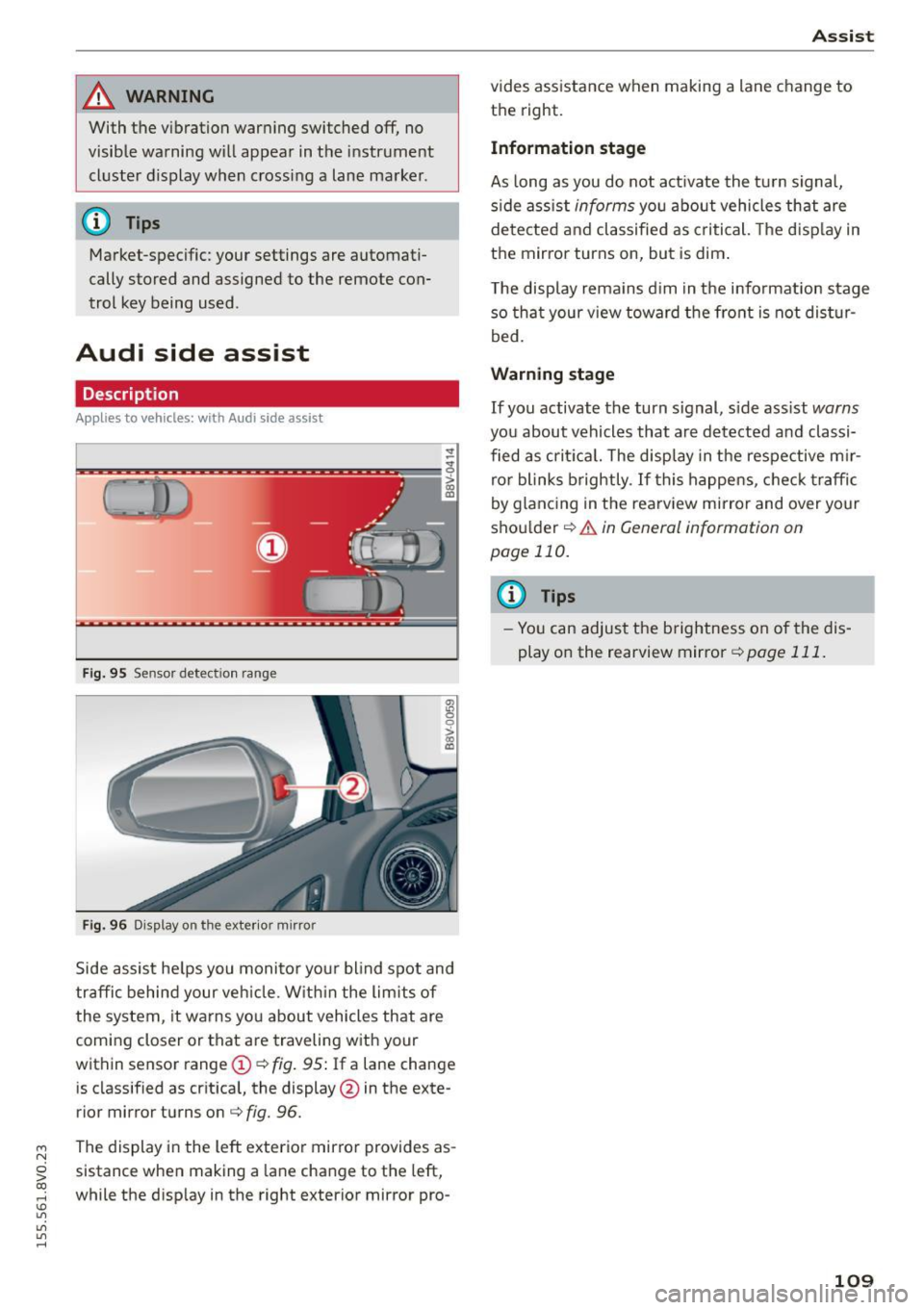
Fig . 9 5 Sensor detect io n range
Fig . 96 Display on the exterior mirror
fR 0
0
> CX)
traffic behind your ve hicle. W it hi n the limit s of
the system, it warns yo u about vehicles that are
coming closer or that are traveling with your
within sensor range
(D ¢ fig . 95: If a lane change
is classified as cr it ica l, the display @in the exte
rior mirror turns on
c:> fig. 96.
The display in the left exterior mirro r provides as
sistance when making a la ne change to the left,
while the d isp lay in the right exterior mirror pro-
A ssi st
vides assistance when making a lane change to
th e right.
Information stage
As long as you do not act ivate the tu rn signa l,
s ide ass ist
informs yo u about vehicles that are
de te cted a nd classified as criti cal. The d is pl ay in
the mirror turns on, but is dim .
T he display rema ins d im in the info rmation stage
so tha t your v iew toward the front is not dis tur
bed.
Warn ing stage
If you activate the turn s ignal, s ide ass ist warns
you about vehicles that are de tected and classi
fied as cri tica l. The display in the respective m ir
ro r blinks brightly . If this happe ns, che ck tr affi c
by glanc ing in the rearv iew mirror and over your
sho ulder
c:> .&. in General information on
page 110.
@ Tips
- Yo u can adjust the brightness on of the dis
play on the rearview mirror
c:> page 111 .
109
Page 112 of 282
Ass is t
General information
App lies to veh icles: w ith Audi side assis t
®
@
©
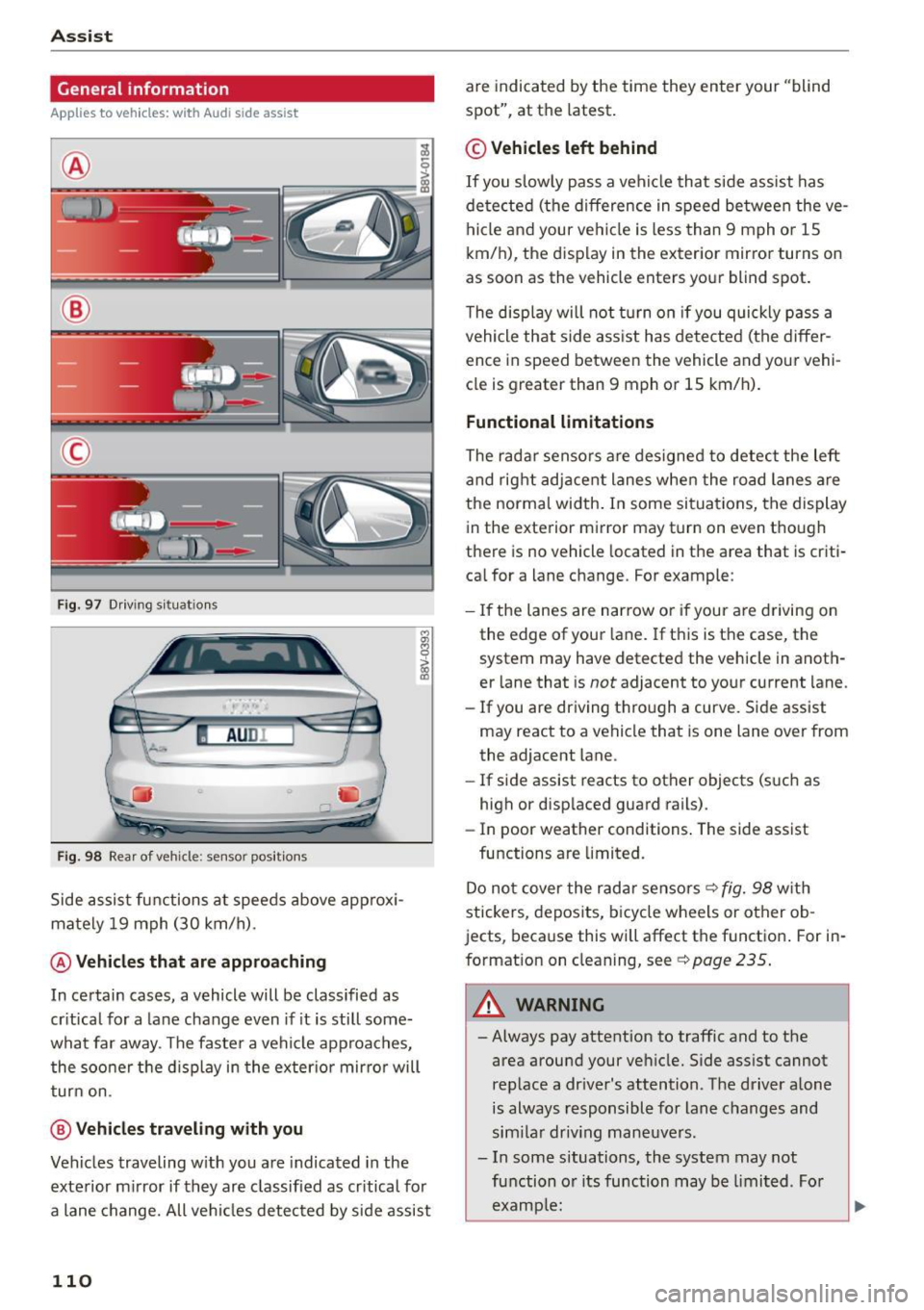
Fig . 97 D riving s ituat io ns
I AU DI
-·
Fi g. 98 Rear of vehicle: sensor pos itio ns
Side assist functions at speeds above approx i
mately 19 mph (30 km/h).
@ Vehicles th at ar e approaching
In certain cases, a vehicle will be classified as
cr itical for a lane change even if it is still some
what far away. The faste r a vehicle approaches,
the soo ner t he d isplay in the exter io r mirro r will
t ur n on.
@ Vehicl es traveling with you
Veh icles traveling w ith you are indicated in the
exte rior m irror if they are classified as cr itical for
a lane change. All ve hicl es detected by side assist
110
are indicated by the time they enter your "blind
spot", at the latest .
© Vehicles left behind
If you slow ly pass a veh icle that side assist has
de tected (the difference in speed be tween the ve
hi cle and your ve hicl e is less than 9 mph o r 1S
km/h), the display in the exterior mirror turns on
as soon as the vehicle enters yo ur blind spot.
T he disp lay will not t urn on if you quickly p ass a
vehicle that side ass ist has de te cted (the differ
ence in speed between the vehicle and your vehi
cle is greater than 9 mph or 1S km/h).
Functional limitations
The radar senso rs are des igned to detect the left
and rig ht adjacent lanes when the road lanes a re
the norma l width . In some si tua tions, the display
in the exterior mirror may turn on even though
there is no vehicle located in the area that is criti
ca l for a lane change. For example:
- If the lanes are nar row o r if your are driving on
the edge of your lane. If t his is t he case, the
system may have detected the vehicle in anoth
er lane that is
not adjacent to yo ur current lane.
- If you are driving t hro ugh a curve. S ide assist
may react to a vehicle that is one lane over from
the adjacent lane.
- If side assist reacts to other objects (s uch as
high or disp laced guard rails) .
- In poor weather conditions . The side assist
functions are limited.
Do no t cover the radar sensors ¢
fig. 98 with
stickers, depos its, bicy cle wheels or other ob
jects, beca use this will affect the function . For in
format ion on cleaning, see
¢ page 235 .
_& WARNING
-Always pay attention to traffic and to the
area around your ve hicle. Side ass ist cannot
rep lace a dr iver's attention. T he driver alone
is always responsible for lane c hanges and
sim ila r driv ing mane uvers .
- In some s ituations, the system may not
fu nction o r its function may be limi ted . Fo r
examp le:
-
Page 113 of 282

M N
0 > co ,...., \!) ..,.,
..,.,
..,., ,....,
-If vehicles are approaching or being left
behind very quickly. The display may not
turn on in time .
- In poor weather conditions such as heavy
rain, snow or heavy mist.
- On very wide lanes, in tight curves, or if
there is a rise in the road surface. Vehicles
in the adjacent lane may not be detected
because they are outside of the sensor range.
- Audi side assist cannot detect all vehicles
under all conditions, which can increase the
risk of accidents .
- Please note that side assist only displays ap
proaching vehicles or vehicles in your blind
spot if your vehicle is traveling at least
19 mph (30 km/h).
- In certain situations, the system may not
work or its function may be limited. For ex
ample:
- The display may not turn on at the right
time if vehicles are approaching or passing
very quickly.
- In poor weather conditions, such as heavy rain, snow or fog.
- In very wide lanes, in tight curves or when
there are slopes in the roadway, vehicles in
the neighboring lanes may not be detect
ed because they are outside of the sensor
range .
(D Note
The sensors can be displaced by impacts or
damage to the bumper, wheel housing and
underbody. This can affect the system. Have
an authorized Audi dealer or authorized Audi
Service Facility check their function .
(Di Tips
-If the window glass in the driver's door or
front passenger's door has been tinted, the
display in the exterior mirror may be misin
terpreted.
- For an explanation on conformity with the
FCC regulations in the United States and the
Industry Canada regulations, refer to
r::!> page 2 65 .
Assist
Switching on and off
App lies to vehicles : wi th Audi side ass ist
The system and be switched on and off in the
MMI*.
"'Select: the I MENU I button> Car> Systems*
control button > Driver assistance> Audi side
assist .
With Off, the system is switched off.
An activated system will signal every time the ig nition is switched on by turning the displays in
the exterior mirrors on briefly.
Adjusting the display brightness
App lies to vehicles: wi th Audi s ide ass ist
The display brightness can be adjusted in the
MM!*.
"'Select: the I MENU I button> Car> Systems*
control button > Driver assistance > Audi side
assist .
The display brightness adjusts automatically to
the brightness of the surroundings, both in the
information and in the warning stage. In very
dark or very bright surroundings, the display is al
ready set to the minimum or maximum level by
the automatic adjustment. In such cases, you
may notice no change when adjusting the bright
ness, or the change may only be noticeable once
the surroundings change.
Adjust the brightness to a level where the display
in the information stage will not disrupt your
view forward. If you change the brightness, the
display in the exterior mirror will briefly show the
brightness level in the information stage . The
brightness of the warning stage is linked to the
brightness in the information stage and is adjust
ed along with the information stage adjustment .
(D Tips
-Side assist is not active while you are mak
ing the adjustment.
- Your settings are automatically stored and assigned to the remote control key being
used.
111
Page 117 of 282
M N
0 > co ,...., \!) ..,.,
..,.,
..,., ,....,
Parking systems
General information
Applies to vehicles: with rea r parking sys te m s/park in g system
p lus/rearview camera
Depending on your vehicle's equipment, various
parking aids will help you when parking and ma
neuvering.
The
rear parking system is an audible parking aid
that warns you of obstacles
behind the vehicle
¢ page 116.
The parking system plus assists you when park
ing by audibly and visually indicating objects de
tected
in front of and behind the vehicle
¢ page 116.
The rearview camera shows the area behind the
vehicle in the MMI display. This display assists
you when you are cross or parallel parking. The
parking system plus functions are also available
¢page 117.
A WARNING ,--
- Always look for traffic and check the area
around your vehicle by looking at it directly
as well. The parking system cannot replace
the driver's attention. The driver is a lways
responsible when entering or leaving a park
ing space and during similar maneuvers .
- Please note that some surfaces, such as
clothing, are not detected by the system.
- Sensors and cameras have blind spots in
which people and objects cannot be detect
ed . Be especially cautious of small children
and animals .
- Always pay attention to the area around the
vehicle - using the rearview mirror, too.
- The sensors can be displaced by impacts or
damage to the radiator grille, bumper,
wheel housing and the underbody . The park
ing system may become impaired as a re
sult . Have an authorized Audi dealer or au
thorized Audi Service Facility check their
function.
- Make sure the sensors are not obstructed by
st ickers, deposits or other materials.
If they
are the sensor function could be impaired .
'
Parking systems
For additional information on cleaning, re
fer to
¢ page 235.
@ Note
- Some objects are not detected or displayed
by the system under certain circumstances:
- Objects such as barrier chains, trailer draw
bars, vertical poles or fences
- Objects above the sensors such as wall ex
tensions
- Objects with specific surfaces or struc
tures such as chain link fences or powder
snow
- If you continue driving closer to a low-lying
object, it may disappear from the sensor
range. Note that you will no longer be
warned about this obstacle.
- The sensors can be displaced by impacts or
damage to the radiator grille, bumper,
wheel housing and the underbody. The park
ing system may become impaired as a re
sult. Have an authorized Audi dealer or au
thorized Audi Service Facility check their
function.
(D Tips
- The system may provide a warning even
though there are no obstacles in the cover
age area in some situations, such as:
- certain road surfaces or for long grass .
- external ultrasonic sources e.g. from
cleaning vehicles.
- heavy rain, snow, or thick vehicle exhaust.
- We recommend that you practice parking in
a traffic-free location or parking lot to be
come familiar with the system. When doing
this, there should be good light and weather
conditions.
- You can change the volume and pitch of the
signals as well as the display¢
page 121 .
-What appears in the MMI display is some
what time-delayed.
- The sensors must be kept clean and free of
snow and ice for the park assist to operate .
115
Page 120 of 282
Parking syste m s
General information
App lies to vehicles: with parking system p lus with rearview
camera
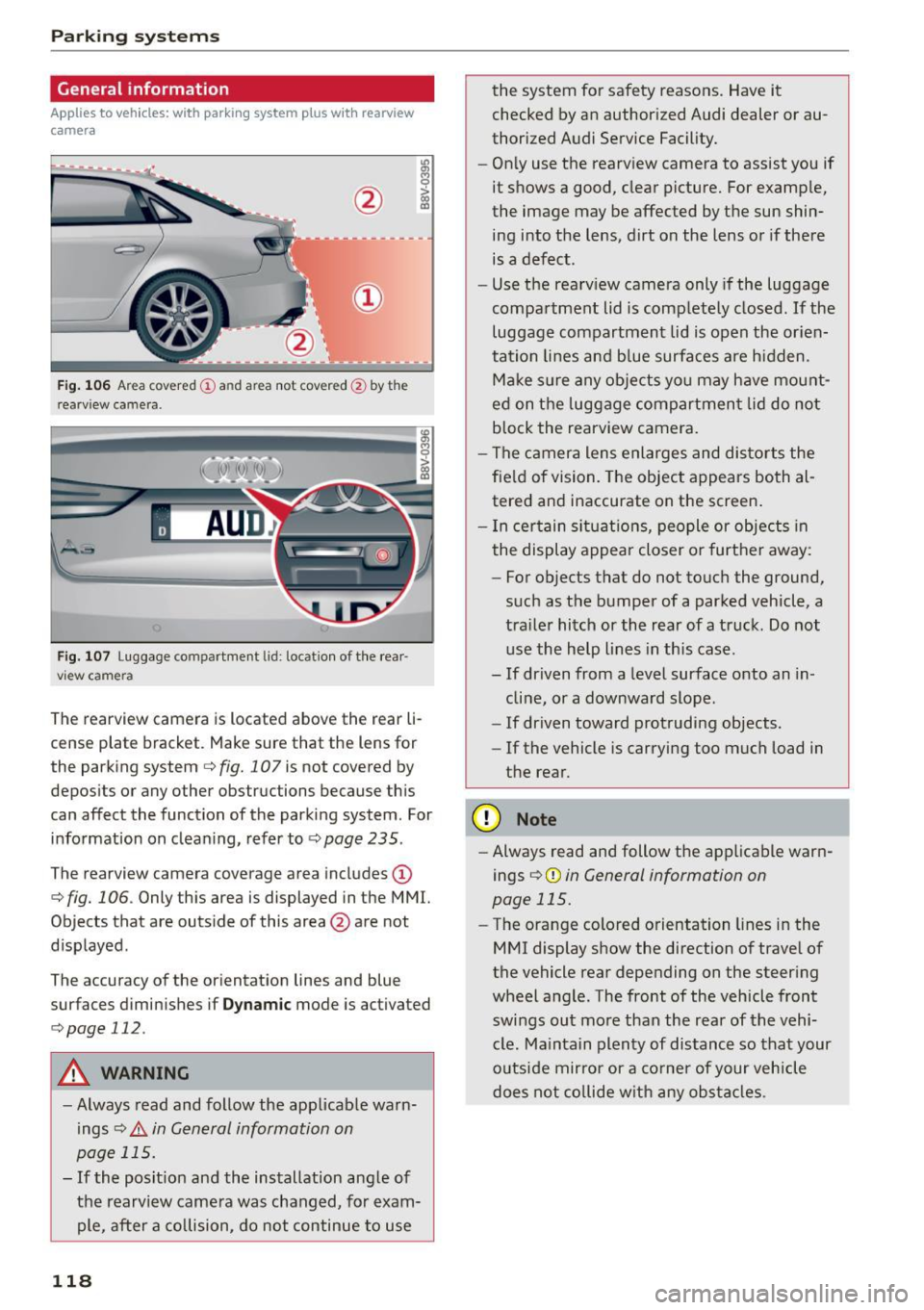
F ig . 106 Ar ea covered (!) an d area not cove red@ by th e
r earv iew ca mera .
Fig. 107 Luggage compartment lid : locat ion of the rear
vi ew came ra
The rearview camera is located above the rear li
cense plate bracket . Make sure that the lens for
the parking system
c::> fig. 107 is not covered by
deposits or any other obstructions because th is
can affect the function of the parking system . For
information on cleaning, refer to
c::> page 235 .
The rearview camera coverage area includes (D
c::> fig. 106. Only this area is displayed in the MMI.
Objects that are outside of this area @are not
displayed .
The accuracy of the or ientation lines and blue
surfaces diminishes if
D yn am ic mode is activated
c::> page 112.
A WARNING
-Always read and follow the app licable warn
ings
c::> .&. in General information on
page 115.
- If the posit ion and the installation ang le of
the rearview camera was changed, for exam ple, after a co llision, do not continue to use
118
the system for safety reasons. Have it
checked by an author ized Audi dealer or au
thorized Audi Service Facility.
- On ly use the rearview camera to assist you if
it shows a good, clear picture. For examp le,
the image may be affected by the sun shin
ing into the lens, dirt on the lens or if there
is a defect.
- Use the rearv iew camera only if the luggage
compartment lid is completely closed.
If the
luggage compartment lid is open the or ien
tation lines and b lue surfaces are h idden.
Make s ure any objects yo u may have mount
ed on t he luggage compartmen t lid do not
block the rearview camera.
- The camera lens enlarges and distorts the
fie ld of vision. The object appears both al
tered and inaccurate on the screen .
- I n ce rtain si tuat ions, people or objects in
the display appea r closer or further away:
- For objects that do not to uch the ground,
such as the bumper of a parked vehicle, a
tra ile r hitch or the rear of a truck. Do not
use the help lines in this case.
- If driven from a level surface onto an in
cline, or a downward slope .
- If driven toward protruding objects.
- If the vehicle is carrying too much load in
the rear.
(D Note
- Always read and follow the applicable warn
ings
c::> (D in General information on
page 115.
- The orange colored o rientation lines in the
MMI display show the direction of trave l of
the vehicle rear depending on the steer ing
wheel a ngle . The front of the vehicle front
swings out more than the rear of the vehi
cle. Ma intain plenty of distance so that your
o utside mirror or a co rne r of your vehicle
does not co llide w ith any ob stacl es .
Page 133 of 282
....,
N
0 > co
rl I.O
"'
"'
"'
rl
.. Make sure that a ll windows are clean and afford
good visibility to the outside .
.. Secure all luggage and other items carefully
r=> page 59, r=> page 59.
.. Make sure that nothing can interfere with the
pedals.
.. Adjust front seat, head restraint and mirrors
correct ly for your he ight.
.,. Instruct passengers to adjust the head re
stra ints according to their he ight .
.. Make sure to use the right child restraint cor
rect ly to protect children
r=> page 172, Child
safety .
.. Sit properly in your seat and make sure that
your passengers do the same
r=> page 54, Front
seats .
.. Fasten your safety belt and wear it proper ly. Al
so instruct your passengers to fasten their safe
ty belts p roperly
r=> page 140.
What impairs driving safety?
Safe driving is directly related to the condition of
the vehicle, the driver as well as the driver 's abili
ty to concentrate on the road without being dis
tracted.
The driver is respons ible for the safety of the ve
h icle and all of its occupants.
If your ability to
d rive is impaired, safety r isks for everybody in the
veh icle increase and you also become a hazard to
eve ryone else on the road
r=> &, . Therefo re:
.. Do not let you rself be distracted by passengers
or by using a cellular telephone .
.. NEV ER dr ive when your dr iv ing abili ty is im
paired (by medicat ions, alcohol, drugs, etc.).
.. Observe all traffic laws, rules of the road and
speed limits and plain common sense.
.. ALWAYS adjust your speed to road, traffic and
weather conditions.
.. Take frequent breaks on long trips. Do not dr ive
for more than two hours at a stretch .
.,. Do NOT drive when you are t ired, under pres
su re or when you a re stressed.
Dri vin g s afe ty
A WARNING
-Impaired dr iving safety increases the risk of
serious personal injury and death wheneve r a
vehicle is being used .
Correct passenger
seating positions
Proper seating position for the driver
The proper driver seating position is important
for safe, relaxed driving.
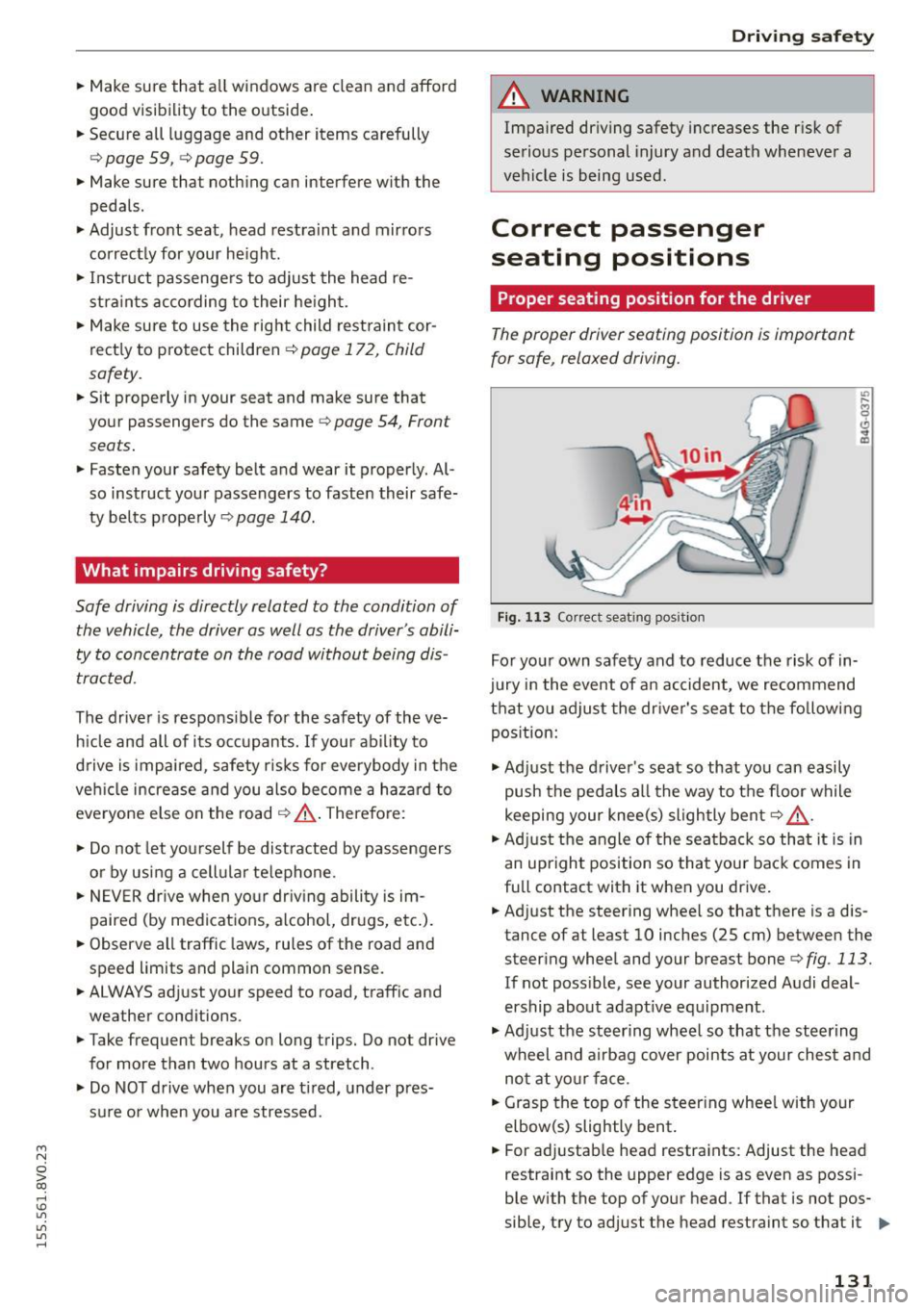
F ig , 1 13 Correct seating pos it ion
For yo ur own safety and to reduce the risk of in
jury in the event of a n accident, we recommend
that you adjust the dr iver's seat to the fo llowing
pos ition:
.,. Ad just the driver's seat so that you can easily
push the pedals all the way to the floor while
keeping your knee(s) slightly bent
r=> &, .
.. Ad just t he angle of the seatbac k so that it is in
an upright position so that your back comes in
full contact with it when you drive .
.. Adjust the steering whee l so that there is a dis
tance of at least 10 inches (25 cm) between the steering wheel and your breast bone
r=> fig. 113.
If not poss ible, see your authorized Audi deal
ership about adapt ive eq uipment.
.,. Ad just the steering wheel so that the steering
wheel and airbag cover points at your che st a nd
no t at yo ur face .
.. Grasp the top of the steer ing whee l with your
elbow(s) slightly bent .
.. For adjustab le head restraints: Adjust the head
restraint so the upper edge is as even as possi-
ble with the top of your head . If that is not pos
sible, try to adj ust the head restraint so that it .,.
131
Page 238 of 282
Care and cleaning
& WARNING
- Only wash the vehicle when the ignition is
off an d follow the i nstructions fr om the car
wash operator to r educe the r isk of acci
dents.
- To reduce the r isk of cuts, protect yourself
from sharp metal components when wash ing the underbody or the inside of the wheel
hous ings.
- After washing the vehicle, the braking effect
may be delayed due to moisture o n the
brake rotors or i ce in the winte r. T he bra kes
mus t be d ried first w ith a few caref ul bra ke
applications .
@ Note
-If you wash the ve hicle in an au tomatic car
wash, you m ust fold the e xterior m irrors in
to reduce the ris k of damage to the mirrors .
Power folding exterior mirrors* must only
be fo lded i n and out using the power folding
funct ion. -
To prevent paint damage, do not wash the
vehicle in direct sunlight.
- T o reduce the r is k of damage to the sur face,
do not use insect remov ing sponges, kitchen
sponges or similar items.
- Mat te finish painted vehicle components:
- To reduce the risk of damage to the sur-
face, do not use po lishi ng agents or hard
wax.
- Never use protective wax.
It can destroy
the matte finish effect.
- Do not place any stickers or magnet ic
signs on vehicle parts painted w ith matte
finish paint. The pa int co uld be damaged
when the sticke rs o r mag nets are re
moved.
@ For the sake of the environment
Only wash the ve hicle in facilities spec ially de
s igned fo r that purpose. This w ill reduce the
r isk of dir ty wa ter co ntaminated w ith oil from
entering the sewe r system.
Cleaning and care information
When cleaning and caring for individua l vehicle
components, refer to the following tables. The
information contained there is simply recommen
dations. For quest ions or for components that are not listed,
consult an authorized A udi dealer
or authorized Audi Service Facility . Also follow
the information found in
¢ _6.
Exterio r cleaning
Component Situation Solution
Windshield wiper
Deposits ¢ page 50, Cleaning windshield wiper blades
blades
Headlights /
Deposits Soft sponge with a mild soap
solutiona)
Tail lights
Sensors /
Deposits Sensors: soft cloth with solvent-free cleaning so lution
camera len se s Camera le ·nses : soft clot h w ith a lcohol-free clea ning so lu-
tion
Snow/ ice Hand brush/solvent-free de- icing spray
Wheel s Road sa lt Water
Brake dust Acid-free specia l cleaning solution
E xhau st tail pipe s Road salt Water, clean
ing solution su itab le for stain less stee l, if nee -
essary
D ecorative parts / Deposits Mild soap solution al, a clean ing solution suitable for stain-
trim l ess stee l, if necessary
236
Page 241 of 282
M N
0 > co ,...., \!) 1.1'1
1.1'1
1.1'1
,....,
avoid scratches, move the scraper only in
one direction and not back and forth.
- Never remove snow or ice from door win
dows and mirrors using warm or hot water
because this could cause cracks to form.
- To avoid damage to the rear window de
fogger, do not apply any stickers on the
heating wires on the inside of the window.
- Decorative parts/trim
- Never use chrome care or cleaning prod-
ucts .
- Paint
- To reduce the risk of scratches, the vehicle
must be free of dirt and dust before pol
ishing or waxing.
- To prevent paint damage, do not polish or
wax the vehicle in direct sunlight.
- To reduce the risk of paint damage, do not
polish away rust spots.
- Remove cosmetics and sunscreen immedi
ately -these could damage the paint.
- Displays
- To avoid scratches, do not use dry cleaning
methods on displays.
- Controls
- Make sure that no fluids enter the con-
trols, because this could cause damage.
- Safety belts
- Do not remove the safety belts to clean
them.
- Never clean safety belts or their compo
nents chemically or with corrosive fluids
or solvents and never allow sharp objects
to come into contact with the safety belts.
This could cause damage to the belt web
bing.
- If there is damage to the webbing, the
connections, the retractors or the buckles,
have them replaced by an authorized Audi
dealer or authorized Audi Service Facility.
- Textiles/artificial leather/Alcantara
- Never treat artificial leather/Alcantara
with leather care products, solvents, floor polish, shoe polish, spot remove or similar
products.
- Have a specialist remove stubborn stains
to prevent damage.
Care and cleaning
- Never use steam cleaners, brushes, hard
sponges, etc. when cleaning.
- Do not turn on the seat heating* to dry
the seat.
- Objects with sharp edges such as zippers,
rivets on clothing or belts can cause dam
age to the surface.
- Open hook and loop fasteners, for exam
ple on clothing, can damage seat covers.
Make sure hook and loop fasteners are
closed .
- Natural leather
- Never treat leather with solvents, floor
polish, shoe polish, spot remover or simi
lar products .
- Objects with sharp edges such as zippers, rivets on clothing or belts can cause dam
age to the surface .
- Never use steam cleaners, brushes, hard
sponges, etc. when cleaning .
- Do not turn on the seat heating* to dry the seat.
- To help prevent the leather from fading,
do not leave the vehicle in direct sunlight
for long periods of time . If leaving the ve
hicle parked for long periods of time, you
should cover the leather to protect it from
direct sunlight.
(D Tips
- Insects are easier to remove from paint that
has been freshly waxed .
- Regular waxing can prevent rust spots from
forming.
239