2015 AUDI S3 SEDAN Tire
[x] Cancel search: TirePage 62 of 282
Seats and storag e
-Loose objects in the passenger compart
ment can fly forward during abrupt maneu
vers or acc idents and injure occupants.
- Always store objects in the luggage com
partment and use suitable straps, particu
larly with heavy objects.
- When you transport heavy objects, a lways
remember that a change in the center of
gravity may result in a change in the veh i
cle's handling character istics.
- Follow all warnings
Q page 130, Driving
safety .
(D Tips
The tire pressure must be adjusted to the load
- see the tire pressure sticker located on the
driver's side B-pillar.
General information
.&, WARNING
Refer to the chapter Dr iving Safely
Q page 130, Driving safety for important in
formation, tips, suggestions and warnings that you should read and fo llow for your own
safety and the safety of your passengers.
Increasing the size of the luggage
compartment
The rear seat backrests can be folded forward ei
ther separately or together.
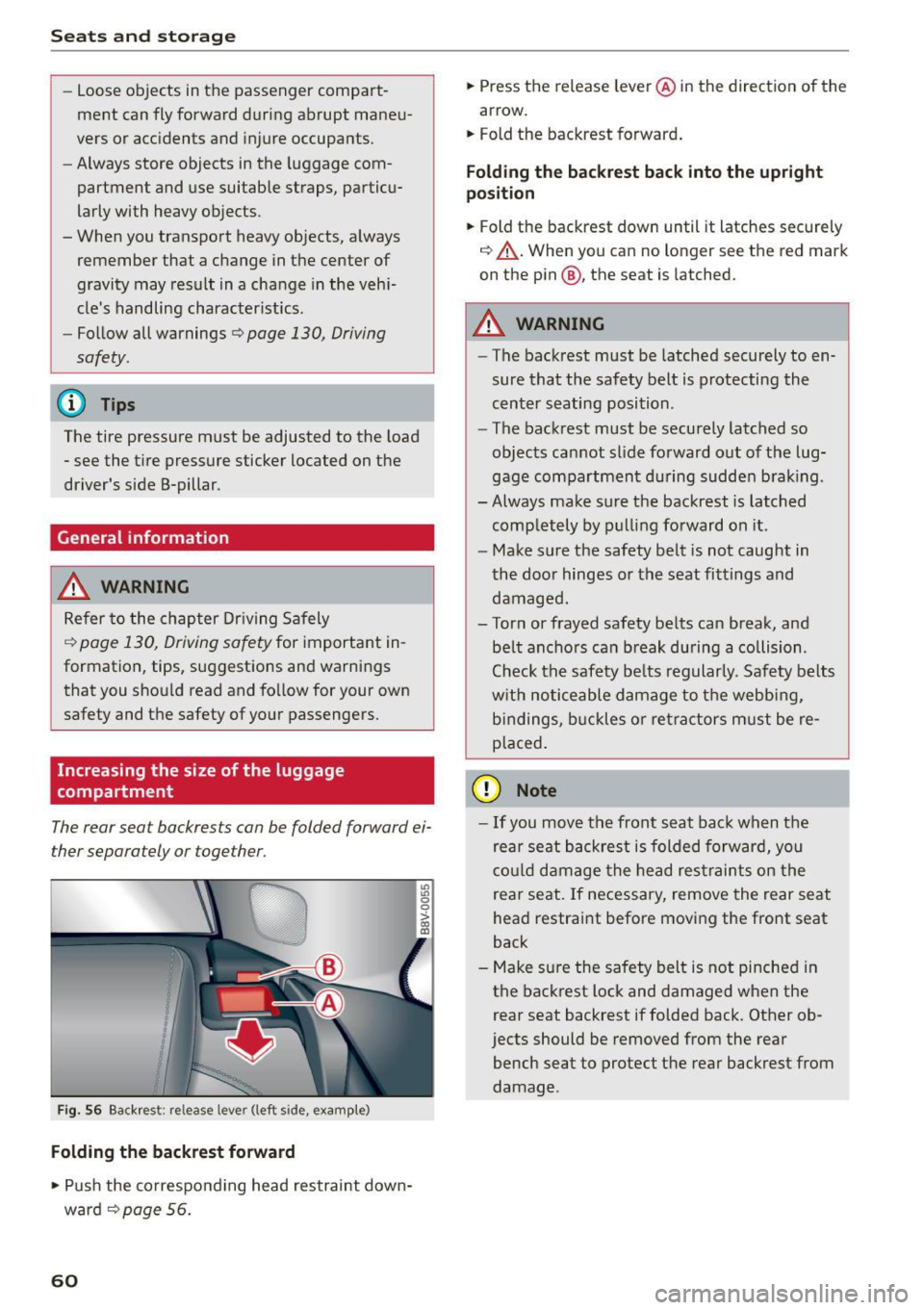
Fig. 56 Backrest: release lever (left side, example)
Folding the backrest forward
.,. Push the co rresponding head restraint down
ward ¢
page 56.
60
.,. Press the release leve r@ in the direction of the
arrow.
.,. Fold the backrest forward .
Folding th e backre st back into the upright
po sition
.,. Fold the backrest down until it latches securely
¢ ,&. .When you can no longer see the red mark
on the pin@, the seat is latched.
.&, WARNING
- The backrest must be latched securely to en
sure that the safety belt is protecting the
cent er seating position .
- The backrest must be securely latched so
objects cannot slide forward o ut of the lug
gage compartment du ring sudde n brak ing .
- Always make sure the backrest is latched
comp letely by pulling forward on it .
- Make sure the safety belt is not caught in
the doo r hinges or the seat fittings and
damaged.
- Torn or frayed safety be lts can break, and
be lt ancho rs can b reak du ring a collision .
Check the safety be lts regularly. Safety belts
w it h noticeable damage to t he webb ing,
bi ndings, b uckles o r ret ra ctors m ust be re
placed.
(D Note
- If you move the front seat back when the
rear seat backrest is folded forward, you
c o ul d damage the head res traints on the
rear seat. If necessary, remove the rear seat
head restraint before moving the front seat
back
- Make su re the safety belt is not pinched in
the back rest lock and damaged when the
rear seat backrest if folded back. Other ob
jects should be removed from the rear
bench seat to protect the rear backrest from
damage .
Page 65 of 282
M N
0 > co ,...., \!) ..,.,
..,.,
..,., ,....,
tightened. If necessary, retighten the mountings and check the entire system
from t ime to t ime.
- After mounting a roof rack system, or when
you transport objects on the roof of your ve
hicle, the height of the veh icle is naturally
increased. Be careful when driving under
l ow bridges or in parking garages for exam
ple. This could cause damage to the load
and even the vehicle itself.
- Make sure the open rear lid and the sun
roof* do not come into contact with the roof
rac k.
Loading the roof rack
Always distribute loads evenly . Make sure any
thing on the roof rack is securely tied down .
... Always distribute the loads on the roof rack
evenly .
... Always attach items to the roof rack securely
before you d rive off .
The maximum perm iss ible roof weight is
165 lb
( 75 kg ). The roof weight is the total of the
weight of the roof rack, the attachments and the
cargo you a re ca rrying . You must also not exceed
the maximum load weight fo r the roof rack you
a re using.
When using a roof rack system wh ich has a lower
l oad carrying capacity, you must not use up the
tota l maxim um permissible load car ry ing capac i
ty specified above. Inste ad , you shou ld load t he
roof rack system only to the maximum capacity
specified by the manufact urer of the roof rack
system .
A WARNING
Weak, damaged or improper straps used to
secure items to the roof rack can fa il during
hard brak ing or in a collision and cause seri
ous personal injury.
- Make sure the roof rack is insta lled exactly
as spec ified above
¢ page 62.
- Always use suitable mounting straps for se
curing items to the roof rack to help prevent
items from shift ing or f ly ing fo rward.
-
S eat s and stor age
- Items on the roof rac k must always be se
curely mounted.
- The use of a roof rack can negatively affect
the way a vehicle handles. Cargo that is
large, heavy, bulky, long or flat will have a
greater negative inf luence on the vehicle's
ae rodynamics, center of gravity and overall
h a ndling. Always drive slowly, avoid sudden
b rak ing and maneuvers when transpor ting
cargo on the roof of your veh icle.
- Never exceed the maxim um permissible
load carrying capacity of the roof of your ve
h icle, the permiss ible axle weights and the
perm issib le tota l we igh t of your vehicle
¢ page 258, Weights .
@ For the sake of the environment
As a result of the increased wind resistance
created by a roof ra ck , your vehicle is using
fuel unnecessarily. So remove the roof rac k af
ter using it.
63
Page 72 of 282
Driving
Driving
General information
The first 1,000 miles (1,500 km) and
afterwards
The new engine needs to be run-in during the
first 1,000 miles (1,500 km) .
For the first 600 miles (1 ,000 k ilometers ):
.. Do not use full throttle.
.. Do not drive at engine speeds that are more
than 2/3 of the maximum permitted RPM .
.. Avoid high engine speeds .
From 600 to 1,000 miles (1,000 to
1,500 kilometers):
.. Speeds ca n gradually be increased to the maxi
mum perm issible road or eng ine speed .
During and after break-in period
.. Do not rev the engine up to high speeds when it
is cold. This applies whether the transmission is
in N (Neutral) or in gear .
After the break-in peri od
.. Do not exceed maximum engine speed under
any circumstances.
.. Upshift into the next higher gear
before reach
ing the red area at the end of the tachometer
scale
opage 10.
During the first few hours of driving, the engine's
internal friction is higher than later when all the
mov ing parts have been broken in. How well this
break-in process is done depends to a cons idera
b le extent on the way the vehicle is driven dur ing
the first 1,000 miles (1,500 kilometers).
0 Note
Extremely high engine speeds are automati
cally reduced. However, these rpm limits are
programmed for an engine well run-in, not a
new engine.
@ For the sake of the environment
Do not dr ive with unnecessarily high eng ine
speeds -upshifting early saves fuel, reduces
noise and protects the environment.
70
· Driving through water on roads
Note the following to avoid veh icle damage when
driving through water, for example on flooded
roads:
- The water must not be any higher than the bot
tom of the vehicle body .
- Do not dr ive faster than walk ing speed .
A WARNING
After driv ing through water or mud, the brak
ing effect can be reduced due to moisture on
the brake discs and bra ke pads. A few careful
brake applications sho uld dry off the brakes .
(D Note
Vehicle components such as the eng ine,
transmission, suspension or electrical system
can be severe ly damaged by driv ing through
water .
(D Tips
- Determine the depth before driving through
water.
- Do not stop the vehicle, drive in reverse or
switch the engine off when driv ing th rough
water .
- Keep in mind that oncoming veh icles may
create waves that raise the water level and
make it too deep for your vehicle to drive
through safely.
- Avoid driving through salt wate r (corrosion).
Economical and environ
mentally-friendly driving
General
Your personal style of driving will determine the
economy of your vehicle, as well as exhaust and
noise levels.
Fuel economy, env ironmental impact, and wear
on your engine, brakes and tires largely depend
on three factors :
- your personal driving style
- operating conditions
- technical limitations
Page 93 of 282

M N
0 > co ,...., \!) ..,.,
..,.,
..,., ,....,
Trailer mode Driving with a trailer
General information
Your Audi was designed primarily for passenger
transportation .
If you plan to tow a tra iler, p lease remember that
the additiona l load will affect d urability, econo
my and performance .
T railer towing not on ly places more stress on the
vehicle, it a lso calls for more concentrat ion from
the dr iver .
F or this reason, a lways fo llow the operating and
d riving instructions provided and use common
sense.
Technical requirements
Traile r hitch
Use a weight-carrying hitch conforming to the
gross trailer we ight. The hitch must be suitable
for your vehicle and trai ler and must be mounted
securely on the veh icle 's chassis at a technically
sound
location . Use on ly a tra iler hitc h with a re
movable ba ll mou nt. Always chec k w ith the t ra il
e r hitch m anu fac tur er to make sure that you a re
using the co rrec t hitch.
Do not use a bumper hitch .
The hitch must be installed in such a way that it
does not i nterfere wit h the impact -absorbi ng
bumper system. No mod ificat ions should b e
mad e to the vehicle exhaust and brake systems .
Fr om time to t ime, c hec k t hat a ll h itch mou nti ng
bo lts remain sec urely fastened .
When you are no t tow ing a trailer,
remove the
trai ler hitch ball mount . Th is prevents the hitc h
fr om caus ing damage should you r vehicle be
s truck from behind~,&. .
Trailer brakes
If yo ur tra iler is equipped w it h a braking system,
check to be s ure that it conforms to all regu la
tions.
Trailer mode
T he trailer hyd raulic brake system must not be di
rect ly connected to the ve hicle's hydraulic b rake
system .
Safety chains
Always use s afe ty chains be tween your ve hicle
and the tra ile r.
Trailer lights
Tra ile r li ghts must meet all regulations. Be sure
to check w it h your Aud i dea le r fo r corr ect w irin g,
swi tches and relays.
Mirrors
If you a re unable to see the traffic behind you us
i ng the regular o uts ide mirrors, then you
must in
sta ll extended mirrors .
It is importa nt that you
always have clea r vision to the rea r.
_&. WARNING
Afte r removing the trailer hit ch, d o no t store
i t in yo ur vehicle. In ca se of sudden br akin g,
the hitch could fly fo rward and inju re you or
your passengers.
Operating instructions
Maximum traile r weight
A trai le r fo r you r vehicle is limited to a typi cal
class 1 or class 2 trai le r.
Trailer load distribution
B e sure the load in the t raile r is held secure ly in
pla ce to p revent it from shift ing forward, back
ward or sideways .
Never allow a pas senger to ride in a trailer~.&.
in Driving instructions on page 92.
Engine cooling system
Towing a trailer makes the engine work harder . It
is important tha t the cooling system 's pe rform
ance is up to the additional load. Make s ure that
the coo ling system has enoug h flu id.
Tire pressure
When towing a trailer, inflate the tires of your ve-
hicle to the cold tire pressure listed under "Full
lilJJ..
91
Page 94 of 282

Trailer mode
load" on the label located on the driver's side B
pillar (visible when the door is open). Inflate
trailer tires to trailer and tire manufacturers'
specifications.
Lights
Check to make sure both vehicle and trailer lights
are working properly.
Safety chains
Be sure tra iler safety cha ins are properly connect
ed from the trailer to the hitch on the vehicle.
L eave enough slack in the chains to permit turn
ing corners. When you install safety chains, make
sure they will not drag on the road when you are
driving .
The chains should cross under the trai ler tongue
to prevent it from dropping in case of separation
from the hitch .
Driving instructions
Driving with a trailer always requires extra care
and consideration .
To obta in the best poss ible handling of vehicle
and trailer, please note the following:
.,. Do not tow a loaded tra iler when your car itself
is not loaded.
.. Be especia lly careful when passing other
vehicles.
.. Observe speed limits .
.. Do not drive at the maximum permissible
speed.
.. Always apply brakes early.
.. Monitor the temperature gauge.
Weight distribution
Towing a loaded trai ler with an empty car results
in a high ly unstable distribution of weight. If this
cannot be avoided, drive at very low speeds only
to avoid the risk of losing steering control.
A "balanced" rig is easie r to operate and control.
This means that the tow vehicle should be loaded
to the extent possible and permissible, while
keeping the trailer as light as poss ible under the
circumstances. Whenever possible, transfer
some cargo to the luggage compartment of the
92
tow vehicle while observing tongue load require
ments and vehicle loading considerations.
Speed
The higher the speed, the more diff icult it be
comes for the driver to control the rig. Do not
drive at the maximum permissible speed. Reduce
your speed even more if load, weather or wind
conditions are unfavorab le -particularly when
going downh ill.
Reduce veh icle speed
immediately if the trailer
shows the slightest sign of swaying .
Do not try
to stop the swaying by accelerating.
Observe speed limits. In some areas, speeds for
vehicles towing tra ile rs are lower than fo r regular
vehicles .
Always apply brakes early. When driving down
hill, shift int o a lo wer gear to use the eng ine
braking effect to slow the vehicle . Use of the
brakes alone can cause them to overheat and fail.
Coolant temperature
The coolant temperature gauge¢ page 12 must
be obse rved carefully. The coolant temperature
can increase if you dr ive on long inclines in a low
gear at high engine speeds . Reduce your speed
immediately if the LEDs in the top part of the dis
play turn on .
For more information abo ut ind icator lights, re
fer to. ¢
page 19 .
A WARNING
-
Anyone not properly restrained in a moving
vehicle is at a much greater risk in an acci
dent. Never let anyone ride in your car who is
not proper ly wearing the restraints provided
by Aud i.
Trailer mode notes
Important to know
Your vehicle handles differently when towing a
trai ler because of the additiona l weight and dif
ferent weight distribution . Safety, performance
and economy will greatly depend on how careful-
ly you load your trailer and operate your r ig. ..,.
Page 96 of 282

Assist
Assist Electronic speed limiter*
Applies to veh icles: with electronic speed limiter
Your vehicle may be factory equipped with ti res
that are rated for a maximum speed of 130 mph
(210 km/h) . T his is less than the maximum speed
of your vehicle . To reduce the risk of sudden tire
failure and loss of control if the vehicle is operat
ed at excessive speeds, your vehicle also has an
electronic speed limiter. The electronic speed
limiter prevents your vehicle from going faster
than the tir e speed rat ing . For more information
~page 221.
If the engine control unit receives faulty vehicle
road speed signals, the Malfunction Indicator
Lamp (MIL)
¢4 will illuminate . If this occurs,
contact the nearest a utho rized Audi dealer for as
sistance .
A WARNING
Always observe the posted speed limits and
adjust your speed to suit prevailing road, traf
fic and weather conditions . Never drive your
vehicle faster than the maximum speed rating of the tires installed.
Speed warning system
Introduction
The speed warning system helps you to stay un
der a specified maximum speed.
-
The speed warning system warns you if you are
exceeding the maximum speed that you have set .
You will hear a warning tone when your speed ex
ceeds the stored value by approximately 3 mph
(3 km/h) . Th e. (USA models)/. (Canada
models) indicator light and the message
Speed
limit exceeded!
appear in the instrument cluster
disp lay at the same time . The ./. indicator
light turns off when the speed decreases below
the stored maximum speed.
Setting a thresho ld is recommended if you would
like to be reminded when you re ach a certain
maximum speed. Situations where you may want
to do so include driving in a country with a gener-
94
al speed limit or if there is a specified maximum
speed for winter tires.
(D Tips
Regardless of the speed warning system, you
should always monitor your speed using the
speedometer and make sure you are following
the legal speed limit .
Setting the threshold
You can set, change and delete the threshold in
the MMI.
.. Select: the I MENU I button >Car> Systems*
contro l button > Driver assistance > Speed
warning.
You can set any threshold between 20 mph
(30 km/h) and 150 mph (240 km/h) . Settings
can each be adjusted in increments of 6 mph
(10 km/h).
Cruise control system
· Description
Applies to vehicles: with cruise control system
The cruise control system makes it poss ible to
drive at a constant speed starting at 15 mph
(20 km/h).
The speed is kept constant by modify ing engine
power or through an act ive brake intervention.
A WARNING
- Always pay attention to the traffic around
you when the cruise control is in operation.
You are a lways responsible for your speed
and the distance between your vehicle and
other vehicles.
- For reasons of safety, cruise contro l should
not be used in the city, in stop-and-go traf
fic, on winding roads and when road condi tions are poor (such as ice, fog, gravel,
heavy rain and hydroplaning) -you could
have an accident .
- Switch the cruise control off temporarily
when driv ing in turning lanes, highway exits
or in construction zones .
-
Page 122 of 282

Parking systems
Parallel parking
Applies to veh icles: w ith pa rk in g system p lus w it h rearv iew
camera
This view may be used when parallel parking
along the side of a street .
Fig. 110 MMI: blue surface aligned wit h parking spot
Fig. 111 MMI: contact of the blue curved line with the curb
Park ing on the right is described here. It is iden
tical when parking on the left .
If there is an obstacle next to the park ing space
(such as a wall), refer to "Information for parking
next to obstacles" ¢
page 120 .
.,. Turn on the right turn signal.
.,. Position your vehicle next to a parked vehicle in
front of the desired parking space. The distance
to this veh icle should be approximately 3 ft (1
m) .
.,. Turn the MMI on and select the reverse gear .
The park ing system is turned on and the
cross
parking indicator is displayed.
.,. Press the control button on the MMI-controls
to select
(D ¢ fig. 110. The parallel parking in
dicator is displayed .
.,. Back up and al ign your vehicle so the blue area
@ borders on the rear end of the vehicle behind
you or on the parking space line¢.&.
in Gener-
120
al information on page 118, ¢(Din General in
formation on page 118 .
The blue area repre
sents an extension of the vehicle's outline by
approximately 16
ft (5 meters) to the rear. The
long side of the blue area should be on the
curb . The entire b lue area must fit into the
parking space .
.,. With the vehicle stopped, turn the steering
wheel to the right as far as it will go .
.,. Back into the parking space until the blue curve
¢
fig. 111 touches the curb¢.&. in General in
formation on page 118, ¢(Din General infor
mation on page 118.
Stop the vehicle .
.,. With the vehicle stopped, turn the steering
wheel to the left as far as it will go .
.,. Continue to back into the parking space until
the vehicle is parked parallel to the curb¢.&.
in General information on page 118, ¢CI) in
General information on page 118 .@
marks
the rear bumper. Stop the vehicle, at the latest,
when the red orientat ion line @ borders an ob
ject. Keep an eye on the front of your vehicle
while doing this.
Parking next to obstacles
If there is an obstacle (such as a wall) next to the
parking space, position the veh icle so there is
more space on that side. Position the long side of
the blue surface so that there is suff icient space
from the obstacle. The surface must not be
touching . You will also need to start turning the
steering wheel much earlier. The blue curve
¢ fig. 111 must not touch the obstacle and
should have sufficient room .
(D Note
Keep enough distance from the curb to avo id
damage to the rims.
¢j) Tips
The left or right orientation lines and surfaces
will be disp layed, depending on the turn sig
nal being used.
Page 126 of 282
Intelligent Technology
road and traffic conditions . Do not let the in
c reased sa fety prov ided tempt you into tak
ing risks. Th is cou ld increase your r isk of a
collision .
- Please note the risk of a co llision increases
when d riving fast, especially through curves
and on slippery or wet roads, and whe n dr iv
i ng too close to obj ects ahead . T he ESC and
i t s integr ated sy ste ms cann ot a lways pre
ven t colli sion s -the re is s till a risk of acci
dent s!
- Press the ac celerator ped al carefully whe n
acc ele ratin g on eve n, slippe ry su rfac es su ch
Switching on /off
as ice a nd snow . T he d rive wheels can spin
even wh en t hese control systems are instal
led and this ca n affect d riving stability and
increase the risk of a collis ion .
{!) Tips
-ABS an d ASR o nly fu nction co rrec tly when
all four wheels are equipped with identica l
t ir es . Differe nt tire s izes ca n lead to a reduc
t ion in e ngine powe r.
- Yo u may hear noises when t he systems de
sc rib ed ar e wo rking.
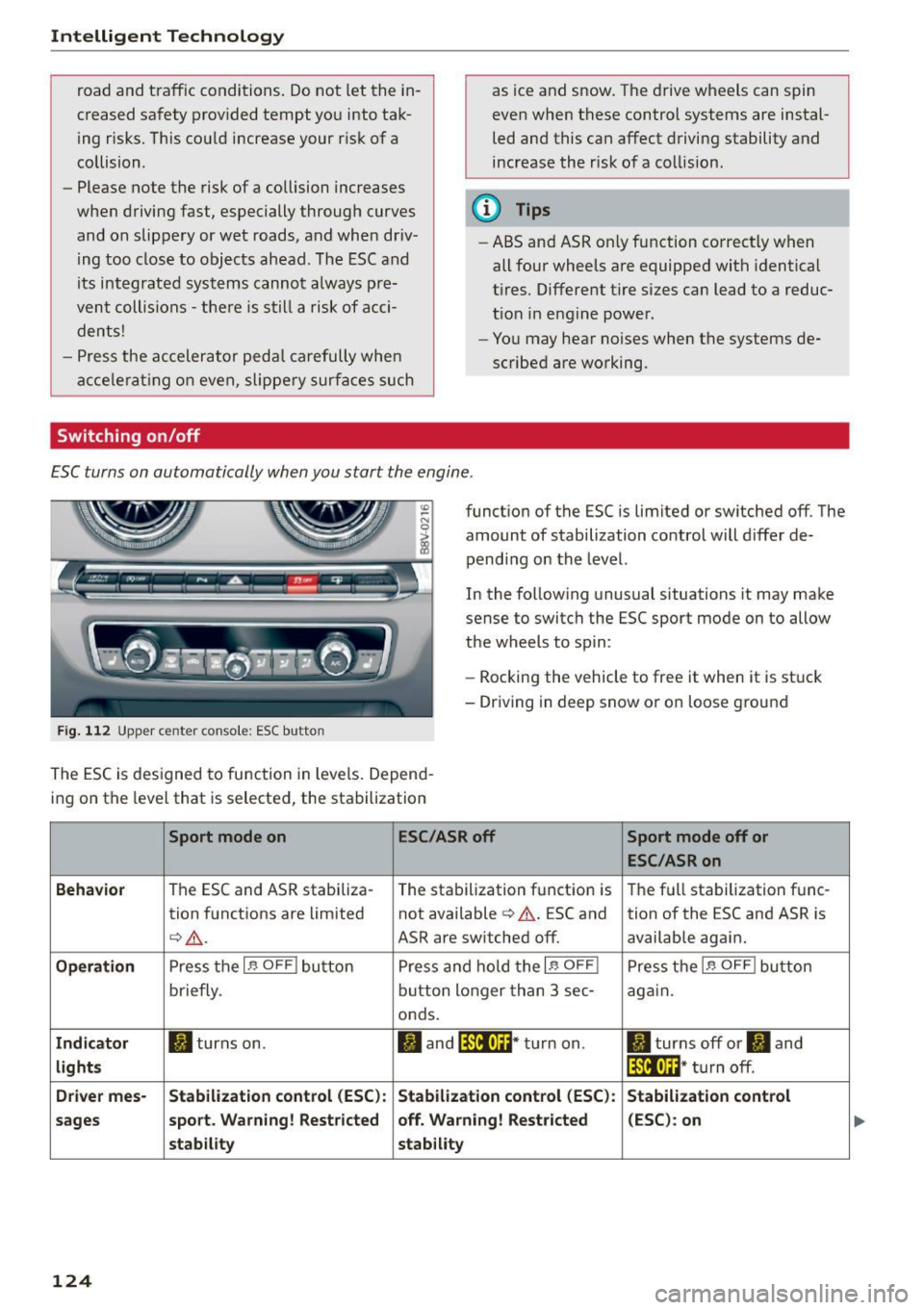
E SC turns on automatically when you start the engine .
Fig. 112 Upper ce nte r con so le : ESC butto n
functio n of the ESC is limited or switched off. The
amount of stabilization control will d iffer de
pend ing on the level.
In the fo llow ing unusual situations it may ma ke
sense to switch the ESC sport mode on to allow
t h e wheels to sp in:
- Rocking the vehicle to free it when it is st uck
- Driving in deep snow or o n loose g ro und
The E SC is d esigned to fu nction in levels . Depen d
i ng on the level that is se lected, the sta bilization
Sport mode on ESC/ASR off Sport mode off or
ESC/ASRon
Behavior
T he ESC and ASR stabiliza- The sta bilization f unct ion is T he f ull sta bilization f unc -
tion f unct ions a re lim ited not available¢& . ESC and
tion of the ESC and ASR is
¢ _& .
ASR are switched off. available again.
Operation Press t he I~ OFF ! bu tton P ress and hold t he I~ OFF I Pre ss th e I~ OFF ! bu tton
briefly. bu
tto n lon ger than 3 sec-
again.
onds.
Indicator II tur ns on. ltl and lf'tl•U~ * tu rn on . II turns off or II and
lights lf'tl•lH* turn off .
Driver mes- Stabilization control (ESC): Stabilization control (ESC) : Stabilization control
sages sport
. Warning! Restricted off . Warning! Restricted (ESC) : on
stab ility stability
124