2015 AUDI S3 mirror
[x] Cancel search: mirrorPage 57 of 310

M N
0 > co ,...., \!) ..,.,
M ..,., ,....,
~ Press the button@repeated ly to select the
correct magnetic zone. The selection mode
turns off after a few seconds.
Calibrating the compass
Applies to vehicles: with dig ital compass
You must recalibrate the compass if it does
not display the correct direction .
~ Press and hold the button @ ~page 54,
fig . 44
until a C appears in the rearview mir
ror.
~ Drive in a circle at about 5 mph ( 10 km/h)
unti l a direction is displayed in the rearview
mirror.
A WARNING
- To avoid endanger ing you rself and other
dr ivers, calibrate the compass in an area
whe re the re is no traff ic.
- The dig ital compass should only be used
as an or ientat ion aid . If you want to
check the compass while dr iving, you
must still pay atten tion to traff ic, the
road, the weather and any other possible
hazards.
Light s and Visi on 55
•
Page 104 of 310

102 Audi side assist
Audi side assist
Side assist
Description
App lies to vehicles: with Audi side assist
Fig . 90 Sensor detect ion ra nge
Fig. 91 Display o n the exterio r mirror
Side assist he lps you monitor your blind spot
and traffic behind your veh icle. Within the
limits of the system, it warns you about
vehicles that are coming closer or that are
traveling with your within sensor range@
c:> fig. 90: If a lane change is classified as criti
cal, the display@in the exterior mirror turns
on c:>fig . 91.
The display in the left exterior mirror provides
assistance when mak ing a lane change to the
le ft, while the display in the right exter ior mir
ror provides assistance when making a lane
cha nge to the right.
Information stage
As long as you do not activate the turn signal,
side assist informs you about vehicles that are
detected and class ified as critical. The display
in the mirror turns on, but is dim. T
he display remains dim in the information
stage so that your view toward the front is not
disturbed .
Warning stage
If you activate the turn signal, side assist
warns you about vehicles that are detected
and classified as critical. The display in the re
spective mirror blinks brightly . If this hap
pens, check traffic by glancing in the rearview
mirror and over your shoulder
c:> .&. in General
information on page 103.
(D Tips
- You can adjust the brightness on of the
display on the rearview mirror
c:>page 104.
Page 105 of 310
....,
N
0 > co
rl I.O
"' ....,
"' rl
General information
Applies to vehicles: with Audi side assist
®
®
©
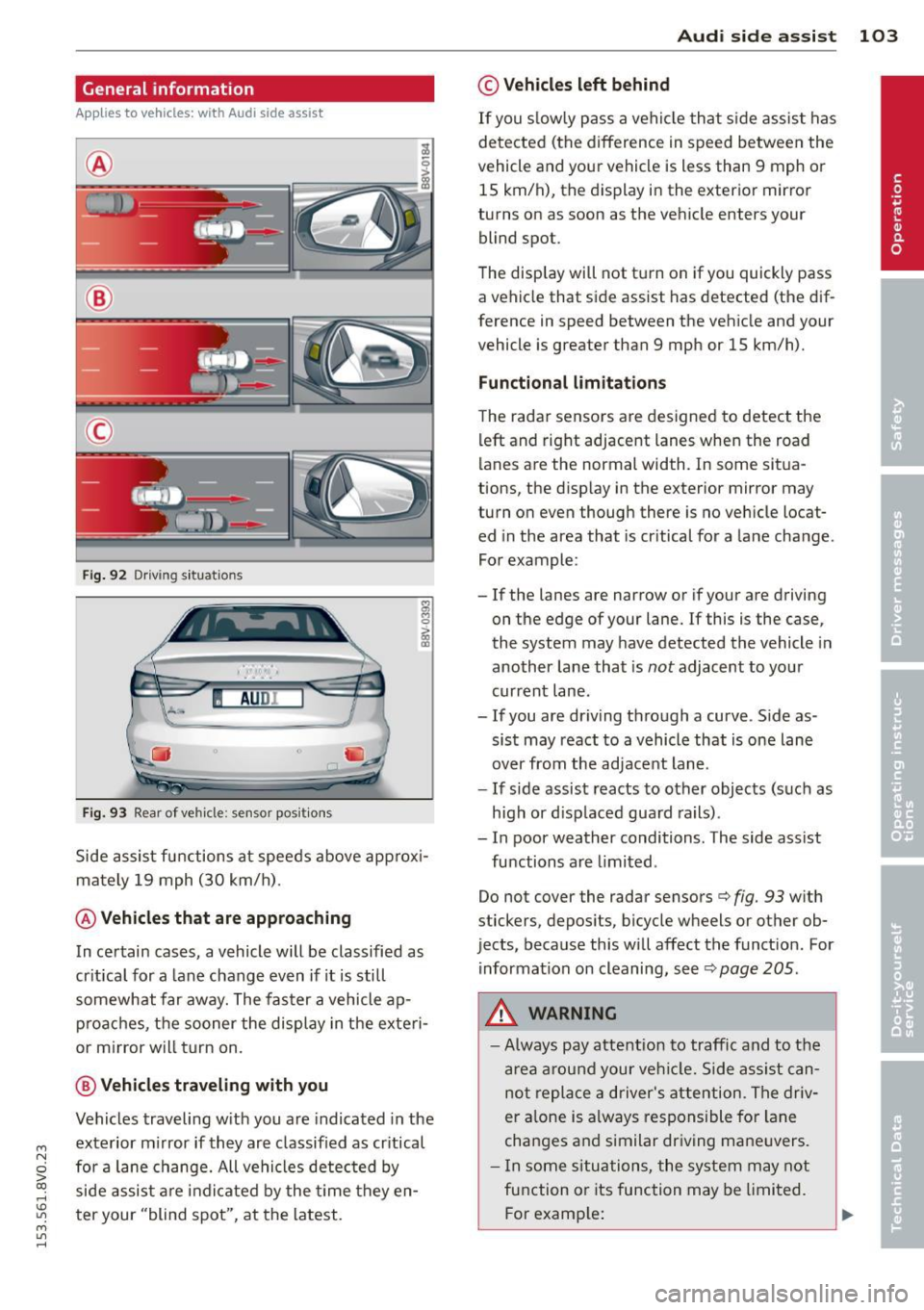
Fig . 92 Dr iv ing s it uat ions
I AU DI
Fi g. 93 Rear of ve hicle: se nsor pos it ions
Side assist functions at speeds above app rox i
mately 19 mph (30 km/h) .
@Vehicl es that ar e approaching
In certain cases, a vehicle will be classified as
cr itical for a lane change even if it is still
somewhat far away. The fas ter a vehicle ap
p roaches, t he sooner the display in the exteri
or m irror will t urn on.
@ V ehicles traveling with you
Vehicles traveling w ith you are indicated in the
exterior m irror if they are classified as cr itical
for a lane change. All vehicles detec ted by
side assist are indi cated by the time they en
t er your "blind spot", at the latest.
Aud i side assist 103
© Veh icles left behind
If you s low ly pass a vehi cle that s ide assist has
detected (the difference in speed between the
vehicle and you r vehicle is less than 9 mph or
15 km/h), the display in the exterio r mir ro r
turns on as soon as the vehicle enters your blind spot.
T he disp lay will not t urn on if you quickly pass
a vehicle that side assist has detected (the dif
ference in speed between the veh icle and your
vehicle is greater than 9 mph or 15 km/h).
Functional limitations
The radar sensors are designed to detect the
left and right adjacent lanes when the road
lan es are the normal width . In some sit ua
tions, the d isp lay in the exterior mirror may
turn on even though there is no ve hicle locat
ed in the area that is cr itical for a lane cha nge.
For example:
- If the lanes are narrow or if your are driving
on the edge of your lane.
If this is the case,
the system may have detected the vehicle in
another lane that is
not adjacent to you r
current lane .
-If you are dr iving through a curve . S ide as
sis t may react to a vehicle that is one lane
over from the adjacent lane.
- If side assist reacts to other objects (such as
high or d isp laced guard rails) .
- In poor weather conditions. The side assist
functions are limited .
Do not cover the radar sensors
c> fig. 93 w ith
stickers, depos its, bicycle wheels or other ob
jects, because this will affect the funct ion. For
information on cleaning, see
c> page 205.
A WARNING
- Always pay attention to traffic and to the
a rea a round your ve hicl e. Side assi st can
not repla ce a d river's attention . Th e driv
er a lone is always responsible for la ne
cha nges and s imilar dr iv ing ma ne uvers.
- In some si tua tions, the system may not
function or its function may be limited.
F or examp le:
Page 106 of 310

104 Audi side assist
-If vehicles are approaching or being
left behind very quickly. The display
may not turn on in time.
- In poor weather conditions such as
heavy rain, snow or heavy mist.
- On very wide lanes, in tight curves, or if
there is a rise in the road surface.
Vehicles in the adjacent lane may not
be detected because they are outside
of the sensor range.
- Audi side assist cannot detect all vehicles
under all conditions, which can increase
the risk of accidents.
- Please note that side assist only displays
approaching vehicles or vehicles in your
blind spot if your vehicle is traveling at
least 19 mph (30 km/h).
- In certain situations, the system may not
work or its function may be limited. For
example:
- The display may not turn on at the
right time if vehicles are approaching
or passing very quickly.
- In poor weather conditions, such as
heavy rain, snow or fog.
- In very wide lanes, in tight curves or
when there are slopes in the roadway,
vehicles in the neighboring lanes may not be detected because they are out
side of the sensor range.
The sensors can be displaced by impacts or damage to the bumper, wheel housing and
underbody. This can affect the system. Have your authorized Audi dealer or au
thorized service facility check their func
tion.
{D) Tips
- If the window glass in the driver's door
or front passenger's door has been tint
ed, the display in the exterior mirror may
be misinterpreted .
- For an explanation on conformity with
the FCC regulations in the United States and
the Industry Canada regulations, re
fer to~
page 292.
Switching on and off
Applies to vehicles: with Aud i s ide ass ist
The system and be switched on and off in the
MMI.
.. Select: the I MENU I button >Car> Systems*
control button > Driver assistance > Audi
side assist.
With Off, the system is switched
off.
An activated system will signal every time the ignition is switched on by turning the displays
in the exterior mirrors on briefly.
Adjusting the display brightness
Applies to vehicles: with A udi side ass ist
The display brightness can be adjusted in the
MMI.
.. Select: the I MENU I button >Car> Systems*
control button > Driver assistance > Audi
side assist.
The display brightness adjusts automatically
to the brightness of the surroundings, both in
the information and in the warning stage. In
very dark or very bright surroundings, the dis play is already set to the minimum or maxi
mum level by the automatic adjustment. In
such cases, you may notice no change when
adjusting the brightness, or the change may
only be noticeable once the surroundings
change.
Adjust the brightness to a level where the dis
play in the information stage will not disrupt
your view forward. If you change the bright
ness, the display in the exterior mirror will
briefly show the brightness level in the infor
mation stage. The brightness of the warning
stage is linked to the brightness in the infor
mation stage and is adjusted along with the
information stage adjustment. .,_
Page 120 of 310

118 Parking systems
Parking systems
General information
Appl ies to vehicles: with rea r parking sys te m s/park in g
syste m plus/rearv iew camera
Depending on your vehicle's equipment, vari
ous parking aids will help you when parking
and maneuvering.
The
rear parking system is an audible parking
aid that warns you of obstacles
behind the ve
hicle
¢ page 119.
The parking system plus assists you when
parking by audibly and visually indicating ob
jects detected
in front of and behind the vehi
cle
¢ page 119.
The rearview camera shows the area behind
the vehicle in the MMI display . This display as
sists you when you are cross or parallel park ing. The parking system plus functions are al
so available ¢
page 120.
& WARNING
-Always look for traffic and check the area
around your vehicle by looking at it di
rectly as well. The parking system cannot
replace the driver 's attention. The driver
is always responsible when entering or
leaving a parking space and during simi
lar maneuvers .
- Please note that some surfaces, such as
clothing, are not detected by the system.
- Sensors and cameras have blind spots in
which people and objects cannot be de
tected . Be especially cautious of small
children and animals .
- Always pay attention to the area around
the vehicle -using the rearview mirror,
too.
- The sensors can be displaced by impacts
or damage to the radiator grille, bumper,
wheel housing and the underbody. The
parking system may become impaired as
a result . Have your authorized Audi deal
er or authorized service facility check
their function . -
Make sure the sensors are not obstructed
by stickers, deposits or other materials.
If they are, the sensor function could be impaired. For additional information on
cleaning, refer to¢
page 205.
(D Note
- Some objects are not detected or dis
played by the system under certain cir
cumstances:
- Objects such as barrier chains, trailer
draw bars, vertical poles or fences
- Objects above the sensors such as wall
extensions
- Objects with specific surfaces or struc
tures such as chain link fences or pow
der snow
- If you continue driving closer to a low-ly
ing object, it may disappear from the
sensor range. Note that you will no lon
ger be warned about this obstacle.
- The sensors can be displaced by impacts
or damage to the radiator grille, bumper,
wheel housing and the underbody. The
parking system may become impaired as
a result. Have your authorized Audi deal
er or authorized service facility check
their function .
(D Tips
- The system may provide a warning even
though there are no obstacles in the cov
erage area in some situations, such as:
- certain road surfaces or for long grass.
- external ultrasonic sources e.g. from
cleaning vehicles.
- heavy rain, snow, or thick vehicle ex
haust.
- We recommend that you practice park
ing in a traffic-free location or parking
lot to become familiar with the system.
When doing this, there should be good
light and weather conditions.
- You can change the volume and pitch of
the signals as well as the disp lay
¢ page 124.
Page 123 of 310

....,
N
0 > co
rl I.O
"' ....,
"' rl
General information
Applies to vehicles: with park ing system p lus wit h rear
view ca mera
Fig. 108 Area covered
(D and area not covered @by
the rearv iew camera.
Fig. 109 Rear l id: Location of the rear-v iew camera
The rearview camera is located above the rear
license plate bracket . Make sure that the lens
for the parking system ~
fig. 109 is not cov
ered by deposits or any other obstructions be
cause this can affect the function of the park ing system. For information on cleaning, refer
to~page205.
The rearview camera coverage area includes
(D ¢ fig. 108. Only this area is displayed in
the MMI. Objects that are outside of this area
@ are not displayed.
The accuracy of the orientation lines and blue
surfaces diminishes if
dynamic mode is acti
vated
¢page 106.
_& WARNING
-Always read and follow the applicable
warnings¢
& in General information on
page 118.
- If the position and the installation angle
of the rearview camera was changed, for
example, after a collision, do not contin
ue to use the system for safety reasons .
Parking systems 121
Have it checked by your authorized Audi
dealership.
- Only use the rearview camera to assist
you if it shows a good, clear picture. For
example, the image may be affected by
the sun shining into the lens, dirt on the
lens or if there is a defect.
- Use the rearv iew camera only if the lug
gage compartment lid is completely
closed.
If the luggage compartment lid
is open the orientation lines and blue
surfaces are hidden. Make sure any ob
jects you may have mounted on the lug gage compartment lid do not block the
rearview camera.
- The camera lens enlarges and distorts
the field of vision. The object appears
both altered and inaccurate on the
screen.
- In certain situations, people or objects in
the display appear closer or farther away:
- For objects that do not touch the
ground, such as the bumper of a
parked vehicle, a trailer hitch or the
rear of a truck. Do not use the help
lines in this case.
-If driven from a level surface onto an
incline , or a downward slope.
- If driven toward protruding objects.
-If the vehicle is carrying too much load
in the rear.
(D Note
-Always read and follow the applicable
warnings
c:>(D in General information on
page 118.
- The orange colored orientation lines in
the MMI display show the direction of
travel of the vehicle rear depending on
the steering wheel angle. The front of
the vehicle front swings out more than
the rear of the vehicle. Maintain plenty
of distance so that your outside mirror or
a corner of your vehicle does not collide
with any obstacles.
Page 204 of 310

202 Trailer towing
Trailer towing Driving with a trailer
General information
Your Audi was designed primarily for passen
ger transportation .
If you plan to tow a tra iler, p lease remember
that the addit ional load will affect durab ility,
economy and performance .
T railer towing not on ly places more stress on
the vehicle, it also calls for more concentra
tion from the driver.
F or this reason, always fo llow the operating
and drivi ng i nstr uctions provided and use
common sense.
Technical requirements
Traile r hitch
Use a weight-carrying hitch conforming to the
gross trailer we ight. The hitch must be suita
b le for your veh icle and trailer and mu st be
mounted secure ly on the ve hicle's chassis at a
technically sound location . Use only a trailer
h itch with a removab le ball mount. A lways
check with the tr ailer hitch manu fac tur er to
make sure tha t you are using t he cor rect
hitch.
Do not us e a bumper hitch .
The hitch must be installed in such a way t hat
it does not interfe re with t he impact-absorb
ing bumper syst em . No mod ifications should
be made to the vehi cle exhaust and brake sys
tems . From time to time, check th at a ll hit ch
mo unt ing bo lts remain secure ly fastened.
When you are not towing a trail er, remove the
tra iler hitch ba ll mount. This prevents the
hi tch from causing d amage sho uld your ve hi
cle be str uck from be hind
¢ A .
Trailer brakes
If you r tra ile r is eq uipped w ith a braking sys
tem, check to be su re that it conforms to a ll
r egulat ions . T
he trailer hyd raulic brake system mus t not be
direct ly connected to the vehicle's hydraulic
brake system .
Safety chains
Always use s afety chains be tween your ve hicle
and t he tra ile r.
Trailer lights
Tra ile r li ghts must meet all regulations. Be
su re to c hec k w ith your Audi dea le r fo r cor rect
wiring, swi tches and relays.
Mirrors
If you are unable to see the traffic behind you
u sing the regular o utside m irrors, then you
must insta ll ext ended mirro rs . It is important
t h at you
always have clea r vis io n to the rea r.
,8. WARNING
-
Afte r removing t he trailer hit ch, d o no t
s tore it in yo ur vehicle . In case of sudden
br aking, t he h itch cou ld fly forward an d in
j ur e you or yo ur passengers .
Operating instructions
Maximum traile r weight
A trai le r fo r you r vehicle is limited to a typi cal
class 1 or class 2 trai le r.
Trailer load distribution
B e sure the load in the t ra ile r is held secure ly
i n p lace to p reven t it from shift ing forw ard,
backw ard or sideways.
Never allow a passenger to ride in a trailer
¢ A in Driving instru ctions on page 203.
Engine cooling system
Towing a trailer makes the engine work hard
er . It is impo rtant that the cooling system 's
performance is up to the additional load .
Make su re that the coo ling system has enough
fl uid .
Tire pressure
When towing a trailer, inflate the tires of your
vehicle to t he cold tire pressure listed under
ll>
Page 210 of 310

208 Care and cleaning
Component Situ ation Solution
Tex tile s,
Deposits adhering to Vacuum cleaner
art ifi cial l eather , the surface
Alcan ta ra Water-based depos- Absorbent cloth and m
ild soap so lution a>
its such as coffee,
tea, blood, etc.
Oil-based deposits Apply
a mild soap solut ion a>, blot away the dissolved oil
such as oil, make- or dye, treat afterward w ith water, if necessary
up, etc.
Special deposits Special stain remover, blot with absorbent material,
such as ink, nail pol-treat afterward with mild soap so lution, if necessary a)
ish, latex paint, shoe
polish, etc.
Natu ral leathe r Fresh stains Wool
cloth with a mi ld soap so lutiona >
Water-based depos- Fresh stains: absorbent cloth its such as coffee, Dr ied stains: stain remover suitable for leather
tea, blood, etc.
Oi l-based deposits Fresh stains: absorbent cloth and stain remover suitable
such as oil, make- for leather
up, etc . dried stains: Oil clean ing spray
Special deposits Spot remover suitable for leathe r
such as ink, nail po l-
ish, latex paint, shoe
polish, etc.
Ca re Regularly apply cond it io ni ng cream that protects from
light and penetrates into the mater ia l. Use spec ially-
co lored! conditioning cream, if necessary.
Carb on p art s Deposits clean th e same way as plastic parts
a) Mi ld soap solution: maximu m two tablespoons of neutral soap in 1 quart (l liter) of water
_& WARNING
The windsh ie ld may not be treated with
water-repelling windshield coating agents .
Unfavorab le conditions such as wetness,
darkness, or low sun can result in in
creased glare. Wiper blade chatter is also
possible .
([) Note
-Headlight s/tail li ght s
-Never clean headlights or tail lights
w ith a dry cloth or sponge.
- Do not use any cleaning product that
conta ins alcohol, because they could
cause cracks to form.
-
- Whee ls
- Never use any pa int polish or other
abrasive materials.
- Damage to the protective layer on the
rims s uch as stone chips or scratches
must be repaired immediately.
- Sen sors/ cam era len ses
-Never use warm or hot water to re-
move snow or ice from the camera
lens. This could cause the lens to crack.
- Never use abrasive cleaning mater ials
or alcohol to clean the camera lens.
This could cause scratches and cracks.
-Door windo ws
-Remove snow and ice on windows and
exter ior mirrors with a plastic scrape r.