2015 AUDI S3 change time
[x] Cancel search: change timePage 92 of 310

90 Audi adaptive cruise control
After each change, the new stored speed ap
pears briefly in the information line
c::> page 88, fig. 80@.
Driving in stop-and-go traffic
Applies to vehicles: with Audi adaptive cruise control
The adaptive cruise control system assists you
in stop-and-go traffic. If an object that is de
tected ahead stops, your vehicle will brake
and stay at a stop, within the limits of the sys
tem.
Starting with adaptive cruise control
1
l
If you veh icle brakes to a stop because an ob
ject is detected ahead, ACC autom. go ap
pears briefly in the instrument cluster display
Your veh icle is in automat ic start mode.
As long as the message ACC autom. go is dis
played and the object detected ahead starts
to move, your vehicle w ill cont inue driving
c::> & .
You can activate ACC autom. go again for a
short time by pulling the lever to posit ion @
r::;, page 90, fig . 82
The start mode ACC autom. go ends when the
brake pedal is pressed .
Criteria for switching off
The adaptive c ruise control switches off for
safety reasons when stationary:
- when the dr iver's door is open,
- when the veh icle is stationary for more than
3 minutes,
- when the dr iver's safety be lt is not fastened .
,&. WARNING
If the message ACC autom . go1l appears,
the vehicle continues driving, even if there
is an obstacle between your vehicle and
the object ahead. This increases the risk of
an accident.
ll This is not available in some co un tri es .
(D Tips
If adaptive cruise contro l is active and your
vehicle does not start driving even though
the message ACC autom. go
1l appears ,
you can start by tapp ing the accelerator
pedal.
- If an obstacle is detected when driving
w ith adaptive cru ise control, the system
w ill request you to begin driving
r::;, page 92 . You vehicle will beg in driv
ing more slowly. This can also happen in
situations where there is no visible ob
stacle.
Interrupting cruise control
Applies to vehicles: wit h Aud i adapt ive c ru ise control
Fig. 82 Operating leve r
Requirement: The adaptive cruise cont ro l is
switched on.
Overriding cruise control
Overriding means exceeding the selected
speed when adaptive cruise control is active,
for example when press ing the accelerator
peda l when pass ing.
.. To accelerate manually, pull the lever to
ward you into position @and hold it there.
The message ACC: override appears. Or
.. press the acce lerator pedal.
.. To resume cruise control, release the lever
or take your foot off the accelerator pedal.
Interrupting cruise control while driving
.. Move the lever into position @. The mes
sage ACC: standby appears. Or
Page 93 of 310

....,
N
0 > co
rl I.O
"' ....,
"' rl
.. press the brake peda l.
.. To resume the stored speed, move the lever
into position @.
Inte rrupting crui se contr ol wh en stopped
.. Push the lever away from you into position
@ . The message ACC : s ta ndb y appea rs .
.. To resume cru ise control, press the brake
pedal and pull the lever toward you into po
sit ion @.
A WARNING
It is dangerous to activate cru ise contro l
and resume the stored speed when the
current road, traffic or weather conditions
do not permit th is . This could result in a
crash.
Setting the distance
Applies to vehicles: with Audi adaptive cruise control
Fig. 83 O perat ing lever : setting the d istance
.. Tap the switch to display the current set dis
tance¢
fig. 83.
.,. To increase or reduce the distance in incre
ments, tap the switch again to the right o r
left . T he d istance between the two vehicles
will change in the instr ument cluster d is
play.
When approaching an object detected ahead ,
the adaptive cru ise cont ro l system brakes to
matc h that object's speed and then regulates
to the stored distance . If the object detected
ahead acce lerates, adaptive cru ise control will
also acce lerate up to the stored speed .
The highe r the speed, the greater the distance
in meters ¢.&. . The
Dist ance 3 sett ing is rec
ommended. That is equal to the general rec -
Audi adapti ve crui se control 91
ommendation of "hal f the speed shown on
the speedometer" .
T he distances provided are examp le values.
Depend ing on the dr iv ing situation, the cur
rent speed and the way the object detected
ahead is driving, the act ual distance may be
more or less than these target d istances .
c::;, _c::::, ___ Distance 1 : Th is sett ing corre-
sponds to a distance o f 92 feet/ 28 meters
when traveling at 62 mph ( 100 km/h), or a
time distance of 1 second.
c::;, __ c::::, __ Distanc e 2: This setting corre
sponds to a distance o f 118 feet/ 36 meters
when traveling at 62 mph ( 100 km/h), or a
time distance of 1.3 seconds .
c::;, ___ c::;,_ Dista n ce 3 : This sett ing corre-
sponds to a distance o f 164 feet/ 50 meters
when traveling at 62 mph ( 100 km/h), or a
t ime distance of 1.8 seconds.
c::;, ____ c::::, Dista n ce 4: T his sett ing corre-
sponds to a distance o f 219 feet/ 67 meters
when traveling at 62 mph ( 100 km/h), or a
time distance of 2.4 seconds.
A WARNING
-
- Driving too close to other vehicles in
creases the risk of co llisions and ser ious
inju ries .
- Sett ing s hort dista nces to veh icles ahead
reduces the distance and time that you
have to stop your vehicle safe ly. This in
creases the need for yo u to pay attention
to traffic.
- Always follow applicable traff ic laws, use
common sense and select a distance to
veh icles ahead that takes the cur ren t
traffic , ro ad and weather conditions into
acco unt .
@ Tips
Distance 3 is set automatically each time
you swi tch the ignit ion on.
It yo u wou ld
l ik e to have th is distance as a b asic setti ng,
you can have the
adaptive crui se cont rol
menu extended/ enabled from an author
i zed repair fac ility .
Page 105 of 310
....,
N
0 > co
rl I.O
"' ....,
"' rl
General information
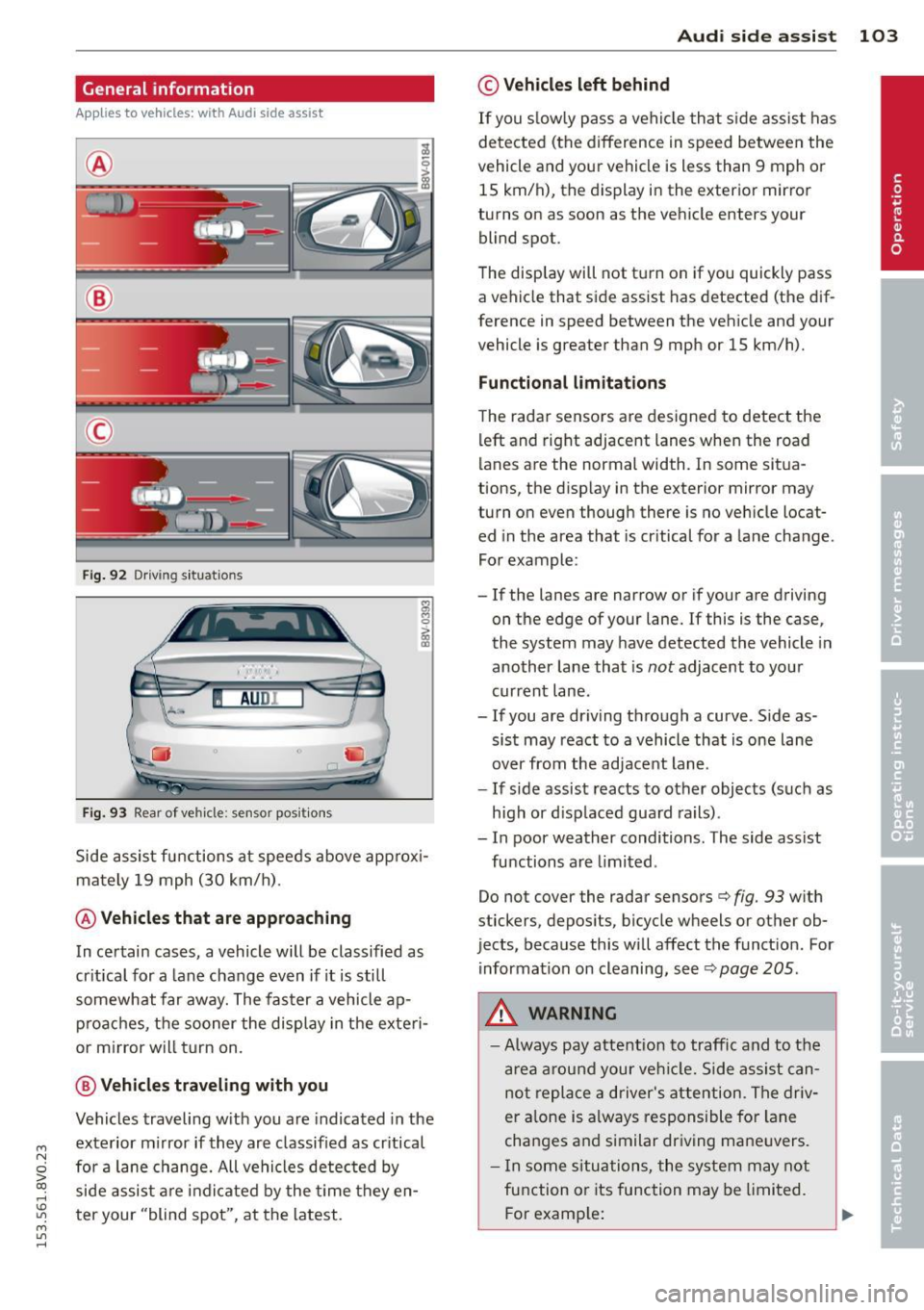
Applies to vehicles: with Audi side assist
®
®
©
Fig . 92 Dr iv ing s it uat ions
I AU DI
Fi g. 93 Rear of ve hicle: se nsor pos it ions
Side assist functions at speeds above app rox i
mately 19 mph (30 km/h) .
@Vehicl es that ar e approaching
In certain cases, a vehicle will be classified as
cr itical for a lane change even if it is still
somewhat far away. The fas ter a vehicle ap
p roaches, t he sooner the display in the exteri
or m irror will t urn on.
@ V ehicles traveling with you
Vehicles traveling w ith you are indicated in the
exterior m irror if they are classified as cr itical
for a lane change. All vehicles detec ted by
side assist are indi cated by the time they en
t er your "blind spot", at the latest.
Aud i side assist 103
© Veh icles left behind
If you s low ly pass a vehi cle that s ide assist has
detected (the difference in speed between the
vehicle and you r vehicle is less than 9 mph or
15 km/h), the display in the exterio r mir ro r
turns on as soon as the vehicle enters your blind spot.
T he disp lay will not t urn on if you quickly pass
a vehicle that side assist has detected (the dif
ference in speed between the veh icle and your
vehicle is greater than 9 mph or 15 km/h).
Functional limitations
The radar sensors are designed to detect the
left and right adjacent lanes when the road
lan es are the normal width . In some sit ua
tions, the d isp lay in the exterior mirror may
turn on even though there is no ve hicle locat
ed in the area that is cr itical for a lane cha nge.
For example:
- If the lanes are narrow or if your are driving
on the edge of your lane.
If this is the case,
the system may have detected the vehicle in
another lane that is
not adjacent to you r
current lane .
-If you are dr iving through a curve . S ide as
sis t may react to a vehicle that is one lane
over from the adjacent lane.
- If side assist reacts to other objects (such as
high or d isp laced guard rails) .
- In poor weather conditions. The side assist
functions are limited .
Do not cover the radar sensors
c> fig. 93 w ith
stickers, depos its, bicycle wheels or other ob
jects, because this will affect the funct ion. For
information on cleaning, see
c> page 205.
A WARNING
- Always pay attention to traffic and to the
a rea a round your ve hicl e. Side assi st can
not repla ce a d river's attention . Th e driv
er a lone is always responsible for la ne
cha nges and s imilar dr iv ing ma ne uvers.
- In some si tua tions, the system may not
function or its function may be limited.
F or examp le:
Page 106 of 310

104 Audi side assist
-If vehicles are approaching or being
left behind very quickly. The display
may not turn on in time.
- In poor weather conditions such as
heavy rain, snow or heavy mist.
- On very wide lanes, in tight curves, or if
there is a rise in the road surface.
Vehicles in the adjacent lane may not
be detected because they are outside
of the sensor range.
- Audi side assist cannot detect all vehicles
under all conditions, which can increase
the risk of accidents.
- Please note that side assist only displays
approaching vehicles or vehicles in your
blind spot if your vehicle is traveling at
least 19 mph (30 km/h).
- In certain situations, the system may not
work or its function may be limited. For
example:
- The display may not turn on at the
right time if vehicles are approaching
or passing very quickly.
- In poor weather conditions, such as
heavy rain, snow or fog.
- In very wide lanes, in tight curves or
when there are slopes in the roadway,
vehicles in the neighboring lanes may not be detected because they are out
side of the sensor range.
The sensors can be displaced by impacts or damage to the bumper, wheel housing and
underbody. This can affect the system. Have your authorized Audi dealer or au
thorized service facility check their func
tion.
{D) Tips
- If the window glass in the driver's door
or front passenger's door has been tint
ed, the display in the exterior mirror may
be misinterpreted .
- For an explanation on conformity with
the FCC regulations in the United States and
the Industry Canada regulations, re
fer to~
page 292.
Switching on and off
Applies to vehicles: with Aud i s ide ass ist
The system and be switched on and off in the
MMI.
.. Select: the I MENU I button >Car> Systems*
control button > Driver assistance > Audi
side assist.
With Off, the system is switched
off.
An activated system will signal every time the ignition is switched on by turning the displays
in the exterior mirrors on briefly.
Adjusting the display brightness
Applies to vehicles: with A udi side ass ist
The display brightness can be adjusted in the
MMI.
.. Select: the I MENU I button >Car> Systems*
control button > Driver assistance > Audi
side assist.
The display brightness adjusts automatically
to the brightness of the surroundings, both in
the information and in the warning stage. In
very dark or very bright surroundings, the dis play is already set to the minimum or maxi
mum level by the automatic adjustment. In
such cases, you may notice no change when
adjusting the brightness, or the change may
only be noticeable once the surroundings
change.
Adjust the brightness to a level where the dis
play in the information stage will not disrupt
your view forward. If you change the bright
ness, the display in the exterior mirror will
briefly show the brightness level in the infor
mation stage. The brightness of the warning
stage is linked to the brightness in the infor
mation stage and is adjusted along with the
information stage adjustment. .,_
Page 158 of 310

156 Airbag sys te m
the front airbag during braking or in a
sudden maneuver. Objects near the air
bags can become project iles and cause
injury, part icularly when the seat is re
cl ined.
- Never place or transport objects on the
front passenger seat . Objects on the
front passenger seat could cause the ca pacitive sensor in the seat to s ignal to
airbag system that t he seat is occupied
by a person when it in fa ct is not, o r that
the person on the seat is heavie r than he
or she actually is. The change in electric
capacitance because of such objects can
cause the passenger front a irbag to be
turned on when it sho uld be off, or can
cause the airbag to work in a way that is
different from the way it wou ld have
worked w ithout ob jects on the seat.
- Always make sure that there is nothing
on the front passenge r seat that will
cause the capacitive passenge r detection
sys tem in the seat to s ignal to t he A irbag
System th at the se at i s oc cupied by a
person when i t is not, or to signa l that it
is occupied by someone who is heavier
than the person actually sitting on t he
seat. The presence of an object co uld
cause the passenger front a irbag to be
turned on when it sho uld be off, or could
cause the airbag to work in a way that is
differe nt from the way it wou ld have
wor ked w ithout the object on the seat.
A WARNING
Th e fine dust created when a irbags dep loy
c an ca u se b reathing problems for peop le
w ith a his to ry o f asthma o r othe r bre at h
ing conditions .
- T o reduce the r is k of b reathing prob lems ,
those wit h asthma or o ther resp iratory
conditions should ge t fresh a ir r ight
away by gett ing out of the vehicle o r
opening windows or doo rs .
- If you are in a coll is ion in which ai rbags
deploy, wash your hands and face w ith
mild soap and water befo re eat ing. -
Be ca reful not to get the dust into your
eyes, or into any c uts or scratches.
- If the resid ue s hould get into your eyes,
f lush them w ith wate r.
Monitoring the
Advanced Airbag
System
tli Airbag monitor ing indicator light
Two separate indicators monitor the function
of the Advanced Airbag System: the airbag
monitoring indicator light and the
PASSEN
GER AIR BAG OFF
light.
The Advanced Airbag System as well as the
s ide airbags and side curta in a irbags w ith
eject ion mit igat ion features (including the
electron ic contro l unit, se nsors a nd system
wiring) are all mon itored continuously to
make su re that they are functioning p roperly
whenever the ignition is on. Eve ry time you
tu rn o n the ignition, the a irbag sys tem indica
tor light
II w ill come on fo r a few seconds
(funct ion check) .
The system must be inspected when the
indicator light
II:
- does not come on when the igni tion is
sw itched on,
- does not go out a few seconds after you
have switched on the ignit ion, or
- comes on while driv ing.
If an airbag system malfunction is detected,
the indicator lig ht w ill first sta rt flashing to
catch t he d rive r's attent io n and the n stay on
conti nuously to serve as a constant rem inder
to have the sys tem inspected immed iate ly.
If a malfunction occurs that tu rns the front
airbag on the passenge r side off, the
PASSEN
GER AIR BAG OFF
light will come on and stay
o n wheneve r th e ign it io n is on. .,..
Page 161 of 310

M N
ci > co ,...., \!) ..,.,
M ..,., ,....,
on the front passenger seat that might cause the capa citive passenger detecti on
system to miscalcu late electrical capac i
tance.
Important safety instructions on
monitoring the Advanced Airbag System
A WARNING
- If the status of the Adv a need Airb ag Sys
tem has changed while the vehicle is
moving, the
PASSENGER AIR BAG OFF
light b links for about S seconds to catch
the driver's attent ion. If this happens, al
ways stop as soon as it is safe to do so
and check the steps described above .
- If the
PASSENGER AIR BAG OFF light
does not go off when an adult who is not
very small is sitting on the front passen ger seat after taking the steps descr ibed
above, make sure the adult is properly
seated and restrained at one of the rear seating pos it ions. Have the a irbag sys
tem inspected by your authorized Audi
dealer before transporting anyone on the
front passenger seat .
A WARNING
An airbag system that is not funct ioning
properly cannot provide supplemental pro
tection in a frontal crash.
- If the airbag indicator light
c> page 21
comes when the vehicle is be ing used,
have the system inspected immediately
by you r autho rized Aud i dea le r. It is pos
sible that the a irbag will inf late when it
is not s upposed to, or w ill not inflate
when it sho uld.
A WARNING
If the front airbag infla tes, a ch ild witho ut
a child restraint, or in a rearward -facing
child safety seat, or in a forward-facing
child rest raint that has not been properly
installed will be serio usly injured and can
be killed.
-
A irbag system 159
-Even tho ugh you r vehicle is equipped
with an Advanced A irbag System, make
certa in that all children, espec ia lly 12
yea rs and younger, always ride on the
back seat prope rly rest rained for their
age and size .
- Always install forward o r rear-facing
child seats on the rear seat -even with
an Advan ced A irbag System.
- I f you must install a rearwa rd fac ing
child safety seat on the front passenger
seat because of exceptional circumstan
ces and the
PASSENGER AIR BAG OFF
light does no t come on an d stay on, im
mediately insta ll the rearward -fac ing
child safety seat in a rear seating posi
tion and have the airbag system inspect
ed by your authorized Audi dealer .
- If, in exceptiona l circumstances, you
m ust install a forward-fac ing ch ild re
straint on the front passenger seat, al
ways move the seat into its rearmost po
sition in the seat's fore and aft adjust
ment rang e, as fa r away from the a irbag
as poss ible. The backrest must be ad just
ed to an upright pos ition. Make su re that
the
PASSENGER AIR BAG OFF light
comes on and stays on all the time when
eve r the ignit ion is switched on .
A\_ WARNING
-
-If the PASSENGER AIR BAG OFF light
does not go out when an a dult is sitting
on the front passenger seat after taking
the steps described above, make sure the adu lt is properly seated and restra ined at
one of the rea r seat ing pos itions .
- Have the airbag system inspected by
your Aud i dea le r before transporting
a nyone on the front passenger sea t.
(D Tips
If the capacitive passenger detection sys
tem determ ines that the front passenger
seat is empty, the fronta l airbag on the
passenger side will be t urned off, and the
PASSENGER AIR BAG OFF ligh t will s tay
on. •
•
•
Page 174 of 310

172 Child Saf ety
c::> page 144, Airbag system and
c::> page 170 , Important things to
know.
Always rep lace child restraints that were
installed in a vehicle during a crash . Dam
age to a child restraint that is not visible
could cause it to fail in another collision
situation.
Advanced front airbag system and children
Your veh icle is eq uipped with a front "Ad
vanced Airbag System" in compliance with
United States Federal Motor Vehicle Safety
Standard ( FMVSS) 208 as applicab le at the
time your vehicle was manufactured.
The Advanced Airbag system in your vehicle has been certified to meet the " low -risk" re
quirements for 3 and 6 year-o ld children on
the passenger side and small adults on the
driver side. The low risk deployment criter ia
are intended to reduce the risk of injury
through interaction with the a irbag that can
occur, for example, by be ing too close to the
steering wheel and instrument panel when
the airbag inflates. In addi tion, the system
h as been certified to comply w ith the "sup
pression" requirements of the Sa fety Stand
ard, to turn
off the front airbag for infants up
to 12 months who a re restrained on the front
passenger seat in chi ld restraints that are list
ed in the Standard.
Even though yo ur vehicle is equipped with an
Advanced Airbag system, all chi ldren, espe
cially those 12 years and younger, shou ld al
ways ride in the back seat properly restrained
for the ir age and s ize . The a irbag on the pas
senger side makes the front seat a potentially
dangerous place for a child to ride. The front
seat is not the safest place fo r a ch ild in a fo r
ward-facing child safety seat. It can be a ve ry
dangerous place for an infan t or a large r ch ild
in a rearward- facing seat. The vehicle's Advanced Airbag System has a
capacitive passenger detection system i n the
front passenger seat cush ion that can detect
the presence of a baby or a ch ild in a child re
stra int system on this seat.
The capacitive passenger detection system registers the changes that result in an electri
ca l fie ld when a chi ld, a child restra int, and a
baby blanket are on the front passenger seat.
The change in the measured capac itance due
to the p resence of a child, a ch ild restraint,
and a baby blanket on the front passenge r
seat is related to the chi ld restraint system
rest ing o n the seat. The meas ured capa cit an ce
of a child restrain t system varies depend ing
on the type of system and specific make and
model.
T he electrical c apa citan ce of the various
types, makes, and models of child restraints
specified by the U .S . Nationa l Highway Traffic
Safety Administration (NH TSA) in the re levant
safety standard are stored in the Advanced
Airbag System contro l unit together with the
capacitances typical of infants and a 1-year
o ld child . When a child restraint is used on the
front passenger seat with a typical 1 year-old
infa nt, the Advanced Airbag System compa res
the capacitance measu red by the capacitive
passenge r de tection system wi th the data
stored in the electron ic cont ro l unit . Child restraints and Advanced front
airbag system
Regardless of the c hild restra int that you use,
make sure that it has been cert ified to meet
U nited States Federal Motor Vehicle Safety
Standards and has been ce rtified by its manu
factu rer for use with an airbag. A lways be sure
t h at the c hild restr aint is properly installed at
one of the rear seating posi tions. If in excep
t iona l circumstances yo u must use it on the
front passenger seat, carefully read a ll of the
information on child sa fety and Advanced Air
bags and heed all of the applicable WARN
INGS . Make certain that the c hild and chi ld re
stra int are correctly recognized by the capac i
t ive passenger detection system in the front .,.
Page 191 of 310

M N
0 > co ,...., \!) 1.1'1
M 1.1'1 ,....,
Smart Technology
Information about
data recorded by
vehicle control
modules
Your vehicle is not equipped with a crash data
recorder. This device is installed by some vehi
cle manufacturers to record data about crash
es so that it can be analy zed later . Crash data
recorders are also called "Event Data Record
ers ( EDR)" .
In some legal jurisdictions, it is not permitted
to access or download data recorded by pre
installed crash data recorders in order to eval
uate a crash without clear consent of the vehi
cle owner .
Your vehicle is not equipped with a crash data recorder. However it does contain a variety of
electronic control modules for various vehicle
systems such as engine function, exhaust
treatment or airbags and safety belts .
These electronic control modules record vehi cle data during normal driving for diagnosis
and repair purposes . The recording capability
of the electronic control modules is limited to
data only- no sound is recorded.
If the control
module detects a system ma lfunction or other
change in status, a very limited amount of da
ta is recorded for an extremely small period of
time . Data that is recorded in such a case may
include vehicle speed, d riving direction, the
load on the brakes and head restraints and
performance in the event of an acciden t or
other change in status . The stored data can
only be read or downloaded with special devi
ces.
Electronic stabilization
control (ESC)
Description
The Electronic Stabilization Control (ESC) con
tr ibutes to driver safety. It reduces the risk of
slipp ing and improves driving stability. ESC
Smart Technolog y 189
detects critical situations such as the vehicle
oversteering and understeering or the wheels
are spinning . The vehicle is stabilized by ap
plying the brakes or reducing engine torque.
Once the ESC is activated, the indicator light
m blinks in the instrument cluster .
The following systems are integrated in the
ESC:
Anti-lock braking system (ABS )
ABS prevents the whee ls from locking when
braking. The vehicle can still be steered even
during hard braking. Apply steady pressure to
the brake pedal. Do not pump the pedal. A
pulsing in the brake peda l indicates that the
system is acting to stabilize the vehicle.
Brake assi st sys tem
The brake assist system can decrease braking
distance. It increases braking power when the
driver presses the brake pedal quickly in emer
gency situations. You must press and hold the brake pedal until the dangerous situation is
over . In vehicles with adaptive cruise control*,
the brake assist system is more sensit ive if the
distance detected to the vehicle ahead is too
small.
Anti-slip regulation (ASR)
ASR reduces engine power when the drive
wheels begin spinning and adapts the force to
the road conditions . This makes it easier to
start , accelerate and dr ive up inclines .
Electronic differential lock (EDL)
The EDL brakes wheels that are spinning and
transfers the drive power to the other drive
wheel or wheels if the vehicle is equ ipped with
all wheel drive*). This function is not available
at higher speeds .
In extreme cases, EDL automatically switches
off to keep the brake on the braked wheel
from overheating . The vehicle is still working
correctly. EDL will switch on aga in automat i
cally when cond itions have returned to nor-
mal. .,..
•
•
•