2015 AUDI RS7 SPORTBACK warning
[x] Cancel search: warningPage 102 of 302
100 Night visi on assis tant
Pedestrian warning
Applies to vehicles: with night vision assistant
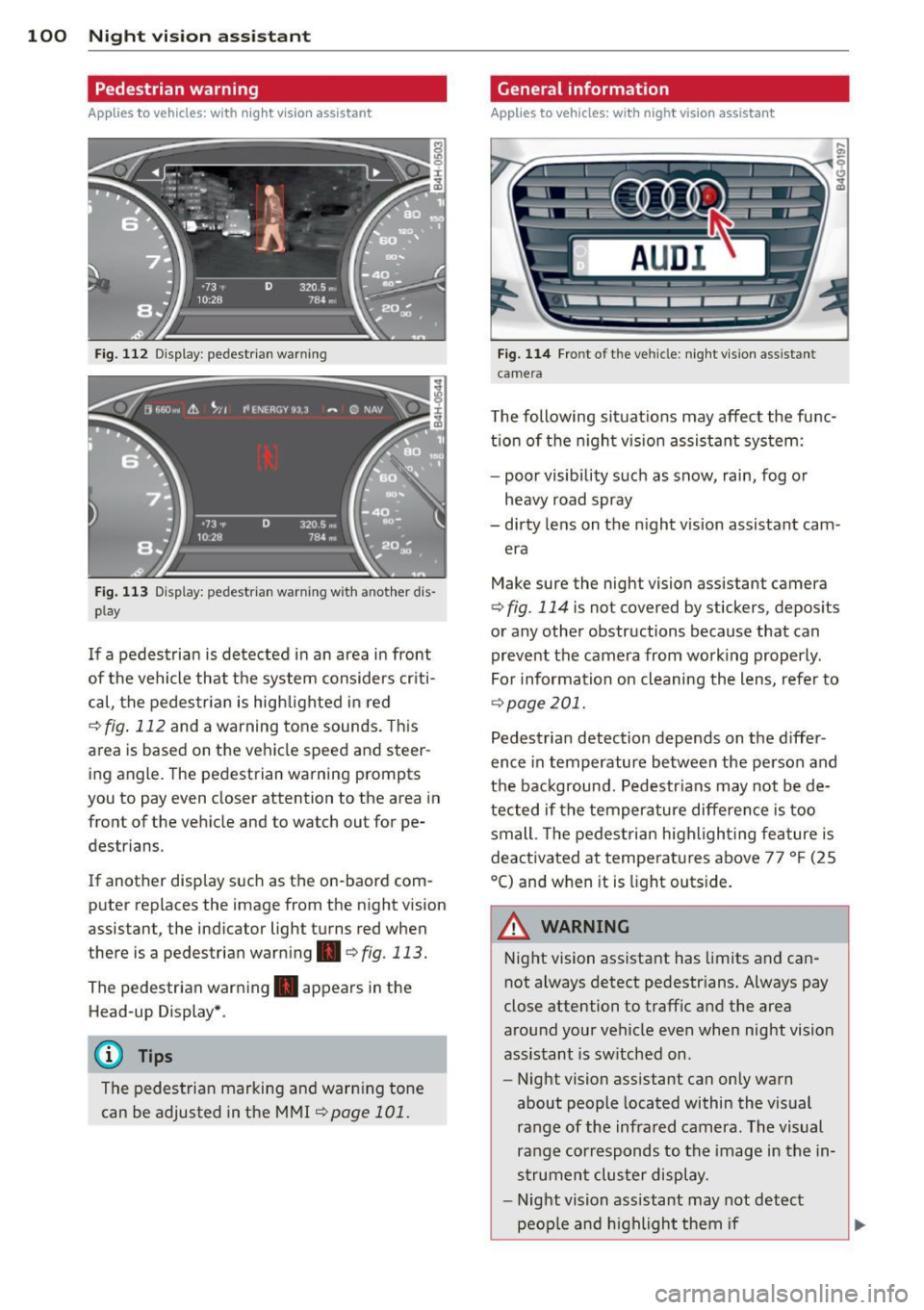
Fig. 112 Display : pedestrian warning
Fig . 113 D is p lay: pedestrian warning w ith a nother dis
p lay
I f a pedestrian is detected in an area in front
of the vehicle that the system considers criti
cal, the pedestrian is high lighted in red
Q fig . 112 and a warning tone sounds. This
area is based on the vehicle speed and steer
ing angle. The pedestrian warning prompts
you to pay even closer attention to the area in
front of the vehicle and to watch out for pe
destrians.
If another display s uch as the on-baord com
puter replaces the image from the n ight vision
assistant, the indicator light turns red when
there is a pedestrian warning .
qfig . 113.
The pedestrian warning . appears in the
Head-up Display *.
(D Tips
The pedestrian marking and warning tone
can be adjusted in the MMI
!:!) page 101.
General information
Applies to vehicles: with night vision assistant
Fig. 114 Fro nt of th e ve hicle: night v ision assistant
camera
T he following situat ions may affect the func
t ion of the n ight vision assistant system:
- poor visibility such as snow, rain, fog or
heavy road spray
- dirty lens on the n ight vis ion assistant cam -
era
Make sure the night vision assistant camera
q fig . 114 is not covered by stickers, deposits
or any other obstructions because that can
prevent the camera from working properly.
For information on cleaning the lens, refer to
Q page 201.
Pedestrian detection depends on the d iffer
ence in temperature between the person and
the background. Pedestr ians may not be de
tected if the temperature diffe rence is too
small . Th e pedestrian highl ighting feature is
deactivated at tempe ratures above 77 ° F (25
°C) and when it is light outs ide.
A WARNING
Night vision assistant has limits and can
not always detect pedestr ians. Always pay
close attention to traffic and the area
around your vehicle even when night vision
assistant is sw itched on .
- Night vision assistant can only warn
about people located within the visual
range of the infrared camera. The visual
range corresponds to the image in the in
strument cluster display .
- Night vision assistant may not detect
-
peop le and highlight them if .,.
Page 103 of 302

"' N
a:: I.J ""'. rl I.O
"' rl
"' rl
-they are not in an upright position, for
examp le if they are s itting, crouching
or lying down and/or
- if the outline in the display is incom
p lete or interrupted, for example be
cause the person is partially hidden by
a parked veh icle .
(D Tips
-Pedestrian detection and the pedestrian
warming are lim ited to objects that are
detected as pedestr ians. The system
does not detect animals . Even though
the shape and warmth radiated by each
object det ected is evaluated, the system
does have lim itations and it can give in
correct warnings.
- Fo r techn ical reasons , the image pauses
in split second i nterva ls.
Switching on and off
Appl ies to vehicles: with night vision assistant
Fig . 115 Area a round the lig ht switch: night vis io n as
si st ant button
.. Switch the ignition on and turn the light
switch to the
AUTO position or io.
.. To switch night vision ass istant on, press the
~ button c::> fig. 11 S. T he image from the
night vision camera appears in the instru
ment cluster d isp lay.
.. Press the button~ again to sw itch night vi
s ion assistant off .
Night vision assistant 101
Settings in the MMI
Applies to vehicles: with night vision assistant
Fig. 116 Disp lay : exa mple of pedest rian detect io n and
warn ing to n e sw itched off
.. Select: !CAR ! function button> (Car)* sys
tems
co ntrol button > Driver assist > Night
vision assist.
Highlight pedestrians -
You can switch pedes
trian detec tion
on and off. If you switch pe
destrian detection off, the pedestrian warning
tone also switches off . The symbols
II and
e appear in the upper r ight area of the in
strument cluster display
r:!) fig. 116.
Warning tone -You can switch the tone for
the pedestrian warning
on and off. When the
warning tone is sw itched off, a yellow symbol
for the deactivated warning tone with a line
through it appears in the upper right of the in
strument cluster display¢
fig. 116.
Contrast -When the night vision assistant is
switched on and the image is visib le in the in
strument cluster display, you can adjust the
contrast in the image from
Min to Max .
Driver messages
Applies to vehicles: with night vision assistant
Night vision assistant: system malfunction!
The system cannot work properly and is
switched off. See your authorized Audi dealer
for assistance.
Night vision assistant: not available
The system cannot detect properly under cur
rent conditions and is switched off temporari-
~ ~
Page 106 of 302

104 Autom atic Tran smi ssi on
power. Shifting may become noticeable when
accelerating .
When the veh icle is stationary or at speeds
be low 1 mph (2 km/h), you must always apply
the foot brake before and while moving the lever to D/S out of N .
.&_ WARNING
Read and follow all WARNINGS <=:> & in
Driving the automatic transmission on
page 105.
([) Note
Coasting downhi ll with the transmission in
N and the engine not running wi ll result in
damage to the automatic transmission
and possibly the catalytic converter.
(D Tips
- Audi drive select: you can adjust the
sporty shift characteristics in the
D y
namic driving mode.Swill appear in the
i nstrument cluster display instead of D .
- If you accidentally select N while driving,
take your foot off the acce lerator pedal
i mmediately and wait for the engine to
slow down to idle before selecting D/S.
- If there is a power failure, the selector
lever will not move out of the P position.
The emergency release can be used if
this happens
<=:> page 108.
Automatic Shift Lock {ASL)
The Automatic Shift Lock safeguards you
against accidentally shifting into a forward or the reverse gear and causing the vehicle to
move unintentionally.
. I r )
Fig . 118 Shift gate: selecto r lever lock pos it ions and
r elease button highl ig h ted
The selector lever lock is released as follows:
... Turn the ignition on .
.,. Step on the brake pedal.
At the same time
press and hold the release button on the
gear selector knob <=:>
fig. 118 w ith your
thumb until you have moved the selector
lever to the desired position .
Automatic selector le ve r lock
The selector lever is locked in the P and N po
sitions when the ign ition is turned on . You
must press the brake pedal and the release
button to select another position . As a re
minder to the driver, the following wa rning
appea rs in the instrumen t clus ter display
when the selector is in P and N:
Wh en stationar y appl y brak e peda l w hile se
le ct in g gear
The Automatic Shift Lock only funct ions when
the veh icle is stationary or at speeds below
1 mph (2 km/h) .
At speeds above about 1 mph (2 km/h) the
Automat ic Shift Lock is automatically deacti
vated in the N position .
A time delay element prevents the selector lever from locking when it is moved through
the N pos it ion (going from R to D/S) . The lock
ing element w ill lock the selector lever if the
Ill>
Page 107 of 302

"' N
a:: I.J "". rl I.O
"' rl
"' rl
lever is left in N (Neutral) for more than ap
proximately 2 second, without the brake ped
al being pressed .
Release button
The release button on the selector lever pre
vents the leve r from being accidentally shifted
into certa in positions. Depending on the direc
tion of the shift, the se lector lever locks at d if
ferent positions. The positions are highlighted in the illustration
c!> fig . 118.
Driving the automatic transmission
Fig. 119 Shift gate on the c ente r conso le: se lector le v
er with release button
Starting the engine
.,. The selector lever must be in P or N.
Starting off
.,. Press and hold the brake pedal.
.,. Press and hold the release button in these
l ector lever handle, se lect the desired se lec
tor lever position such as 0/5 and release
the button .
.,. Wait briefly until the transmission has shift
ed (you will feel a slight movement).
.,. Remove your foot from the brake pedal and
acce lerate.
Stopping temporarily
.,. Keep the vehicle stationary using the brak
ing pedal, for example at traffic lights .
.,. Do not press the accelerator pedal when do
ing this .
.,. To prevent the vehicle from rolling when you
start driving, set the parking brake when
stopping on steep inclines
c!> .&,.
Automatic Transmission 105
.,. The parking brake will release automatica lly
and the vehicle will start moving once you
press the acce lerator pedal.
Stopping/parking
If the selector lever is not in the P position
when you open the driver's door, the vehicle
could roll . The message
Transmission: Car
may roll! Shift to park!
appears .
.,. Press and hold the brake pedal un til the ve-
hicle has come to a complete stop .
.,. App ly the parking b rake
c::> page 77, Parking.
.,. Select the P selector lever position c::> .&,.
Stopping on an incline
.,. Always
press the brake pedal to hold the ve
hicle in place and prevent it from "rol ling
back"
c::> .&, . Do not try to prevent the vehi
cle from "rolling back" when a gear is en
gaged by increasing the engine speed
c::>(D.
Starting on an incline
.,. Activate the parking brake.
.,. With the driving gear selected, press the ac
celerator pedal carefully. The parking brake
wi ll release automatically if your seat belt is
fast ened .
Under certain circumstances, such as driving
in the mountains, it may be useful to switch
temporarily to the manual shift program in or
der to adjust the gears to the driving condi
tions by hand
c::>page 107.
On slopes, activate the parking brake first and
then move the selector lever to the P position.
This prevents too much stress from being placed on the locking mechanism.
A WARNING
-
- The vehicle can also roll when the engine
is stopped .
- Unintended vehicle movement can cause
serious injury.
- Never leave your vehicle with the engine
running while in gear . If you must leave
your veh icle when the engine is running,
Page 108 of 302

106 Automatic Tran sm iss ion
activate the parking brake and move the
selector lever to P.
- Power is sti ll transmitted to the whee ls
when the engine is running at idle. To
prevent the vehicle from "creeping", you
must keep your foot on the brake when
the engine is runn ing and the selector
lever is in D/S or R or "tiptronic" mode is
selected.
- Do not press the accelerator pedal when changing the selector lever pos ition
wh ile the vehicle is stat ionary and the
eng ine is running.
- Never shift into
R or P wh ile driving.
- Before driv ing down a steep slope, re-
duce your speed and shift into a lower
gear with "tip tronic".
- Do not ride the brakes or press the brake
peda l too often or too long when dr iving
down a hill. Constant braking causes the
brakes to ove rheat and s ubstant ially re
duces braking per formance, increases
braking distance or causes comp lete fail
ure of the brake system.
- To prevent the veh icle from rolling back
when stopping on inclines, a lways hold it
in place with the brake peda l o r parking
brake.
- Never hold the ve hicle on an incl ine with
a slipping clutch . The clutch opens auto
matically when it becomes too hot from
the overload. An indicator lamp
ml illu
minates and a dr iver message appears
¢ page 1O7when the clutch is overload
ed.
- If the engine must remain running, never
hav e any driv ing pos ition engaged when
c heck ing under the hood . M ake sure the
selector lever has securely engaged and
is locke d in P with the parking brake se t
¢page 211. Otherwise, any increase in
engine speed may set the vehicle in mo
t ion, eve n with the park ing brake ap
plied.
Qd) Note
- When stopping on an incline, do not try to hol d the vehicle in place by pressing the acce
lerator pedal while a d riving gear
is se lected. This can cause the transmis
sion to ove rheat and can damage it. Acti
vate the parking brake or press the brake peda l to prevent the vehicle from rolling.
- Allowing the vehicle to ro ll when the en
gine is stopped and the selector lever is
in N will damage the transmission be
cause it is not lubricated under those cir
cumstances .
(D Tips
For safety reasons, the parking brake is re
leased automatically only when t he driv
er's safety belt is engaged in the buckle.
Hill descent control
The hill descent control system assists the
driver when driving down declines .
Hill descent control is activated when these
lector lever is in D/S and you press the brake
pedal. The transmission automatically selects
a gear that is suitable fo r the incline . H ill de
scent cont ro l tries to ma inta in the speed ach
ieved a t the time o f braking, with in phys ica l
and tec hni cal lim it a tions. If may st ill be nec
essary to ad just the speed with the brakes.
Hill descent contro l sw itches off once the de
cl in e leve ls o ut o r yo u press the a cce le rato r
peda l.
On vehicles with the cru ise cont ro l system*
~ page 79, hill descent control is also activat
ed whe n the speed is set.
A WARNING
-
Hill desce nt cont ro l cannot overcome
physical lim itations, so it may not be a ble
to maintain a constant speed unde r a ll
conditions. A lways be ready to apply the
brakes .
Page 109 of 302

"' N
a:: I.J "". rl I.O
"' rl
"' rl
Manual shift program
Using the manual shift program you can
manually select gears.
,
Ir_
Fig. 120 Ce nter console : sh ift ing the gears manually
Fig. 121 Stee rin g wheel : S hi ft paddles
Gear selection with selector lever
The t iptron ic mode can be selected eithe r with
the vehicle stationary or on the move.
• Push the selector lever to the right from
0/
S. An M appears in the instrument cluster
display as soon as the transmission has
shifted.
• To upshift, push the selector lever forward
to the plus posi tion 0
~ fig. 120.
• To downshift, push the lever to the minus
position
0 -
Gear selection with shift paddles
The shift paddles are activated when these
lector lever is in D/S or the tiptron ic manual
shift program.
• To upsh ift, touch the shift paddle on the
right 0~fig.121 .
• To downshift, touch the shift paddle on the
left
0 .
• If you do not press a shift paddle within a
short time while in the
0/5 posit ion, the
transmission will return to automatic mode .
Automatic Transmission 107
To keep shifting using the shift paddles,
move the selector lever to the right out of
the D/S pos ition.
When accelerating, the transmission does
not
automatically shift to the next gear shortly
before the maximum permitted engine RPM is
reached.
If you have se lected a lower gear than the cur
rent one, the automatic transmission will shift
down only when the engine will not be over
revved.
With kick-down , the transmission shifts into a
lower gear depending on speed and engine
RPM.
(D Tips
Tiptronic is inoperat ive when the transmis
sion is in the fa il-safe mode.
Kick-down
Kick-down enables maximum acceleration.
When you depress the accelerator peda l be
yond the resistance point, the automatic
transmission downshifts into a lower gear, de
pending on vehicle speed and engine speed .
The upshift into the next higher gear takes
place once th e maximum specified engine
speed is reached .
A WARNING
Please note that the drive wheels can spin
if kick-down is used on a smooth slippery
road - there is a risk of skidd ing.
Transmission malfunction
[!l Transmission : Press brake pedal and se
lect gear again
Press the brake pedal and select the desired
selector lever position again . You can then
continue driving.
[!l Transmission overheating: Please drive
conservatively
Page 111 of 302
M N
0:: <.J "SI: ...... \!) 1.1"1
...... 1.1"1 ......
Parking systems
General information
Applies to vehicles: with parking system plus/rear view
camera/peripheral cameras
Depending on your vehicle's equipment, vari
ous parking aids w ill help you when parking
and maneuvering.
The
pa rking syste m plus assists you when
parking by audibly and visually indicating ob
jects detected
in front of and behind the vehi
cle
¢ page 110.
The rea r view c amera shows the area behind
the vehicle in the Infotainment disp lay . This
display assists you when you are cross or par
allel parking
¢ page 111 . In addit ion, you are
assisted by the functions from the parking
system plus¢
page 110.
The periph era l ca mera s assist you with park
i ng and maneuvering. You are aided by var ious
cameras depending on the vehicle equipment l eve l¢
page 114. In addition, you are assist
e d by the func tion s from th e parking sy stem
plus ¢page 110.
A WARNING
- Always look for traff ic and check the area
around your vehicle by looking at it di
rectly as well. The parking system cannot
replace the driver's attent ion. The dr iver
is always responsible for safety during
park ing and for all other maneuvers .
- Please note that some surfaces, such as
clothing, are not detected by the system.
- Sensors and cameras have blind spots in
wh ich peop le and objects cannot be de
tected. Be especially cautious of children and animals.
- T he sensors can be displaced by impacts
or damage to the radiator grille, bumper ,
wheel housing and the underbody. The parking systems may become impaired
as a result. Have your authorized Audi
dealer or qualified workshop check their
function.
Par king system s 109
-Make sure the sensors are not covered by
stickers, deposits or any other obstruc
tions as it may impair the sensor func
tion . For information on cleaning, refer
to ¢
page 201 .
(D Note
- Some objects are not detected by the
system under certain c ircumstances :
- Objects such as ba rrie r chains, trailer
draw bars, vertical po les or fences
- Objects above the sensors such as wall
extensions
- Objects w ith specific surfaces or st ruc
tures such as chain link fences or pow
der snow.
- If you continue driving closer to a low-ly
ing object, it may disappea r from the
sensor range. Note that you w ill no lon
ger be warned about this obstacle.
@ Tips
- T he system may provide a warning even
tho ugh there are no obstacles in the cov
erage area in some situations, such as:
- certain road surfaces or for long grass.
- externa l ultrasonic sources e.g. from
clean ing vehicles.
- heavy rain, snow or thick vehicle ex
ha ust.
- We recommend that you practice park
ing in a traff ic-free location or park ing
lot to become familiar w ith the system.
When doing this, there should be good light and weather cond itions .
- You can change the vo lume and pitch of
the s ignals as well as the display
¢ page 119 .
-What appears in the infotainment dis
play is somewhat time-delayed .
Page 112 of 302

110 Parking systems
Parking system plus
Description
Applies to vehicles: wit h park ing system p lus
Audi parking system plus provides audio and
visual signals when parking.
Fig. 123 Display field
Sensors are located in the front and rear
bumpers.
If these detect an obstacle, visual
and in some situations audible signals warn
you.
Make sure the sensors are not covered by
stickers, deposits or any other obstructions as
it may impair the sensor function. For infor
mation on cleaning, refer to
~ page 201.
The display field begins approximately at :
@ 4 ft (1.20 m)
® 3 ft (0.90 m)
© 5.2 ft (1.60 m)
@ 3 ft (0 .90 m)
The closer you get to the obstacle, the shorter
the interval between the audible signals. A
continuous tone sounds when the obstacle is
less than approximately 1 ft (0.30 m) away.
Do not continue driving farther~&.
in Gener
al information on page 109,
~CD in General
information on page 109!
If the distance to an obstacle remains con
stant, the volume of the distance warning
gradually drops after about four seconds (this
does not apply in the continuous tone range).
Switching on/off
Applies to vehicles : w it h park ing system pl us
Fig. 124 Center console :
P.! button
Fig. 125 Infotainment: visual distance d isplay
Switching on
.,. Shift into reverse or
.,. Press the
P"1A button in the center console
~ fig. 124. A short confirmation tone
sounds and the
LED in the button turns on.
Switching off
.. Dr ive forward faster than 6 mph (10 km/h),
or
.,. press the
Pif.lA button, or
.,. switch the ignition off.
Visual display
Using the segments, you can estimate the dis
tance to an object in front of or behind the ve
hicle~
fig . 125 . The red lines mark the ex
pected direction of travel according to the
steering ang le . A wh ite segment indicates an
identified obstacle that is outside of the vehi
cle's path. Red segments show identified ob
stacles that are in your vehicle's path. As your
vehicle comes closer to the obstacle, the seg ments move closer to the vehicle. At the lat-
est the collision area has been reached when ..,.