2015 AUDI RS5 CABRIOLET brake light
[x] Cancel search: brake lightPage 86 of 284

84 Transmi ssion
In the no rm al m ode D, the transmission auto
matica lly selects the suitab le gear ratio. It de
pends on eng ine load, veh icle speed and driv
ing style.
Select the
s p or t mode S for spo rty driving.
The vehicle makes full use of the eng ine 's
power. Shifting may become noticeab le when
accelerating.
When the vehicle is stationary or at speeds
be low 1 mph (2 km/h), you must always apply
the foot brake before and while mov ing the
lever to D/S out of N.
A WARNING
Read and follow all WARNINGS c> .&. in
Driving the automatic transmission on
page 85 .
(D Note
-
Coasting downh ill with the transmission in
N and the engine not running w ill result in
damage to the automatic transmiss ion
and possibly t he catalyt ic converter .
(D Tips
-On vehicles with drive select*, you can
adjust the sporty shift characteristics in
the
Dynamic d riving mode.Swill appear
i n the instrum ent cluster disp lay instead
ofD.
- If you accidentally select N whil e driv ing ,
take your foot off the acce le rator pedal
i mmedia tely and wait fo r the engine to
s low down to idle be fore se lecting D/S.
- If there is a power failure, the se lector
l ever will not move out of t he P posi tion.
The eme rgency release can be used if
th is happens<=>
page 89.
Automatic Shift Lock {ASL)
The Automatic Shift Lock safeguards you
against accidentally shifting into a forward or
the reverse gear and causing the vehicle to
move unintentionally.
Fi g. 9 7 Shi ft ga te : se lecto r le ver lock pos itio ns and re
lease b utto n hig h lighted
The selector lever lock is released as follows:
.. Turn the ignition on .
.. Step on the brake pedal.
At the same time
press and hold the release button on the
side of the gear selector knob<=>
fig. 97 with
your thumb until you have moved the selec
to r lever to the desired position.
Automatic selector leve r lock
The selector lever is locked in the P and N po
s itions w hen the ign ition is turned on . You
must p ress the brake pedal and t he release
button to select anothe r position . As a re
minde r to the drive r, the following wa rni ng
appea rs in the in strumen t clus ter di splay
when the sele ctor is in P and N:
When stationar y apply brak e pedal while se
lecting gear
The Automatic Shift Lock only funct ions when
t h e veh icle is stationary or at speeds be low
1 mph (2 km/h) .
At speeds above about 1 mph (2 km/h) the
Automat ic Shift Lock is automatically deact i
vated in the N position .
A time delay element prevents the selector lever from locking when it is moved through
the N pos it ion (go ing from R to D/S) . The lock
ing element w ill lock the selecto r leve r if t he
Ill>
Page 87 of 284

"' N
a: LL co
rl I.O
"' rl
"' rl
lever is left in N (Neutral) for more t han ap
prox imately 2 seconds, without the b rake ped
a l being pressed .
Release button
The release b utton on the selec tor leve r pre
ve nts the leve r from bei ng accide ntally s hifte d
i n to ce rtain positions. Depen ding on the direc
tion of the shift, the se lector lever locks at d if
ferent positions. The positions are h ighlighted
in the ill ustration
c!> fig . 97.
Ignition key safety interlock
The key canno t be removed from the igni tion
un less the se lector lever is in the P park posi
tion . When the ignition key is remove d, the
se lecto r lever wi ll be locked in the P pos ition.
Driving the automatic transmission
F ig. 98 S hift gate o n th e ce nte r conso le: selector lever
wit h release bu tton
Starting the engine
.. The selector leve r must be in P or N.
Starting off
.. Press a nd ho ld t he brake ped al.
.. Press and ho ld the release bu tton in these
l ector lever handle, se lect the desi red se lec
tor leve r pos ition such as D/S and re lease
t h e b utton.
.. Wait br iefly u ntil t he transmission has shift
ed (you will feel a slight movement).
.. Remove your foot from the b rake pedal a nd
acce le rate.
Stopping temporarily
.. Keep the vehicle stationary us ing the brak
ing peda l, for e xamp le at traffic lights.
Transm ission 85
.. Do not press the accelerator peda l w hen do
ing this .
.. To preve nt t he vehicle from ro lling when yo u
start dr iv ing, set the parking b rake w hen
stopping on steep inclines
c!> _&. .
.. The parking brake will release automat ica lly
an d the vehicle will start mov ing o nce you
p ress th e acce lerator pedal.
Stopping/parking
If the selector lever is not in the P position
whe n you open the driver's door , the veh icle
could roll . The message
Transmission: Car
may roll! Shift to park! ap pears .
.. Press and hold the brake peda l until the ve-
hicle has come to a comp lete stop .
.. App ly t he park ing brake
co page 79 .
.. Select the P selec to r lever posit io n
co _&. .
Stopping on an incline
.. Always press the brake pedal to ho ld the ve
hicle in place and prevent it from "ro lling
back"
co _&. . Do not try to p revent the ve hi
cle from "rolling back" when a gear is en
gaged by increas ing t he engine spee d co (!).
Starting on an incline
.. Activate the parking brake .
.. With t he driving gear selected, p ress the ac
celerato r peda l carefully . The parking brake
w ill rel ease au toma tically if your sea t belt is
fast ene d .
U nder certa in circumstances, such as driving
in the mounta ins, i t may be usefu l to sw itch
t emporar ily to the man ual sh ift program in or
d er to adju st the gears to th e d riv in g con di
ti ons by ha nd
co page 87 .
On s lopes, activate the parki ng b rake first and
t hen move the s electo r leve r to the P posi tion .
T his pr eve nts t oo much st ress from be ing
p la ced o n the locking me chani sm .
&_ WARNING
- Th e vehicle c an als o roll whe n the engi ne
is s topped .
~
Page 90 of 284

88 Transmi ssion
Launch Control Program
Th e Launch Cont rol Program provides the
best accel eration possible when starting from
a st op .
R equirement : The engine must be at operat
i n g t emp eratur e and the steering wheel must
not be turned .
.,. Press the
I~ O FFI button c:> page 173 while
the engine is running. The
II ind icator light
i lluminates in the instrument cluster and
Stabilization control (ESC ): Sport . Warn
ing! Re stricted sta bility
appea rs in the dr iv
er information system d isplay.
.,. Move the selec tor lever to the D/S pos ition
to select sport mode (S) or select the
dy
nami c
driving mode in drive select*
c:> page 103.
... Press the brake peda l strongly with your left
foot and hold it down for at least 1 second.
.,. At the same t ime, press the accelerator ped
al down complete ly w ith your r ight foot un
t il t he engine reaches and maintains a h igh
RPM .
.,. Remove you r foot from the brake pedal
withi n S seconds
c:> &, .
&_ WARNING
-Always adapt you r driving to the traffic
flow .
- O nly use the Launch Control Program
when road and traffic con dit ions allow it
and other dr ivers will not be endangered
o r annoyed by yo ur dr iv ing and t he vehi
cle's acce lerat ion.
- Please note that the driving wheels can spin and the vehicle can break away
w hen sport mode is sw itched on, espe
c ially when the road is slippery .
- Once yo u have accelerated, yo u should
switch sport mode off by pressing the
I~ O FF I but ton .
(D Tips
- The transm ission temperat ure may in
crease significantly after using the Launch Control Program . If that hap- pens, the p
rog ram may not be availab le
for a few minutes . It will be available
again after a cool-down period .
- When accelerating using the La unch
Cont ro l program, a ll vehicle parts are
subject to heavy loads. Th is can result in
increased wear.
Transmission malfunction
['1 Transmission: Pre ss brake pedal and se
lect gear again .
Press the bra ke peda l and select the desired
selector lever position again. You ca n then
co ntinue driving .
['1 Transmission overheating: Please drive
conservatively.
T he transmiss ion temperat ure has inc reased
s ignificantly due to the sporty d riving manner .
Drive in a less sporty manner until the tem
perature returns to the normal range and the
indicator light switches of.
ID T ransmission malfunction: You can con
tinue driving
T he re is a sys tem malfunc tion in the transm is
sion . You may continue driving .
Drive to yo ur
autho rized Audi deale r or qualified repair fa
c ility soon to have the ma lfunction corrected.
['1 Transmis sion malfun ction : Limited driv
ing functionality
T he re is a system malfunction in the t ransm is
s io n. The transm ission is swi tching to emer
gency mode. This mo de on ly shifts in to cer
ta in gears o r will no longer shift at al l. The en
gine may sta ll. Drive to your authorized Audi
dealer or qualified repair facility immediately
to have t he malfunction corrected.
('1 ffl Transmi ssion malfunction: No reverse
You can continue driving
T he re is a sys tem mal func tion in the t ransm is
s io n. The transm iss ion is swi tch ing to eme r
gency mode. This mode on ly shifts into cer -
tain gears o r will no longer shift at all . The en
gine may sta ll. You cannot engage the
reverse liJJ,
Page 95 of 284
Audi adaptive cruise control and braking guard 93
shown in the tachometer @and is also
shown briefly in the display @¢
fig. 108 .
Switching Audi adaptive cruise control off
~ Push the lever away from you into position
@ until it clicks into place. The message
ACC off appears.
@ Indicator lights
II-Adaptive cru ise control is switched on.
No vehicles are detected up ahead. The stored
speed is ma intained.
• -A moving vehicle is detected up ahead.
The adaptive cruise control system regulates
the speed and distance to the moving vehicle
ahead and acce lerates/brakes automatica lly.
• -When automatic braking is not able to
keep enough distance to a previously detected
mov ing vehicle up ahead, you must take con
trol and brake¢
page 95, Request for driver
intervention.
© Display
If adaptive cruise control is not shown in the
d isplay, you can call it up with the
I RESET I
button ¢ page 23.
Based on the symbols in the d isplay, you can
determine if the system is maintaining a dis
tance to the vehicle ahead and what that dis
tance is.
No vehicle -No vehicle ahead was detected.
White vehicle -A vehicle ahead was detected .
Red vehicle -Prompt for the driver to take ac
tion
~ page 95.
Both arrows on the scale © indicate the dis
tance to the vehicle ahead . No ar row appears
when the vehicle is on an open road and there
is no object ahead . If an object is detected
ahead, the arrow moves on the scale.
The green zone on the scale shows the stored
distance. For information on changing the
~ stored distance, refer to~ page 94. If the
a: ~ distance selected is too close or may soon be-
rl I.O
"' rl
"' rl
come too close, the arrows move into the red
zone on the scale .
A WARNING
Improper use of the adaptive cruise con
trol can cause collisions, other accidents
and serious personal injuries.
- Pressing the
!SET ! button when driv ing at
speeds below 20 mph (30 km/h), w ill au
tomatically accelerate the vehicle to
20 mph (30 km/h), which is the mini
mum speed that can be set.
@ Tips
-If you switch the ignit ion or the adaptive
cruise control off, the set speed is erased
from the system memory.
- The electronic stab ilizat ion control (ESC)
and the anti-slip-regulat ion (ASR) are au
tom atica lly turned on when the adaptive
cruise control is turned on. Both systems
cannot be turned off if the adaptive
cruise control is turned on .
Changing the speed
Applies to vehicles: with Aud i adapt ive cru ise control
0
f
jJ
0
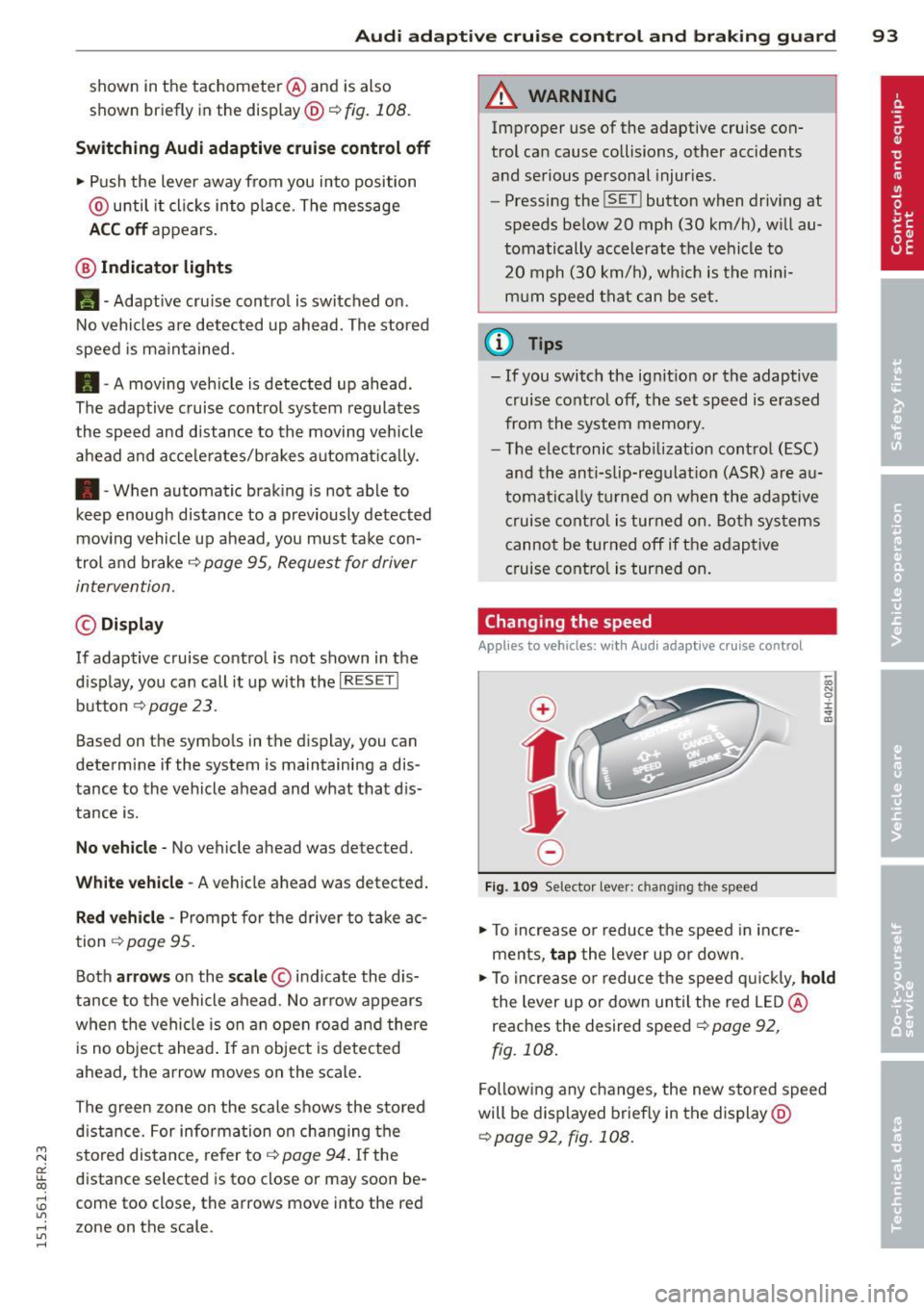
Fig. 109 Selector lever: ch ang ing the speed
~ To increase or reduce the speed in incre
ments,
tap the lever up or down.
-0:, N 0 ± ... a)
~ To increase or reduce the speed quickly, hold
the lever up or down until the red LED@
reaches the desired speed ¢
page 92,
fig. 108.
Following any changes, the new stored speed
will be displayed briefly in the display@
~page 92, fig. 108.
Page 173 of 284
M N
a! u.. co ,...., \!) ..,.,
,...., ..,., ,....,
@ Tips
Your vehicle may be equipped with Audi
connect. Your use of certain Aud i connect
features req uires wireless serv ices that are
provided by a third party wireless telecom
municat ions provider. For details regard
ing how information obtained through
Aud i connect is collected, processed,
transmitted, used, and shared, please see
your contra ct w ith the wire less telecom
municat ions provider and the "About A udi
connect" tab in your vehicle's MMI*:
!MENU ! button> Audi connect > About
Audi con nect .
Electronic Stabilization
Control (ESC)
Description
ESC helps to improve road holding and vehicle
dynamics to help reduce the probability of
skidd ing and loss of veh icle control. It works
only when the eng ine is running. ESC detects
certain difficult driv ing situations, including
when the vehicle is beginning to spin (yaw) out of cont ro l and he lps you to get the vehicle
back under control by select ively b rak ing the
wheels, and/or red ucing engine power and
p roviding steering assistance to help hold the
ve hicle on the driver's intended course . The in
dicator light
DJ in the instrument cluster
blinks when ESC is taking action to help you
control the vehicle.
ESC has limitations.
It is important to remem
ber that ESC cannot overcome the laws of
phys ics. It will not a lways be able to help out
under all conditions you may come up against.
For example, ESC may not always be able to
help you master situat ions where there is a
sudden change in the coefficient of fr iction of
the road surface. When there is a sect io n of
d ry road that is s udden ly cove red with water,
slush o r snow, ESC canno t perform the same
way it would on the dry su rface.
If the vehicle
hydroplanes (rides on a c ush ion of water in
stead of the road surface), ESC wi ll not be
ab le to he lp you steer the veh icle because con-
Int ellig ent technolog y 171
tact with the pavement has been interrupted
and the vehicle cannot be braked or steered .
D uring fast corner ing, particular ly on wind ing
roads, ESC cannot always deal as effectively
with difficult dr iv ing s ituations than at lower
speeds. When towing a trailer, ESC is not able
to help you regain control as it would if you
were not tow ing a trailer.
Always adjust your speed and driving style to road, traffic and weather conditions . ESC can
not override the vehicle's physical lim its, in
crease the availab le tract ion, or keep a veh icle
o n the road if road departu re is a result of
driver ina ttent io n. Instead , ESC imp roves the
poss ibility of keep ing the vehicle under con
trol and on the road during extreme maneu
vers by using the driver's steering i nputs to
help keep the vehicle go ing in the intended di
rect ion. If you are traveling at a speed that
causes you to run off the road before ESC can
provide any assistance, you may not experi
ence the benefits of ESC.
ESC is switched on all the time. In certain sit
uat ions when you need less traction, you can
switch off ASR by pressing the butto n
[ill
~ page 173, fig. 166 or~ page 173,
fig. 167. Be sure to sw itch ASR on aga in when
you no lo nger need less traction.
The following systems are integrated in the
ESC:
Anti-lock bra king sy stem (ABS )
ABS prevents the whee ls from locking up
when brak ing. T he vehicle can st ill be steered
even dur ing hard braking. App ly steady pres
su re to the brake peda l. Do not pump the ped
al. A pulsing in the brake pedal ind icates that
the system is helping you to brake the veh icle .
Brake assi st system
The brake ass ist system can decrease braking
distance. It increases brak ing power when the
drive r presses the brake peda l quickly in emer
gency s ituations. You must press and hold the
brake pedal unti l the s ituation is over. In
vehicles with adaptive c ruise control*, the
brake assis t system is more sensitive if the
•
•
Page 174 of 284

172 Intelligent technology
distance detected to the vehicle ahead is too
smal l.
Anti-slip regulation (ASR )
ASR reduces eng ine power when the drive
wheels begin to spin and adapts the fo rce to
the road condit ions. This makes it eas ier to
start, accelerate and drive up hills .
Electronic differential lock (EDL )
The EDL brakes wheels that are spinn ing and
transfers the d rive powe r to the other wheels.
This f unct ion is available up to abo ut 60 mph
(100 km/h) .
In extreme cases, ED L automat ica lly switches
off to help keep the brake on the braked whee l
from ove rheating. EDL wi ll switch on aga in a u
tomatically when conditions have returned to
norma l.
Steering recommendation
The ESC helps to stabilize the ve hicle by
changing the steering to rque.
In vehicles with dynam ic steeri ng*, ESC also
helps to stabilize the stee ring in critical s itua
tions.
Select ive wheel torque control
Selective whee l torque control is used when
driving on curves . The front wheel on the in
side of the curve or both wheels on the inside
of the curve are braked selective ly as needed.
This a llows mo re prec ise d riving in curves. The
appl icable system may no t activate when d riv
i ng in wet or snowy condi tions.
A WARNING
- The ESC and its integrated systems can
not overcome the laws of physics. This is especia
lly important on slippery o r wet
roads. If the systems begin acting to sta
bilize your veh icle, you should immedi
ately change your speed to match the
road and traffic cond itions. Do not let
the increased safety provided by these
systems tempt you to take risks. Do ing
so will in crease the r is k of a loss of vehi
cle control, collision and serious person al
in juries.
- Always adap t your speed to road, traffi c
and weather conditions . The risk of los
ing control of the vehicle increases when
driving too fast, especially through
curves and on slippery or wet roads, and
when dr iv ing too close to vehicles up
ahead. The ESC and its integrated sys
tems cannot a lways p revent collisions -
there is still a risk of acc idents!
- Always accelerate with special care on
even, smooth s urfaces such as those that
are wet or covered with ice and snow.
T he drive w heels can spin even w ith
these assistance sys tems that cannot al
ways he lp to re duce the risk of loss of ve
h icle control.
(D Tips
- ABS and ASR o nly wo rk correctly when
a ll four wheels are equipped wi th iden ti
c al tires. D ifferen t tire sizes can lead to a
reduction in engine powe r.
- Yo u may hear noises when the systems
descr ibed are workin g.
-If the ind icator light DJ or Ea (USA
mode ls)/ lCOj
~ page 18,
<=>page 19.
Page 176 of 284

174 Intelligent technology
Braking
What affects braking efficiency?
New brake pad s
Du ring the first 2 50 miles (400 k m), new
b ra ke pads do not possess their fu ll braking
effect , they have to be "broken in" first¢.&. .
The break-in period can be considerably lon
ger for vehicles with ceramic brake rotors*.
You can compensate for this slightly reduced br aking power by push ing harder on the brake
pedal. Avoid heavy braking loads during the
b reak-in per iod.
Operating conditions and d riving h abits
The brakes on today's automobi les are st ill
subject to wear, depend ing largely on operat
ing conditions and dr iv ing habits ¢.&. . On
vehicles that are e ithe r dr iven mostly in stop
and-go city traffic o r are driven ha rd, the
b rake pads should be checked by you r aut hor
iz ed A udi de aler more often than specified in
the
Warrant y & Maintenan ce booklet . Fail ure
to have your b ra ke pads inspected can resu lt
in red uced brake performance.
On steep slopes, yo u sh ou ld use t he b ra ki ng
effect of the eng ine. Th is w ay, you preven t un
necessa ry wear on the brake system . If you
must use yo ur brakes, do not ho ld the brakes
down continuously. P ump the brakes at inter
va ls.
Operating noise
N oises may occur when braking depending on
the speed, braking fo rce and outside condi
tions s uch as temperature a nd h umidity.
Due to the na ture of the mate rials used i n ce
ramic brake rotors*, noises may become more
apparent at low speeds.
Effect of water and road salt
I n ce rtain situat ions, for exampl e after d riving
throug h wate r, in heavy ra in, after overn igh t
conde nsation or afte r washi ng your c ar, the
b ra ki ng effect can be reduced by moisture or
ice on the bra ke rotors and b rake pads. The brakes must be dr
ied first with a few careful
brake applications .
At highe r speeds and with the winds hield wip
ers t urned on, the b ra ke pads press against
the b rake roto rs fo r a short amount o f time .
This occurs at regular intervals without the drive r not icing and p rov ides for better brake
response time under wet conditions.
The effectiveness of the brakes can be red uced
whe n the vehicle is driven on a sa lt -covered
road and the brakes are not used . Likewise,
you clean off accumulated salt coating from brake d iscs and pads with a few cautious ap
plicat ions of the bra ke
¢ .&. .
D ue to the ir s urface characteristics, ceramic
brake rotors* absorb moisture in such condi
tions . T his can cause a temporary reduction in
braking force compared to dry brakes . You can
compensate for th is by pressi ng the brake
p eda l harde r.
Corrosion
There may be a tende ncy for dirt to build up
on the brake pads and corros ion to form on
the d iscs if the car is not driven regu larly or
only for short trips w it h litt le use of the
brakes .
If the brakes are not used frequently, or if cor
ros io n has formed on the discs, it is adv isable
to clean off the pads and discs by braking
firmly a few times from a moderately h igh
speed ¢.&. .
Faults in the brake system
If you shou ld notice a sudden increase in
brake pedal trave l, then one of the two brake
c ir cuits may have fa iled
c::> .&. .
Low brake fluid level
Malfunctions can occur in the brake system if
t h e brake fluid level is too low. The brake flu id
level is monitored electro nically .
Brake boo ster
The brake booster increases the pressure that
yo u generate with the brake peda l. It works
on ly when the engine is running
. ¢ .&. .,.
Page 177 of 284

M N
er
u..
co ,...., \!) ..,.,
,...., ..,., ,....,
Brake lining w ear sta tus
Brake lining we ar may be che cked by visual in
spection of the condition of the brake pads
through the openings in the whee l. If neces
sary, the wheel may be remove d for this in
spection
c> page 244, Changing a wheel.
.&_ WARNING
- New brake pads do n't have the best sto p
ping power and must be "broken-in" dur
ing the init ial 100 to 1 50 m iles (150 to
200 k ilometers) of normal city driving.
T he break-in period can be considerably
longer for veh icles with ceram ic br ake ro
tors*. You can compensate for this by pressing the brake pedal more firmly.
T his also applies later when new pads are
installed .
- You should perform braking maneuvers
for the purpose of cleaning the brake
system on ly if road condit ions permit.
Other road users must not be put at r isk -
you may cause an acc ident!
- Before descending a steep grade, reduce
speed and shift transmiss ion into a lower
gear or lower driving range. Do not ride
the brakes or hold the pedal down too
long or too ofte n. This cou ld cause the
brakes to get hot and d imin ish b raking
efficiency.
- Do not "r ide the brakes" by resting your
foot on the pedal when you do not inte nd
t o brake. Th is may cause the b rakes to
overheat, prema ture wear and inc reased
stopping distance .
- Under certa in climat ic and operating
conditions such as passing through wa
ter, driving in heavy rain or after wash ing
the vehicle, the effectiveness of the brakes can be reduced. In winter, ice can
accumulate on the brake pads, linings,
discs and drums. Carefully apply brakes
for a test. Brakes will dry and ice coat ings will be cleaned off after a few ca re
ful brake applications.
- Driv ing fo r an extended pe riod of time on
salt-covered roads w ithout using you r
Intellig ent technolog y 175
brakes can a lso affect braking efficiency .
Clean off accum ulated salt coating from
brake discs and pads with a few careful
brake applications.
- If you damage the front spoiler, or if you
install a different spoiler , be sure the air
f low to the front brakes is not obstruct
ed. Otherw ise the brake system could
overheat reducing t he effectiveness of
the entire brake system.
- Failure of one b rake circuit will impa ir
the braking capab ility result ing in an in
creased s topping distance. Avoid driving
the vehicle and have it towed to the near
est a utho rized Audi dea le r or q ualified
workshop.
- Never let the vehi cle roll to a stop with
the engine shut off.
- If the b ra ke booste r is no t working, the
brake peda l must be p ressed considera
b ly harder to make up for the lack of
booster assistance .
Electro-mechanical
power assist, dynamic
steering
The electro-mechanical power assist helps
the driver when steering.
Power steer ing adapts electronically based on
t he ve hicl e speed.
Indicator lights and messages
• Steering defect ive! Do not drive vehicle!
If this indicator light turns on and stays on
and this message appears, the power steer ing
may have failed.
Do
not continue driving. See your authorized
Audi dealer or a qualified repair facility for as
s istance.
E!'Y D ynamic stee ring: System fault! You can
continue dri ving
If the indica tor ligh t turns on and the mes-
sage appears, the stee ring may be more diffi
cu lt to move o r more sensit ive than usual. The ..,.
•
•