2015 AUDI R8 SPYDER light
[x] Cancel search: lightPage 28 of 232

Drive r in formation syste m
fastest lap"+", the slowest lap"-" and the aver
age lap time "0" .
.. To continue t iming for additional laps, press
the wiper switch @ .
.. To reset the timer to zero, press and hold the
I RESET I button again for approximate ly 2 sec
onds .
.,. To sw itch the lap timer off comp letely, press
the
I RES ET I button br iefly.
@ Tips
- Saved lap t imes cannot be ind ividually de
l eted from the total results.
- The saved lap timer values will not be lost
after turn ing the ignit ion off.
On-Board Diagnostic
system (OBD)
Malfunction Indicator Lamp (MIL)
The Malfunction Ind icator Lamp (MIL)
llil is part
of the On-Board Diagnostic (OBD II) system .
The warning light illuminates when there is a malfunct ion in the engine electronic system . A
malfunct ion may have various causes:
- The fuel filler cap may be improperly closed
¢ page 153.
- T here is a leak in the fuel vapor recovery sys
tem .
- The engine control receives faulty vehicle road-
speed signals.
Contact your nearest authorized Audi dealer for
assistance.
I f the light illuminates , the catalyt ic converte r
could be damaged. Continue dr iving
w ith re
du ced pow er
(avoiding sustained high speeds
and/or rapid accelerations) and have the condi
tion corrected.
An improper ly closed fuel filler cap may also
cause the MI L light to illuminate
¢ page 153.
26
On-Board Diagnostics
Fig. 19 Locatio n of Data Li nk Co nnector (DLC)
On-Board D iagnostics monitors the components
of your emission control system. Each monitored component in your engine system has been as
s igned a code. In case of a malfunct ion, the com
ponent will be ident ified and the fault stored as a
code in the control module memo ry.
In order to make an accurate diagnosis, the stor
ed data can only be d isplayed using spec ia l diag
nostic equipmen t (generic scan tool for OBD) .
In order to connect the special diagnostic equip ment, push the plug into the Data Link Connector
(DLC) ¢
fig. 19.
Your authorized Audi dealer or a qualified service
station can interpret the code and perform the
necessary repair .
A WARNING
Do not use the d iagnost ic connector for per
sona l use. Incorrect usage ca n cause ma lfunc
tions, which can increase the r isk of a coll i
sion!
-
Page 29 of 232

Opening and closing Keys
Key set
F ig. 20 Key set
Fig. 21 Remote master key : Indicator l ight
@ Ma ste r key with r em ote control
You can centra lly lock and unlock your vehicle and
start the engine with the master key with remote
control. To fold the key out and back in place,
press the release button
c:;, fig. 20 (arrow) .
@Vale t key
The valet key only fits the lock in the driver's door
and the ignition lock. If you have to leave the key
with somebody e lse, you are well-advised to turn
over the valet key o nly.
Be aware that the front lid and glove compart
ment can be opened from ins ide the vehicle using
the release buttons.
© Emergency k ey
The emergency key is only for temporary use if
;::: the vehicle key should be lost or misplaced.
l'N "1: rl I.O
"' N
"' rl
Open ing and clo sing
Key replac ement
If you lose a key, contact you r a uthorized Audi
dealer immed iate ly to have the
Lost key disab led .
Be sure to bring all your keys with you.
If a key is lost, you should report it to your insur
ance company.
Reg istered keys
You can inquire about the number of remote
master keys registered to your vehicle
c:;, page 22 .
In this way, you can be ce rtain of obta ining all
the remote master keys if yo u purchase a used
vehicle.
State of master key battery
When a button is pressed, the check light f lashes
c:;, fig. 21. If the check light does not come on or
flash, the battery is dead and has to be replaced.
Battery replacement
c:;, page 28.
A WARNING ..__
- Do not leave your vehicle unattended with
the key in the ignition lock. Entry by u nau
thor ized persons could endanger you or re
sult in theft or damage the vehi cle. Always
lock all doors a nd take the key .
- D o not leave ch ildren unattended in the ve
h icle, espe cially wi th access to vehicle keys.
Ungua rded access to the keys provides chil
dren the opportunity to start the engine
and/or activate vehicle systems such as the power windows etc. Unsupervised operation
of any vehicle system by children can result
i n ser ious injury.
@ Tips
- If you open the driver's door with the key
left in the ignition lock, a chime will so und.
Th is is your rem inder to remove the key and
lock the door.
- For security reasons, rep lacement keys are
only avai lable from Audi dealers.
-
27
Page 31 of 232

..... N
r-N "': ..... \!) 1.1'1
N 1.1'1 .....
Power locking system
General description
The power locking system locks or unlocks all
doors simultaneously.
The power lock ing system i n your veh icle incorpo
rates the follow ing funct ions:
- Central lock ing function
- Remote contro l feature ¢ page 28.
- Ant i-Theft Alarm Sys tem ¢ page 33.
All the doors and the front lid are loc ked by the
centra l locking system when you lock the vehicle.
The unlocking and lock ing mode* can be changed
i n the dr iver information system
¢ page 22.
Unlocking the vehicle
You can un lock the vehicle from outside either by
usi ng the remote co ntrol
or by insert ing and
turning the key in the driver's door lock. When
you
unlock your vehicle:
- The anti -theft alarm system is deactivated
briefly.
- The veh icle inter ior lights ill uminate for app rox
imately 30 seconds .
- All t urn signa l lights will flas h twice when the
ca r is un locked .
- After unloc king the veh icle, you have 30 sec
onds to open a door or the front lid. After 30 seco nds, the vehicle automatically locks and
the anti-theft a larm system activates again.
The fron t lid can be locked or un locked e ither by
usi ng the remote contro l
or by inserting and
turning t he key in the driver's door lock . Unlock
ing the vehicle with the remote control~ will
only unlock the front lid, to open it, the lid han
d le needs to be pressed.
Loc king the vehicle
You ca n lock the vehicle from o utside eithe r by
using the remote co ntro l
or by insert ing and
turning the key in the drivers's door lock. When
you
lock the vehicle:
- All doors and the front lid are locked.
- All turn sign al ligh ts will flash once whe n the
car is locked .
Opening and closing
-The ant i-theft a larm system is ac tivated. The
horn of the anti-theft a la rm system will soun d
and the anti-theft alarm system read iness
light, located in the center of the instrument
pane l be low the windshield on the right side of
the air vent, will start to bli nk.
- The vehicle in terior lights turn
off.
Automatic locking*
The automatic locking feature loc ks a ll the vehi
cle doors and the front lid when you dr ive faste r
t h an 9 mph (15 km/h).
You can unlock t he veh icle from the i nsi de by:
- remov ing the key from the ignition switc h (the
ve hicle w ill automat ica lly unloc k itself) or
- pressing the unlock pa rt of th e power lock
sw itch
ccri o r
pull ing the door handle (to open the door).
If you wish, yo u can have an a utho rized Aud i
dealer convert your powe r doo r lock system to
automat ic locking.
Unintentionally locking yourself out
T he vehicle does not lock with t he centra l locking
swi tch ¢page 31 if the dr ive r's door is open.
D o no t lock your ve hicle w ith the
remote master
key u ntil all doors an d the front lid a re closed. In
t hi s way you avo id loc king yo ursel f out ac ciden
ta lly.
A WARNING
-
- W hen you loc k yo ur vehicle from o utside,
nobody- espec ia lly children -shou ld remain
inside the vehicle. Remember, when you
lock the vehicle from the outside the win
dows cannot be ope ned from the inside.
- W hen you leave the veh icle, always remove
the ignition key and take it with you. This
will prevent passengers (children, for exam
p le) from accidenta lly bei ng locke d in th e
veh icle should they accide ntally press the
power l ocking sw itc h in one of the doo rs .
- Do not leave ch il dr en inside t he vehicle un
s upe rvise d. In a n em erge ncy it would be im
p o ssible to open the door s fro m the outs id e
wit ho ut t he key.
~
29
Page 32 of 232

Opening and closing
@ Tips
- The dr iver's door can be locked and un
l ocked with the key if the power locking sys
tem fails. The passenger 's door can be
l ocked manually
c:> page 32.
- In the event of a crash with airbag deploy
ment all loc ked doors will be automatically
unlocked to give access to the vehicle occu
pants from the outs ide .
- The anti-t heft alarm system cannot be acti
vated if the power locking system is not ac
tivated .
- You are well advised not to keep valuables
i nside an unattended vehicle, v is ible or not.
Eve n a prope rly locked veh icle cannot p ro
v id e the secur ity of a safe!
Unlocking and locking the vehicle with the
remote control
How the remo te control works.
F ig. 2 3 Remote co ntrol: fun ctio n butto ns
Whether only the d river's doo r or the entire veh i
cle is unlocked when the opening button @ is
pressed once, depends on the settings in the
Driver information system
Central locking menu
~ page 22 .
To unlock the vehicle III
• Press button @.
• Press but ton @ two
times w ith in two seconds
to unlock all doors and the front lid .
To lock the vehicle
~
• Press button @~.&. in General description on
page 29 .
• Watch that all turn signal lights flash once.
30
To unlock front lid only~
• Press bu tton © for approxima tely one se con d.
PANIC Button
• Push the red button @to activate t he panic
fu nction . The horn sou nds an d the turn signa ls
fla sh.
• Push the button @aga in t o de acti va te the pan-
ic fu nct io n.
The remote cont ro ls allows you to:
- lock or unlock the vehicle
- select ively un lock the front lid.
The turn signa ls will flash brief ly whenever you
l ock or u nlock the veh icle. Also, the interior light
will come on o r go off whenever yo u open or
close the driver's door.
The transm itter and battery are located in the
head of the remote contro l. The receiver is locat
ed inside the vehicle . The maximum effective
range depends on severa l things . Remembe r, if
the battery is weak, the effect ive range decreas
es .
The remote -cont ro l key contains a fo ld-out key
that you can use to man ually lock or unlock t he
vehicle and to start the eng ine .
I f you need to replace the remote control , or if
you need to have it repaired, you must see your
authorized Aud i dea ler. Only then can yo u use the
key agai n.
A WARNING
Read and follow all WARNI NGS c:> & in Gener
al description on page 29 .
(D Tips
- The remote control key is automatically de
act ivated when the ignition is sw itched on.
- The operation of the remote contro l key can
be temporarily d isrupted by interference
from transmitters in the vicinity of the vehi
cle wo rking in the same freque ncy ra nge
(e.g . a cell phone, radio eq uipment).
- In orde r to make su re the locking function is
wor king, you should a lways keep yo ur eye
II>
Page 33 of 232
.... N
l'
N "1: .... I.O
"' N
"' ....
on the vehicle to make sure it is properly
l ocked.
- Do not use the remote control if you are in
side the car, otherwise you may unintention
ally lock the vehicle, and then you would set
off the ant i-theft a larm when you try to
start the engine or open a door . In case this
happens anyhow, push the unlock button©.
- Use the panic funct ion only if you are in an
emergency situa tion.
Resetting the remote control
The remote control must be reset if the vehicle
does no t unlock .
.. Press the unlock button 0 on the remote con
trol.
.. Manually unlock the driver's door lock with the
mechan ical key wi thin 30 se cond s.
.. Press e ither the lock-
{fl or the unlock CD button
to comple te the reset sequence .
Operating locks with the key
To lock and unlock the vehicle from the outside ,
turn the key in the lock of the driver's door .
Fig. 24 Key turn s for op ening and closin g
.. To un lock the vehicle, tu rn t he key to the open
ing position @¢
fig. 24 .
.. To lock the vehicle , turn the key in the lock of
the driver's door to the lock position @
c:> .&_.
A WARNING
Always read and heed WARNING c> A in Gen
eral description on page 29 .
Opening and clo sing
Locking and unlocking the vehicle from
inside
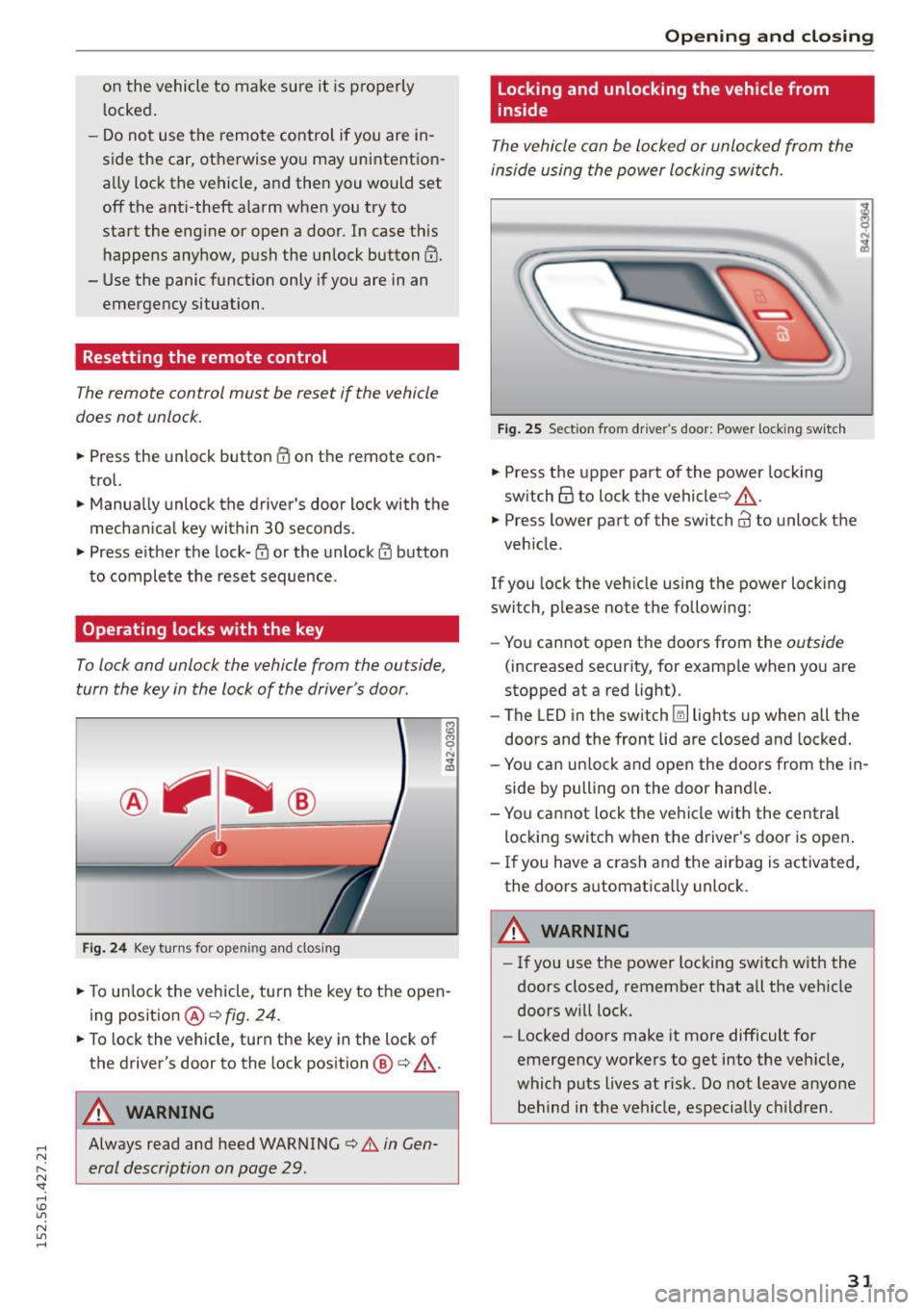
The vehicle can be locked or unlocked from the
inside using the power locking swi tch .
Fig . 2 5 Sect ion fro m drive r's door : Powe r loc king switc h
.. Press the upper part of the powe r lock ing
sw itch@ to lock the vehicle ¢,&. .
.,. Press lower part o f the sw itch@ to unlo ck the
veh icle .
If you lock the veh icle using the power locking
switch, p lease no te t he following:
- You cannot open the doors from the
outside
(increased security, for examp le when you are
stopped at a red light) .
- The LED in the switch~ lights up when all the
doors and the front lid a re closed and locked.
- Yo u can un lock and open the doors from the in
side by pulling on the door hand le .
- You ca nnot lock the ve hicle w it h the central
locking switch when the d river's door is open .
- If you have a crash and the airbag is activated,
the doors a utomatically unlock.
A WARNING
-
- If you use the power loc king switch with the
doors closed, remember that all the veh icle
doors w ill lock.
- Locked doors make it more difficult for
emergency workers to get into the veh icle,
which puts lives at r isk. Do not leave anyone
behind in the vehicle, especially children .
31
Page 37 of 232

.... N
l'
N "1: .... I.O
"' N
"' ....
the ignition is switched off. Only when ei
ther of the front doors are opened are the power windows switched off.
- Be careful when closing the windows. Check
to see that no one is in the way, or serious injury could result!
- Always remove the ignition key whenever
you leave your vehicle .
- If you lock your vehicle from the outside, no
one, especially children, should remain in
the vehicle.
- Do not stick anything on the windows or the windshield that may interfere with the driv
er's field of vision.
(D Tips
- When the doors are opened, the windows
are automatically lowered 0.4 in (10 mm).
Reactivating the system after battery
disconnection
If the vehicle bat tery is disconnected and then
reconnected, the automati c closing and opening
function will not work until it is reactivated .
... Pull and hold the power window switch until
the window is completely closed .
.,. Release the switch and pull it again for one sec
ond .
Garage door opener
(Homelink)
Description
Fig. 32 Garage door opene r: exa mples of using wit h diffe r
ent sy stems
Opening and closing
You can activate various systems such as garage
doors, security systems and home lighting from
inside your vehicle using the garage door opener
(Homelink) . There are three buttons for this in
the vehicle headliner that can be in used in place of up to three hand -held transmitters .
To operate systems using the garage door open er, the th ree buttons in the headliner must be
programmed first.
A WARNING
=
Make sure no people or objects are in the im-
mediate vicinity of the equipment when using
or programming the garage door opener. Peo
ple can be injured and objects can be dam
aged if they are caught in the equipment.
@ Tips
-For security reasons, we recommend that
you clear the programmed buttons before
selling the vehicle.
- For additional information about Homelink ,
visit www .homelink.com.
- For Declaration of Compliance to United
States FCC and Industry Canada regulations
Qpage 218.
35
Page 38 of 232

Opening and closing
Programming the Homelink transmitter
Fig. 33 Overhead console: Homelink keypad
Fig . 34 Fr ont bumper: loca tion of transmitter unit
The transmitter is programmed in two phases.
For rolling code transmitters, a third phase is al
so necessa ry .
Pha se 1: programming the ove rhead keypad
l.
Make sure you r vehicle is w ith in operat ing
range of the remote controlled garage door
ope ner .
2 . Set the park ing brake ~
& in Description on
page 35 .
3. Turn the ignition o n. Do not sta rt the e ngine!
4. Press and hold t he two outside Home Link
b uttons
(D and ® for approx im ately 20 sec
onds until indicator light @~
fig. 33 begins
to flas h. The n re lease both buttons. Do not
hold the buttons for longer than 30 seconds.
.,. This procedure only needs to be perfo rmed
once . It erases the factory-set default codes
and does not have to be repeated to prog ram
additional remote controls .
5 . Press and hold the Homelink button
(D , ®
or ® until the ind ic a tor light @ starts
fl ash ing
slowly. Release the bu tton.
36
.,. The system will remain in programming mode
for
5 minutes . Go to the front of the vehicle
and proceed with phase 2 .
Phase 2:
programming the bumper mounted tran smit
ter
6. Hold the original remote control at a dis
tance between
0-6 in . (0 -15 cm) from the
bumper below the appropr iate headlight for
you r vehicle ~
fig. 34 (u se the shortest dis
tance possib le).
7. Aim the remote control just below the
driver
side
h eadlight.
8 . Press and ho ld the activation but to n on the
remote co ntrol.
.,. May be different in Canada .
If so, press and re
press (cycle) the activation button on your re
mote control every two seconds.
9 . The emergency flashers w ill flash
three
times
(after about 15-60 seconds) when the
programmi ng is s uccessf ul. Release the but
ton on t he remote con trol.
.,. To program more device s, repe at st ep s 4 to 9.
10 . Pr ess and ho ld the trained Home link button
and o bserve the ind icator light@~
fig. 33.
.,. If the ind icator light is solid/co nti nu ous, pro
gramm ing is complete and yo ur device sho uld
activate when you press and re lease the trained
Homelink button .
.,. If the indicator light blinks rapidly for 2 sec
onds and is the n a so lid/continuous light, pro
ce ed w ith phase 3 to program a roll ing code de
vice .
Phase 3: rolling code programming
.,. A second person o n a ladder wh o ca n safe ly
reach the garage door opener motor is recom
mended .
11. Locate the "learn" button on the ga rag e doo r
o pener mo tor ( refer to the oper ati ng in str uc
t ions for the opener, as the lo cat io n of th is
b utton may vary by manufacturer) .
12 . Pres s and release the learn b utton on the ga
rage door o pener motor.
.,. Note: once the b utton is pressed, there are 30
seconds
in which to initiate th e next step.
13 . On t he Home link keypad ins ide the ve hicle,
firmly p ress and hold the Homelink butto n
IJ,,
Page 39 of 232

..... N
r-N "': ..... \!) 1.1'1
N 1.1'1 .....
previously programmed in phases 1 and 2 for
two seconds and release. Repeat this se
quence
twice.
"'Some vehicles may require the press/hold/re
lease sequence up to three times to complete
the training process .
"' HomeLink should now activate your rolling
code equipped device.
If the 5 minute time limit is exceeded, the emer
gency flashers will flash one time
to indicate
that the process has been terminated . In this
case, repeat steps 4 through 9.
If the emergency flashers do not flash
three
times (after about 15-60 seconds), programming
was not successful. In this case, repeat steps 4
through 9.
Remote control units for garage door openers in
Canada are set to stop transmitting radio fre
quency signals after two seconds . This time may
not be sufficient for the Homelink system to
learn the radio frequency signal. Perform all oth
er steps as described above.
Operating the Homelink transmitter
The Homelink transmitter works in the same
manner as the original handheld remote control
that came with the system.
"'Press the appropriate programmed button
Q),
0 or @ ¢ page 36, fig. 33 to activate the de
sired remote control function ¢
A. in Descrip
tion on page 35.
Reprogramming a single button
A Homelink button can be reprogrammed indi
vidually without affecting the other button allo
cations.
Programming the overhead keypad
"'Press the appropriate Homelink button until
the indicator light begins flashing slowly.
Programming the bumper mounted transmit
ter
l. Hold the original remote control at a dis
tance between
0-5 in . (0-13 cm) from the
Opening and closing
bumper below the appropriate headlight for
your vehicle (use the shortest distance possi ble).
2. Aim the remote control just below the
driver
side
headlight.
3. Press and hold the activation button on the remote control.
4. The emergency flashers will flash
three
times
(after about 15-60 seconds) when the
programming is successful. Now release the
button on the remote control.
.. If the device utilizes a rolling code, please fol
low phase 3 of ¢
page 36, Programming the
Homelink transmitter
for rolling code pro
gramming.
This procedure will cause the existing program ming on the Homelink button to be erased!
Erasing the programming of the Home link
transmitter
When you erase the programming, the program
ming on all three of the transmitter channels
with be lost!
"' Perform steps 1 to 4 as described on
¢ page 36, Phase 1: programming the over
head keypad .
When completed, the Home link system will be in
the programming mode and is then ready to
learn the codes for remote controlled devices .
(D Tips
-Programmed buttons cannot be erased indi
vidually .
- For security reasons you are advised to erase
the programming of the Homelink system
before you sell your vehicle .
37