2015 AUDI Q5 door lock
[x] Cancel search: door lockPage 67 of 302

M N
co
a:
co
,...., \!) ..,.,
N ..,., ,....,
In addition to the setting for the drive r's seat ,
the exterior rear view mirror setting can be stor
ed and reca lled through seat memory if the veh i
cle is properly equipped.
Storin g and recallin g se tting s
With the help of the memory buttons 1 and 2
¢ fig. 65 the settings for two different drivers
can be stored and reca lled
r::!> page 65.
The cu rrent settings are also a utomat ica lly as
signed to the remote control key being used
when the vehicle is locked . When the vehicle is
un locked, the settings assigned to the remote
contro l key being used are automatica lly recalled .
Turnin g seat m emo ry on and off
If the IO FF I sw itch is depressed, the seat memory
is inoperative . When the Memory function is off,
the LED in the button lights up.
All the stored settings a re retained. We recom
mend using the
I O FF I sw itch and de activating the
seat memory if the vehicle is only go ing to be
used
temporarily by a driver whose settings are
not going to be stored .
Storing and recalling settings
Applies to vehicles: with seat memory
Storing settings
~ Adjust the driv er's seat.
~ Adjust the two exter ior mirrors.
~ Press the !SET I button. The light in the button
will come on.
~ Now p ress a memory button (III or~). If the
stor ing procedure is correct, a confirmation
tone w ill sound .
Recall ing setting s
~ If the dr iver 's door is open and the ignit ion is
switched off, tap the correspond ing memory
button br iefly .
~ If the dr iver's door is closed or the ignit ion is
switched on, p ress the approp riate memo ry
button until the s to red pos ition is rea ched .
Successful storage is confirmed audibly and by
the light in the
ISET I button illum inat ing
r::!> page 64, fig . 65.
S eat s and stor age
When the vehicle is lo cked , the current settings
are stored and assigned to the remote contro l
key . But the settings stored on memory buttons
1 to 2 are not deleted . They can be recalled at
any time . When the vehicle is
unlocked , the set
t ings assigned to the remote control key a re re
stored .
If your vehicle is driven by other persons using
your remote control key, you should save your in
dividua l seat position on one of the memory but
tons . You can recall your settings again simply
and conveniently by p ress ing the corresponding
memo ry butto n. When the vehicle is locked,
these settings are automatica lly re-assigned to
the remote control key and stored .
& WARNING
- For safety reasons, the seat setting can only
be recalled when the vehicle is stationary -
otherwise you risk hav ing an accident.
- In an emergency the recall proced ure can be
cancelled by pressing the
I OFF I switch or by
tapp ing of the memory buttons.
Activating remote control key memory
Applies to vehicles: wit h seat memory
To assign the dr iver 's seat settings to the remote
control key when locking the vehicle, the function
must be activated in the radio or MMI*.
~ Select: ! CAR I function button > Seat adju st
ment > Dri ver's seat > Key mem. p ro fi le > On .
Or
~ Select: !CARI function button> Car sy ste ms*
cont ro l butto n > Vehicl e se tting s > Seats >
Driver 's seat > Remote control ke y> On .
(j) Tips
If you do not want anothe r driver's sett ings to
be assigned to the remote control key, switch
off the memory function usi ng the rad io or
M MI* or t he
I OFF I button r::!> page 64.
65
Page 88 of 302

Driving
Starting the vehicle with the emergency
key
You can use the emergency key as an ignition key
in an emergency.
Fig. 100 Glove compartment: Adapter for e merg en cy key
Fig. 101 In sert emergency key into the adapter
... Take the adapter for the emergency key out of
the glove compartment
r:::;, fig . 100 .
.,. Push the emergency key r:::;, fig. 101 fully into
the adapter . Make sure that the Audi rings are
facing up .
.,. Press the emergency key in the adapter down
until it latches audibly.
.,. Insert the adapter with the emergency key for
ward into the ignition switch. The engine can now be started as usual.
Stopping the engine
... Bring the vehicle to a full stop.
... Move the selector lever to the P or N position .
.,. Press on the ignition key. The engine is turned
off .
.,. You can now remove the key.
86
Steering lock
The steering locks when you remove the ignition
key. The locked steering helps prevent vehicle
theft.
Emergency off
If it is necessary in unusual circumstances, the
engine can be switched off while the vehicle is
moving. The engine will be switched off if you
press on the key for an extended period.
A WARNING
- Never turn off the engine before the vehicle
has come to a complete stop. The full func
tion of the brake booster and the power
steering is not guaranteed. You must use
more force to turn or brake if necessary . Be
cause you cannot steer and brake as you
usually would, this could lead to crashes
and serious injuries.
- For safety reasons, you should always park
your vehicle with the selector lever in P. Oth erwise, the vehicle could inadvertently roll
away.
- The radiator fan can continue to run for up
to 10 minutes even after you have turned off the engine and removed the ignition key .
The radiator fan can also turn on again if the
engine coolant heats up because of intense
sunlight or heat build-up in the engine com
partment .
- Always take the key with you whenever you
leave your vehicle. Otherwise, the engine
could be started or electrical equipment
such as the power windows could be operat
ed. This can lead to serious injury.
- Never leave children or persons requiring as
sistance unattended in the vehicle. The
doors can be locked using the remote trans
mitter, preventing people from escaping
from the vehicle on their own in the event of
an emergency. Depending on the time of
year, people inside the vehicle can be ex
posed to very high or very low tempera
tures.
Page 89 of 302

M N
co ~ co
rl I.O
"' N
"' rl
CD Note
If the engine has been under heavy load for
an extended per iod, heat builds up in the en
gine c ompartment after the engine is switch
ed off -there is a risk of damag ing the eng ine .
Allow t he engine to run at idle fo r about two
m inutes befo re switch ing it off.
Convenience key
Starting the engine
Applies to vehicles: with Conven ience key
The I STAR T ENGINE S TOP I button switches the
ignition on and starts the engine.
Fi g. 1 02 Cente r co nsole : STAR T ENGIN E STOP b utto n
Starting the engine
• Hybrid dr ive *: refer to the information for start
ing the vehicle under
Q page 99 .
• Step on t he brake pedal and move the selector
lever to P o r N
Q ,& .
• Press on the 1~s= T~A_R_T_E_N--GI N_E_S_T_O_P_I button
Q fig. 102 -the engine will start.
• It is possible that there w ill be a slight de lay
when start ing the eng ine for diesel vehicles * in
colder temperatures. Therefore, yo u must hold
t h e brake pedal down until the engine starts .
The indicator lamp
II i ll uminates when the en
gine is preheated.
Switching the ignition on /off
If yo u wou ld like to switch the ignition on with
out start ing the engine, fo llow these steps:
• Press the
!S TAR T EN GINE STOPI button with
out pressing the brake ped al.
• To sw itch the ignition off, press the button
again .
Driv ing
Diesel vehicles * are preheated while the ignition
is switched on.
When sta rting the engine, major electrical loads
are swi tched off temporarily .
If the engine should not start immediately, the
sta rting process is au tomatically s topped afte r a
sho rt time. Repeat s tarting p roced ure.
Sta rt-Stop-System* :
Note the information on Q page 91, Start/Stop
system .
A WARNING
=
-Never a llow th e engine to run in confined
spaces -da nger of asphyx iat io n.
- Always take the key w ith you whenever you
leave your vehicle. Ot herwise, t he engine
could be started or e lectr ica l equipment
such as the power win dows could be ope rat
ed . This can lead to se rious i njury.
- Never le ave children or pe rsons re quiring as
sistance unattende d in the vehi cle. The
doors can be locked us ing the remote trans
mitter, preventing people from escaping
from the veh icle on the ir own in the event o f
an emergency. Depending on the time of
year, people inside the vehicle can be ex posed to very high or very low tempera
tures.
CD Note
Avoid high eng ine rpm, full throttle and heavy
engine loads u ntil the engine has reached op
erating temperature -otherwise you r isk en
gine damage.
@ For the sake of the environment
Do not let the engine run wh ile parked to
warm up. Begin dr iving immediately . Th is re
duces unnecessa ry em iss io ns.
@ Tips
- After starting a cold engine, there may be a
brief per iod of increased noise because the
oil p ressu re must f irst build up in the hy
draulic valve adjusters. Th is is norma l and
-
no t a cause fo r concern . ..,
87
Page 90 of 302

Driving
-If you leave the vehicle with the ignit ion
switched on, the ignition will switc h off af
ter a certa in period of time. P lease note that
e lectr ica l equipment s uch as exterior lights
will switch off as well when that happens.
Switching engine off
A pp lies to veh icles: w ith Convenie nce key
.,. Bring your veh icle to a complete stop.
.. Move the selector lever to the P or N position .
.,. Press the
!START ENGINE STOPI button
"*page 87, fig. 102.
Stee ring lock
The steering locks when you turn the engine off
using the
!START ENGINE STOP I button and open
the dr iver's door. The locked steering helps pre
vent vehicle theft.
Emergen cy off
If necessary, the eng ine can be sw itched off with
the selector lever in the R or D/S position . The en
g ine stops if you press and hold the
I STAR T ENGINE ST OP ! button at speeds below
6 mph ( 10 km/h) a nd p ress the brake pedal.
..&, WARNING
- Never turn off the engine be fore the ve hicle
has come to a comp lete stop. The fu ll func
tion of the b rake booster and the power
stee ring is not guaranteed. Yo u must use
more force to turn or bra ke i f necessary. Be
cause you cannot steer and brake as you
usually wou ld, this could lead to crashes
and serious injur ies.
- For safety reasons, you should always park
your vehicle with the selector lever in P. Oth
erwise , the vehicle could inadver tently roll
away.
- The rad iator fan ca n continue to run for up
to 10 m inutes eve n after you have turned
off the engine a nd removed the ignition key.
T he ra diato r fan ca n also turn on aga in if the
engi ne coola nt he ats up becau se of intense
s u nligh t or heat bui ld-up in the engine com
partment.
88
- Always take the key with you whenever you
leave your vehicle. Otherwise, the engine
could be started or electrical equipment
such as the power windows could be operat
ed. This can lead to serious in jury.
- Never leave children or persons requiring as
sistance unattended in the vehicle. The
doors can be locked using the remote t rans
m itter, prevent ing people from escaping
from the vehicle on the ir own in the event of
a n emergency. Depe nding on the time o f
yea r, peop le inside the vehicle can be ex
posed to very high or very low tempera
tures .
(D Note
If the engine h as been unde r heavy lo ad for
an ex tended pe riod, hea t bu ilds up in t he en
gine compartment after the engine is switch
ed off -there is a risk of damaging the engine .
A llow the engine to run at id le for about two
minutes before switching it off.
Driver messages
Ignition is on
This message appears and a warning tone sounds i f you open the drive r's door when the ign ition is
switched on .
No key identified
This message appears when the
I START ENGI NE STO PI* button is p ressed if the re
i s no master key ins ide the ve hicle or if the sys
tem does no t re cogn ize it. For examp le, the mas
te r k ey cannot be recogn ized if it is covered by an
ob ject (e.g. a luminum brief case) wh ic h
screens
the radio sig na l. Electro nic devices such as cell
phones can a lso interfere with the radio signa l.
Press brake pedal to start engine
This message appears if yo u do not p ress the
brake pedal to start the eng ine.
Shift to N or P to start engin e
This message appears when attempt ing to start
the engine if the selector lever for the automat ic .,.
Page 91 of 302
transmission is not in the P or N position . The en
gine can only be started with the se lecto r in
these posit ions.
l!,JI Is the key in the vehicle ?
This message appears in a veh icle w ith Conven
i en ce key* if the mas ter key is removed from the
ve hicl e with the eng ine running.
If th e maste r
key is no longer in the vehicle, you c annot sw itch
on the i gnition after s topping the engine and you
also ca nnot start the engine again . Moreover, you
cannot lock the veh icle from the o utside with the
key .
Shift to P otherwi se vehicle can roll awa y. Doors
do not lock if lever is not in P.
This mes sage appea rs for sa fe ty rea sons a long
w ith a w arning s ignal.
It ap pears if the se lector
l ever fo r the automatic t ransmission is not in the
P posit ion when switching
off the ignition. Move
the selector lever to the P posit ion, otherwise the
ve hicle is not secured aga inst ro lling away. You
also ca nnot lock the vehicle using the locking
button* on the door ha ndle or using the remote
key .
Turn off ignition before leav ing car
This message appears i f the driver's door is
opened while the ignition is switched on. Always
sw itch
off the ign ition if yo u are leaving the vehi
cle . See a lso
c;, page 93.
Turn off ignition before leaving car . Batter y is
discharging
This mes sage appea rs if the driver's door is
opened while the igni tion is sw itched on . Always
switch
off the ignition if yo u are leaving the vehi
cle. See a lso
c;, page 93.
Shift to P and turn off ignition, oth erwise ve hi
cle can roll away
This m essage appears if the driv er's door is
ope ned while the igni tion is sw itched on and t he
se lec to r lever i s not in t he P po siti on. Shift these
l ec to r l ever in to the P pos ition and switch
off t he
~ ignit ion when yo u exit the vehicle . Otherwise the
co ~ ve hicle co uld roll. See also c;, page 93.
rl
:5: Convenien ce key defec tive! Use ignition lock
N l/1 rl
D riv ing
This message appears if the engine m ust be
started or stopped using the ignition key and not
the
I START ENGINE STOPi* button.
Electromechanical
parking brake
Operation
The electromechanical parking brake replaces
the hand brake.
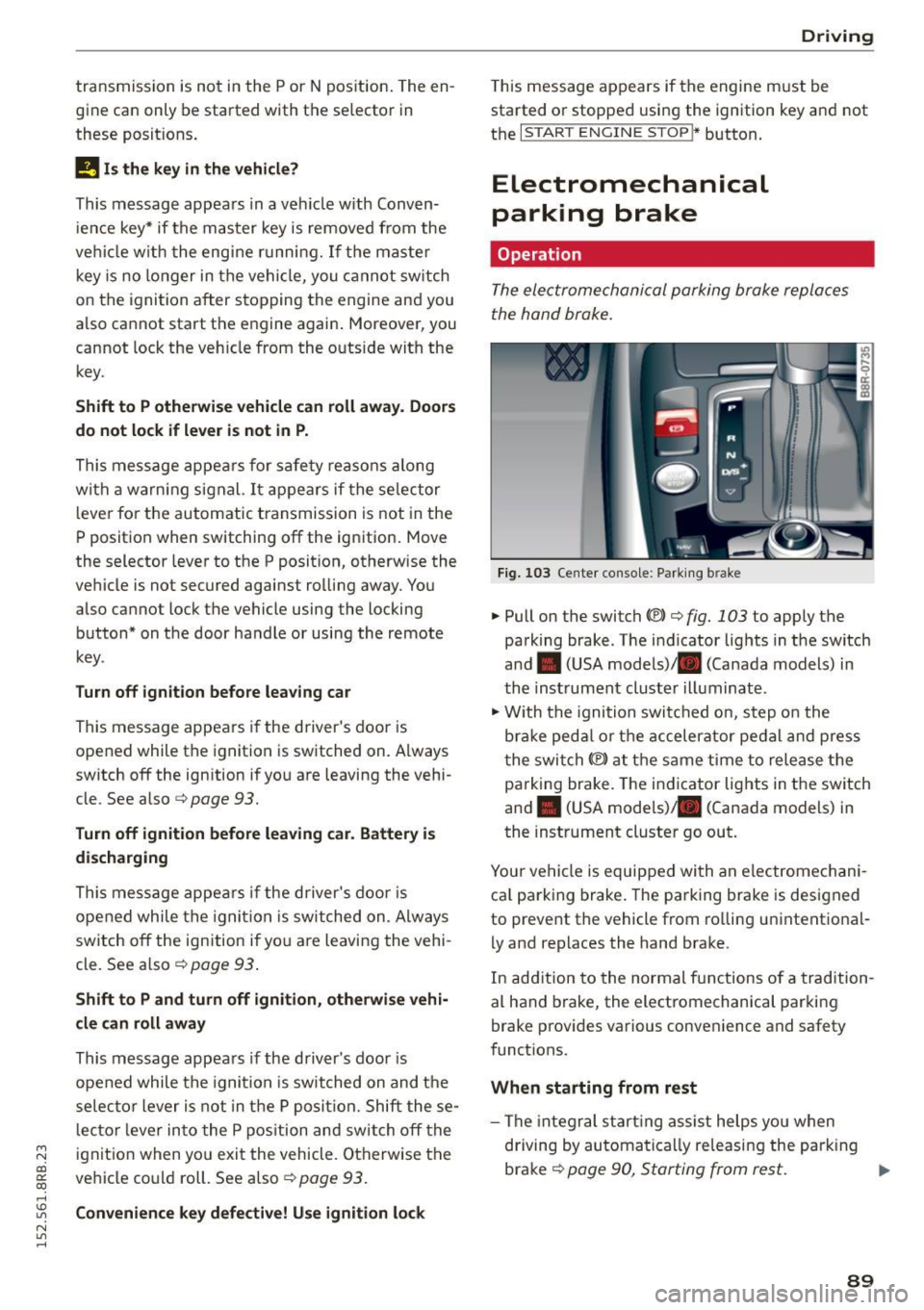
Fig . 103 Ce nte r console : Parki ng b rake
.,. Pull on the switch «el) c:;, fig. 103 to apply the
parking brake . The i ndicator lig hts in the switch
and . (USA models) . (Canada models) in
th e inst rument cluste r illuminat e.
.,. With the ignition swi tch ed on, step o n the
b rak e ped al or t he ac celer ato r pe dal an d pre ss
t he swi tch
(®) at the same time to release the
pa rking brake. The ind icator lights in the switch
and . (USA mode ls) . (Canada models) in
the inst rument cluste r go out.
Your vehicle is equipped with an electromechani ca l park ing brake . The pa rking brake is designed
to prevent the vehicle from ro lling u nintent io na l
l y and replaces the hand brake .
In add ition to the normal f unctions of a tradition
al hand brake, the electromechanical parki ng
brake prov ides various conve nience and safety
funct ions.
When starting from rest
- The integr al st art ing ass ist helps yo u when
d riving by automa tica lly re leasi ng the par king
brake
c:;, page 90, Starting from rest. IJo-
89
Page 92 of 302

Driving
- When starting on inclines, the sta rting assist
prevents the vehicle from unintentionally roll
i ng back . T he braking force of the parking brake
is not released unt il sufficient driving force has
been built up at the wheels.
Em ergency brake function
An emergency bra ke ensures that the vehicle can
be slowed down even if the normal brakes fa il
c::> page 91, Emergency broking .
A WARNING
-
If a drive range is engaged with the vehicle
stationary and the engine running, you must
in no instance accelerate careless ly. Otherwise
t he vehicle will start to move immed iate ly -
r isk of an accident.
(1) Tips
- If the parking brake is applied with the igni
tion switched off, the indicator lights in the
swi tch and . (USA
models) ;II (Cana-
da models) in t he instrument cluster wil l go
out after a certa in period of time.
- Occasiona l noises when th e par king b rake is
applied and released are normal and are not
a cau se for co nce rn.
- When the ve hicle is par ked, the parking
b rake goes t hro ugh a se lf-test cycle a t regu
lar in tervals . Any associa ted noises are no r
mal.
Parking
~ Press the brake peda l to stop the vehicle.
~ Pu ll the switch c::> page 89 , fig . 103 to set the
parking brake.
~ Move the selecto r lever to P .
~ Turn the eng ine off c::> ,&. .
~ When on incl ines or declines, turn the steer ing
whee l so that the vehicle w ill roll into the curb
if it beg ins to move.
A WARNING
- W hen you leave your veh icle -even if only
br ie fly -always remove the igni tion key. This
applies part icu larly when children remain in
90
-
the vehicle. Ot herwise the ch ild ren could
start the engine, release the parking b rake
or operate electrical equ ipment (e.g . power
w indows) . There is the risk of an accident.
- W hen the veh icle is locked, no one -part icu
larly not chi ldren shou ld remain in the ve hi
cle. Locked doors make it more d ifficult for
emerge ncy wor kers to get into the ve hicle -
putting lives at risk .
Starting from rest
The starting assist function ensures that the
parking broke is released automatically upon
starting.
Stopping and applying parking brake
~ Pull the sw itch to app ly the parking brake.
Starting and automatically releasing the
parking brake
~ When you sta rt to drive as us ual, the parking
brake is automatically released and yo ur vehicle
beg ins to move.
When stopping at a traffic signa l or stopping in
c ity t raffic on vehicles with an a utomat ic trans
mission, the parking brake ca n be applied. The
vehicle does not have to be he ld with the foot
brake . The park ing brake e liminates the tendency
to c reep with a d rive ra nge engaged . As soon as
you d rive off as usua l, the par king b rake is re
l eased a utomat ic all y and the vehi cle starts to
move .
Starting on slopes
When sta rting on inclines, the starting assist pre
vents the vehicle from unintentionally ro lling
ba ck. The braking for ce of t he parking b ra ke is
not released until sufficient dr iv ing force has
been built up a t the wheels.
(D Tips
Fo r safety reaso ns, the p arking bra ke is re
l e ased auto m atically only w hen t he d river 's
s a fe ty be lt is engaged in t he b uckle .
Page 95 of 302

M N
co ~ co
rl I.O
"' N
"' rl
General information
Applies to vehicles: with Start-Stop-System
The standard Start-Stop-mode can be cancelled
for different system-related reasons.
Fig . 105 Instrument cluster: E ngin e-Stop tempo rarily un
available
Engine will not switch off
.... M
9 cc IX) ID
Before each stop phase, the system checks if cer
tain conditions have been met. For example, the
engine will
not be switched off in the following
situations:
- The engine has not reached the minimum re
quired temperature for Start-Stop-mode.
- The interior temperature selected by the A/C system has not been reached.
- The outside temperature is extremely high/low.
- The windshield is being defrosted ~
page 82.
-The park ing system* is switched on .
- The battery cha rge level is too low.
- The steer ing whee l is sharply turned or there is
a steering movement.
- After engaging the reverse gear.
Engine automatically restarts
The stop phase is interrupted in the following sit
uations, for example. The engine restarts without
any action by the driver.
- The interior temperature varies from the tem
perature selected in the A/C system.
- The windshield is beeing defrosted
~ page 82.
-The brake pedal is pressed several times in a
row.
Driving
- The battery charge level becomes too low.
Switching the ignition off automatically
To prevent the battery from draining, the ignition
will switch off
automatically when all of the fol
lowing condit ions have been met:
- The vehicle has already been driven.
- The engine has been turned off by the Start-
Stop-System.
- The driver's door is opened.
- The driver's seat belt is removed .
- The brake pedal is not pressed down.
- The vehicle is stationary .
In this case, the activated low beam will be re
placed by the side marker lights. The side marker
lights will switch off after approximately 30 mi
nutes or when you lock the vehicle .
If the Start-Stop-System has
not turned off the
engine or if you have switched the Start-Stop
System off manually, the ignition will
not be au
tomatically switched off and the engine will con
tinue to run~,&. .
A WARNING
Never allow the engine to run in confined
spaces - danger of asphyxiation.
(D Tips
-
If you shift into the D/S or N positions after
sh ifting into reverse, the vehicle must be driv
en faster than 6 mph (10 km/h) in orde r for
the engine to switch off again.
93
Page 127 of 302

M N
co
a:
co
,...., \!) 1.1"1
N 1.1"1 ,....,
(Neutral) for more than approximately 1 second,
without the brake pedal being pressed.
Release button
The release button on the selector lever prevents
the lever from be ing acc identally shifted into cer
tain positions. Pressing this button deactivates
the selector lever lock . Depending on the direc
tion of the shift, the se lector lever locks at differ
ent positions. The positions are highlighted in
the illustration¢
fig. 135.
Ignition key safety interlock
The key cannot be removed from the igni tion un
l ess the se lector lever is in the P park position .
When the ignition key is removed, the selector
l ever will be locked in the P position.
Driving the automatic transmission
Fig. 136 Shift gate on the center conso le: selector lever
with release button
Starting the engine
.,. The selector lever must be in P or N.
Starting off
.,. Press and hold the brake pedal.
.,. Press and ho ld the release button in the se lec
tor lever handle, select the desired selector lev
er position such as D/S and release the button.
.,. Wait br iefly until the transmission has shifted
(you will feel a slight movement).
.,. Remove your foot from the brake pedal and ac
celerate.
Stopping temporarily
.,. Keep the vehicle stationary using the brak ing
pedal, for example at traffic lights.
Automatic transmission
.,. Do not press the accelerator peda l when doing
this.
.,. To prevent the vehicle from rolling when you
start dr iv ing, set the parking brake when stop
ping on steep incl ines¢ &_.
The parking brake will re lease automatically and
the vehicle wi ll start moving once you press the
acce lerator pedal.
Stopping/parking
If the selector lever is not in the P position when
you open the driver's door, the vehicle could roll.
The message
Transmission: Car may roll! Shift
to park!
appears.
.,. Press and hold the brake pedal until the vehicle
has come to a complete stop.
.,. App ly the parking brake¢
page 90, Parking .
.,. Select the P se lector lever position ¢ &_ .
Stopping on an incline
.,. Always press the brake pedal to hold the vehi
cle in place and prevent it from "ro lling back"
¢ &_ . Do
not try to prevent the vehicle from
"rolling back" when a gear is engaged by in
creasing the engine speed
c> (D .
Starting on an incline
.,. Activate the parking brake .
.,. With the driving gear selected, press the acce l
erator pedal carefu lly. The parking brake wi ll re
lease automatically if your seat belt is fastened.
Under certain circumstances, such as driving in
the mountains, it may be usefu l to switch tempo
rari ly to the manual shift program in order to ad
just the gears to the driving conditions by hand
¢page 127 .
On s lopes, activate the parking brake first and
then move the selector lever to the P position .
This prevents too much stress from being placed on the locking mechanism .
A WARNING ,_
-Unintended vehicle movement can cause se-
rious injury.
~
125