2015 AUDI Q5 fuel
[x] Cancel search: fuelPage 32 of 302

Driver information system
CJ) Note
Do not continue driving if the. symbo l ill u
m inates. There is a malfunct ion in the engine
cooling system -you could damage your en
gine.
9=:;r: Engine oil pressure malfunction
The red engine oil pressure warning symbol re
quires immediate service or repair. Driving with a
low oil pressure indication is likely to cause se
vere engine damage .
If the . symbol on the display flashes, the en
g ine oil pressure is too low. A driver message ap
pears as well to explain the malfunction in more
deta il. The dr iver warning goes out after about 5
seconds, but it can be brought up at any time by
p ress ing the
ISETI but to n again.
Turn off engine! Oil pressure too low
• Stop the vehicle .
• Turn the eng ine off .
• Check the eng ine oil level
c::, page 225.
• Contact your authorized Audi dealer for ass is -
tance if necessary.
Engine oil level too low
If the engine o il level is too low, add engine oi l
c::, page 225.
Engine oil level correct
If the symbol . flashes even though the engine
oil level is correct, please contact your nearest
authorized Audi Dealer for assistance. Do not
continue driving . Do not leave the engine running
idle, either.
(D Tips
- The engine oil pressure symbol. is not
an indicator for a low engine oil level. Do
not rely on it. Instead, check the oil level in
your engine at regular intervals, preferably each time you refuel, and always before
going on a long trip.
- The yellow oil level warning indication
Ill
requires oil refill or workshop service with
out delay. Do not wait until the red oil
30
pressure warning • starts to flash before
you respond to the low oil level warning
II. By then, your engine may already have
suffered serious damage.
~ ... Fill engine oil now
WARNING: Please add oil immediately
If the . symbol lights up , then the oil has to be
replenished right now
c::, page 225.
@-Steering malfunction
If there is a malfunction in the electronic steer
ing column lock, the steering cannot be un
locked.
If the . symbol in th e disp lay blinks, there is a
malfunction in the electronic steering co lumn
l ock. A driver message appears as well to exp lain
the malfunct ion in more deta il. The dr iver warn
i ng goes out after about 5 seconds, but it can be
brought up at any time by pressing the
ISE TI but
ton again .
Steering defective! Do not drive vehicle!
• Contact your nearest authorized Audi dealer.
• Do
not tow your vehicle .
A WARNING
Your vehicle must not be towed in the event
of a malfunction in the electronic steering co l
umn lock because it cannot be steered due to
the locked steering. If it is towed with the
steering locked, there is the risk of an acci
dent.
© -Ignition lock malfunct ion
A malfunction in the ignition lock must be re
paired immediately.
If the . symbo l in the display blinks, there is a
malfunction in the electronic ignition lock. A driv
er message appears as well to explai n the mal
funct ion in more deta il. The driver warning goes
out after about 5 seconds, but it can be brought
up at any time by pressing the
ISETI button again.
Ignition lock defective. Contact dealer! ll-
Page 33 of 302

M N
co
a:
co
,...., \!) 1.1'1
N 1.1'1 ,....,
~ Do not turn the engine off.
~ Drive immediately to an authorized Audi dealer
to have the malfunction corrected .
If there is a malfunction in the e lectronic ignition
l ock, the ignition cannot be turned off . Drive im
mediately to an authorized service facility to have
the cause of the ma lfunction corrected.
On vehicles with Convenience key*, the engine
should not be switched off using the Start/Stop
button because the engine cannot be started
again after the ignition has been switched off.
Yellow symbols
Fig. 24 Display: Ye llow warn ing symbo l
N M
9 a: a, a,
When a ye llow warning symbol appears, one
warning tone so unds . A driver message appears
as we ll to exp la in the malf unction in more detail.
The driver warning goes out after about S sec
onds, but it can be brought up at any time by press ing t he
ISETI button again.
Check the function d isp layed as soon as possible.
The yellow symbol w ill not go out aga in until the
reason for the malfunction has been corrected.
If several priority 2 malfunctions are present, the
symbols appear in succession and remain for
about 2 seconds.
Elect rom echan ica l steering, Dy
namic steering*
¢page 195
Worn brake pads
¢page32
Battery voltage
¢page33
Driver information system
Defective light bulb
¢ page 32
Fog lights
¢page 32
Rear fog lights
¢page 32
Check engine oil leve l
¢page 33
Engine oil sensor malf unc tion
¢page 33
Engine temperature*
¢page 214
Low fuel level
¢page 33
Refill Ad Blue*
¢page 218
AdBlue malfunction *
¢page 218
Windshield washer fluid level
low
¢page 33
Convenience key*
Key not in veh icle
¢ page 32
Light/rain sensor defective
¢page 32
Dynamic headlight range con
trol defective
¢ page 34
Battery in remote control key
¢page 37
Electromechanical parking
brake
¢page 91
Engine speed lim itation*
¢ page 33, ¢page 100
Diesel particulate filter* clog
ged
¢ page 34
Adaptive light defective*
¢page 34
Steering malfunction
¢page 34
31
Page 35 of 302

M N
co
a:
co
,...., \!) ..,.,
N ..,., ,....,
IJ-If a rea r fog lamp has failed , the indicator
light turns on to indicate the location on the vehi
cle.
Vehi cle light s: Sy stem fault!
If the message appea rs, there is a malfunct ion in
the head lights or light switch.
Drive to your authorized Aud i dea le r immediately
to have the malfunction corrected .
A WARNING
-Light bu lbs are pressurized and could ex
plode whi le they a re being changed causing
serious persona l injury.
-
- Wor k w ith due care when handling the high
voltage section of gas discharge (xenon) l igh ts *. Failure to do so could result in death
o r serious injury.
@ Tips
Have the bulb replaced or the connection re
pa ired by your authorized Audi Serv ice depart
ment.
<:;::> Windshield washer flu id level too low
llt Plea se refill wa sher fluid
If the symbol illuminates, add windshield washe r
fluid to the washer system and also to the head
light washer system¢
page 234 .
Bil Fuel supply too low
When the D symbol i llum inates, this means
there are about 2 .6 gallons ( 10 liters) of fue l left
in the fuel tank. Time to refuel!
¢ page 215.
If the symbo l lights up, even when the re is ample
fue l in the tank, and the text
Fuel tank sy stem
malfun ction! Contact dealer
appears in the dis
p lay, there is a fau lt in the system . Contact an a u
thor ized Audi dealer to have the fault rectified.
D Battery voltage
If battery power drops into the range where it
can limit the abil ity of the engine to sta rt, th is
the symbo l(•) ::ippears in the instrument cluster
Driver information s ystem
display with the following driver message Lo w
batter y: Batte ry will be charged while d riving.
While t his d river no tification is disp layed, you
have to be prepa red fo r limited star ting capabili
ty .
Driver message appears and goes out again
If this drive r message appears after the ign ition
is tur ned on or while d riving a nd it goes ou t again
after a wh ile, the ba ttery has been adequa tely re
charged .
Driver message appears and does not go out
again
If this drive r notific ation appea rs after the ign i
t ion is tu rned on or while dr iv ing and does not go
out again, the battery's state of charge is no t in
the optimal range. Start ing capability is restrict
ed. Have the battery checked at an authorized
Audi dealer or other qualified workshop as soon as possible.
~ Check engine oil
II Add oil, ma x x qt (l) . You may cont . driv .
When the Ill symbol and dr iver message appear,
add the amount of oil appear ing in the disp lay at
the next opportunity ¢
page 225.
'l:7;,.. Engine oil sensor defective
• Oil le vel! Sen sor defective
If the symbol illuminates, contact yo ur author
ized Audi dealer and have the oil sensor inspect
ed . Until you have this done, check the oil level
each time you ref uel just to be on the safe s ide
¢ page 225.
!? Engine speed limitation
Applies to vehicles: with engine speed limitation
II! Do not ex ce ed max . engine speed of XXXX
rpm
T he II! symbol illuminates when there is a n en
gine co ntro l malfunction . The indicato r light ~
i n t he i nstr ument cluster also illum inates. The
engine speed is limited to the speed displayed in .,,.
33
Page 41 of 302

M N
co
a:
co
...... \!) 1.1'1
N 1.1'1 ......
Turn signals
When you unlock the vehicle, the turn signa ls
flash twice. When you lock the vehicle, the turn
signals flash once. If they do not flash, one of the
doors, the rear lid or the hood is not locked.
Unintentionally locking yourself out
In the following cases there safeguards to pre
vent yo u locking yo ur remote master key in the
vehicle:
- Th e veh icle does not lock with the power lock
ing switch ~
page 42 if the dr iver's door is
open .
- On vehicles with Convenience key*, if the most
recently used master key is in the luggage com
partment, the rear lid is automatically un locked
again after it is closed.
Do not lock your vehicle with the
remote master
key or Convenience key*
until all doors and the
rear lid are closed . In this way you avoid locking
yourself out accidenta lly.
& WARNING
- When you leave the vehicle, always remove
the ignition key and take it with you. This
will prevent passengers (children, for exam
ple) from accidentally being locked in the
vehicle should they acc identally press the
power locking switch in the front doors .
- Do not leave children ins ide the veh icle un
supervised . In an emergency it wou ld be im
poss ible to open the doors from the outside
without the key.
(D Tips
-In the event of a crash with airbag deploy
ment all locked doors will be automatically
unlocked to give access to the vehicle occu
pants from the outside.
- If the power locking system should mal
function, you can lock the dr iver's door us
in g the mechanical key~
page 42.
-If the power locking system should fail, you
can still open the fuel tank flap in an emer
gency~
page 217.
- You are we ll advised not to keep valuables
insi de an unattended vehicle, vis ible or not.
Opening and closing
Even a properly locked vehicle cannot pro
vide the security of a safe.
- If the LED in the upper edge of the driver's
door pane l comes on for about 30 seconds
after the vehicle is locked, there is a mal
function in the power locking or the ant i
theft warning system. Have the malfunction corrected by an authorized Audi dealership
or qualified repair facility .
Setting power locking
The driver can determine the functions for power
locking in the radio or in the MMI*.
.. Select: !CARI function button> Cent ral locking .
Or
.,. Select:
!CARI function button > Car systems*
control button > Vehicle settings > (Central
locking )*.
Unlocking single door/Unlock doors -
you can
specify wh ich doors unlock when you open the ve
hicle .
- Select ing Off /All and press ing the ~ button on
the remote control key unlocks the entire vehi
cle .
- Select ing
On /Driver and press ing the ~ button
on the remote control key once unlocks only the
driver's door. In vehicles with a convenience
key*, only the door whose handle you pull will
unlock. If you press the
[ru butto n twice, the en
tire vehicle will unlock. If you p ress the~ but
ton, the entire vehicle will always lock.
Trunk lid/tailgate /Lock exterior trunk handle -if
you select
On , the rear lid handle locks
~ page 43, fig. 35. In this case, the rear lid can
be opened with the
l""'I button on the master key
Q page 40, fig. 29 or with the~ button in the
driver's door~
page 43, fig . 34.
Fold mirrors * -if you select On , the outside mir
rors will fold in automatically when you press the
~ button on the remote control key Q page 59.
Confirmation tone /Tone when locking -if you
select
On , a tone w ill sound when you lock the ve
hicle.
39
Page 76 of 302
Seats and storag e
Install ing th e attachm ent s
.. Remove the cap @¢ fig. 84.
.. Slide the attachment into the T -groove (V .
.. Tighten the attachment accord ing to the roof
rack installation instructions.
.. Close the cap .
Inst a lling th e cov er p ro fil e
.. Seal the openings in the T-groove 0 with the
cover profile @ after having installing the at
tachments .
.. If you not want to use the attachment, seal the
whole T-groove
0 with the cover profile @.
.. Cut the cover profile to the length needed, if
necessary .
Roof load
The cargo on the roof must be securely attached.
Handling characteristics change when cargo is transported .
The permissible roof load for your vehicle is
165 lbs (75 kg ). The roof load is the total of the
weight of the roof rack, the attachments and the
cargo you are carry ing .
.,&. WARNING
-The cargo must be secure ly attached on the
roof rack, otherwise you r is k an acc ident .
- Distribute the load as evenly as possible and
do not make the roof rack wider than the
maximum permitted.
- You must under no circumstances exceed
the permiss ible roof load, the permissib le
axle loads and the permissib le overall
weight of your vehicle - risk of an accident.
- Mount the attachments to the roof rack on ly
afte r you have placed the roof rack on the
vehicle.
- Cons ider tha t when transport ing heavy ob
jects or one wi th a la rge surface, the han
dling characteristics change due to shift in
the center of gravity or the greater surface
exposed to the wind. So adapt your driving
and your speed to prevailing condit ions . We
recommend that you do not drive faster
than 80 mph (130 km/h) .
74
- Mounting a roof rack changes the height of
your veh icle. Keep this in mind when parking
your veh icle in your garage, or when driving
through a tunnel or under an overpass .
(D Note
-Make sure the rear lid does not hit the cargo
on the roof rack when you open it. On
vehicles with automat ic rear lid/trunk lid
operation* you may have to adjust the open
posit ion of the rear lid ¢
page 44 .
-Remove the roof rack and attachment be
fore taking your vehicle through an auto
matic car wash to avoid damage .
@ For the sake of the environment
As a result of the increased wind resistance
created by a roof rack, your vehicle is using
fuel unnecessarily. So remove the roof rack af
te r using it .
Beverage holders
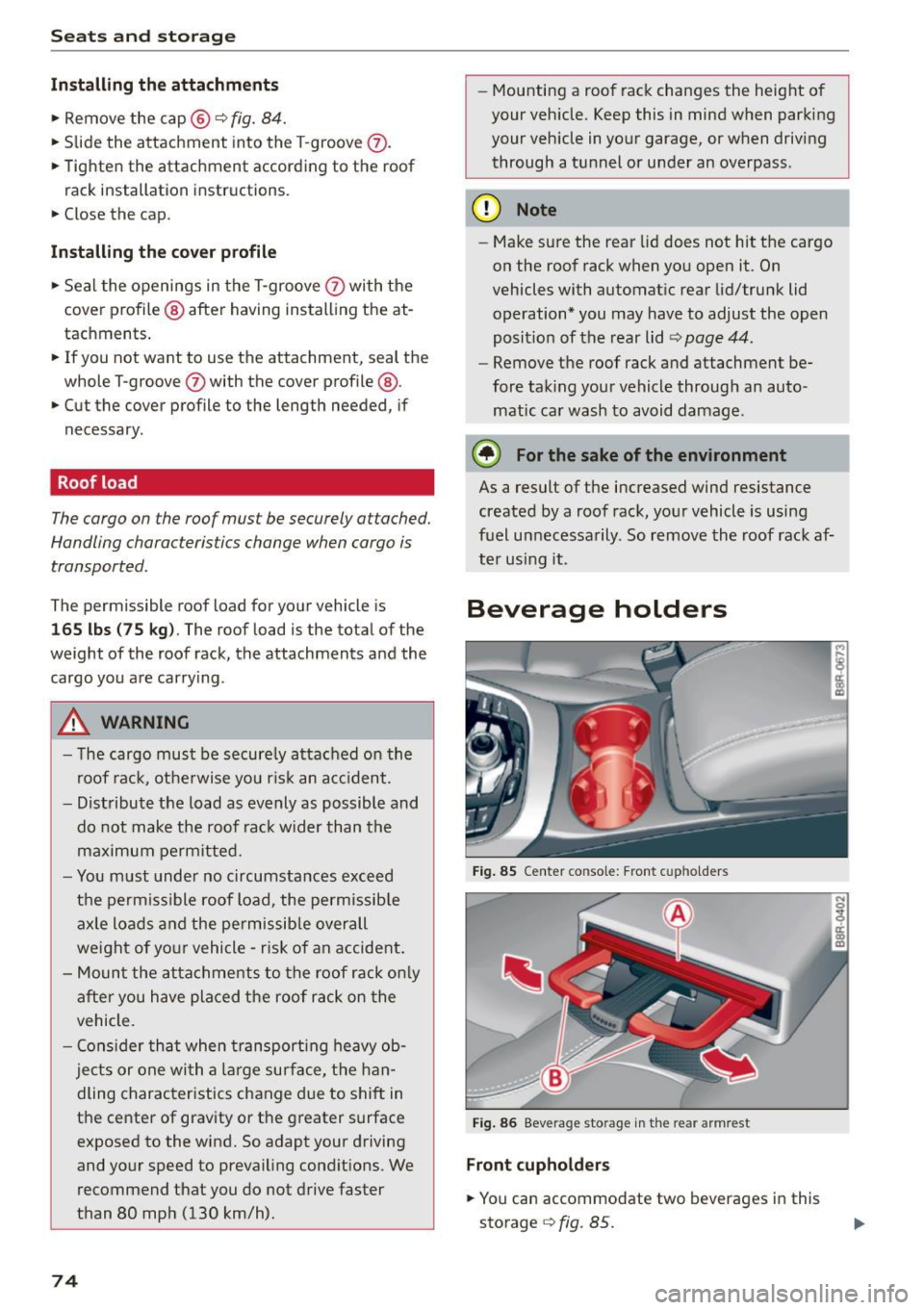
Fig. 85 Center co nsole: F ront c upholder s
Fig . 86 Beverage sto rage in the re ar a rm rest
Front cuphol der s
.. You can accommodate two beverages in this
storage
<=> fig . 85.
Page 82 of 302

Warm and cold
Warm and cold Climate control system
Description
The climate control system warms, cools and
adds humidity to the air in the vehicle interior. It
is the most effective when the windows and pan
oramic sliding sunroof* are closed . If there is a
build-up of heat inside the vehicle, ventilation
can help to speed up the cooling proc ess.
In all heating mode functions except
defrost, the
blower only switches to a higher speed once the
engine coolant has reached a certain tempera
ture.
Condensation from the cooling system can drip
and form a puddle of water under the vehicle.
This is normal and does not mean there is a leak.
Pollutant filter
The pollutant filter removes pollutants such as
dust and pollen from the air.
The air pollutants filter must be changed at the
intervals specified in your Warranty & Mainte
nance booklet, so that the air conditioner can
properly work.
If you drive your vehicle in an area with high air pollution , the filter may need to be changed
more frequently than specified in your Audi War
ranty
& Maintenance booklet. If in doubt, ask
your authorized Audi Service Advisor for advice.
Key coded settings
The climate control settings are automatically
stored and assigned to the remote control key
that is in use .
.8, WARNING
Reduced visibility is dangerous and can cause
accidents.
- For safe driving it is very important that all
windows be free of ice, snow and condensa
tion.
80
- Completely familiarize yourself with the
proper use and function of the heating and
ventilation system and especially how to de
fog and defrost the windows .
- Never use the windshield wiper/washer sys
tem in freezing weather until you have
warmed the windshield first, using the heat
ing and ventilation system . The washer solu
tion may freeze on the windshield and re
duce visibility .
(D Note
-If you suspect that the air conditioner has
been damaged, switch the system off to
avoid further damage and have it inspected
by a qualified dealership.
- Repairs to the Audi air conditioner require
special technical knowledge and special
tools. Contact an authorized Audi dealer for
assistance.
@ For the sake of the environment
By reducing the amount of fuel you use, you
also reduce the amount of pollutants emitted
into the air.
(D Tips
-Keep the air intake slots (in front of the
windshield) free from ice, snow and debris
in order to maintain the proper function of
the climate control system.
- The energy management system may switch
the seat heating* or rear window defroster
off temporarily. These systems are available
again as soon as the energy balance has
been restored.
- The air flowing out of the vents and
throughout the vehicle's entire interior is
discharged at the rear of the vehicle. Make
sure that the outlet slots are not covered by clothing, etc.
Page 93 of 302

M N
co
a:
co
,...., \!) ..,.,
N ..,., ,....,
Starting off with a trailer
To prevent rolling back unintentionally on an in
cline, do the following:
11-Keep the switch pulled and depress the acceler
ator. The park ing brake stays applied and pre
vents the vehicle from roll ing backward .
11-You can release the switch once you are sure
th at you a re developing enough dr iving force at
the whee ls by depressing the a cce le rato r.
Depending on the weight of the r ig (veh icle and
trai ler) and the severity of the inc line, you may
r oll bac kwards as you sta rt . Yo u can prevent roll
in g ba ckwards by ho ld in g the pa rking brake
sw itch pulled o ut and accelera ting - just as you
wo uld when sta rting on a hill with a conventiona l
hand brake .
Emergency braking
In the event that the conventional brake system
fails or locks .
11-In a n eme rgency, pull the sw itch and conti nue
to pull it to slow your vehi cle down wi th the
parking brake .
11-As soon as you release the switch or acce le rate,
the braking process stops.
If yo u pull the sw itch and hold it above a speed of
about S mph (8 km/h), t he emergency braking
f u nction is init iated . The veh icle is braked at all
four whee ls by activating the hydra ulic brake sys
t em. The brake performance is simi lar to making
an emergency stop¢.&. .
In o rder not to activate the emergency brak ing by
mistake, an audible warning tone (b uzzer)
sounds w hen the sw itch is p ulled. As soon as t he
sw itch is released, or the accelerator peda l is de
p ressed, emergency brak ing stops.
A WARNING
Emergency b raking should on ly b e used i n an
eme rgency, when the normal foot brake has
f ail ed or the br ake pedal is obstruc ted. Using
t he par king brake to pe rform emergency brak
ing w ill slow your vehicle down as if you had
made a fu ll brake a pplicat ion . The laws of
Dri ving
physics cannot be suspended even with ESC
and its associated components (ABS, ASR,
EDS). In corners and when road or weather
c o nditions are bad, a f ull brake application
can cause the vehicle to skid o r th e rear end to
b reak away -risking an accid ent .
Driver messages in the instrument cluster
Caution: Vehicle parked too steep
T h is message appears w hen t he pa rking brake is
applied on an in cli ne that exceeds about 30% .
In this case the braking power of the park ing
brake may
not be adequat e to prevent the veh i
cle from rolling unintentionally .
Press brake pedal to release parking brake
This dr iver message appears when the sw itch to
release the parking bra ke was pressed. The par k
ing brake can only be released if you step on the
brake pedal and at the same t ime press t he
switch or you automat ica lly release the parki ng
brake with the starti ng assist ¢
page 90.
fpjj Parking brake malfunction!
This dr iver message appears together w ith the
yellow
rm symbol whe n there is a parking brake
malfu nction .
Start/Stop system
Description
Applies to veh icles: w ith Start -Stop -System
T he Sta rt-Stop -System can help increase fuel
economy and reduce CO2 emissions.
In the Star t-Stop -mode, the engine shu ts o ff au
tomatica lly when the vehicle is stoppe d, such as
at a t raffic lig ht. The ignition remains sw itche d
on during this stop phase. The engine w ill be au
tomat ica lly restarted when needed.
The last S tart -Stop -System sett ing (on/off using
t h e b utton
10 ~1) will be restored w hen the ig ni
t ion is turned on. The LED in the
l(A) ~I b utton turns
on when the Start-Stop-System is sw itched off
manua lly.
91
Page 101 of 302

Starting the vehicle
Applies to vehicles: with hybrid drive
The vehicle is started and turned off either w ith
the ign ition key
q page 84 or with the
IS TAR T ENGINE STOP I button* ¢page 87 in the
same way as a conventional vehicle .
When starting the vehicle, the need les in the in
strument cluster
move upward br iefly. When the
vehicle enters d rive ready mode, the status mes
sage
hybrid ready appears briefly in the instru
ment cluster display and the needl e in the power
meter points to READY
q page 99.
Depending on the operation mode of the hybr id
system, there are two possib le drive ready modes
after the vehicle has been started:
Drive r eady mode with combustion engine
If the ope rat ing requirements q page 101 for
e lec tric dr ive mode are
not met, the combustion
Power meter overview
Applies to vehicles: with hybrid drive
H ybri d
engine starts the vehicle as usual. You can start
driving as usual.
Drive ready m ode with th e el ectric motor
If the operating requi rements 9 page 101 for
the e lectr ic dr ive mode are met , the combustion
engi ne remains off after starting the vehicle.
(j) Tips
To p reven t the 12 volt batte ry from d ischarg
i ng, never leave t he veh icle parked in the dr ive
ready mode. Remove the key from the igni tion
or press the
! S T AR T ENGINE ST OP I button *.
When leaving the vehicle always take the key
with you.
The power meter shows the hybrid drive condition and the availability of the hybrid system.
F ig. 1 10 Powe r meter overview
An economical dr iv ing and recuperation range is
shown in g reen . A d riving range that is not eco
n omical is shown in o range. In addi tion, the ba t-
"' tery status provides information about the high
N
~ voltage battery charge stat us.
co
rl I.O
"' N
"' rl
@ Fuel eff icient driving with in the
combust ion engine 's pa rtial load
range
@ System limits for electric driving in
the EV mode
@ El ectric dr iving or driv ing with the
combust ion engine (EFFIC IENCY)
99