2015 AUDI A3 emergency key
[x] Cancel search: emergency keyPage 11 of 288

CD
@
®
©
®
Power windows
Door handle
Aud i side assist ........ .... .
Centra l locking switch ... .. .. .
Powe r exter ior rearview m irror
adjuster .................. .
@ Light switch .... .... ... .. .. .
(J) Vents
® Leve r fo r:
- Turn signal and high beam ..
- Audi act ive lane assist ... .. .
® Steer ing whee l w ith horn and
- Drive r's airbag ........... .
- Buttons for the on-board com-
puter .. ................. .
- Buttons for the MMI, tele
phone, navigation and voice
recognition system
- Sh ift padd les for t ipt ronic
mode (automatic t ransm is-
sion) .. .. .. ........... .. .
@ Instrument cluster : .. ... .. .. .
@ Leve r for the w indshield w iper/
washer
....................
@ Steering column with:
- Emergency operation of the ig
nition ( in ve hicles w ith a con -
venience key) ............ .
- Ignit io n (in veh icles with a me-
chanical ignition) ......... .
@ Adjustable s teer ing column
~ Depending on equipmen t: 38
98
35
48
42
64
44
94
1
4 4
27
1 10
10
46
75
70
70
- Cru ise cont ro l lever . . . . . . . . 79
- Audi adaptive cruise cont rol 82
@ D river's knee a irbag . . . . . . . . . 157
@ Instrument illum ination . . . . . . 45
@ Hood re lease leve r . . . . . . . . . . 211
@ Child safety lock buttons . . . . . 38
@ MMI disp lay (navigation radio,
TV/video)
@ Glove compartment ( lockable)
@ Front passenger's airbag .. .. .
@ Spea ker (t reble) 5
8
144
@) Front passenger's knee airbag 157
Cockpi t 9
@ Depending on equipment, but
tons for:
- Aud i drive select . . . . . . . . . . . 102
- Parking system plus (or with
rearv iew camera) . . . . . . . . . . 115
- Emergency flashers . . . . . . . . 43
- Elect ron ic Stabilization Con-
trol ( ESC) . . . . . . . . . . . . . . . . 185
- MMI display
- Airbag off in dicator . . . . . . . . . 153
@ Depend ing on equ ipment:
- Manual a ir cond it io ni ng sys-
t em . . . . . . . . . . . . . . . . . . . . . 65
- Automatic a ir condit ioning
sys tem . .. .. .... ........ .
66
Socket ... .... .. . .. .. ..... . 56 @
@
@
@
@
@
S tronic se lector lever ....... .
( upholder .. .. .. . ......... . 105
57
MMI On/Off knob
MM I controls
Parking brake
@ ,.., I s=T~ A~R~ T_ E _N_ G_I _N_ E_S_ T_ O_ P_ I button
(ve hicles w ith convenience key)
(D Tips
- Some of the equipment shown here is
only installed in certain models or is
available as an option .
- The operation of t he M ulti Med ia Inter
face
(MMI) i s descr ibed in a separate
owne r's manual. Yo u will also find infor
mation on A udi con nect t here .
76
73
•
Page 36 of 288

34 Openin g and clo sing
• To open the luggage compartment lid, press
and hold the ©~ button for at least one
second .
• To trigger the alarm, press the red iPANICI
button @. The vehicle horn and emergency
flashers turn on .
• To turn off the alarm, press the red IPANICI
button @again .
If the vehicle is unlocked and a door or the
luggage compartment lid are not opened
within 45 seconds, the vehicle locks aga in au
tomatically. This feature prevents the vehicle
from being ac cidentally left un locked over a
l ong period of time. This does not apply when
you push the@i""I button for at least one
second.
F o r vehicles w ith
sa fet y c ent ral l ocking (selec
tive unlocking) ¢
page 3 7, only the driver's
door and the fue l filler door are opened by
pressing the@~ button once, and the ent ire
vehicle unlocks when the button is pressed
twice.
@ Tips
- Only use the remote co ntrol key or con
venience key within view of the vehicle.
- Do not use the remote control if you are inside the car, otherwise you may unin
tentionally lock the vehicle, and then you
would set off the anti-theft alarm when
you open a door. In case this happens anyhow, push the unlock button@.
- The vehicle can only be locked when the
se lector lever is in the
P posit ion.
- Use the panic function only if you are in
an emergency situation.
- Additional remote control key or conven
ience key functions¢
page 39, Con
venience opening/closing .
Locking and unlocking with convenience
key
Applies to vehicles: with co nvenience key
The front doors and the luggage compart
ment lid can be unlocked and locked without using the remo te control key.
F ig. 20 Driv er's doo r: locking t he veh icle w ith the co n
venience key
0 0
I
• To unlock the door automatically, grasp the
driver's or front passenger's door handle
¢ fig. 20
• To open the door, pull the door hand le .
• To unlock or open the luggage compartment
lid, press the handle in the luggage com
partment lid
q page 37, fig. 24 .
• To lock the vehicle, bring the selector lever
into the
P position (automatic transmis
sion), close the door and touch the sensor
on t he d river 's doo r hand le
one time. Do not
hold the door handle while doing this.
Only the front doors and luggage compart
ment lid can be unlocked or locked . The re
mote control key must be w ith in a range of
abo ut 5
ft (1.5 m) from the door o r the rear
li d. It makes no d ifference whethe r the re
mote control key is in your jacket pocket,
purse or briefcase.
If you ho ld the doo r hand le wh ile loc king , th is
c a n p revent the lo ck ing f unct ion.
The door cannot be opened for a brief period directly after locking it . Th is allows you the
oppo rtun ity to check that the driver's doo r is
locked.
The sett ings in the MMI specify if the ent ire
vehicle or one of the doors is unlocked
¢ page 36.
Page 37 of 288

(D Tips
If you vehicle is left standing for a long pe
riod of t ime, note the following:
- The proximity sensor sw itches off afte r a
few days to save energy. You then have
to pull once on the door hand le to unlock
the vehicle and a second time to open it.
- To prevent the battery from draining and
to retain the start ing ability of your vehi
cle as long as poss ible, the energy man
agement system gradually tuns off un necessary convenience functions You
may not be able to unlock your vehicle
using the convenience key.
- For Declaration of Compliance to United
States FCC and Industry Canada regula
tions, see
r:o page 2 71.
Unlocking /locking with the key
In the event that the power locking system
fails, the driver's door can locked and un
locked using the door lock .
Fig . 21 Driver's door: door lock
• To un lock the driver's door, t urn the key to
the open position @.
• To lock the driver's door, move the selector
lever to the P position (automatic transmis
s ion) and turn the key once to the close posi
t ion @.
The settings in the MMI specify if the entire
vehicle or one of the doors is unlocked
i:::o page36 .
Openin g an d clos ing 35
@ Tips
Additional remote control key or conven
i ence key functions~
page 39, Conven-
ience opening/closing.
Central locking switch
Fig . 22 Driver's door: centra l locking switch
• To lock the vehicle, press the [§] button
q ,&..
• To unlock the vehicle, press the Im button
r=ofig.22.
When locking the vehicle with the centra l
locking switch, the following applies:
- Opening the doo r and the luggage compart
ment lid from the
outside is not possib le
(for security such as when stopped at a
light).
- The LED in the central locking switch turns
on when all doors are closed and locked.
- Yo u can open the doo rs individually from the
inside by pulling the doo r handle.
- In the event of a crash w ith airbag deploy
ment, the doo rs unlock automat ica lly to al
low access to the vehicle.
A WARNING
- The power lock ing switch works with the
ignit ion off and a utomatica lly locks the
entire veh icle when the [§] button is
pressed.
- The central locking switch is inoperative
when the vehicle is locked from the out side.
- Locked doors make it more difficult for
emergency workers to get into the veh i-
cle, which puts lives at risk. Do not leave ..,
Page 39 of 288

Safety central locking
Applies to vehicles: with safety central lock ing
Safety central locking provides the possib ility,
to only unlock the driver's door and the fuel
fil ler door. The rest of the vehicle remains
lock ed.
Unlocking the driver's door and the fuel
filler door
.,. Press the remote contro l key or convenience
key ~ button
once or turn th e key once in
the opening direction.
Unlocking all doors , the luggage
compartment lid and the fuel filler door
.,. Press the remote control key or convenience
key ~ button
twice within five seconds or
turn the key
twice within five seconds in the
opening direction.
When unlocking just the driver's door, the an
ti-theft alarm system* is also immediat ely de
activated .
I n vehicles with an MMI, you can directly ad
just the safety central locking
~ page 36.
Front passenger's door and rear doors
emergency locking
All doors must be locked separately if the
power locking system fails.
Fig. 23 Emergency door locking
..,
0 0 >
::l
The drive r's door can be locked using the door
lock cylinder ~
page 35.
The emergency lock on the other doors is lo
cated on the side of the front passenger's and rear doors. It is only visible when the door is
open .
Opening and closing 3 7
.,. Pull the cover cap out of the opening.
.,. Insert the key bit in the slot inside and turn
the key all the way to the right (right door)
or left (left door).
Once the door has been closed, it can no lon
ger be opened from the outside. The door can
be unlo cked and opened from the inside by
pulling the door handle once .
If the child safety lock on the rear doors is ac
tivated, pull the inner door handle first. Then
you can open the door from the outside.
Luggage compartment
Lid
Opening and closing the luggage
compartment lid
Fig. 24 Luggage compart ment lid: opening (ha ndl e)
Fig. 25 Luggage compartment lid/grip: clos ing
Opening the luggage compartment lid
.., 0 > co a:,
.,. Press and hold the l= I button on the remote
contro l key for at least one second, or
.,. Press the handle in the luggage compart
ment lid
q fig. 24.
Page 40 of 288

38 Openin g and clo sing
Clo sing th e lugg ag e compartm ent lid
.,. Use the inside grip to pull the l uggage com
partment lid down and allow it to drop
gently to close it ¢
fig. 25 ¢ A.
,& WARNING
-After closing the luggage compartment
lid, make sure that it is latched. Other
wise the luggage compartment lid could
suddenly open when driving, which in
creases the risk of an accident.
- Never drive with the luggage compart
ment lid ajar or open, because po isonous
gases can enter the veh icle interior and
create the risk of asphyxiation.
- Never leave you r vehicle unattended, es
pecially with the luggage compartment
lid left open. A child could crawl in to the
car thro ugh t he luggage compartment
and pull the lid shut, becom ing trapped
and unab le to get out. To reduce the risk
of personal injury, never let children play
in or around your vehicle. A lways keep
the rear lid as well as the vehicle doors
closed when not in use.
-Always ensure that no one is w ith in
range of the rear lid when it is moving, in
particular close to the h inges -fingers or
hands can be pinched .
@ Tips
-When the vehicle is locked, the luggage
compartment lid can be unlocked sepa
rately by pressing the~ button on the
remote control key. When the luggage
compartment lid is closed aga in, it locks
automatically.
- In case of an emergency or a faulty han
dle, the luggage compartment lid can be
opened from the inside¢
page 246.
Child safety Lock
Child safety lock
Applies to vehicles: with mechanical child safety lock
The child safety locks t prevent the rear
doors from opening from the inside .
Fig. 26 Rear doors: chi ld safety lock
.,. To tu rn t he chi ld safety locks o n, turn the ig
n ition key in the d irec tion of the arrow.
.,. To turn
off , turn the ignition key opposite
the direction of the arrow.
When the ch ild safety locks are activated, the
i nside door hand les do not work and the doors
can only be opened from the outside .
The child safety lock only functions on the
doo r in which it was activated .
Power windows
Controls
The driver con control all power windows.
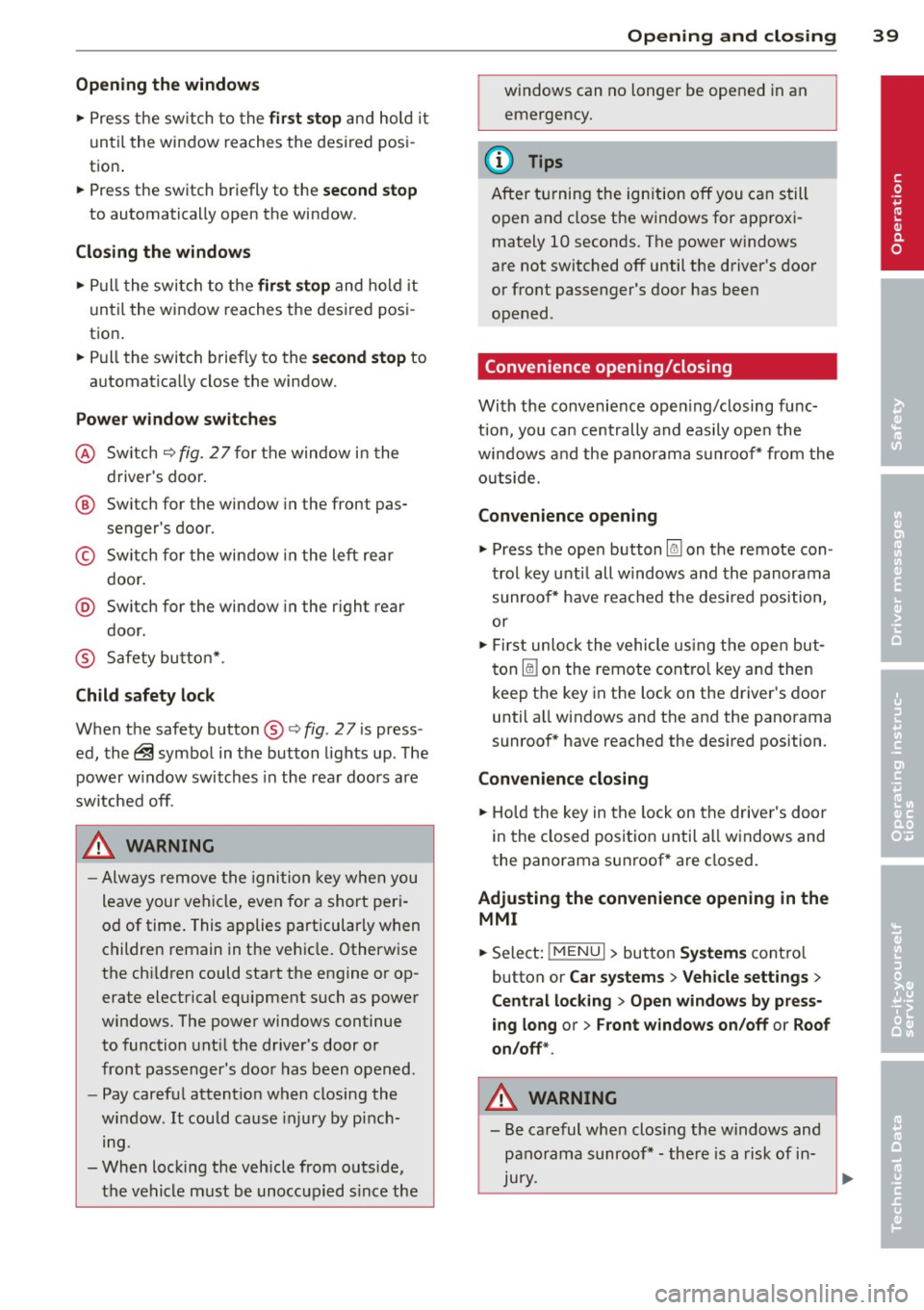
Fig. 27 Sect ion of the dri ver ·s doo r: co ntro ls
All power window switches have a two- posi
ti on f unc tion:
Page 41 of 288
Opening th e windows
"' Press the sw itch to the fir st sto p and hold i t
until the window reaches the desi red posi
tion .
"' Press the switch briefly to the
se cond stop
to automatic ally open the window .
Clos ing th e windows
"' Pull the swi tch to t he fir st sto p and hold it
until the window reaches the desi red posi
tion .
"' Pull the switch briefly to the
sec on d s top to
automatica lly close the window .
Pow er wi nd ow switch es
@ Sw itch c::> fig. 2 7 f or the window in the
driver's door.
@ Sw itch for the window in the fron t pas
senger 's door .
© Switch for the window in the left rear
door.
@ Sw itch for the window in the r ight re ar
door.
® Safety bu tton* .
Child safe ty lock
When the safety button® c::> fig. 2 7 is press
ed, the~ symbol in the button lights up . The
power w indow switches in the rear doors are
switched off.
A WARNING
- Always remove the ignition key when you
leave your vehicle, even for a short peri
od of time . This applies particularly when
children remain in the vehicle . Otherwise
the chi ldren could start the engine or op
erate electrical equ ipment such as power
windows. The power windows continue
to function unt il the driver 's door or
front passenger's door has been opened .
- Pay carefu l attent ion when closing the
window . It could cause injury by pinch
ing.
- When locking the veh icle from outs ide,
the vehicle must be unoccupied s ince the
Opening and clo sin g 39
windows can no longer be opened in an
emergency.
(D Tips
After turning the ignition off you can s till
open and close the windows for approxi mately 10 seconds. The power windows
are not switched off until the driver's door
or front passenger's door has been
opened .
Convenience opening/closing
With the convenience open ing/closing func
tion, you can centrally and eas ily ope n the
windows and the pano rama sunroof* from the
o utside.
Convenienc e opening
"' Press the open button~ on the remote con
trol key u ntil all w indows and the panorama
sunroof* have reached the desired position,
or
"' First unlock the vehicle using the open but
ton
Im on the remote cont ro l key and then
keep the key in the lock on the driver's door
until a ll windows and the and the panorama
sunroof* have reached the desired position .
Conven ience closing
"' Hold the key in the lock on the drive r's door
i n the closed position unt il a ll windows and
the panorama sunroof * are closed.
Adjusting the convenience opening in the
MMI
"' Select: !MENU I > button System s contro l
button or
Car s ystems > Vehicle settings >
C entral locking > Open windows b y press
ing long
or > F ront windo ws on /off or Roof
on /off *.
A WARNING
- Be careful when clos ing the windows and
panorama sunroof* - the re is a risk of in-
Jury.
li1'-
•
Page 76 of 288

74 Driving
(D Tips
-After starting a cold engine, there may
be a brief period of increased noise be
cause the oil pressure must first build up in the hydraulic valve adjusters. This is
normal and not a cause for concern.
- If the . indicator light blinks in the in
strument cluster before switching the ig
nition off, the ignition will not switch on
again
Qpage 189.
-If you leave your vehicle with the ignition
switched on, the ignition will switch off
after a certain amount of time. Make
sure that electrical equipment such as
the exterior lights are switched off.
Turning th n ine off using the
button
Applies to vehicles: with conven ience key
.. Bring the vehicle to a fu ll stop.
.. Automatic transmission: Move the selector
lever into the P position.
.. Press the !START ENGINE STOPI button
Q page 73, fig. 66.
If the engine does not stop, proceed as fol
lows
q page 75, Starting the engine if there
is a malfunction .
Steering wheel lock1
)
The steering locks when you turn the engine
off using the
I START ENGINE STOP !* button,
move the selector lever into the P position
(automatic transmission*) and open the driv
er's door.
The locked steering helps prevent vehicle
theft.
Emergency off function
If it is necessary in unusua l circumstances, the
engine can be switched off while the vehicle is
moving at speeds less than 6 mph (10 km/h).
If you press the
I START ENGINE STOP I* but
ton while driving, the message
Pressing
start/stop button again will switch off en-
l) This function is not availa ble in all coun tries.
gine! appears . To switch the engine off, press
the
I START ENGINE STOP !* button twice in a
row briefly or press and hold for longer than
two seconds.
A WARNING
- Never turn off the engine before the ve
hicle has come to a complete stop . The
full function of the brake booster and the
power steering is not guaranteed . You
must use more force to turn or brake, if
necessary. Because you cannot steer and
b rake as you usually would, this could
lead to accidents and serious injuries.
- The brake booster and power steering
only work when the engine is running . If
the engine is off, you have to use more
force when steering or braking. Because
you cannot steer and brake as you usual
ly would, this could lead to crashes and
serious injuries .
- Always take the vehicle key with you
when leaving the vehicle, even for a
short period of time . This applies partic
ularly when children remain in the vehi
cle. Otherwise the children could start
the engine or operate electrical equip
ment such as power windows.
- For safety reasons, you should always
park your vehicle with the selector lever
in P. Otherwise, the vehicle could inad
vertently roll away.
-After the eng ine has been switched off,
the radiator fan can continue to run for
up to 10 minutes -even with the ignition
switched off. It can also switch on again
after some time if the coolant tempera
ture rises as the result of a heat buildup or if the engine is hot and the engine
compartment is additionally heated by
the sun's rays.
0 Note
If the engine has been under heavy load
for an extended period of time, heat builds up in the engine compartment after the ..,_
Page 77 of 288

engine is switched off - there is a risk of
damaging the engine. For this reason, let
the engine run for at idle for approximate
ly two minutes before shutting it off .
(D Tips
-After the engine has been switched off,
the radiator fan can continue to run for up to 10 minutes - even with the ignition
switched off.
It can also switch on again
after some time if the coolant tempera
ture rises as a result of heat bui ldup or if
the engine compartment is heated by
sunlight and the engine is hot.
Starting the engine if there is a
malfunction
Appl ies to vehicles: with convenience key
It may not be possible to start the engine un
der certain circumstances , for example if the
battery in the vehicle key is drained, if inter
ference is affected the key or if there is a sys
tem malfunction.
Fig. 67 Steering col umn/rem ote control key : start ing
th e engin e if th ere is a malfun ctio n
As long as the message y>l) Key not recog
nized. See owners manual
appears, you can
emergency start your vehicle.
.. Press the brake pedal
9 &. in Starting the
engine with the
S TART ENGINE STOP but
ton on page 73.
.. Press the l ~s~ T~A~R= T~E~N-G~I~N~E~S~T~O~P~ I button.
.. Hold the master key as shown in the illustra
tion in the location indicated
y>>) 9 fig. 67 .
The eng ine will start .
.. If the engine does not automatically start,
press the
I STAR T ENGIN E STOP ! button
again.
Driving 75
Drive to an authorized Audi dealer or qualified
repair facility immediately to have the mal
function corrected .
(D Tips
You can display the message that appears
during an emergency by pressing the
I START ENGINE STOP!* button.
Driver messages
Turn off ignition before leaving car. Battery
is discharging
This message appears and a warning tone
sounds if you open the driver's door when the
ignition is switched on. Turn off the ignition
so that the battery will not discharge.
Pressing start/stop button again will switch
off engine!
This message appears when you press the
!STAR T ENG INE ST OP!* button while driving
¢ page 74, Emergency off function.
Engine start system malfunction. Please
contact Service
The eng ine automatic start system has a mal
funct ion. Drive to an authorized Audi dealer or
qualified repair facility immediately to have
the malfunction corrected. To start the en
gine, press and hold the
I STAR T ENG INE ST OP I button.
DI Key not recognized. See owner 's manual
This message appears if there is no conven
ience key inside the vehicle or if the system
does not recognize the key . The convenience
key may not be recogn ized, for example, if it is
cove red by an object that
disrupts the s ignal
(such as a briefcase), o r if the key battery is
weak . Electronic devices such as cell phones
can a lso interfere with the signal.
To start or stop the engine, see "Correct ing a
malfunction "¢
page 75.
Ill Key not in vehicle?
The Ill indicator light turns on and this mes
sage appears if the convenience key was