2015 AUDI A3 instrument cluster
[x] Cancel search: instrument clusterPage 89 of 288

.. To resume cruise control, release the lever
or take your foot off the acce lerator pedal.
Interrupting cruise control while driving
.. Move the lever into position @. The mes
sage
ACC: standby appears . Or
.. press the brake pedal.
.. To resume the stored speed, move the lever
into position @.
Interrupting cruise control when stopped
Applies to vehicles w ith an automatic trans
mission:
.,. Push the lever away from you into position
@ . The message
ACC: standby appears.
.. To resume cruise control, press the brake
pedal and pull the lever toward you into po
sition @.
_& WARNING
It is dangerous to activate cruise contro l
and resume the stored speed when the
current road, traffic or weather conditions
do not permit th is . This could result in a
crash .
Setting the distance
Appl ies to vehicles: with Audi adaptive cruise co ntrol
Fig. 78 Opera tin g lev er: Se tting the d ista nce
-
.. Tap the switch to display the current set dis
tance
¢ fig . 78.
.. To increase or reduce the distance in incre
ments, tap the switch again to the right or
left . The distance between the two vehicles
will change in the instrument cluster d is
play .
Audi adaptive cruise control 87
When approaching an object detected ahead,
the adaptive cruise control system brakes to
match that object's speed and then regulates
to the stored distance . If the object detected
ahead accelerates, adaptive cru ise control w ill
also accelerate up to the stored speed .
The hig her the speed, the greater the distance
in meters ¢
A. The Distance 3 setting is rec
ommended. That is equal to the general rec
ommendation of "half the speed shown on
the speedometer ".
The distances provided are example values. Depending on the driving situation, the cur
rent speed and the way the object detected
ahead is driving, the actual distance may be
more o r less than these target distances .
o:;:::::,_o:;:::::, ___ Distance 1: This setting corre-
sponds to a d istance of 2 feet/ 28 meters
when traveling at 62 mph (100 km/h), or a
time distance of 1 second .
o:;:::::, __ o:;:::::, __ Distance 2: This setting corre
sponds to a d istance of 118 feet/ 36 meters
when traveling at 62 mph (100 km/h), or a
time distance of 1.3 seconds.
o:;:::::, ___ o:;:::::,_ Distance 3: This setting corre-
sponds to a d istance of 164 feet/ 50 meters
when traveling at 62 mph (100 km/h), or a
time distance of 1.8 seconds.
o:;:::::, ____ o:;:::::, Distance 4: This setting corre-
sponds to a d istance of 219 feet/ 67 meters
when traveling at 62 mph (100 km/h), or a
time distance of 2 .4 seconds.
_& WARNING
Following other vehicles too closely in
cre ases the risk of collisions and serious
personal injury.
- When setting the distance, you as the
driver are responsible for adhering to any
applicable local regulations .
(D Tips
Distance 3
is set automatically each time
you switch the ignition on.
It you would
like to have th is distance as a basic setting, .,..
Page 93 of 288

Warnings
Applies to vehicles: with Audi pre sense fro nt or Audi
adaptive cruise control
Fig . 80 Instrument cluster: approach warning
The system recognizes various dangerous sit
uations:
- Vehicles with adaptive cruise control: The
distance warning occurs if you drive too
closely to the object ahead for a long period
of time.
If the object ahead brakes strongly,
you would not be able to avoid a collision.
The ind icator light . indicates this.
- The
approach warning occurs when an ob
ject ahead is traveling more slowly or brakes
strongly. When this warning occurs, it may only be possible to avoid a collision by
swerving or braking strongly. The message
Audi pre sense. Distance c::> fig . 80 and a
warning tone will warn you about the dan ger. For vehicles with adaptive cruise con
trol, the. indicator light also turns on.
If you do not react enough or not at all to a
dangerous s ituation that was detected by the
system, pre sense front provides assistance by
applying the brakes .
- If a collision is imminent, the system will
first provide an
acute warning by braking
sharply. You will also be made aware of the
danger by the instrument cluster display
c::> fig. 80. For vehicles with adaptive cruise
control, the. indicator light also turns on .
-If you do not react to the acute warning, pre
sense front can brake with increasing force
within the limits of the system
l)_ This re
duces the vehicle speed in the event of a col-
l l This is not available in some countries .
Audi pre sense 91
lision. The message Audi pre sense -Input
also appears.
- At low driving speeds, pre sense front can
begin complete deceleration shortly before
a collision
l) .
-If pre sense front determines that you are
not braking strongly enough when a colli
sion is imminent, it can increase the braking
force.
A WARNING
--- Pre sense front cannot overcome natural
physical laws.
It is a system designed to
assist and it cannot prevent a collision .
The driver must always intervene. The driver is always responsible for braking
at the correct t ime. Do not let the in
creased safety provided tempt you into
taking risks. This could increase your risk
of a collision.
- The system can deploy incorrectly due to
system-specific limits .
- Please note that the sensor does not al
ways detect all objects . This increases
the risk of a collision.
- Pre sense front does not react to people
or animals or objects that are crossing
the vehicle's path or are difficult to de
tect
c::> page 82, General Information.
- Reflective objects such as guard rails or
the entrance to a tunnel, heavy rain and
ice can affect the function of the radar
sensor and the system's ability to detect
a collision risk .
- Lack of attention can cause collisions,
other accidents and serious personal in
juries. The pre sense front is an assist
system and cannot prevent a collis ion by
itself. The driver must always intervene.
The driver is always responsib le for brak
ing at the correct time.
- Always pay close attention to traffic,
even when the pre sense front is switch-
ed on. Be ready to intervene and be ready .,_
Page 97 of 288

Switching on and off
Applies to vehicles: with Audi active lane assist
•
Fig. 81 Turn signal lever: butto n for act ive la n e ass ist
Fig. 82 Windsh ield: ca mera w indow for act ive lane as
s is t
.. Press the~ fig. 81 button to switch the sys
tem on and off. The . or. indicator light
in the instr ument cluster turns on or off.
Indicator lights
• Ready:
The indicator light turns on when
the system is ready for use. The system can
now be operated .
• Not Ready : The indica tor light turns on if
the system is switched on but is inoperable.
This may be due to the following reasons:
- There is no lane boundary line.
- The relevant lane marker lines are not de-
tected (for example, markings in a construc
tion zone or because they are obstructed by
snow, dirt, water or light ing) .
- The vehicle speed is below the activation
speed of approximately 40 mph (65 km/h)
(the speed may vary depending on your
country) .
- The lane is narrower than 8
ft (2 .5 m) or
wider than 18
ft (5.5 m).
- The curve is too narrow.
Audi active lane assist 95
-The driver's hands are not on the steering
wheel.
a) Tips
- Make sure the camera's field of view
~ fig. 82 is not obstructed by stickers or
other objects. For information on clean
ing, see¢
page 201 .
-Market-specific: In certain countries: If
the system is switched on, it wi ll remain
operab le each time the ignition is switch
ed on.
lane assist display in the instrument
cluster
Applies to vehicles: with Audi active lane assist
Fig. 83 Ins trumen t cluster: monoc hrome d ispl ay
Fig. 84 Instrume nt clust er: mult icolored d isp lay
The lane assist display can be called up using
the buttons in the
multifunction steering
wheel* ¢
page 27.
Monochrome display
Refer to ~ fig. 83
Page 98 of 288

96 Audi active lane assist
@ So lid lines: act ive la ne assist is sw itch-
ed on and ready to provide wa rn in gs on
t he s ide th at is indica ted.
@ B linking lines ( left or right): active lane
assist is warning you by a vibration in
t he stee ring wheel that yo u are l eaving
t h e l ane.
® Unfilled line(s): active lane assist is
switched on but is not rea dy to prov ide
warnings.
N o lines: t he active lane assist is
switched
off .
Multicolored display
Refe r to¢ fig. 8 4
@ Solid white lines : active la ne assist is
switched on and ready to provide warn-
ings on the side that is ind icated.
@ Red lin es (left or r igh t): ac tive lane as-
sis t is warning you by a vibration in t he
steering whee l th at you a re leav ing the
lane.
® Gray unfilled lines: active lane ass ist is
s witched on but is not ready to prov ide
w ar nings.
N o lines: the active lane assist is
switched
off.
Messages in the instrument cluster
display
I f the active lane ass ist has a mal func tion, the
B indicato r light in the inst rumen t cluste r
di spl ay t urn s
off and one of the followi ng
me ssages appe ars:
Audi active lane assist: currently not avai la
ble. No camera view
This message appears if the camera is unable
to detect the li nes . This co uld happe n if:
- The came ra field of view ¢
page 95, fig. 82
is dirty o r covered i n ice. Clean the area on
t h e windshie ld.
l ) Thi s function is not available in all cou ntr ies.
- The camera field o f view is fo gged ove r. Wa it
until the fog has cleared before switching
the act ive lane assist on agai n.
- The system has bee n una ble to detect t he
lanes for an exten ded period of t ime due to
road conditions. Switch the active lane as
sist bac k on when the lines are more v is ible.
Audi active lane assist: currently unavailable
T he re is a te mporary a ct ive lane assis t mal
f unc tion. Try swi tching the active lane assi st
o n again later .
Audi active lane assist: system fault!
Drive to an authorized A udi dealer or qualified
repair fac ility immediately to have the mal
funct ion corrected.
B Audi active lane assist: Please continue
steering vehicle!
T his messa ge ap pears if yo u are not stee ring
by yoursel f. If th is is t he case, act ive lane as
s ist does not switch
off, but it is "not ready" to
provide a warning. The system can help you
kee p the vehicle in the lane. However, yo u are
r esponsible for dr iv ing the vehicle and must
stee r it yourse lf .
Adjusting the steering time and
vibration warning
App lies to veh icles: w ith Audi ac tive la ne ass ist
You can adju st individual active lane assis t
se ttings in the MMI.
"' Select: !ME NUI button> Systems cont ro l
but to n or
Car sy stem s > Driver assistance >
Audi active lane assist .
Steering timel)
Early :
in this setting, the correct ive steering
happens con tinuously to he lp keep the vehicle
i n t he c ent er of t he lane.
Late : in this setting, the system provides cor
rect ive steer ing just befo re a vehicle whee l
touches a detected lane marke r line . ..,.
Page 103 of 288

Driver messages
Applies to vehicles: with Audi side assist
If the side assist switches off automatica lly, a
message appea rs in the instrument cluster
disp lay .
@j Audi active lane assist: currently not
available. No camera view
The radar sensors' vision is affected. Do not
cover the area in fron t of the sensors with bike
wheels, stickers, dirt or other objects. Clean
the area in front of the sensors, if necessary
r::!) page 99, fig. 88.
@j Audi side assist : currently unavailable
Side assist cannot be switched on temporari ly
because there is a malfunction (for example,
the battery charge leve l may be too low) .
@j Audi side assist: System fault!
The system cannot guarantee that it wi ll de
tec t ve hicl es correctly and it is switched off.
The sensors have been displaced or are faulty.
H ave the system checked by an authorized
Audi dealer or authorized Aud i Service Facility
soon.
Audi side assist 101
•
Page 105 of 288
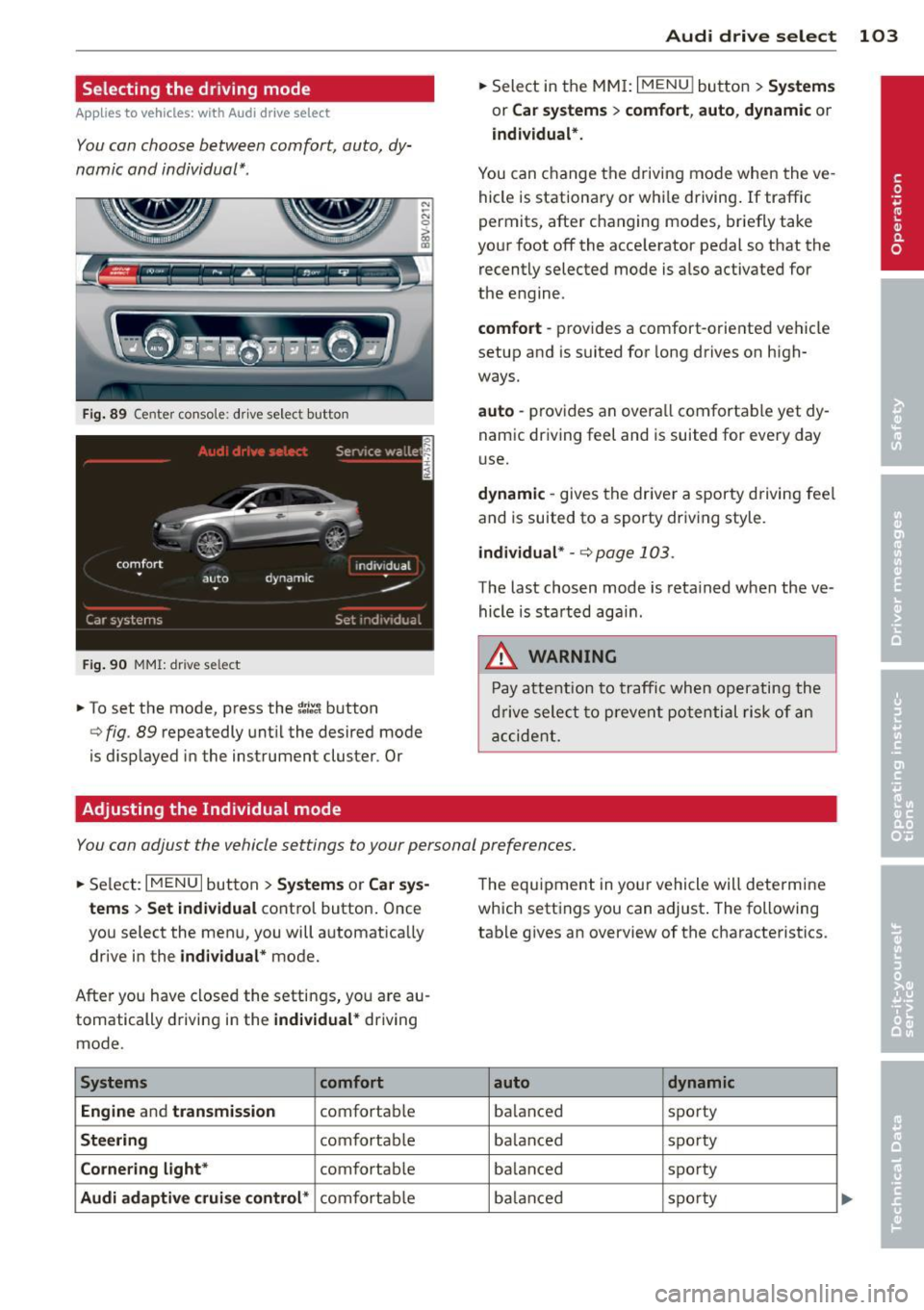
Selecting the driving mode
Applies to vehicles: with Audi drive select
You can choose between comfort, auto, dy
namic and individual* .
Fig. 89 Center conso le : drive select button
Fig. 90 MMI: dr ive se lect
.. To set the mode, press the ~:/:a button
N
-N 0 ::> a, Q)
Q fig . 89 repeatedly until the desired mode
is d isplayed in the instrument cluster . Or
Adjusting the Individual mode Audi drive
select 103
.. Select in the MMI: I MENU I button > Systems
or Car systems > comfort, auto, dynamic or
individual*.
You can change the driving mode when the ve
hicle is stationary or while driving. If traffic
permits, after changing modes, briefly take
your foot off the acce lerator pedal so that the
recently selected mode is also activated for
the engine .
comfort -provides a comfort-oriented vehicle
setup and is suited for long drives on high
ways.
auto -provides an overal l comfortable yet dy
namic driving feet and is suited for every day
use.
dynamic -gives the driver a sporty driving fee l
and is suited to a sporty driv ing style .
individual * -¢ page 103.
The last chosen mode is retained when the ve
hicle is started aga in .
.&_ WARNING
Pay attention to traffic when operating the
drive select to prevent potential risk of an
accident.
You can adjust the vehicle settings to your personal preferences .
.. Select: IM ENU I button > Systems or Car sys
tems > Set individual
control button. Once
you select the menu, you will automatica lly
drive in the
individual* mode.
After you have closed the settings, yo u are au
tomatically driving in the
individual* driving
mode .
Systems comfort
Engine
and transmission comfortable
Steering comfortable
Cornering light* comfortable
Audi adaptive cruise control* comfortable The
equipment in your vehicle will determine
which settings you can adjust . The following
table gives an overview of the characteristics .
auto dynamic
balanced sporty
ba lan ced sporty
ba lanced sporty
ba lanc ed sporty
Page 107 of 288

Automatic
transmission S tronic-transmission
Introduction
Applies to vehicles: with S tronic transmiss ion
Your vehicle is equipped with an electronical
l y -controlled DSG transmission called S tronic.
T wo independent clutches transfer the power
between the engine and transmission. It al
lows the vehicle to accelerate without a no
ticeable interruption in traction .
T he transmission upshifts or downshifts auto
matically. The driving style continuously influ
ences the selection of the driving program .
When a
moderate driving style is used, the
transmission selects the most econom ica l
driving mode. The transmission upshifts at a
lower RPM and downshifts at a higher RPM to
improve fuel effic iency .
T he transmission switches to a sporty mode
after a kick-down or when the driver uses a
sporty driving style characterized by quick ac
celerator pedal movements, heavy accelera
tion, frequent changes in speed and traveling
at the maximum speed.
If desired, the driver can also select the gears
manually (tiptronic mode) r=> page 110,
Shifting manually (tiptronic mode) .
Selector lever positions
Applies to vehicles: with S tro nic transmission
Fig. 91 Instrument cluster: selector leve r positions
The instrument cluster display shows the cur
rent selector lever position and current gear .
Automatic transmission 105
P -Park
The wheels are mechanically locked in this po
sition. You can only shift into Park when the
vehicle is
stationary r=> &..
To shift in and out of the P selector lever posi
tion, press the interlock button in the selector
lever
while pressing the brake peda l.
R- Reverse
Only shift into reverse gear when the vehicle is
stationary and the engine is running at idle
speed
r=> &. .
To select the R selector lever position, press
the interlock button
while press ing the brake
pedal. The back-up lights sw itch on in the R
pos ition if the ignition is switched on .
N -Neutral
The transm iss ion is in idle in this position .
DIS -Normal position for driving forward
In the D/S selector lever position , the trans
mission can be operated either in the normal
D mode or in the S sport mode. To select the S
spor t mode, pull the selector lever back brief
ly. Pulling the lever back again will select the
normal D mode . The instrument cluster dis
play shows the selected driving mode.
In the
normal mode D, the transmission auto
matically selects the suitable gear ratio . It de
pends on engine load, vehicle speed and driv
ing style .
Select the
sport mode S for sporty driving .
The vehicle makes full use of the eng ine's
power. Shift ing may become noticeable when
acce lerat ing.
To move from selector lever position N to D,
you must press the brake pedal and the vehi cle must be traveling less than 1 mph (2 km/
h) or be stationary~ &.-
.&_ WARNING
Read and follow all WARNINGS.
- The vehicle can roll even if the ignition is
switched off. ...
.__ _____________ __J ....
•
Page 145 of 288

Fo r exa mple, the a irbag may depl oy if:
-a small child that is heavier than a typical 1
year-o ld child is on the front passe nger seat
(regardless of whether the child is in one of
the chi ld seats listed
page 168), or
- a ch ild who has outgrown child rest raints is
on the front passenger seat.
If the front passenger airbag is turned off, the
P ASS ENGER AIR B AG OFF light comes on in
the instrument cluster and stays on.
If the front passenger airbag deploys, the
Federal Standard requires the airbag to meet
the "low risk" deployment criter ia to reduce
the r isk of injury through interaction with the
airbag. "Low risk" deployment occurs in those
crashes that take place at lower decelerations
as defined in the electronic control unit
r::> page 153, PASSENGER AIR BAG OFF light.
Always remember, a chi ld seat or infant carri
er insta lled on the front seat may be struck
and knocked out of position by the rapidly in
flating passenger's airbag in a frontal colli
sion. The airbag could greatly reduce the ef
fectiveness of the child restraint and even se
riously injure the child during inflat ion.
For this reason, and because the back seat is
the safest place for children - when properly
restrained according to their age and size - we
strongly recommend that children always sit
in the back seat
r::> page 166, Child Safety .
A WARNING
A child in a rearward-facing child seat in
stalled on the front passenger seat will be
ser iously injured and can be killed if the
front airbag inflates -even with an Ad
vanced Airbag System .
- T he inflating airbag will hit the child seat
or infant carrier with great force and wi ll
smash the child seat and child against
the backrest, center armrest, door or roof.
- Always install rear-facing child seats on
the rear seat.
- If you must install a rearward facing
child seat on the front passenger seat
-
A irbag system 143
because of exceptional circumstances
and the
PAS SENGER AIR BAG OFF light
does not come on and stay on, immed i
ately install the rear-fac ing child seat in a
rear seat ing pos ition and have the airbag
system inspected by your A udi dealer.
- Forward-facing child seats installed on the front passenger's seat may interfere
with the dep loyment of the a irbag and
cause serious persona l injury to the
child.
A WARNING
If, in except iona l circumstances, you must
install a forward -facing child restraint on
the front passenger's seat:
- Always ma ke s ure the forward-facing
seat has been designed and certified by its manufacturer for use on a front seat
with a passenger front and s ide a irbag.
- Never put the forward-facing child re
straint up against or very near the instru
ment panel.
- Always move the passenge r seat into its
rea rmost pos ition in the seat's fore and
aft ad justment range, as far away from
the airbag as possible before installing
the forward-fac ing ch ild restra int. The
backrest must be adjusted to an upright
position.
- Make sure that the
PASSENGER AIR BAG
OFF
l ight comes on and stays on all the
time wheneve r the ig nit ion is switched
on.
A WARNING
To reduce the ri sk of ser ious injury, ma ke
sure that the
PASSENGER AIR BAG OFF
light w ill be displayed whenever a child re
straint is insta lled on the front passenger
seat and the ignition is switched on.
- If the PASSENGER AIR BAG OF F light
does not stay on, perform the checks de
scribed
¢ page 152, Monitoring the Ad-
vanced Airbag System.
~
•
•
•