2015 AUDI A3 lane assist
[x] Cancel search: lane assistPage 98 of 288

96 Audi active lane assist
@ So lid lines: act ive la ne assist is sw itch-
ed on and ready to provide wa rn in gs on
t he s ide th at is indica ted.
@ B linking lines ( left or right): active lane
assist is warning you by a vibration in
t he stee ring wheel that yo u are l eaving
t h e l ane.
® Unfilled line(s): active lane assist is
switched on but is not rea dy to prov ide
warnings.
N o lines: t he active lane assist is
switched
off .
Multicolored display
Refe r to¢ fig. 8 4
@ Solid white lines : active la ne assist is
switched on and ready to provide warn-
ings on the side that is ind icated.
@ Red lin es (left or r igh t): ac tive lane as-
sis t is warning you by a vibration in t he
steering whee l th at you a re leav ing the
lane.
® Gray unfilled lines: active lane ass ist is
s witched on but is not ready to prov ide
w ar nings.
N o lines: the active lane assist is
switched
off.
Messages in the instrument cluster
display
I f the active lane ass ist has a mal func tion, the
B indicato r light in the inst rumen t cluste r
di spl ay t urn s
off and one of the followi ng
me ssages appe ars:
Audi active lane assist: currently not avai la
ble. No camera view
This message appears if the camera is unable
to detect the li nes . This co uld happe n if:
- The came ra field of view ¢
page 95, fig. 82
is dirty o r covered i n ice. Clean the area on
t h e windshie ld.
l ) Thi s function is not available in all cou ntr ies.
- The camera field o f view is fo gged ove r. Wa it
until the fog has cleared before switching
the act ive lane assist on agai n.
- The system has bee n una ble to detect t he
lanes for an exten ded period of t ime due to
road conditions. Switch the active lane as
sist bac k on when the lines are more v is ible.
Audi active lane assist: currently unavailable
T he re is a te mporary a ct ive lane assis t mal
f unc tion. Try swi tching the active lane assi st
o n again later .
Audi active lane assist: system fault!
Drive to an authorized A udi dealer or qualified
repair fac ility immediately to have the mal
funct ion corrected.
B Audi active lane assist: Please continue
steering vehicle!
T his messa ge ap pears if yo u are not stee ring
by yoursel f. If th is is t he case, act ive lane as
s ist does not switch
off, but it is "not ready" to
provide a warning. The system can help you
kee p the vehicle in the lane. However, yo u are
r esponsible for dr iv ing the vehicle and must
stee r it yourse lf .
Adjusting the steering time and
vibration warning
App lies to veh icles: w ith Audi ac tive la ne ass ist
You can adju st individual active lane assis t
se ttings in the MMI.
"' Select: !ME NUI button> Systems cont ro l
but to n or
Car sy stem s > Driver assistance >
Audi active lane assist .
Steering timel)
Early :
in this setting, the correct ive steering
happens con tinuously to he lp keep the vehicle
i n t he c ent er of t he lane.
Late : in this setting, the system provides cor
rect ive steer ing just befo re a vehicle whee l
touches a detected lane marke r line . ..,.
Page 99 of 288

Vibration warning
You can switch the additional v ibrating wa rn
ing in the steering wheel on or off .
&_ WARNING ,~
With the vibration warning switched off,
no v isible warning will appear in the in
strument cluster display when cross ing a
lane marker.
(D Tips
Market-specific: Your settings are auto
matically stored and assigned to the re
mote control key being used.
Audi active lane assist 97
•
Page 100 of 288

98 Audi side assist
Audi side assist
Side assist
Description
App lies to vehicles: with Audi side assist
Fig . 85 Se nsor detect ion ra nge
Fig. 86 Display o n the exte rior mirror
Side assist helps you monitor your blind spot
and traffic behind your vehicle. Within the
limits of the system, it warns you about
vehicles that are coming closer or that are
traveling with your within sensor range@
c:> fig. 85: if a lane change is classified as criti
cal, the display@in the exterior mirror
c:> fig. 86 turns on.
The display in the left exterior mirror provides
assistance when mak ing a lane change to the
left, while the display in the right exterior mir
ror provides assistance when making a lane
change to the right.
Information stage
As long as you do not activate the turn signal,
side assist
informs you about vehicles that are
detected and class ified as critical. The display
in the mirror turns on, but is dim. The
display remains dim in the information
stage so that your view toward the front is not
disturbed .
Warning stage
If you activate the turn signal, side assist
warns you about vehicles that are detected
and class ified as critical. The display in the re
spective mirror blinks brightly. If this hap
pens, check traffic by glancing in the rearview
mirror and over your shoulder
c:> .&. in General
information on page 99.
(D Tips
- You can adjust the brightness on of the
display on the rearview mirror
c:>page 100.
Page 101 of 288
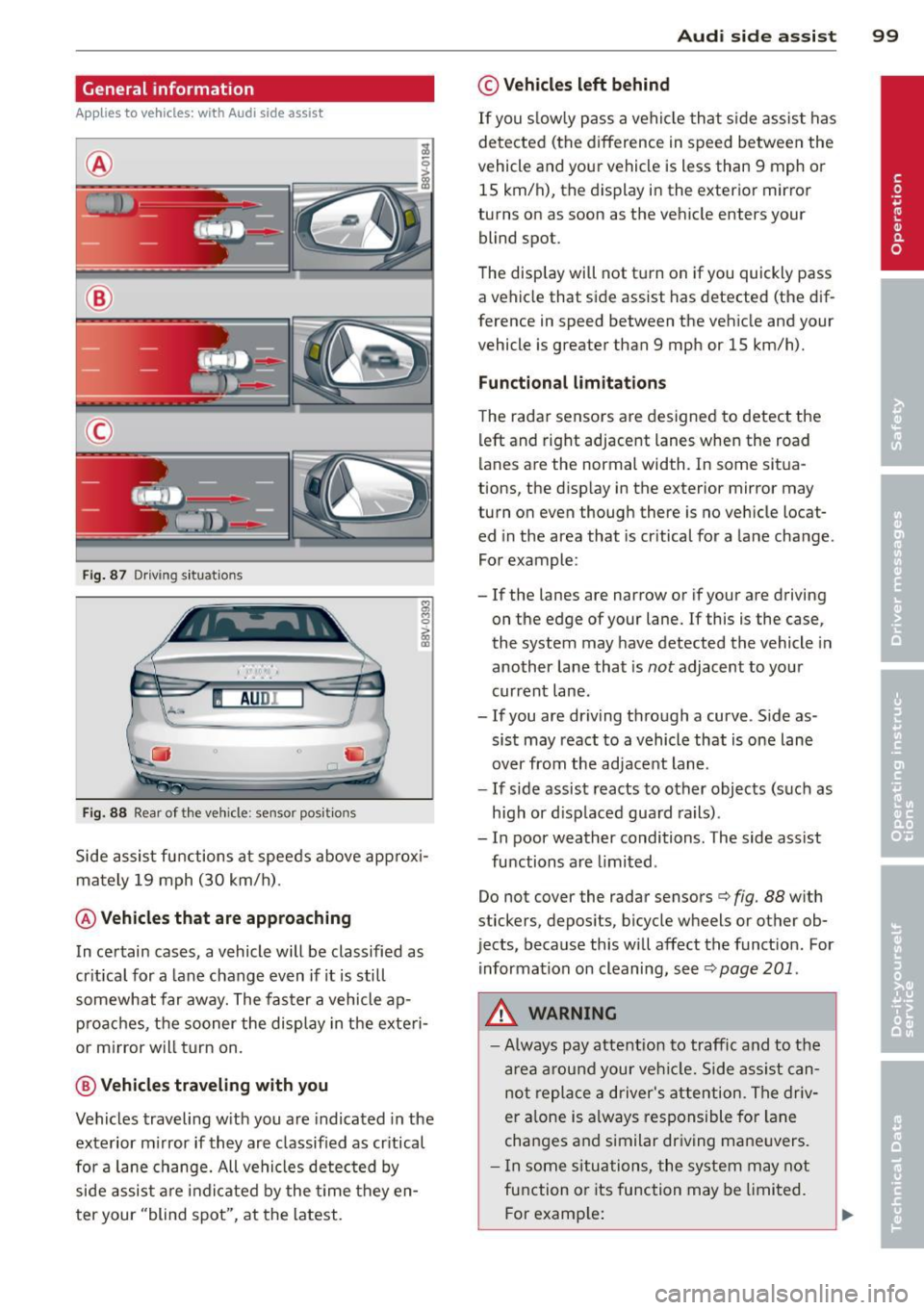
General information
Applies to vehicles: with Audi side assist
®
®
©
Fig . 87 Driving situations
I AUDI
Fi g. 88 Rear of the vehicle: sensor posit ions
Side assist functions at speeds above approx i
mately 19 mph (30 km/h).
@ Vehicl es th at ar e approaching
In certain cases, a vehicle will be classified as
cr itical for a lane change even if it is still
somewhat far away. The fas ter a vehicle ap
p roaches, t he sooner the display in the exteri
or m irror will t urn on.
@ V ehicles traveling with you
Vehicles traveling w ith you are indicated in the
exterior m irror if they are classified as cr itical
for a lane change. All vehicles detec ted by
side assist are indicated by the time they en
t er your "blind spot", at the latest.
Audi side assist 99
© Veh icles left behind
If you s low ly pass a vehi cle that s ide assist has
detected (the difference in speed between the
vehicle and you r vehicle is less than 9 mph or
15 km/h), the display in the exterio r mir ro r
turns on as soon as the vehicle enters your blind spot.
T he disp lay will not t urn on if you quickly pass
a vehicle that side assist has detected (the dif
ference in speed between the veh icle and your
vehicle is greater than 9 mph or 15 km/h).
Functional limitations
The radar sensors are designed to detect the
left and right adjacent lanes when the road
lanes are the normal width. In some sit ua
tions, the d isp lay in the exterior mirror may
turn on even though there is no ve hicle locat
ed in the area that is cr itical for a lane cha nge.
For example:
- If the lanes are narrow or if your are driving
on the edge of your lane.
If this is the case,
the system may have detected the vehicle in
another lane that is
not adjacent to you r
current lane .
-If you are dr iving through a curve . S ide as
sis t may react to a vehicle that is one lane
over from the adjacent lane.
- If side assist reacts to other objects (such as
high or d isp laced guard rails) .
- In poor weather conditions. The side assist
functions are limited .
Do not cover the radar sensors
c> fig. 88 with
stickers, depos its, bicycle wheels or other ob
jects, because this will affect the funct ion. For
information on cleaning, see
c> page 201 .
A WARNING
-Always pay attention to traffic and to the
a rea a round your ve hicl e. Side assi st can
not repla ce a d river's attention. The driv
er a lone is always responsible for la ne
cha nges and s imilar dr iv ing ma ne uvers.
- In some si tua tions, the system may not
function or its function may be limited.
F or examp le:
Page 102 of 288

100 Audi side assist
-If vehicles are approaching or being
left behind very quickly. The display
may not turn on in time.
- In poor weather conditions such as
heavy rain, snow or heavy mist.
- On very wide lanes, in tight curves, or if
there is a rise in the road surface.
Vehicles in the adjacent lane may not
be detected because they are outside
of the sensor range.
- Side assist cannot detect all vehicles un
der all conditions- danger of accident!
- Please note that side assist indicates
there are approaching vehicles, or
vehicles in your blind spot, only after
your vehicle has reached a driving speed
of at least 19 mph (30 km/h).
- In certain situations, the system may not
function or its function may be limited.
For example:
- if vehicles are approaching or being left
behind very quickly. The display may
not turn on in time.
- in poor weather conditions such as heavy rain, snow or heavy mist.
- on very wide lanes, in tight curves or if
there is a rise in the road surface.
Vehicles in the adjacent lane may not
be detected because they are outside
of the sensor range.
The sensors can be displaced by impacts or damage to the bumper, wheel housing and
underbody. This can affect the system. Have your authorized Audi dealer or quali
fied repair facility check their function.
(D Tips
-If the window glass in the driver's door
or front passenger's door has been tint
ed, the display in the exterior mirror may
be misinterpreted.
- For Declaration of Compliance to United
States FCC and Industry Canada regula
tions, see
9 page 271.
Switching on and off
Applies to vehicles : wi th Audi side ass ist
The system and be switched on and off in the
MMI.
"'Select: !MENUI button> Systems control
button or
Car systems > Driver assistance >
Audi side assist. With off, the system is
switched off.
An activated system will signal every time the ignition is switched on by turning the displays
in the exterior mirrors on briefly.
Adjusting the display brightness
App lies to vehicles: wi th Audi s ide ass ist
The brightness can be adjusted in the MMI.
"'Selec t: !ME NUI button> Systems control
button or
Car systems > Driver assistance >
Audi side assist .
The display brightness adjusts automatically
to the brightness of the surroundings, both in
the information and in the warning stage . In
very dark or very bright surroundings, the dis
play is already set to the minimum or maxi
mum level by the automatic adjustment. In
such cases, you may notice no change when
adjusting the brightness, or the change may
only be noticeable once the surroundings
change.
Adjust the brightness to a level where the dis
play in the information stage will not disrupt
your view forward. If you change the bright
ness, the display in the exterior mirror will
briefly show the brightness level in the infor
mation stage. The brightness of the warning
stage is linked to the brightness in the infor
mation stage and is adjusted along with the
information stage adjustment.
(D Tips
- Side assist is not active while you are
making the adjustment.
- Your settings are automatically stored
and assigned to the remote control key
being used.
Page 103 of 288

Driver messages
Applies to vehicles: with Audi side assist
If the side assist switches off automatica lly, a
message appea rs in the instrument cluster
disp lay .
@j Audi active lane assist: currently not
available. No camera view
The radar sensors' vision is affected. Do not
cover the area in fron t of the sensors with bike
wheels, stickers, dirt or other objects. Clean
the area in front of the sensors, if necessary
r::!) page 99, fig. 88.
@j Audi side assist : currently unavailable
Side assist cannot be switched on temporari ly
because there is a malfunction (for example,
the battery charge leve l may be too low) .
@j Audi side assist: System fault!
The system cannot guarantee that it wi ll de
tec t ve hicl es correctly and it is switched off.
The sensors have been displaced or are faulty.
H ave the system checked by an authorized
Audi dealer or authorized Aud i Service Facility
soon.
Audi side assist 101
•
Page 274 of 288
272 Index
A
A/C (a utomatic cl imate control system)
A/C (manual cl imate control system)
ABS 66
65
refer to An
ti-lock braking system . . . . . 185
Accessories . . . . . . . . . . . . . . . . . . . . S6, 270
Active lane ass ist . . . . . . . . . . . . . . . . . . . . 94
Activating vibration wa rning .. .. .. .. .. 96
Adj ust ing steering t ime .... .. .. .... .. 96
C lean ing the camera area .. .. .. .. .. . 20 2
Dr iver messages . . . . . . . . . . . . . . . . . . . . 95
I ndicator light . . . . . . . . . . . . . . . . . . . . . 95
switch ing on and off . ... .. .. .. .... .. 95
Adapt ive cruise control . . . . . . . . . . . . . . . . 82
Automatic t ra nsm ission ... .. .. .... .. 86
C lean ing the senso r ..... .. .. .. .. .. . 202
D river messages . . . . . . . . . . . . . . . . . . . . 88
General Information . . . . . . . . . . . . . . . . 82
Request for driver intervention . . . . . . . . 88
Stop-and-go-traffic . . . . . . . . . . . . . . . . . 86
Adapt ive dampers .......... .. .. .... . 102
I ndicator light . .. ..... ... .. .. .... .. 25
Adapt ive light . . . . . . . . . . . . . . . . . . 42, 102
I ndicator light . . . . . . . . . . . . . . . . . . . . . 25
Adding W indshield washer fluid ..... .. .... . 224
Ad justing ai r dist ribution (Climate con trol
system) ..... ... .. ..... ... .. .. .... .. 67
Ad justing a ir vents ......... .. .. .... .. 68
Ad justing a ir vents (manual climate co n-
trol system) . . . . . . . . . . . . . . . . . . . . . . . . . 65
Ad justing automatic headlights . .. ... ..
44
Ad justing the center conso le lighting .... 45
Ad justing the temperat ure
manual climate control system . . . . . . . . 65
advanced key
refer to Convenience key . . . . . . . . . . . . . 73
A irbag .. .. .. ... .......... .. .. .. .. . 14 0
I nd icator ligh t . . . . . . . . . . . . . . . . . . . . . 2 1
A irbag system ... ....... ... .. .. .. .. . 161
Advanced Airbag System ....... .. .. . 144
Advanced Airbag System components . 148
Ca re . .. .. .. ............. .. .. .. .. . 156
C hi ldren . .... ........... .... .... . 168
C hil d restra ints ........... .. .. .... . 168
Components (front airbags) . ... .. .. . 1 48 Danger of fitting a ch
ild seat on the front
passenger seat ... .. ... ..... ... .. .. 142
Disposa l .. .. .. .. ... .. ..... ... .. .. 156
Front a irbags . . . . . . . . . . . . . . . . 144, 146
How do the front airbags work? .. .... 150
How many a irbags does my vehicle
have? ...... .. .. .. ... ... ... .. .. .. 148
How the Advanced Airbag System com-
ponen ts wo rk togethe r ......... .. .. 150
Im port ant sa fe ty inst ru cti ons on the
k nee airbag system .. .. ..... ... .. .. 159
Impo rtant things to know .. ... ... . .. 140
Knee airbags ..... .. ... ..... ... .. .. 157
Monitoring .... .. ............. .... 152
PASSENGER AIR BAG OFF light ... .... 153
Repairs ... .... .. ............. .... 156
Safety instructions ................. 155
S ide a irbags ... .. ... .. .. ... ..... .. 160
S ide curtain airbags ... ...... ... .. .. 163
Warning/Indicato r lights ..... .. .. .. 152
When must the system be inspec ted? . 152
Alarm system
refer to Anti-theft alarm system . . . . . . . 31
Alcantara clean ing .............. .... 204
Al ignment pi n (changing the whee l) .. .. 24 7
All-weather lights (LED headlights) . .. .. . 42
All-wheel drive Winter tires ..... .. ... ..... ... .. .. 240
All wheel d rive . . . . . . . . . . . . . . . . . . . . . 190
Alternator
refer to A lternator (indicator light) . .. . 20
Alternato r (indicato r light) .. ... .. .. .. . 20
Amb ient lighting .. ............. .... . 45
Anti-free ze
refer to Eng ine coolant
216
Anti -lock b raking system . ..... ... .. .. 185
Indicator light ... ... .. ..... .... . .. . 22
An ti-s lip reg ulatio n ............. .. .. 185
Indi cator ligh t ... ............. .. ... 22
Anti -theft a la rm system . . . . . . . . . . . . . . . 31
Anti-theft systems Electronic immob ilizer .. ..... ... .. .. . 36
Artific ia l lea ther cleani ng ........... .. 20 4
ASR
refer to Anti -slip regulation
A udi active lane assist 185
refer to Active
lane ass ist ....... .... . 94
Page 280 of 288

278 Index
How many airbags does my vehicle have?
How often should I check my tire pres-148
sures? .. .. .... ............. ...... . 232
How safety belt pretensioners work .... 137
Hydroplaning .............. ... .... . 236
I
Ignition
Indicator light . . . . . . . . . . . . . . . . . . . . .
21
switching on and off (with button) ... .. 73
Ignition key safety interlock . . . . . . . . . . . 70
Ignition lock
mechanical . . . . . . . . . . . . . . . . . . . . . . . .
70
Immobiliz er . . . . . . . . . . . . . . . . . . . . . . . . 31
Important things to do before driving .. 121
Improperly worn safety belts . . . . . . . . . . 13 7
Indicator lights . . . . . . . . . . . . . . . . . . . . . .
14
Infant seats .............. .... .... . 172
Installing child safety seats
Safety belts . . . . . . . . . . . . . . . . . . . . . .
177
Insta lling the upper tether strap on the
anchorage ..... ........... .... .... .
183
Instrument cluster ......... ...... .. .. 10
Instruments ................. ..... .. 10
Adjusting the lighting ........... ... . 45
Interior lighting ..................... 45
Intermittent (windshield wipers) ... .... 46
]
Jump-starting 259
Jump er cables ... .......... .. .. .. .. . 260
K
Key ......... ........ ........ ....... 31
Checking the number ................ 31
Driver messages (mechanical ignition
key) ..... .. ................ ..... ..
75
Dr iver messages (with convenience key). 75
Key not recognized ......... ... .... .. 75
Key replacement . . . . . . . . . . . . . . . . . . . 31
Replacing the battery ....... .. .. .. .. 33
un locki ng/locking . . . . . . . . . . . 33, 34, 35
Key recognition
automatic climate control system ... ..
66
Manual climate contro l system . . . . . . . . 65
Kick-down
Automatic transmission
110
Kn ee air bags ................... .... 157
Description .. .. .. ............. .. .. 157
How they work .................... 158
Important safety instructions ........ 159
L
Lane assist
refer to Active lane assist ........ ... . 94
LATCH ........ .... ............... . 180
Description .... .. .. .............. . 181
Installing a child restraint ........... 182
Location ......................... 181
Mounting and releasing the anchorage
hook ..... .... .. .. .............. .
182
Launch Control-Program (automatic trans-
m1ss1on) ....... .. .. ........... ....
111
Leather care/clean ing ................ 204
Leaving home ..... .................. 44
LED headlights
All-weather lights ..................
42
Lifting jack . .. .. .. ................. 251
Lifting vehicle .................. .... 263
Light
adaptive light .. .................. ..
42
Adjust ing automatic headlights ....... 44
Coming/Leaving home .............. . 44
Fog lights/rear fog light(s) ........... 42
Headlight flasher ................... 44
Headlights . . . . . . . . . . . . . . . . . . . . 42, 44
Highway light .... ................ ..
43
Low beams ..................... ... 42
Parking light .......................
42
Switching daytime running lights on and
off ........... .. .. .............. .. 44
Light/rain sensor
Head lights ....................... . 42
Indicator light .....................
25
Intermittent (windshield wipers) ...... 46
Lighting
Exterior . . . . . . . . . . . . . . . . . . . . . . . . . . . 42
Interior . . . . . . . . . . . . . . . . . . . . . . . . . . .
45
Lights
Ambient lighting ...................
45
Headlight range control system ... ... . 42
Interior/reading . ...................
45