Page 220 of 545
Continued
219
uuAudio System Basic Operation uOn Demand Multi-Use Display
TM
Features
To delete a speed dial:
1. Select Shortcuts .
2. Select Phone .
3. Select Speed Dial .
4. Select Edit.
5. Select Delete .
6. Select the preset number with the phone number you want to delete.
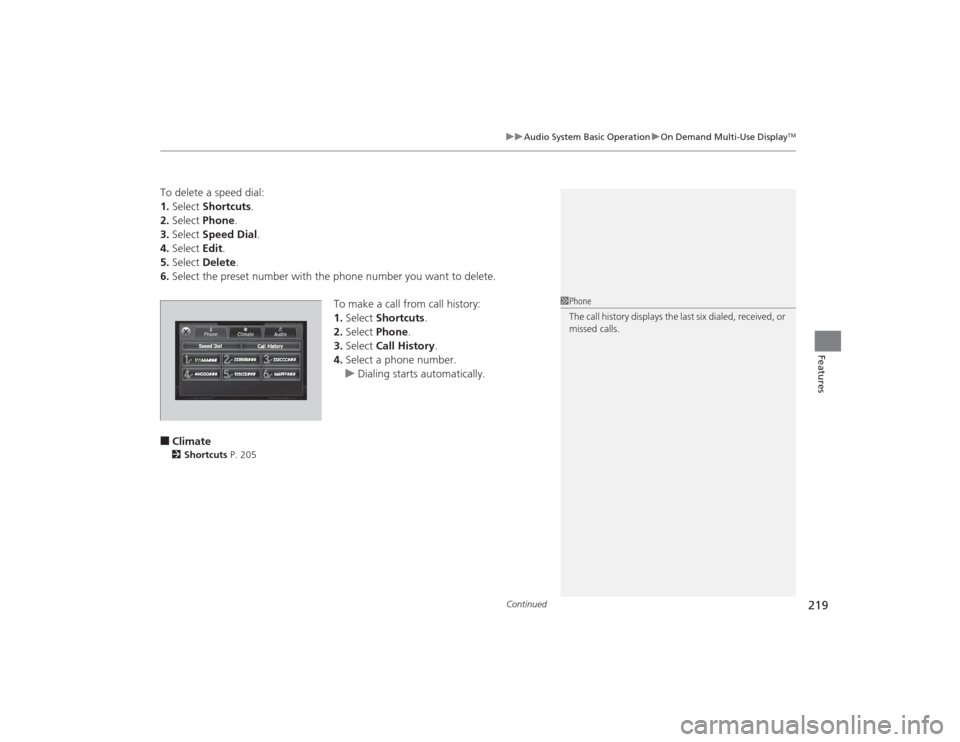
To make a call from call history:
1.Select Shortcuts .
2. Select Phone.
3. Select Call History .
4. Select a phone number.
u Dialing starts automatically.■Climate2 Shortcuts P. 205
1Phone
The call history displays the last six dialed, received, or
missed calls.
Page 227 of 545
226
uuAudio System Basic Operation uAdjusting the Sound
Features
Adjusting the Sound
1. Press the SETTINGS button.
2. Rotate to select Audio Settings, then
press .
3. Rotate to select Sound, then press .
Rotate to scroll through the following
choices:
1 Adjusting the Sound
The SVC has four modes: Off, Low , Mid, and High.
SVC adjusts the volume level based on the vehicle
speed. As you go faster, audio volume increases. As
you slow down, audio volume decreases.
2 Adjusting the Sound P. 221On Demand Multi-Use Display
TM
SETTINGS Button
Speed-sensitive
Volume
Compensation
Bass
Treble Fader
Balance
Subwoofer SVC
Page 262 of 545
261
uuCustomized Features u
Continued
Features
“Trip A” Reset Timing“Trip B” Reset Timing
Language Selection
Adjust Outside Temp. Display
Forward Collision Warning Distance
*
ACC Forward Vehicle Detect Beep
*
Turn by Turn Display
*
Default
Door Unlock Mode
Keyless Access Light Flash
Interior Light Dimming TimeHeadlight Auto Off TimerAuto Light Sensitivity
Vehicle
Settings
Meter SetupDriver Assist
System
SetupKeyless Access
SetupLighting Setup
Keyless Access Beep
Lane Keeping Assist Suspend Beep
*
Blind Spot Info
*
Auto Seatbelt Tension
*
Driving
Position Setup
Road Departure Mitigation Setting
*
ACC Display Speed Unit
*
Remote Start System On/Off
*
Memory Position Link
Keyless Access Beep Volume
Auto Engine Idle Stop Guidance Screens
*
* Not available on all models
Page 264 of 545
263
uuCustomized Features u
Continued
Features
Add Bluetooth
DeviceDisconnect
Default
Phone
Connect Phone
Edit Bluetooth DeviceAdd Bluetooth Device
Bluetooth Device
List
Edit Speed DialAuto TransferAuto AnswerRing Tone
Automatic Phone SyncUse Contact Photo
Default
Default
Enable Text/EmailSelect Account
New Text/Email Alert
Text/Email
Phone
Settings
Message Auto ReadingInfo Screen Preference
Clock/Wallpaper TypeClock Adjustment
Clock
Default
Other
Info
Settings
Clock Format
Page 268 of 545
267
uuCustomized Features u
Continued
Features
*1:Default SettingSetup
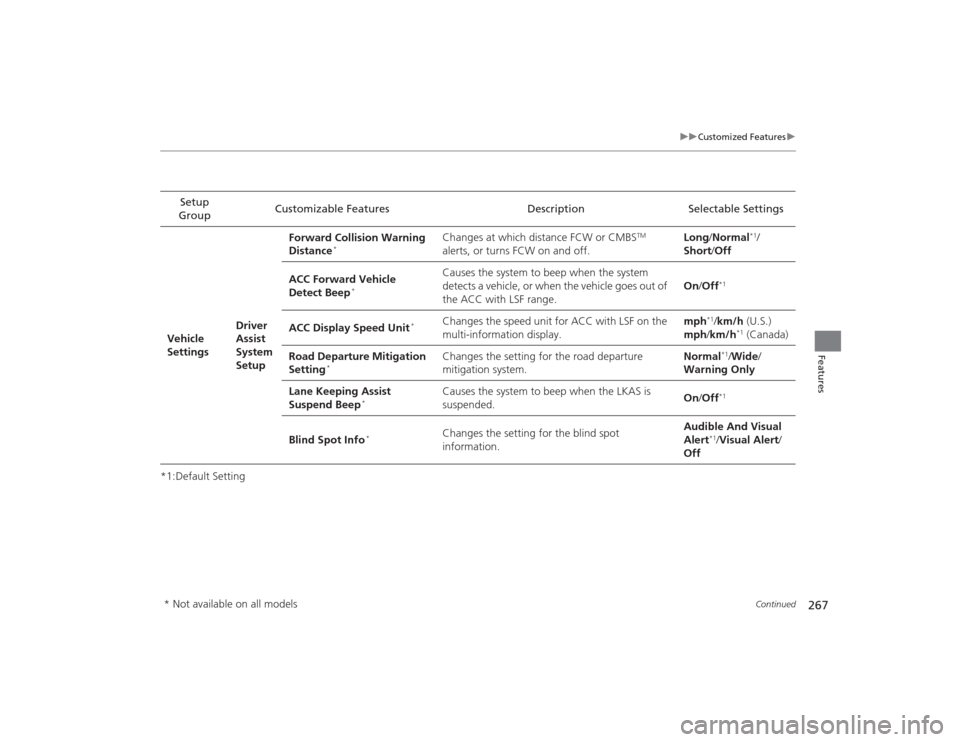
Group Customizable Features Description Selectable Settings
Vehicle
Settings Driver
Assist
System
SetupForward Collision Warning
Distance
*
Changes at which distance FCW or CMBS
TM
alerts, or turns FCW on and off. Long
/Normal
*1/
Short/ Off
ACC Forward Vehicle
Detect Beep
*
Causes the system to beep when the system
detects a vehicle, or when the vehicle goes out of
the ACC with LSF range. On
/Off
*1
ACC Display Speed Unit
*
Changes the speed unit for ACC with LSF on the
multi-information display. mph
*1/
km/h (U.S.)
mph /km/h
*1 (Canada)
Road Departure Mitigation
Setting
*
Changes the setting for the road departure
mitigation system. Normal
*1/
Wide /
Warning Only
Lane Keeping Assist
Suspend Beep
*
Causes the system to beep when the LKAS is
suspended. On
/Off
*1
Blind Spot Info
*
Changes the setting for the blind spot
information. Audible And Visual
Alert
*1/
Visual Alert /
Off
* Not available on all models
Page 269 of 545

268
uuCustomized Features u
Features
*1:Default SettingSetup
Group Customizable Features Description Selectable Settings
Vehicle
Settings Meter
SetupLanguage Selection
Changes the displayed language on the multi-
information display. English
*1/
Français /
Español
Adjust Outside Temp.
Display Adjusts the temperature reading by a few
degrees. -5°F ~ ±0°F*1
~ +5°F
(U.S.)
-3°C ~ ±0°C*1 ~ +3°C
(Canada)
“Trip A” Reset Timing Changes the setting of how to reset trip meter A,
average fuel economy A, average speed A, and
elapsed time A. When Refueled
/IGN
Off /Manually
Reset
*1
“Trip B” Reset Timing Changes the setting of how to reset trip meter B,
average fuel economy B, average speed B, and
elapsed time B. When Refueled
/IGN
Off /Manually
Reset
*1
Auto Engine Idle Stop
Guidance Screens
*
Selects whether the Auto Idle Stop display comes
on. On
/Off
*1
Turn by Turn Display
*
Selects whether the turn-by-turn display comes
on during the route guidance. On
*1/
Off
Driving
Position
Setup Memory Position Link
Turns the driving position memory system on and
off.
On*1/
Off
Auto Seatbelt Tension
*
Turns the auto seatbelt tension setting for the
seat belt e-pretensioner on and off. On
*1/
Off
* Not available on all models
Page 271 of 545

270
uuCustomized Features u
Features
*1:Default SettingSetup
Group Customizable Features Description Selectable Settings
Vehicle
Settings Door
SetupAuto Door Lock
Changes the setting for the automatic locking
feature. With Vehicle
Speed
*1/
Shift from P/
Off
Auto Door Unlock Changes the setting for when the doors unlock
automatically. All Doors When
Driver’s Door
Opens*1/
All Doors
When Shifted to
Park /All Doors When
Ignition Switched
Off /Off
Key And Remote Unlock
Mode Sets up either the driver’s door or all doors to
unlock on the first push of the remote or built-in
key. Driver Door
*1/
All
Doors
Keyless Lock Answer Back LOCK/UNLOCK- The exterior lights flash.
LOCK (2nd push)- The beeper sounds.
On
*1/
Off
Security Relock Timer Changes the time it takes for the doors to relock
and the security system to set after you unlock
the vehicle without opening any door. 90seconds/
60seconds/
30seconds
*1
IDS
Setup
Preferred IDS Mode Changes the IDS mode setting for when you set
the power mode to ON. Last Used
*1/
Econ /
Normal /Sport
Page 274 of 545
273
uuCustomized Features u
Continued
Features
*1:Default SettingSetup
Group Customizable Features Description Selectable SettingsPhone
Settings
Phone
Connect Phone
Pairs a new phone to HFL, or connects or
disconnects a paired phone.
2
Phone Setup P. 286
—
Bluetooth Device List
Pairs a new phone to HFL, edits or deletes a
paired phone, or creates a security PIN.
2Phone Setup P. 286
—
Edit Speed Dial
Edits, adds or deletes a speed dial entry.
2Phone Setup P. 286
—
Auto Transfer
Sets calls to automatically transfer from your
phone to HFL when you enter the vehicle.
On
*1/Off
Auto Answer
Sets whether to automatically answer an
incoming call after about four seconds.
On /Off
*1
Ring Tone
Selects the ring tone.
Fixed /Mobile
Phone
*1/ Off
Automatic Phone Sync
Sets a phonebook data to be automatically
imported when a phone is paired to HFL.
On
*1/Off
Use Contact Photo
Displays a caller’s picture on an incoming call
screen.
On
*1/Off