2015 Acura RDX Wheel controls
[x] Cancel search: Wheel controlsPage 137 of 365

136
Controls
Adjusting the Seats
Adjusting the Seat Positions
Adjust the driver's seat as far back as possible
while allowing you to maintain full control of
the vehicle. You should be able to sit upright,
well back in the seat and be able to
adequately press the pedals without leaning
forward, and grip the steering wheel
comfortably. The passenger's seat should be
adjusted in a similar manner, so that it is as far
back from the front airbag in the dashboard
as possible.
■Adjusting the front power seats
1Adjusting the Seats
The National Highway Traffic Safety Administration
and Transport Cana da recommend that drivers allow
at least 10 inches (25 cm) between the center of the
steering wheel and the chest.
Always make seat adjustments before driving.
3WARNING
Sitting too close to a front airbag can result
in serious injury or death if the front
airbags inflate.
Always sit as far back from the front
airbags as possible while maintaining
control of the vehicle.
Move back.
Allow sufficient
space.
Horizontal Position
Adjustment
Height Adjustment
(Driver’s seat only)
Seat-back Angle
Adjustment Lumbar Support
Adjustment
(Driver’s seat
only)
Page 138 of 365

Continued137
uuAdjusting the Seats uAdjusting the Seat Positions
Controls
Adjust the driver's seat -back to a comfortable,
upright position, leaving ample space
between your chest and the airbag cover in
the center of the steering wheel.
The front seat passenger should also adjust
their seat-back to a comfortable, upright
position.
Reclining a seat-back so that the shoulder part of the belt no longer rests against the
occupant's chest reduces the protective capa bility of the belt. It also increases the
chance of sliding under the belt in a crash and being seriously injured. The farther a
seat-back is reclined, the gr eater the risk of injury.
■Adjusting the Seat-Backs1Adjusting the Seat-Backs
Do not put a cushion, or other object, between the
seat-back and your back. Do ing so may interfere with
proper seat belt or airbag operation.
If you cannot get far e nough away from the steering
wheel and still reach th e controls, we recommend
that you investigate whether some type of adaptive
equipment may help.
3WARNING
Reclining the seat-back too far can result in
serious injury or death in a crash.
Adjust the seat-back to an upright position,
and sit well back in the seat.
Page 159 of 365
158
Features
Audio System
About Your Audio System
On models with navigation system, see Navigation System Manual for operation of
the audio system, Bluetooth® HandsFreeLink ®, and voice commands for these
features.
The audio system features AM/FM radio and the XM ® Radio service. It can also play
audio CDs, WMA/MP3/AAC files, iP od, iPhone, USB flash drives, and Bluetooth®
devices.
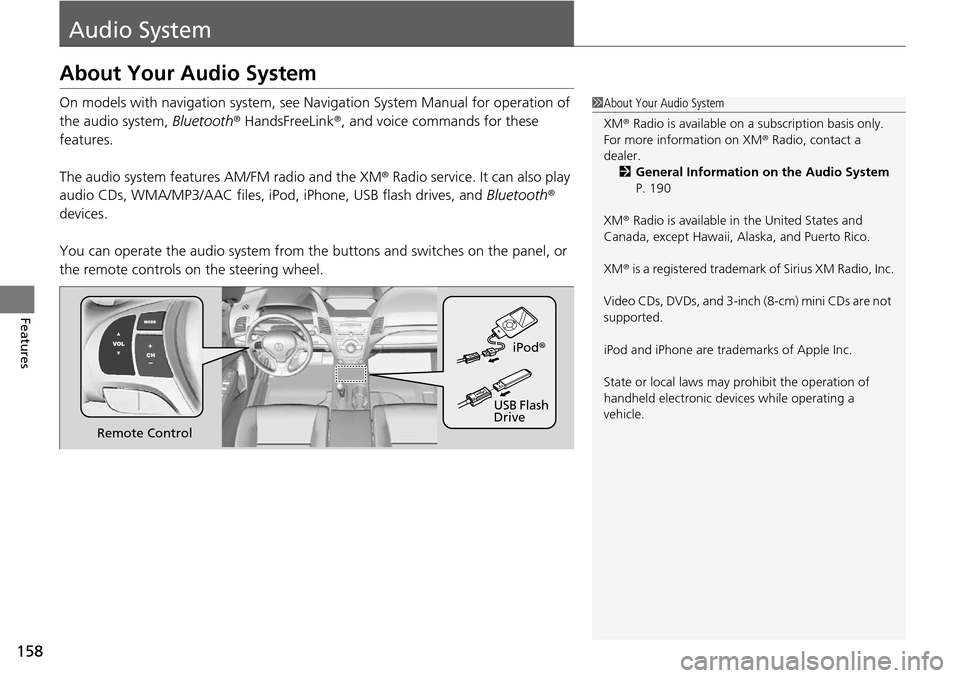
You can operate the audio system from the buttons and switches on the panel, or
the remote controls on the steering wheel.1About Your Audio System
XM ® Radio is available on a subscription basis only.
For more information on XM ® Radio, contact a
dealer.
2 General Information on the Audio System
P. 190
XM ® Radio is available in the United States and
Canada, except Ha waii, Alaska, and Puerto Rico.
XM ® is a registered trademark of Sirius XM Radio, Inc.
Video CDs, DVDs, and 3-inch (8-cm) mini CDs are not
supported.
iPod and iPhone are trademarks of Apple Inc.
State or local laws may pr ohibit the operation of
handheld electronic devices while operating a
vehicle.
Remote Control iPod
®
USB Flash
Drive
Page 162 of 365
161
Features
Audio System Basic Operation
To use the audio system function, the power mode must be in ACCESSORY or ON.
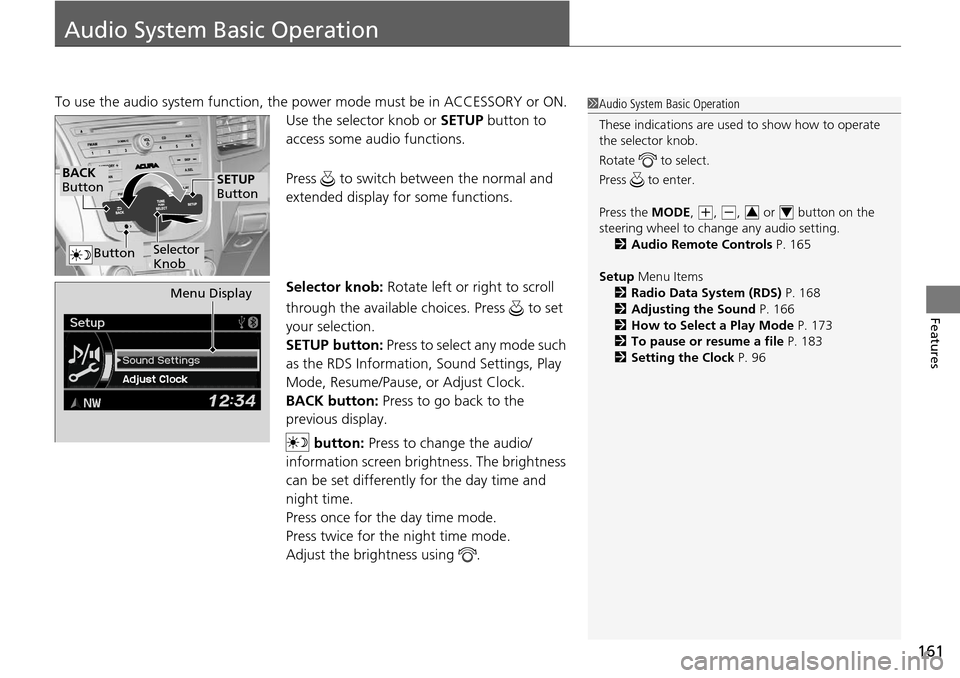
Use the selector knob or SETUP button to
access some au dio functions.
Press to switch between the normal and
extended display fo r some functions.
Selector knob: Rotate left or right to scroll
through the available choices. Press to set
your selection.
SETUP button: Press to select any mode such
as the RDS Information, Sound Settings, Play
Mode, Resume/Pause, or Adjust Clock.
BACK button: Press to go back to the
previous display.
button: Press to change the audio/
information screen brightness. The brightness
can be set differently for the day time and
night time.
Press once for the day time mode.
Press twice for the night time mode.
Adjust the brightness using . 1 Audio System Basic Operation
These indications are used to show how to operate
the selector knob.
Rotate to select.
Press to enter.
Press the MODE,
( +, (-, or button on the
steering wheel to cha nge any audio setting.
2 Audio Remote Controls P. 165
Setup Menu Items
2 Radio Data System (RDS) P. 168
2 Adjusting the Sound P. 166
2 How to Select a Play Mode P. 173
2 To pause or resume a file P. 183
2 Setting the Clock P. 9634
BACK
Button
Selector
Knob
SETUP
Button
Button
Menu Display
Page 169 of 365
uuAudio System Basic Operation uPlaying the AM/FM Radio
168
Features
Provides text data information related to your selected RDS capable FM station.
■RDS information
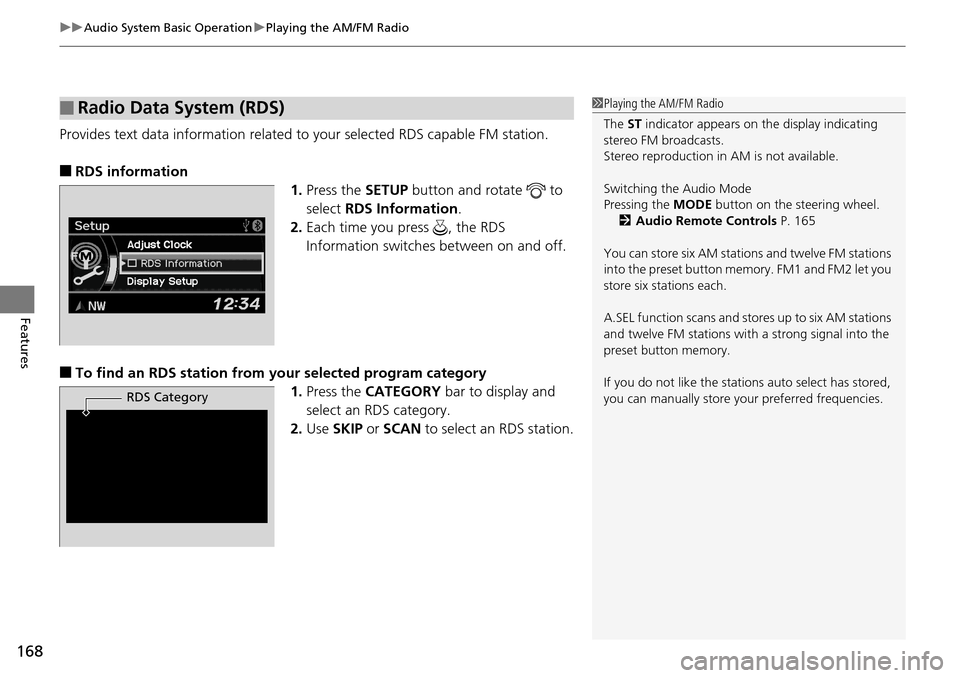
1.Press the SETUP button and rotate to
select RDS Information .
2. Each time you press , the RDS
Information switches between on and off.
■To find an RDS station from your selected program category
1.Press the CATEGORY bar to display and
select an RDS category.
2. Use SKIP or SCAN to select an RDS station.
■Radio Data System (RDS)1Playing the AM/FM Radio
The ST indicator appears on the display indicating
stereo FM broadcasts.
Stereo reproduction in AM is not available.
Switching the Audio Mode
Pressing the MODE button on the steering wheel.
2 Audio Remote Controls P. 165
You can store six AM stations and twelve FM stations
into the preset button me mory. FM1 and FM2 let you
store six stations each.
A.SEL function scans and stor es up to six AM stations
and twelve FM stations wi th a strong signal into the
preset button memory.
If you do not like the stati ons auto select has stored,
you can manually store your preferred frequencies.
RDS Category
Page 197 of 365

196
Features
Bluetooth® HandsFreeLink ®
For models with navigation system, see Navigation System Manual for how to
operate Bluetooth ® HandsFreeLink ®.
Bluetooth ® HandsFreeLink ® (HFL) allows you to place and receive phone calls using
your vehicle's audio system, without handling your cell phone.
Using HFL
(Pick-up) button: Press to go directly to the Phone screen or to answer an
incoming call.
(Hang-up) button: Press to end a call.
(Talk) button: Press to call a number with a stored voice tag.
(Back) button: Press to cancel a command.
PHONE button: Press to go directly to the Phone screen.
Selector knob: Rotate to select an item on the screen, then press .
■HFL Buttons
1Bluetooth ® HandsFreeLink ®
To use HFL, you need a Bluetooth-compatible cell
phone. For a list of compatible phones, pairing
procedures, and special feature capabilities:
•U.S.: Visit www.acura.com/handsfreelink , or call
1-888-528-7876.
•Canada: Visit www.handsfreelink.ca , or call
1-888-528-7876.
Voice control tips
•Aim the vents away from the ceiling and close the
windows, as noise coming fr om them may interfere
with the microphone.
•Press and release the button when you want to
call a number using a st ored voice tag. Speak
clearly and naturally after a beep.
•If the microphone picks up vo ices other than yours,
the command may be misinterpreted.
•To change the volume level, use the audio system's
volume knob or the remote audio controls on the
steering wheel.
State or local laws may pr ohibit the operation of
handheld electronic devices while operating a
vehicle.
Models with navigation system
Models without navigation system
Talk Button
Volume upMicrophone
Hang-up Button
Pick-up Button
Volume down
Selector Knob
PHONE Button
Back Button
Page 358 of 365

Index
357
Index
Index
Numbers
4WD.......................................................... 253
A
ABS (Anti-lock Brake System) .................. 259
Accessories and Modifications ................ 266
Accessory Power Sockets ......................... 148
Additives Coolant .................................................. 282
Engine Oil ............................................... 277
Washer ................................................... 286
Additives, Engine Oil ............................... 277
Adjusting Armrest .................................................. 142
Front Seats.............................................. 136
Head Restraints ....................................... 138
Mirrors.................................................... 133
Rear Seats ............................................... 141
Steering Wheel ....................................... 132
Temperature ............................................. 85
Air Conditioning System (Climate Control System) ....................... 152
Changing the Mode................................ 152
Defrosting the Windshield and Windows .............................................. 153
Dust and Pollen Filter .............................. 312
Recirculation/Fresh Air Mode................... 152
Sensors ................................................... 155
Synchronized Mode ................................ 154
Using Automatic Climate Control............ 152 Air Conditioning System
(Heating and Cooling System)
Dust and Pollen Filter ............................... 312
Air Pressure ....................................... 302, 347
Airbags ........................................................ 37
Advanced Airbags ..................................... 43
After a Collision ......................................... 40
Airbag Care ............................................... 51
Front Airbags (SRS) .................................... 40
Indicator ........................................ 48, 72, 75
Passenger Airbag Off Indicator .................. 49
Sensors ...................................................... 37
Side Airbag Cutoff System ......................... 46
Side Airbag Off Indicator ........................... 50
Side Airbags .............................................. 44
Side Curtain Airbags .................................. 47
AM/FM Radio ............................................ 167
Anti-lock Brake System (ABS) .................. 259
Indicator .................................................... 71
Armrest ..................................................... 142
Audio Remote Controls ............................ 165
Audio System ............................................ 158
Adjusting the Sound ................................ 166
Auxiliary Input Jack .................................. 159
Error Messages ........................................ 187
General Information ................................ 190
iPod ®....................................................... 174
MP3/WMA/AAC ...................................... 179
Pandora ®................................................. 177
Reactivating ............................................. 160
Recommended CDs ................................. 191 Recommended Devices............................ 193
Security Code .......................................... 160
Theft Protection ...................................... 160
USB Adapter Cable.................................. 159
USB Flash Drives ...................................... 193
Audio/Information Display ...................... 162
Authorized Manuals ................................ 355
Auto Door Locking/Unlocking ................. 106
Customize ................................................. 92
Automatic Lighting .................................. 123
Automatic Transmission ........................... 243
Creeping ................................................. 243
Fluid ........................................................ 284
Kickdown ................................................ 243
Operating the Shift Lever................... 16, 245
Sequential Shift Mode ............................. 246
Shift Lever Does Not Move ...................... 332
Shifting ................................................... 244
Auxiliary Input Jack .................................. 159
Average Fuel Economy .............................. 85
Average Speed ........................................... 86
AWD .......................................................... 253
B
Battery ...................................................... 310
Charging System Indicator................. 69, 335
Jump Starting .......................................... 330
Maintenance (Checki ng the Battery) ........ 310
Belts (Seat) .................................................. 29
Beverage Holders ..................................... 147