12Introduction
Driver Information Centre(uplevel)
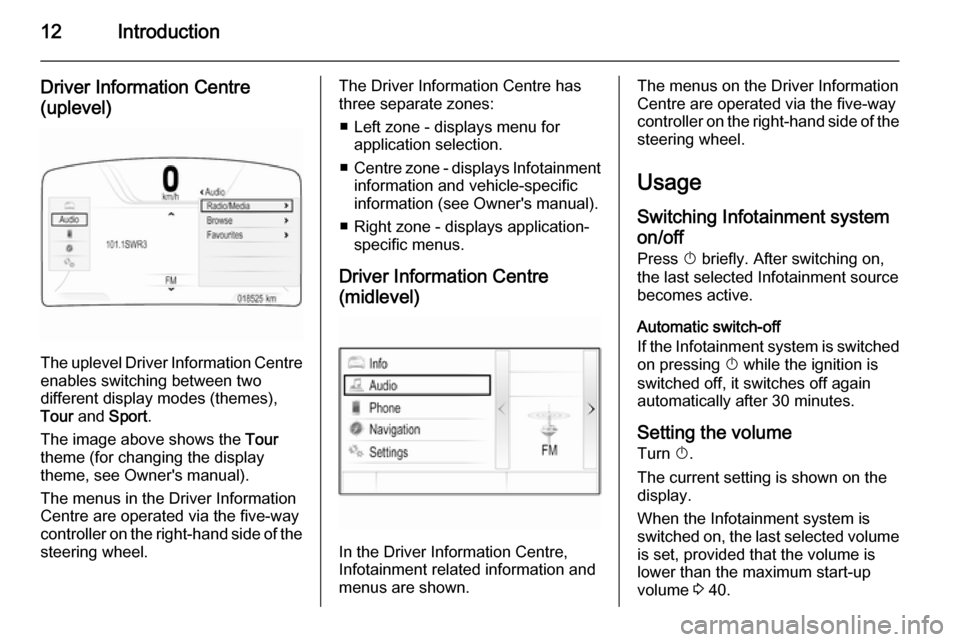
The uplevel Driver Information Centre enables switching between two
different display modes (themes),
Tour and Sport .
The image above shows the Tour
theme (for changing the display
theme, see Owner's manual).
The menus in the Driver Information Centre are operated via the five-way
controller on the right-hand side of the steering wheel.
The Driver Information Centre hasthree separate zones:
■ Left zone - displays menu for application selection.
■ Centre zone - displays Infotainment
information and vehicle-specific
information (see Owner's manual).
■ Right zone - displays application- specific menus.
Driver Information Centre
(midlevel)
In the Driver Information Centre,
Infotainment related information and
menus are shown.
The menus on the Driver Information
Centre are operated via the five-way
controller on the right-hand side of the steering wheel.
Usage
Switching Infotainment system on/off
Press X briefly. After switching on,
the last selected Infotainment source
becomes active.
Automatic switch-off
If the Infotainment system is switched on pressing X while the ignition is
switched off, it switches off again
automatically after 30 minutes.
Setting the volume Turn X.
The current setting is shown on the
display.
When the Infotainment system is
switched on, the last selected volume
is set, provided that the volume is
lower than the maximum start-up
volume 3 40.