2015.5 Peugeot 308 display
[x] Cancel search: displayPage 5 of 396
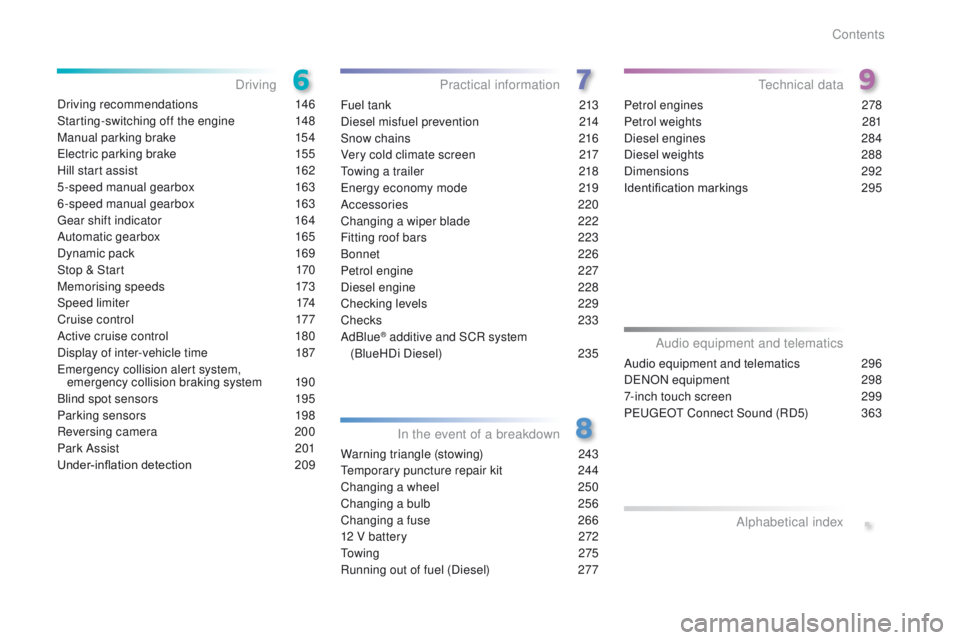
Driving recommendations 146
Starting-switching off the engine
1
48
Manual parking brake
1
54
el
ectric parking brake
1
55
Hill start assist
1
62
5-speed manual gearbox
1
63
6-speed manual gearbox
1
63
ge
ar shift indicator
1
64
Automatic gearbox
1
65
Dynamic pack
1
69
Stop & Start
1
70
Memorising speeds
1
73
Speed limiter
1
74
Cruise control
1
77
Active cruise control
1
80
Display of inter-vehicle time
1
87
em
ergency collision alert system,
emergency collision braking system
1
90
Blind spot sensors
1
95
Parking sensors
1
98
Reversing camera
2
00
Park Assist
2
01
Under-inflation detection
20
9Fuel tank
2 13
Diesel misfuel prevention
2
14
Snow chains
2
16
Very cold climate screen
2
17
to
wing a trailer
2
18
en
ergy economy mode
2
19
Accessories
2
20
Changing a wiper blade
2
22
Fitting roof bars
2
23
Bonnet
226
Petrol engine
2
27
Diesel engine
2
28
Checking levels
2
29
Checks
233
AdBlue
® additive and SCR system
(
BlueHDi Diesel)
23
5
Warning triangle (stowing)
2
43
te
mporary puncture repair kit
2
44
Changing a wheel
2
50
Changing a bulb
2
56
Changing a fuse
2
66
12 V battery
2
72
to
w i n g
2 7 5
Running out of fuel (Diesel)
2
77Petrol engines
2
78
Petrol weights
2
81
Diesel engines
2
84
Diesel weights
2
88
Dimensions
2
92
Identification markings
2
95
Driving
Practical information
In the event of a breakdownte chnical data
.
Audio equipment and telematics 296
D
eN
ON equipment
2
98
7-inch touch screen
2
99
Peuge
O
t Connect Sound (RD5)
3
63
Audio equipment and telematics
Alphabetical index
Contents
Page 10 of 396
8
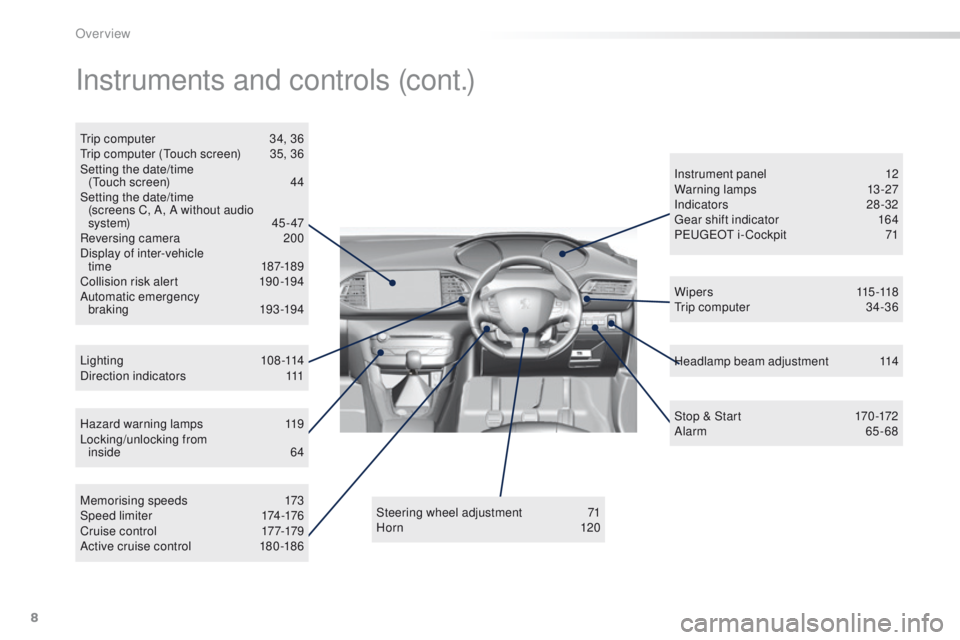
Hazard warning lamps 119
Locking/unlocking from inside
6
4
Lighting
108-114
Direction indicators
1
11 Instrument panel
1
2
Warning lamps
1
3-27
Indicators
2
8-32
ge
ar shift indicator
1
64
P
e
uge
Ot
i- Cockpit
7
1
Steering wheel adjustment
7
1
H or n
120Headlamp beam adjustment
1
14
Memorising speeds
1
73
Speed limiter
1
74-176
C r u i s e c o nt r o l
17
7-179
Active cruise control
1
80 -186 W i p e r s
115 -118
tr
ip computer
3
4-36
Instruments and controls (cont.)
trip computer
3 4, 36tr
ip computer (to uch screen) 3 5, 36
Setting the date/time (
to
uch screen)
4
4
Setting the date/time (screens C, A, A without audio
system)
45 - 47
Reversing camera
2
00
Display of inter-vehicle time
18
7-189
Collision risk alert
1
90 -194
Automatic emergency braking
193 -19 4 Stop & Start
1
70 -172
Alarm
65-68
Over view
Page 12 of 396
10
Optimise the use of your gearbox
With a manual gearbox, move off gently and change up without waiting.
During acceleration change up early.
With an automatic or electronic gearbox, give preference to automatic
mode and avoid pressing the accelerator pedal heavily or suddenly.
Control the use of your electrical
equipment
Before moving off, if the passenger compartment is too warm, ventilate it
by opening the windows and air vents before using the air conditioning.
Above 30 mph (50 km/h), close the windows and leave the air vents
open.
Remember to make use of equipment that can help keep the
temperature in the passenger compartment down (sunroof and window
blinds...).
Switch off the air conditioning, unless it has automatic regulation, as
soon as the desired temperature is attained.
Switch off the demisting and defrosting controls, if not automatic.
Switch off the heated seat as soon as possible.
Switch off the headlamps and front foglamps when the level of light
does not require their use.
Avoid running the engine before moving off, particularly in winter; your
vehicle will warm up much faster while driving.
As a passenger, if you avoid connecting your multimedia devices
(film, music, video game...), you will contribute towards limiting the
consumption of electrical energy, and so of fuel.
Disconnect your portable devices before leaving the vehicle.
eco-driving
eco-driving is a range of everyday practices that allow the motorist to optimise their fuel consumption and CO2 emissions.
Drive smoothly
Maintain a safe distance between vehicles, use engine braking rather
than the brake pedal, and press the accelerator progressively. th ese
practices contribute towards a reduction in fuel consumption and
CO
2 emissions and also helps reduce the background traffic noise.
I
f your vehicle has cruise control, make use of the system at speeds
above 25 mph (40 km/h) when the traffic is flowing well.
th
e gear shift indicator invites you engage the most suitable gear: as
soon as the indication is displayed in the instrument panel, follow it
straight away.
For vehicles fitted with an electronic or automatic gearbox, this
indicator appears only in manual mode.
Eco-driving
Page 14 of 396
12
Instrument panel
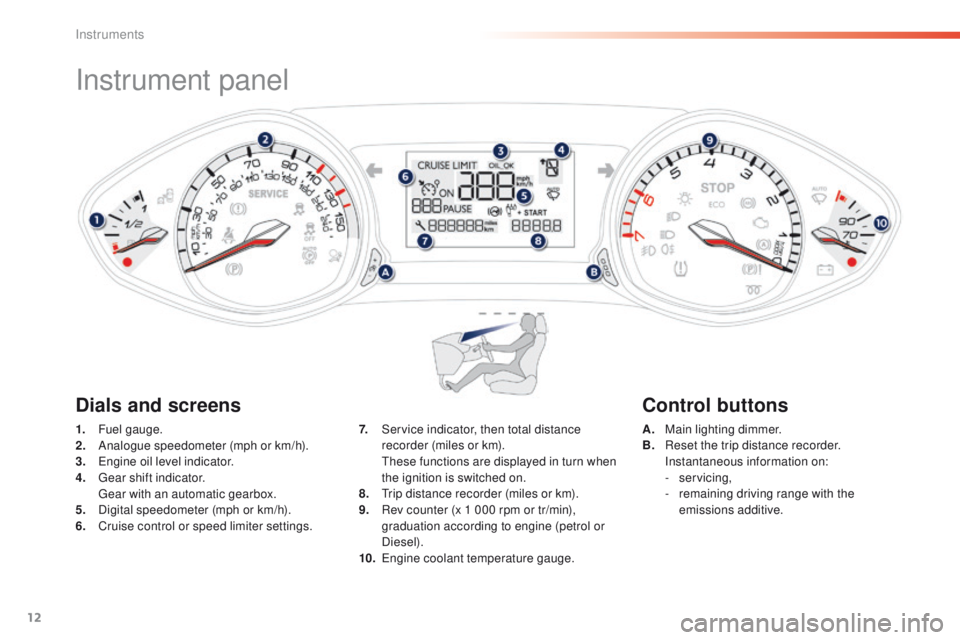
1. Fuel gauge.
2. Analogue speedometer (mph or km/h).
3.
e
n
gine oil level indicator.
4.
g
e
ar shift indicator.
g
e
ar with an automatic gearbox.
5.
D
igital speedometer (mph or km/h).
6.
C
ruise control or speed limiter settings. A. M
ain lighting dimmer.
B. R eset the trip distance recorder.
I
nstantaneous information on:
-
servicing,
-
r
emaining driving range with the
emissions additive.
7. S
ervice indicator, then total distance
recorder (miles or km).
t
h
ese functions are displayed in turn when
the ignition is switched on.
8.
t
r
ip distance recorder (miles or km).
9.
R
ev counter (x 1 000 rpm or tr/min),
graduation according to engine (petrol or
Diesel).
10.
e
ng
ine coolant temperature gauge.
Dials and screens Control buttons
Instruments
Page 19 of 396
17
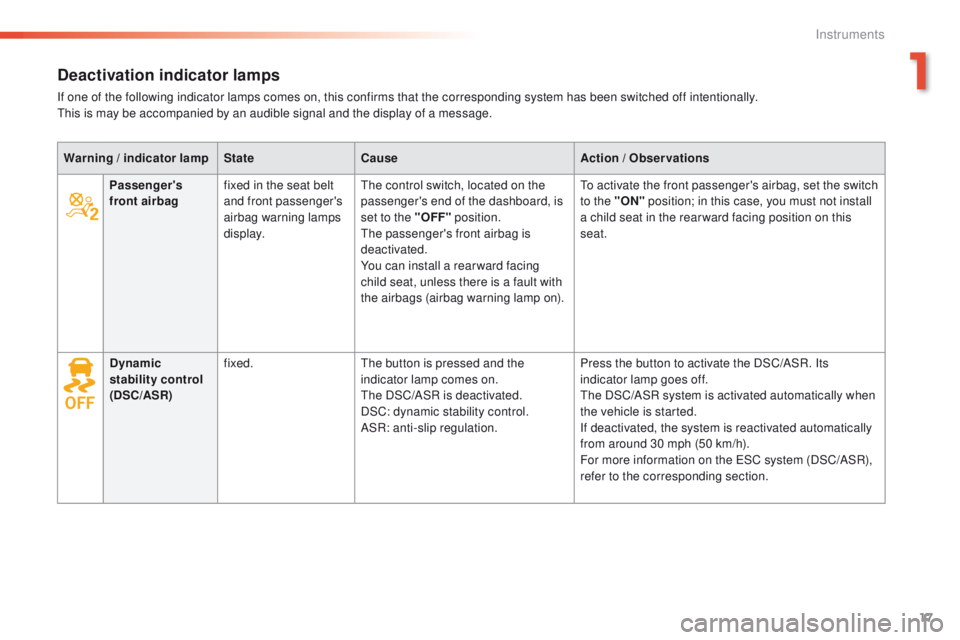
Deactivation indicator lamps
If one of the following indicator lamps comes on, this confirms that the corresponding system has been switched off intentionally.this is may be accompanied by an audible signal and the display of a message.
Warning
/ indicator lamp State Cause Action
/ Observations
Passenger's
front airbag fixed in the seat belt
and front passenger's
airbag warning lamps
display.
th
e control switch, located on the
passenger's end of the dashboard, is
set to the "OFF" position.
the
passenger's front airbag is
deactivated.
You can install a rear ward facing
child seat, unless there is a fault with
the airbags (airbag warning lamp on).
to a
ctivate the front passenger's airbag, set the switch
to the "ON" position; in this case, you must not install
a child seat in the rear ward facing position on this
seat.
Dynamic
stability control
(DSC/ASR) fixed.
th
e button is pressed and the
indicator lamp comes on.
the
DSC/ASR is deactivated.
DSC: dynamic stability control.
ASR: anti-slip regulation. Press the button to activate the DSC/ASR. Its
indicator lamp goes off.
th
e DSC/ASR system is activated automatically when
the vehicle is started.
If deactivated, the system is reactivated automatically
from around 30 mph (50 km/h).
For more information on the
e SC system (DSC/ASR),
refer to the corresponding section.
1
Instruments
Page 21 of 396
19
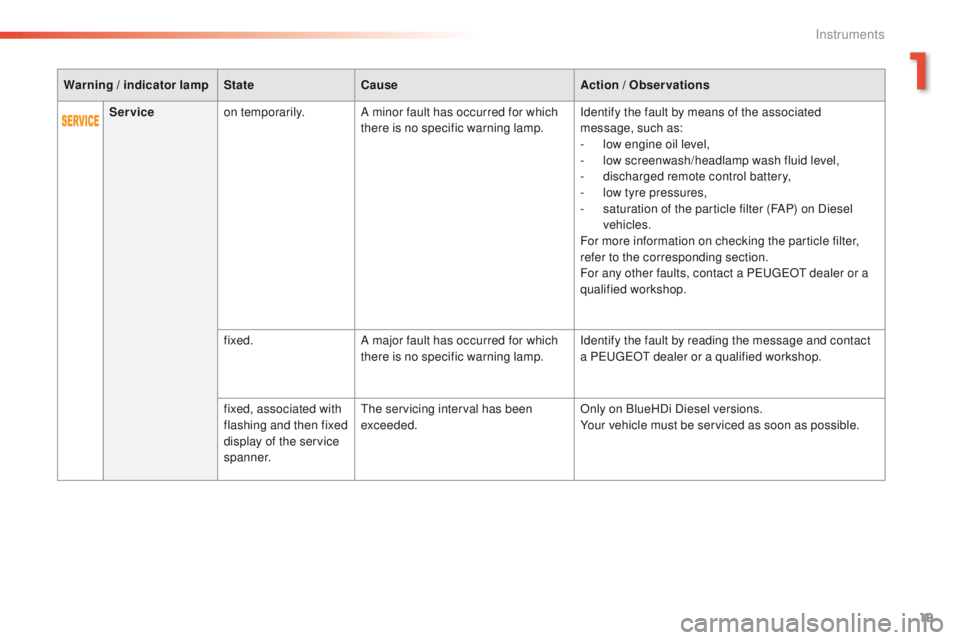
Warning / indicator lamp State Cause Action / Observations
Service on temporarily. A minor fault has occurred for which
there is no specific warning lamp. Identify the fault by means of the associated
message, such as:
-
l
ow engine oil level,
-
l
ow screenwash/headlamp wash fluid level,
-
d
ischarged remote control battery,
-
l
ow tyre pressures,
-
s
aturation of the particle filter (FAP) on Diesel
vehicles.
For more information on checking the particle filter,
refer to the corresponding section.
For any other faults, contact a P
e
uge
Ot
dealer or a
qualified workshop.
fixed. A major fault has occurred for which
there is no specific warning lamp. Identify the fault by reading the message and contact
a P
e
uge
Ot
dealer or a qualified workshop.
fixed, associated with
flashing and then fixed
display of the service
spanner.
the
servicing interval has been
exceeded. Only on BlueHDi Diesel versions.
Your vehicle must be serviced as soon as possible.
1
Instruments
Page 31 of 396
29
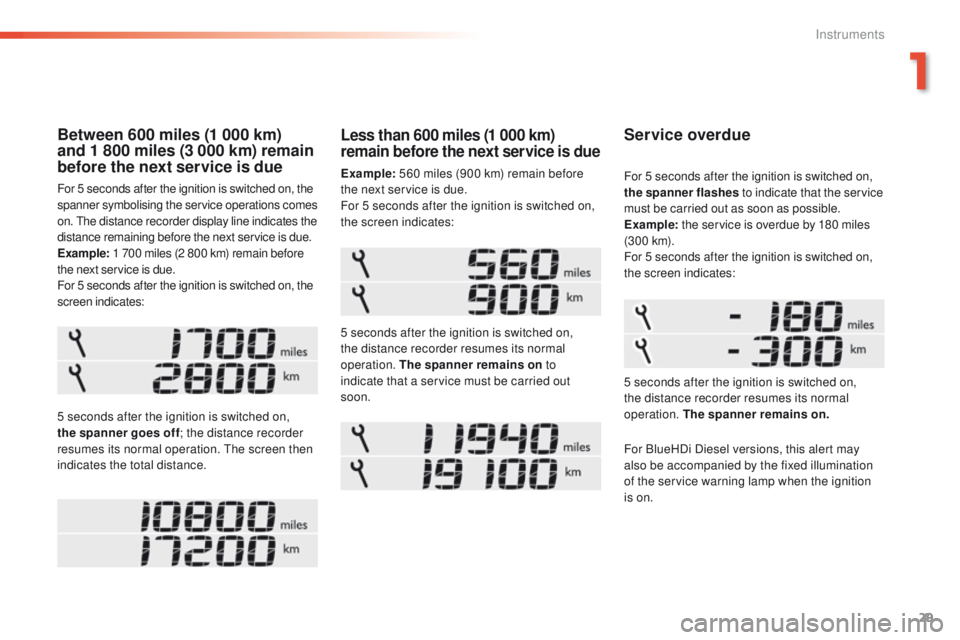
Between 600 miles (1 000 km)
and 1 800 miles (3 000 km) remain
before the next service is due
For 5 seconds after the ignition is switched on, the
spanner symbolising the service operations comes
on. t
h
e distance recorder display line indicates the
distance remaining before the next service is due.
Example: 1 700 miles (2 800 km) remain before
the next service is due.
For 5 seconds after the ignition is switched on, the
screen indicates:
5 seconds after the ignition is switched on,
the spanner goes off ; the distance recorder
resumes its normal operation.
t
h
e screen then
indicates the total distance.
Service overdue
5 seconds after the ignition is switched on,
the distance recorder resumes its normal
operation. The spanner remains on. For 5 seconds after the ignition is switched on,
the spanner flashes to indicate that the service
must be carried out as soon as possible.
Example: the service is overdue by 180 miles
(3 0 0 k m).
For 5 seconds after the ignition is switched on,
the screen indicates:
Less than 600 miles (1 000 km)
remain before the next service is due
Example: 560 miles (900 km) remain before
the next service is due.
For 5 seconds after the ignition is switched on,
the screen indicates:
5 seconds after the ignition is switched on,
the distance recorder resumes its normal
operation. The spanner remains on to
indicate that a service must be carried out
soon.
For BlueHDi Diesel versions, this alert may
also be accompanied by the fixed illumination
of the service warning lamp when the ignition
is on.
1
Instruments
Page 32 of 396
30
the distance remaining may be
weighted by the time factor, depending
on the driving conditions.
th
erefore, the spanner may also come
on if you have exceeded the period
since the last service, indicated in the
manufacturer's service schedule.
For BlueHDi Diesel versions, the
spanner may also be brought on earlier
than expected, depending on the
degree of deterioration of the engine oil
(depending on the country of sale).
th
e rate of deterioration of the engine
oil depends on the driving conditions in
which the vehicle is used.
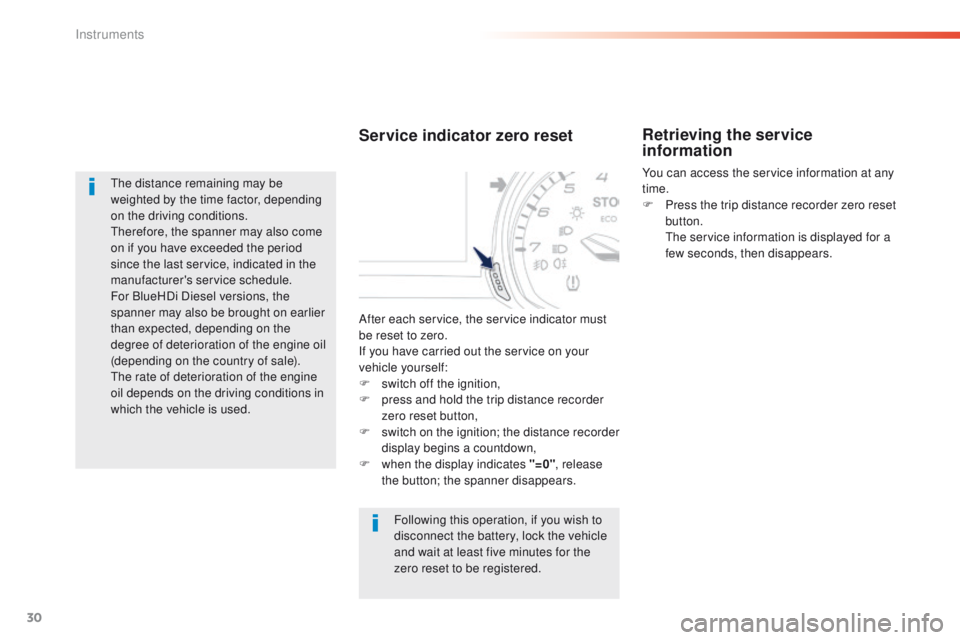
Service indicator zero reset
Following this operation, if you wish to
disconnect the battery, lock the vehicle
and wait at least five minutes for the
zero reset to be registered.
Retrieving the service
information
You can access the service information at any
time.
F
P
ress the trip distance recorder zero reset
button.
t
h
e service information is displayed for a
few seconds, then disappears.
After each service, the service indicator must
be reset to zero.
If you have carried out the service on your
vehicle yourself:
F
s
witch off the ignition,
F
p
ress and hold the trip distance recorder
zero reset button,
F
s
witch on the ignition; the distance recorder
display begins a countdown,
F
w
hen the display indicates "=0" , release
the button; the spanner disappears.
Instruments