Page 27 of 180

2-6
12
3
4
5
6
7
8
9
10
11
12
13
14
●
If you think or feel that the vehicle may tip or roll, keep your body completely inside the protec-
tive structure of the vehicle:
Brace yourself by pressing your feet firmly on the floorboards and keep a firm grip on thesteering wheel or passenger handhold.
Do not put your hands or feet outside of the vehicle for any reason. Your arm or leg could be crushed.
Do not try to stop a vehicle tipover using your arm or leg.
●
Do not operate this vehicle on any public street , road, or highway, even if dirt or gravel.
●
Do not operate the vehicle in fast-flowing water or water deeper than 37 cm (15 in). If you must
cross shallow, slow-moving water, choose your path carefully to avoid sharp drop-offs, large
rocks, or slippery surfaces. Operating this vehicle through deep or fast-flowing water can lead
to loss of control or overturn. To reduce your risk of drowning or other injuries, use care when
crossing through water.
●
When loaded with cargo or towing a trailer:
Reduce speed, operate in low gear only, and allow more room to stop.
Avoid hills and rough terrain. Use extreme caution when towing or carrying a load on in-
clines.
Load trailer properly and use extra care when towing or pulling.
●
Do not tow or pull objects from any part of the vehicle other than the trailer hitch bracket or
winch (if installed).
1XP7B_EE.book Page 6 Tuesday, February 4, 2014 3:40 PM
Page 32 of 180
3-2
3
4
5
6
7
8
9
10
11
12
13
14
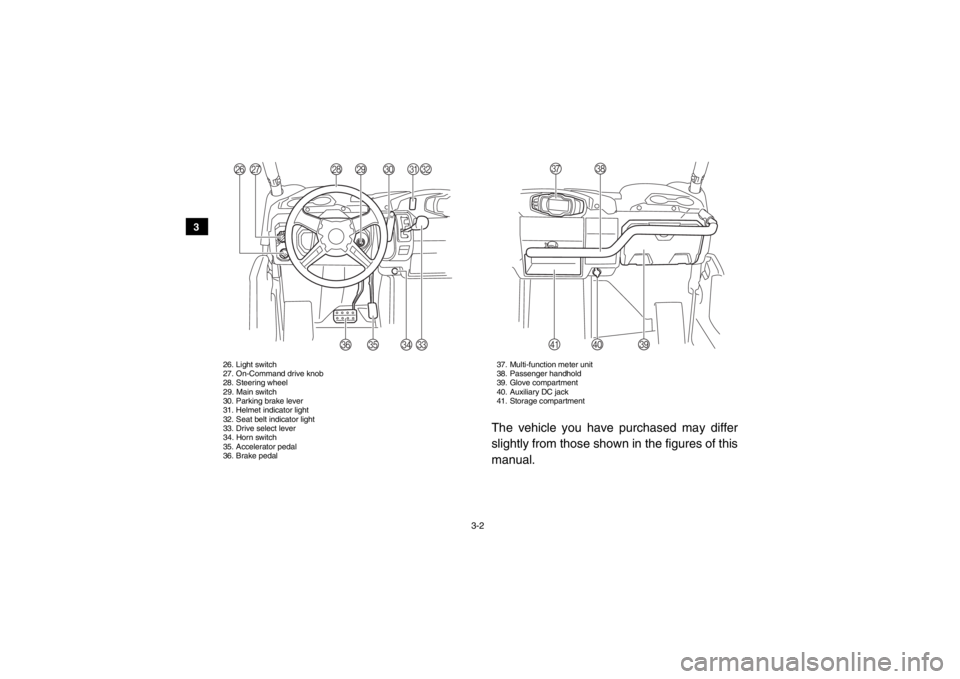
26. Light switch
27. On-Command drive knob
28. Steering wheel
29. Main switch
30. Parking brake lever
31. Helmet indicator light
32. Seat belt indicator light
33. Drive select lever
34. Horn switch
35. Accelerator pedal
36. Brake pedal 37. Multi-function meter unit
38. Passenger handhold
39. Glove compartment
40. Auxiliary DC jack
41. Storage compartment
The vehicle you have purchased may differ
slightly from those shown in the figures of this
manual.
Z
Y
Q
R
S
T
X
P
UVW
a
]
[
\^
1XP7B_EE.book Page 2 Tuesday, February 4, 2014 3:40 PM
Page 34 of 180
4-2
4
5
6
7
8
9
10
11
12
13
14
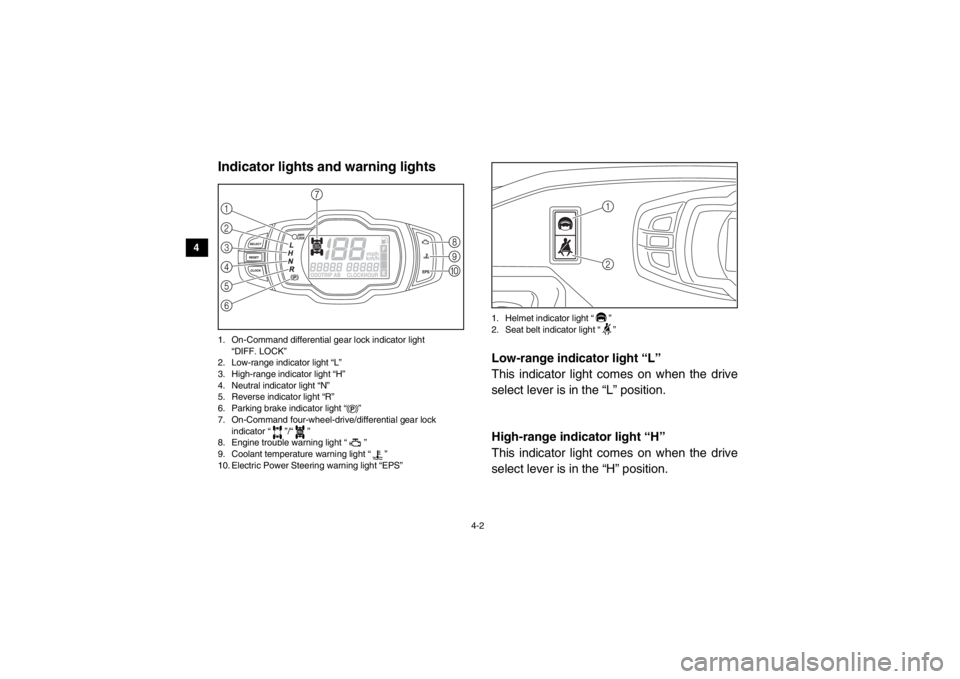
EVU00150Indicator lights and warning lights1. On-Command differential gear lock indicator light “DIFF. LOCK”
2. Low-range indicator light “L”
3. High-range indicator light “H”
4. Neutral indicator light “N”
5. Reverse indicator light “R”
6. Parking brake indicator light “ ”
7. On-Command four-wheel-drive/differential gear lock indicator “ ”/“ ”
8. Engine trouble warning light “ ”
9. Coolant temperature warning light “ ”
10. Electric Power Steering warning light “EPS” 1. Helmet indicator light “ ”
2. Seat belt indicator light “ ”
EVU01140Low-range indicator light “L”
This indicator light comes on when the drive
select lever is in the “L” position.EVU01150High-range indicator light “H”
This indicator light comes on when the drive
select lever is in the “H” position.
356421
7
809
DIFF.
LOCK
21
1XP7B_EE.book Page 2 Tuesday, February 4, 2014 3:40 PM
Page 37 of 180
4-5
1
2
34
5
6
7
8
9
10
11
12
13
14
5B410003Engine trouble warning light “ ”
This warning light comes on or flashes if a
problem is detected in the electrical circuit
monitoring the engine. When this occurs,
have a Yamaha dealer check the self-diagno-
sis system. (See page 4-11 for an explanation
of the self-diagnosis device.)
The electrical circuit of the warning light can
be checked by turning the key to “ ” (on). If
the warning light does not come on initially
when the key is turned to “ ” (on), or if the
warning light remains on, have a Yamaha
dealer check the electrical circuit.Electric Power Steering warning light
“EPS”
This warning light comes on when the key is
turned to “ ” (on), and then goes off once
the engine is started. If the warning light re-
mains on or comes on after the engine is
started, the EPS system may not be working
correctly. When this occurs, have a Yamaha
dealer check the EPS system.
The electrical circuit of the warning light can
be checked by turning the key to “ ” (on). If
the warning light does not come on, have a
Yamaha dealer check the electrical circuit.
TIPIf the steering load is too heavy (i.e., exces-
sive steering use when the Viking is traveling
at a slow speed), the power assist is reduced
to protect the EPS motor from overheating.
1XP7B_EE.book Page 5 Tuesday, February 4, 2014 3:40 PM
Page 48 of 180
4-16
4
5
6
7
8
9
10
11
12
13
14
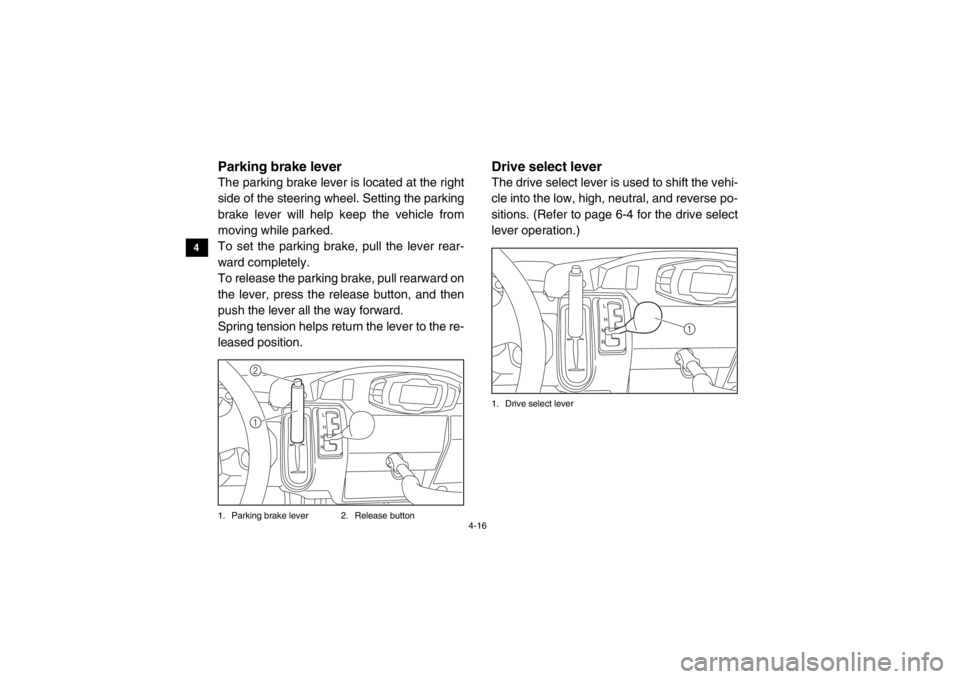
EVU00280Parking brake leverThe parking brake lever is located at the right
side of the steering wheel. Setting the parking
brake lever will help keep the vehicle from
moving while parked.
To set the parking brake, pull the lever rear-
ward completely.
To release the parking brake, pull rearward on
the lever, press the release button, and then
push the lever all the way forward.
Spring tension helps return the lever to the re-
leased position.1. Parking brake lever 2. Release button
EVU00290Drive select leverThe drive select lever is used to shift the vehi-
cle into the low, high, neutral, and reverse po-
sitions. (Refer to page 6-4 for the drive select
lever operation.)1. Drive select lever
12
1
1XP7B_EE.book Page 16 Tuesday, February 4, 2014 3:40 PM
Page 64 of 180
5-2
5
6
7
8
9
10
11
12
13
14 Final gear oil/
Differential gear oil
Check for leakage. 5-7, 8-15, 8-17
Accelerator pedal Check for proper accelerator pedal operation. 5-7
Seat belts Check for proper operation and belt wear. 5-7
Passenger handhold Check for stability and proper fastening. 5-8, 7-9
Steering Check for proper operation. 5-8
Fittings and fasteners Check all fittings and fasteners. 5-8
Instruments, lights and
switches Check operation, and correct if necessary.
5-8, 8-49, 8-52, 8-53
Wheels and tires Check tire pressure and for wear and damage. 5-8, 8-39, 8-41
Axle boots Check for damage. 8-21
ITEM
ROUTINE PAGE
1XP7B_EE.book Page 2 Tuesday, February 4, 2014 3:40 PM
Page 70 of 180

5-8
5
6
7
8
9
10
11
12
13
14
A crash can damage the restraint systems in
your vehicle. A damaged restraint system
may not properly protect the person using it,
resulting in serious injury or death in a crash.
To help make sure your restraint systems are
working properly after a crash, have them in-
spected and any necessary replacements
made as soon as possible.Passenger handholdCheck that the handhold bar and its supports
are in good condition. Confirm that the locking
pins are securely fastened, and then push
and pull on the handhold to make sure that it
is not loose.EVU01230SteeringPark on level ground. Turn the steering wheel
right and left. Check for excessive free play,
abnormal noises, or a rough feeling. Have a
Yamaha dealer repair as necessary for proper operation.
EVU00470Fittings and fastenersAlways check the tightness of chassis fittings
and fasteners before a ride. Take the vehicle
to a Yamaha dealer or refer to the Service
Manual for correct tightening torque.Instruments, lights and switchesCheck that all instruments, lights and switches
are working properly. Correct if necessary.Control cablesWhen riding in cold weather, always make
sure all control cables work smoothly before
you begin riding. WARNING! Control cables
can freeze in cold weather and you could
be unable to control the vehicle.EVU00500TiresCheck tire pressure regularly to make sure it
is at the recommended specifications. Also
check for wear and damage.
1XP7B_EE.book Page 8 Tuesday, February 4, 2014 3:40 PM
Page 80 of 180
6-7
6
7
8
9
10
11
12
13
14
TIP●
When the knob is set to “DIFF LOCK” or “4WD”, the differential gear lock indicator and indi-
cator light will flash until the differential gear is completely locked or unlocked.
●
When the indicator and indicator light are flashing, turning the steering wheel back and forth
will help the differential gear lock to engage or disengage.
●
Riding before the differential gear is properly engaged or disengaged (e.g., when the indica-
tor and indicator light are flashing) will cause the vehicle speed to be limited until the differ-
ential gear is completely engaged or disengaged.
1XP7B_EE.book Page 7 Tuesday, February 4, 2014 3:40 PM