2014 VOLVO XC90 center console
[x] Cancel search: center consolePage 110 of 308

04 Interior
Rear seats
04
108
Entering the third row of seats
G027027
Tilting the outboard backrests in the second row of seats:
•Pull up the handle (1), hold it up, and tilt the backrest forward to move the seat.
• Return the backrest to the upright posi-tion to slide the seat back to its originalposition.
Forward/rearward seat adjustmentLift the adjustment bar (2) to move the seat forward or rearward.
Removing the center console 1
G028445
In order to make it possible to move the cen- ter seat in the second row of seats as far for-ward as possible (seven-seat models only),the rear section of the center console can beremoved. •
Pull the handle (see illustration) and lift out the console.
• To return the console to its original posi-tion, slide it back into position until itclicks into place.
G027033
Sliding center seat – second row (seven-seat models only)
The center seat in the second row can be moved farther forward than the outboardseats. This makes it possible for a childseated in this position to sit closer to the peo-ple in the front seats.
1
The center console cannot be removed on vehicles equipped with the optional Rear Seat Entertainment System.
Page 117 of 308

04 Interior
Storage compartments
04
* Option/accessory, for more information, see Introduction.115
Storage compartment in third row of seats
Storage compartment
Glove compartment
Storage compartment in center console
Rear seat cup holders
Storage pocket (also in front edge of front seats)
Grocery bag holder*
WARNING
Make sure that no hard, sharp or heavy objects lie on or in any of the storageareas where they might cause injury duringsudden braking.
Storage compartment in the center console
G027019
To open the lid on the storage compartment, press the lower edge of the opening latch(see illustration above). This lid can be foldedback to form a small table area for rear seatpassengers. Lift the tray under the lid to expose the deep storage bin with slots for CD storage.
G027020
Cup holders for the front seatsTwo cup holders are provided for the front seat occupants. Press lightly on the rear edgeof the cover to open it.
Ashtray (accessory)An ashtray insert is available from your Volvoretailer. This insert slides into either of thecup holders.
Pen holderThere is a pen holder in the center console, infront of the gear selector.
Page 118 of 308
04 Interior
Storage compartments
04
116
G027018
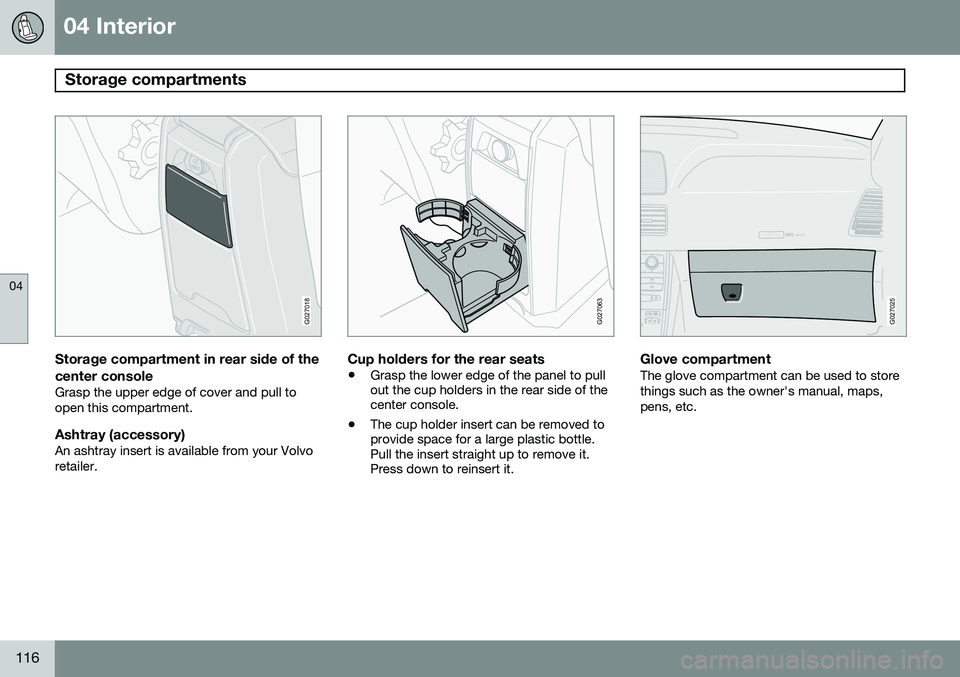
Storage compartment in rear side of the
center console
Grasp the upper edge of cover and pull to open this compartment.
Ashtray (accessory)An ashtray insert is available from your Volvoretailer.
G027063
Cup holders for the rear seats
• Grasp the lower edge of the panel to pull out the cup holders in the rear side of thecenter console.
• The cup holder insert can be removed toprovide space for a large plastic bottle.Pull the insert straight up to remove it.Press down to reinsert it.
ATTENTIONPakjdskdl ioiuip kjöpp opoodidåuswi
CSOUND
MENU
80
ENTERLSEEEXITMY KEYRTO
AIRBAG
G027025
Glove compartmentThe glove compartment can be used to store things such as the owner's manual, maps,pens, etc.
Page 134 of 308

05 Locks and alarm
Child safety locks
05
132* Option/accessory, for more information, see Introduction.
G021513
Child safety locks in the rear doors - driver's side and passenger's side respectively
Manual child safety locks – rear doorsThe controls are located on the rear door jambs. Use a key or small screwdriver toadjust these controls.
Turn outward: the door cannot be
opened from the inside. The door can be opened from the outside.
Turn inward: the door locks function
normally (the door can be opened from the inside).
WARNING
Remember, in the event of an accident, the rear seat passengers cannot open thedoors from the inside with the buttons inposition A.
REAR AC
G027105
Power child locks*To prevent the rear doors from being opened from the inside:
1. Turn the vehicle's ignition key to at least
position I or II.
2. Press the button in the center console (see the illustration). Indicator light in the button ON:
the rear
doors and windows cannot be opened from the inside. Indicator light in the button OFF: the rear
doors can be opened from the inside and the windows can be opened. A message will appear in the instrument panel display when the child safety locks areactivated/deactivated.
Page 162 of 308

06 Starting and driving
Front/rear park assist*
06
160* Option/accessory, for more information, see Introduction.
Front/rear park assist
The park assist system is designed to assist you when driving into parking spaces,garages, etc. It utilizes four ultrasound sen-sors located in one or both bumpers to meas-ure the distance to a vehicle, object, or a per-son who may be close to the front or rear ofyour vehicle. Park assist is available in two versions:
• Rear bumper only
• Front and rear bumpers
WARNING
Park Assist is an information system, NOT a safety system. This system is designedto be a supplementary aid when parkingthe vehicle. It is not, however, intended toreplace the driver's attention and judge-ment.
Function
The system is activated automatically when the vehicle is started. The indicator light in thebutton in the center console illuminates. • The front park assist system is active from the time the engine is started untilthe vehicle exceeds a speed of approxi-mately 10 mph (15 km/h). It is also activewhen the vehicle is backing up.
• Rear park assist is active when the engineis running and reverse gear has beenselected.
Rear park assistThe distance monitored behind the vehicle is approximately 5 ft (1.5 m). The signal comesfrom the rear speakers. The system must be deactivated when towing a trailer, carrying bicycles in a rear-mountedcarrier, etc, which could trigger the rear parkassist system's sensors.
NOTE
Rear park assist is deactivated automati- cally when towing a trailer if Volvo genuinetrailer wiring is used.
Front park assistThe distance monitored in front of the vehicle is approximately 2.5 ft (0.8 m). The audiblesignal comes from the audio system's frontspeakers.
• It may not be possible to combine auxili- ary headlights and front park assist sincethese lights could trigger the system'ssensors.
Activating/deactivating park assist
The system is activated automatically when the vehicle is started.
• Press the Park assist button on the center console (see page 65) to temporarilydeactivate the system(s). The indicatorlight in the button will go out when thesystem has been deactivated.
• Park assist will be automatically reactiva-ted the next time the engine is started, orif the button is pressed (the indicator lightin the button will illuminate).
Page 175 of 308

06 Starting and driving
Blind Spot Information System*
06
}}
* Option/accessory, for more information, see Introduction.173
Light reflected from a wet road surface
G018177
The vehicle's own shadow against a large, light, smooth surface such as barriers between laneson a highway
Sunlight directly in the camera when the sun is low on the horizon
G026955
Switching BLIS on and offBLIS is automatically activated when the igni- tion is switched on. The indicator lights willprovide confirmation by flashing 3 times.
• The system can be switched off by press- ing the
BLIS button in the center console
(see the illustration). The indicator light inthe button goes out when the system isswitched off, and a text message is dis-played.
• BLIS
can be switched on again by press-
ing the button. The indicator light in thebutton will illuminate and a new text mes-sage will be displayed. Press the READ
button (see page 62) to erase the mes-sage.
System statusText in the display
BLIND-SPOT SYST SERVICEREQUIREDBLIS not functioning properly. Contact anauthorized Volvo serv-ice technician.
BLIND-SPOT SYST R CAM-ERA BLOCKEDThe right side BLIS camera is obscured.Clean the lenses.
BLIND-SPOT SYST L CAM-ERA BLOCKEDThe left side BLIS camera is obscured.Clean the lenses.
BLIND-SPOT SYST CAM-ERASBLOCKEDBLIS camera obscured. Clean thelenses.
BLIND-SPOT INFO SYSTEMOFFBLIS system off
Page 194 of 308

07 Wheels and tires
Tire Sealing System
07
192* Option/accessory, for more information, see Introduction.
Introduction
Certain models are equipped with a tire seal- ing system* that enables you to temporarilyseal a hole in the tread surface and re-inflatea flat tire, or to adjust a tire’s inflation pres-sure. The system consists of an air compressor, a container for the sealing compound, wiring toconnect the system to the vehicle’s electricalsystem via one of the 12-volt sockets, and ahose used to connect the system to the tire’sinflation valve.
NOTE
The tire sealing system's compressor has been tested and approved by Volvo.
The 12-volt sockets are located on the rear side of the center console (in the rear seat)and in the cargo area.
Accessing the tire sealing systemThe tire sealing system is stowed under thefloor of the cargo area. To access it:
1. Fold up or remove any protective floor
covering or carpet.
2. Open the floor hatch.
3. Lift out the tire sealing system.
NOTE
• The tire sealing system is only intended to seal holes on the tire’stread area, not the sidewall.
• Tires with large holes or tears cannotbe repaired with the tire sealing sys-tem.
• After use, stow the tire sealing systemproperly to help prevent rattling.
WARNING
•After using the tire sealing system, the vehicle should not be driven fartherthan approximately 120 miles (200km).
• Have the tire inspected by a trainedand qualified Volvo service technicianas soon as possible to determine if itcan be permanently repaired or mustbe replaced.
• The vehicle should not be driven fasterthan 50 mph (80 km/h) while using atire that has been temporarily repairedwith the tire sealing system.
• After using the tire sealing system,drive carefully and avoid abrupt steer-ing maneuvers and sudden stops.
Tire sealing system–overview
Speed limit sticker (on the rear side of the compressor)
On/Off switch
Electrical wire
Bottle holder (orange cover)
Protective hose cover
Air pressure release knob
Hose
Bottle with sealing compound
Air pressure gauge
Page 263 of 308

10 Audio
Radio functions
10
261
channels will be displayed as 93.9 – 2 WNYC, 93.9 - 3 WNYC, etc.
• Reception coverage area
: Due to cur-
rent IBOC transmitter power limitations,the reception coverage area in digitalmode is somewhat more limited than thestation's analogue coverage area. Pleasebe aware that as with any radio broadcasttechnology, terrain, time of day, foliagelevel and building location can have posi-tive or negative effects on radio recep-tion.
• Analogue to digital/digital to analogue blending
: Analogue to digital blending
will occur as the signal strength reaches a preset threshold in the receiver. This willbe noticeable in fringe areas (areas withweak reception) and is normal.
NOTE
There may be a noticeable difference in sound quality when a change from ana-logue to digital or digital to analogueoccurs, such as:
• Volume increase or decrease
• Equalizer settings, i.e., Bass/ Mid- range/Treble cut or boost
• Time alignment (Digital program mate-rial in extreme cases can be as muchas 8 seconds behind the analogue).This will noticeable as a "stuttering"effect.
The above items are dependant on the broadcaster's equipment settings and do not indicate a fault in the vehicle's radio receiver or antenna systems .
Switching HD on or offThe factory setting for HD radio is on. How-
ever, when driving through areas with weak HD signals (fringe areas), you may experiencethat the radio repeatedly switches betweenanalogue/digital and digital/analogue recep-tion. If this happens, it may be desirable toswitch HD off. To do so:
1. Be sure the audio system is switched on and in AM or FM mode.
2. Press MENU in the center console con-
trol panel. 3. Press
ENTER to turn HD off (the X will
disappear from the box on the display screen).
This will disable the radio's capability to receive digital broadcasts but it will continueto function as a conventional (analogue)AM/FM receiver. Please note that when HD isswitched off, it will not be possible to tune tosub-channels (see the following section for amore detailed explanation of sub-channels). Repeat steps 2 and 3 above to reactivate HD (an X will appear in the box on the displayscreen).
Sub-channels
Example of an HD Radio station with sub-chan- nels