2014 VOLVO V60 service
[x] Cancel search: servicePage 104 of 442

||
03 Instruments and controls
03
102* Option/accessory, for more information, see Introduction.
MessageSpecification
Time for reg- ular mainte-nanceTime for regular service - contact a workshop B
. The
timing is determined by the number of kilometresdriven, number of monthssince the last service,engine running time andoil grade.
Maintenance overdueIf the service intervals are not followed then thewarranty does not coverany damaged parts - contact a workshop B
.
Transmission Oil changeneededContact a workshop B
to
check the car as soon as possible.
Transmission ReducedperformanceThe gearbox cannot han- dle full capacity. Drivecarefully until the mes- sage clears C
.
If shown repeatedly -contact a workshop B
.
Transmission hot ReducespeedDrive more smoothly or stop the car in a safemanner. Disengage thegear and run the engineat idling speed until the message clears C
.
MessageSpecification
Transmission hot Stopsafely Waitfor coolingCritical fault. Stop the car immediately in a safemanner and contact a workshop B
.
Temporarily offAA function has been tem- porarily switched off andis reset automaticallywhile driving or after star-ting again.
Low battery chargePower savemodeThe audio system is switched off to saveenergy. Charge the bat-tery.
A Part of message, shown together with information on where the problem has arisen.
B An authorised Volvo workshop is recommended.
C For more information regarding the automatic gearbox, seeAutomatic gearbox -- Geartronic* (p. 273).
Related information
• Messages - handling (p. 102)
• Menu navigation - combined instrument panel (p. 100)
Messages - handling
Use the left-hand stalk switch to acknowledge and browse among messages (p. 101) thatare shown in the information display of thecombined instrument panel. When a warning, information or indicator symbol illuminates, a corresponding messageappears in the display at the same time. Anerror message is stored in a memory list untilthe fault has been rectified. Press
OK on the left-hand stalk switch to
acknowledge a message. Scroll through mes- sages with the thumbwheel (p. 100).
NOTE
If a warning message appears while you are using the trip computer, the messagemust be read (press OK) before the previ-
ous activity can be resumed.
Related information
• Menu overview - combined instrument panel (p. 101)
ProCarManuals.co’
Page 108 of 442

||
03 Instruments and controls
03
106* Option/accessory, for more information, see Introduction.
FunctionsInformation
Digital speed
• km/h
• mph
• No displayShows the car's speed digitally in the centre of the combined instrument panel:
• Open with
OK, select with the thumbwheel, confirm with OK and back out with ENTER.
Parking heater *
• DIRECT START
• - Timer 1 - leads to the menu for select- ing time.
• - Timer 2 - leads to the menu for select-ing time.For a description of programming the timer, see Engine block heater and passenger compartment heater* - timer (p. 130).
Additional heater
*
•
Auto On
•Off
For more information, see Additional heater* (p. 134).
TC options • Distance to empty tank
• Fuel consumption
• Average speed
• Trip meter
T1 and total dist.
•Trip meter T2 and total dist.
Here you can select/activate the options that you want to be available as selectable headings in the trip computer. The symbols for the items already selected are WHITE with a "tick" - others areGREY and have no "tick":
1. Open the function with
OK, scroll through the symbols for the options with the thumbwheel
and select/stop on the desired symbol.
2. Confirm with OK - the symbol changes colour from GREY to WHITE and is marked with a
"tick".
3. Continue to select the function symbols with the thumbwheel or finish with RESET.
Service statusShows the number of months and mileage to next service.
ProCarManuals.co’
Page 112 of 442

||
03 Instruments and controls
03
110* Option/accessory, for more information, see Introduction.
FunctionsInformation
Trip computer reset • Average
• Average speedNote
that this function does not reset both trip meters T1 and T2 - see the table under the next
section "Headings" or the section "Resetting with 'Digital'" (p. 112) for information on the proc- ess.
MessagesFor more information, see Messages - handling (p. 102).
ThemesThe appearance of the combined instrument panel (p. 59) is selected here.
Settings *Select Auto On or Off.
For more information, see Additional heater* (p. 134).
Contrast mode /Colour modeAdjusting the combined instrument panel's brightness and colour intensity.
Parking heater *
•
Direct start
• - Symbol Timer 1 - leads to the menu for selecting time.
• - Symbol Timer 2 - leads to the menu forselecting time.
For a description of programming the timer, see Engine block heater and passenger compart- ment heater* - timer (p. 130).
Service statusShows the number of months and mileage to next service.
Oil level AFor more information, see Engine oil - checking and filling (p. 346).
A
Certain engines.
HeadingsThree trip computer headings can be dis- played simultaneously - one in each "win-dow" (see previous figure). One of the heading combinations in the fol-lowing table can be selected for constant dis-
play in the combined instrument panel. Pro-ceed as follows to determine which:
ProCarManuals.co’
Page 119 of 442

04 Climate control
04
* Option/accessory, for more information, see Introduction.117
Air cleaning - passenger compartment filter
All air entering the car's passenger compart- ment is cleaned with a filter. The filter must be replaced at regular inter- vals. Follow the Volvo Service Programme forthe recommended replacement intervals. Ifthe car is used in a severely contaminatedenvironment, it may be necessary to replacethe filter more often.
NOTE
There are different types of passenger compartment filter. Make sure that the cor-rect filter is fitted.
Related information
• Air cleaning (p. 116)
Air cleaning - Clean Zone Interior Package (CZIP)*
CZIP comprises a series of modifications that keep the passenger compartment evenclearer from allergy and asthma-inducing sub-stances. The following is included: •An enhanced fan function that means that the fan starts when the car is opened withthe remote control key. The fan fills thepassenger compartment with fresh air.The function starts when required and isdisengaged automatically after a time orwhen one of the passenger compartmentdoors is opened.
• The air quality system IAQS (p. 118) is afully automatic system that cleans the airin the passenger compartment from con-taminants such as particles, hydrocar-bons, nitrous oxides and ground-levelozone.
NOTE
To keep the CZIP standard in cars with CZIP the IAQS filter must be changed after15 000 km or once per year depending onwhichever occurs first. However, up to75 000 km over 5 years. In cars withoutCZIP and where the customer does notwant to keep the CZIP standard the IAQSfilter must be changed at a regular service.
For more information on CZIP, see the bro- chure included with the purchase of the car.
Related information
•
General information on climate control (p. 115)
• Air cleaning (p. 116)
ProCarManuals.co’
Page 135 of 442

04 Climate control
04
133
SymbolDisplaySpecification
Fuel operated heater stopped Low fuel levelStarting the heater is not possible due to fuel level being too low - this is in order to facilitate starting the engine as well as approx. 50 km driving.
Fuel operated heater Service requiredHeater not working. Contact a workshop for repair. Volvo recommends that you contact an authorised Volvo workshop.
A display text clears automatically after a time or after one press on the indicator stalk (p.100) OK button.
ProCarManuals.co’
Page 158 of 442

||
06 Locks and alarm
06
156* Option/accessory, for more information, see Introduction.
Related information
• Detachable key blade - unlocking doors (p. 156)
• Child safety locks - manual activation (p.169)
• Passenger airbag - activating/deactivat-ing* (p. 30)
Detachable key blade - unlocking doors
The detachable key blade (p. 155) can be used if central locking cannot be activatedwith the remote control key (p. 149), e.g. if thekey's battery has run out. If central locking cannot be activated with the remote control key - e.g. if the batteries aredischarged - then the left-hand front door canbe opened as follows:
1. Unlock the left-hand front door with the
key blade in the door handle's lock cylin- der. For illustration and more information,see Keyless drive* - unlocking with thekey blade (p. 162).
NOTE
When the door has been unlocked using the key blade and is opened, the alarm istriggered.
2. Deactivate the alarm by inserting theremote control key in the ignition switch.
For cars with the Keyless system, see Keyless drive* - unlocking with the key blade(p. 162).
Related information
• Remote control key with key blade (p. 149)
• Remote control key/PCC - replacing thebattery (p. 158)
Privacy locking*
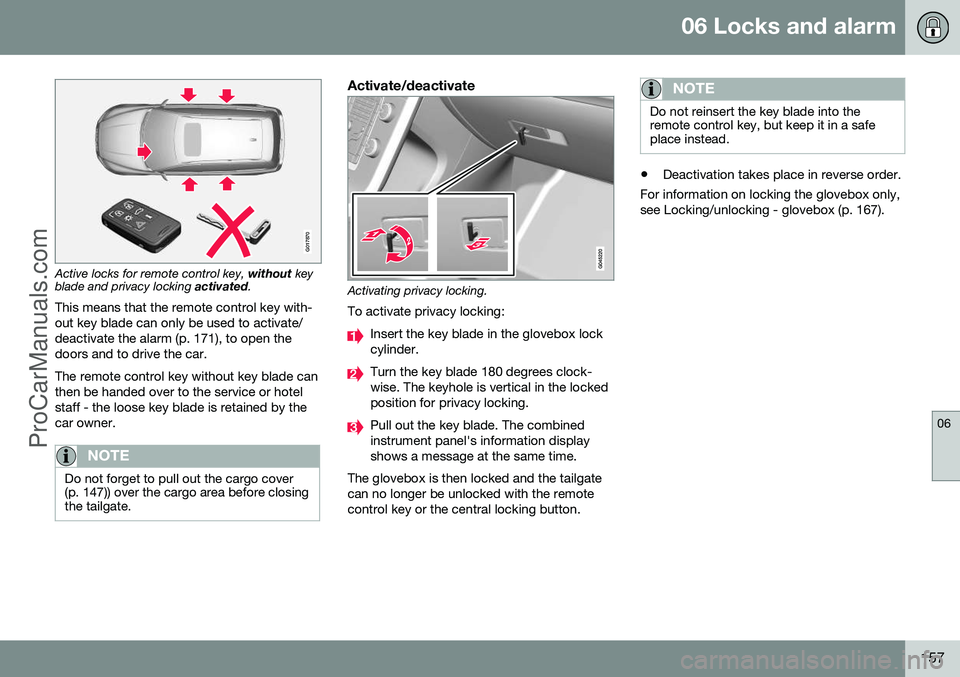
Privacy locking is intended for when the car is left for service, with a hotel parking valet orsimilar. The glovebox is then locked and thetailgate lock is disconnected from the centrallocking - the tailgate cannot be opened witheither the central locking button in the frontdoors or the remote control key (p. 149).
G017869
Active locks for remote control key
with key
blade.
ProCarManuals.com
Page 159 of 442
06 Locks and alarm
06
157
G017870
Active locks for remote control key, without key
blade and privacy locking activated.
This means that the remote control key with- out key blade can only be used to activate/deactivate the alarm (p. 171), to open thedoors and to drive the car. The remote control key without key blade can then be handed over to the service or hotelstaff - the loose key blade is retained by thecar owner.
NOTE
Do not forget to pull out the cargo cover (p. 147)) over the cargo area before closingthe tailgate.
Activate/deactivate
Activating privacy locking.
To activate privacy locking:
Insert the key blade in the glovebox lock cylinder.
Turn the key blade 180 degrees clock- wise. The keyhole is vertical in the lockedposition for privacy locking.
Pull out the key blade. The combined instrument panel's information displayshows a message at the same time.
The glovebox is then locked and the tailgatecan no longer be unlocked with the remotecontrol key or the central locking button.
NOTE
Do not reinsert the key blade into the remote control key, but keep it in a safeplace instead.
• Deactivation takes place in reverse order.
For information on locking the glovebox only, see Locking/unlocking - glovebox (p. 167).
ProCarManuals.co’
Page 180 of 442

07 Driver support
07
178
Stability and traction control system (DSTC) - symbols and messages
The stability and traction control system (p. 175) (DSTC - Dynamic Stability & TractionControl) helps the driver to avoid skidding andimproves the car's traction.
Table
SymbolMessageSpecification
DSTC Temporarily OFFThe system is temporarily reduced due to excessive brake disc temperature. - The function is reactiva- ted automatically when the brakes have cooled.
DSTC Service requiredThe system is disengaged.
• Stop the car in a safe place, switch off the engine and start it again.
• Visit a workshop if the message remains - an authorised Volvo workshop is recommended.
and
"Message"There is a text message in the combined instrument panel (p. 59) - Read it!
Constant glow for 2 seconds.System check when the engine is started.
Flashing light.The system is being activated.
Sport
mode is activated.
Related information
•Stability and traction control system (DSTC) - operation (p. 176)
ProCarManuals.co’