Page 203 of 442

07 Driver support
07
* Option/accessory, for more information, see Introduction.201
SymbolMessageSpecification
Cruise control Service requiredThe adaptive cruise control is disengaged. • Contact a workshop - an authorised Volvo workshop is recommended.
Press Brake To hold +
acoustic alarm (Only with Queue Assis- tant)The car is stationary and the cruise control will release the foot brake to allow the parking brake to take over and hold the car, but a fault in the parking brake means the car will shortly begin to roll.
• The driver must brake himself/herself. The message remains and the alarm sounds until the driver depresses the brake pedal or uses the accelerator pedal.
Below 30 km/h Only fol- lowing
(Only with Queue Assis- tant)
Shown with attempts to activate the cruise control at speeds below 30 km/h without a vehicle in front within the activation distance (approx. 30 metres).
Related information
• Adaptive cruise control - ACC* (p. 188)
• Adaptive cruise control* - overview (p. 190)
• Adaptive cruise control* - function (p.189)
ProCarManuals.co’
Page 206 of 442
07 Driver support
07
204* Option/accessory, for more information, see Introduction.
Distance Warning* - symbols and messages
Distance Warning (Distance Alert) is a function that informs the driver about the time interval to vehicles in front. The function has certainlimitations.
Symbol
AMessageSpecification
Radar blocked See manualDistance Warning temporarily disengaged. The radar sensor is blocked and cannot detect other vehicles, e.g. in the event of heavy rain or if slush has collected in front of the radar sensor. Read about radar sensor limitations (p. 197).
Collision warn. Service requiredDistance Warning and Collision Warning with Auto Brake fully or partially disengaged. Visit a workshop if the message remains - an authorised Volvo workshop is recommended.
A
Symbols are schematic - may vary by market and car model.
Related information
• Distance Warning* (p. 202)
• Distance Warning* - limitations (p. 203)
ProCarManuals.co’
Page 213 of 442

07 Driver support
07
211
City Safety™ - symbols and messages
In conjunction with automatic braking by the City Safety™ (p. 205) system, one or moresymbols may illuminate in the combinedinstrument panel and a text message may beshown. A text message can be acknowledged
by briefly pressing the
OK button on the
direction indicator stalk.
SymbolMessageMeaning/Action
Auto braking by City SafetyCity Safety™ is braking or has automatically braked.
Windscreen Sensors blockedThe laser sensor is temporarily non-operational because something is blocking it. • Remove the object blocking the sensor and/or clean the windscreen in front of the sensor.
Read about laser sensor limitations (p. 207).
City Safety Service requiredCity Safety™ is not operational.
• Visit a workshop if the message remains - an authorised Volvo workshop is recommended.
Related information
• City Safety™ (p. 205)
• City Safety™ - limitations (p. 207)
• City Safety™ - function (p. 205)
• City Safety™ - operation (p. 206)
• City Safety™ - laser sensor (p. 209)
ProCarManuals.co’
Page 225 of 442
07 Driver support
07
* Option/accessory, for more information, see Introduction.223
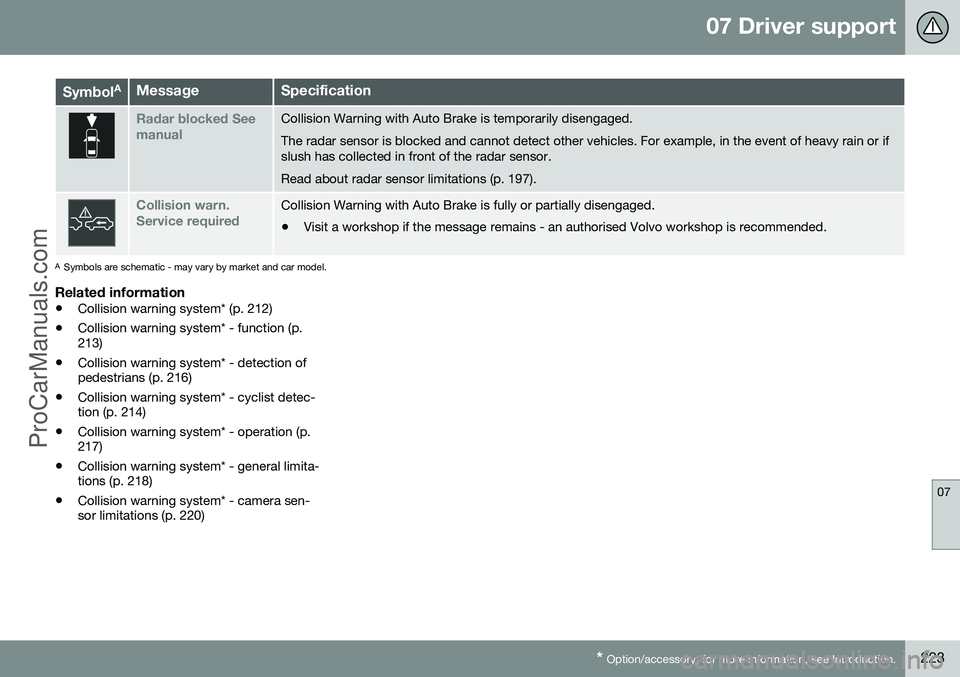
Symbol AMessageSpecification
Radar blocked See manualCollision Warning with Auto Brake is temporarily disengaged. The radar sensor is blocked and cannot detect other vehicles. For example, in the event of heavy rain or if slush has collected in front of the radar sensor. Read about radar sensor limitations (p. 197).
Collision warn. Service requiredCollision Warning with Auto Brake is fully or partially disengaged.
• Visit a workshop if the message remains - an authorised Volvo workshop is recommended.
A
Symbols are schematic - may vary by market and car model.
Related information
• Collision warning system* (p. 212)
• Collision warning system* - function (p. 213)
• Collision warning system* - detection ofpedestrians (p. 216)
• Collision warning system* - cyclist detec-tion (p. 214)
• Collision warning system* - operation (p.217)
• Collision warning system* - general limita-tions (p. 218)
• Collision warning system* - camera sen-sor limitations (p. 220)
ProCarManuals.co’
Page 229 of 442

07 Driver support
07
}}
* Option/accessory, for more information, see Introduction.227
Driver Alert Control (DAC)* - symbols and messages
DAC (p. 224) can show symbols and text messages on the combined instrument panel or in the centre console's display screen indifferent situations.
Combined instrument panel
Symbol
AMessageSpecification
Driver Alert Time for a breakThe vehicle has been driven inconsistently - the driver is alerted by an acoustic warning signal + text.
Windscreen Sensors blockedThe camera sensor is temporarily disengaged. Shown in the event of snow, ice or dirt on the windscreen for example.
• Clean the windscreen surface in front of the camera sensor.
Read about camera sensor limitations (p. 220).
Driver Alert Sys Service requiredThe system is disengaged.
• Visit a workshop if the message remains - an authorised Volvo workshop is recommended.
A
Symbols are schematic - may vary by market and car model.
Display
Sym-
bol AMessageSpecification
Driver Alert OFFThe function is disengaged.
Driver Alert AvailableThe function is activated.
ProCarManuals.co’
Page 234 of 442

07 Driver support
07
232
Lane Departure Warning (LDW) - symbols and messages
In situations where there is no LDW function a symbol may be shown in the combinedinstrument panel in combination with anexplanatory message - follow the recommen-dation given if appropriate.
Message examples:
Symbol
AMessageSpecification
Lane departure warning ON/Lane departure warning OFFThe function is switched on/off. Shown at switch-on/off.The text disappears after 5 seconds.
Lane Depart. Warning Unavail-
able at this speedThe function is set in standby mode due to speed being lower than 65 km/h.
Lane Depart. Warning Unavail-
ableThe lane does not have clear side markings or the camera sensor is temporarily disengaged. Read about camera sensor limitations (p. 220).
Lane Depart. Warning Availa-
bleThe function scans the lane's side markings.
Windscreen Sensors blockedThe camera sensor is temporarily disengaged. Shown in the event of snow, ice or dirt on the windscreen for example.
• Clean the windscreen surface in front of the camera sensor.
Read about camera sensor limitations (p. 220).
Driver Alert Sys Service requiredThe system is disengaged.
• Visit a workshop if the message remains - an authorised Volvo workshop is recommended.
A
Symbols are schematic - may vary by market and car model.
ProCarManuals.co’
Page 240 of 442

07 Driver support
07
238* Option/accessory, for more information, see Introduction.
Lane Keeping Aid (LKA) - symbols and messagesIn situations where there is no LKA function or it is interrupted, a symbol may be shown inthe combined instrument panel in combina- tion with an explanatory message - follow therecommendation given if appropriate. Message examples:
Symbol
AMessageSpecification
Lane Keeping Aid Unavail-
able at this speedThe Lane Keeping Aid is set in standby mode due to speed being lower than 65 km/h.
Lane Keeping Aid Unavail-
able for current markingsThe lane does not have clear side lines or the camera sensor is temporarily disengaged. Read about the limitations of the camera sensor, see Collision warning system* - camera sensor limitations (p.220) and Collision warning system* - operation (p. 217).
Lane Keeping Aid Availa-
bleThe function scans the lane's side lines.
Windscreen sensors blocked See manualThe camera sensor is temporarily disengaged. Shown in the event of snow, ice or dirt on the windscreen for example.
• Clean the windscreen surface in front of the camera sensor.
Read about the limitations of the camera sensor, see Collision warning system* - camera sensor limitations (p. 220) and Collision warning system* - operation (p. 217).
Lane Keeping Aid Service requiredThe system is disengaged.
• Visit a workshop if the message remains - an authorised Volvo workshop is recommended.
Lane Keeping Aid Inter- ruptedLKA has been set to standby mode. The lines of the LKA symbol indicate when the function is active again.
A
The table's symbols are schematic. The symbols shown in the combined instrument panel may have a slightly different appearance.
ProCarManuals.co’
Page 245 of 442

07 Driver support
07
* Option/accessory, for more information, see Introduction.243
Park assist syst* - fault indication
Parking assistance is used as an aid to park- ing. An acoustic signal as well as symbols onthe centre console's display screen indicatethe distance to the detected obstacle.
If the combined instrument panel'sinformation symbol illuminates withconstant glow and the text message
Park assist syst Service required is shown
then parking assistance is disengaged.
IMPORTANT
In certain conditions the parking assis- tance system may produce incorrect warn-ing signals that are caused by externalsound sources that emit the same ultra-sonic frequencies that the system workswith. Examples of such sources include horns, wet tyres on asphalt, pneumatic brakesand exhaust noises from motorcycles etc.
Related information
• Park Assist* (p. 240)
• Park assist syst* - cleaning the sensors (p. 243)
• Park assist syst* - function (p. 240)
• Park assist syst* - forward (p. 242)
• Park assist syst* - backward (p. 241)
• Park assist camera (p. 244)
Park assist syst* - cleaning the sensors
Parking assistance is used as an aid to park- ing. An acoustic signal as well as symbols onthe centre console's display screen indicatethe distance to the detected obstacle. The sensors must be cleaned regularly to ensure that they work properly. Clean themwith water and car shampoo.
Sensor location, front.
Sensor location, rear.
NOTE
Dirt, ice and snow covering the sensors may cause incorrect warning signals.
Related information
•Park Assist* (p. 240)
• Park assist syst* - function (p. 240)
• Park assist syst* - forward (p. 242)
• Park assist syst* - fault indication (p. 243)
• Park assist syst* - backward (p. 241)
• Park assist camera (p. 244)
ProCarManuals.co’
