Page 451 of 560
5
451 5-2. Steps to take in an emergency
When trouble arises
VERSO-S_EE
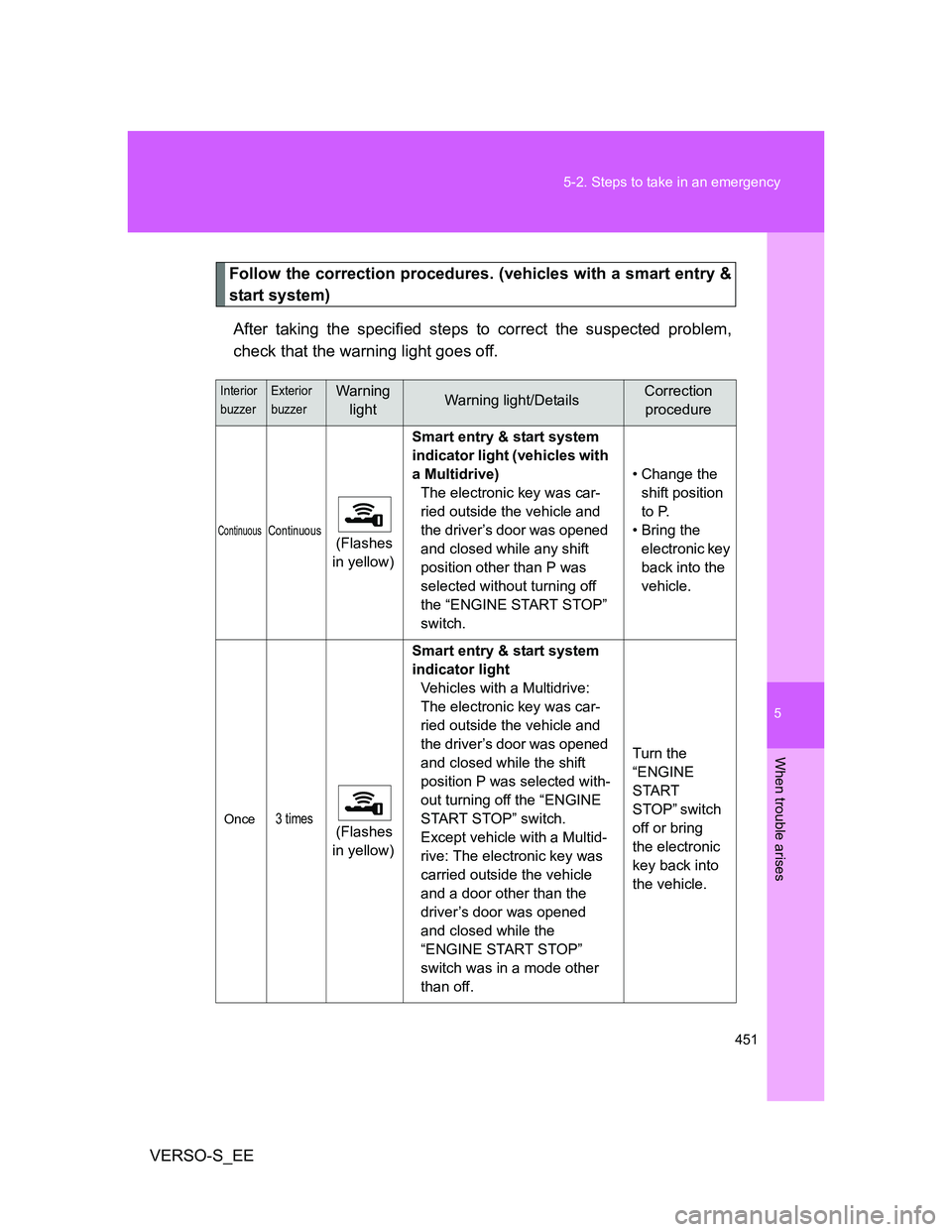
Follow the correction procedures. (vehicles with a smart entry &
start system)
After taking the specified steps to correct the suspected problem,
check that the warning light goes off.
Interior
buzzerExterior
buzzerWarning
lightWarning light/DetailsCorrection
procedure
ContinuousContinuous (Flashes
in yellow)Smart entry & start system
indicator light (vehicles with
a Multidrive)
The electronic key was car-
ried outside the vehicle and
the driver’s door was opened
and closed while any shift
position other than P was
selected without turning off
the “ENGINE START STOP”
switch.• Change the
shift position
to P.
• Bring the
electronic key
back into the
vehicle.
Once3 times (Flashes
in yellow)Smart entry & start system
indicator light
Vehicles with a Multidrive:
The electronic key was car-
ried outside the vehicle and
the driver’s door was opened
and closed while the shift
position P was selected with-
out turning off the “ENGINE
START STOP” switch.
Except vehicle with a Multid-
rive: The electronic key was
carried outside the vehicle
and a door other than the
driver’s door was opened
and closed while the
“ENGINE START STOP”
switch was in a mode other
than off.Turn the
“ENGINE
START
STOP” switch
off or bring
the electronic
key back into
the vehicle.
Page 452 of 560
452 5-2. Steps to take in an emergency
VERSO-S_EE
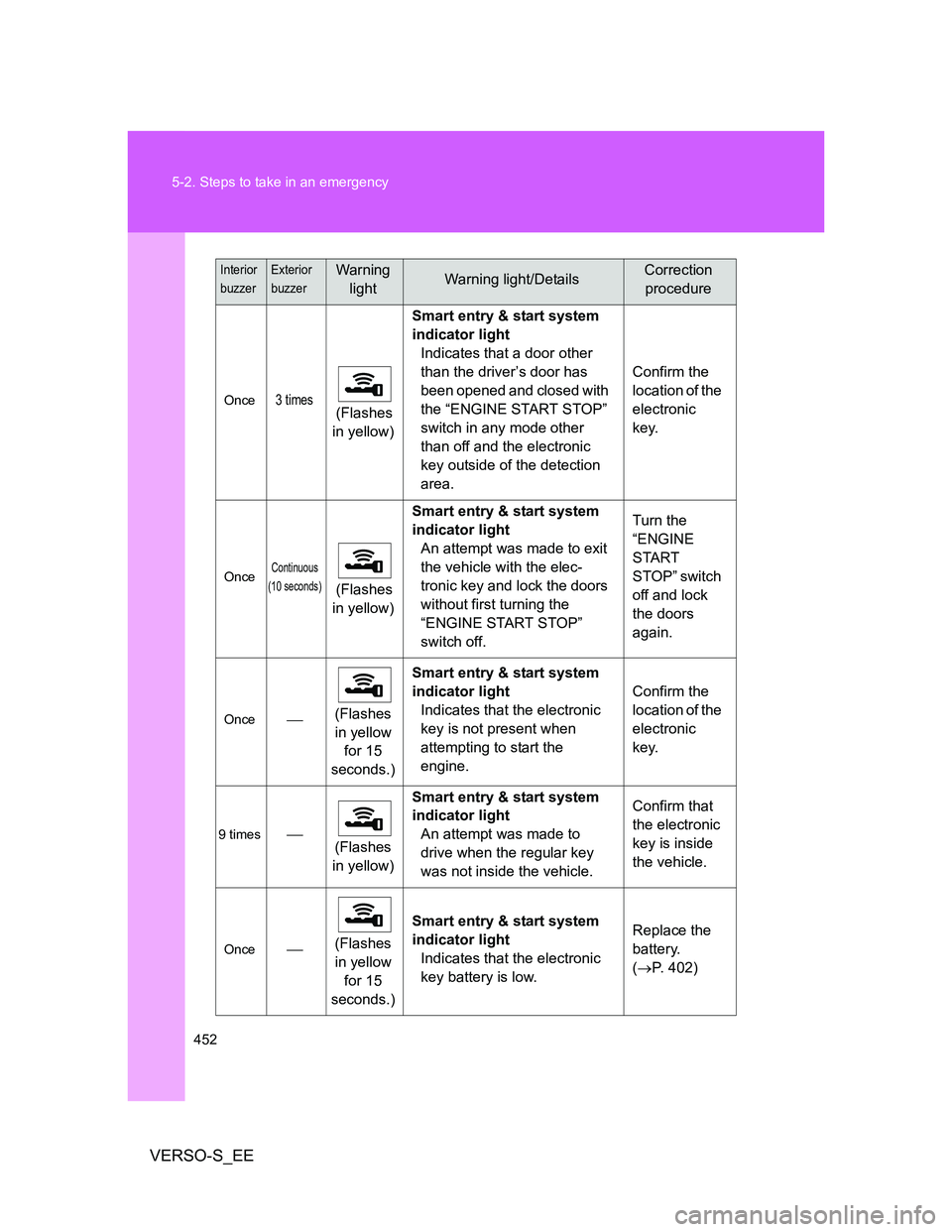
Once3 times (Flashes
in yellow)Smart entry & start system
indicator light
Indicates that a door other
than the driver’s door has
been opened and closed with
the “ENGINE START STOP”
switch in any mode other
than off and the electronic
key outside of the detection
area.Confirm the
location of the
electronic
key.
OnceContinuous
(10 seconds)
(Flashes
in yellow)Smart entry & start system
indicator light
An attempt was made to exit
the vehicle with the elec-
tronic key and lock the doors
without first turning the
“ENGINE START STOP”
switch off.Turn the
“ENGINE
START
STOP” switch
off and lock
the doors
again.
Once(Flashes
in yellow
for 15
seconds.)Smart entry & start system
indicator light
Indicates that the electronic
key is not present when
attempting to start the
engine.Confirm the
location of the
electronic
key.
9 times
(Flashes
in yellow)Smart entry & start system
indicator light
An attempt was made to
drive when the regular key
was not inside the vehicle.Confirm that
the electronic
key is inside
the vehicle.
Once(Flashes
in yellow
for 15
seconds.)Smart entry & start system
indicator light
Indicates that the electronic
key battery is low.Replace the
battery.
(P. 402)
Interior
buzzerExterior
buzzerWarning
lightWarning light/DetailsCorrection
procedure
Page 453 of 560
5
453 5-2. Steps to take in an emergency
When trouble arises
VERSO-S_EE
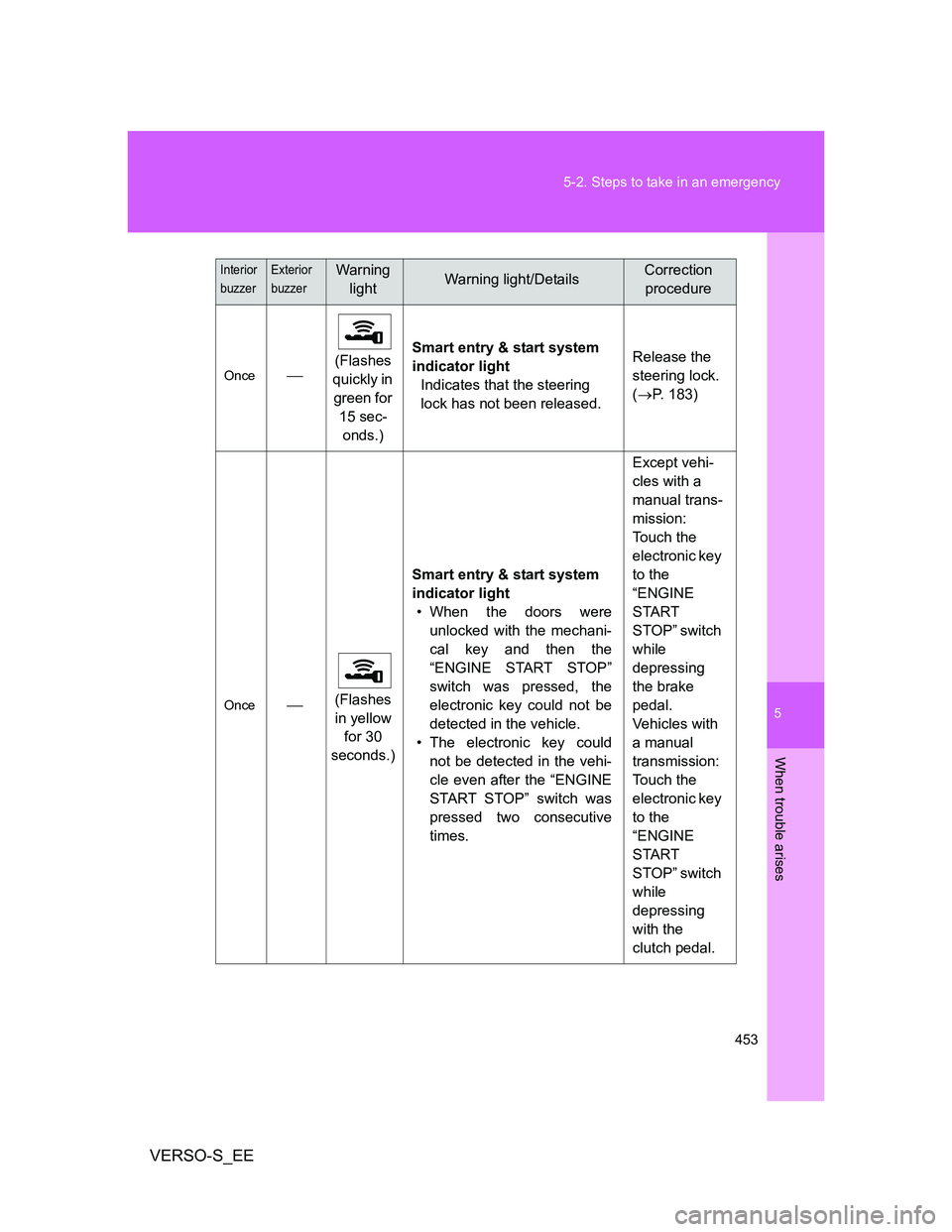
Once(Flashes
quickly in
green for
15 sec-
onds.)Smart entry & start system
indicator light
Indicates that the steering
lock has not been released.Release the
steering lock.
(P. 183)
Once(Flashes
in yellow
for 30
seconds.)Smart entry & start system
indicator light
• When the doors were
unlocked with the mechani-
cal key and then the
“ENGINE START STOP”
switch was pressed, the
electronic key could not be
detected in the vehicle.
• The electronic key could
not be detected in the vehi-
cle even after the “ENGINE
START STOP” switch was
pressed two consecutive
times.Except vehi-
cles with a
manual trans-
mission:
Touch the
electronic key
to the
“ENGINE
START
STOP” switch
while
depressing
the brake
pedal.
Vehicles with
a manual
transmission:
Touch the
electronic key
to the
“ENGINE
START
STOP” switch
while
depressing
with the
clutch pedal.
Interior
buzzerExterior
buzzerWarning
lightWarning light/DetailsCorrection
procedure
Page 491 of 560
5
491
5-2. Steps to take in an emergency
When trouble arises
VERSO-S_EE
If you lose your keys
New genuine Toyota keys can be made by any authorized Toyota
dealer or repairer, and another duly qualified and equipped profes-
sional using the other key and the key number stamped on your key
number plate.
Page 492 of 560
492
5-2. Steps to take in an emergency
VERSO-S_EE
If the electronic key does not operate properly (vehicles with a smart entr y & start system)
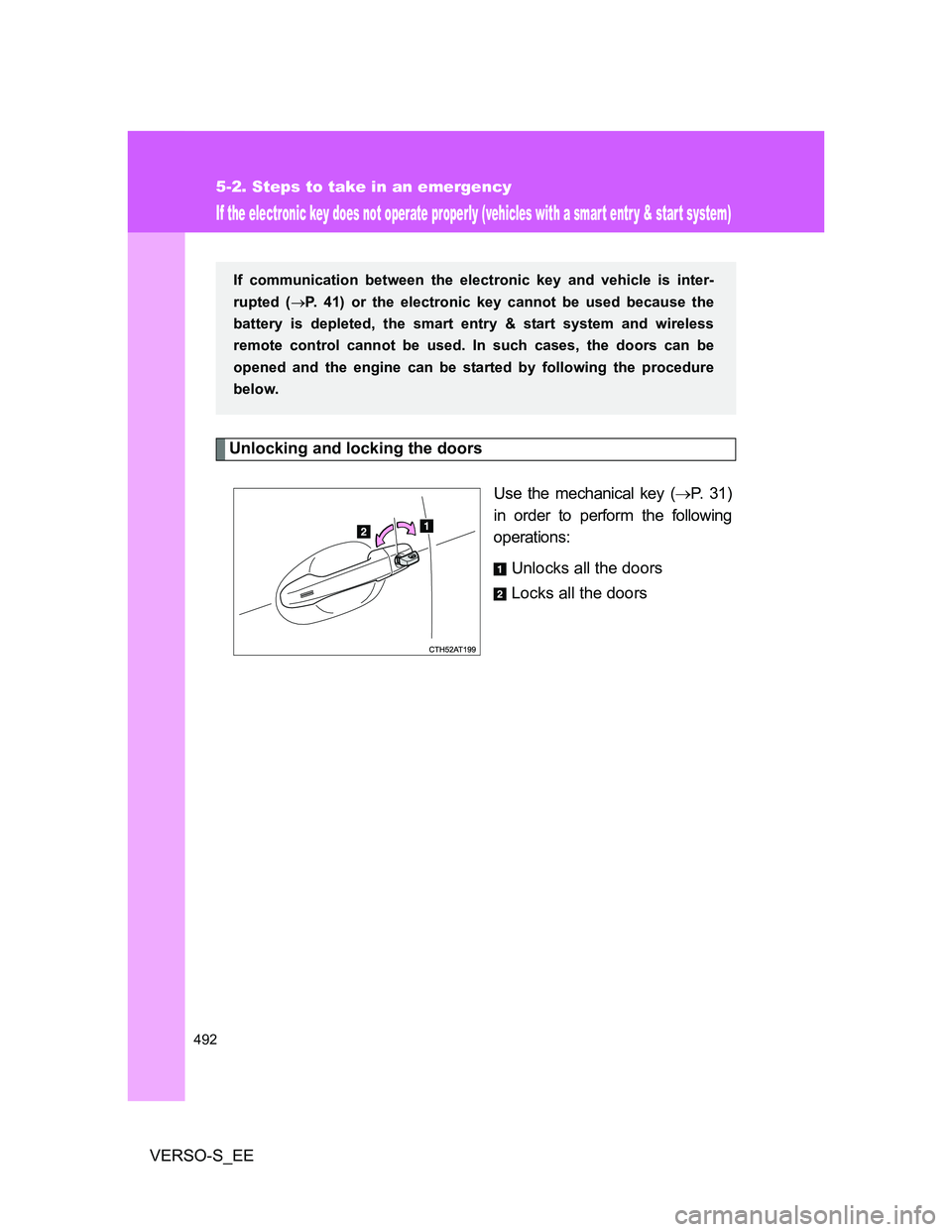
Unlocking and locking the doors
Use the mechanical key (P. 31)
in order to perform the following
operations:
Unlocks all the doors
Locks all the doors
If communication between the electronic key and vehicle is inter-
rupted (P. 41) or the electronic key cannot be used because the
battery is depleted, the smart entry & start system and wireless
remote control cannot be used. In such cases, the doors can be
opened and the engine can be started by following the procedure
below.
Page 493 of 560
5
493 5-2. Steps to take in an emergency
When trouble arises
VERSO-S_EE
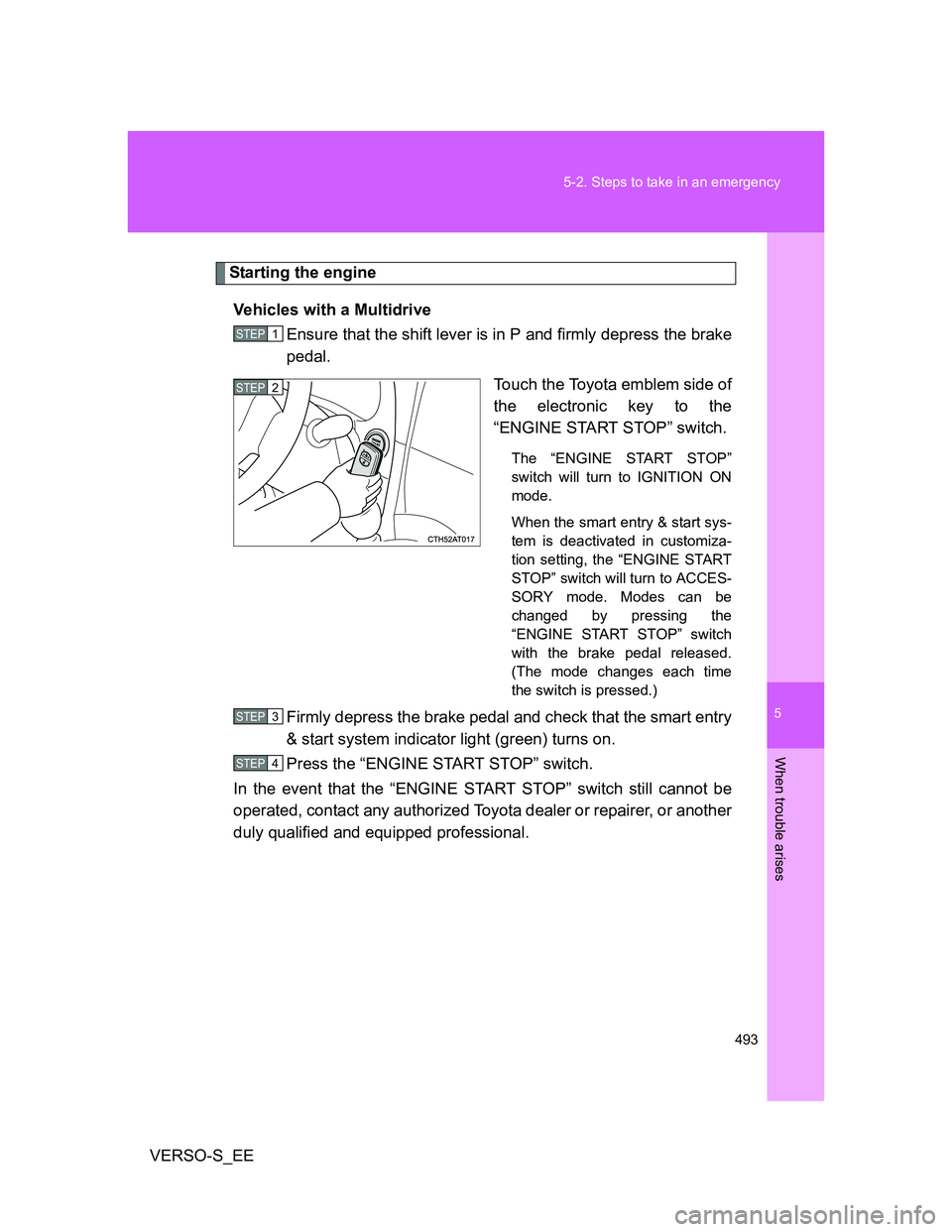
Starting the engine
Vehicles with a Multidrive
Ensure that the shift lever is in P and firmly depress the brake
pedal.
Touch the Toyota emblem side of
the electronic key to the
“ENGINE START STOP” switch.
The “ENGINE START STOP”
switch will turn to IGNITION ON
mode.
When the smart entry & start sys-
tem is deactivated in customiza-
tion setting, the “ENGINE START
STOP” switch will turn to ACCES-
SORY mode. Modes can be
changed by pressing the
“ENGINE START STOP” switch
with the brake pedal released.
(The mode changes each time
the switch is pressed.)
Firmly depress the brake pedal and check that the smart entry
& start system indicator light (green) turns on.
Press the “ENGINE START STOP” switch.
In the event that the “ENGINE START STOP” switch still cannot be
operated, contact any authorized Toyota dealer or repairer, or another
duly qualified and equipped professional.
STEP1
STEP2
STEP3
STEP4
Page 494 of 560
494 5-2. Steps to take in an emergency
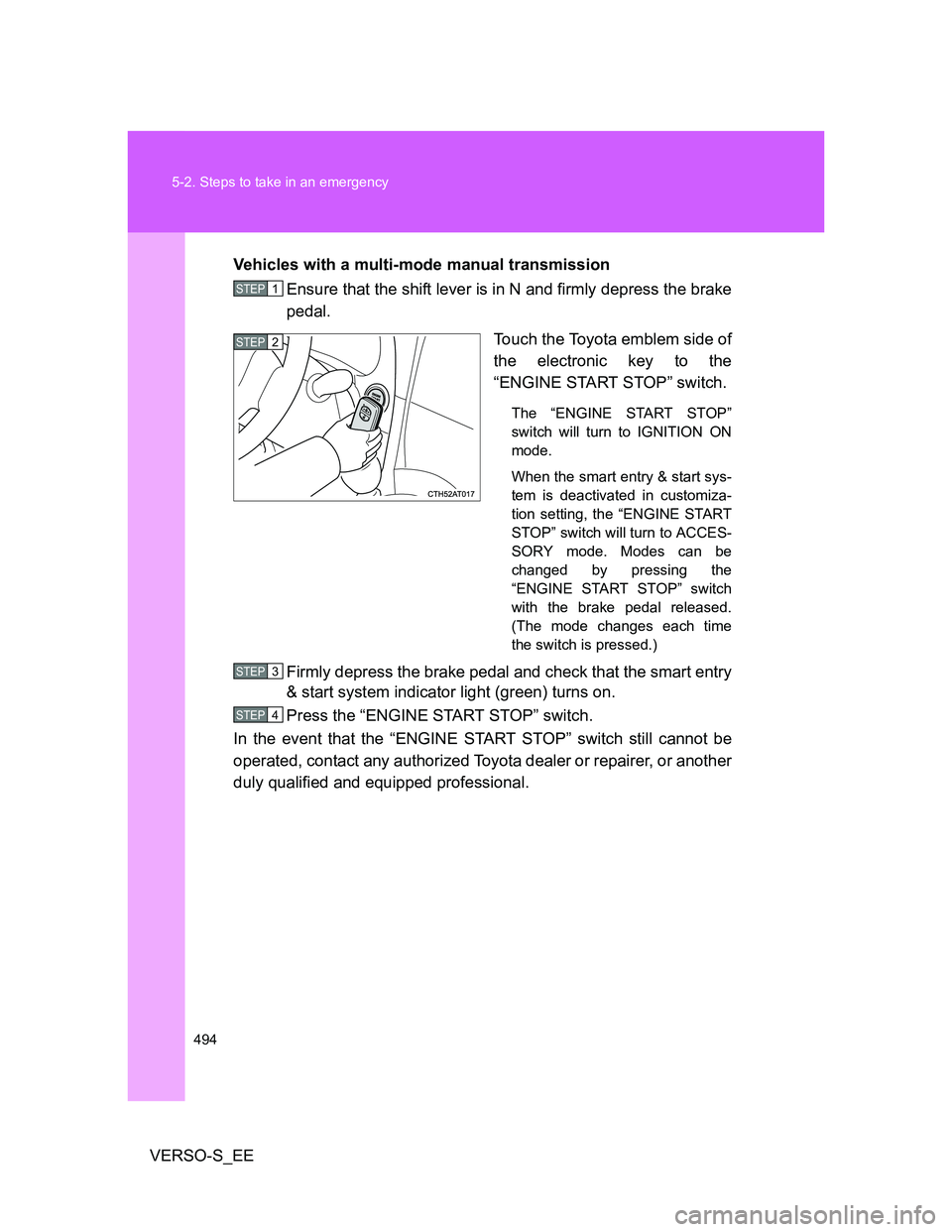
VERSO-S_EEVehicles with a multi-mode manual transmission
Ensure that the shift lever is in N and firmly depress the brake
pedal.
Touch the Toyota emblem side of
the electronic key to the
“ENGINE START STOP” switch.
The “ENGINE START STOP”
switch will turn to IGNITION ON
mode.
When the smart entry & start sys-
tem is deactivated in customiza-
tion setting, the “ENGINE START
STOP” switch will turn to ACCES-
SORY mode. Modes can be
changed by pressing the
“ENGINE START STOP” switch
with the brake pedal released.
(The mode changes each time
the switch is pressed.)
Firmly depress the brake pedal and check that the smart entry
& start system indicator light (green) turns on.
Press the “ENGINE START STOP” switch.
In the event that the “ENGINE START STOP” switch still cannot be
operated, contact any authorized Toyota dealer or repairer, or another
duly qualified and equipped professional.
STEP1
STEP2
STEP3
STEP4
Page 495 of 560
5
495 5-2. Steps to take in an emergency
When trouble arises
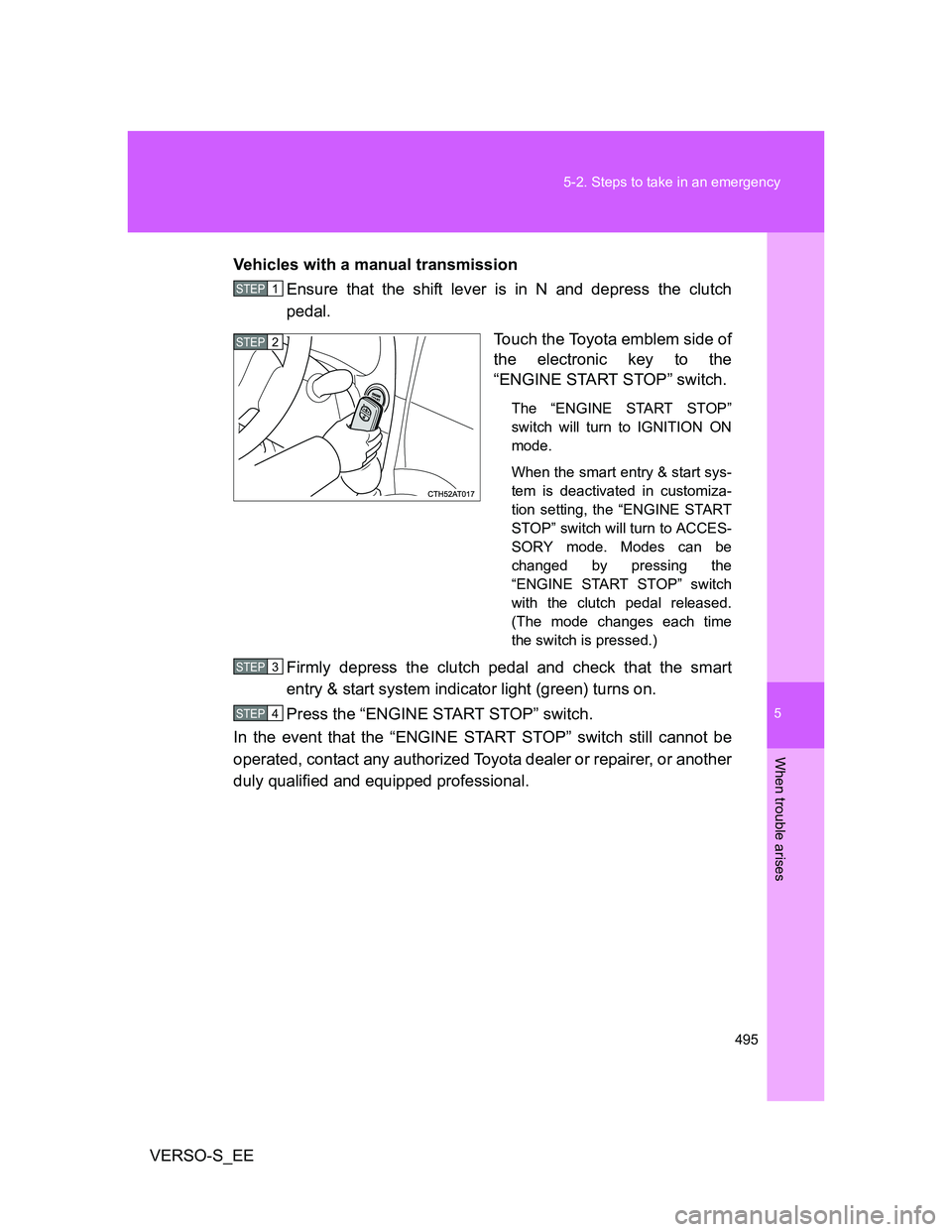
VERSO-S_EEVehicles with a manual transmission
Ensure that the shift lever is in N and depress the clutch
pedal.
Touch the Toyota emblem side of
the electronic key to the
“ENGINE START STOP” switch.
The “ENGINE START STOP”
switch will turn to IGNITION ON
mode.
When the smart entry & start sys-
tem is deactivated in customiza-
tion setting, the “ENGINE START
STOP” switch will turn to ACCES-
SORY mode. Modes can be
changed by pressing the
“ENGINE START STOP” switch
with the clutch pedal released.
(The mode changes each time
the switch is pressed.)
Firmly depress the clutch pedal and check that the smart
entry & start system indicator light (green) turns on.
Press the “ENGINE START STOP” switch.
In the event that the “ENGINE START STOP” switch still cannot be
operated, contact any authorized Toyota dealer or repairer, or another
duly qualified and equipped professional.
STEP1
STEP2
STEP3
STEP4