Page 3 of 872
1
2
3
4
5
6
7
3
SIENNA_OM_OM45483U_(U)
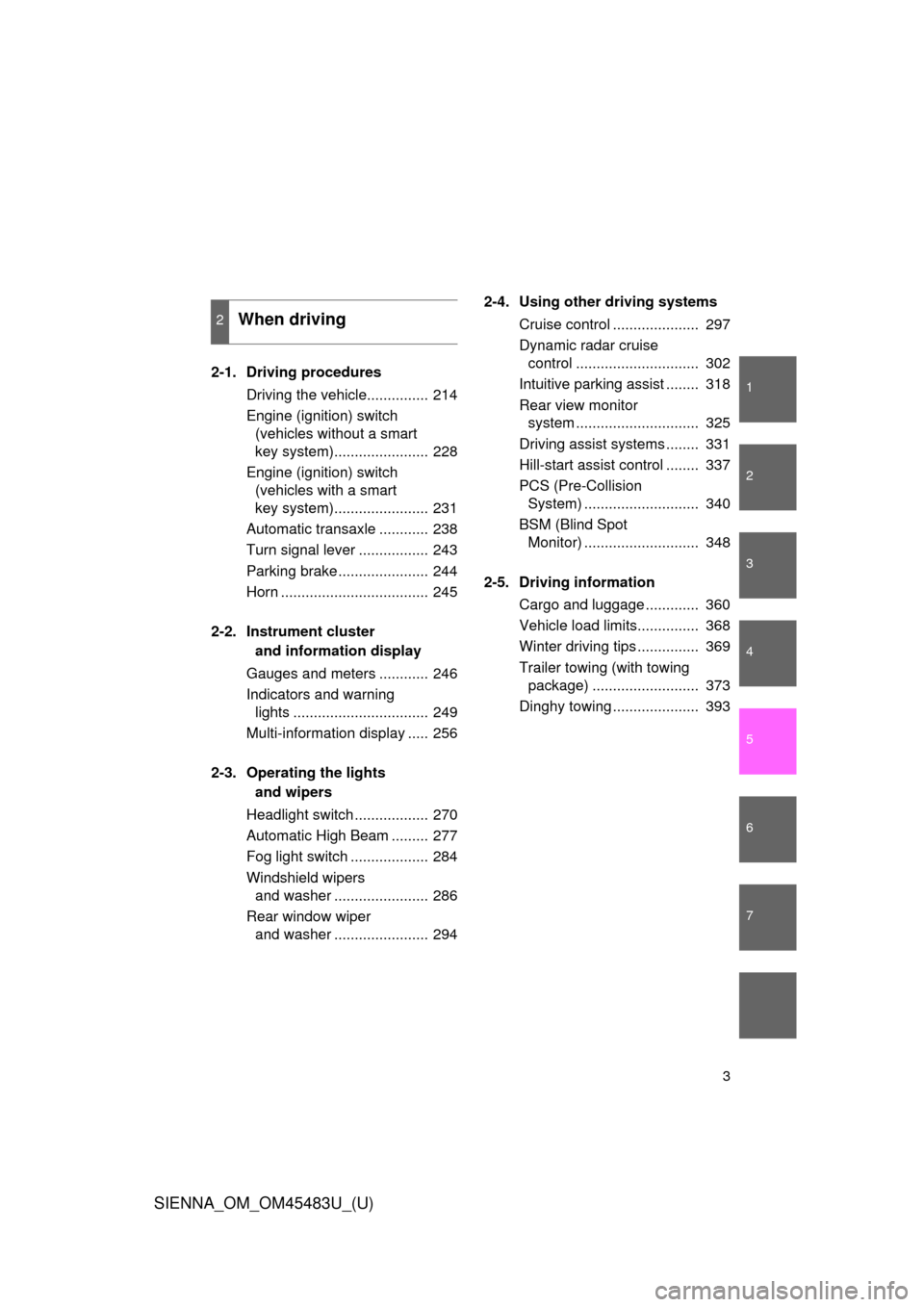
2-1. Driving proceduresDriving the vehicle............... 214
Engine (ignition) switch (vehicles without a smart
key system)....................... 228
Engine (ignition) switch (vehicles with a smart
key system)....................... 231
Automatic transaxle ............ 238
Turn signal lever ................. 243
Parking brake ...................... 244
Horn .................................... 245
2-2. Instrument cluster and information display
Gauges and meters ............ 246
Indicators and warning lights ................................. 249
Multi-information display ..... 256
2-3. Operating the lights and wipers
Headlight switch .................. 270
Automatic High Beam ......... 277
Fog light switch ................... 284
Windshield wipers and washer ....................... 286
Rear window wiper and washer ....................... 294 2-4. Using other driving systems
Cruise control ..................... 297
Dynamic radar cruise control .............................. 302
Intuitive parking assist ........ 318
Rear view monitor system .............................. 325
Driving assist systems ........ 331
Hill-start assist control ........ 337
PCS (Pre-Collision System) ............................ 340
BSM (Blind Spot Monitor) ............................ 348
2-5. Driving information Cargo and luggage ............. 360
Vehicle load limits............... 368
Winter driving tips ............... 369
Trailer towing (with towing package) .......................... 373
Dinghy towing ..................... 393
2When driving
Page 8 of 872
SIENNA_OM_OM45483U_(U)
8
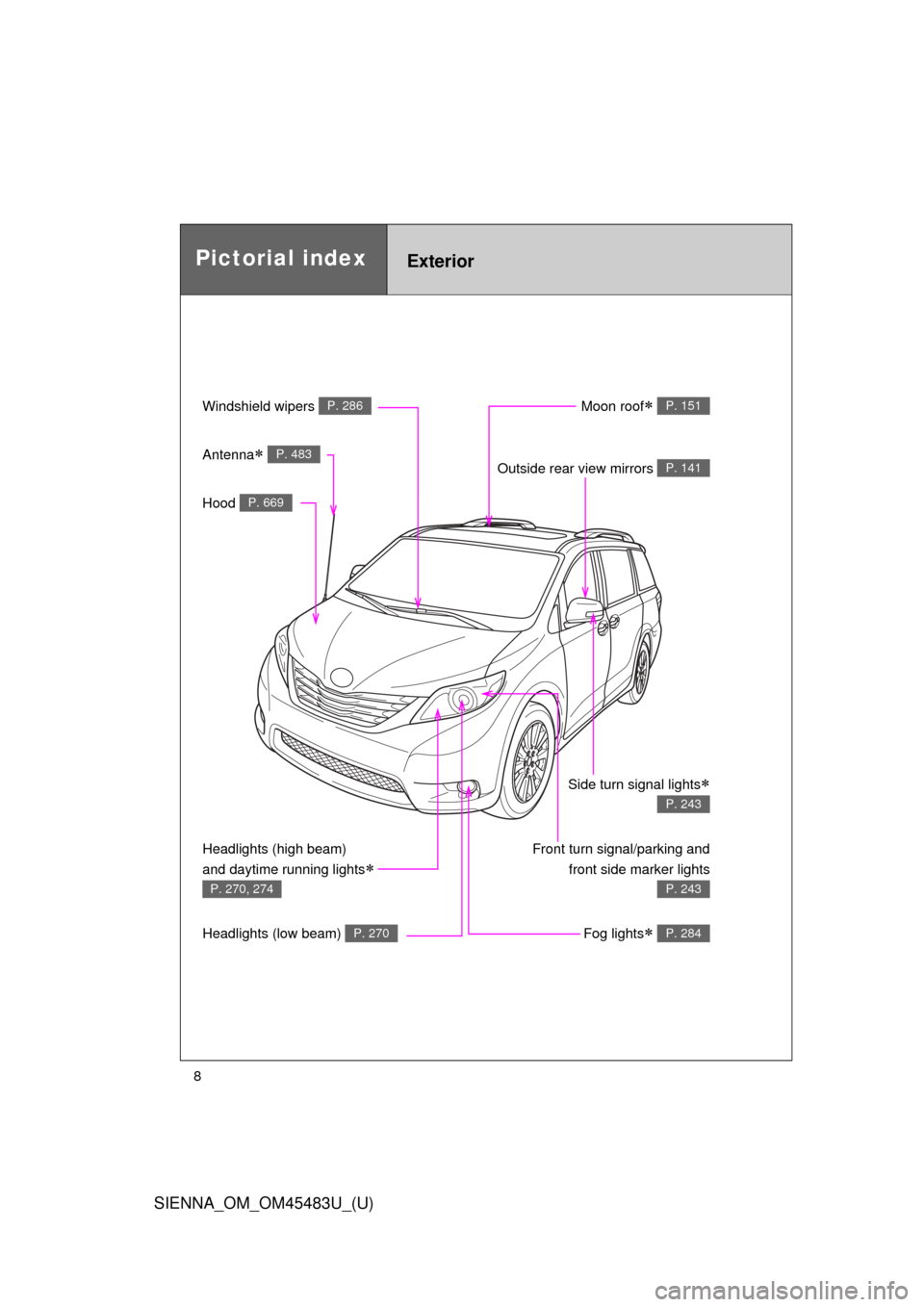
Pictorial indexExterior
Windshield wipers P. 286
Hood P. 669
Moon roof P. 151
Outside rear view mirrors P. 141
Front turn signal/parking andfront side marker lights
P. 243
Headlights (high beam)
and daytime running lights
P. 270, 274
Headlights (low beam) P. 270Fog lights P. 284
Antenna P. 483
Side turn signal lights
P. 243
Page 9 of 872
SIENNA_OM_OM45483U_(U)
9
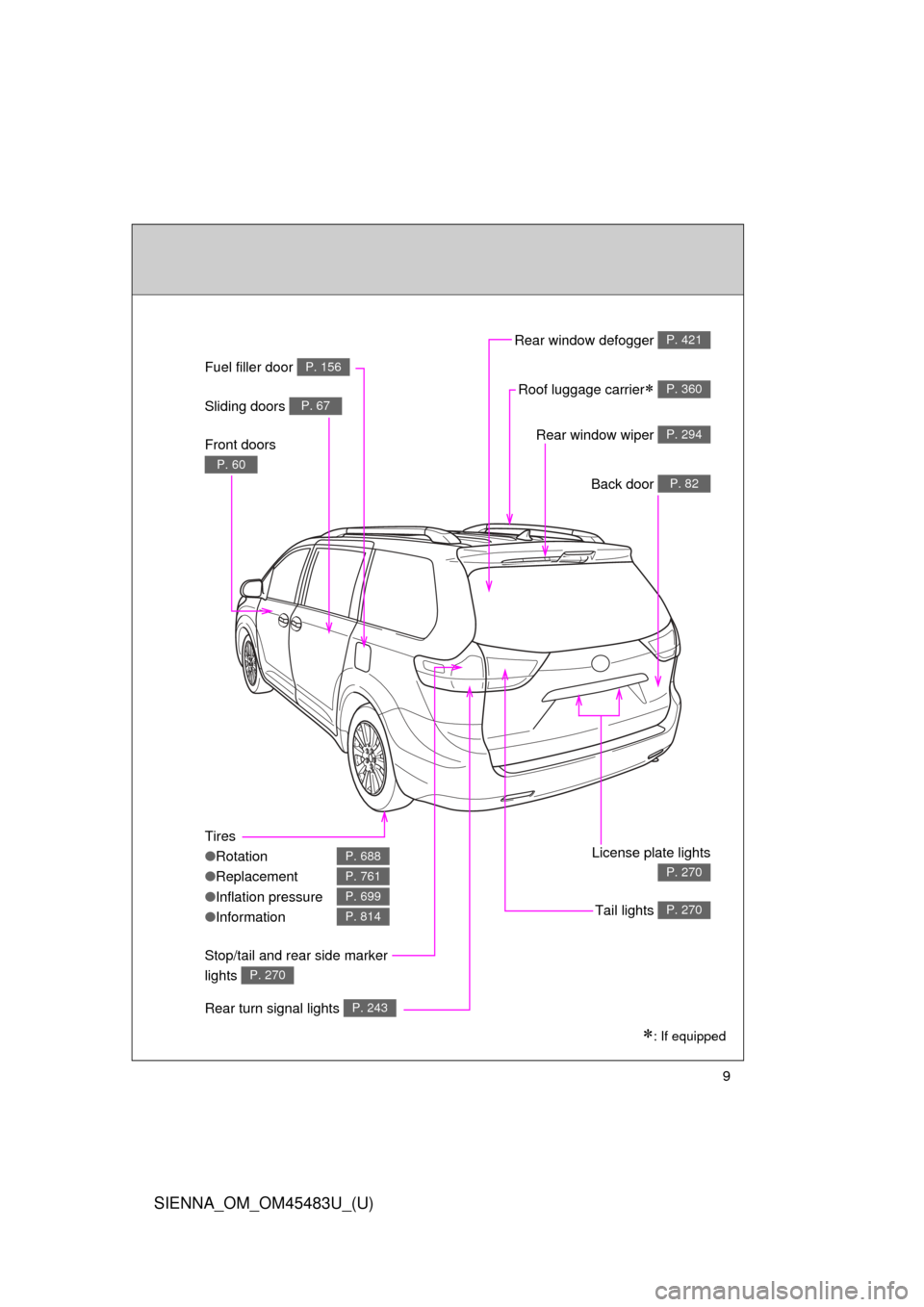
: If equipped
Rear window wiper P. 294
Fuel filler door P. 156
Sliding doors P. 67
Roof luggage carrier P. 360
Back door P. 82
License plate lights
P. 270
Tail lights P. 270
Tires
●Rotation
● Replacement
● Inflation pressure
● Information
P. 688
P. 761
P. 699
P. 814
Stop/tail and rear side marker
lights
P. 270
Rear turn signal lights P. 243
Rear window defogger P. 421
Front doors
P. 60
Page 16 of 872
SIENNA_OM_OM45483U_(U)
16
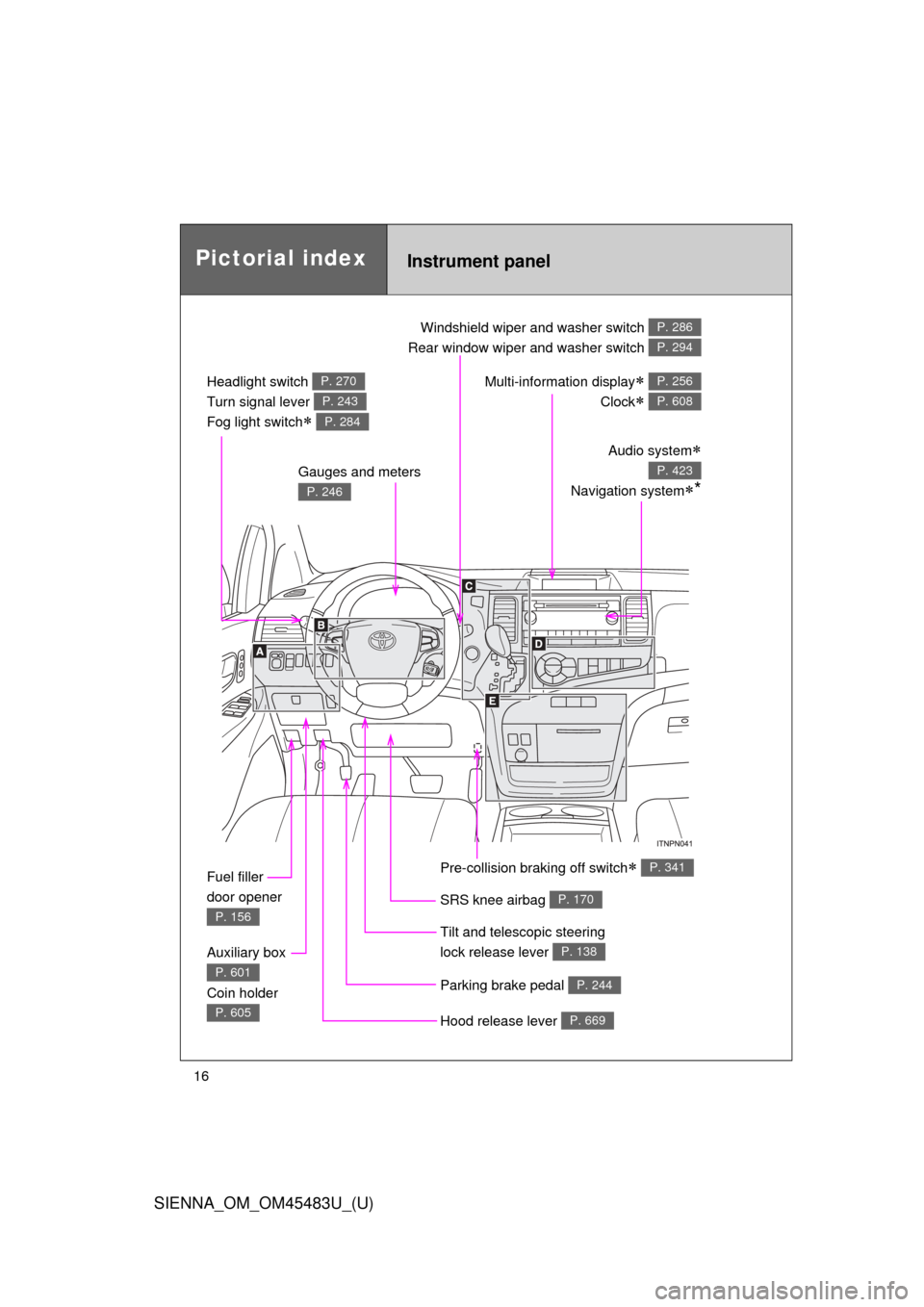
Pictorial indexInstrument panel
Headlight switch
Turn signal lever
Fog light switch
P. 270
P. 243
P. 284
Windshield wiper and washer switch
Rear window wiper and washer switch P. 286
P. 294
Gauges and meters
P. 246
Audio system
Navigation system*
P. 423
Multi-information display
Clock
P. 256
P. 608
Fuel filler
door opener
P. 156
Auxiliary box
Coin holder
P. 601
P. 605Hood release lever P. 669
Parking brake pedal P. 244
Tilt and telescopic steering
lock release lever
P. 138
SRS knee airbag P. 170
Pre-collision braking off switch P. 341
Page 43 of 872
43
1-2. Opening, closing and locking the doors
1
Before driving
SIENNA_OM_OM45483U_(U)
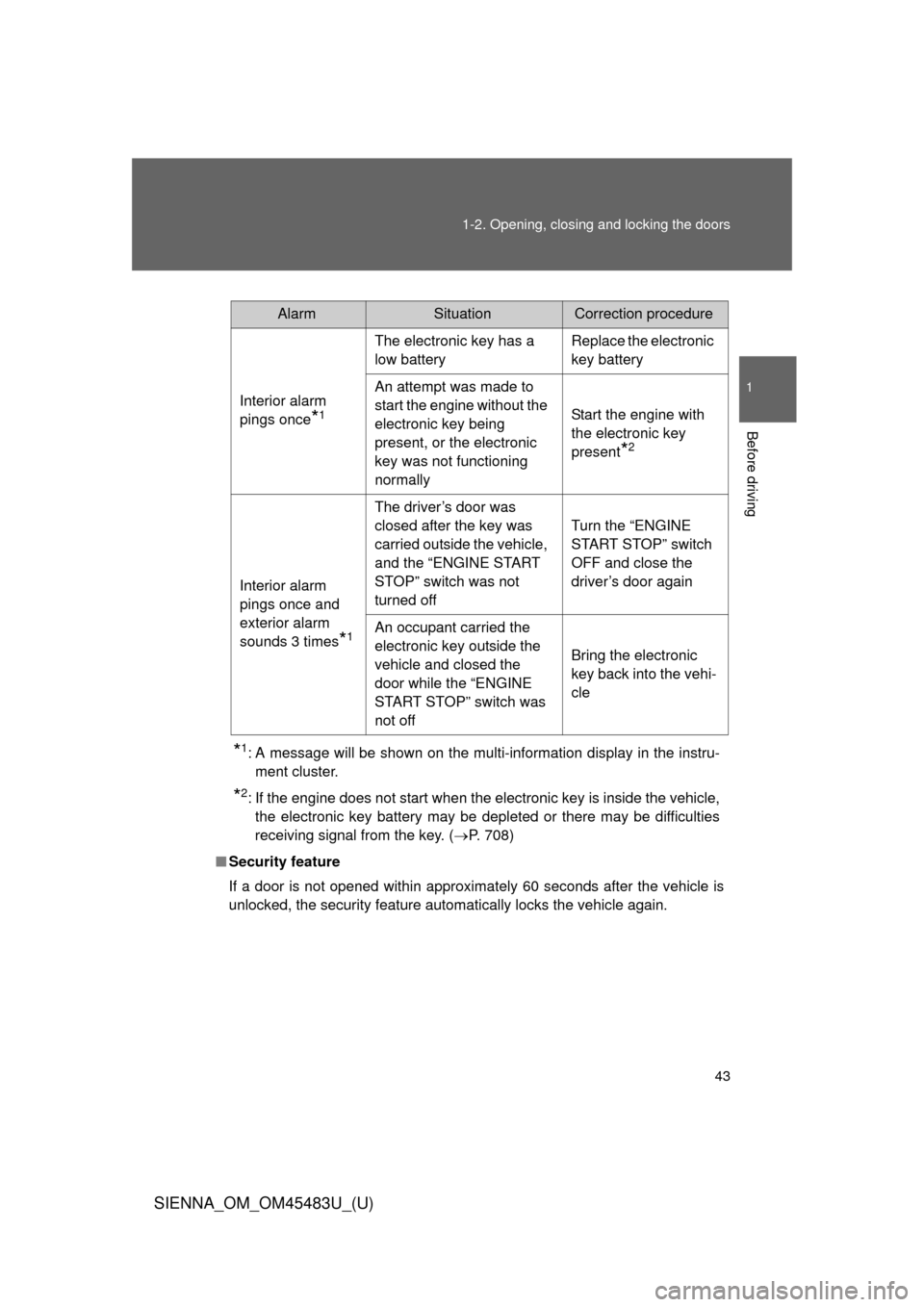
*1: A message will be shown on the multi-information display in the instru-
ment cluster.
*2: If the engine does not start when the electronic key is inside the vehicle,the electronic key battery may be depleted or there may be difficulties
receiving signal from the key. ( P. 708)
■ Security feature
If a door is not opened within approximately 60 seconds after the vehicle is
unlocked, the security feature automatically locks the vehicle again.
AlarmSituationCorrection procedure
Interior alarm
pings once
*1
The electronic key has a
low battery Replace the electronic
key battery
An attempt was made to
start the engine without the
electronic key being
present, or the electronic
key was not functioning
normally Start the engine with
the electronic key
present
*2
Interior alarm
pings once and
exterior alarm
sounds 3 times
*1
The driver’s door was
closed after the key was
carried outside the vehicle,
and the “ENGINE START
STOP” switch was not
turned offTurn the “ENGINE
START STOP” switch
OFF and close the
driver’s door again
An occupant carried the
electronic key outside the
vehicle and closed the
door while the “ENGINE
START STOP” switch was
not off Bring the electronic
key back into the vehi-
cle
Page 48 of 872

48 1-2. Opening, closing and locking the doors
SIENNA_OM_OM45483U_(U)
■Note for locking the doors
●Touching the door lock sensor while wearing gloves may delay or prevent
lock operation. Remove the gloves and touch the lock sensor again.
● When the lock operation is performed using the lock sensor, recognition
signals will be shown up to two consecutive times. After this, no recogni-
tion signals will be given.
● If the door handle becomes wet while the electronic key is within the
effective range, the door may lock and unlock repeatedly. Place the key
in a position 6 ft. (2 m) or more separate from the vehicle while the vehi-
cle is being washed. (Take care to ensure that the key is not stolen.)
● If the electronic key is inside the vehicle and a door handle becomes wet
during a car wash, a message may be shown on the multi-information
display and a buzzer will sound outside the vehicle. To turn off the alarm,
lock all the doors.
● The lock sensor may not work properly if it comes into contact with ice,
snow, mud, etc. Clean the lock sensor and attempt to operate it again, or
use the lock sensor on the lower part of the door handle.
● Fingernails may scrape against the door during operation of the door
handle. Be careful not to injure fingernails or damage the surface of the
door.
Page 121 of 872
121
1
1-3. Adjustable components (seats, mirrors, steering wheel)
Before driving
SIENNA_OM_OM45483U_(U)
Driving position memor y
: If equipped
Your preferred driving position (the position of the driver’s seat and
outside rear view mirrors) can be memorized and recalled with the
touch of a button. It is also possi ble to set this function to activate
automatically when th e doors are unlocked.
Two different driving positions can be entered into memory.
■ Entering a position to memory
Vehicles without a smart key system
Turn the engine switch to the “ON” position.
Vehicles with a smart key system
Turn the “ENGINE START STOP” switch to IGNITION ON
mode.
Adjust the driver’s seat and outside rear view mirrors to the
desired positions. Press the “SET” button, then
within 3 seconds press button
“1” or “2” until the signal
beeps.
If the selected button has
already been preset, the previ-
ously recorded position will be
overwritten.
STEP1
STEP2
STEP3
Page 123 of 872
123
1-3. Adjustable components (s
eats, mirrors, steering wheel)
1
Before driving
SIENNA_OM_OM45483U_(U)
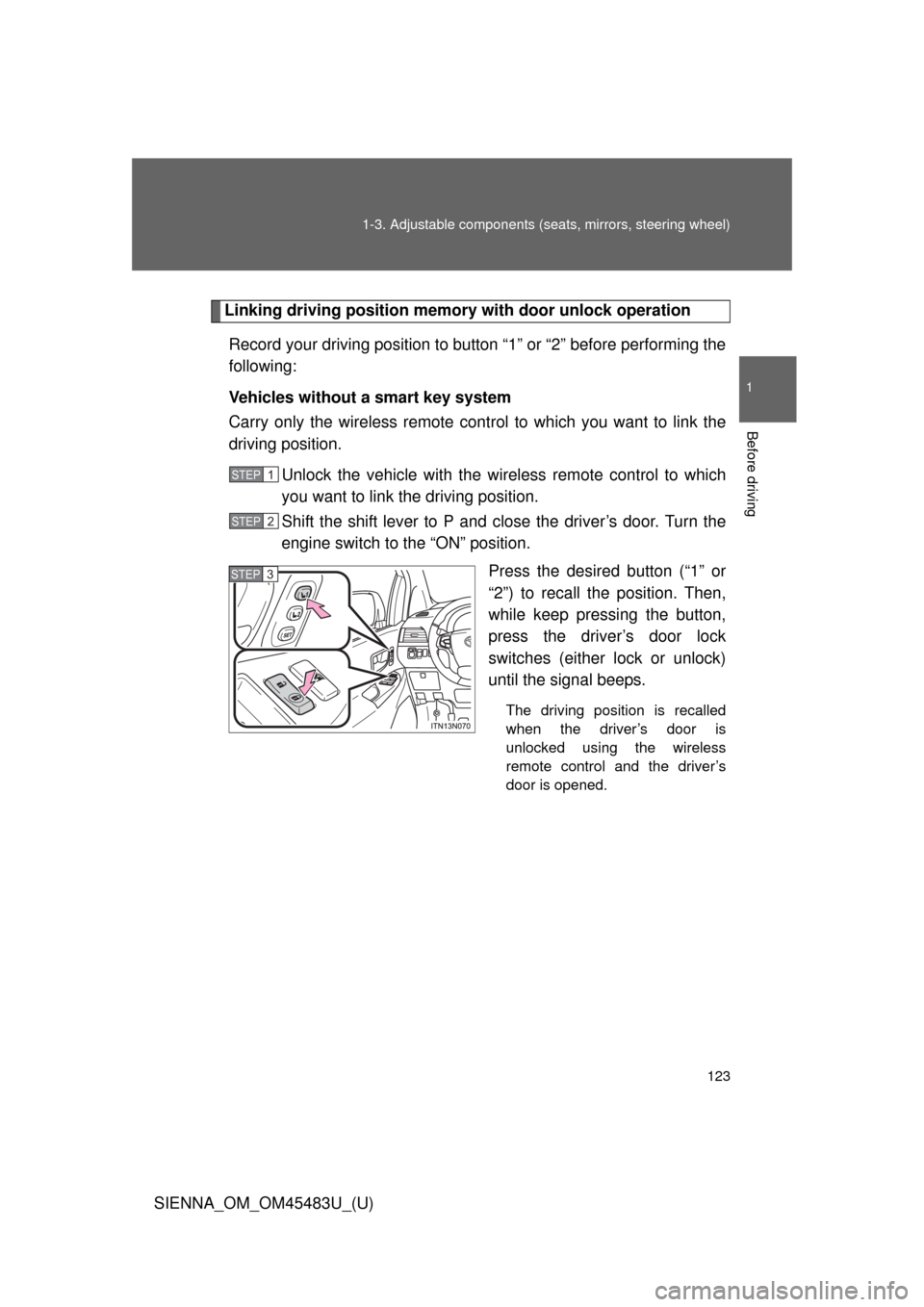
Linking driving position memory with door unlock operation
Record your driving position to button “1” or “2” before performing the
following:
Vehicles without a smart key system
Carry only the wireless remote cont rol to which you want to link the
driving position.
Unlock the vehicle with the wire less remote control to which
you want to link the driving position.
Shift the shift lever to P and close the driver’s door. Turn the
engine switch to the “ON” position.
Press the desired button (“1” or
“2”) to recall the position. Then,
while keep pressing the button,
press the driver’s door lock
switches (either lock or unlock)
until the signal beeps.
The driving position is recalled
when the driver’s door is
unlocked using the wireless
remote control and the driver’s
door is opened.
STEP1
STEP2
STEP3