Page 124 of 872
124 1-3. Adjustable components (seats, mirrors, steering wheel)
SIENNA_OM_OM45483U_(U)Vehicles with a smart key system
Carry only the electronic key to wh
ich you want to link the driving
position. If 2 or more keys are in the vehicle, the driving position can-
not be linked properly.
Shift the shift lever to P and close the driver’s door. Turn the
“ENGINE START STOP” switch to IGNITION ON mode. Press the desired button (“1” or
“2”) to recall the position. Then,
while keep pressing the button,
press the driver’s door lock
switches (either lock or unlock)
until the signal beeps.
The driving position is recalled
when the driver’s door is
unlocked using the wireless
remote control and the driver’s
door is opened.
STEP1
STEP2
Page 213 of 872
When driving2
213
SIENNA_OM_OM45483U_(U)
2-1. Driving proceduresDriving the vehicle............ 214
Engine (ignition) switch (vehicles without a smart
key system).................... 228
Engine (ignition) switch (vehicles with a smart
key system).................... 231
Automatic transaxle ......... 238
Turn signal lever .............. 243
Parking brake ................... 244
Horn ................................. 245
2-2. Instrument cluster and information display
Gauges and meters............. 246
Indicators and warning lights .............................. 249
Multi-information display............................ 256
2-3. Operating the lights and wipers
Headlight switch ............... 270
Automatic High Beam ...... 277
Fog light switch ................ 284
Windshield wipers and washer .................... 286
Rear window wiper and washer .................... 294 2-4. Using other driving systems
Cruise control ................... 297
Dynamic radar cruise control ............................ 302
Intuitive parking assist...... 318
Rear view monitor system ........................... 325
Driving assist systems ..... 331
Hill-start assist control ...... 337
PCS (Pre-Collision System).......................... 340
BSM (Blind Spot Monitor).......................... 348
2-5. Driving information Cargo and luggage .......... 360
Vehicle load limits ............ 368
Winter driving tips ............ 369
Trailer towing (with towing package)............. 373
Dinghy towing .................. 393
Page 243 of 872
243
2-1. Driving procedures
2
When driving
SIENNA_OM_OM45483U_(U)
Tur n signal lever
■Turn signals can be operated when
Vehicles without a smart key system:
The engine switch is in the “ON” position.
Vehicles with a smart key system:
The “ENGINE START STOP” switch is in IGNITION ON mode.
■ If the indicator flashes faster than usual
Check that a light bulb in the front or rear turn signal lights has not burned
out.
The turn signal lever can be used to show the following intentions of
the driver:
Right turn
Left turn
Lane change to the right
(push and hold the lever
partway)
The right hand signal will flash
until you release the lever.
Lane change to the left
(push and hold the lever
partway)
The left hand signal will flash
until you release the lever.
Page 251 of 872
251
2-2. Instrument cluster and information display
2
When driving
SIENNA_OM_OM45483U_(U)
■
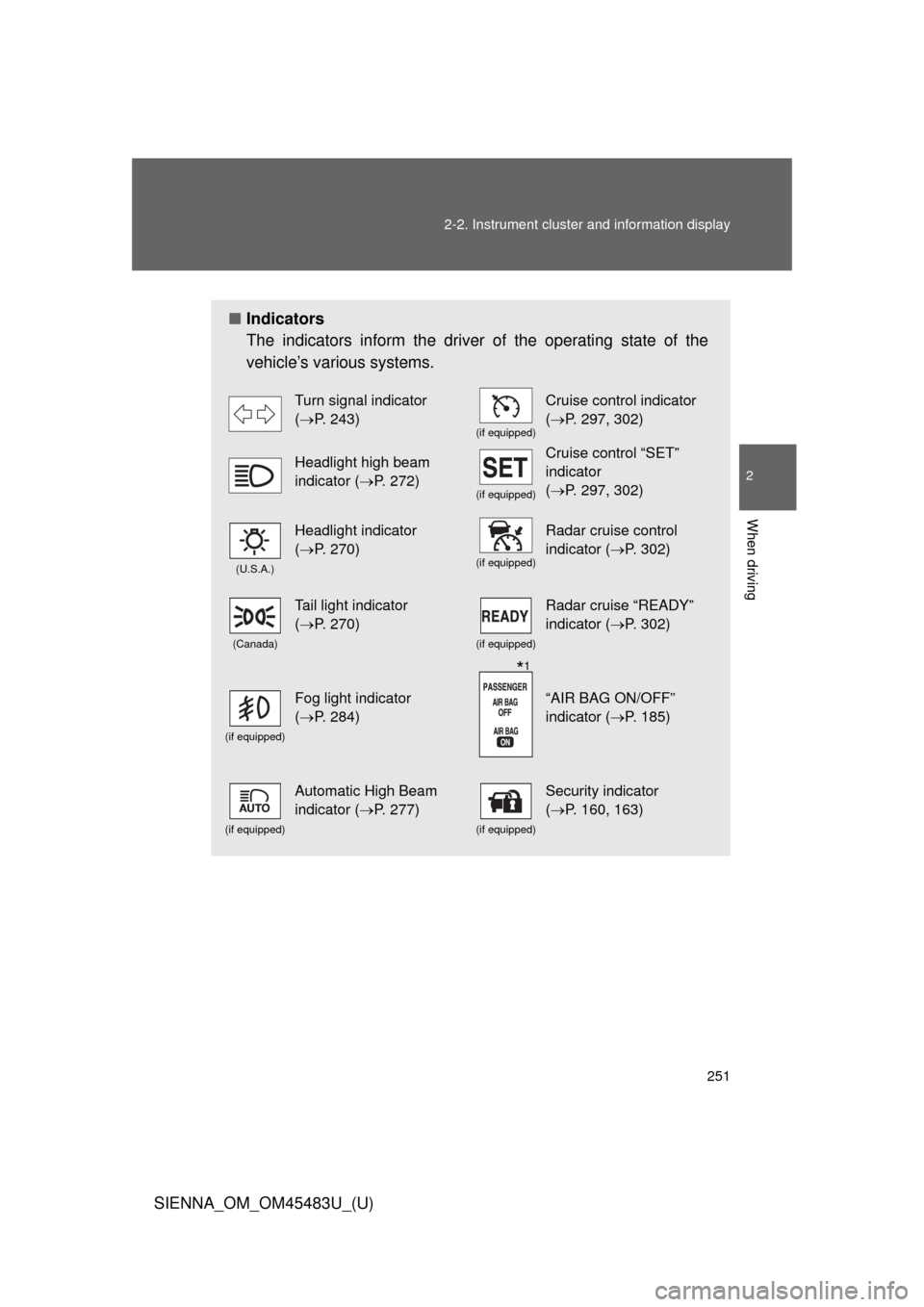
Indicators
The indicators inform the driver of the operating state of the
vehicle’s various systems.
Turn signal indicator
(P. 243)
(if equipped)
Cruise control indicator
(P. 297, 302)
Headlight high beam
indicator ( P. 272)
(if equipped)
Cruise control “SET”
indicator
(P. 297, 302)
(U.S.A.)
Headlight indicator
(P. 270)
(if equipped)
Radar cruise control
indicator (P. 302)
(Canada)
Tail light indicator
(P. 270)
(if equipped)
Radar cruise “READY”
indicator (P. 302)
(if equipped)
Fog light indicator
(P. 284)“AIR BAG ON/OFF”
indicator (P. 185)
(if equipped)
Automatic High Beam
indicator ( P. 277)
(if equipped)
Security indicator
(P. 160, 163)
*1
Page 280 of 872
280 2-3. Operating the lights and wipers
SIENNA_OM_OM45483U_(U)
■Limitations of the Automatic High Beam
Do not rely on the Automatic High Beam. Always drive safely, taking care to
observe your surroundings and turning high beam on or off manually if nec-
essary.
■ Camera sensor detection information
●High beam may not be automatically turned off in the following situations:
• When oncoming vehicles suddenly appear from a curve.
• When the vehicle is cut in front of by another.
● High beam may be turned off if an oncoming vehicle that is using fog
lights without using the headlights is detected.
● Houselights, streetlights, red traffic signals, and illuminated billboards or
signs may cause the high beam to turn off.
● The following factors may affect the amount of time taken to turn high
beam on or off:
• The brightness of headlights, fog lights, and tail lights of oncoming and
preceding vehicles
• Road conditions (wetness, ice, snow etc.)
• The number of passengers and amount of baggage
● High beam may be turned on or off when unexpected by the driver.
Page 349 of 872
349
2-4. Using other
driving systems
2
When driving
SIENNA_OM_OM45483U_(U)
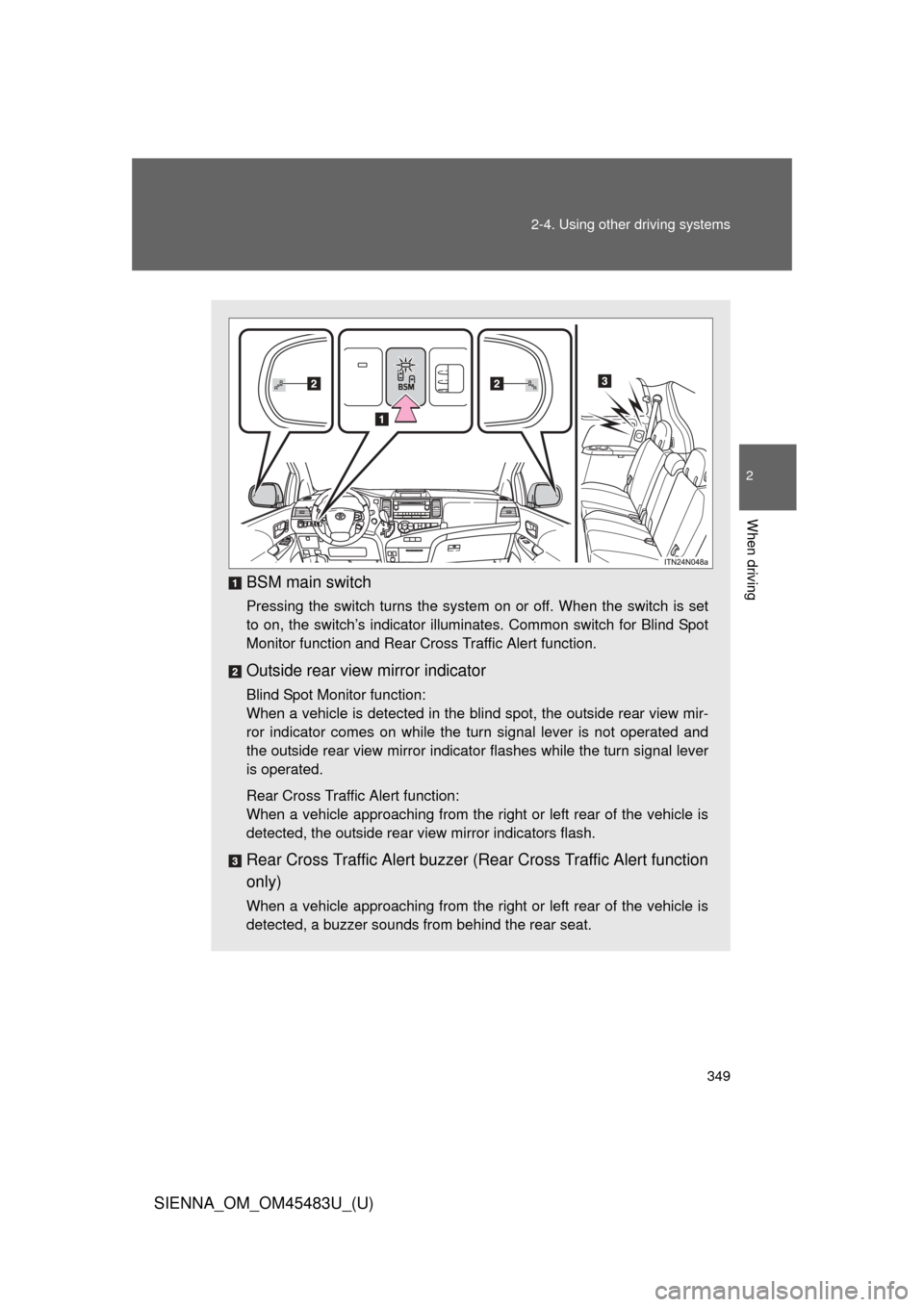
BSM main switch
Pressing the switch turns the system on or off. When the switch is set
to on, the switch’s indicator illuminates. Common switch for Blind Spot
Monitor function and Rear Cross Traffic Alert function.
Outside rear view mirror indicator
Blind Spot Monitor function:
When a vehicle is detected in the blind spot, the outside rear view mir-
ror indicator comes on while the turn signal lever is not operated and
the outside rear view mirror indicator flashes while the turn signal lever
is operated.
Rear Cross Traffic Alert function:
When a vehicle approaching from the right or left rear of the vehicle is
detected, the outside rear view mirror indicators flash.
Rear Cross Traffic Alert buzzer (Rear Cross Traffic Alert function
only)
When a vehicle approaching from the right or left rear of the vehicle is
detected, a buzzer sounds from behind the rear seat.
Page 434 of 872
434 3-2. Using the audio system
SIENNA_OM_OM45483U_(U)
Silencing the sound (type B and C)Press .
Press the button again to turn the system back on.
■ When the battery is disconnected (type A only)
All preset stations are erased.
■ Radio antenna type
●Detachable antenna (type A and B)
To remove a detachable antenna, carefully turn it counterclockwise.
● Wire antenna (type C)
The radio antenna is mounted inside the rear quarter window.
■ Reception sensitivity
●Type B and C Cargo loaded on the roof luggage carrier, especially
metal objects, may adversely affect the reception of XM
® Satellite Radio.
● Maintaining perfect radio reception at all times is difficult due to the con-
tinually changing position of the antenna, differences in signal strength
and surrounding objects, such as trains, transmitters, etc.
● Type C The radio antenna is mounted inside the rear quarter window.
To maintain clear radio reception, do not attach metallic window tinting or
other metallic objects to the antenna wire mounted inside the rear quarter
window.
Page 436 of 872
436 3-2. Using the audio system
SIENNA_OM_OM45483U_(U)
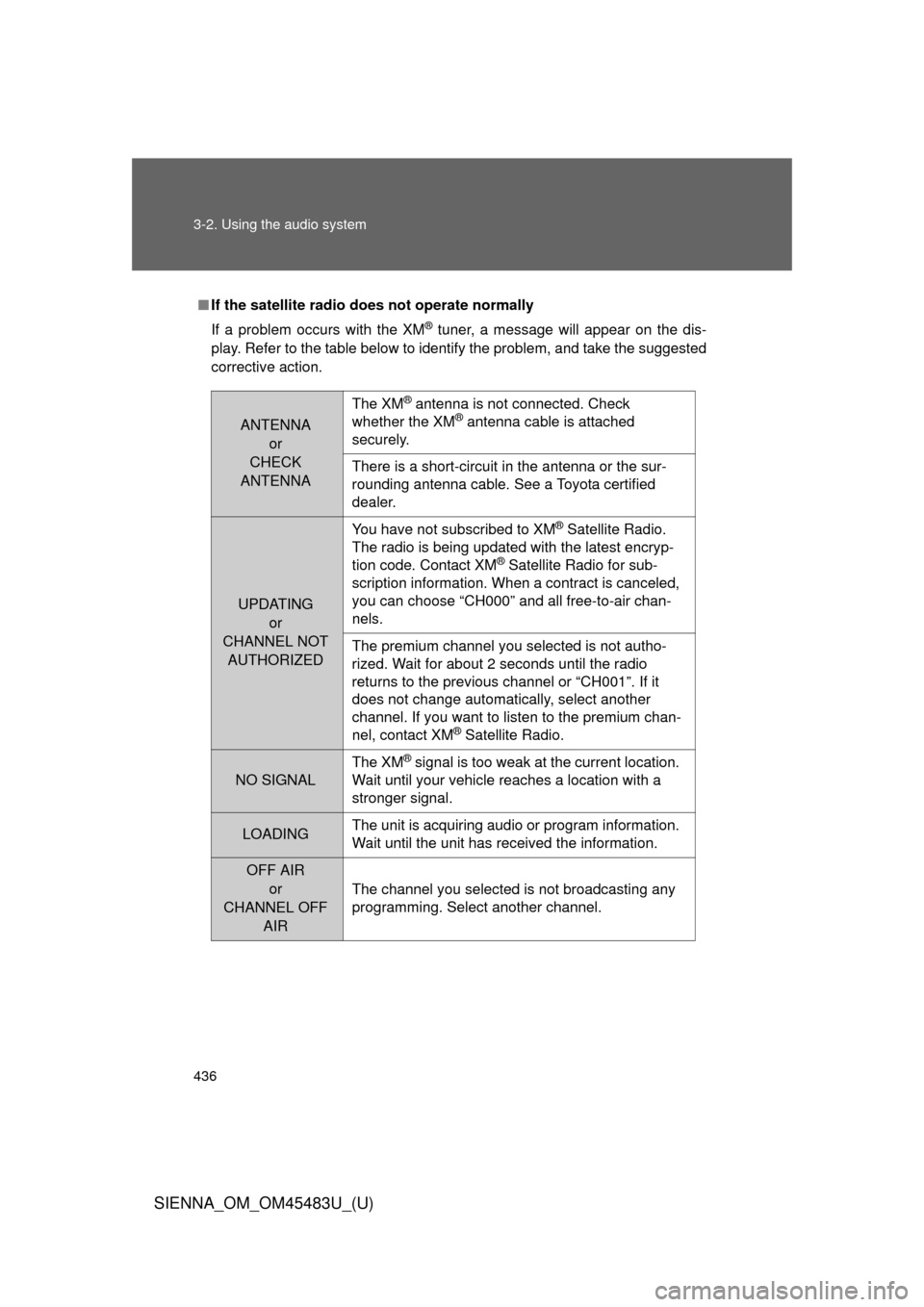
■If the satellite radio does not operate normally
If a problem occurs with the XM
® tuner, a message will appear on the dis-
play. Refer to the table below to identify the problem, and take the suggested
corrective action.
ANTENNA or
CHECK
ANTENNA
The XM® antenna is not connected. Check
whether the XM® antenna cable is attached
securely.
There is a short-circuit in the antenna or the sur-
rounding antenna cable. See a Toyota certified
dealer.
UPDATING
or
CHANNEL NOT AUTHORIZED You have not subscribed to XM
® Satellite Radio.
The radio is being updated with the latest encryp-
tion code. Contact XM
® Satellite Radio for sub-
scription information. When a contract is canceled,
you can choose “CH000” and all free-to-air chan-
nels.
The premium channel you selected is not autho-
rized. Wait for about 2 seconds until the radio
returns to the previous channel or “CH001”. If it
does not change automatically, select another
channel. If you want to listen to the premium chan-
nel, contact XM
® Satellite Radio.
NO SIGNAL The XM
® signal is too weak at the current location.
Wait until your vehicle reaches a location with a
stronger signal.
LOADING The unit is acquiring audio or program information.
Wait until the unit has received the information.
OFF AIR
or
CHANNEL OFF AIR
The channel you selected is not broadcasting any
programming. Select another channel.