Page 228 of 872
228
2-1. Driving procedures
SIENNA_OM_OM45483U_(U)
Engine (ignition) switch (vehicles without a smar t key system)
■Starting the engine
Check that the parking brake is set.
Check that the shift lever is set in P.
Firmly depress the brake pedal.
Turn the engine switch to the “START” position to start the
engine.
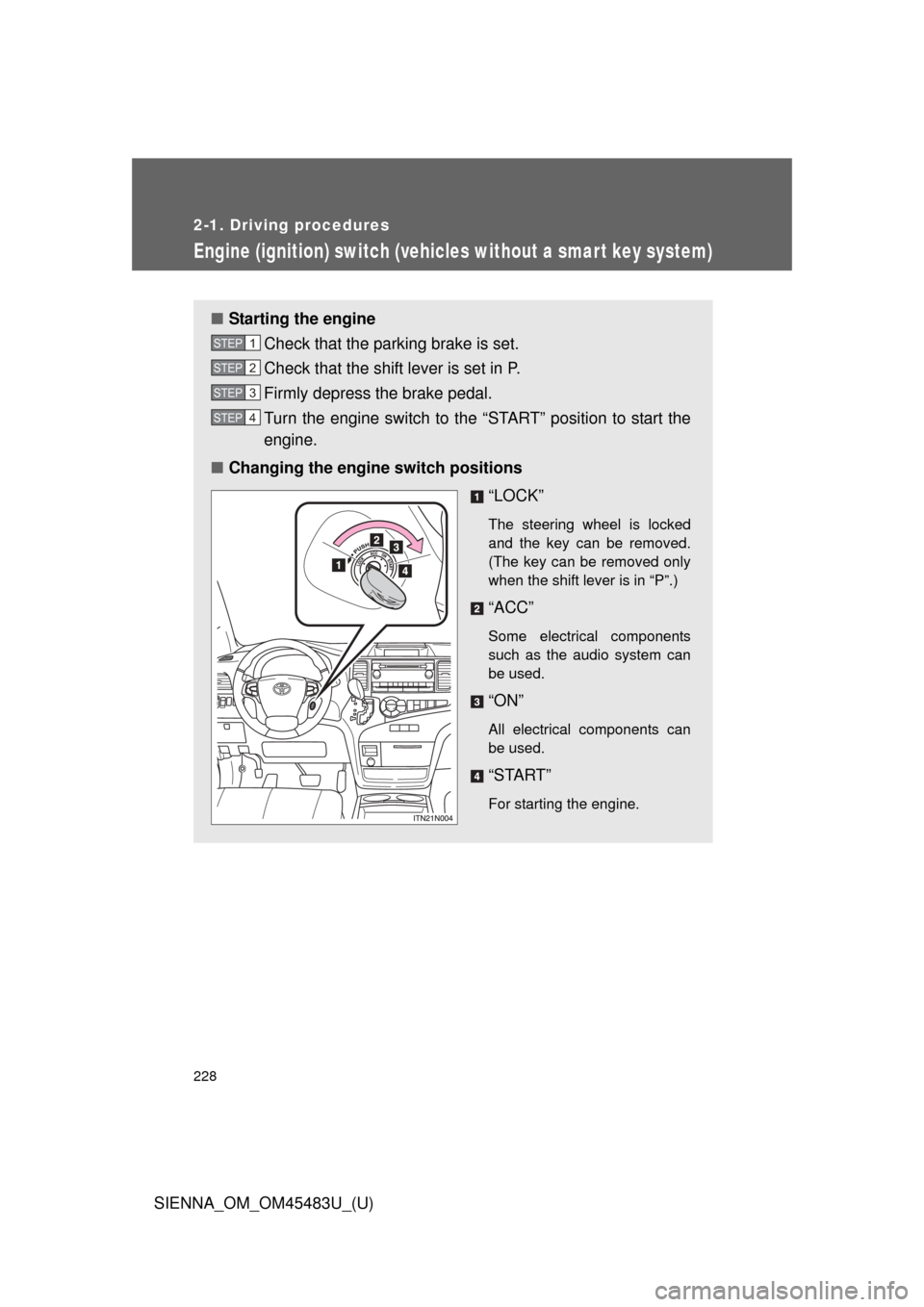
■ Changing the engine switch positions
“LOCK”
The steering wheel is locked
and the key can be removed.
(The key can be removed only
when the shift lever is in “P”.)
“ACC”
Some electrical components
such as the audio system can
be used.
“ON”
All electrical components can
be used.
“START”
For starting the engine.
STEP1
STEP2
STEP3
STEP4
Page 231 of 872
231
2-1. Driving procedures
2
When driving
SIENNA_OM_OM45483U_(U)
Engine (ignition) switch (vehicles with a smart key system)
Performing the following operations when carrying the electronic
key on your person starts the engine or changes “ENGINE START
STOP” switch modes.
■ Starting the engine
Check that the parking brake is set.
Check that the shift lever is set in P.
Firmly depress the brake pedal.
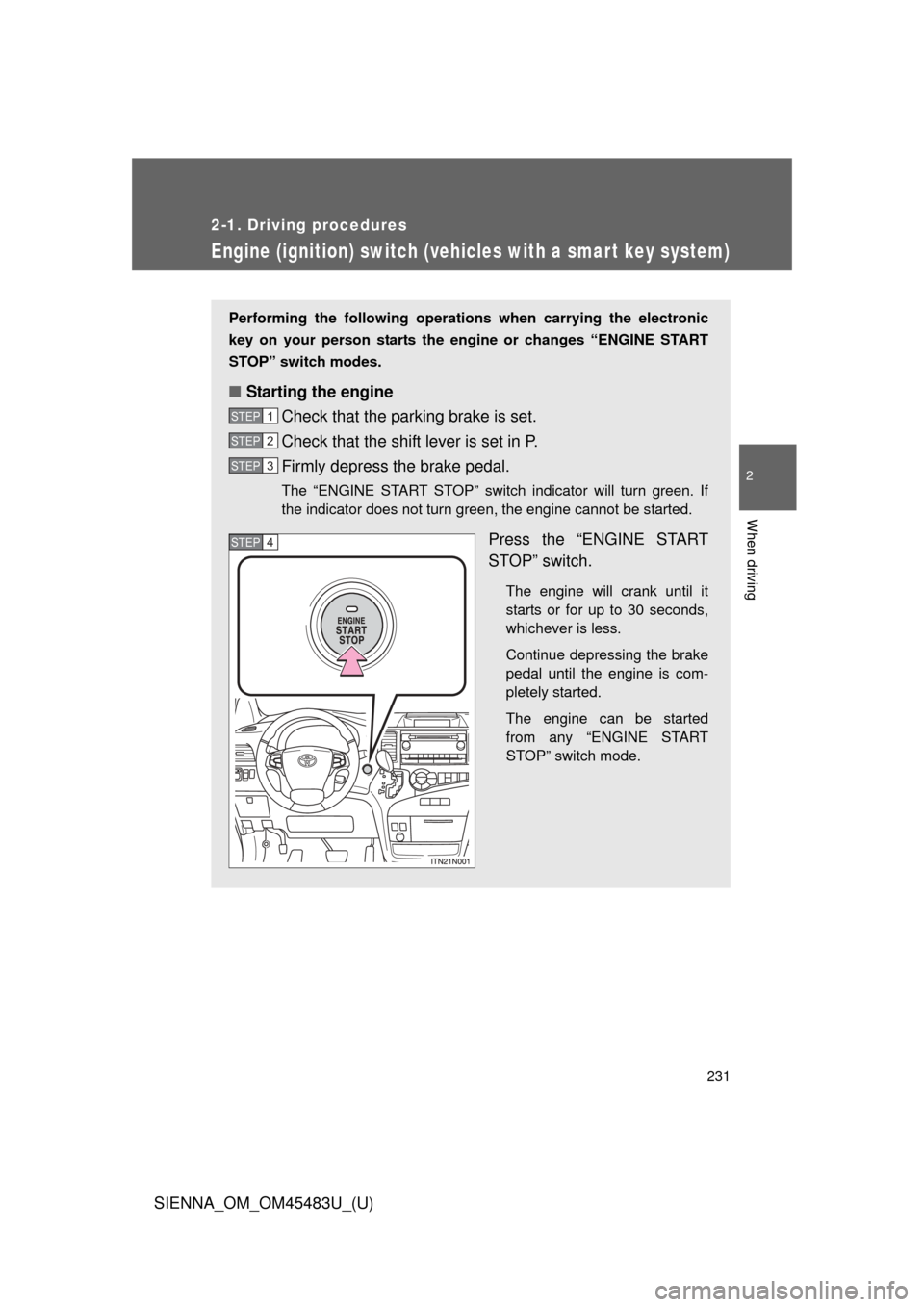
The “ENGINE START STOP” switch indicator will turn green. If
the indicator does not turn green, the engine cannot be started.
Press the “ENGINE START
STOP” switch.
The engine will crank until it
starts or for up to 30 seconds,
whichever is less.
Continue depressing the brake
pedal until the engine is com-
pletely started.
The engine can be started
from any “ENGINE START
STOP” switch mode.
STEP1
STEP2
STEP3
STEP4
Page 233 of 872
233
2-1. Driving procedures
2
When driving
SIENNA_OM_OM45483U_(U)
■
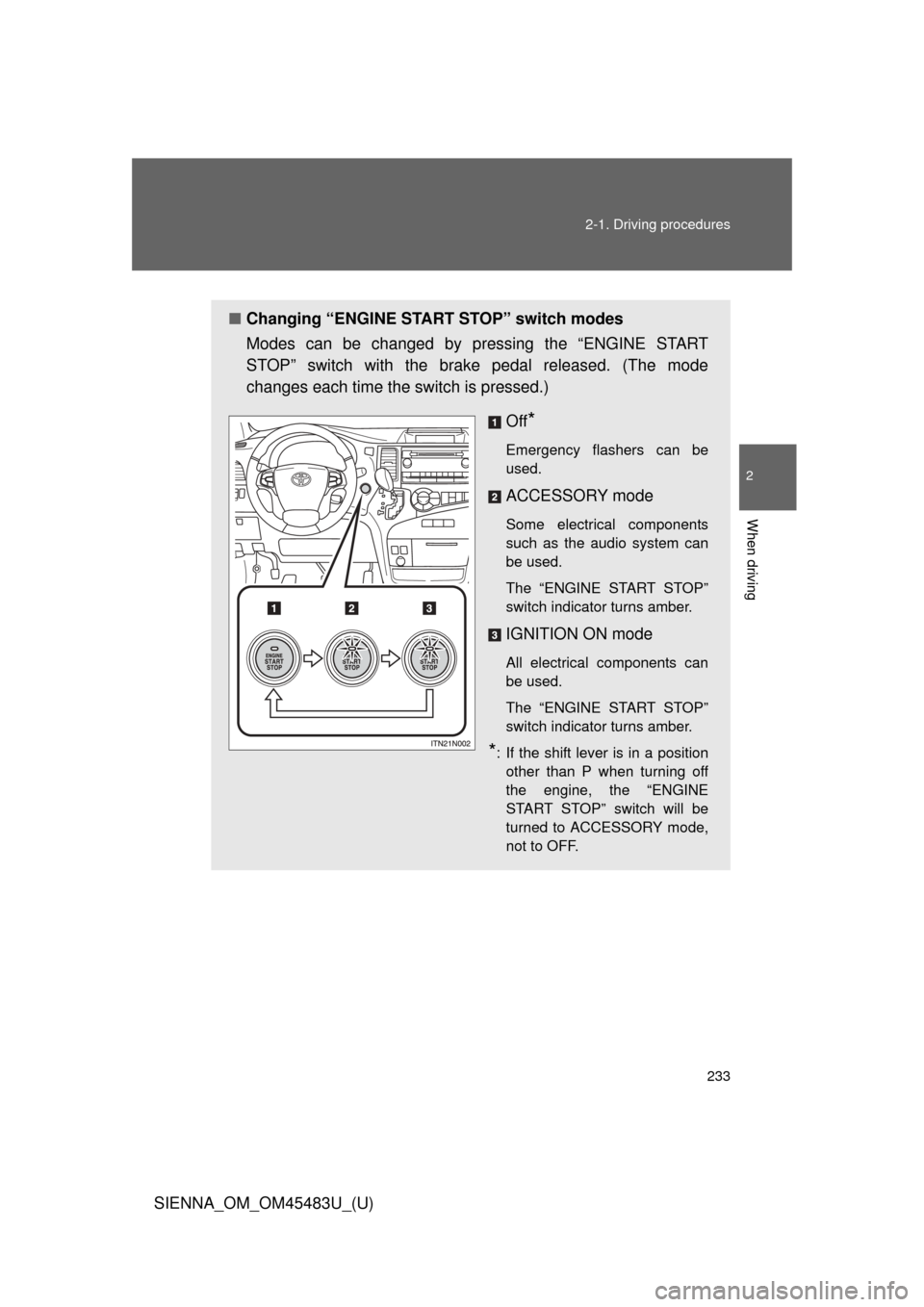
Changing “ENGINE START STOP” switch modes
Modes can be changed by pressing the “ENGINE START
STOP” switch with the brake pedal released. (The mode
changes each time the switch is pressed.)
Off
*
Emergency flashers can be
used.
ACCESSORY mode
Some electrical components
such as the audio system can
be used.
The “ENGINE START STOP”
switch indicator turns amber.
IGNITION ON mode
All electrical components can
be used.
The “ENGINE START STOP”
switch indicator turns amber.
*: If the shift lever is in a positionother than P when turning off
the engine, the “ENGINE
START STOP” switch will be
turned to ACCESSORY mode,
not to OFF.
Page 234 of 872

234 2-1. Driving procedures
SIENNA_OM_OM45483U_(U)
When stopping the engine with the shift lever in a position other
than PIf the engine is stopped with the sh ift lever in a position other than P,
the “ENGINE START STOP” switch will not be turned off but instead
be turned to ACCESSORY mode. Perform the following procedure to
turn the switch off:
Check that the parking brake is set.
Shift the shift lever to P.
Check that the indicator on the “ENGINE START STOP”
switch is illuminated in amber and then press the “ENGINE
START STOP” switch once.
Check that the indicator on the “ENGINE START STOP”
switch is off.
■Auto power off function
If the vehicle is left in ACCESSORY mode for more than 20 minutes or
IGNITION ON mode (the engine is not running) for more than an hour with
the shift lever in P, the “ENGINE START STOP” switch will automatically turn
off. However, this function cannot entirely prevent battery discharge. Do not
leave the vehicle with the “ENGINE START STOP” switch in ACCESSORY
or IGNITION ON mode for long periods of time when the engine is not
running.
■ Operation of the “ENGINE START STOP” switch
When operating the “ENGINE START STOP” switch, one short, firm press is
enough. If the switch is pressed improperly, the engine may not start or the
“ENGINE START STOP” switch mode may not change. It is not necessary to
press and hold the switch.
STEP1
STEP2
STEP3
STEP4
Page 238 of 872
238
2-1. Driving procedures
SIENNA_OM_OM45483U_(U)
Automatic transaxle
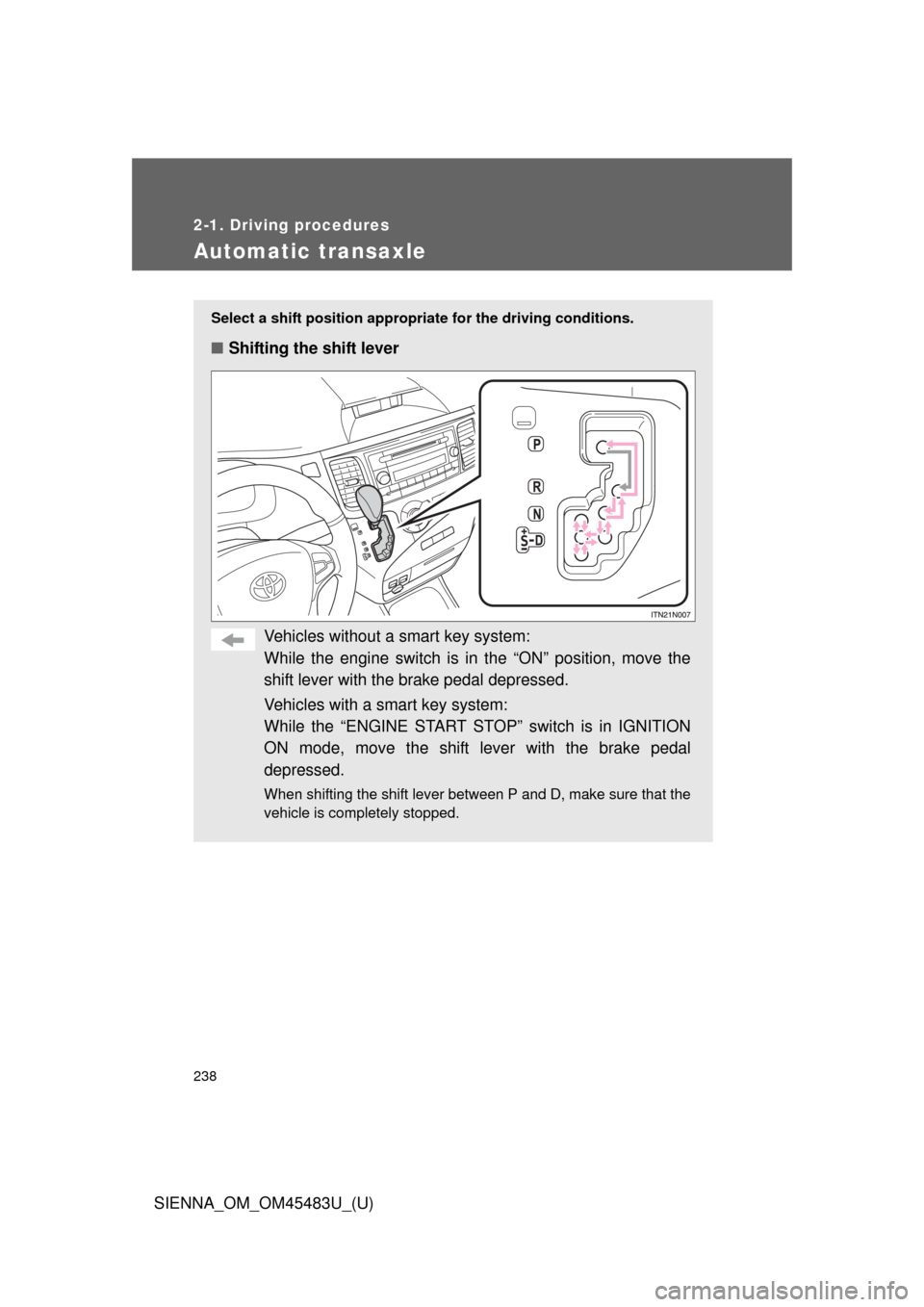
Select a shift position appropriate for the driving conditions.
■Shifting the shift lever
Vehicles without a smart key system:
While the engine switch is in the “ON” position, move the
shift lever with the brake pedal depressed.
Vehicles with a smart key system:
While the “ENGINE START STOP” switch is in IGNITION
ON mode, move the shift lever with the brake pedal
depressed.
When shifting the shift lever between P and D, make sure that the
vehicle is completely stopped.
Page 243 of 872
243
2-1. Driving procedures
2
When driving
SIENNA_OM_OM45483U_(U)
Tur n signal lever
■Turn signals can be operated when
Vehicles without a smart key system:
The engine switch is in the “ON” position.
Vehicles with a smart key system:
The “ENGINE START STOP” switch is in IGNITION ON mode.
■ If the indicator flashes faster than usual
Check that a light bulb in the front or rear turn signal lights has not burned
out.
The turn signal lever can be used to show the following intentions of
the driver:
Right turn
Left turn
Lane change to the right
(push and hold the lever
partway)
The right hand signal will flash
until you release the lever.
Lane change to the left
(push and hold the lever
partway)
The left hand signal will flash
until you release the lever.
Page 248 of 872
248 2-2. Instrument cluster and information display
SIENNA_OM_OM45483U_(U)
■The meters and display illuminate when (Optitron type meters)
Vehicles without a smart key system:
The engine switch is in the “ON” position.
Vehicles with a smart key system:
The “ENGINE START STOP” switch is in IGNITION ON mode.
NOTICE
■To prevent damage to the engine and its components
●Do not let the indicator needle of the tachometer enter the red zone, which
indicates the maximum engine speed.
● The engine may be overheating if the engine coolant temperature gauge is
in the red zone (H). In this case, immediately stop the vehicle in a safe
place, and check the engine after it has cooled completely. (
P. 790)
Page 252 of 872
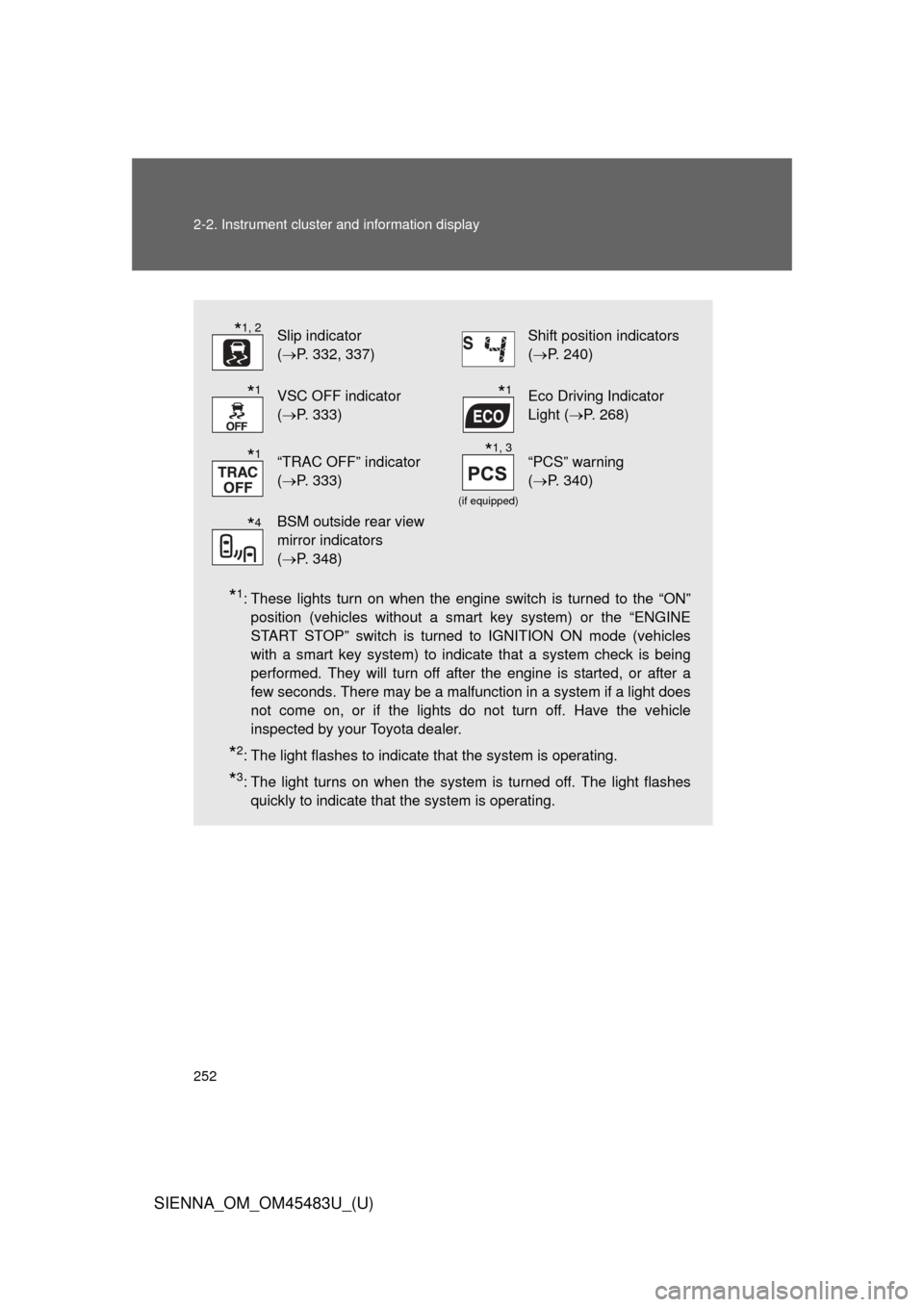
252 2-2. Instrument cluster and information display
SIENNA_OM_OM45483U_(U)
*1: These lights turn on when the engine switch is turned to the “ON”position (vehicles without a smart key system) or the “ENGINE
START STOP” switch is turned to IGNITION ON mode (vehicles
with a smart key system) to indicate that a system check is being
performed. They will turn off after the engine is started, or after a
few seconds. There may be a malfunction in a system if a light does
not come on, or if the lights do not turn off. Have the vehicle
inspected by your Toyota dealer.
*2: The light flashes to indicate that the system is operating.
*3: The light turns on when the system is turned off. The light flashesquickly to indicate that the system is operating.
Slip indicator
(P. 332, 337)Shift position indicators
(P. 240)
VSC OFF indicator
(P. 333)Eco Driving Indicator
Light ( P. 268)
“TRAC OFF” indicator
(P. 333)
(if equipped)
“PCS” warning
(P. 340)
BSM outside rear view
mirror indicators
(P. 348)
*1, 2
*1*1
*1*1, 3
*4