2014 TOYOTA SIENNA brakes
[x] Cancel search: brakesPage 308 of 872

308 2-4. Using other driving systems
SIENNA_OM_OM45483U_(U)Example of follow-up cruising
When following a vehicle driv
ing slower than the set speed
The system continues follow-up cruising while adjusting for changes in the
speed of the vehicle ahead in order to maintain the vehicle-to-vehicle dis-
tance set by the driver.
Example of acceleration
When there are no longer any vehi cles ahead driving slower than
the set speed
The system accelerates until the set speed is reached. The system then
returns to constant speed cruising.
Approach warning
When your vehicle is too close to a vehicle ahead, and sufficient
automatic deceleration via the cruise control is not possible, the dis-
play will flash and the bu zzer will sound to alert the driver. An exam-
ple of this would be if another driver cuts in front of you while you are
following a vehicle. Apply the brakes to ensure an appropriate vehi-
cle-to-vehicle distance.
■ Warnings may not occur when
In the following instan ces, there is a possibility that the warnings
will not occur:
● When the speed of the vehicl e ahead matches or exceeds your
vehicle speed
● When the vehicle ahead is traveling at an extremely slow speed
● Immediately after the cruise control speed was set
● At the instant the accelerator is applied
Page 314 of 872

314 2-4. Using other driving systems
SIENNA_OM_OM45483U_(U)
CAUTION
■Before using dynamic radar cruise control
Do not overly rely on vehicle-to-vehicle distance control.
Be aware of the set speed. If automatic deceleration/acceleration is not
appropriate, adjust the vehicle speed, as well as the distance between your
vehicle and vehicles ahead by applying the brakes, etc.
■ Caution regarding the driving assist systems
Observe the following precautions.
Failure to do so may cause an accident resulting in death or serious injury.
●Assisting the driver to measure following distance
The dynamic radar cruise control is only intended to help the driver in
determining the following distance between the driver’s own vehicle and a
designated vehicle travelling ahead. It is not a mechanism that allows
careless or inattentive driving, and it is not a system that can assist the
driver in low-visibility conditions. It is still necessary for driver to pay close
attention to the vehicle’s surroundings.
● Assist the driver to judge proper following distance
The dynamic radar cruise control determines whether the following dis-
tance between the driver’s own vehicle and a designated vehicle travelling
ahead is appropriate or not. It is not capable of making any other type of
judgement. Therefore, it is absolutely necessary for the driver to remain
vigilant and to determine whether or not there is possibility of danger in
any given situation.
● Assisting the driver to operate the vehicle
The dynamic radar cruise control has no capability to prevent or avoid a
collision with a vehicle travelling ahead. Therefore, if there is ever a\
ny
danger, the driver must take immediate and direct control of the vehicle
and act appropriately in order to ensure the safety of all involved.
■ To avoid inadvertent cruise control activation
Switch the cruise control off using the “ON-OFF” button when not in use.
Page 316 of 872

316 2-4. Using other driving systems
SIENNA_OM_OM45483U_(U)
CAUTION
■When the sensor may not be correctly detecting the vehicle ahead
Apply the brakes as necessary when any of the following types of vehicles
are in front of you.
As the sensor may not be able to correctly detect these types of vehicles,
the approach warning ( P. 308) will not be activated, and a fatal or serious
accident may result.
● Vehicles that cut in suddenly
● Vehicles traveling at low speeds
● Vehicles that are not moving
● Vehicles with small rear ends (trailers with no load on board etc.)
● Motorcycles traveling in the same lane
■ Conditions under which the vehicle -to-vehicle distance control may
not function correctly
Apply the brakes as necessary in the following conditions as the radar sen-
sor may not be able to correctly detect vehicles ahead, and a fatal or serious
accident may result:
● When water or snow thrown up by the surrounding vehicles hinders the
functioning of the sensor
● When your vehicle is pointing upwards (caused by a heavy load in the lug-
gage compartment, etc.)
● When the road curves or when the lanes are narrow
● When steering wheel operation or your position in the lane is unstable
● When the vehicle ahead of you decelerates suddenly
Page 323 of 872
323
2-4. Using other
driving systems
2
When driving
SIENNA_OM_OM45483U_(U)
■Sensor detection information
●Certain vehicle conditions and the surrounding environment may affect
the ability of the sensor to correctly detect obstacles. Particular instances
where this may occur are listed below.
• There is dirt, snow or ice on the sensor.
• The sensor is frozen.
• The sensor is covered in any way.
• The vehicle is leaning considerably to one side.
• On an extremely bumpy road, on an incline, on gravel, or on grass
• The vicinity of the vehicle is noisy due to vehicle horns, motorcycle
engines, air brakes of large vehicles, or other loud noises producing
ultrasonic waves.
• There is another vehicle equipped with parking assist sensors in the vicinity.
• A sensor is coated with a sheet of spray or heavy rain.
• The vehicle is equipped with a fender pole or radio antenna.
• A bumper or sensor receives a strong impact.
• The vehicle is approaching a tall or right-angled curb.
• In harsh sunlight or intense cold weather
In addition to the examples above, there are instances in which, because of
their shapes, signs and other objects may be judged by the sensor to be
closer than they are.
● The shape of the obstacle may prevent the sensor from detecting it. Pay
particular attention to the following obstacles:
• Wires, fences, ropes etc.
• Cotton, snow and other materials that absorb sound waves
• Sharply-angled objects
• Low obstacles
• Tall obstacles with upper sections projecting outwards in the direction
of your vehicle
Page 331 of 872
331
2-4. Using other driving systems
2
When driving
SIENNA_OM_OM45483U_(U)
Driving assist systems
To help enhance driving safety and performance, the following sys-
tems operate automatically in res ponse to various driving situations.
Be aware, however, that these systems are supplementary and
should not be relied upon too heavi ly when operating the vehicle.
■ABS (Anti-lock Brake System)
Helps to prevent wheel lock when the brakes are applied suddenly, or if
the brakes are applied while driving on a slippery road surface
■Brake assist
Generates an increased level of braking force after the brake pedal is
depressed, when the system detects a panic stop situation
■VSC (Vehicle Stability Control)
Helps the driver to control skidding when swerving suddenly or turning
on slippery road surfaces
■Enhanced VSC (Enhanced Vehicle Stability Control)
Provides cooperative control of the ABS, TRAC, VSC and EPS.
Helps to maintain directional stability when swerving on slippery road
surfaces by controlling steering performance.
■TRAC (Traction Control)
Helps to maintain drive power and prevent the drive wheels from spin-
ning when starting the vehicle or accelerating on slippery roads
■Hill-start assist control (if equipped)
P. 337
■EPS (Electric Power Steering)
Employs an electric motor to reduce the amount of effort needed to turn
the steering wheel
Page 332 of 872
332 2-4. Using other driving systems
SIENNA_OM_OM45483U_(U)
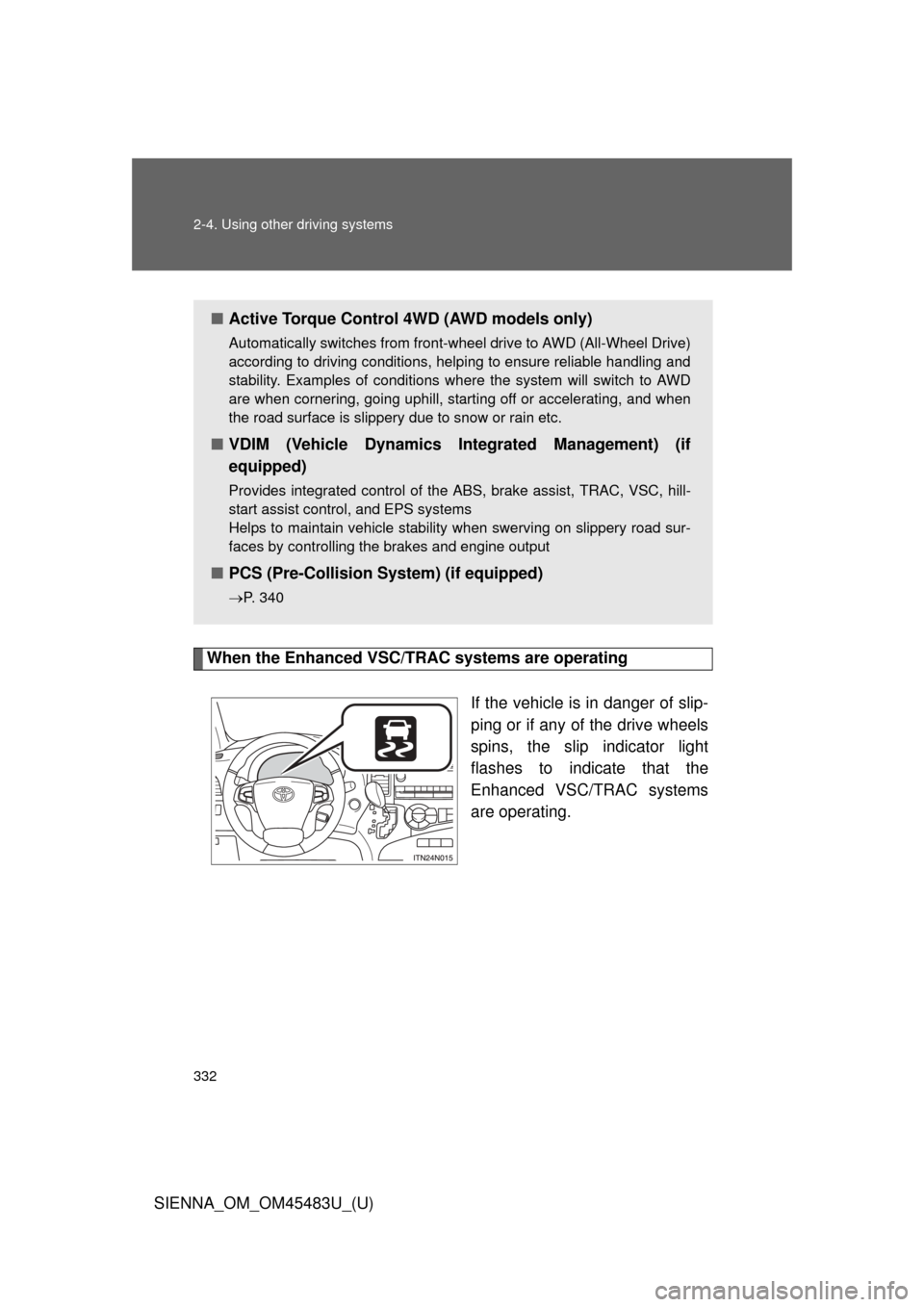
When the Enhanced VSC/TRAC systems are operatingIf the vehicle is in danger of slip-
ping or if any of the drive wheels
spins, the slip indicator light
flashes to indicate that the
Enhanced VSC/TRAC systems
are operating.
■Active Torque Control 4WD (AWD models only)
Automatically switches from front-wheel drive to AWD (All-Wheel Drive)
according to driving conditions, helping to ensure reliable handling and
stability. Examples of conditions where the system will switch to AWD
are when cornering, going uphill, star ting off or accelerating, and when
the road surface is slippery due to snow or rain etc.
■ VDIM (Vehicle Dynamics In tegrated Management) (if
equipped)
Provides integrated control of the ABS, brake assist, TRAC, VSC, hill-
start assist control, and EPS systems
Helps to maintain vehicle stability when swerving on slippery road sur-
faces by controlling the brakes and engine output
■ PCS (Pre-Collision System) (if equipped)
P. 340
Page 338 of 872

338 2-4. Using other driving systems
SIENNA_OM_OM45483U_(U)
■Hill-start assist control can be operated when
• The shift lever is in a position other than P.
• The parking brake is not applied.
• The accelerator pedal is not depressed.
■ Hill-start assist control
●While hill-start assist control is operating, the brakes remain automati-
cally applied after the driver releases the brake pedal. The stop lights and
the high mounted stoplight turn on.
● Hill-start assist control operates for about 2 seconds after the brake pedal
is released.
● If the slip indicator does not flash and the buzzer does not sound when
the brake pedal is further depressed, slightly reduce the pressure on the
brake pedal (do not allow the vehicl e to roll backward) and then firmly
depress it again. If the system still does not operate, check if the operat-
ing conditions explained above have been met.
■ Hill-start assist control buzzer
●When hill-start assist control is activated, the buzzer will sound once.
● In the following situations, hill-start assist control will be canceled and the
buzzer will sound twice.
• No attempt is made to drive the vehicle within approximately 2 seconds
of releasing the brake pedal.
• The shift lever is moved to P.
• The parking brake is applied.
• The brake pedal is depressed again.
• The brake pedal has been depressed for more than approximately 3 minutes.
■ If the slip indicator comes on...
It may indicate a malfunction in the system. Contact your Toyota dealer.
Page 340 of 872
340
2-4. Using other driving systems
SIENNA_OM_OM45483U_(U)
PCS (Pre-Collision System)
: If equipped
When the radar sensor detects possibility of a frontal collision, the
pre-collision system such as t he brakes and seat belts are auto-
matically engaged to lessen impact as well as vehicle damage.
■ Pre-collision seat belts (front seat belts only)
If the pre-collision s ensor detects that a co llision is unavoidable,
the pre-collision system will retract the seat belt before the colli-
sion occurs. The same will happen if the driver makes an emer-
gency braking or loses co ntrol of the vehicle. (P. 132)
However, when the VSC system is disabled, the system will not
operate in the event of skidding.
■ Pre-collision brake assist
When there is a high possibility of a frontal collision, the system
applies greater braking force in relation to how strongly the
brake pedal is depressed.
■ Pre-collision braking
When there is a high possibility of a frontal collision, the system
warns the driver using a warning light and buzzer. If the system
determines that a collision is un avoidable, the brakes are auto-
matically applied to reduce th e collision speed. Pre-collision
braking can be disabled usi ng the pre-collision braking off
switch.