Page 721 of 872
721
4-3. Do-it-yourself maintenance
4
Maintenance and care
SIENNA_OM_OM45483U_(U)
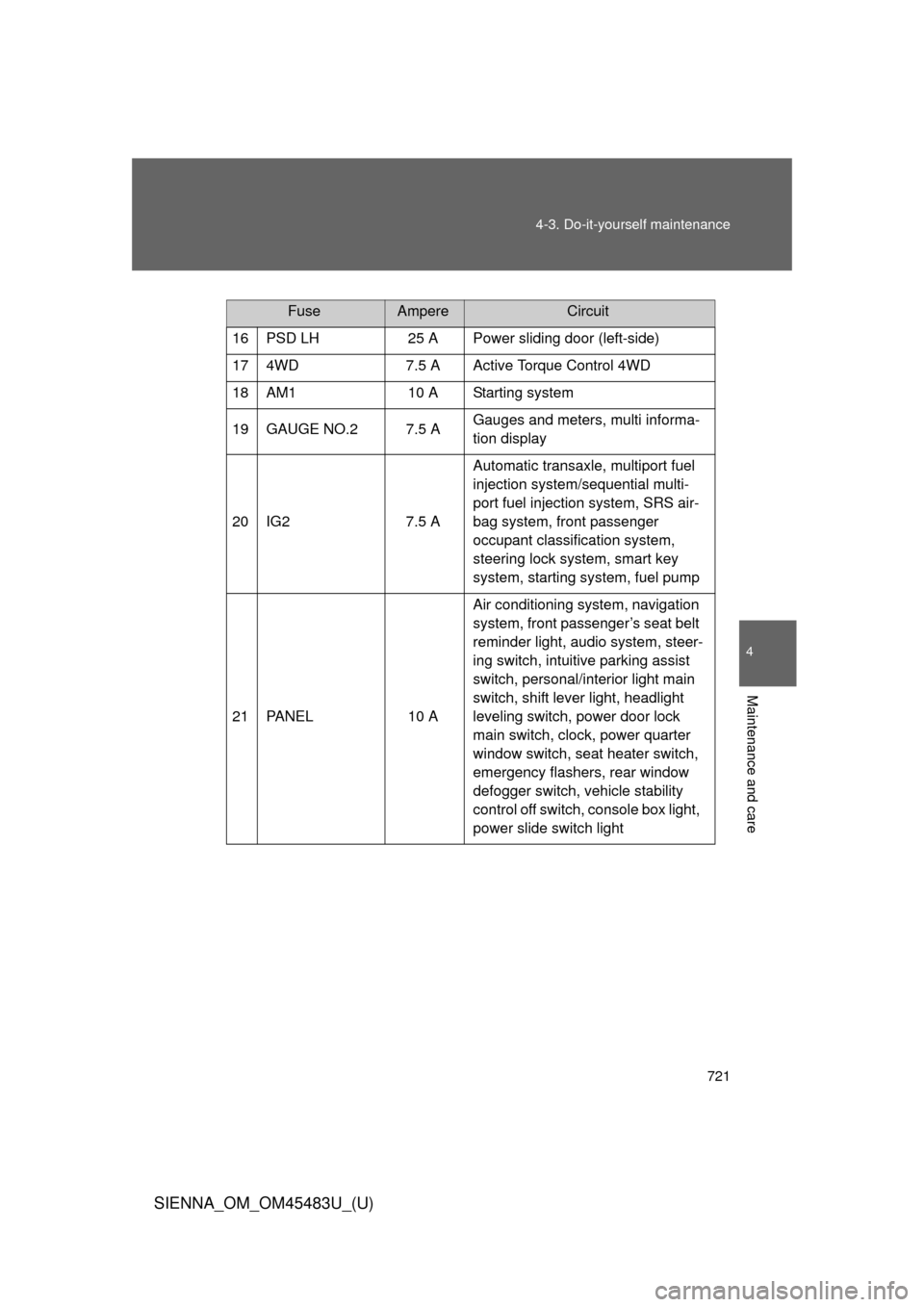
FuseAmpereCircuit
16 PSD LH 25 A Power sliding door (left-side)
17 4WD 7.5 A Active Torque Control 4WD
18 AM1 10 A Starting system
19 GAUGE NO.2 7.5 A Gauges and meters, multi informa-
tion display
20 IG2 7.5 AAutomatic transaxle, multiport fuel
injection system/sequential multi-
port fuel injection system, SRS air-
bag system, front passenger
occupant classification system,
steering lock system, smart key
system, starting system, fuel pump
21 PANEL 10 AAir conditioning system, navigation
system, front passenger’s seat belt
reminder light, audio system, steer-
ing switch, intuitive parking assist
switch, personal/interior light main
switch, shift lever light, headlight
leveling switch, power door lock
main switch, clock, power quarter
window switch, seat heater switch,
emergency flashers, rear window
defogger switch, vehicle stability
control off switch, console box light,
power slide switch light
Page 735 of 872
When trouble arises5
735
SIENNA_OM_OM45483U_(U)
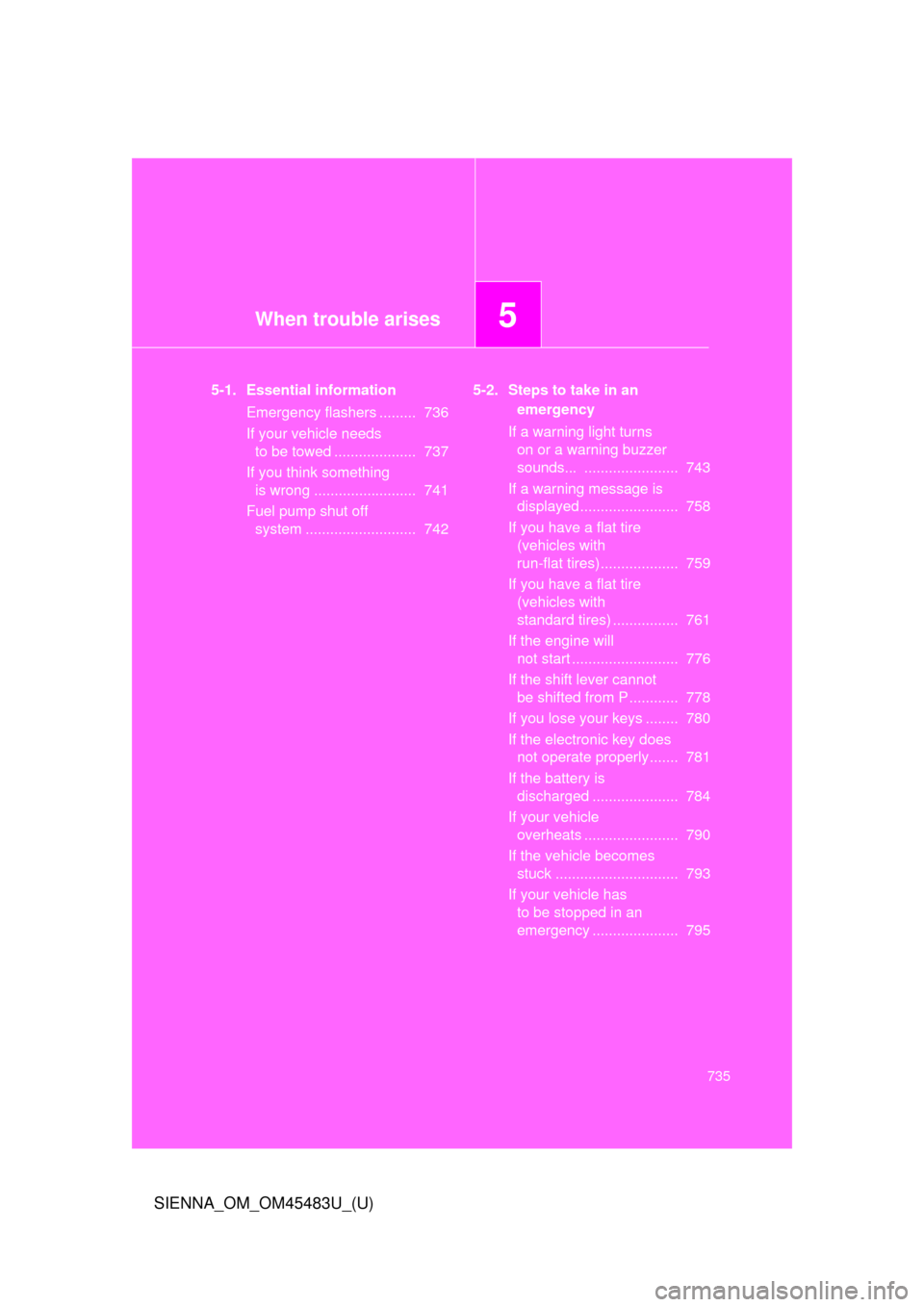
5-1. Essential informationEmergency flashers ......... 736
If your vehicle needs to be towed .................... 737
If you think something is wrong ......................... 741
Fuel pump shut off system ........................... 742 5-2. Steps to take in an
emergency
If a warning light turns on or a warning buzzer
sounds... ....................... 743
If a warning message is displayed........................ 758
If you have a flat tire (vehicles with
run-flat tires)................... 759
If you have a flat tire (vehicles with
standard tires) ................ 761
If the engine will not start .......................... 776
If the shift lever cannot be shifted from P............ 778
If you lose your keys ........ 780
If the electronic key does not operate properly....... 781
If the battery is discharged ..................... 784
If your vehicle overheats ....................... 790
If the vehicle becomes stuck .............................. 793
If your vehicle has to be stopped in an
emergency ..................... 795
Page 758 of 872
758
5-2. Steps to take in an emergency
SIENNA_OM_OM45483U_(U)
If a warning message is displayed
: If equipped
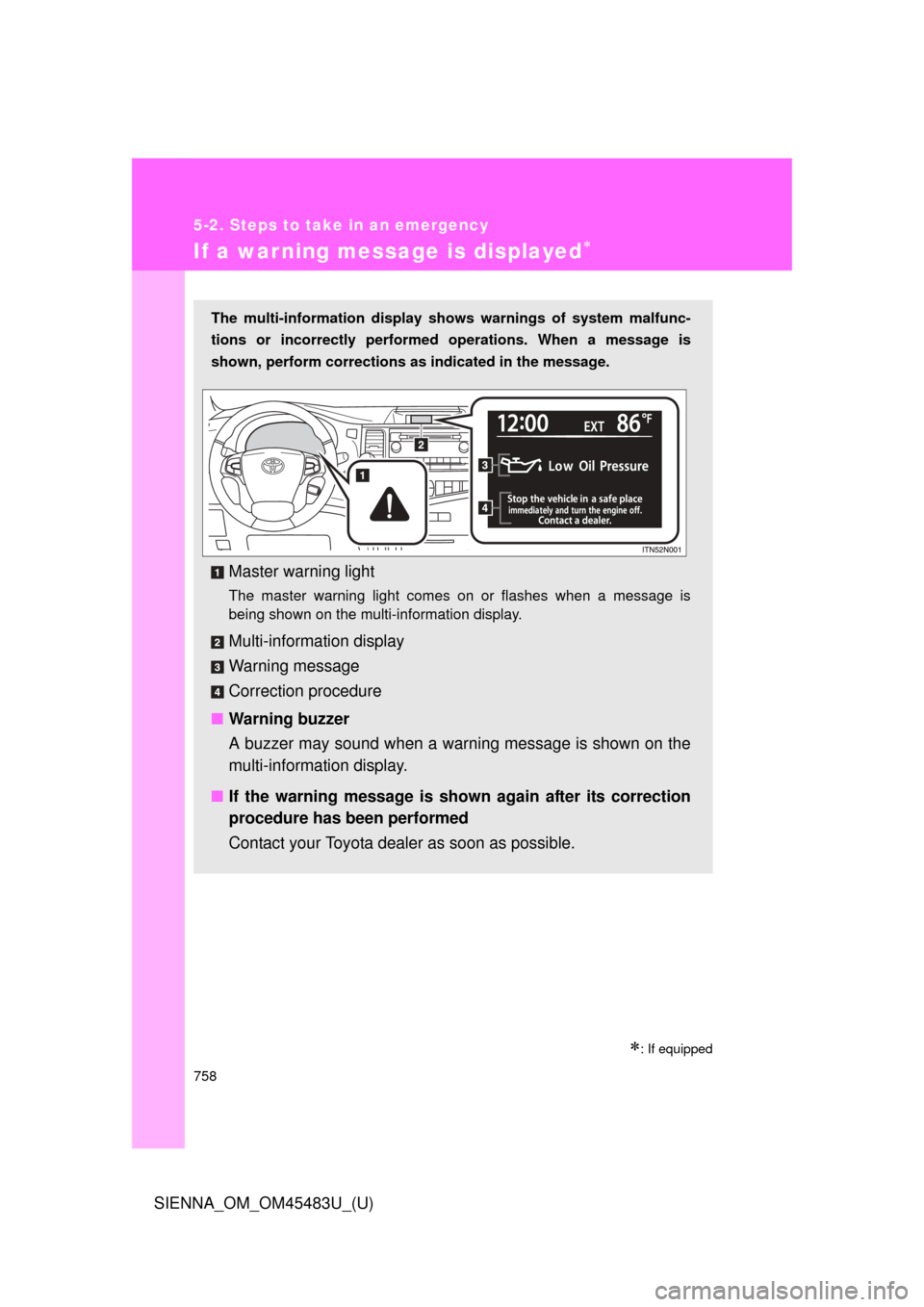
The multi-information display shows warnings of system malfunc-
tions or incorrectly performed operations. When a message is
shown, perform corrections as indicated in the message.
Master warning light
The master warning light comes on or flashes when a message is
being shown on the multi-information display.
Multi-information display
Warning message
Correction procedure
■ Warning buzzer
A buzzer may sound when a warning message is shown on the
multi-informat ion display.
■ If the warning message is shown again after its correction
procedure has been performed
Contact your Toyota dealer as soon as possible.
Page 831 of 872
831
6-2. Customization
6
Vehicle specifications
SIENNA_OM_OM45483U_(U)
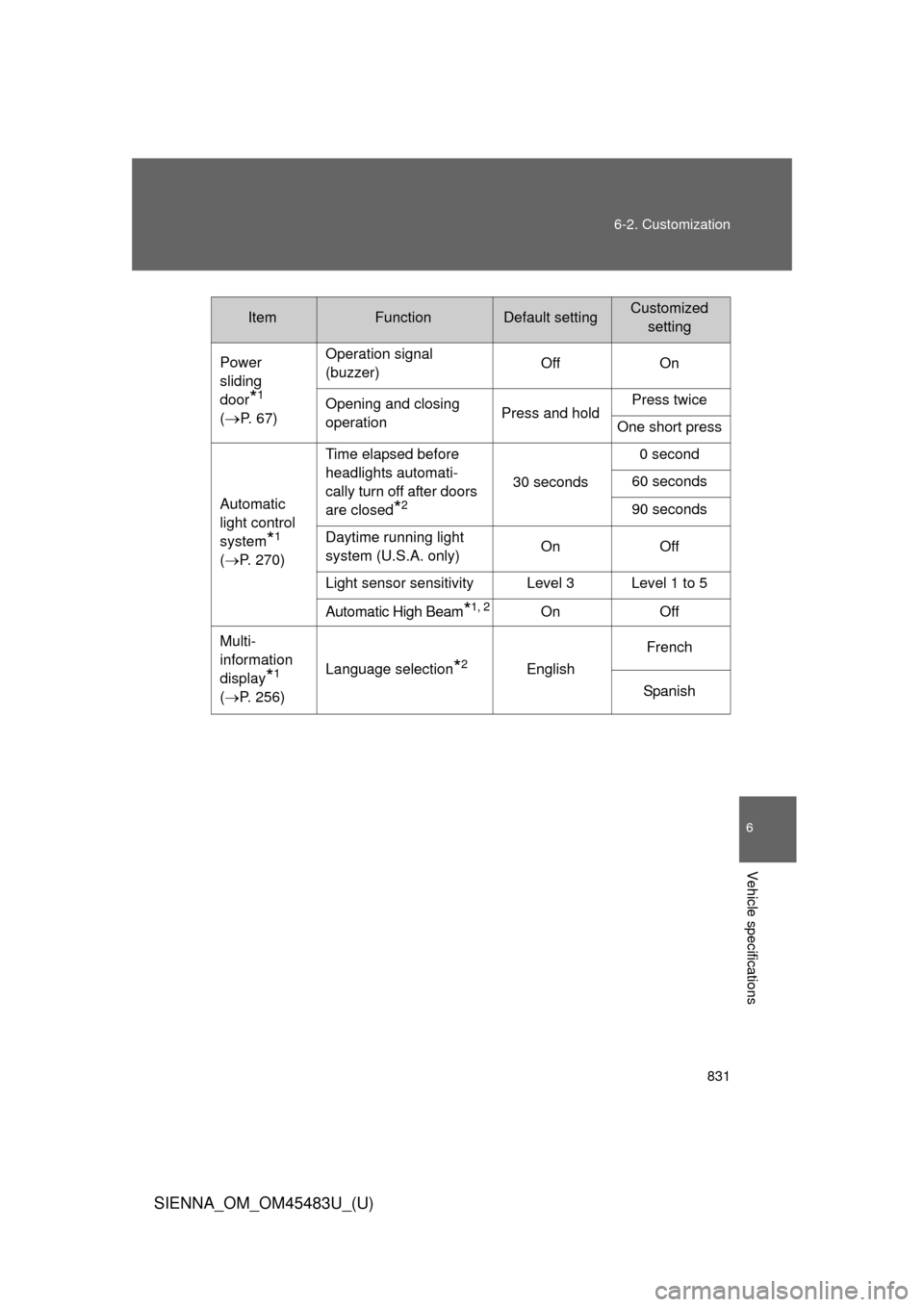
Power
sliding
door
*1
(
P. 6 7 ) Operation signal
(buzzer)
Off On
Opening and closing
operation Press and holdPress twice
One short press
Automatic
light control
system
*1
( P. 270) Time elapsed before
headlights automati-
cally turn off after doors
are closed
*2
30 seconds
0 second
60 seconds
90 seconds
Daytime running light
system (U.S.A. only) On Off
Light sensor sensitivity Level 3 Level 1 to 5
Automatic High Beam*1, 2On Off
Multi-
information
display
*1
( P. 256) Language selection*2English
French
Spanish
ItemFunctionDefault settingCustomized setting
Page 832 of 872
832 6-2. Customization
SIENNA_OM_OM45483U_(U)
*1: If equipped
*2: For vehicles with the multi-information display, the setting can be changedby operating the multi-information display. (
P. 833)
Illumination
(
P. 582)
Time elapsed before
lights turn off
15 seconds7.5 seconds
30 seconds
Operation when the
doors are unlocked On Off
Operation after the
engine switch is turned
to the “LOCK” position
(vehicles without a
smart key system) or
the “ENGINE START
STOP” switch is turned
to OFF (vehicles with a
smart key system) On Off
Rear ceiling light
*1On Off
Outer foot lights
*1On Off
Intuitive
parking
assist
*1
(
P. 318) Buzzer volume Max. Min. to Max.
Seat belt
reminder
(
P. 747) Vehicle speed linked
seat belt reminder
buzzer
On Off
ItemFunctionDefault settingCustomized
setting
Page 833 of 872
833
6-2. Customization
6
Vehicle specifications
SIENNA_OM_OM45483U_(U)
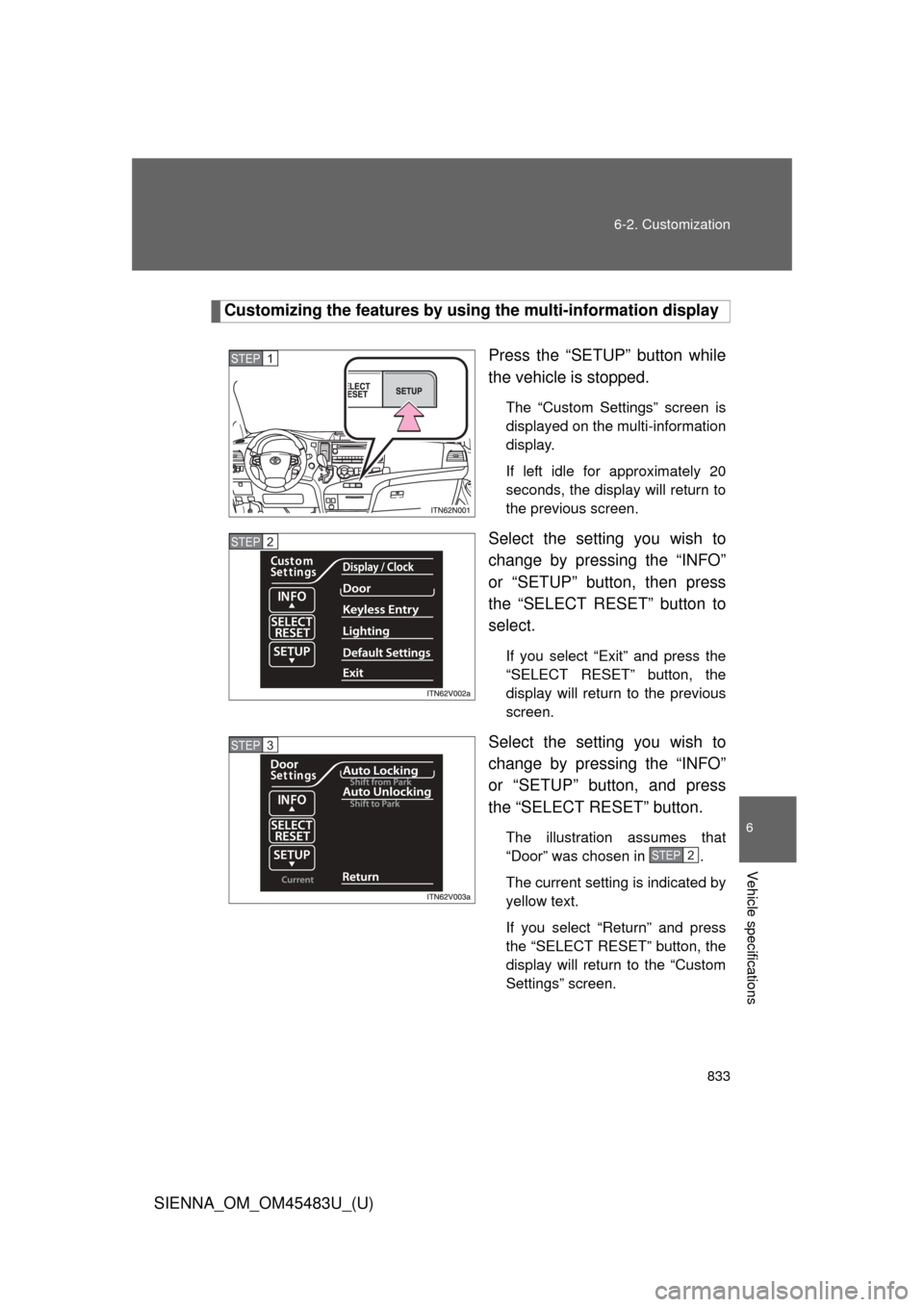
Customizing the features by usi
ng the multi-information display
Press the “SETUP” button while
the vehicle is stopped.
The “Custom Settings” screen is
displayed on the multi-information
display.
If left idle for approximately 20
seconds, the display will return to
the previous screen.
Select the setting you wish to
change by pressing the “INFO”
or “SETUP” button, then press
the “SELECT RESET” button to
select.
If you select “Exit” and press the
“SELECT RESET” button, the
display will return to the previous
screen.
Select the setting you wish to
change by pressing the “INFO”
or “SETUP” button, and press
the “SELECT RESET” button.
The illustration assumes that
“Door” was chosen in .
The current setting is indicated by
yellow text.
If you select “Return” and press
the “SELECT RESET” button, the
display will return to the “Custom
Settings” screen.
STEP1
STEP2
STEP3
STEP2
Page 834 of 872
834 6-2. Customization
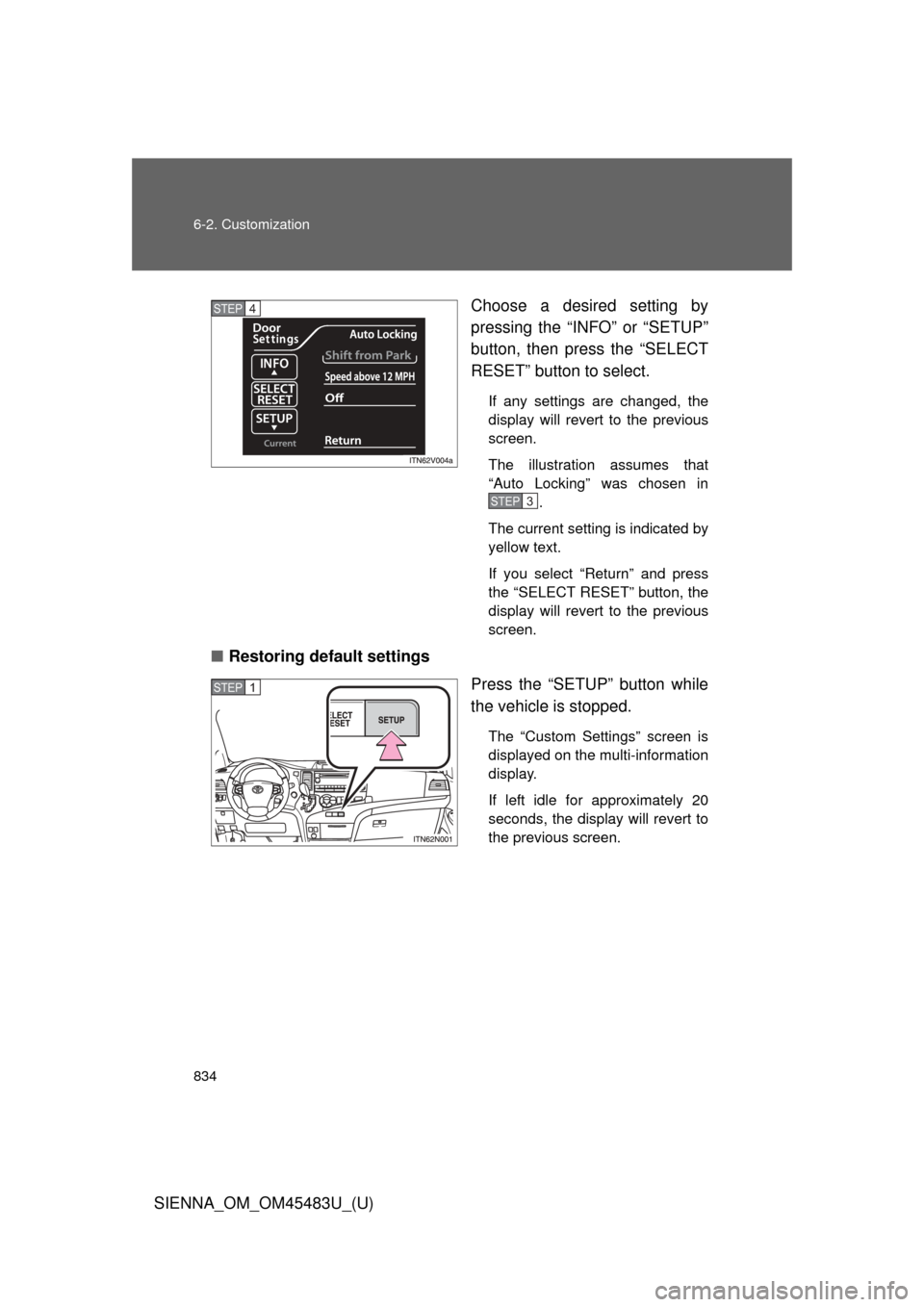
SIENNA_OM_OM45483U_(U)Choose a desired setting by
pressing the “INFO” or “SETUP”
button, then press the “SELECT
RESET” button to select.
If any settings are changed, the
display will revert to the previous
screen.
The illustration assumes that
“Auto Locking” was chosen in
.
The current setting is indicated by
yellow text.
If you select “Return” and press
the “SELECT RESET” button, the
display will revert to the previous
screen.
■ Restoring default settings
Press the “SETUP” button while
the vehicle is stopped.
The “Custom Settings” screen is
displayed on the multi-information
display.
If left idle for approximately 20
seconds, the display will revert to
the previous screen.
STEP4
STEP3
STEP1
Page 835 of 872
835
6-2. Customization
6
Vehicle specifications
SIENNA_OM_OM45483U_(U)
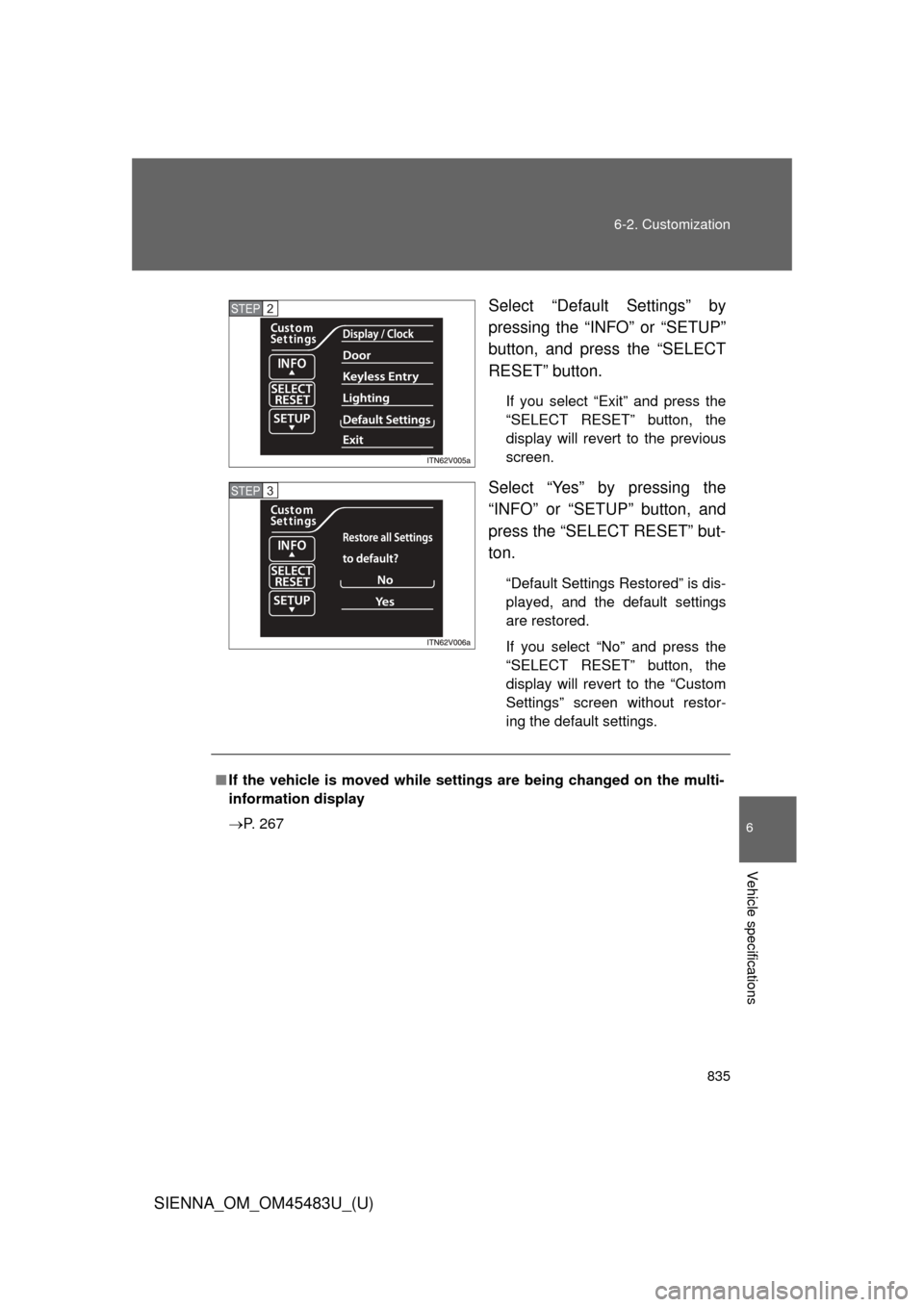
Select “Default Settings” by
pressing the “INFO” or “SETUP”
button, and press the “SELECT
RESET” button.
If you select “Exit” and press the
“SELECT RESET” button, the
display will revert to the previous
screen.
Select “Yes” by pressing the
“INFO” or “SETUP” button, and
press the “SELECT RESET” but-
ton.
“Default Settings Restored” is dis-
played, and the default settings
are restored.
If you select “No” and press the
“SELECT RESET” button, the
display will revert to the “Custom
Settings” screen without restor-
ing the default settings.
STEP2
STEP3
■
If the vehicle is moved while setti ngs are being changed on the multi-
information display
P. 267