Page 171 of 563

170 2-1. Driving procedures
CAUTION
■When starting the hybrid system
Always start the hybrid system while sitting in the driver’s seat. Do not
depress the accelerator pedal while starting the hybrid system under any cir-
cumstances.
Doing so may cause an accident resulting in death or serious injury.
■ Caution while driving
If a hybrid system failure occurs while the vehicle is moving, do not lock or
open the doors until the vehicle reaches a safe and complete stop. Doing so
may cause activation of the steering lock which may lead to an accident,
resulting in death or serious injury.
■ When “CHECK SMART KEY SYSTEM” is displayed on the multi-infor-
mation display
The system may be malfunctioning. Have the vehicle inspected by your
Toyota dealer immediately. Failure to do so may lead to the system operat-
ing abnormally and possibly cause an accident or damage to the vehicle.
■ Stopping the hybrid system in an emergency
If you want to stop the hybrid system in an emergency while driving the vehi-
cle, press and hold the “POWER” switch for more than 2 seconds, or press it
briefly 3 times or more in succession. ( P. 493)
However, do not touch the “POWER” switch while driving except in an emer-
gency. Turning the hybrid system off while driving will not cause loss of
steering or braking control, however, power assist to the steering will be lost.
This will make it more difficult to steer smoothly, so you should pull over and
stop the vehicle as soon as it is safe to do so.
Page 181 of 563
180
2-1. Driving procedures
Hor n
■After adjusting the steering wheel
Make sure that the steering wheel is securely locked.
The horn may not sound if the steering wheel is not securely locked.
(P. 93)
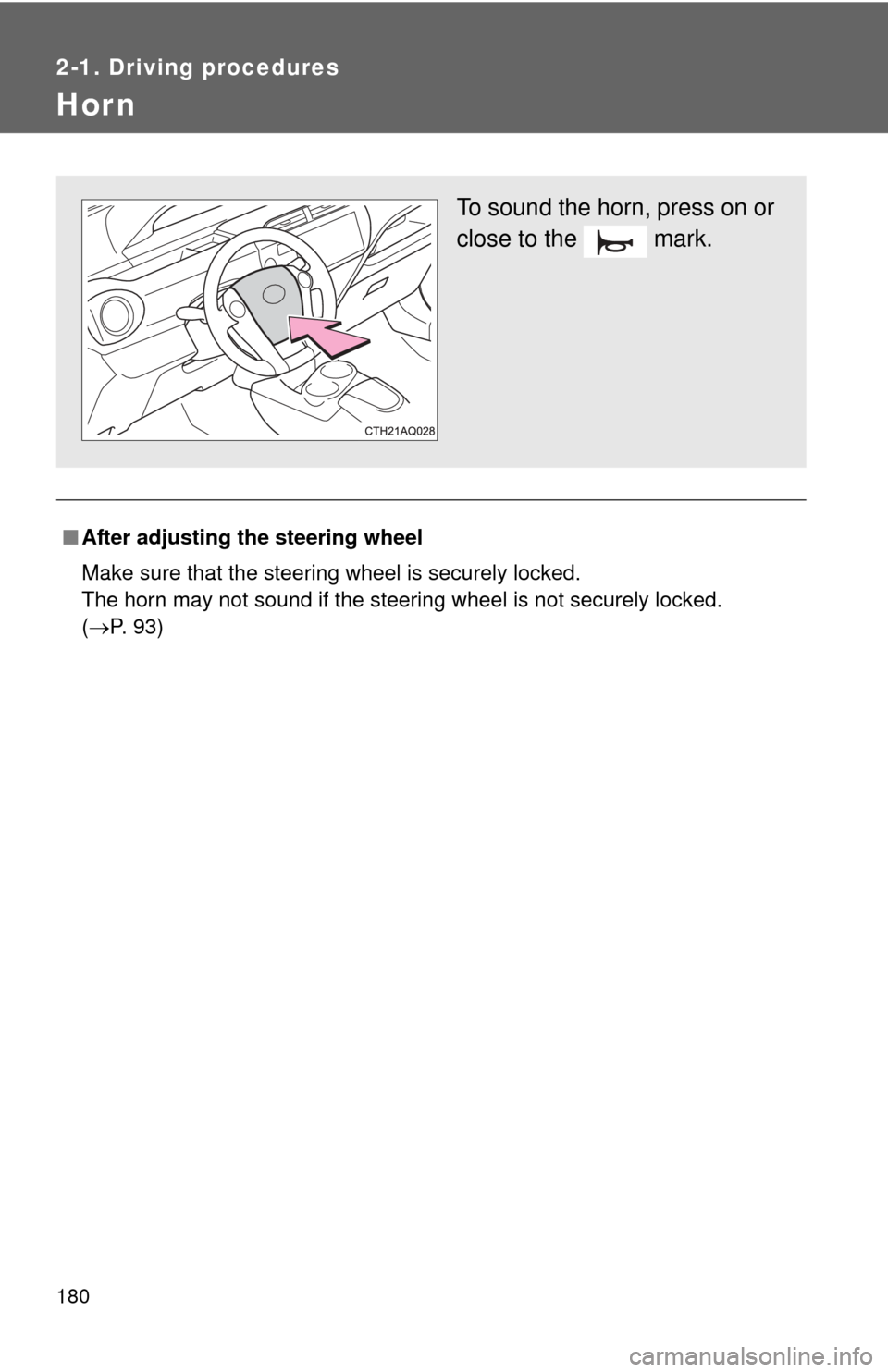
To sound the horn, press on or
close to the mark.
Page 189 of 563
188 2-2. Instrument cluster
Touch tracer display (vehicles with Display Audio system)
When a steering wheel switch is
touched, an illustration of the
switch is shown on the screen,
helping the driver to confirm
which switch they are touching
without needing to look down at
their hands.
The touch tracer display can be
turned off. ( P. 199)
If an audio/navigation system is
used that is not compatible with
the steering switches in this vehi-
cle, the audio switch display may
not operate correctly.
Switching the display
Press the “DISP” switch on the
steering wheel to change the dis-
played item. The “TRIP” switch
may also be used for certain
items.
Page 199 of 563
198 2-2. Instrument cluster
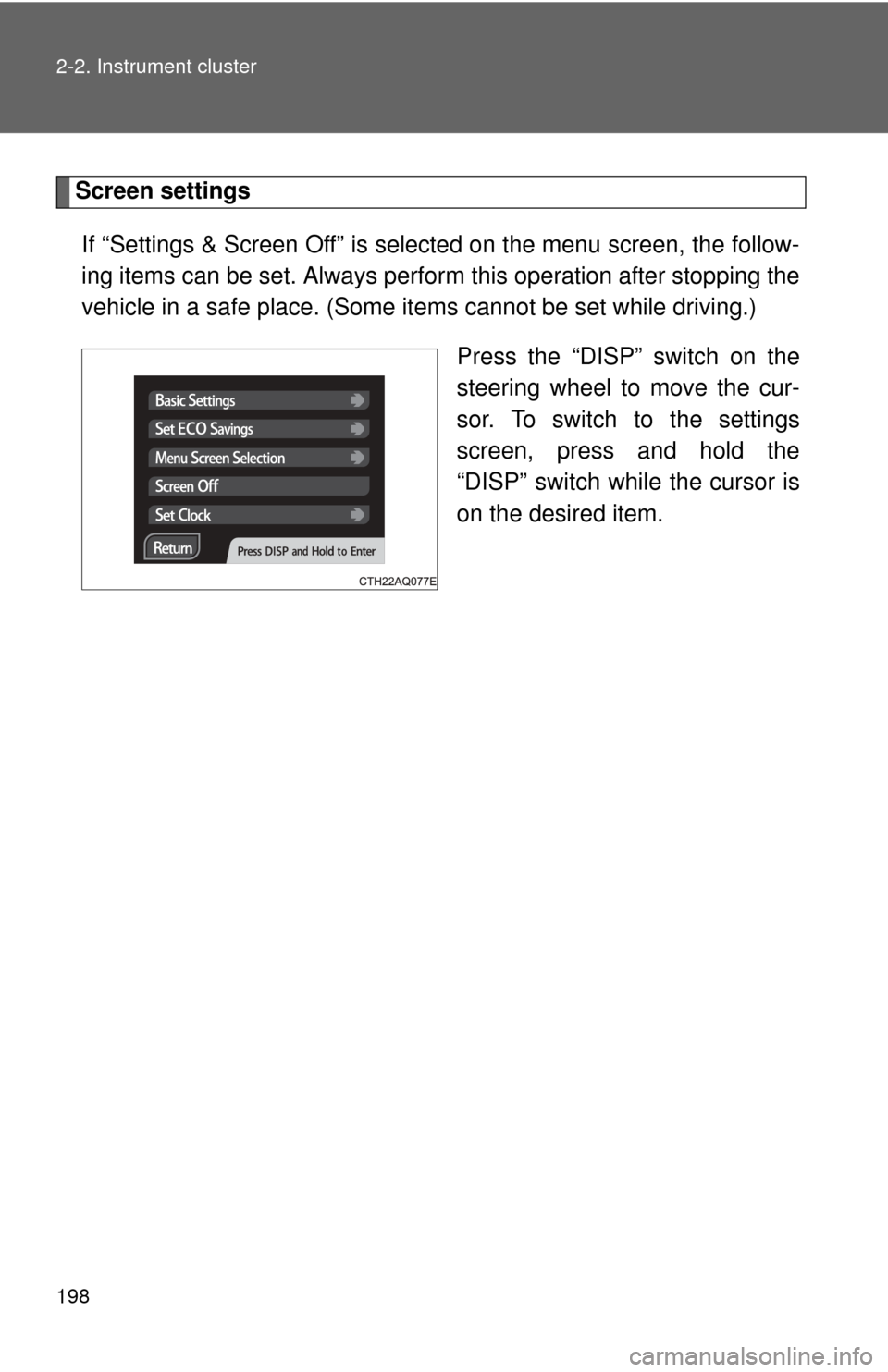
Screen settingsIf “Settings & Screen Off” is selected on the menu screen, the follow-
ing items can be set. Always perform this operation after stopping the
vehicle in a safe place. (Some it ems cannot be set while driving.)
Press the “DISP” switch on the
steering wheel to move the cur-
sor. To switch to the settings
screen, press and hold the
“DISP” switch while the cursor is
on the desired item.
Page 222 of 563

221
2-4. Using other driving systems
2
When driving
Driving assist systems
To help enhance driving safety and performance, the following sys-
tems operate automatically in res ponse to various driving situations.
Be aware, however, that these systems are supplementary and
should not be relied upon too heavi ly when operating the vehicle.
■ABS (Anti-lock Brake System)
Helps to prevent wheel lock when the brakes are applied suddenly, or if
the brakes are applied while driving on a slippery road surface
■Brake assist
Generates an increased level of braking force after the brake pedal is
depressed when the system detects a panic stop situation
■VSC (Vehicle Stability Control)
Helps the driver to control skidding when swerving suddenly or turning
on slippery road surfaces
■TRAC (Traction Control)
Helps to maintain drive power and prevent the drive wheels from spin-
ning when starting the vehicle or accelerating on slippery roads
■Hill-start assist control
Helps to prevent the vehicle from rolling backward when starting on an
incline
■EPS (Electric Power Steering)
Employs an electric motor to reduce the amount of effort needed to turn
the steering wheel
Page 223 of 563

222 2-4. Using other driving systems
When the TRAC/VSC/ABS systems are operatingThe slip indicator light will flash
while the TRAC/VSC/ABS sys-
tems are operating.
■Sounds and vibrations caused by the ABS, brake assist, TRAC, VSC
and hill-start assist control systems
● A sound may be heard from the engine compartment when the hybrid
system is started or just after the vehicle begins to move, if the brake
pedal is depressed forcefully or repeatedly, or 1 - 2 minuets after the
hybrid system is stopped. This sound does not indicate that a malfunc-
tion has occurred in any of these systems.
● Any of the following conditions may occur when the above systems are
operating. None of these indicates that a malfunction has occurred.
• Vibrations may be felt through the vehicle body and steering.
• A motor sound may be heard after the vehicle comes to a stop.
• The brake pedal may pulsate slightly after the ABS is activated.
• The brake pedal may move down slightly after the ABS is activated.
■ EPS operation sound
When the steering wheel is operated, a motor sound (whirring sound) may
be heard. This does not indicate a malfunction.
■ Reduced effectiveness of the EPS system
The effectiveness of the EPS system is reduced to prevent the system from
overheating when there is frequent steering input over an extended period of
time. The steering wheel may feel heavy as a result. Should this occur,
refrain from excessive steering input or stop the vehicle and turn the hybrid
system off. The EPS system should return to normal within 10 minutes.
Page 231 of 563
230
2-5. Driving information
Vehicle load limits
■Total load capacity and seating capacity
These details are also described on the tire and loading information
label. (P. 392)
CAUTION
■Overloading the vehicle
Do not overload the vehicle.
It may not only cause damage to the ti res, but also degrade steering and
braking ability, resulting in an accident.
Vehicle load limits include total load capacity, seating capacity,
towing capacity and cargo capacity.
■ Total load capacity (vehicle capacity weight): ( P. 496)
Total load capacity means the combined weight of occupants,
cargo and luggage.
■ Seating capacity: 5 occupants (Front 2, Rear 3)
Seating capacity means the maxi mum number of occupants whose
estimated average weight is 150 lb. (68 kg) per person.
■ Towing capacity
Toyota does not recommend towing a trailer with your vehicle.
■Cargo capacity
Cargo capacity may increase or decrease depending on the weight
and the number of occupants.
Page 240 of 563

Interior features3
237
3-1. Using the air conditioning system and defogger
Automatic air conditioning system ........................... 238
Rear window and outside rear view
mirror defoggers ............ 247
3-2. Using the audio system Audio system types .......... 248
Using the radio ................. 254
Using the CD player ......... 256
Playing back MP3 and WMA discs .............. 261
Operating an iPod ............ 268
Operating a USB memory .......................... 276
Optimal use of the audio system.................. 284
Using the AUX port .......... 287
Using the steering wheel audio switches ..... 288
3-3. Using the Bluetooth
®
audio system
Bluetooth
® audio/
phone ............................. 291
Using the Bluetooth
®
audio/phone ................... 295
Operating a Bluetooth
®
enabled portable
player ............................. 300
Making a phone call ......... 303 Using the “SET UP” menu
(“Bluetooth” menu) ......... 308
Using the “SET UP” menu (“Phone” menu).............. 314
3-4. Using the interior lights Interior lights list ............... 321
• Interior lights/personal lights................ 322
3-5. Using the storage features
List of storage features .... 324
• Glove box........................ 325
• Console box ................... 325
• Auxiliary boxes ............... 327
• Cup holders ................... 329
• Bottle holders ................. 330
3-6. Other interior features Sun visors ........................ 332
Vanity mirrors ................... 333
Outside temperature display............................ 334
Power outlet ..................... 336
Seat heaters..................... 337
Coat hooks ....................... 339
Assist grips....................... 340
Floor mat .......................... 341
Luggage cover ................. 343