Page 457 of 563
454 5-2. Steps to take in an emergency
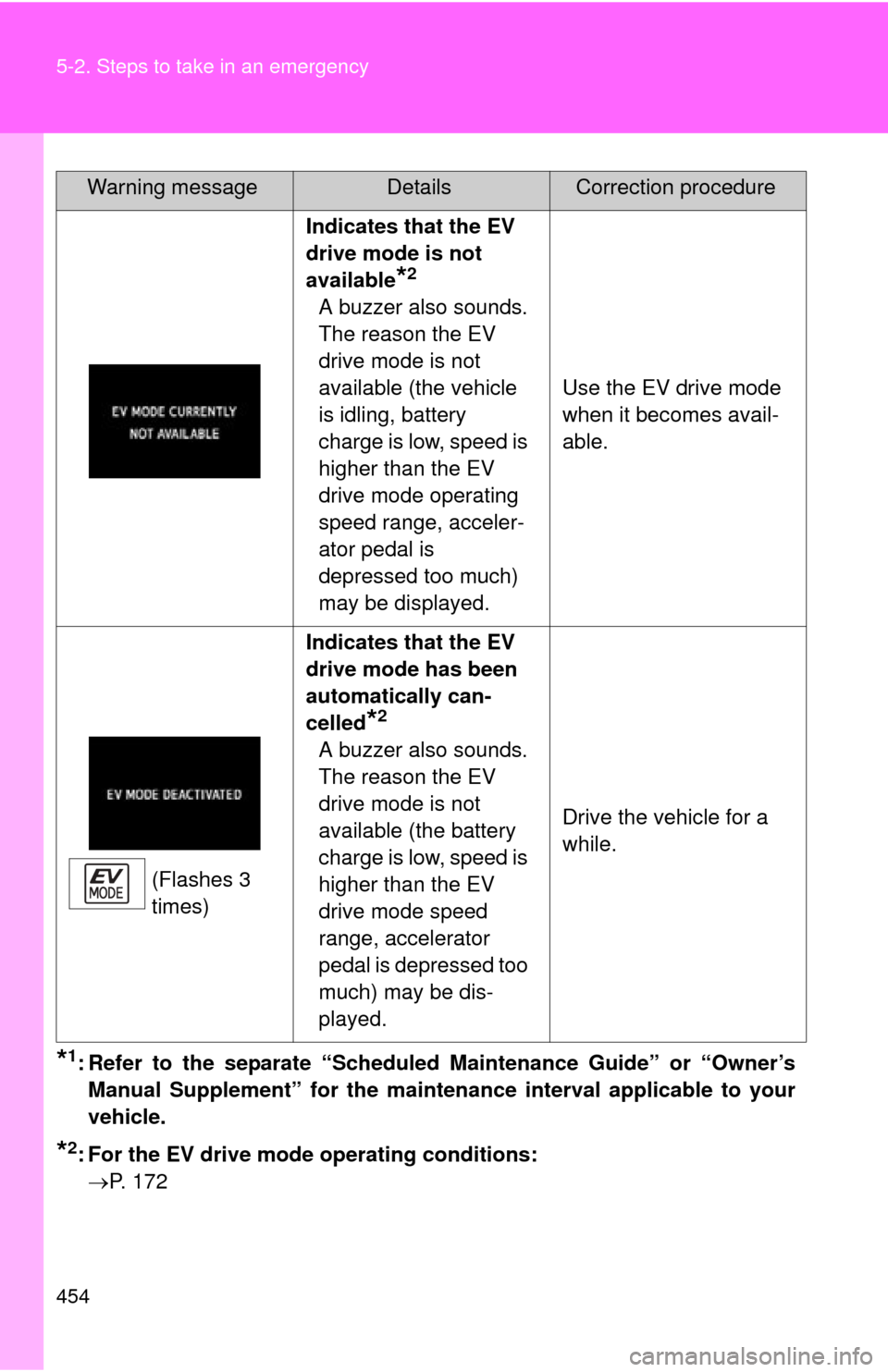
Indicates that the EV
drive mode is not
available
*2
A buzzer also sounds.
The reason the EV
drive mode is not
available (the vehicle
is idling, battery
charge is low, speed is
higher than the EV
drive mode operating
speed range, acceler-
ator pedal is
depressed too much)
may be displayed.Use the EV drive mode
when it becomes avail-
able.
(Flashes 3
times) Indicates that the EV
drive mode has been
automatically can-
celled
*2
A buzzer also sounds.
The reason the EV
drive mode is not
available (the battery
charge is low, speed is
higher than the EV
drive mode speed
range, accelerator
pedal is depressed too
much) may be dis-
played.
Drive the vehicle for a
while.
*1: Refer to the separate “Scheduled Maintenance Guide” or “Owner’s
Manual Supplement” for the maintena nce interval applicable to your
vehicle.
*2: For the EV drive mode operating conditions: P. 172
Warning messageDetailsCorrection procedure
Page 460 of 563
5
When trouble arises
457
5-2. Steps to take in an emergency
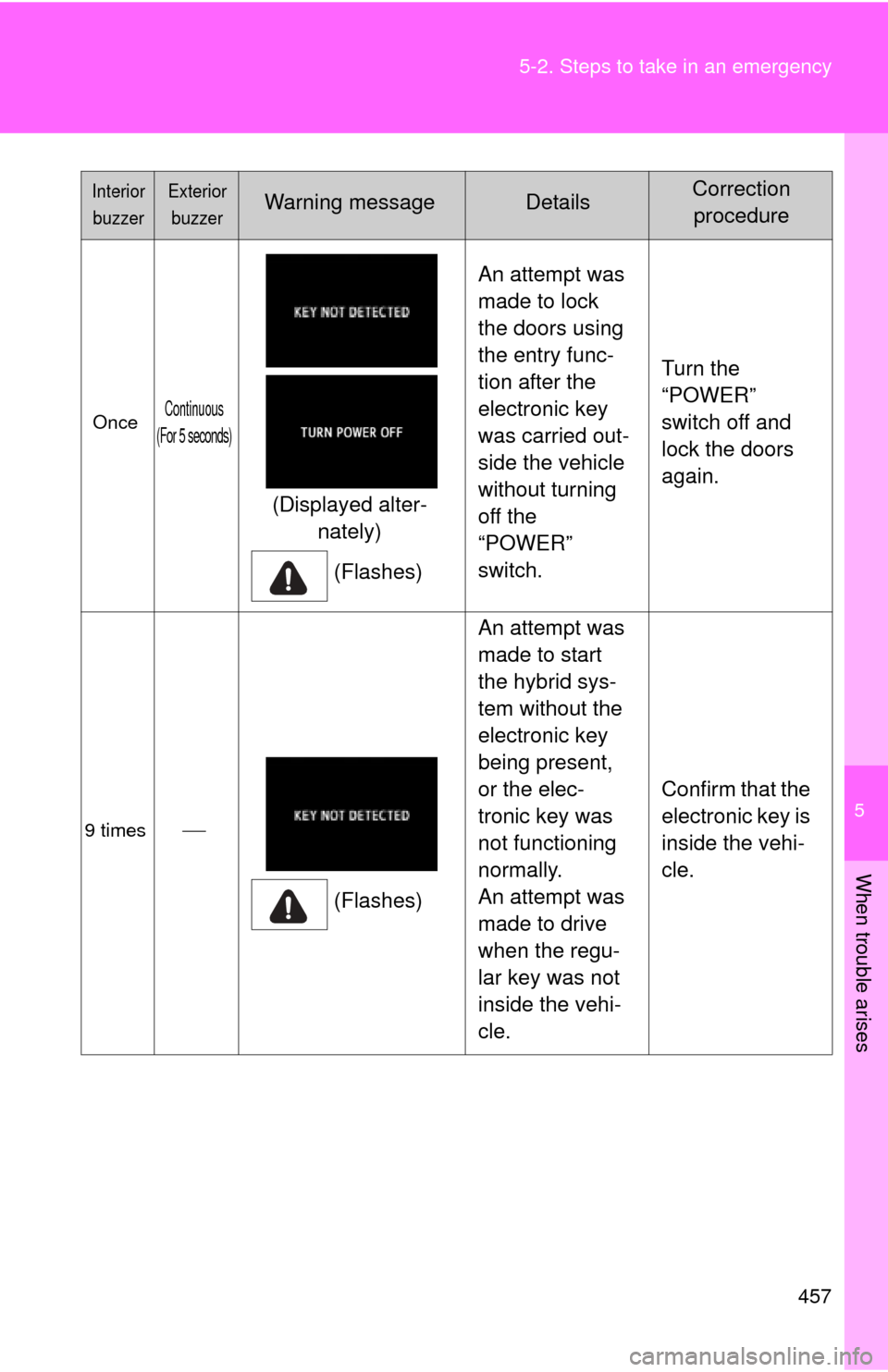
OnceContinuous
(For 5 seconds)
(Displayed alter- nately)
(Flashes) An attempt was
made to lock
the doors using
the entry func-
tion after the
electronic key
was carried out-
side the vehicle
without turning
off the
“POWER”
switch.
Turn the
“POWER”
switch off and
lock the doors
again.
9 times
(Flashes)An attempt was
made to start
the hybrid sys-
tem without the
electronic key
being present,
or the elec-
tronic key was
not functioning
normally.
An attempt was
made to drive
when the regu-
lar key was not
inside the vehi-
cle.
Confirm that the
electronic key is
inside the vehi-
cle.
Interior
buzzerExterior buzzerWarning messageDetailsCorrection procedure
Page 461 of 563
458 5-2. Steps to take in an emergency
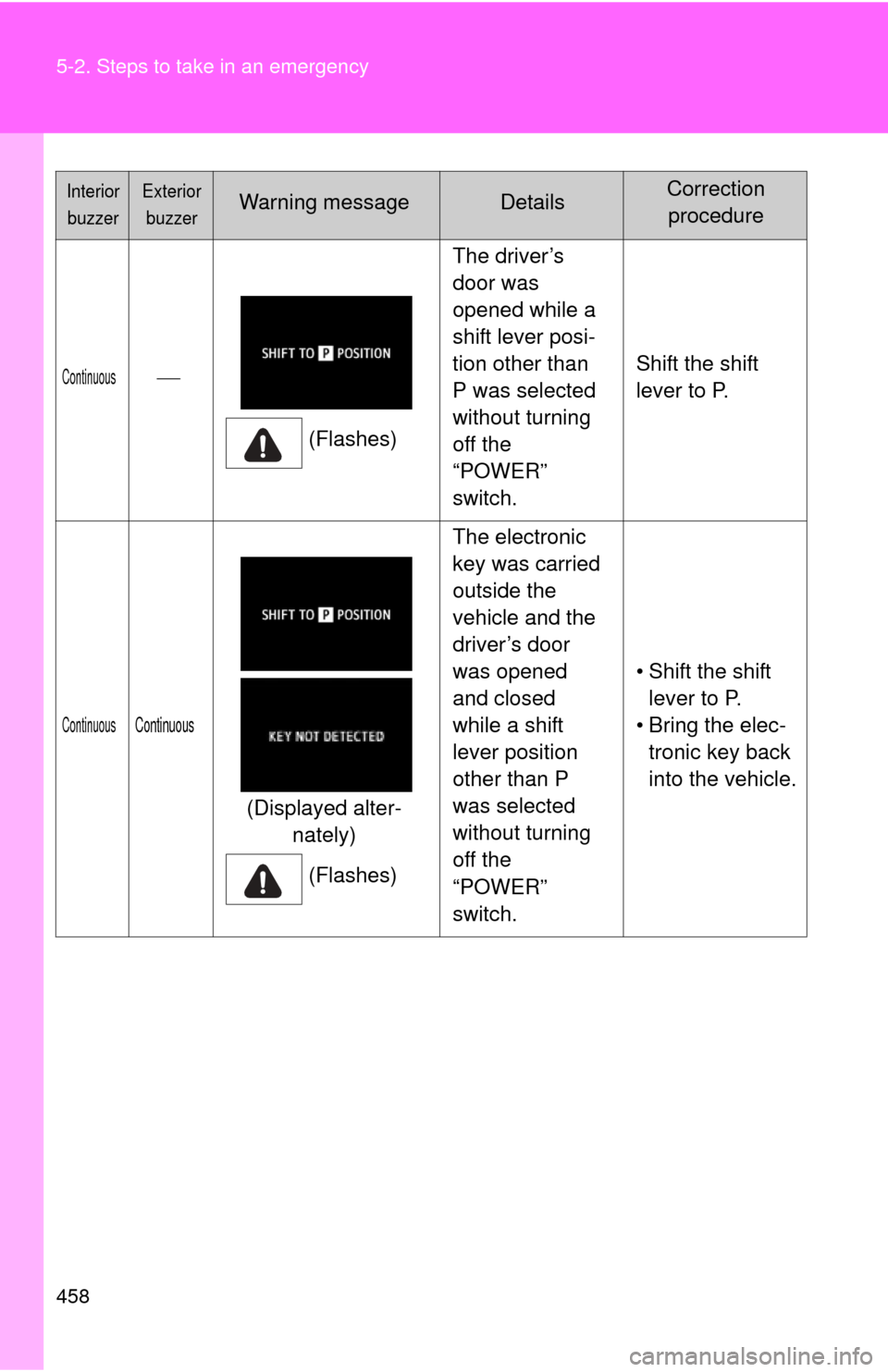
Continuous(Flashes)The driver’s
door was
opened while a
shift lever posi-
tion other than
P was selected
without turning
off the
“POWER”
switch.
Shift the shift
lever to P.
ContinuousContinuous
(Displayed alter-
nately)
(Flashes) The electronic
key was carried
outside the
vehicle and the
driver’s door
was opened
and closed
while a shift
lever position
other than P
was selected
without turning
off the
“POWER”
switch.
• Shift the shift
lever to P.
• Bring the elec- tronic key back
into the vehicle.
Interior
buzzerExterior buzzerWarning messageDetailsCorrection procedure
Page 483 of 563

480 5-2. Steps to take in an emergency
Firmly depress the brake pedal and check that is dis-
played on the multi-information display.
Press the “POWER” switch.
In the event that the “POWER” swit ch still cannot be operated, con-
tact your Toyota dealer.
■ Stopping the hybrid system
Shift the shift lever to P and press the “POWER” switch as you normally do
when stopping the hybrid system.
■ Replacing the key battery
As the above procedure is a temporary measure, it is recommended that the
electronic key battery be replaced immediately when the battery is depleted.
(P. 401)
■ Changing “POWER” switch modes
Release the brake pedal and press the “POWER” switch in above.
The hybrid system does not start and modes will be changed each time the
switch is pressed. ( P. 166)
■ If the doors cannot be locked or unlocked by the smart key system
Lock and unlock the doors by the mechanical key or wireless remote contr\
ol.
■ When the electronic key does not work properly
Check if battery-saving mode is set. If it is set, cancel the function.
(P. 54)
STEP3
STEP4
STEP3
Page 490 of 563
5
When trouble arises
487
5-2. Steps to take in an emergency
If your vehicle overheats
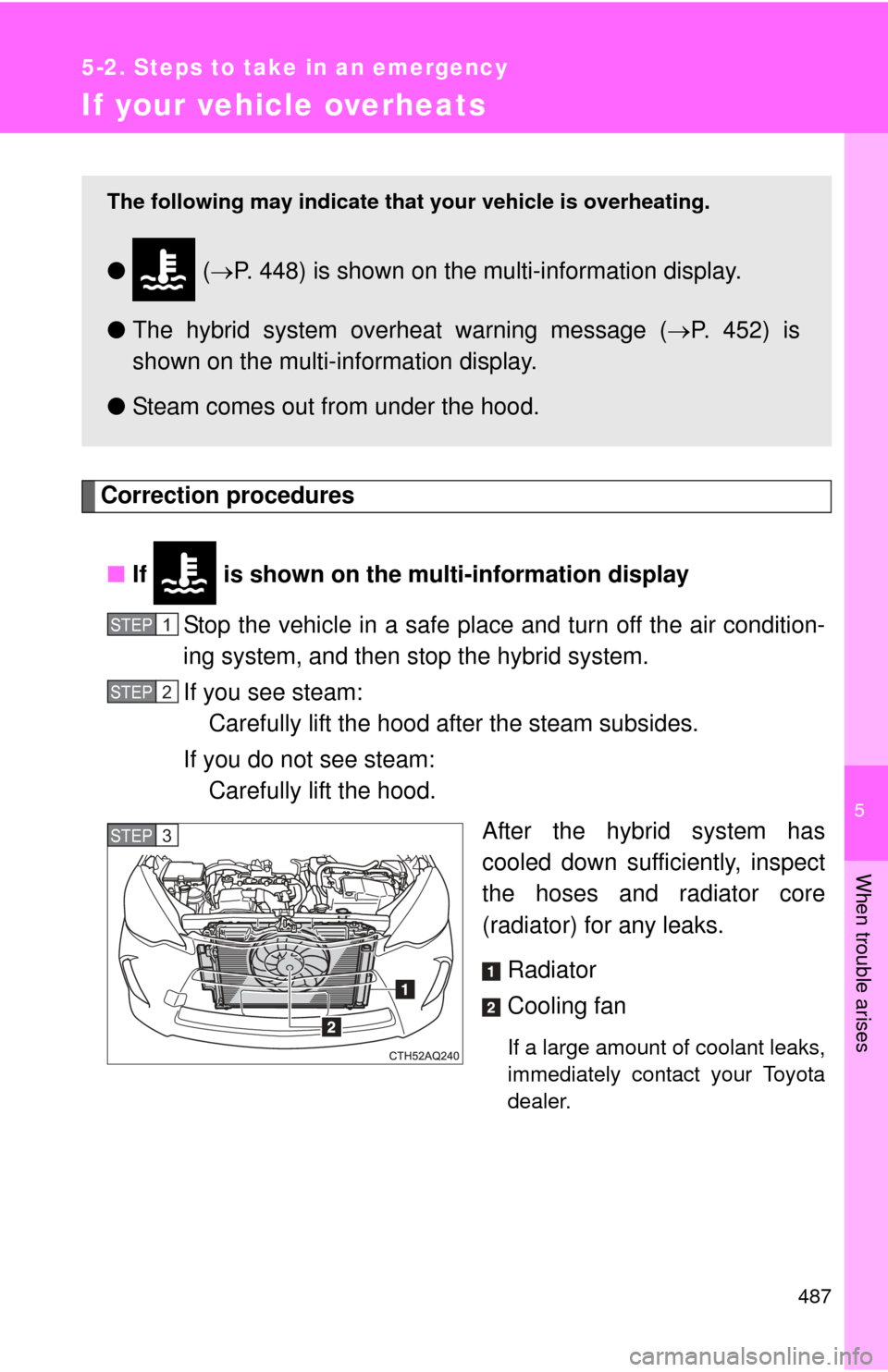
Correction procedures■ If is shown on the mu lti-information display
Stop the vehicle in a safe place and turn off the air condition-
ing system, and then stop the hybrid system.
If you see steam: Carefully lift the hood after the steam subsides.
If you do not see steam: Carefully lift the hood.
After the hybrid system has
cooled down sufficiently, inspect
the hoses and radiator core
(radiator) for any leaks.
Radiator
Cooling fan
If a large amount of coolant leaks,
immediately contact your Toyota
dealer.
The following may indicate that your vehicle is overheating.
● ( P. 448) is shown on the multi-information display.
● The hybrid system overheat warning message ( P. 452) is
shown on the multi-information display.
● Steam comes out from under the hood.
STEP1
STEP2
STEP3
Page 492 of 563
5
When trouble arises
489
5-2. Steps to take in an emergency
■
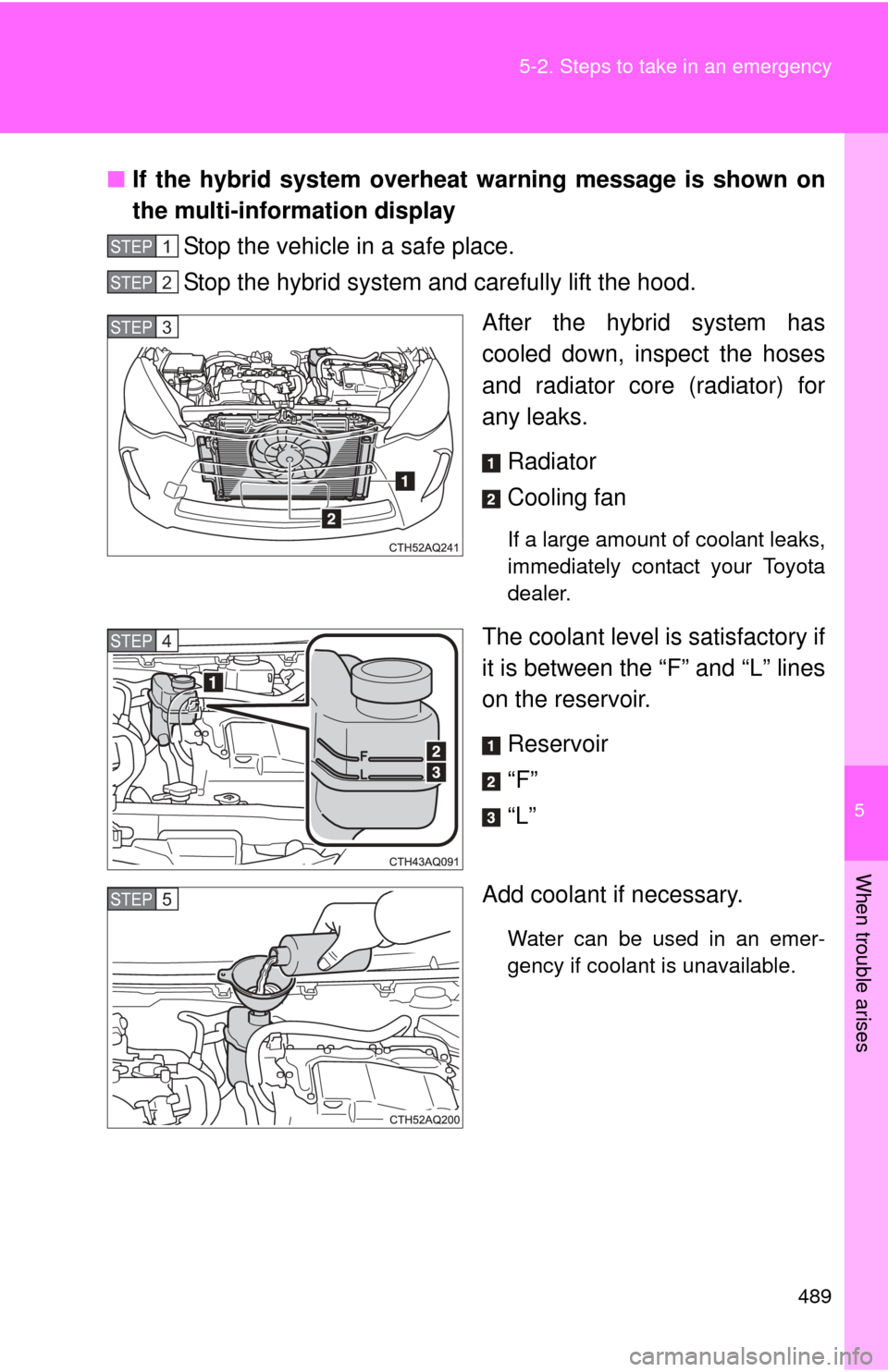
If the hybrid system overheat warning message is shown on
the multi-information display
Stop the vehicle in a safe place.
Stop the hybrid system and carefully lift the hood.
After the hybrid system has
cooled down, inspect the hoses
and radiator core (radiator) for
any leaks.
Radiator
Cooling fan
If a large amount of coolant leaks,
immediately contact your Toyota
dealer.
The coolant level is satisfactory if
it is between the “F” and “L” lines
on the reservoir.Reservoir
“F”
“L”
Add coolant if necessary.
Water can be used in an emer-
gency if coolant is unavailable.
STEP1
STEP2
STEP3
STEP4
STEP5
Page 493 of 563

490 5-2. Steps to take in an emergency
Start the hybrid system and check for the multi-information
display.
If the message does not disappear:Stop the hybrid system and c ontact your Toyota dealer.
If the message is not displayed: Have the vehicle inspected at the nearest Toyota dealer.
CAUTION
■To prevent an accident or injury when inspecting under the hood of
your vehicle
● If steam is seen coming from under the hood, do not open the hood until
the steam has subsided. The engine compartment may be very hot, caus-
ing serious injuries such as burns.
● After the hybrid system has been turned off, check that on the
multi-information display and the “READY” indicator are off.
When the hybrid system is operating, the gasoline engine may automati-
cally start, or the cooling fan may suddenly operate even if the gasoline
engine stops. Do not touch or approach rotating parts such as the fan,
which may lead to fingers or clothing (especially a tie, a scarf or a muffler)
getting caught, resulting in serious injury.
● Do not loosen the radiator cap while the hybrid system and radiator are
hot.
Serious injuries, such as burns, may result from hot coolant and steam
released under pressure.
STEP6
Page 525 of 563
522
6-2. Customization
Customizable features
Customizable FeaturesVehicles with a Display Audio system: Settings that can be
changed using the Display Audio system
(For further information on custom izing settings using the Display
Audio system, refer to the “Dis play Audio System Owner’s Man-
ual”.)
Settings that can be chan ged by your Toyota dealer
Definition of symbols: O = Available, — = Not available
Your vehicle includes a variety of electronic features that can be per-
sonalized to suit your prefer ences. Programming these preferences
requires specialized equipment and may be performed by your
Toyota dealer.
Some function settings are changed simultaneously with other functions
being customized. Contact your Toyota dealer for further details.