Page 465 of 712
4656-4. Using the other interior features
6
Interior features
HIGHLANDER_U (OM48A12U)
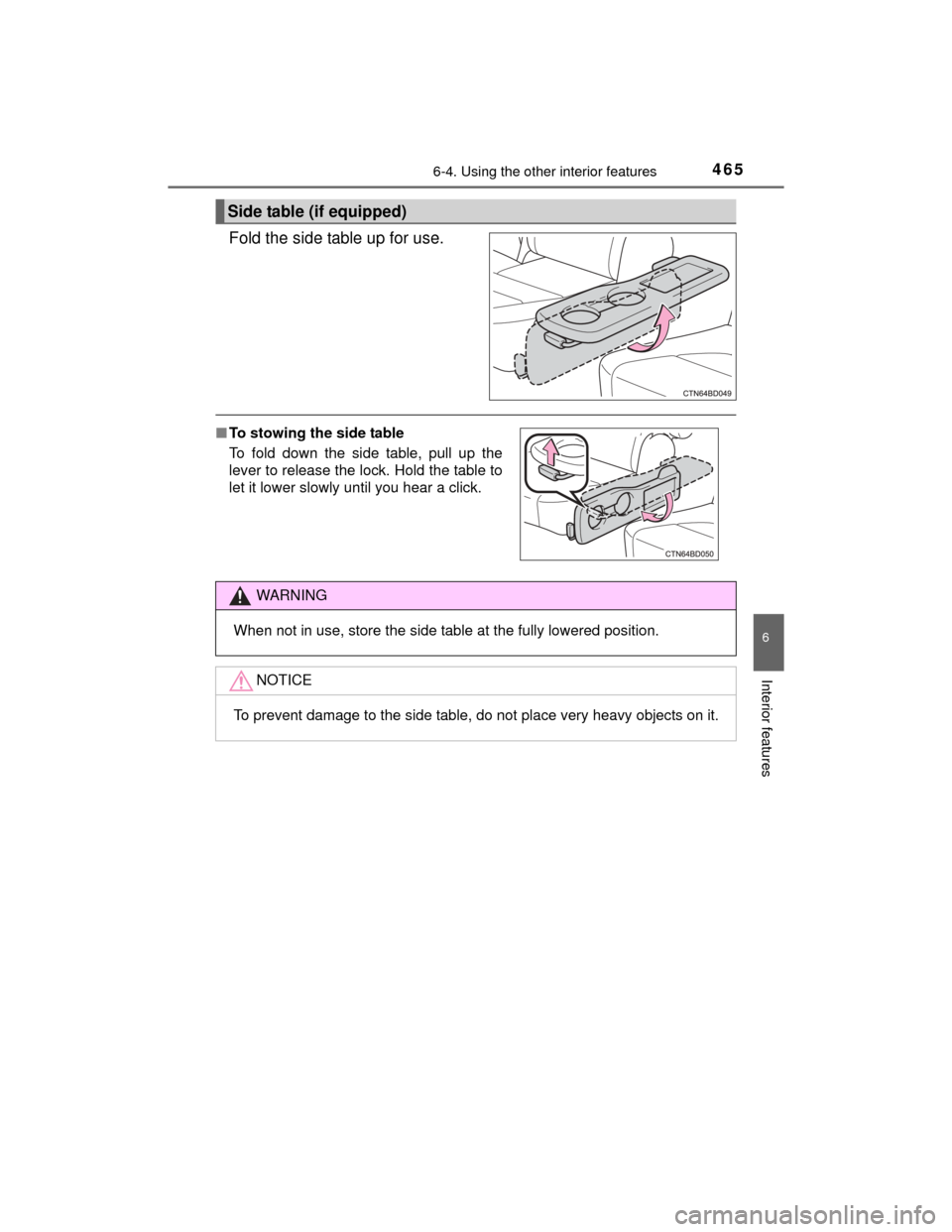
Fold the side table up for use.
Side table (if equipped)
■To stowing the side table
To fold down the side table, pull up the
lever to release the lock. Hold the table to
let it lower slowly until you hear a click.
WARNING
When not in use, store the side table at the fully lowered position.
NOTICE
To prevent damage to the side table, do not place very heavy objects on it.
Page 466 of 712
4666-4. Using the other interior features
HIGHLANDER_U (OM48A12U)
The garage door opener (HomeLink Universal Transceiver) is manu-
factured under license from HomeLink.
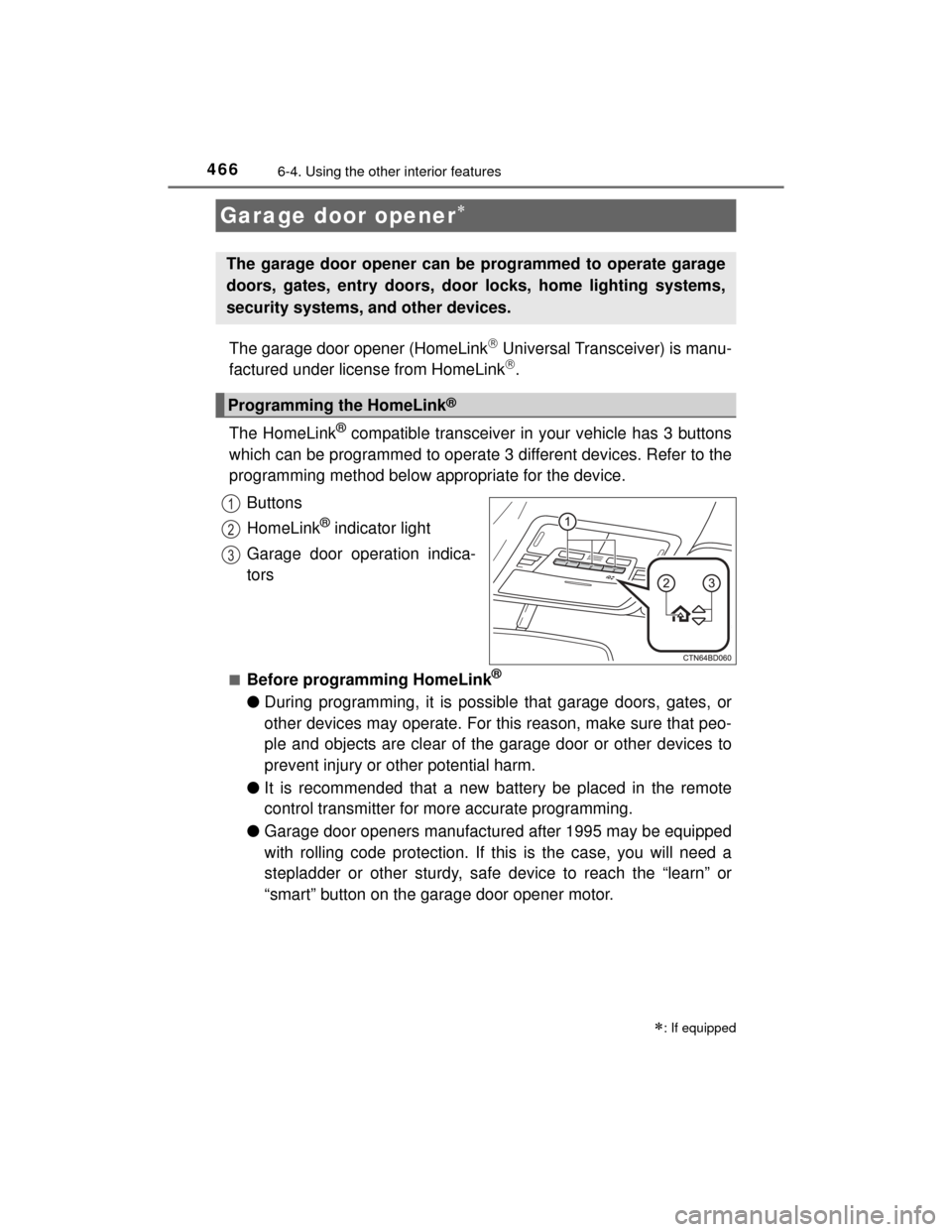
The HomeLink
® compatible transceiver in your vehicle has 3 buttons
which can be programmed to operate 3 different devices. Refer to the
programming method below appropriate for the device.
Buttons
HomeLink
® indicator light
Garage door operation indica-
tors
■Before programming HomeLink®
● During programming, it is possible that garage doors, gates, or
other devices may operate. For this reason, make sure that peo-
ple and objects are clear of the garage door or other devices to
prevent injury or other potential harm.
● It is recommended that a new battery be placed in the remote
control transmitter for more accurate programming.
● Garage door openers manufactured after 1995 may be equipped
with rolling code protection. If this is the case, you will need a
stepladder or other sturdy, safe device to reach the “learn” or
“smart” button on the garage door opener motor.
Garage door opener
: If equipped
The garage door opener can be programmed to operate garage
doors, gates, entry doors, door locks, home lighting systems,
security systems, and other devices.
Programming the HomeLink®
1
2
3
Page 481 of 712
4816-4. Using the other interior features
6
Interior features
HIGHLANDER_U (OM48A12U)■
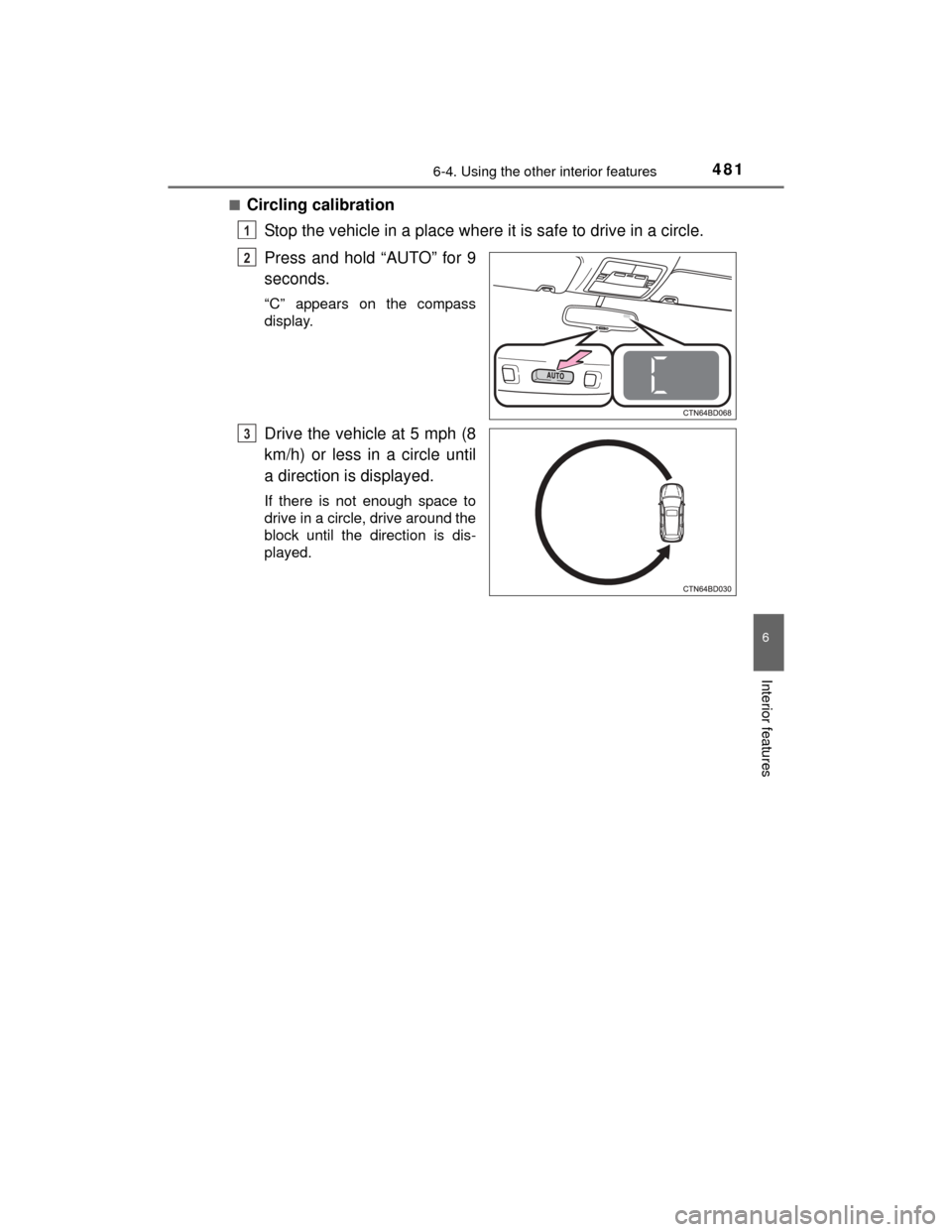
Circling calibration
Stop the vehicle in a place where it is safe to drive in a circle.
Press and hold “AUTO” for 9
seconds.
“C” appears on the compass
display.
Drive the vehicle at 5 mph (8
km/h) or less in a circle until
a direction is displayed.
If there is not enough space to
drive in a circle, drive around the
block until the direction is dis-
played.
1
2
3
Page 485 of 712
4857-1. Maintenance and care
7
Maintenance and care
HIGHLANDER_U (OM48A12U)■
When using a car wash (vehicles with a smart key system)
If the door handle becomes wet while the electronic key is within the effective
range, the door may lock and unlock repeatedly. In that case, follow the fol-
lowing correction procedures to wash the vehicle:
●Place the key in a position 6 ft. (2 m) or more separate from the vehicle
while the vehicle is being washed. (Take care to ensure that the key is not
stolen.)
● Set the electronic key to battery-saving mode to disable the smart key sys-
tem. ( P. 149)
■ Aluminum wheels
●Remove any dirt immediately by us ing a neutral detergent. Do not use hard
brushes or abrasive cleaners. Do not use strong or harsh chemical clean-
ers.
Use the same mild detergent and wax as used on the paint.
● Do not use detergent on the wheels when they are hot, for example after
driving for long distance in the hot weather.
● Wash detergent from the wheels immediately after use.
■ Bumpers
Do not scrub with abrasive cleaners.
WARNING
■When washing the vehicle
Do not apply water to the inside of the engine compartment. Doing so may
cause the electrical components etc. to catch fire.
■ Precautions regarding the exhaust pipe
Exhaust gasses cause the exhaust pipe to become quite hot.
When washing the vehicle, be careful not to touch the pipe until it has
cooled sufficiently, as touching a hot exhaust pipe can cause burns.
■ Precaution regarding the rear bumper with Blind Spot Monitor (if
equipped)
If the paint of the rear bumper is chipped or scratched, the system may mal-
function. If this occurs, consult your Toyota dealer.
Page 491 of 712
4917-2. Maintenance
7
Maintenance and care
HIGHLANDER_U (OM48A12U)
■Repair and replacement
It is recommended that genuine Toyota parts be used for repairs to ensure
performance of each system. If non-Toyota parts are used in replacement or if
a repair shop other than a Toyota dealer performs repairs, confirm the war-
ranty coverage.
■ Reset the maintenance data (U.S.A. only)
After the required maintenance is performed according to the maintenance
schedule, please reset the maintenance data.
To reset the data, follow the procedure described below:
Using the trip meter
Vehicles without a smart key system: Turn the engine switch to the “LOCK”
position with the trip meter A reading shown.
Vehicles with a smart key system: Turn the engine switch off with the trip
meter A reading shown.
Vehicles without a smart key system: While pressing the trip meter reset
button ( P. 95), turn the engine switch to the “ON” position (do not start the
engine, reset mode will be canceled).
Vehicles with a smart key system: While pressing the trip meter reset but-
ton ( P. 95), turn the engine switch to the IGNITION ON mode (do not start
the engine, otherwise the reset mode will be canceled).
Continue to press and hold the button until the trip meter displays “000000”.
Using the multi-information display (vehicles with color display)
While the engine is running, switch the multi-information display to the “Set-
tings” screen. ( P. 94)
Select “Maintenance System” on the “Settings” screen.
Select “Yes” on the “Maintenance System” screen.
“Initialization Completed” will be displayed on the multi-information display
when the reset procedure has been completed.
■ Allow inspection and repairs to be performed by a Toyota dealer
●Toyota technicians are well-trained specialists and are kept up to date with
the latest service information. They are well informed about the operations
of all systems on your vehicle.
● Keep a copy of the repair order. It proves that the maintenance that has
been performed is under warranty coverage. If any problem should arise
while your vehicle is under warranty, your Toyota dealer will promptly take
care of it.
1
2
3
1
2
3
Page 495 of 712
4957-2. Maintenance
7
Maintenance and care
HIGHLANDER_U (OM48A12U)
Head restraints• Do the head restraints move smoothly andlock securely?
Indicators/buzzers• Do the indicators and buzzers function prop-erly?
Lights • Do all the lights come on?
Parking brake
• Does the parking brake move smoothly?
• When parked on a slope and the parking brake is on, is the vehicle securely stopped?
Seat belts• Do the seat belts operate smoothly?
• The seat belts should not be damaged.
Seats• Do the seat controls operate properly?
Steering wheel
• Does the steering wheel rotate smoothly?
• Does the steering wheel have the correct
amount of free play?
• There should not be any strange sounds com-
ing from the steering wheel.
ItemsCheck points
Page 496 of 712
4967-2. Maintenance
HIGHLANDER_U (OM48A12U)
Vehicle exterior
ItemsCheck points
Doors• Do the doors operate smoothly?
Engine hood• Does the engine hood lock system work prop-erly?
Fluid leaks• There should not be any signs of fluid leakageafter the vehicle has been parked.
Tires
• Is the tire inflation pressure correct?
• The tires should not be damaged or exces-sively worn.
• Have the tires been rotated according to the maintenance schedule?
• The wheel nuts should not be loose.
Windshield wipers/rear
window wiper
• The wiper blades should not show any signs
of cracking, splitting, wear, contamination or
deformation.
• The wiper blades should clear the windshield/
rear window without streaking or skipping.
WARNING
■If the engine is running
Turn the engine off and ensure that there is adequate ventilation before per-
forming maintenance checks.
Page 500 of 712
5007-3. Do-it-yourself maintenance
HIGHLANDER_U (OM48A12U)
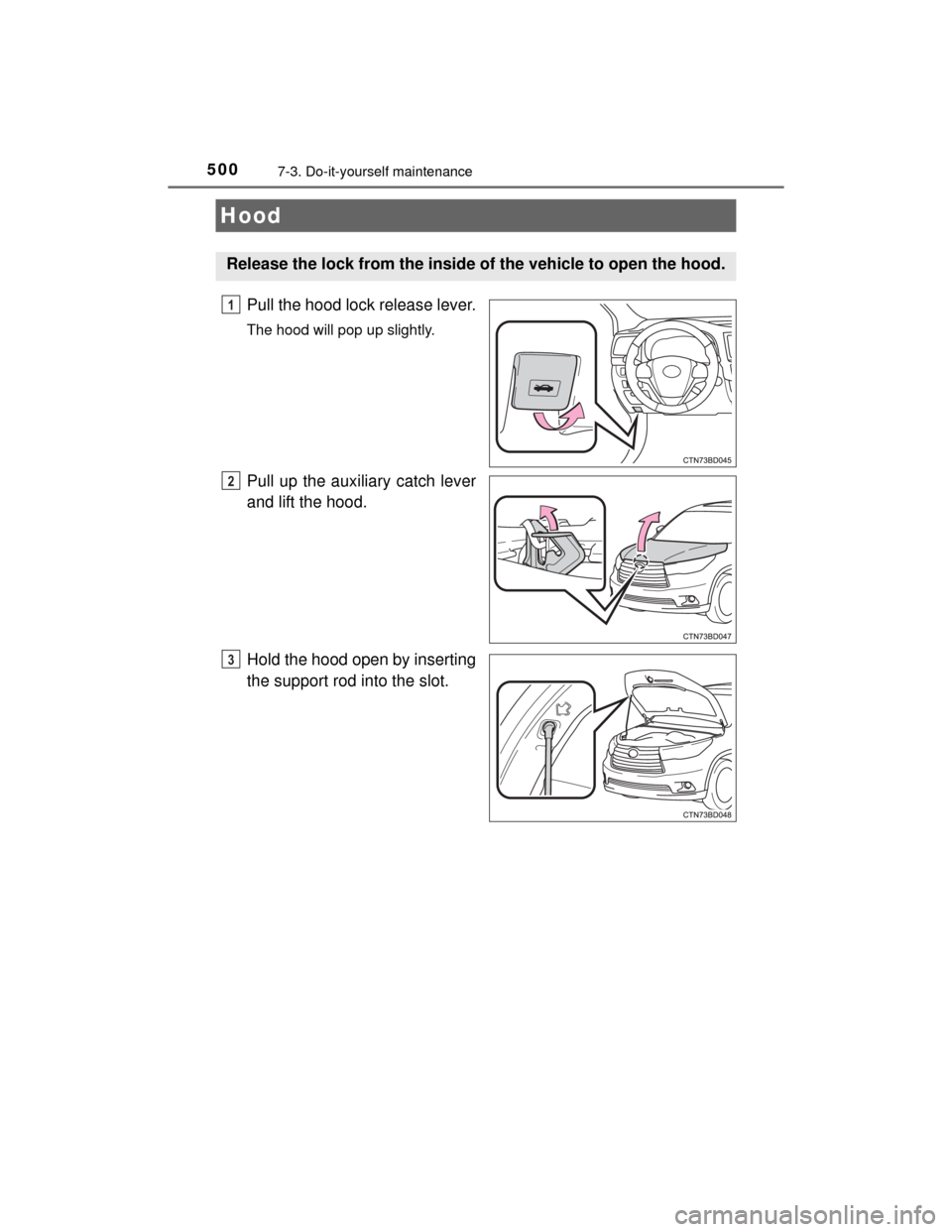
Pull the hood lock release lever.
The hood will pop up slightly.
Pull up the auxiliary catch lever
and lift the hood.
Hold the hood open by inserting
the support rod into the slot.
Hood
Release the lock from the inside of the vehicle to open the hood.
1
2
3