Page 188 of 612

1884-3. Operating the lights and wipers
COROLLA_TMMMS_TMMC_U (OM12F00U)
With the headlights on, push
the lever away from you to turn
on the high beams.
Pull the lever toward you to the
center position to turn the high
beams off.
Pull the lever toward you and
release it to flash the high
beams once.
You can flash the high beams with the headlights on or off.
■Daytime running light system
●To make your vehicle more visible to other drivers, the headlights turn on
automatically (at a reduced intensity) whenever the engine is started and
the parking brake is released. Daytime running lights are not designed for
use at night.
For the U.S.A.: Daytime running lights can be turned off by operating the
switch.
●Compared to turning on the headlights, the daytime running light system
offers greater durability and consumes less electricity, so it can help improve
fuel economy.
■Headlight control sensor (if equipped)
Turning on the high beam headlights
1
2
The sensor may not function properly if an
object is placed on the sensor, or anything
that blocks the sensor is affixed to the
windshield.
Doing so interferes with the sensor
detecting the level of ambient light and
may cause the automatic headlight sys-
tem to malfunction.
Page 189 of 612
1894-3. Operating the lights and wipers
4
Driving
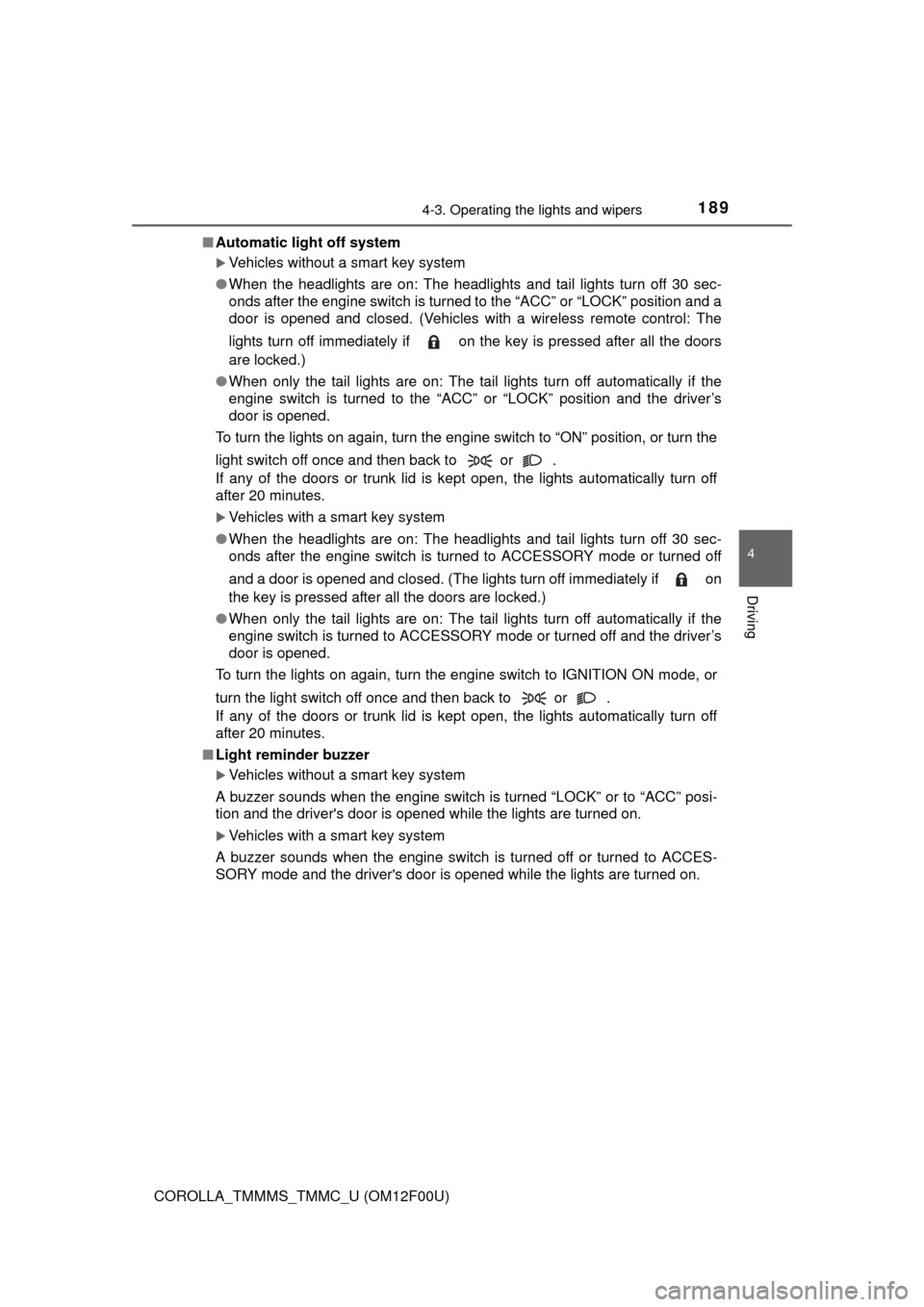
COROLLA_TMMMS_TMMC_U (OM12F00U)■Automatic light off system
Vehicles without a smart key system
●When the headlights are on: The headlights and tail lights turn off 30 sec-
onds after the engine switch is turned to the “ACC” or “LOCK” position and a
door is opened and closed. (Vehicles with a wireless remote control: The
lights turn off immediately if on the key is pressed after all the doors
are locked.)
●When only the tail lights are on: The tail lights turn off automatically if the
engine switch is turned to the “ACC” or “LOCK” position and the driver’s
door is opened.
To turn the lights on again, turn the engine switch to “ON” position, or turn the
light switch off once and then back to or .
If any of the doors or trunk lid is kept open, the lights automatically turn off
after 20 minutes.
Vehicles with a smart key system
●When the headlights are on: The headlights and tail lights turn off 30 sec-
onds after the engine switch is turned to ACCESSORY mode or turned off
and a door is opened and closed. (The lights turn off immediately if on
the key is pressed after all the doors are locked.)
●When only the tail lights are on: The tail lights turn off automatically if the
engine switch is turned to ACCESSORY mode or turned off and the driver’s
door is opened.
To turn the lights on again, turn the engine switch to IGNITION ON mode, or
turn the light switch off once and then back to or .
If any of the doors or trunk lid is kept open, the lights automatically turn off
after 20 minutes.
■Light reminder buzzer
Vehicles without a smart key system
A buzzer sounds when the engine switch is turned “LOCK” or to “ACC” posi-
tion and the driver's door is opened while the lights are turned on.
Vehicles with a smart key system
A buzzer sounds when the engine switch is turned off or turned to ACCES-
SORY mode and the driver's door is opened while the lights are turned on.
Page 190 of 612

1904-3. Operating the lights and wipers
COROLLA_TMMMS_TMMC_U (OM12F00U)■Battery-saving function
In the following conditions, the headlights and the other remaining lights will
go off automatically after 20 minutes in order to prevent the vehicle battery
from being discharged:
●The headlights and/or tail lights are on.
●Vehicles without a smart key system: The engine switch is in the “ACC” or
“LOCK” position.
●Vehicles with a smart key system: The engine switch is turned to ACCES-
SORY mode or turned off.
This function will be canceled in any of the following situations:
●Vehicles without a smart key system: When the engine switch is turned to
the “ON” position.
●Vehicles with a smart key system: When the engine switch is turned to IGNI-
TION ON mode.
●When the light switch is operated
●When the door or trunk is opened or closed
■Customization
Settings (e.g. light sensor sensitivity) can be changed.
(Customizable features: P. 570)
NOTICE
■To prevent battery discharge
Do not leave the lights on longer than necessary when the engine is not
running.
Page 193 of 612

1934-3. Operating the lights and wipers
4
Driving
COROLLA_TMMMS_TMMC_U (OM12F00U)
Washer/wiper dual operation
Wipers will automatically operate a
couple of times after the washer
squirts.
■The windshield wiper and washer can be operated when
Vehicles without a smart key system
The engine switch is in the “ON” position.
Vehicles with a smart key system
The engine switch is in IGNITION ON mode.
■If no windshield washer fluid sprays
Check that the washer nozzles are not blocked if there is washer fluid in the
windshield washer fluid reservoir.
7
CAUTION
■Caution regarding the use of washer fluid
When it is cold, do not use the washer fluid until the windshield becomes
warm. The fluid may freeze on the windshield and cause low visibility. This
may lead to an accident, resulting in death or serious injury.
NOTICE
■When the windshield is dry
Do not use the wipers, as they may damage the windshield.
■When the washer fluid tank is empty
Do not operate the switch continually as the washer fluid pump may over-
heat.
■When a nozzle becomes blocked
In this case, contact your Toyota dealer.
Do not try to clear it with a pin or other object. The nozzle will be damaged.
Page 211 of 612
2114-5. Using the driving support systems
4
Driving
COROLLA_TMMMS_TMMC_U (OM12F00U)
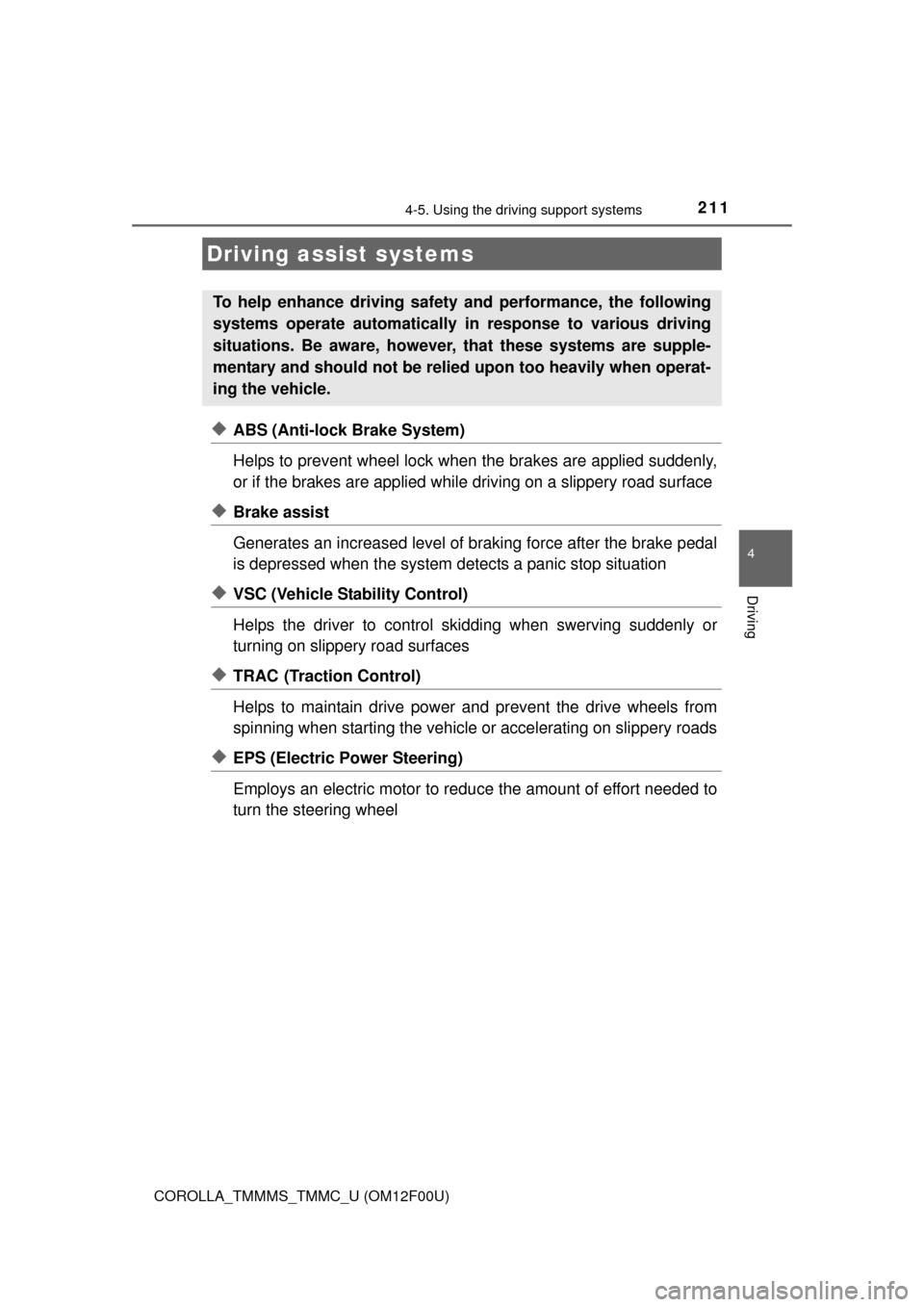
◆ABS (Anti-lock Brake System)
Helps to prevent wheel lock when the brakes are applied suddenly,
or if the brakes are applied while driving on a slippery road surface
◆Brake assist
Generates an increased level of braking force after the brake pedal
is depressed when the system detects a panic stop situation
◆VSC (Vehicle Stability Control)
Helps the driver to control skidding when swerving suddenly or
turning on slippery road surfaces
◆TRAC (Traction Control)
Helps to maintain drive power and prevent the drive wheels from
spinning when starting the vehicle or accelerating on slippery roads
◆EPS (Electric Power Steering)
Employs an electric motor to reduce the amount of effort needed to
turn the steering wheel
Driving assist systems
To help enhance driving safety and performance, the following
systems operate automatically in response to various driving
situations. Be aware, however, that these systems are supple-
mentary and should not be relied upon too heavily when operat-
ing the vehicle.
Page 213 of 612

2134-5. Using the driving support systems
4
Driving
COROLLA_TMMMS_TMMC_U (OM12F00U)
■Turning off both TRAC and VSC systems
To turn the TRAC and VSC systems off, press and hold for more than 3
seconds while the vehicle is stopped.
The “TRAC OFF” indicator light and VSC OFF indicator light will come on.
Press again to turn the systems back on.
■When the “TRAC OFF” indicator light comes on even if the VSC OFF
switch has not been pressed
TRAC/TRC cannot be operated. Contact your Toyota dealer.
■Sounds and vibrations caused by the ABS, brake assist, TRAC and VSC
systems
●A sound may be heard from the engine compartment when the engine is
started or just after the vehicle begins to move. This sound does not indicate
that a malfunction has occurred in any of these systems.
●Any of the following conditions may occur when the above systems are
operating. None of these indicates that a malfunction has occurred.
• Vibrations may be felt through the vehicle body and steering.
• A motor sound may be heard after the vehicle comes to a stop.
• The brake pedal may pulsate slightly after the ABS is activated.
• The brake pedal may move down slightly after the ABS is activated.
■EPS operation sound
When the steering wheel is operated, a motor sound (whirring sound) may be
heard. This does not indicate a malfunction.
■Automatic reactivation of TRAC and VSC systems
After turning the TRAC and VSC systems off, the systems will be automati-
cally re-enabled in the following situations:
●Vehicles without a smart key system: When the engine switch is turned to
the “LOCK” position
Vehicles with a smart key system: When the engine switch is turned off
●If only the TRAC system is turned off, the TRAC will turn on when vehicle
speed increases
If both the TRAC and VSC systems are turned off, automatic re-enabling will
not occur when vehicle speed increases.
■Reduced effectiveness of the EPS system
The effectiveness of the EPS system is reduced to prevent the system from
overheating when there is frequent steering input over an extended period of
time. The steering wheel may feel heavy as a result. Should this occur, refrain
from excessive steering input or stop the vehicle and turn the engine off. The
EPS system should return to normal within 10 minutes.
Page 217 of 612

2174-6. Driving tips
4
Driving
COROLLA_TMMMS_TMMC_U (OM12F00U)
Accelerate the vehicle slowly, keep a safe distance between you and
the vehicle ahead, and drive at a reduced speed suitable to road con-
ditions.
Park the vehicle and move the shift lever to P (automatic transmission
or continuously variable transmission), 1 or R (manual transmission)
without setting the parking brake. The parking brake may freeze up,
preventing it from being released. If necessary, block the wheels to
prevent inadvertent sliding or creeping.
Vehicles with 15-inch tires
Use the tire chains of correct size and type.
Use SAE Class “S” type radial tire chains except radial cable chains or
V-bar type chains.
Vehicles with 16-inch and 17-inch tires
Use the correct tire chain size when mounting the snow chains.
Chain size is regulated for each tire size.
Side chain:
0.12 in. (3 mm) in diameter
0.39 in. (10 mm) in width
1.18 in. (30 mm) in length
Cross chain:
0.16 in. (4 mm) in diameter
0.55 in. (14 mm) in width
0.98 in. (25 mm) in length
Regulations regarding the use of tire chains vary depending on loca-
tion and type of road. Always check local regulations before installing
chains.
When driving the vehicle
When parking the vehicle
Selecting tire chains
1
2
3
4
5
6
Regulations on the use of tire chains
Page 242 of 612
2425-5. Using an external device
COROLLA_TMMMS_TMMC_U (OM12F00U)
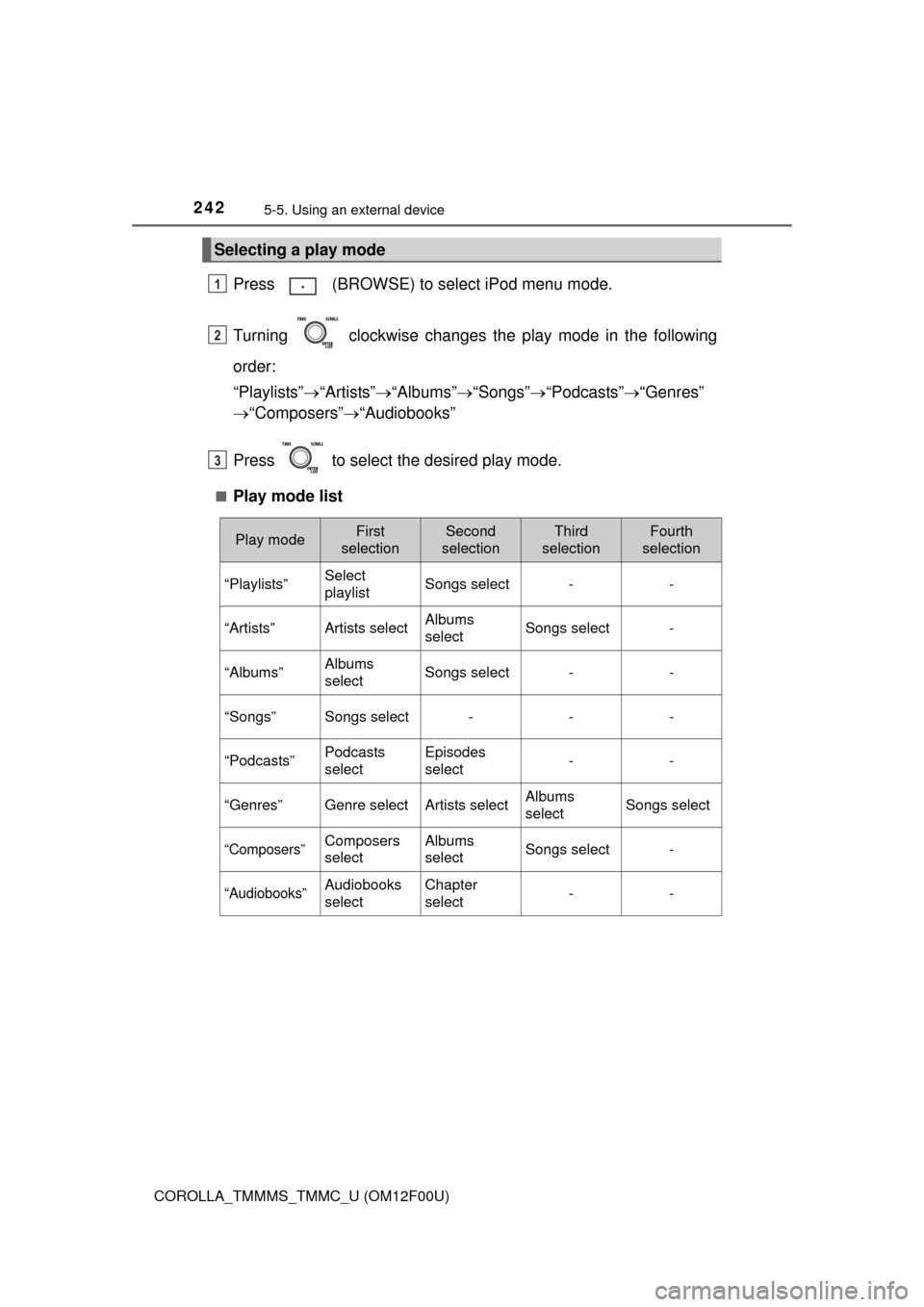
Press (BROWSE) to select iPod menu mode.
Turning clockwise changes the play mode in the following
order:
“Playlists”“Artists”“Albums”“Songs”“Podcasts”“Genres”
“Composers”“Audiobooks”
Press to select the desired play mode.
■Play mode list
Selecting a play mode
1
2
3
Play modeFirst
selectionSecond
selectionThird
selectionFourth
selection
“Playlists”Select
playlistSongs select--
“Artists”Artists selectAlbums
selectSongs select-
“Albums”Albums
selectSongs select--
“Songs”Songs select---
“Podcasts”Podcasts
selectEpisodes
select--
“Genres”Genre selectArtists selectAlbums
selectSongs select
“Composers”Composers
selectAlbums
selectSongs select-
“Audiobooks”Audiobooks
selectChapter
select--