Page 293 of 612
2935-12. Setup (Multimedia system)
5
Interior features
COROLLA_TMMMS_TMMC_U (OM12F00U)
Select “Automatic Sound Levelizer”.
Select “High”, “Mid”, “Low” or “Off”.
■The sound quality level is adjusted individually
The treble, mid and bass levels can be adjusted for each audio mode sepa-
rately.
■About Automatic Sound Leveliser (ASL)
ASL automatically adjusts the volume and tone quality according to the vehi-
cle speed.
Automatic sound leveliser (ASL)
1
2
Page 296 of 612
296
COROLLA_TMMMS_TMMC_U (OM12F00U)5-
13.
Using the Multimedia system
Press the “AUDIO” button to disp lay the audio source selection
screen.
If the audio source selection screen is not displayed, press the “AUDIO”
button again.
Select the desired audio
source.
Select the desired audio
source then or to
reorder.
The audio source changes as follows each time the “MODE/HOLD”
switch is pressed.
Selecting the audio source
Switching between audio sources such as radio and CD are
explained in this section.
Changing audio source
1
2
1
Using the steering wheel switches to change audio source
Page 298 of 612
2985-13. Using the Multimedia system
COROLLA_TMMMS_TMMC_U (OM12F00U)■
Selecting a track/file/song
Press the “” or “” button on “SEEK/TRACK” or turn the “TUNE/
SCROLL” knob to select the desired track/file/song number.
To fast-forward or reverse, press and hold the “” or “” button on
“SEEK/TRACK”.
■Selecting a track/file/song from the track/file/song list
Select “Browse” or cover art.
Select the desired track/file/
song.
When an MP3/WMA/AAC disc or USB memory device is being used,
the folder can be selected. When a Bluetooth
® device or iPod is being
used, the album can be selected.
According to the audio device, the following is displayed.
Selecting, fast-forwarding and reversing tracks/files/songs
1
2
Audio sourceList name
Audio CDTrack
MP3/WMA/AAC disc, USBFolder, File
Bluetooth®Album, Track
iPodAlbum, Song, Video
Page 299 of 612
2995-13. Using the Multimedia system
5
Interior features
COROLLA_TMMMS_TMMC_U (OM12F00U)
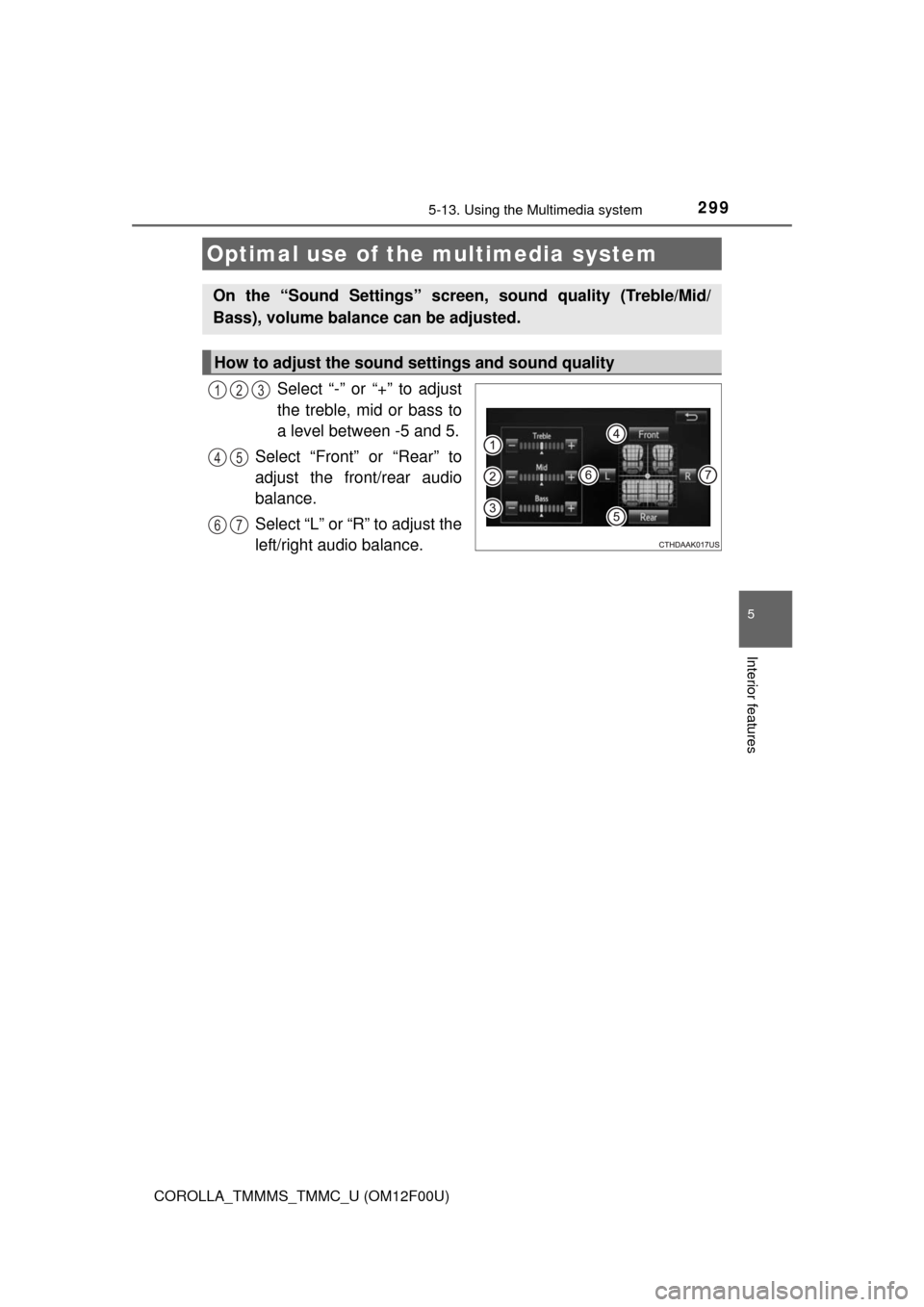
Select “-” or “+” to adjust
the treble, mid or bass to
a level between -5 and 5.
Select “Front” or “Rear” to
adjust the front/rear audio
balance.
Select “L” or “R” to adjust the
left/right audio balance.
Optimal use of the multimedia system
On the “Sound Settings” screen, sound quality (Treble/Mid/
Bass), volume balance can be adjusted.
How to adjust the sound settings and sound quality
123
45
67
Page 300 of 612
300
COROLLA_TMMMS_TMMC_U (OM12F00U)5-
14.
Using the radio (Multimedia system)
Pressing the “AUDIO” button disp lays the audio control screen from
any screens of the selected source.
Audio source selection screen
appears
Preset stations
Scanning for receivable station
Select to display a list of receiv-
able stations
Setting the sound ( P. 299)
Tune in to the desired station using one of the following methods.
■Seek tuning
Press the “ ” or “ ” button on “SEEK/TRACK”.
The radio will begin seeking up or down for a station of the nearest
frequency and will stop when a station is found.
■Manual tuning
Turn the “TUNE/SCROLL” knob.
■Preset stations
Select the desired preset station.
Radio operation
Select “AM” or “FM” on the audio source selection screen to
begin listening to the radio.
Audio control screen
1
2
3
4
5
Selecting a station
Page 302 of 612
302
COROLLA_TMMMS_TMMC_U (OM12F00U)
5-15.
Playing an audio CD and MP3/WMA/AAC discs (Multimedia system)
Pressing the “AUDIO” button displays the audio control screen from
any screens of the selected source.
Audio source selection screen
appears
Displaying the track/file list
Random playback (
P. 288)
Repeat play (
P. 288)
Pause
Select to resume play
Setting the sound (
P. 299)
CD player operation
Insert disc or select “CD” on the audio source selection screen
with a disc inserted to begin listening to a CD.
Audio control screen
1
2
3
4
5
6
Page 303 of 612
3035-15. Playing an audio CD and MP3/WMA/AAC discs (Multimedia system)
5
Interior features
COROLLA_TMMMS_TMMC_U (OM12F00U)
■Displaying the title and artist name
If a CD-TEXT disc is inserted, the title of the disc and track will be displayed.
■Error messages
If an error message is displayed, refer to the following table and take the
appropriate measures. If the problem is not rectified, take the vehicle to your
Toyota dealer.
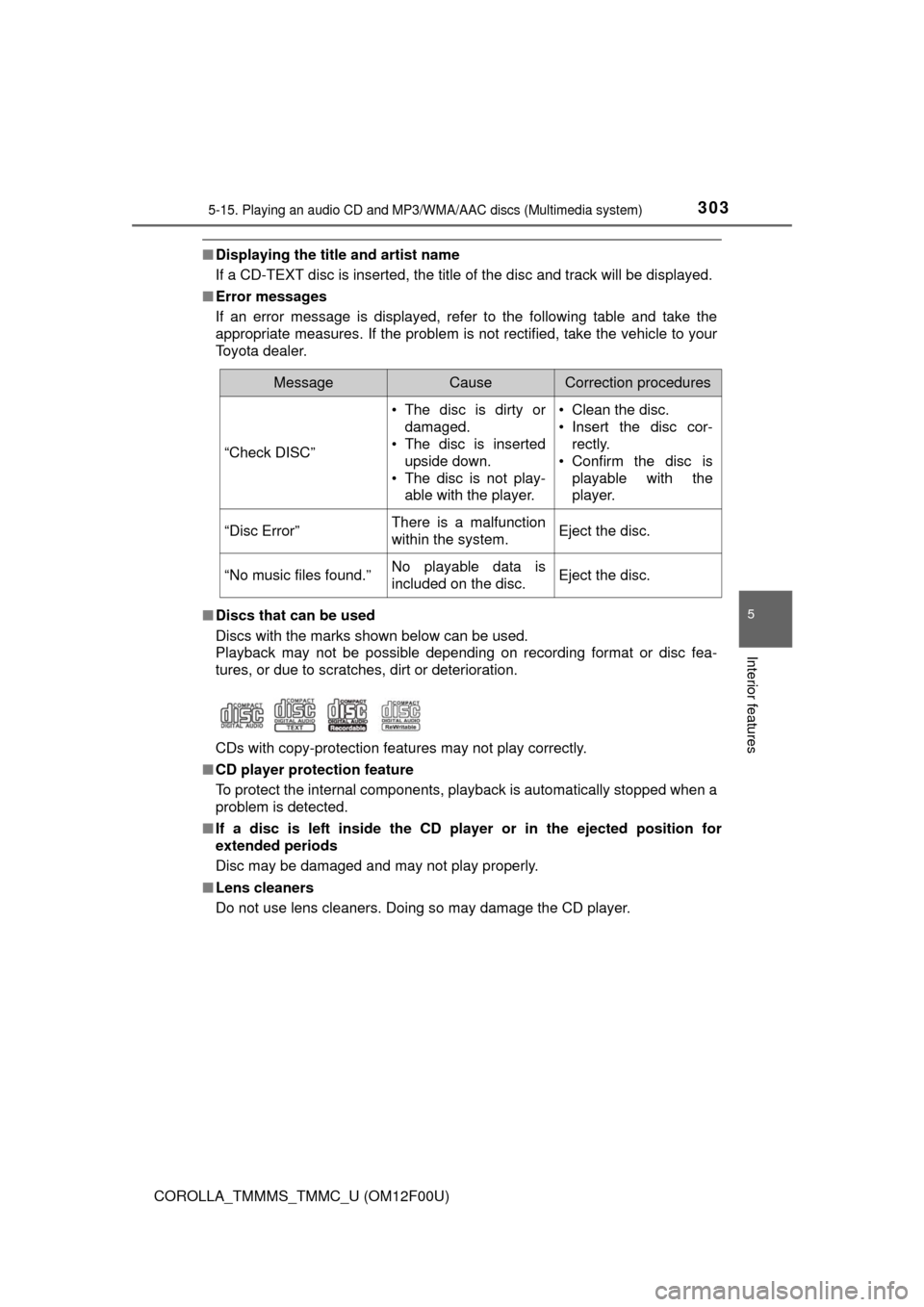
■Discs that can be used
Discs with the marks shown below can be used.
Playback may not be possible depending on recording format or disc fea-
tures, or due to scratches, dirt or deterioration.
CDs with copy-protection features may not play correctly.
■CD player protection feature
To protect the internal components, playback is automatically stopped when a
problem is detected.
■If a disc is left inside the CD player or in the ejected position for
extended periods
Disc may be damaged and may not play properly.
■Lens cleaners
Do not use lens cleaners. Doing so may damage the CD player.
MessageCauseCorrection procedures
“Check DISC”• The disc is dirty or
damaged.
• The disc is inserted
upside down.
• The disc is not play-
able with the player.• Clean the disc.
• Insert the disc cor-
rectly.
• Confirm the disc is
playable with the
player.
“Disc Error”There is a malfunction
within the system.Eject the disc.
“No music files found.”No playable data is
included on the disc.Eject the disc.
Page 304 of 612

3045-15. Playing an audio CD and MP3/WMA/AAC discs (Multimedia system)
COROLLA_TMMMS_TMMC_U (OM12F00U)■MP3, WMA and AAC files
MP3 (MPEG Audio LAYER3) is a standard audio compression format.
Files can be compressed to approximately 1/10 of their original size by using
MP3 compression.
WMA (Windows Media Audio) is a Microsoft audio compression format.
This format compresses audio data to a size smaller than that of the MP3 for-
mat.
AAC is short for Advanced Audio Coding and refers to an audio compression
technology standard used with MPEG2 and MPEG4.
MP3, WMA and AAC file and media/formats compatibility are limited.
●MP3 file compatibility
• Compatible standards
MP3 (MPEG1 LAYER3, MPEG2 LSF LAYER3)
• Compatible sampling frequencies
MPEG1 LAYER3: 32, 44.1, 48 (kHz)
MPEG2 LSF LAYER3: 16, 22.05, 24 (kHz)
• Compatible bit rates (compatible with VBR)
MPEG1 LAYER3: 32-320 (kbps)
MPEG2 LSF LAYER3: 8-160 (kbps)
• Compatible channel modes: stereo, joint stereo, dual channel and mon-
aural
●WMA file compatibility
• Compatible standards
WMA Ver. 7, 8, 9
• Compatible sampling frequencies
32, 44.1, 48 (kHz)
• Compatible bit rates (only compatible with 2-channel playback)
Ver. 7, 8: CBR 48-192 (kbps)
Ver. 9: CBR 48-320 (kbps)