Page 3 of 776
1
2
3
4
5
6
3
AVENSIS_OM_OM20B88E_(EE)
2-1. Driving procedures
Driving the vehicle .............. 184
Engine (ignition) switch
(vehicles with smart
entry & start system)......... 200
Engine (ignition) switch
(vehicles without smart
entry & start system)......... 205
Multidrive ............................ 209
Automatic transmission....... 215
Manual transmission ........... 222
Turn signal lever ................. 226
Parking brake...................... 227
Horn .................................... 231
2-2. Instrument cluster
Gauges and meters ............ 232
Indicators and warning
lights ................................. 235
Multi-information display ..... 2392-3. Operating the
lights and wipers
Headlight switch ................. 252
Fog light switch .................. 259
Windshield wipers and
washer ............................. 261
Rear window wiper and
washer (wagon) ............... 266
2-4. Using other driving systems
Cruise control ..................... 267
Dynamic radar cruise
control .............................. 273
Speed limiter ...................... 292
Toyota parking
assist-sensor .................... 295
Rear view monitor
system.............................. 300
LKA (Lane-Keeping
Assist) .............................. 310
Driving assist systems........ 319
PCS (Pre-Crash Safety) ..... 325
2-5. Driving information
Cargo and luggage............. 334
Winter driving tips............... 336
Trailer towing...................... 340
2When driving
Page 4 of 776
TABLE OF CONTENTSIndex
4
AVENSIS_OM_OM20B88E_(EE)
3-1. Using the air conditioning
system and defogger
Automatic air conditioning
system .............................. 352
Manual air conditioning
system .............................. 362
Power heater ...................... 370
Rear window and outside
rear view mirror
defoggers.......................... 373
Windshield wiper
de-icer............................... 3743-2. Using the audio system
Audio system types ............ 375
Using the radio ................... 383
Using the CD player ........... 390
Playing back MP3 and
WMA discs ....................... 398
Operating an iPod .............. 408
Operating a
USB memory.................... 418
Optimal use of the
audio system .................... 428
Using the AUX port ............ 430
Using the steering wheel
audio switches ................. 431
Bluetooth
® audio/phone ..... 434
Using the Bluetooth®
audio/phone ..................... 441
Operating a Bluetooth
®
enabled portable player ... 447
Making a phone call ........... 451
Using the “SET UP” menu
(“Bluetooth” menu) ........... 457
Using the “SET UP” menu
(“TEL” menu).................... 463
3-3. Using the interior lights
Interior lights list ................. 470
• Personal/interior light
main switch ...................... 471
• Personal/interior lights ..... 471
• Personal lights ................. 472
3Interior features
Page 8 of 776
8
AVENSIS_OM_OM20B88E_(EE)
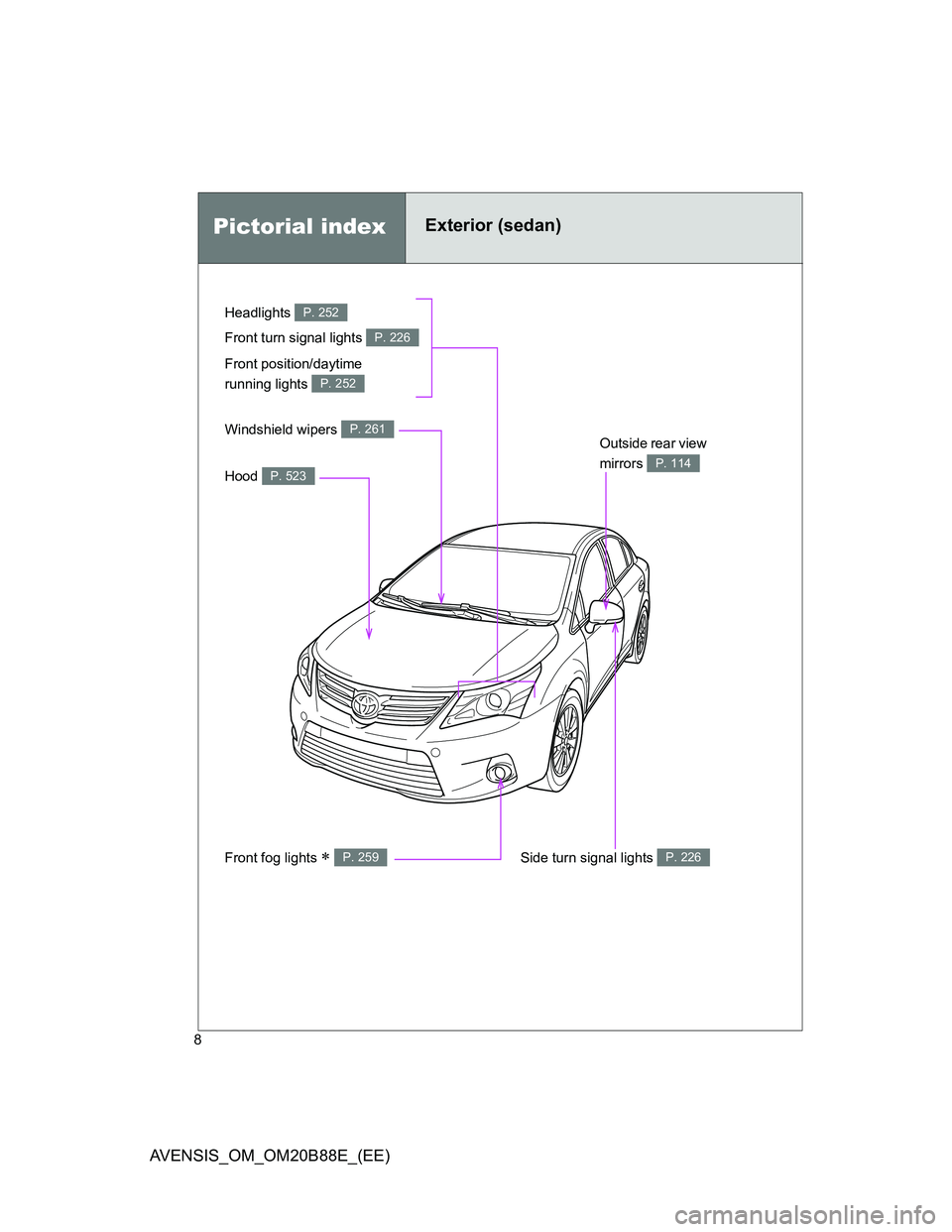
Headlights P. 252
Pictorial indexExterior (sedan)
Front fog lights P. 259
Front turn signal lights P. 226
Hood P. 523
Windshield wipers P. 261Outside rear view
mirrors
P. 114
Side turn signal lights P. 226
Front position/daytime
running lights
P. 252
Page 9 of 776
9
AVENSIS_OM_OM20B88E_(EE)
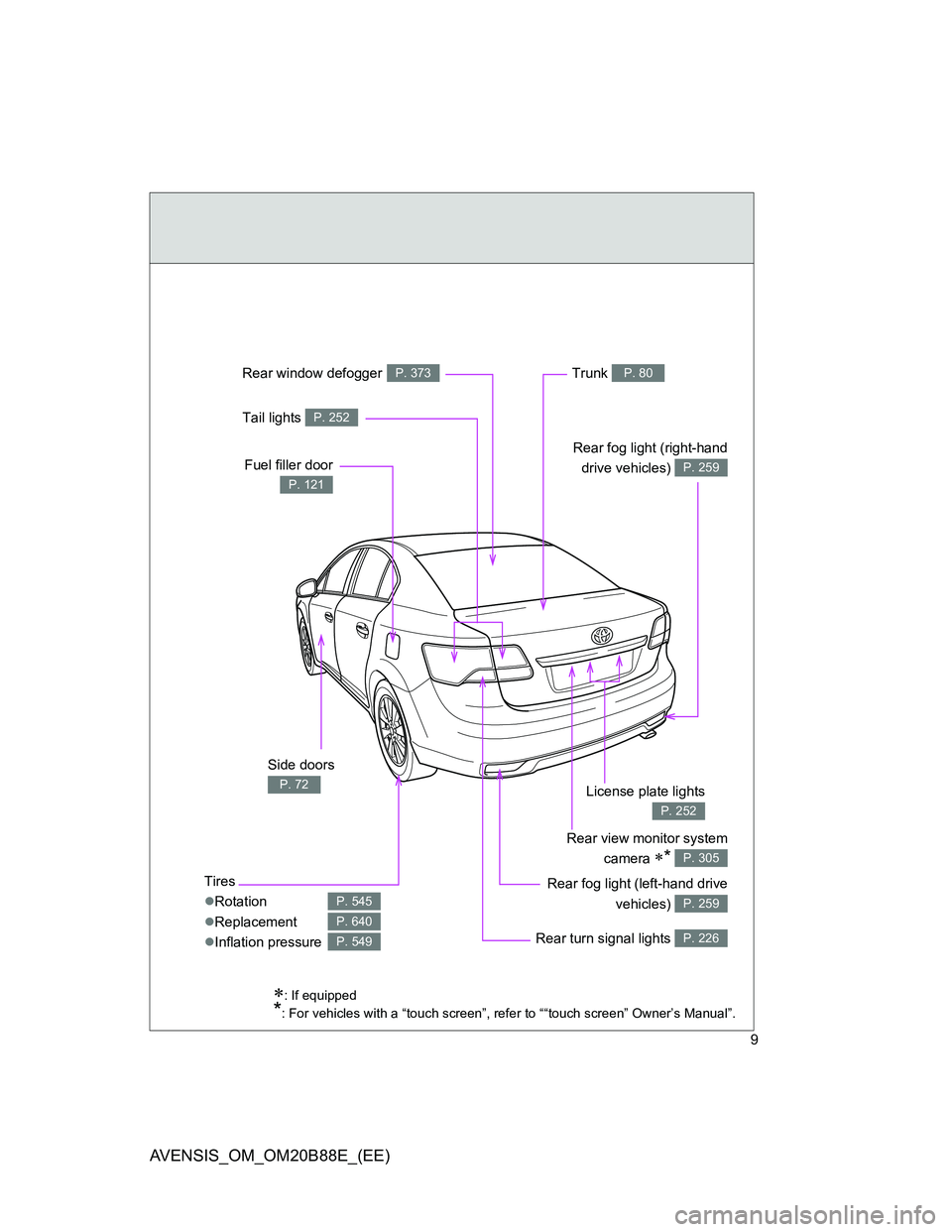
Tires
Rotation
Replacement
Inflation pressure
P. 545
P. 640
P. 549
: If equipped
*: For vehicles with a “touch screen”, refer to ““touch screen” Owner’s Manual”.
Trunk P. 80
Side doors
P. 72
Fuel filler door
P. 121
Rear fog light (right-hand
drive vehicles)
P. 259
Rear window defoggerP. 373
Rear view monitor system
camera
* P. 305
Rear fog light (left-hand drive
vehicles)
P. 259
Rear turn signal lights P. 226
License plate lights
P. 252
Tail lights P. 252
Page 10 of 776
10
AVENSIS_OM_OM20B88E_(EE)
Pictorial indexExterior (wagon)
Headlights P. 252
Front fog lights P. 259
Front turn signal lights P. 226
Hood P. 523
Windshield wipers P. 261Outside rear view
mirrors
P. 114
Side turn signal lights P. 226
Front position/daytime
running lights
P. 252
Page 11 of 776
11
AVENSIS_OM_OM20B88E_(EE)
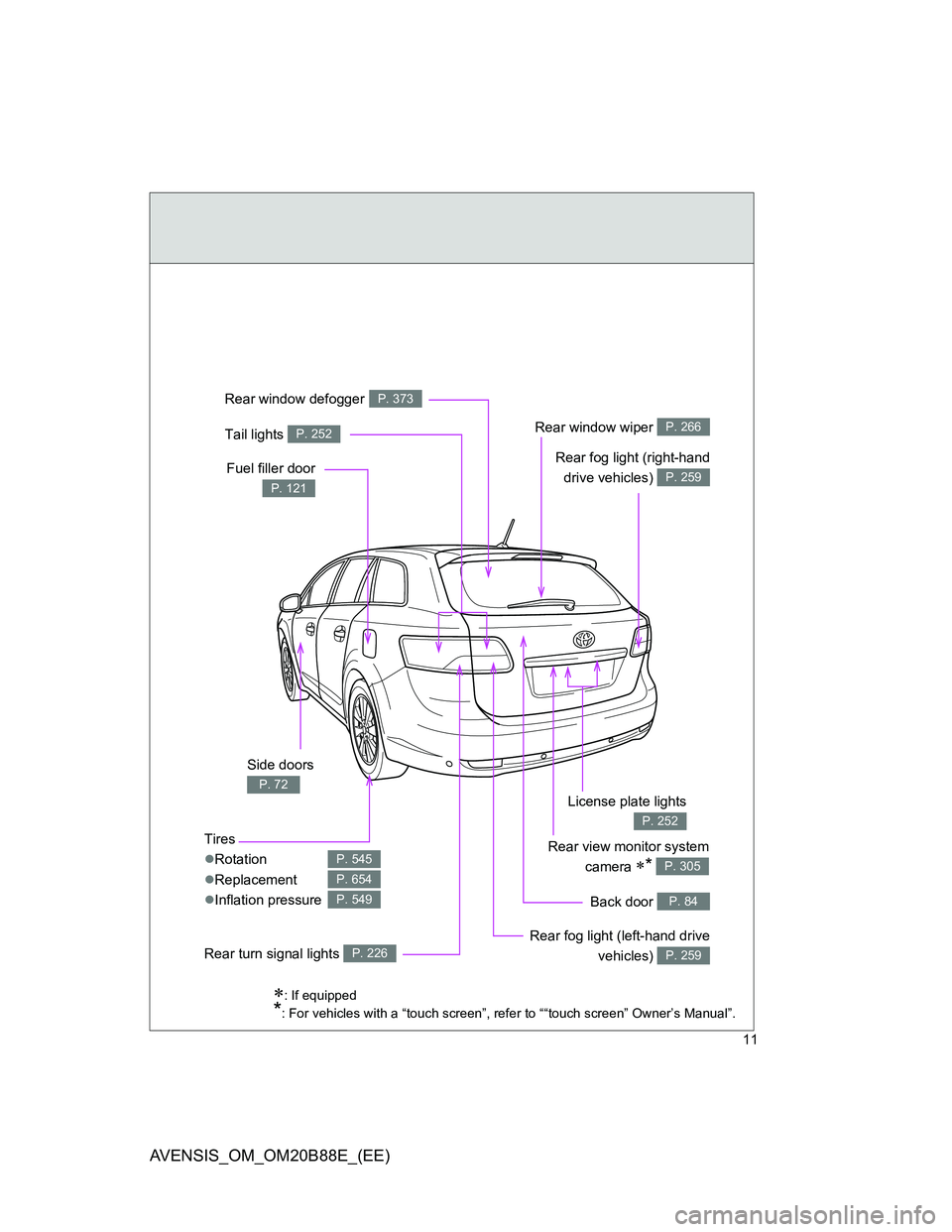
: If equipped
*: For vehicles with a “touch screen”, refer to ““touch screen” Owner’s Manual”.
Rear view monitor system
camera
* P. 305
Side doors
P. 72
Tires
Rotation
Replacement
Inflation pressure
P. 545
P. 654
P. 549Back door P. 84
Fuel filler door
P. 121
Tail lights P. 252Rear window wiper P. 266
Rear window defoggerP. 373
License plate lights
P. 252
Rear fog light (left-hand drive
vehicles)
P. 259
Rear fog light (right-hand
drive vehicles)
P. 259
Rear turn signal lights P. 226
Page 183 of 776
2When driving
183
AVENSIS_OM_OM20B88E_(EE)
2-1. Driving procedures
Driving the vehicle ............ 184
Engine (ignition) switch
(vehicles with smart
entry & start system)....... 200
Engine (ignition) switch
(vehicles without smart
entry & start system)....... 205
Multidrive .......................... 209
Automatic transmission .... 215
Manual transmission......... 222
Turn signal lever ............... 226
Parking brake ................... 227
Horn .................................. 231
2-2. Instrument cluster
Gauges and meters .......... 232
Indicators and warning
lights ............................... 235
Multi-information display ... 2392-3. Operating the
lights and wipers
Headlight switch................ 252
Fog light switch ................. 259
Windshield wipers and
washer ............................ 261
Rear window wiper and
washer (wagon) .............. 266
2-4. Using other driving systems
Cruise control.................... 267
Dynamic radar cruise
control ............................. 273
Speed limiter ..................... 292
Toyota parking
assist-sensor .................. 295
Rear view monitor
system ............................ 300
LKA (Lane-Keeping
Assist) ............................. 310
Driving assist systems ...... 319
PCS (Pre-Crash Safety) ... 325
2-5. Driving information
Cargo and luggage ........... 334
Winter driving tips ............. 336
Trailer towing .................... 340
Page 256 of 776

256 2-3. Operating the lights and wipers
AVENSIS_OM_OM20B88E_(EE)
Daytime running light system
To make your vehicle more visible to other drivers, the daytime running lights
turn on automatically (at a reduced intensity) whenever the engine is started
and the parking brake is released. Daytime running lights are not designed
for use at night.
Headlight control sensor (if equipped)
Automatic light off system
Vehicles with smart entry & start system
When the light switch is in the “AUTO” position, the headlight and all
the lights turn off automatically if the “ENGINE START STOP” switch is
turned to ACCESSORY mode or turned OFF.
When the light switch is in the position, the front fog lights turn
off automatically if the “ENGINE START STOP” switch is turned to
ACCESSORY mode or turned OFF.
When the light switch is in the
position, the headlights and front
fog lights turn off automatically if the “ENGINE START STOP” switch is
turned to ACCESSORY mode or turned OFF.
The front position and tail lights turn off automatically after 20 minutes.
To turn the lights on again, turn to IGNITION ON mode, or turn the light
switch OFF once and then back to the or position.
The sensor may not function properly if
anything that blocks the sensor is affixed
to the windshield.
Doing so interferes with the sensor
detecting the level of ambient light and
may cause the automatic headlight sys-
tem to malfunction.