Page 293 of 530
2915-1. Using the air conditioning system and defogger
5
Interior features
4RUNNER (U)_(OM35A83U)■
When the outside temperature exceeds 75°F (24°C) and the air condition-
ing system is on
●In order to reduce the air conditioning power consumption, the air condition-
ing system may switch to recirculated air mode automatically. This may also
reduce fuel consumption.
● Recirculated air mode is selected as a default mode when the engine switch
is turned to the “ON” position (vehicles without a smart key system) or the
engine switch is turned to IGNITION ON mode (vehicles with a smart key
system).
● It is possible to switch to outside air mode at any time by pressing
.
■When the outside temperature falls to nearly 32 F (0C)
The dehumidification function may not operate even when is pressed.
■ When driving on dusty roads
Close all windows. If dust thrown up by the vehicle is still drawn into the vehi-
cle after closing the windows, it is recommended that the air intake mode be
set to outside air mode and the fan speed to any setting except off.
■ When the indicator light on flashes
Press
to turn off the cooling and dehumidification function and turn it on
again. There may be a problem in the air conditioning system if the indicator
light continues to flash. Turn the air conditioning system off and have it
inspected by your Toyota dealer.
■ Air conditioning odors
●During use, various odors from inside and outside the vehicle may enter into
and accumulate in the air conditioning system. This may then cause odor to
be emitted from the vents.
● To reduce potential odors from occurring:
• It is recommended that the air conditioning system be set to outside air
mode prior to turning the vehicle off.
• The start timing of the blower may be delayed for a short period of time immediately after the air conditioning system is started in automatic
mode.
■ Air conditioning filter
P. 383
Page 296 of 530
2945-1. Using the air conditioning system and defogger
4RUNNER (U)_(OM35A83U)
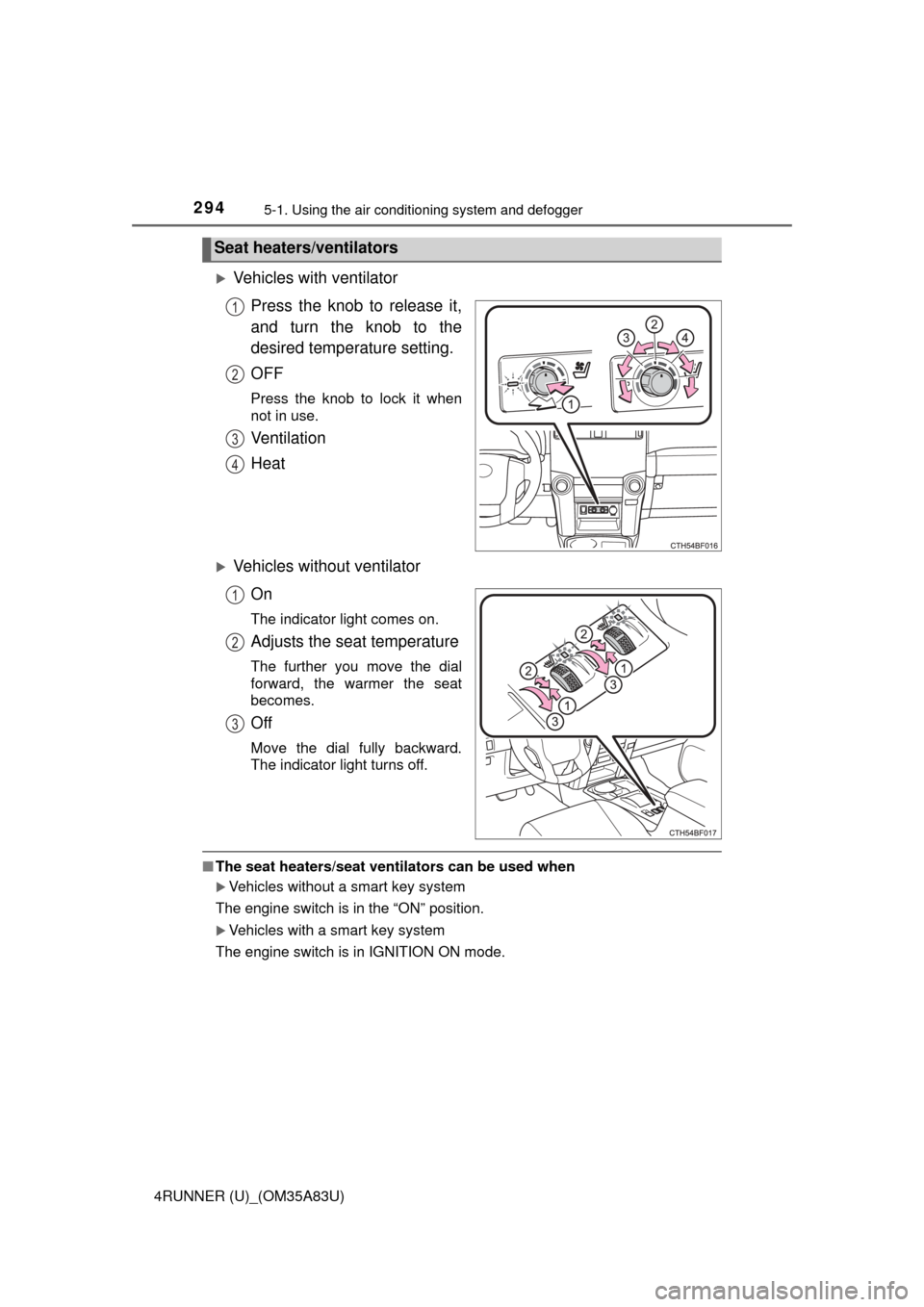
Vehicles with ventilator
Press the knob to release it,
and turn the knob to the
desired temperature setting.
OFF
Press the knob to lock it when
not in use.
Ventilation
Heat
Vehicles without ventilatorOn
The indicator light comes on.
Adjusts the seat temperature
The further you move the dial
forward, the warmer the seat
becomes.
Off
Move the dial fully backward.
The indicator light turns off.
■The seat heaters/seat ventilators can be used when
Vehicles without a smart key system
The engine switch is in the “ON” position.
Vehicles with a smart key system
The engine switch is in IGNITION ON mode.
Seat heaters/ventilators
1
2
3
4
1
2
3
Page 297 of 530
295
5
Interior features
4RUNNER (U)_(OM35A83U)
5-2. Using the interior lights
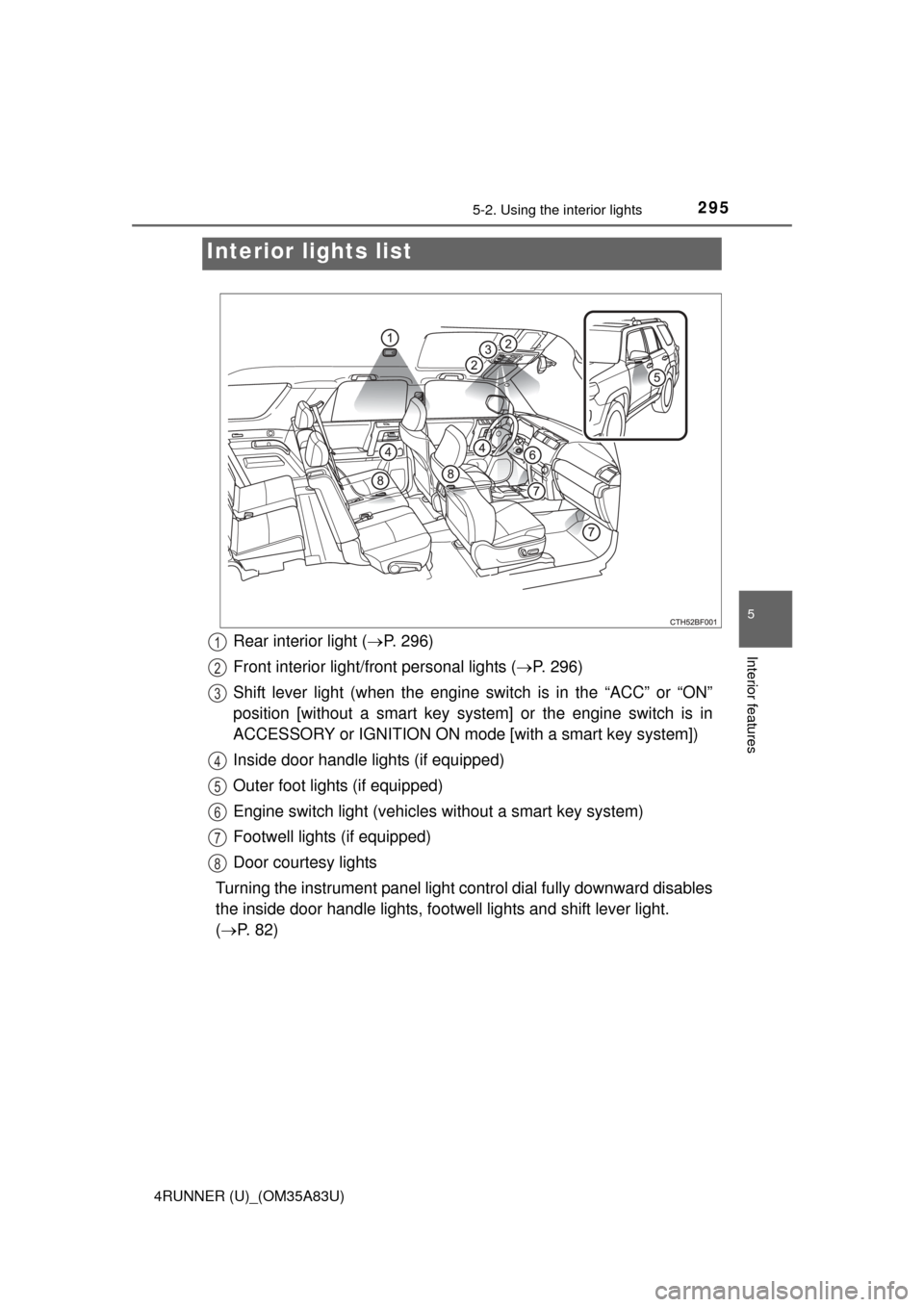
Interior lights list
Rear interior light ( P. 296)
Front interior light/fr ont personal lights ( P. 296)
Shift lever light (when the engine switch is in the “ACC” or “ON”
position [without a smart key syst em] or the engine switch is in
ACCESSORY or IGNITION ON mode [with a smart key system])
Inside door handle lights (if equipped)
Outer foot lights (if equipped)
Engine switch light (vehicles without a smart key system)
Footwell lights (if equipped)
Door courtesy lights
Turning the instrument panel light control dial fully downward disables
the inside door handle lights, footwell lights and shift lever light.
( P. 82)1
2
3
4
5
6
7
8
Page 299 of 530
2975-2. Using the interior lights
5
Interior features
4RUNNER (U)_(OM35A83U)
■Illuminated entry system
Vehicles without a smart key system
The lights automatically turn on/off according to the engine switch position,
whether the doors are locked/unlocked, and whether the doors are open/
closed.
Vehicles with a smart key system
The lights automatically turn on/off according to engine switch mode, the
presence of the electronic key, whether the doors are locked/unlocked, and
whether the doors are opened/closed.
■ To prevent battery discharge
If the following lights remain on, the lights will go off automatically after 20
minutes:
●Engine switch light
● Front interior light
● Rear interior light
● Personal lights
● Footwell lights
● Inside door handle lights
● Door courtesy lights
■ Customization
Setting (e.g. the time elapsed before lights turn off) can be changed.
(Customizable features: P. 485)
NOTICE
■To prevent battery discharge
Do not leave the lights on longer than necessary when the engine is not
running.
Page 301 of 530
2995-3. Using the storage features
5
Interior features
4RUNNER (U)_(OM35A83U)
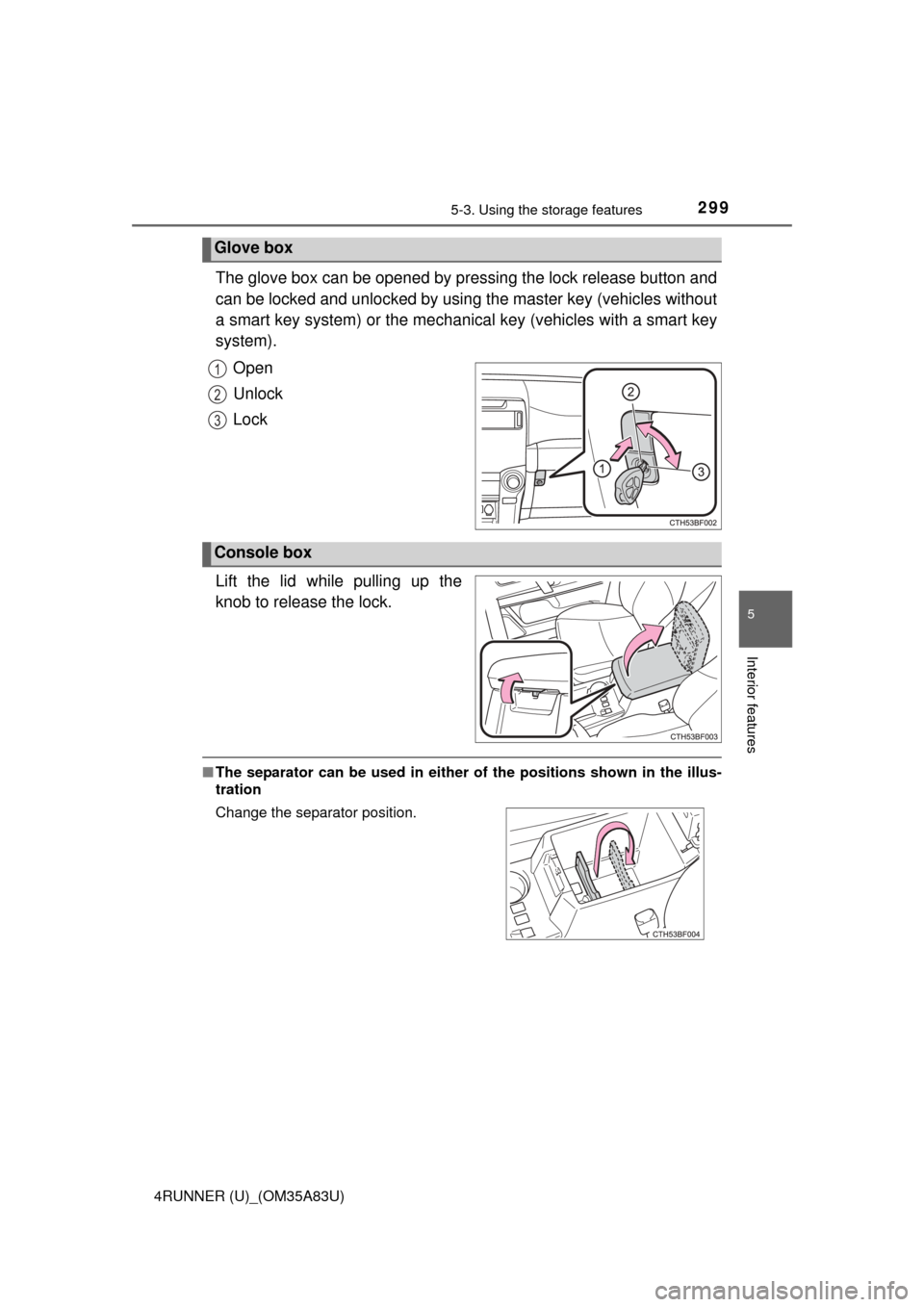
The glove box can be opened by pressing the lock release button and
can be locked and unlocked by using the master key (vehicles without
a smart key system) or the mechanical key (vehicles with a smart key
system).
Open
Unlock
Lock
Lift the lid while pulling up the
knob to release the lock.
■ The separator can be used in either of the positions shown in the illus-
tration
Glove box
1
2
3
Console box
Change the separator position.
Page 313 of 530
3115-4. Other interior features
5
Interior features
4RUNNER (U)_(OM35A83U)
The clock can be adjusted by pressing the buttons.Adjusts the hours
Adjusts the minutes
■For quicker adjustment of the clo ck (Vehicles with Multi-terrain Select
only)
To advance the minutes and hours quickly, press and hold the “M” or “H” but-
ton.
The time can be adjusted back or forth by following the procedure below:
■ The clock is displayed when
Vehicles without a smart key system
The engine switch is in the “ACC” or “ON” position.
Vehicles with a smart key system
The engine switch is in ACCESSORY or IGNITION ON mode.
■ When disconnecting and reco nnecting battery terminals
The clock data will be reset.
Clock
1
2
The hour or minute can be moved forward
or backward by pressing the “MODE/ ”
or “SET/ ” button while pressing and
holding the “H” or “M” button. If the
“MODE/ ” or “SET/ ” button is also
pressed and held in the above operation,
the hour or minute will move faster.
Page 314 of 530
3125-4. Other interior features
4RUNNER (U)_(OM35A83U)
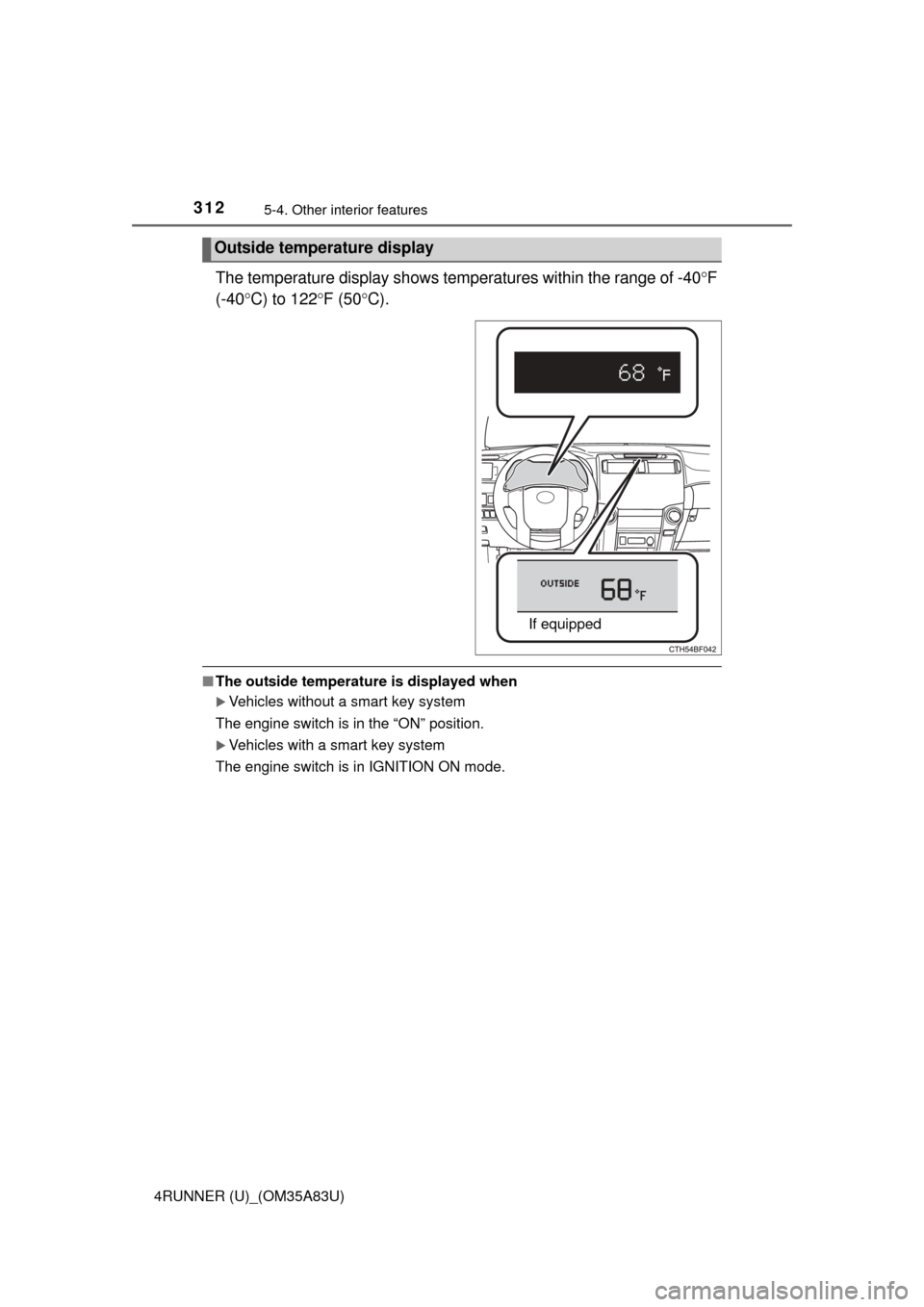
The temperature display shows temperatures within the range of -40F
(-40 C) to 122 F (50 C).
■The outside temperature is displayed when
Vehicles without a smart key system
The engine switch is in the “ON” position.
Vehicles with a smart key system
The engine switch is in IGNITION ON mode.
Outside temperature display
If equipped
Page 315 of 530
3135-4. Other interior features
5
Interior features
4RUNNER (U)_(OM35A83U)■
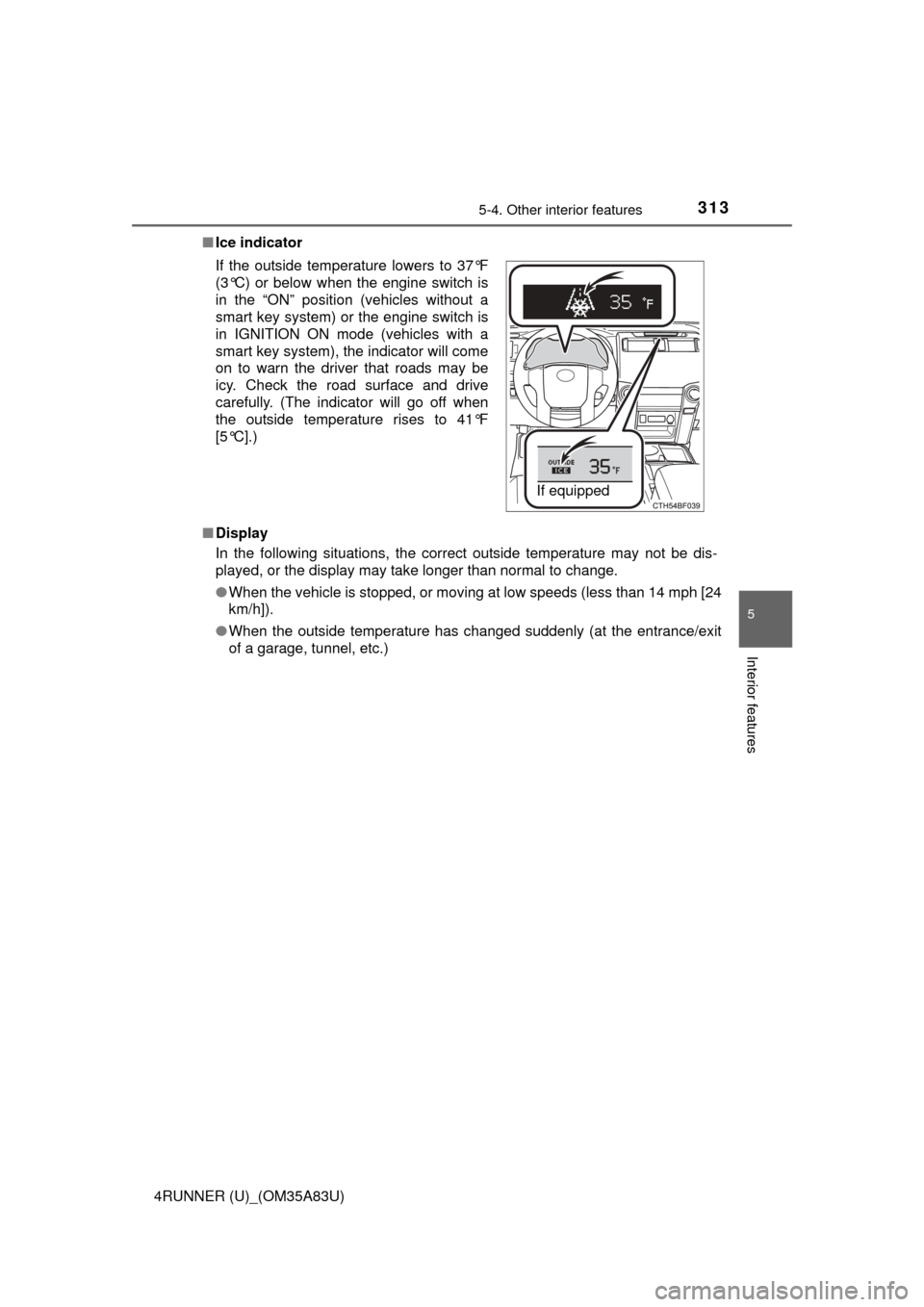
Ice indicator
■ Display
In the following situations, the correct outside temperature may not be dis-
played, or the display may take longer than normal to change.
●When the vehicle is stopped, or moving at low speeds (less than 14 mph [24
km/h]).
● When the outside temperature has changed suddenly (at the entrance/exit
of a garage, tunnel, etc.)
If the outside temperature lowers to 37°F
(3°C) or below when the engine switch is
in the “ON” position (vehicles without a
smart key system) or the engine switch is
in IGNITION ON mode (vehicles with a
smart key system), the indicator will come
on to warn the driver that roads may be
icy. Check the road surface and drive
carefully. (The indicator will go off when
the outside temperature rises to 41°F
[5°C].)
If equipped