2014 TOYOTA 4RUNNER ECO mode
[x] Cancel search: ECO modePage 27 of 530

271-1. For safe use
1
For safety and security
4RUNNER (U)_(OM35A83U)
CAUTION
Observe the following precautions.
Failure to do so may cause the driver’s floor mat to slip, possibly interfering
with the pedals while driving. An unexpectedly high speed may result or it may
become difficult to stop the vehicle, leading to an accident, or leading to death
or a serious injury.
■When installing the driver’s floor mat
● Do not use floor mats designed for other models or different model year
vehicles, even if they are Toyota Genuine floor mats.
● Only use floor mats designed for the driver’s seat.
● Always install the floor mat securely using the retaining hooks (clips) pro-
vided.
● Do not use two or more floor mats on top of each other.
● Do not place the floor mat bottom-side up or upside-down.
■ Before driving
● Check that the floor mat is securely
fixed in the correct place with all the
provided retaining hooks (clips). Be
especially careful to perform this check
after cleaning the floor.
● With the engine stopped and the shift
lever in P, fully depress each pedal to
the floor to make sure it does not inter-
fere with the floor mat.
Page 78 of 530

782. Instrument cluster
4RUNNER (U)_(OM35A83U)
*1: These lights turn on when the engine switch is turned to IGNITION ONmode (vehicles with a smart key system) or the engine switch is turned to
the “ON” position (vehicles without a smart key system) to indicate that a
system check is being performed. They will turn off after the engine is
started, or after a few seconds. There may be a malfunction in a system if
the lights do not come on, or do not turn off. Have the vehicle inspected by
your Toyota dealer.
*2: The light flashes to indicate a malfunction.
*3: The light flashes rapidly to indicate a malfunction.
*4: The light flashes continuously to indicate a malfunction.
Open door warning light
(P. 420)*1Master warning light
(P. 426)
Low fuel level warning
light ( P. 420)*1Tire pressure warning
light (P. 421)
Seat belt reminder light
(P. 421)
(if equipped)
Unengaged “Park” warn-
ing light ( P. 420)
*1
Low engine oil pressure
warning light ( P. 418)*1
(if equipped)
KDSS warning light
(P. 420)
*1
Power steering warning
light ( P. 420)*1, 2
(if equipped)
Automatic running
boards indicator light
(P. 420)
Page 80 of 530

802. Instrument cluster
4RUNNER (U)_(OM35A83U)
*1: These lights turn on when the engine switch is turned to the “ON” position(vehicles without a smart key system) or the engine switch is turned to
IGNITION ON mode (vehicles with a smart key system) to indicate that a
system check is being performed. They will turn off after the engine is
started, or after a few seconds. There may be a malfunction in a system if
the lights do not come on, or do not turn off. Have the vehicle inspected by
your Toyota dealer.
*2: The light flashes to indicate that the system is operating.
*3: The light does not turn on when the system is disabled.
*4: This light illuminates on the center panel.
(if equipped)
“A-TRAC” indicator
(P. 240)*1
(if equipped)
Crawl Control indicator
(P. 250)
*1
(if equipped)
“AUTO LSD” indicator
(P. 242)*1, 2
(if equipped)
Automatic running
boards indicator
(P. 114)
(if equipped)
Multi-terrain Select indi-
cator (P. 253)
CAUTION
■ If a safety system warning light does not come on
Should a safety system light such as the ABS and SRS warning light not
come on when you start the engine, this could mean that these systems are
not available to help protect you in an accident, which could result in death
or serious injury. Have the vehicle inspected by your Toyota dealer immedi-
ately if this occurs.
Page 86 of 530
862. Instrument cluster
4RUNNER (U)_(OM35A83U)
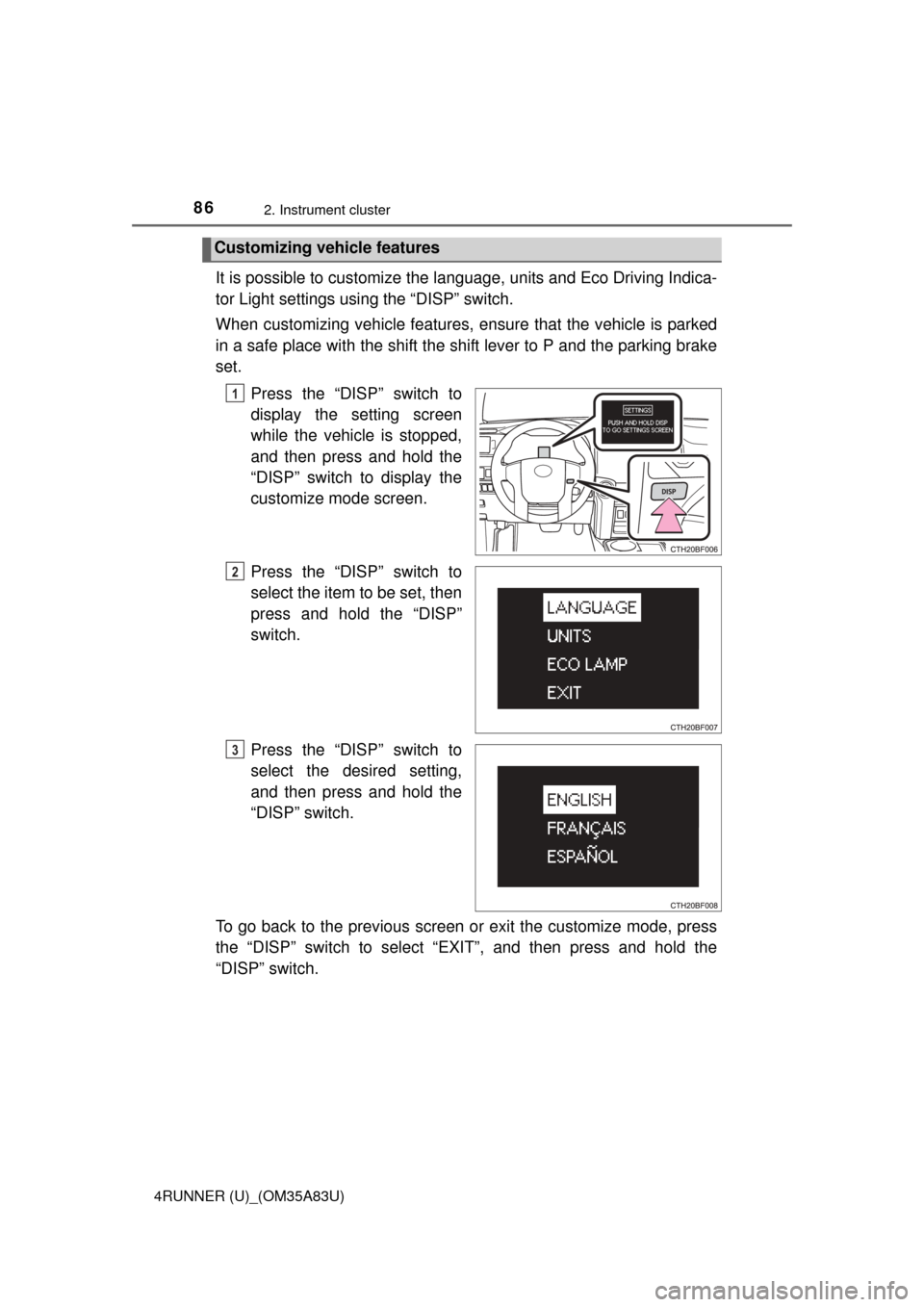
It is possible to customize the language, units and Eco Driving Indica-
tor Light settings using the “DISP” switch.
When customizing vehicle features, en sure that the vehicle is parked
in a safe place with the shift the shift lever to P and the parking brake
set.
Press the “DISP” switch to
display the setting screen
while the vehicle is stopped,
and then press and hold the
“DISP” switch to display the
customize mode screen.
Press the “DISP” switch to
select the item to be set, then
press and hold the “DISP”
switch.
Press the “DISP” switch to
select the desired setting,
and then press and hold the
“DISP” switch.
To go back to the previous screen or exit the customize mode, press
the “DISP” switch to select “EXIT”, and then press and hold the
“DISP” switch.
Customizing vehicle features
1
2
3
Page 91 of 530
912. Instrument cluster
2
Instrument cluster
4RUNNER (U)_(OM35A83U)
■Adjusting the brightness of the accessory meter
●If left idle for approximately 6 seconds or more while adjusting, the display
will revert to the trip information display.
● When the parking lights are on, the brightness of the accessory meter can
be adjusted only with the instrument panel light control.
● If the “MODE/ ” button is pressed and held when the accessory meter
light control is displayed, the display will switch to compass calibration.
(P. 335)
■ Liquid crystal display
Small spots or light spots may appear on the display. This phenomenon is
characteristic of liquid crystal displays, and there is no problem with continu-
ing to use the display.
NOTICE
■The accessory meter at low temperatures
Allow the interior of the vehicle to warm up before using the liquid crystal
display. At extremely low temperatures, the display monitor may respond
slowly, and display changes may be delayed.
Page 96 of 530
963-1. Key information
4RUNNER (U)_(OM35A83U)
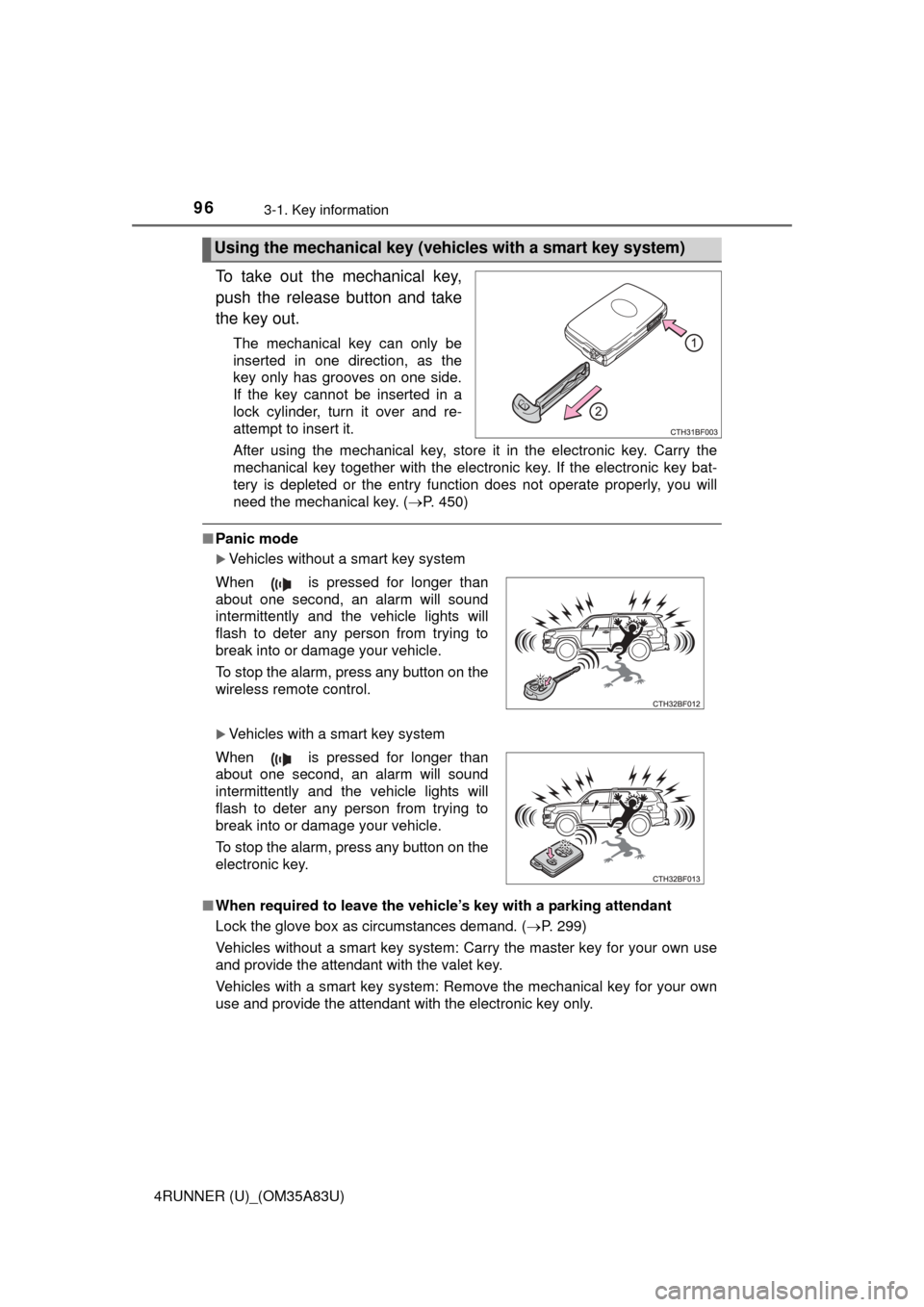
To take out the mechanical key,
push the release button and take
the key out.
The mechanical key can only be
inserted in one direction, as the
key only has grooves on one side.
If the key cannot be inserted in a
lock cylinder, turn it over and re-
attempt to insert it.
After using the mechanical key, store it in the electronic key. Carry the
mechanical key together with the electronic key. If the electronic key bat-
tery is depleted or the entry function does not operate properly, you will
need the mechanical key. (P. 450)
■Panic mode
Vehicles without a smart key system
Vehicles with a smart key system
■ When required to leave the vehicle’s key with a parking attendant
Lock the glove box as circumstances demand. ( P. 299)
Vehicles without a smart key system: Carry the master key for your own use
and provide the attendant with the valet key.
Vehicles with a smart key system: Remove the mechanical key for your own
use and provide the attendant with the electronic key only.
Using the mechanical key (vehic les with a smart key system)
When is pressed for longer than
about one second, an alarm will sound
intermittently and the vehicle lights will
flash to deter any person from trying to
break into or damage your vehicle.
To stop the alarm, press any button on the
wireless remote control.
When is pressed for longer than
about one second, an alarm will sound
intermittently and the vehicle lights will
flash to deter any person from trying to
break into or damage your vehicle.
To stop the alarm, press any button on the
electronic key.
Page 98 of 530

983-1. Key information
4RUNNER (U)_(OM35A83U)●
To avoid serious deterioration, do not leave the electronic key within 3 ft. (1
m) of the following electrical appl iances that produce a magnetic field:
•TVs
• Personal computers
• Cellular phones, cordless phones and battery chargers
• Recharging cellular phones or cordless phones
• Table lamps
• Induction cookers
Vehicles without a smart key system
If the wireless remote control function does not operate, the battery may be
depleted. Replace the battery when necessary. ( P. 385)
■ Precautions when disconnecting the battery (vehicles with a smart key
system)
● In some cases, it may not be possible to unlock the doors using the smart
key system immediately after the battery has been disconnected. Use the
wireless remote control or the mechanical key to lock or unlock the doors.
● The engine may not start on the first attempt after reconnecting the battery
but will start normally after the second attempt. This is not a malfunction.
● The engine switch mode is memorized by the vehicle. When the battery is
reconnected, the system will return to the mode it was in before the battery
was disconnected. Before disconnecting the battery, turn the engine switch
off.
If you are unsure what mode the engine switch was in when the battery was
disconnected, be especially careful when reconnecting the battery.
■ Replacing the battery
P. 385
■ Confirmation of the registered key number
The number of keys already registered to the vehicle can be confirmed. Ask
your Toyota dealer for details.
■ If a wrong key is used (vehicles with a smart key system)
The key cylinder rotates freely to isolate inside mechanism.
■ Certification for wireless remote control
For vehicles sold in the U.S.A.
FCC ID: HYQ14ACX
FCC ID: HYQ13CZD
FCC ID: HYQ14ADF
FCC ID: HYQ13CZE
FCC ID: HYQ12BBY
FCC ID: HYQ13BDC
Page 104 of 530

1043-1. Key information
4RUNNER (U)_(OM35A83U)
The following functions can be set or canceled:
For instructions on customizing, refer to P. 485.
■
Setting and canceling the functions
To switch between setting and canceling, follow the procedure
below: Vehicles without a smart key system: close all the doors and turn
the engine switch to the “ON” position. (Perform step 2 within 20
seconds.)
Vehicles with a smart key system : close all the doors and turn the
engine switch to IGNITION ON mode. (Perform step 2 within 20
seconds.)
Automatic door lockin g and unlocking systems
FunctionOperation
Speed linked door locking function
All doors are automatically locked
when vehicle speed is approxi-
mately 12 mph (20 km/h) or higher.
Shift position linked door locking
functionAll doors are automatically locked
when shifting the shift lever to posi-
tion other than P.
Shift position linked door unlocking
functionAll doors are automatically unlocked
when shifting the shift lever to P.
Driver's door linked door unlocking
function
(
vehicles without a smart key sys-
tem
)
All doors are automatically unlocked
when driver's door is opened within
10 seconds after turning the engine
switch to “ACC” or “LOCK”.
Driver's door linked door unlocking
function
(vehicles with a smart key system)All doors are automatically unlocked
when driver's door is opened within
10 seconds after turning the engine
switch off.
1