2014 TOYOTA 4RUNNER ECO mode
[x] Cancel search: ECO modePage 287 of 530
2855-1. Using the air conditioning system and defogger
5
Interior features
4RUNNER (U)_(OM35A83U)■
When the outside temperature falls to nearly 32 F (0C)
The dehumidification function may not operate even when is pressed.
■ Air conditioning odors
●During use, various odors from inside and outside the vehicle may enter into
and accumulate in the air conditioning system. This may then cause odor to
be emitted from the vents.
● To reduce potential odors from occurring:
It is recommended that the air conditioning system be set to outside air
mode prior to turning the vehicle off.
CAUTION
■To prevent the windshield from fogging up
● Do not use during cool air operation in extremely humid weather.
The difference between the temperature of the outside air and that of the
windshield can cause the outer surface of the windshield to fog up, block-
ing your vision.
■ To prevent burns
● Do not touch the rear view mirror surfaces when the outside rear view mir-
ror defoggers are on.
● Do not touch the glass at lower part of the windshield or to the side of the
front pillars when the windshield wiper de-icer is on.
NOTICE
■To prevent battery discharge
Do not leave the air conditioning system on longer than necessary when the
engine is stopped.
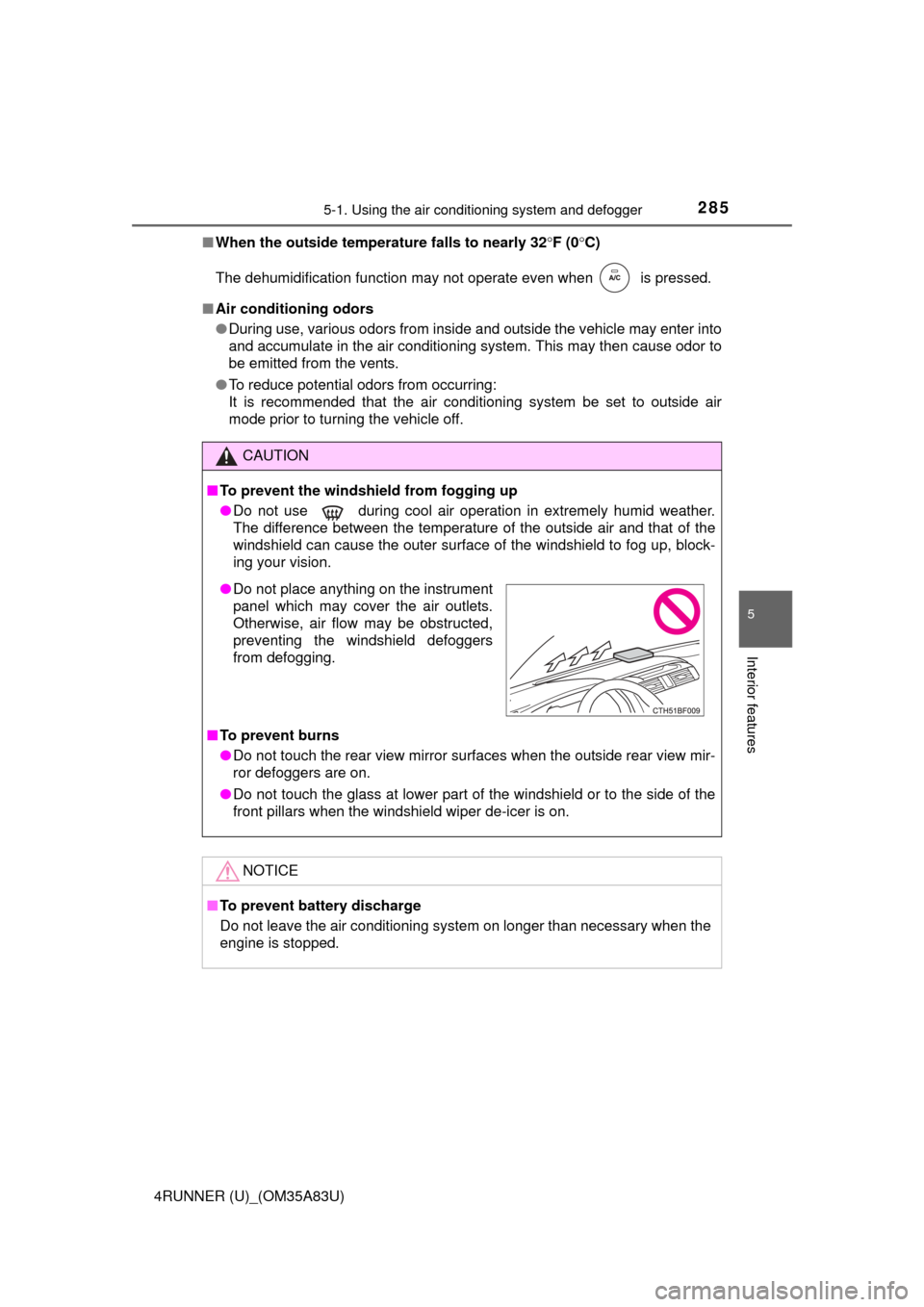
● Do not place anything on the instrument
panel which may cover the air outlets.
Otherwise, air flow may be obstructed,
preventing the windshield defoggers
from defogging.
Page 293 of 530
2915-1. Using the air conditioning system and defogger
5
Interior features
4RUNNER (U)_(OM35A83U)■
When the outside temperature exceeds 75°F (24°C) and the air condition-
ing system is on
●In order to reduce the air conditioning power consumption, the air condition-
ing system may switch to recirculated air mode automatically. This may also
reduce fuel consumption.
● Recirculated air mode is selected as a default mode when the engine switch
is turned to the “ON” position (vehicles without a smart key system) or the
engine switch is turned to IGNITION ON mode (vehicles with a smart key
system).
● It is possible to switch to outside air mode at any time by pressing
.
■When the outside temperature falls to nearly 32 F (0C)
The dehumidification function may not operate even when is pressed.
■ When driving on dusty roads
Close all windows. If dust thrown up by the vehicle is still drawn into the vehi-
cle after closing the windows, it is recommended that the air intake mode be
set to outside air mode and the fan speed to any setting except off.
■ When the indicator light on flashes
Press
to turn off the cooling and dehumidification function and turn it on
again. There may be a problem in the air conditioning system if the indicator
light continues to flash. Turn the air conditioning system off and have it
inspected by your Toyota dealer.
■ Air conditioning odors
●During use, various odors from inside and outside the vehicle may enter into
and accumulate in the air conditioning system. This may then cause odor to
be emitted from the vents.
● To reduce potential odors from occurring:
• It is recommended that the air conditioning system be set to outside air
mode prior to turning the vehicle off.
• The start timing of the blower may be delayed for a short period of time immediately after the air conditioning system is started in automatic
mode.
■ Air conditioning filter
P. 383
Page 296 of 530
2945-1. Using the air conditioning system and defogger
4RUNNER (U)_(OM35A83U)
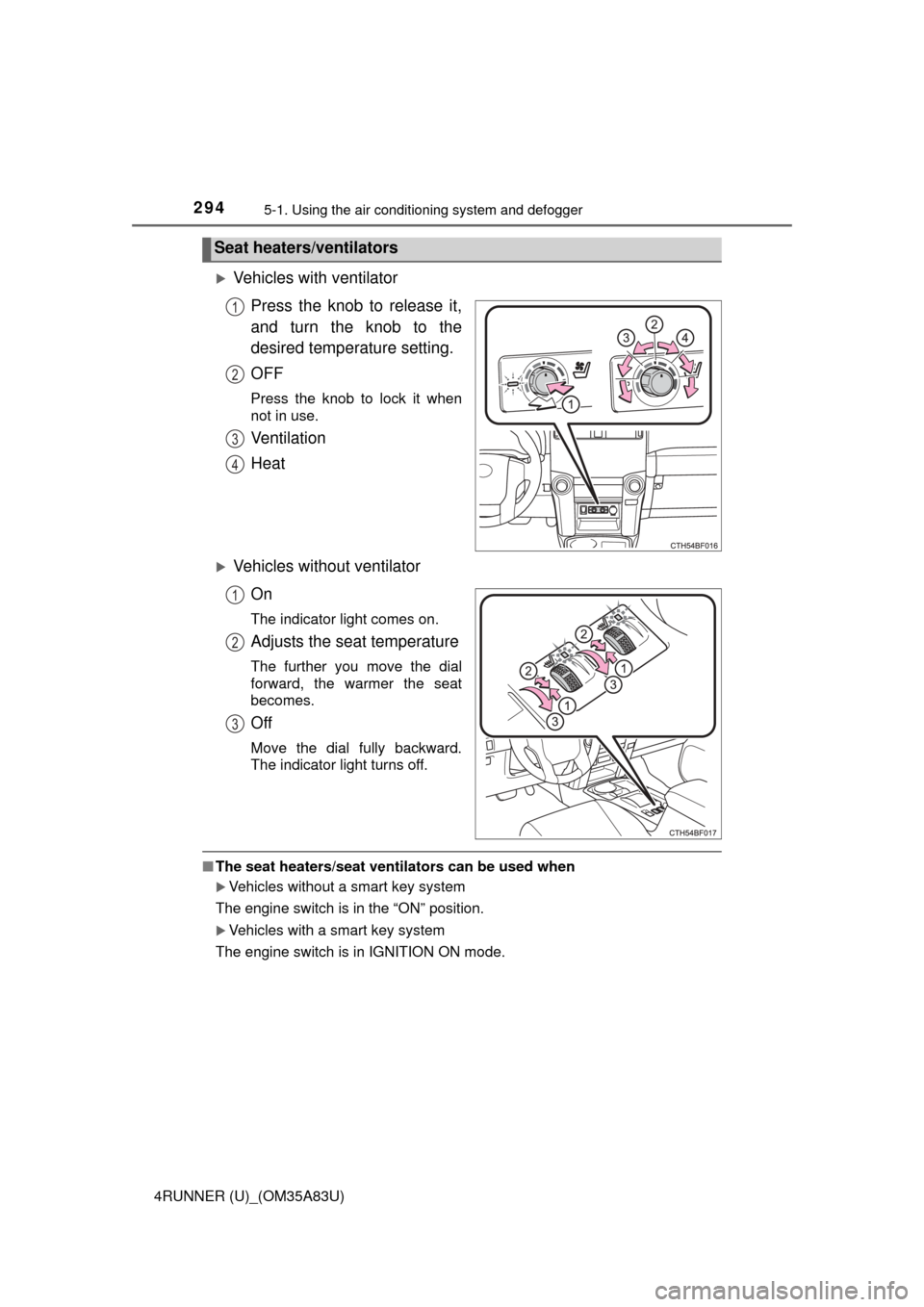
Vehicles with ventilator
Press the knob to release it,
and turn the knob to the
desired temperature setting.
OFF
Press the knob to lock it when
not in use.
Ventilation
Heat
Vehicles without ventilatorOn
The indicator light comes on.
Adjusts the seat temperature
The further you move the dial
forward, the warmer the seat
becomes.
Off
Move the dial fully backward.
The indicator light turns off.
■The seat heaters/seat ventilators can be used when
Vehicles without a smart key system
The engine switch is in the “ON” position.
Vehicles with a smart key system
The engine switch is in IGNITION ON mode.
Seat heaters/ventilators
1
2
3
4
1
2
3
Page 313 of 530

3115-4. Other interior features
5
Interior features
4RUNNER (U)_(OM35A83U)
The clock can be adjusted by pressing the buttons.Adjusts the hours
Adjusts the minutes
■For quicker adjustment of the clo ck (Vehicles with Multi-terrain Select
only)
To advance the minutes and hours quickly, press and hold the “M” or “H” but-
ton.
The time can be adjusted back or forth by following the procedure below:
■ The clock is displayed when
Vehicles without a smart key system
The engine switch is in the “ACC” or “ON” position.
Vehicles with a smart key system
The engine switch is in ACCESSORY or IGNITION ON mode.
■ When disconnecting and reco nnecting battery terminals
The clock data will be reset.
Clock
1
2
The hour or minute can be moved forward
or backward by pressing the “MODE/ ”
or “SET/ ” button while pressing and
holding the “H” or “M” button. If the
“MODE/ ” or “SET/ ” button is also
pressed and held in the above operation,
the hour or minute will move faster.
Page 330 of 530
3285-4. Other interior features
4RUNNER (U)_(OM35A83U)
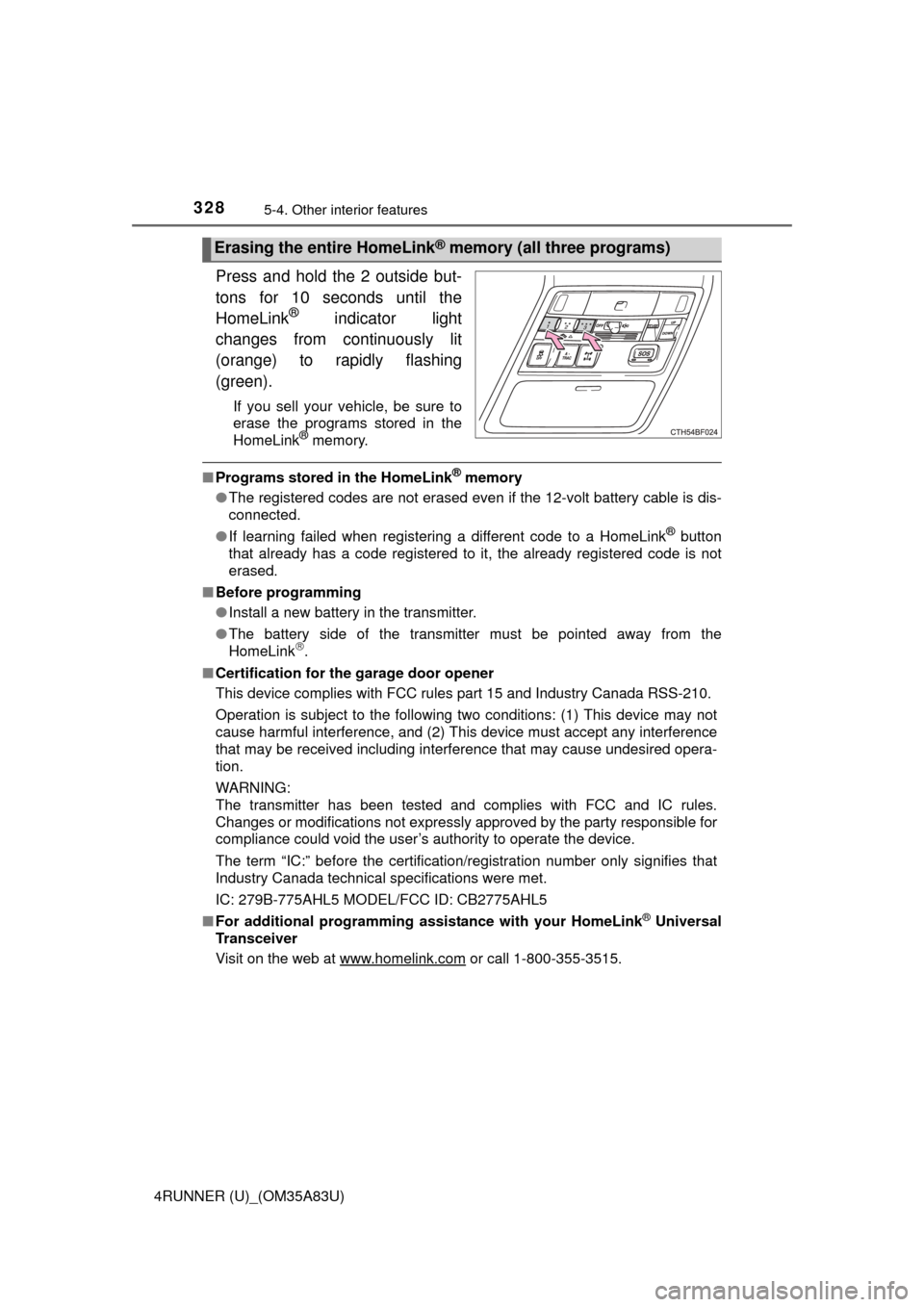
Press and hold the 2 outside but-
tons for 10 seconds until the
HomeLink
® indicator light
changes from continuously lit
(orange) to rapidly flashing
(green).
If you sell your vehicle, be sure to
erase the programs stored in the
HomeLink
® memory.
■ Programs stored in the HomeLink® memory
● The registered codes are not erased even if the 12-volt battery cable is dis-
connected.
● If learning failed when registering a different code to a HomeLink
® button
that already has a code registered to it, the already registered code is not
erased.
■ Before programming
●Install a new battery in the transmitter.
● The battery side of the transmitter must be pointed away from the
HomeLink
.
■ Certification for the garage door opener
This device complies with FCC rules part 15 and Industry Canada RSS-210.
Operation is subject to the following two conditions: (1) This device may not
cause harmful interference, and (2) This device must accept any interference
that may be received including interference that may cause undesired opera-
tion.
WARNING:
The transmitter has been tested and complies with FCC and IC rules.
Changes or modifications not expressly approved by the party responsible for
compliance could void the user’s authority to operate the device.
The term “IC:” before the certification/registration number only signifies that
Industry Canada technical specifications were met.
IC: 279B-775AHL5 MODEL/FCC ID: CB2775AHL5
■ For additional programming assi stance with your HomeLink
® Universal
Transceiver
Visit on the web at www.homelink.com
or call 1-800-355-3515.
Erasing the entire HomeLink® memory (all three programs)
Page 333 of 530
3315-4. Other interior features
5
Interior features
4RUNNER (U)_(OM35A83U)■
Services
Subscribers have the following Safe
ty Connect services available:
● Automatic Collision Notification
*
Helps drivers receive necessary response from emergency ser-
vice providers. ( P. 332)
*: U.S. Patent No. 7,508,298 B2
● Stolen Vehicle Location
Helps drivers in the event of vehicle theft. ( P. 333)
● Emergency Assistance Button (SOS)
Connects drivers to response-center support. ( P. 333)
● Enhanced Roadside Assistance
Provides drivers various on-road assistance. ( P. 333)
■Subscription
After you have signed the Telemati cs Subscription Service Agree-
ment and are enrolled, you c an begin receiving services.
A variety of subscription terms is available for purchase. Contact
your Toyota dealer, call 1-800-331-4331, or push the “SOS” button
in your vehicle for furt her subscription details.
■Safety Connect Services Information
●Phone calls using the vehicles Bluetooth® technology will not be possible
during Safety Connect.
● Safety Connect is available beginning Fall 2009 on select Toyota models.
Contact with the Safety Connect response center is dependent upon the
telematics device being in operative condition, cellular connection availabil-
ity, and GPS satellite signal reception, which can limit the ability to reach the
response center or receive emergency service support. Enrollment and
Telematics Subscription Service Agreement required. A variety of subscrip-
tion terms is available; charges vary by subscription term selected.
● Automatic Collision Notification, Emergency Assistance, Stolen Vehicle
Location, and Enhanced Roadside Assistance will function in the United
States, including Hawaii and Alaska, and in Canada. No Safety Connect
services will function outside of the United States in countries other than
Canada.
● Safety Connect services are not subject to section 255 of the Telecommuni-
cations Act and the device is not TTY compatible.
■ Languages
The Safety Connect response center will offer support in multiple languages.
The Safety Connect system will offer voice prompts in English and Spanish.
Please indicate your language of choice when enrolling.
■ When contacting th e response center
You may be unable to contact the response center if the network is busy.
Page 334 of 530
3325-4. Other interior features
4RUNNER (U)_(OM35A83U)
When the engine switch is turned to the “ON” position (vehicles with-
out a smart key system) or the engine switch is turned to IGNITION
ON mode (vehicles with a smart key system), the red indicator light
comes on for 2 seconds then turns off. Afterward, the green indicator
light comes on, indicating that the service is active.
The following indicator light patterns indicate specific system usage
conditions:
● Green indicator light on = Active service
● Green indicator light flashing = Sa fety Connect call in process
● Red indicator light (except at vehi cle start-up) = System malfunction
(contact your Toyota dealer)
● No indicator light (off) = Safety Connect service not active
■Automatic Collision Notification
In case of either airbag deployment or severe rear-end collision, the
system is designed to automatical ly call the response center. The
responding agent receives the vehicle’s location and attempts to
speak with the vehicle occupants to assess the level of emergency.
If the occupants are unable to communicate, the agent automati-
cally treats the call as an emergency, contacts the nearest emer-
gency services provider to descri be the situation, and requests that
assistance be sent to the location.
Safety Connect LE D light Indicators
Safety Connect services
Page 339 of 530
3375-4. Other interior features
5
Interior features
4RUNNER (U)_(OM35A83U)■
Deviation calibration
Stop the vehicle.
Change the accessory meter display to deviation calibration
mode by doing the following.
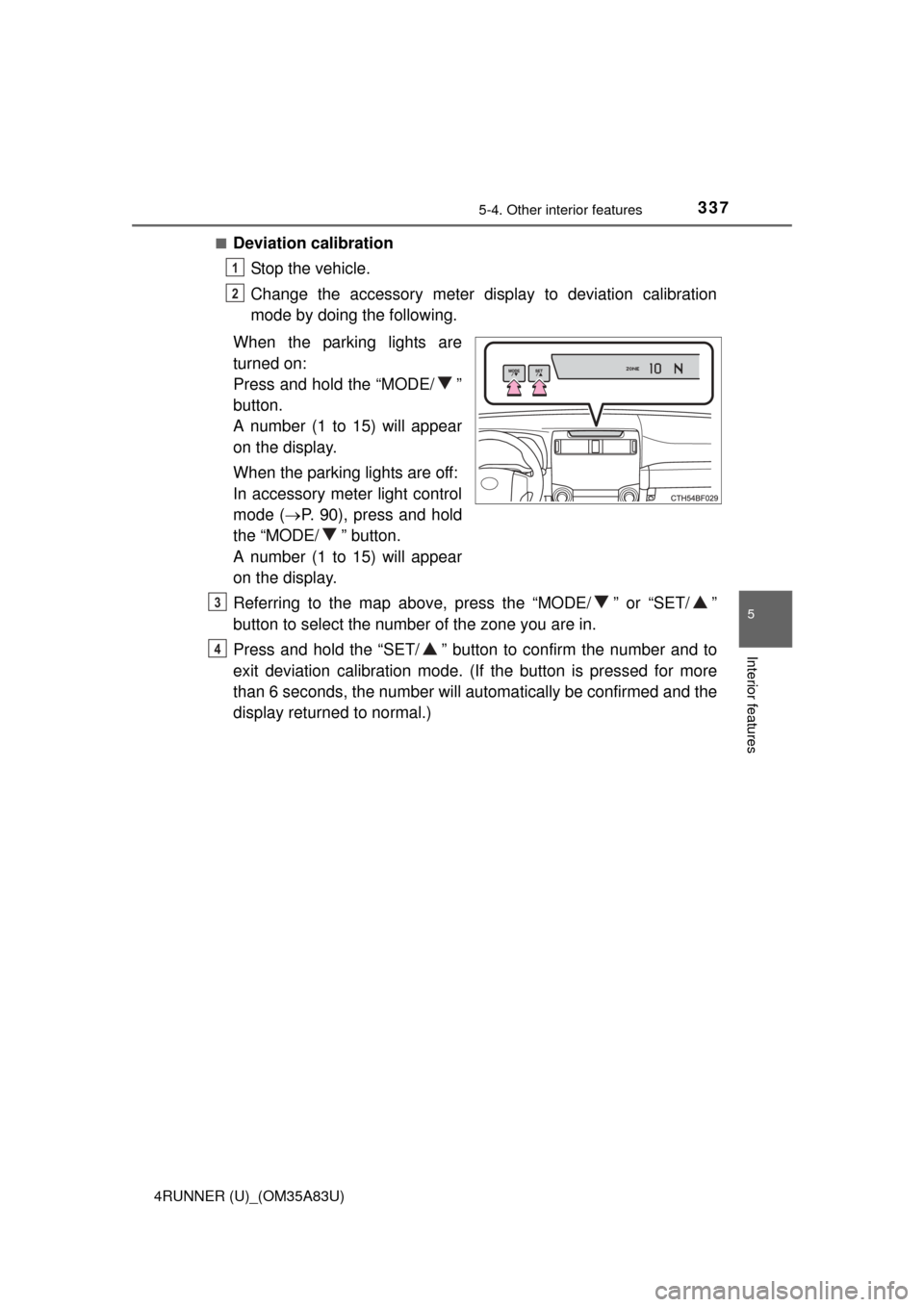
When the parking lights are
turned on:
Press and hold the “MODE/ ”
button.
A number (1 to 15) will appear
on the display.
When the parking lights are off:
In accessory meter light control
mode ( P. 90), press and hold
the “MODE/ ” button.
A number (1 to 15) will appear
on the display.
Referring to the map above, press the “MODE/ ” or “SET/ ”
button to select the number of the zone you are in.
Press and hold the “SET/ ” button to confirm the number and to
exit deviation calibration mode. ( If the button is pressed for more
than 6 seconds, the num ber will automatically be confirmed and the
display returned to normal.)
1
2
3
4