2014 TOYOTA 4RUNNER ECO mode
[x] Cancel search: ECO modePage 370 of 530
3686-3. Do-it-yourself maintenance
4RUNNER (U)_(OM35A83U)■
After recharging/reconnecting the ba ttery (vehicles with a smart key sys-
tem)
The engine may not start. Follow the procedure below to initialize the system.
Shift the shift lever to P.
Open and close any of the doors.
Restart the engine.
● Unlocking the doors using the smart key system may not be possible imme-
diately after reconnecting the battery. If this happens, use the wireless
remote control or the mechanical key to lock/unlock the doors.
● Start the engine with the engine switch in ACCESSORY mode. The engine
may not start when the engine switch turned from off. However, the engine
will operate normally from the second attempt.
● The engine switch mode is recorded by the vehicle. If the battery is recon-
nected, the vehicle will return the engine switch mode to the status it was in
before the battery was disconnected. Make sure to turn off the engine
before disconnect the battery. Take extra care when connecting the battery
if the engine switch mode prior to discharge is unknown.
If the system will not start even after multiple attempts, contact your Toyota
dealer.
CAUTION
■ Chemicals in the battery
Batteries contain poisonous and corrosive sulfuric acid and may produce
hydrogen gas which is flammable and explosive. To reduce the risk of death
or serious injury, take the following precautions while working on or near the
battery:
● Do not cause sparks by touching the battery terminals with tools.
● Do not smoke or light a match near the battery.
● Avoid contact with eyes, skin and clothes.
● Never inhale or swallow electrolyte.
● Wear protective safety glasses when working near the battery.
● Keep children away from the battery.
1
2
3
Page 377 of 530

3756-3. Do-it-yourself maintenance
6
Maintenance and care
4RUNNER (U)_(OM35A83U)■
If the tread on snow tires wears down below 0.16 in. (4 mm)
The effectiveness of the tire
s as snow tires is lost.
■Tire pressure warning system certification
FCC ID: PAXPMV107J
FCC ID: HYQ13BCX
For vehicles sold in the U.S.A.
This device complies with Part 15 of th e FCC Rules. Operation is subject
to the following two cond itions: (1) this device may not cause harmful
interference, and (2) this device must accept any interference received,
including interference that may cause undesired operation.
FCC WARNING:
Changes or modifications not expressly approved by the party responsi-
ble for compliance could void the user ’s authority to operate the equip-
ment.
For vehicles sold in Canada
Operation is subject to the following two conditions: (1) this device may
not cause interference, and (2) this device must accept any interference,
including interference that may cause undesired operation of the device.
CAUTION
■When inspecting or replacing tires
Observe the following precautions to prevent accidents.
Failure to do so may cause damage to parts of the drive train as well as
dangerous handling characteristics, which may lead to an accident
resulting in death or serious injury.
●Do not mix tires of different ma kes, models or tread patterns.
Also, do not mix tires of remarkably different treadwear.
●Do not use tire sizes other than those recommended by Toyota.
●Do not mix differently constructed ti res (radial, bias-belted or bias-ply
tires).
●Do not mix summer, all season and snow tires.
●Do not use tires that have been used on another vehicle.
Do not use tires if you do not know how they were used previously.
Page 429 of 530

4277-2. Steps to take in an emergency
7
When trouble arises
4RUNNER (U)_(OM35A83U)
Indicates a malfunction in the intuitive parking
assist-sensorThe site of the malfunction flashes and stays
on.
A buzzer will sound for several seconds and
this warning message will disappear after sev-
eral seconds.
If the engine switch is turned to a mode other
than IGNITION ON mode and then back to
IGNITION ON mode, the buzzer will sound and
this message will be displayed again.
Have the vehicle inspected by your Toyota
dealer.
Indicates that one or more of the doors is not fully
closed
If the vehicle reaches a speed of 3 mph (5 km/h), flashes and a buzzer sounds to indicate
that the door(s) are not yet fully closed.
Make sure that all the doors are closed.
Indicates that the back door is not fully closed
If the vehicle reaches a speed of 3 mph (5 km/h), flashes and a buzzer sounds to indicate
that the back door is not yet fully closed.
Close the back door.
Indicates that the moon roof is not fully closed
(with the engine switch off, and the driver's door
open)
A buzzer also sounds.
Close the moon roof.
Indicates that the parking brake is still engaged
If the vehicle reaches a speed of 3 mph (5 km/h),
flashes and a buzzer sounds to indicate
that the parking brake is still engaged.
Release the parking brake.
Indicates that the washer fluid level is low.
Add washer fluid.
Warning messageDetails/Actions
(Flashes)
(Flashes)
(Flashes)
Page 430 of 530
4287-2. Steps to take in an emergency
4RUNNER (U)_(OM35A83U)
*: Refer to the separate “Scheduled Maintenance Guide” or “Owner’s ManualSupplement” for the maintenance interval applicable to your vehicle.
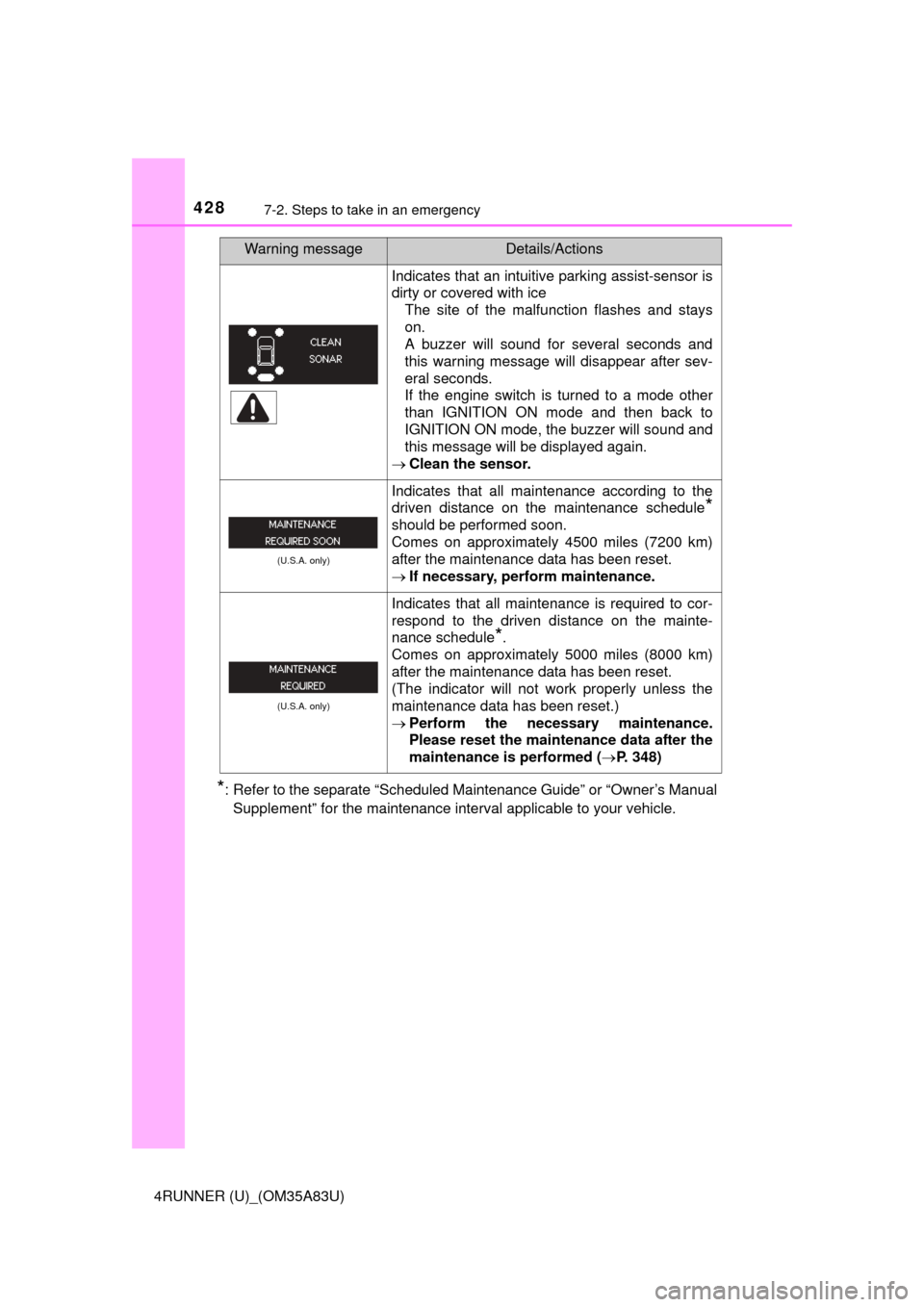
Indicates that an intuitive parking assist-sensor is
dirty or covered with ice The site of the malfunction flashes and stays
on.
A buzzer will sound for several seconds and
this warning message will disappear after sev-
eral seconds.
If the engine switch is turned to a mode other
than IGNITION ON mode and then back to
IGNITION ON mode, the buzzer will sound and
this message will be displayed again.
Clean the sensor.
(U.S.A. only)
Indicates that all maintenance according to the
driven distance on the maintenance schedule
*
should be performed soon.
Comes on approximately 4500 miles (7200 km)
after the maintenance data has been reset.
If necessary, perform maintenance.
(U.S.A. only)
Indicates that all maintenance is required to cor-
respond to the driven distance on the mainte-
nance schedule
*.
Comes on approximately 5000 miles (8000 km)
after the maintenance data has been reset.
(The indicator will not work properly unless the
maintenance data has been reset.)
Perform the necessary maintenance.
Please reset the maintenance data after the
maintenance is performed ( P. 348)
Warning messageDetails/Actions
Page 433 of 530
4317-2. Steps to take in an emergency
7
When trouble arises
4RUNNER (U)_(OM35A83U)
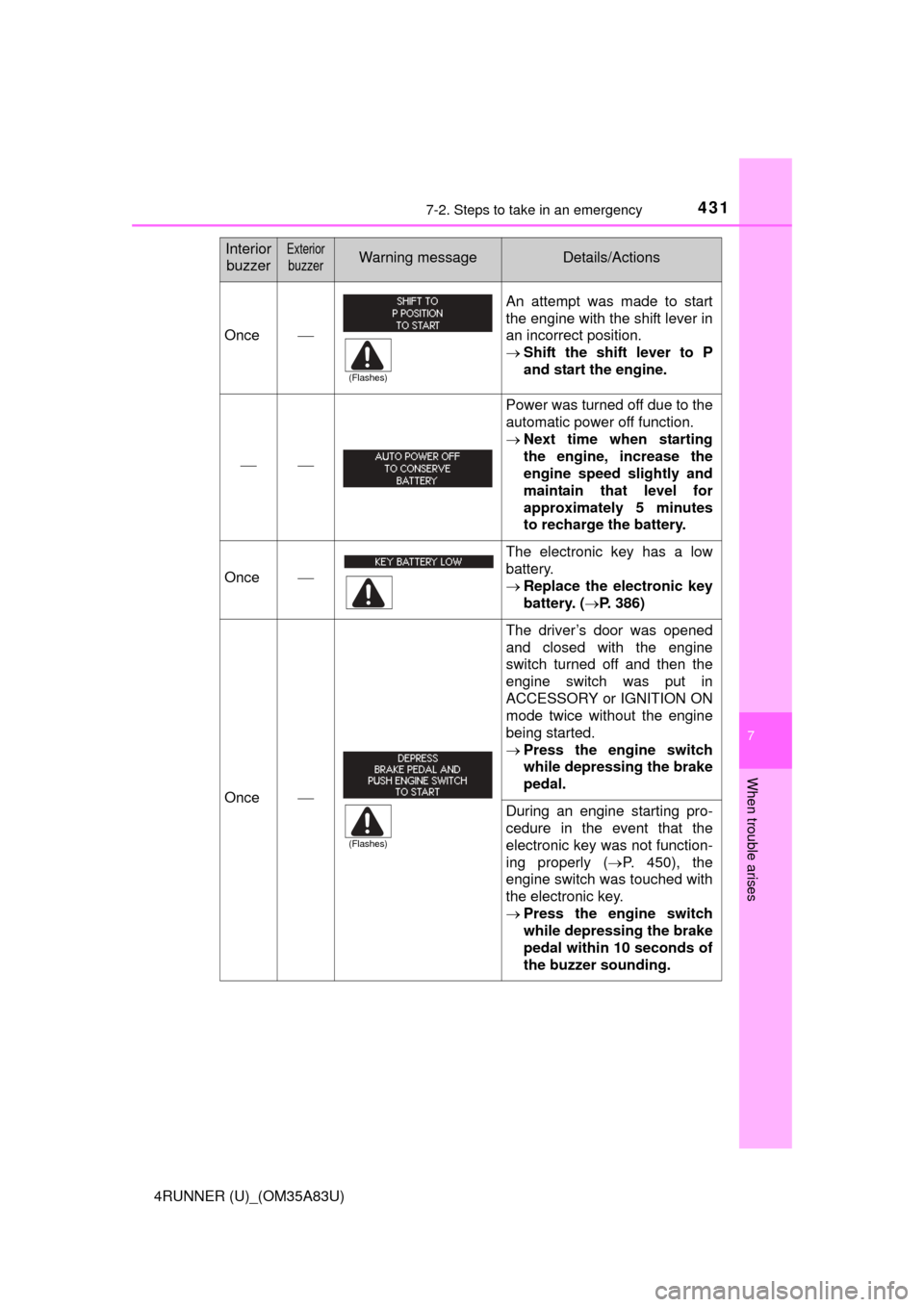
Once
An attempt was made to start
the engine with the shift lever in
an incorrect position.
Shift the shift lever to P
and start the engine.
Power was turned off due to the
automatic power off function.
Next time when starting
the engine, increase the
engine speed slightly and
maintain that level for
approximately 5 minutes
to recharge the battery.
Once
The electronic key has a low
battery.
Replace the electronic key
battery. ( P. 386)
Once
The driver’s door was opened
and closed with the engine
switch turned off and then the
engine switch was put in
ACCESSORY or IGNITION ON
mode twice without the engine
being started.
Press the engine switch
while depressing the brake
pedal.
During an engine starting pro-
cedure in the event that the
electronic key was not function-
ing properly ( P. 450), the
engine switch was touched with
the electronic key.
Press the engine switch
while depressing the brake
pedal within 10 seconds of
the buzzer sounding.
Interior
buzzerExterior
buzzerWarning messageDetails/Actions
(Flashes)
(Flashes)
Page 449 of 530
4477-2. Steps to take in an emergency
7
When trouble arises
4RUNNER (U)_(OM35A83U)
One of the following may be the cause of the problem:
●One or both of the battery terminals may be disconnected.
● The battery may be discharged. ( P. 452)
● There may be a malfunction in the steering lock system (vehicles
with a smart key system).
Contact your Toyota dealer if the problem cannot be repaired, or if repair
procedures are unknown.
When the engine does not start, the following steps can be used as an
interim measure to start the engine if the engine switch is functioning
normally:
Set the parking brake.
Shift the shift lever to P.
Turn the engine switch to ACCESSORY mode.
Press and hold the engine switch for about 15 seconds while
depressing the brake pedal firmly.
Even if the engine can be started using the above steps, the system
may be malfunctioning. Have the v ehicle inspected by your Toyota
dealer.
The starter motor does not turn ov er, the interior lights and head-
lights do not turn on, or the horn does not sound.
Emergency start function (vehicles with a smart key system)
1
2
3
4
Page 453 of 530

4517-2. Steps to take in an emergency
7
When trouble arises
4RUNNER (U)_(OM35A83U)
■Stopping the engine
Shift the shift lever to P and press the engine switch as you normally do when
stopping the engine.
■ Replacing the key battery
As the above procedure is a temporary measure, it is recommended that the
electronic key battery be replaced immediately when the battery is depleted.
(P. 386)
■ Changing engine switch modes
Within 10 seconds of the buzzer sounding, release the brake pedal and press
the engine switch.
The engine does not start and modes will be changed each time the switch is
pressed.( P. 196)
Page 455 of 530
4537-2. Steps to take in an emergency
7
When trouble arises
4RUNNER (U)_(OM35A83U)
Vehicles with a smart key system only: Open and close any of the
doors of your vehicle with the engine switch off.
Maintain the engine speed of the second vehicle and start the
engine of your vehicle by turni ng the engine switch to the “ON”
position (vehicles without a smart key system) or turning the engine
switch to IGNITION ON mode (v ehicles with a smart key system).
Once the vehicle’s engine has started, remove the jumper cables in
the exact reverse order from which they were connected.
Once the engine starts, have the vehicle inspected at your Toyota
dealer as soon as possible.
■ Starting the engine when the battery is discharged
The engine cannot be started by push-starting.
■ To prevent battery discharge
●Turn off the headlights and the audio system while the engine is off.
● Turn off any unnecessary electrical components when the vehicle is running
at a low speed for an extended period, such as in heavy traffic.
■ Charging the battery
The electricity stored in the battery will discharge gradually even when the
vehicle is not in use, due to natural discharge and the draining effects of cer-
tain electrical appliances. If the vehicle is left for a long time, the battery may
discharge, and the engine may be unable to start. (The battery recharges
automatically during driving.)
■ When recharging or replacing the battery
●Vehicles with a smart key system: In some cases, it may not be possible to
unlock the doors using the smart key system when the battery is dis-
charged. Use the wireless remote control or the mechanical key to lock or
unlock the doors.
● The engine may not start on the first attempt after the battery has recharged
but will start normally after the second attempt. This is not a malfunction.
● Vehicles with a smart key system: The engine switch mode is memorized by
the vehicle. When the battery is reconnected, the system will return to the
mode it was in before the battery was discharged. Before disconnecting the
battery, turn the engine switch off.
If you are unsure what mode the engine switch was in before the battery dis-
charged, be especially careful when reconnecting the battery.
● Make sure that the key is not inside the vehicle when recharging or replac-
ing the battery. The key may be locked in the vehicle if the alarm is acti-
vated. ( P. 73)
4
5
6