2014 SKODA OCTAVIA lock
[x] Cancel search: lockPage 78 of 280
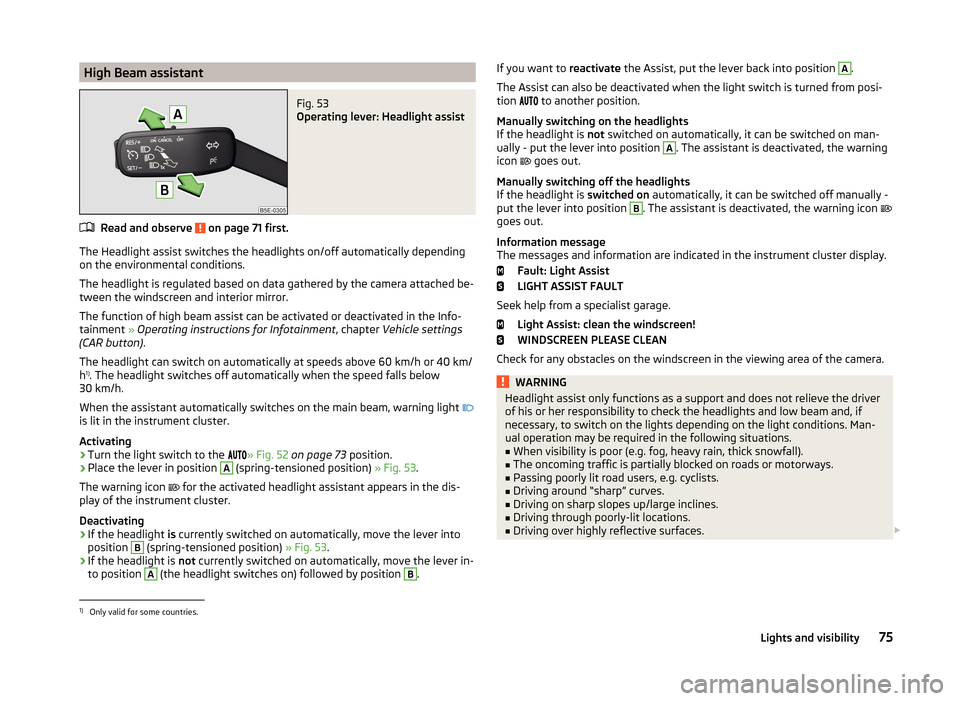
High Beam assistantFig. 53
Operating lever: Headlight assist
Read and observe on page 71 first.
The Headlight assist switches the headlights on/off automatically depending
on the environmental conditions.
The headlight is regulated based on data gathered by the camera attached be-
tween the windscreen and interior mirror.
The function of high beam assist can be activated or deactivated in the Info- tainment » Operating instructions for Infotainment , chapter Vehicle settings
(CAR button) .
The headlight can switch on automatically at speeds above 60 km/h or 40 km/
h 1)
. The headlight switches off automatically when the speed falls below
30 km/h.
When the assistant automatically switches on the main beam, warning light
is lit in the instrument cluster.
Activating
›
Turn the light switch to the » Fig. 52
on page 73 position.
›
Place the lever in position
A
(spring-tensioned position) » Fig. 53.
The warning icon for the activated headlight assistant appears in the dis-
play of the instrument cluster.
Deactivating
›
If the headlight is currently switched on automatically, move the lever into
position
B
(spring-tensioned position) » Fig. 53.
›
If the headlight is not currently switched on automatically, move the lever in-
to position
A
(the headlight switches on) followed by position
B
.
If you want to reactivate the Assist, put the lever back into position A.
The Assist can also be deactivated when the light switch is turned from posi-
tion
to another position.
Manually switching on the headlights
If the headlight is not switched on automatically, it can be switched on man-
ually - put the lever into position A
. The assistant is deactivated, the warning
icon
goes out.
Manually switching off the headlights
If the headlight is switched on automatically, it can be switched off manually -
put the lever into position
B
. The assistant is deactivated, the warning icon
goes out.
Information message
The messages and information are indicated in the instrument cluster display.
Fault: Light Assist
LIGHT ASSIST FAULT
Seek help from a specialist garage. Light Assist: clean the windscreen!
WINDSCREEN PLEASE CLEAN
Check for any obstacles on the windscreen in the viewing area of the camera.
WARNINGHeadlight assist only functions as a support and does not relieve the driver
of his or her responsibility to check the headlights and low beam and, if
necessary, to switch on the lights depending on the light conditions. Man-
ual operation may be required in the following situations.■
When visibility is poor (e.g. fog, heavy rain, thick snowfall).
■
The oncoming traffic is partially blocked on roads or motorways.
■
Passing poorly lit road users, e.g. cyclists.
■
Driving around “sharp” curves.
■
Driving on sharp slopes up/large inclines.
■
Driving through poorly-lit locations.
■
Driving over highly reflective surfaces.
1)
Only valid for some countries.
75Lights and visibility
Page 80 of 280

Only the rear fog light on the trailer lights up if the vehicle has a factory-fitted
towing device or a towing device from ŠKODA original accessories and it is
driven with a trailer.
COMING HOME / LEAVING HOME
Read and observe
on page 71 first.
COMING HOME (hereinafter referred to only as a function) switches the light
automatically for a short time after leaving the vehicle.
LEAVING HOME (hereinafter referred to only as a function) switches the light
automatically for a short time when approaching the vehicle.
The daytime running lights are switched on automatically if the following
conditions are met.
The light switch is in position
» Fig. 52 on page 73 .
The visibility in the vehicle environment is reduced.
The ignition is switched off.
The parking aid is activated.
The function is switched on (the driver's door is opened/the car is un-
locked via the remote control).
The function switches on the following light, depending on the equipment
fitted.
› Parking lights
› Low beam
› Entry lighting in the exterior mirrors
› Licence plate light
Poorer visibility is evaluated by a sensor mounted in the bracket of the interior
mirror.
COMING HOME
The light turns on automatically when you open the driver's door on (within 60
seconds of turning off the ignition).
The light turns off 10 seconds after closing all the doors and the boot lid or af-
ter the pre-set time has expired.
If a door or the boot lid remains open, the light goes out after 60 seconds.
LEAVING HOME
The light turns on automatically after the vehicle is unlocked with the remote
control.
The light turns off after 10 seconds or after a pre-set time or after the vehicle
is locked.
Enabling / disabling and setting function
The functions and setting of the lighting duration can be activated or deactiva-
ted in the Infotainment » Operating instructions for Infotainment , chapter Ve-
hicle settings (button CAR) .
CAUTION
■
Do not attach any stickers or similar objects in front of the light sensor on
the windscreen to avoid impairing the function or its reliability.■
If this function is activated constantly, the battery will be heavily discharged
particularly in short-haul traffic.
Hazard warning light system
Fig. 55
Button for hazard warning light
system
Read and observe on page 71 first.
Switching on/off
›
Press the button
» Fig. 55 .
All the turn signal lights on the vehicle flash at the same time when the hazard
warning light system is switched on. The warning light for the turn signals and
the warning light in the button also flash at the same time. The hazard warn-
ing light system can also be operated if the ignition is switched off.
If one of the airbags is deployed, the hazard warning light system will switch
on automatically.
If the turn signal light is switched on when the hazard warning light and the
ignition are both switched on, then only the turn signal light on the corre-
sponding vehicle side will flash.
77Lights and visibility
Page 81 of 280

WARNINGSwitch on the hazard warning light system if, for example, the following oc-
curs.■
You encounter a traffic congestion.
■
The vehicle has to be parked on the roadside, due to a fault for example.
Parking lights
Read and observe
on page 71 first.
The parking light is provided for a temporary lighting of the parked vehicle.
Parking light switching on
›
Switch off the ignition.
›
Place the control lever into position
A
or
B
as far as it can go
» Fig. 51 on
page 73 - the parking light on the right/left-hand side of the vehicle is
switched on.
If the right or left turn signal light has been switched on and the ignition is
switched off, the parking light is not automatically switched on.
Switching on the side light on both sides
›
Turn the light switch
A
to position » Fig. 50
on page 71 and lock the vehi-
cle.
After pulling out the ignition key and opening the driver's door, an audible
warning sounds. After a few seconds or after closing the driver's door, the au-
dible alarm is turned off, but the parking lights will remain switched on.
CAUTION
Turning on the parking light means the battery is heavily loaded, especially
over short distances.
Driving abroad
Read and observe
on page 71 first.
The low beam is set asymmetrically. It illuminates the side of the road on
which the vehicle is being driven to a greater extent.
When driving in countries with opposing traffic system (traffic on the left/
right), asymmetric headlight adjustment can dazzle oncoming traffic. In order
to avoid this, the headlights must be adjusted at a specialist garage.
You can adjust the Xenon headlights yourself by setting the travel mode in In- fotainment » Operating instructions for Infotainment , chapter Vehicle settings
(button CAR) .
Note
You can find out more information on adjusting the headlights at a specialist
garage.
Interior lights
Introduction
This chapter contains information on the following subjects:
Front interior light
78
Rear interior lights
79
Front door warning light
79
Entry space lighting
80
Note
With the ignition off, the light turns off automatically after about 10 minutes.
Front interior light
Fig. 56
Operation of the front light: Variant 1/variant 2
Positions of rocker switch
A
. » Fig. 56
Switching on
Control with the door contact switch (middle position)
Switching off
78Using the system
Page 82 of 280
There is no icon available for the center position (operation with the door con-
tact switch) in Version 2.
Switch for reading lamp B
» Fig. 56
Switching left reading lamp on/off
Switching right reading lamp on/off
Conditions for operating the light with the door contact switch - setting
The system is turned on when any of the following is present.
› The vehicle is unlocked.
› One of the doors is opened.
› The ignition key is removed.
The system is turned off when any of the following is present.
› The vehicle is locked.
› The ignition is switched on.
› About 30 seconds after all the doors have been closed.
Note
Two diffuse lights are integrated in the front interior lighting that illuminate
the gearshift lever and the middle of the dash panel. These are switched on
automatically when the parking light is activated. At the same time (with park-
ing lights and the ignition switched on), the door handle illumination is turned
on.
Rear interior lights
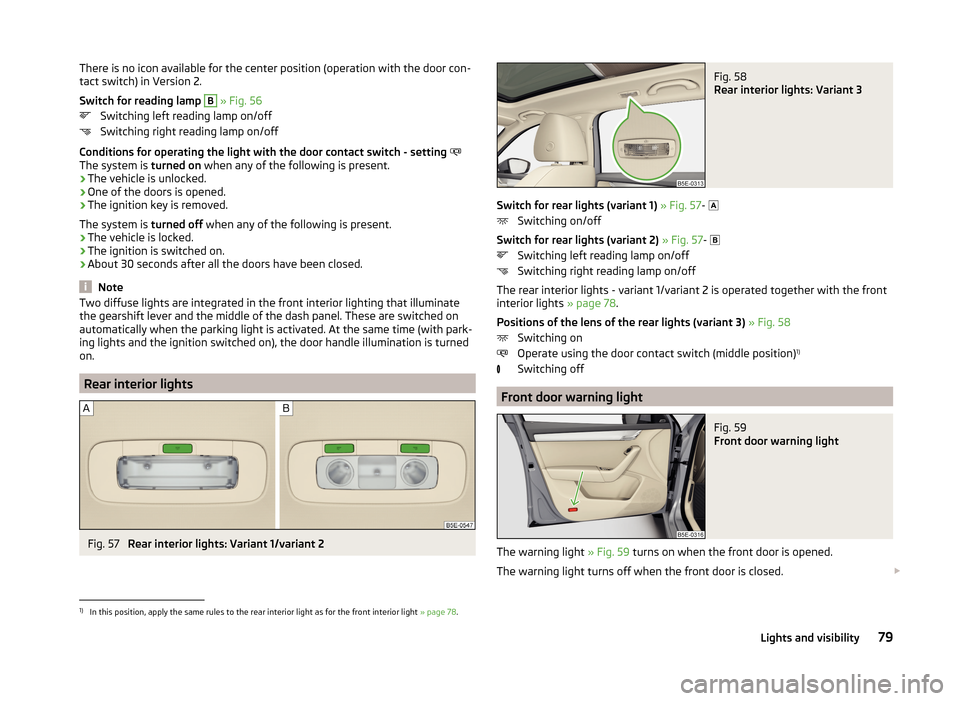
Fig. 57
Rear interior lights: Variant 1/variant 2
Fig. 58
Rear interior lights: Variant 3
Switch for rear lights (variant 1) » Fig. 57-
Switching on/off
Switch for rear lights (variant 2) » Fig. 57-
Switching left reading lamp on/off
Switching right reading lamp on/off
The rear interior lights - variant 1/variant 2 is operated together with the front
interior lights » page 78.
Positions of the lens of the rear lights (variant 3) » Fig. 58
Switching on
Operate using the door contact switch (middle position) 1)
Switching off
Front door warning light
Fig. 59
Front door warning light
The warning light » Fig. 59 turns on when the front door is opened.
The warning light turns off when the front door is closed.
1)
In this position, apply the same rules to the rear interior light as for the front interior light
» page 78.
79Lights and visibility
Page 83 of 280

There is a reflector installed here on some vehicles instead.
Entry space lighting
The lighting is positioned on the bottom edge of the exterior mirror and illumi-
nates the entry area of the front door.
The light comes on after the vehicle has been unlocked or on opening the
front door. The lighting goes out about 30 seconds after the doors are closed
or if the ignition is switched on.
WARNINGIf the entry light is on, do not touch its cover – risk of burns!
Visibility
Introduction
This chapter contains information on the following subjects:
Windscreen and rear window heater
80
Sun visors in the front
81
Sun screen
81
Windscreen and rear window heater
Fig. 60
Buttons for the front and rear window heater: manual air condi-
tioning, heating/Climatronic
The heating for quick defrosting and ventilation of the front /and rear window.
Buttons for the heater in the centre console » Fig. 60
Switching the rear window heater on/off
Switching the windscreen heater on/off
When the heater is switched on, a lamp lights up inside or below the button.
The heating only works when the engine is running.
The heater automatically switches off after approximately 10 minutes.
If the heating of the motor is switched off with the heating turned on and then
started again within 15 minutes again, the heating is continued. The start of
the time limit for the Auto Off is counted before switching off the engine al-
ready from switching on the heating.
For the sake of the environment
The heating should be switched off as soon as the window is de-iced or free
from mist. The reduced current consumption will have a favourable effect on
fuel economy.
Note
■ If the on-board voltage drops, the heater switches off automatically, in order
to provide sufficient electrical energy for the engine control » page 203, Auto-
matic load deactivation .■
If the light within or below the button flashes, the radiator will not work be-
cause of the low state of the battery.
■
If the Climatronic recognises that the windshield could fog up, the windshield
heating is automatically switched on. This function can be activated/deactiva-
ted in the Infotainment » Operating instructions for Infotainment , chapter ve-
hicle settings .
80Using the system
Page 88 of 280

Exterior mirrorsFig. 65
Exterior mirror operation
Read and observe on page 84 first.
The rotary knob can be moved into the following positions (depending on ve-hicle equipment)
Adjust the left mirror
Adjust the right mirror
Switch off mirror control
Mirror heater
Folding in the exterior mirrors
Adjust the position
The mirror can be adjusted to the desired position by moving the knob in the
direction of the arrow » Fig. 65.
The movement of the mirror surface is identical to the movement of the rotary
knob.
Synchronous adjustment of the mirror
›
Activating the synchronous adjustment of the mirrors in Infotainment » Info-
tainment operating instructions , chapter Vehicle settings (button CAR) .
›
Turn the knob for the mirror control to the position for the driver mirror ad-
justment.
›
Adjust the mirror to the desired position.
Fold in both of the exterior mirrors with the rotary knob
It is only possible to fold in both exterior mirrors when the ignition is switched
on and at a speed of up to 50 km/h.
The mirrors are extended to the driving position by turning the rotary knob
from position to a new position.
Automatically folding in and folding back both exterior mirrors
The exterior mirrors are automatically collapsed after locking the vehicle in the
park position.
The exterior mirrors are folded out automatically after unlocking the vehicle in
the driving position.
Folding in both mirrors can be activated or deactivated in the Infotain-
ment » Operating instructions for Infotainment , chapter Vehicle settings (CAR
button) .
Mirror with automatic dimming
The exterior mirror blackout is controlled together with the automatic dimming
interior mirror » page 84.
Memory function for mirrors
Applies to vehicles with electrically adjustable driver's seat.
It is possible to save the current setting of the exterior mirror when saving the
driver's seat position, » page 89, Memory Function of the electrically adjusta-
ble seat or » page 89 , Memory function of the remote control key .
Fold in passenger's mirror
Applies to vehicles with electrically adjustable driver's seat.
The passenger-side mirror can tilt down to improve the view to the curb when
reversing.
The mirror will be folded in automatically if the following conditions are met. The function is deactivated in Infotainment » Operating instructions for In-
fotainment , chapter Vehicle settings (CAR button) .
The knob for the mirror control is in the position for the passenger mirror
adjustment.
The reverse gear is engaged.
The mirror setting has been previously stored, » page 89, Memory Func-
tion of the electrically adjustable seat or » page 89 , Memory function of
the remote control key .WARNINGDo not touch the exterior mirror surfaces, if the exterior mirror heating is
switched on - hazard of burning. 85Lights and visibility
Page 90 of 280

Note■After a certain time, play can develop within the adjustment mechanism of
the backrest angle.■
For safety reasons, it is not possible to store the seat position in the electric
seat memory and remote control key memory if the inclination angle of the
seat backrest is more than 102° in relation to the seat cushion.
■
Each time you store the position of the electrically adjustable driver's seat
and exterior mirrors, the existing setting is deleted.
Manually adjusting seats
Fig. 66
Control elements at the seat
Read and observe on page 86 first.
Control elements at the seat » Fig. 66
Adjusting a seat in a forward/back direction
Adjusting height of seat 1)
Adjusting the angle of the seat backrest
Adjusting lumbar support
Adjusting a seat in a forward/back direction
›
Pull the lever
A
» Fig. 66 in the direction of the arrow and push the seat in
the required direction.
The lock must click into place after you release the lever.
Adjusting height of seat 1)
›
Again push or pull the lever
B
» Fig. 66 in the direction of one of the arrows.
Adjusting the angle of the seat backrest
›
The seat back release (do not lean on).
›
Push the lever
C
» Fig. 66 in the direction of one of the arrows.
ABCDAdjusting lumbar support›Push the lever D » Fig. 66 in the direction of one of the arrow.
Adjusting the front seats electronically
Fig. 67
Control elements at the seat
Read and observe
on page 86 first.
Control elements at the seat » Fig. 67
seat adjustment
Adjusting the angle of the seat backrest
Adjusting lumbar support
Adjusting a seat in a forward/back direction
›
Push the switch
A
in the direction of one of the arrows 1 » Fig. 67 .
Adjust the angle of the seat cushion
›
Push the switch
A
in the direction of one of the arrows 2 » Fig. 67 .
Set the height of the seat cushion
›
Push the switch
A
in the direction of one of the arrows 3 » Fig. 67 .
Adjusting the angle of the seat backrest
›
Push the switch
B
in the direction of one of the arrows 4 » Fig. 67 .
Raising or lowering the curvature of the lumbar support
›
Push the switch
C
in the region of one of the arrows 5 » Fig. 67 .
Reducing or increasing the curvature of the lumbar support
›
Push the switch
C
in the region of one of the arrows 6 » Fig. 67 .
ABC1)
Only valid for some countries.
87Seats and head restraints
Page 91 of 280

The adjusted driver's seat position can be set in the memory of the
seat » page 89 or the remote control key » page 89.
Note
If the setting procedure is interrupted, you will need to press the button again.
Head restraints - adjusting height
Fig. 68
Front headrests: move up and
down
Fig. 69
Rear headrests: move up and down
Read and observe
on page 86 first.
Best protection is achieved if the top edge of the head rest is at the same level as the upper part of your head.
Adjust front support
›
Press the locking button
A
» Fig. 68 and hold and move support in the de-
sired direction.
Adjust rear support
›
Grasp the restraint and move upwards in the direction of
1
» Fig. 69 .
›To move the restraint
down, press the securing button B in the direction of
arrow 2 and hold while at the same time pressing the restraint in the direc-
tion of arrow 3
.
WARNINGWith seats occupied, the respective head rests must be correctly set (must
not be in the bottom position) - risk of fatal injury!
Note
■ The middle rear head restraint is only adjustable in two positions.■For the sports seats, the head restraints are integrated into the front seat
backrests. This headrest can not be adjusted in height.
Headrests - removing and installing
Fig. 70
Rear headrests: removing/installing
Read and observe
on page 86 first.
Only the real head restraints may be removed or installed.
›
Pull the head restraint out of the seat backrest as far as the stop.
›
Press the locking button
A
in the direction of arrow
1
» Fig. 70 , while at
the same time using a flat screwdriver with a max. width of 5 mm to press
the securing button in opening
B
in the direction of arrow
2
.
›
Remove the restraint in the direction of arrow
3
.
›
To re-insert the head restraint, push it far enough down in the direction of
arrow
4
into the seat backrest until the locking button clicks into place.
WARNINGWith seats occupied, the respective head rests must be installed and adjus- ted correctly - risk of fatal injury! 88Using the system