2014 SKODA FABIA light
[x] Cancel search: lightPage 57 of 216
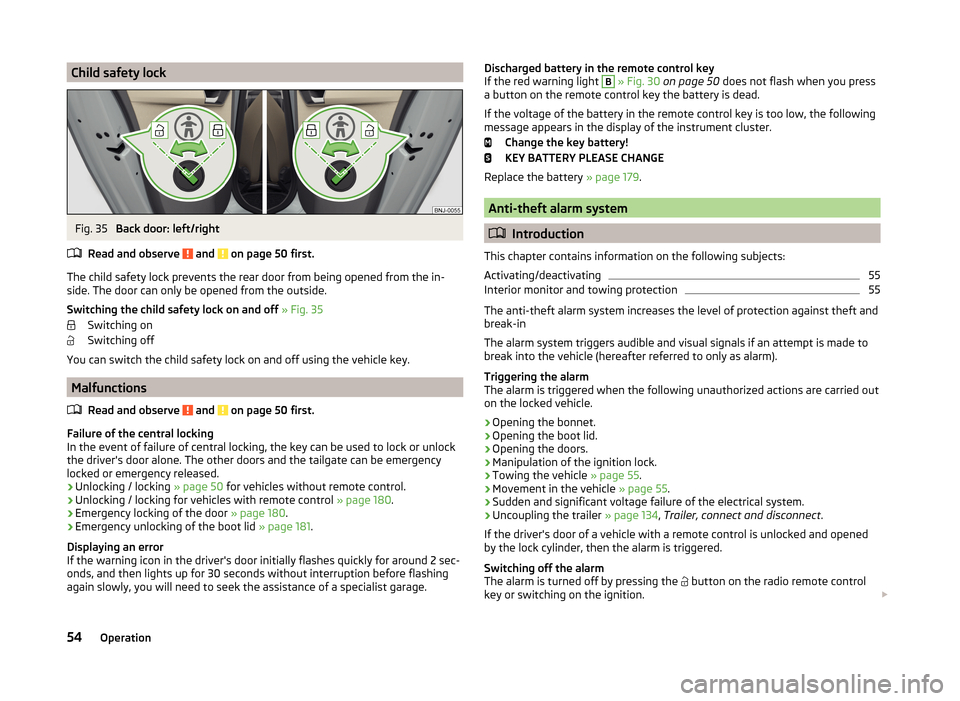
Child safety lockFig. 35
Back door: left/right
Read and observe
and on page 50 first.
The child safety lock prevents the rear door from being opened from the in- side. The door can only be opened from the outside.
Switching the child safety lock on and off » Fig. 35
Switching on
Switching off
You can switch the child safety lock on and off using the vehicle key.
Malfunctions
Read and observe
and on page 50 first.
Failure of the central locking
In the event of failure of central locking, the key can be used to lock or unlock
the driver's door alone. The other doors and the tailgate can be emergency
locked or emergency released.
› Unlocking / locking
» page 50 for vehicles without remote control.
› Unlocking / locking for vehicles with remote control
» page 180.
› Emergency locking of the door
» page 180.
› Emergency unlocking of the boot lid
» page 181.
Displaying an error
If the warning icon in the driver's door initially flashes quickly for around 2 sec-
onds, and then lights up for 30 seconds without interruption before flashing
again slowly, you will need to seek the assistance of a specialist garage.
Discharged battery in the remote control key
If the red warning light B » Fig. 30 on page 50 does not flash when you press
a button on the remote control key the battery is dead.
If the voltage of the battery in the remote control key is too low, the following
message appears in the display of the instrument cluster.
Change the key battery!
KEY BATTERY PLEASE CHANGE
Replace the battery » page 179.
Anti-theft alarm system
Introduction
This chapter contains information on the following subjects:
Activating/deactivating
55
Interior monitor and towing protection
55
The anti-theft alarm system increases the level of protection against theft and
break-in
The alarm system triggers audible and visual signals if an attempt is made to
break into the vehicle (hereafter referred to only as alarm).
Triggering the alarm
The alarm is triggered when the following unauthorized actions are carried out
on the locked vehicle.
› Opening the bonnet.
› Opening the boot lid.
› Opening the doors.
› Manipulation of the ignition lock.
› Towing the vehicle
» page 55.
› Movement in the vehicle
» page 55.
› Sudden and significant voltage failure of the electrical system.
› Uncoupling the trailer
» page 134, Trailer, connect and disconnect .
If the driver's door of a vehicle with a remote control is unlocked and opened by the lock cylinder, then the alarm is triggered.
Switching off the alarm
The alarm is turned off by pressing the button on the radio remote control
key or switching on the ignition.
54Operation
Page 59 of 216

WARNING■Ensure that the lock is properly engaged after closing the boot lid. Other-
wise, the lid might open suddenly while the vehicle is moving, even if the
lid was locked – risk of accident!■
Never drive with the tailgate fully opened or slightly ajar otherwise ex-
haust gases may get into the interior of the vehicle – risk of poisoning.
■
Do not press on the rear window when closing the tailgate, as otherwise
this could crack – risk of injury.
■
Make sure that when closing the boot lid, no body parts are crushed -
there is danger of injury!
Note
The function of the button in the grip above the licence plate is deactivated
when starting off or at a speed of 5 km/hour or more for vehicles with central
locking. The function is restored after the vehicle stops and the door is
opened.
Opening/closing
Fig. 37
Opening / closing tailgate
Read and observe
on page 56 first.
After unlocking the vehicle, the boot lid can be opened with the button in the
handle above the number plate.
Opening/closing boot lid » Fig. 37
Unlocking the door
Open flap
Closing the flap (by pulling the handle)
123CAUTIONOn vehicles with a variable loading floor, this must not be affixed by means of
the hook on the frame of the boot lid when closing the boot lid » page 91 -
there is the risk of damage to the hook.
Automatic locking of the boot lid
Read and observe
on page 56 first.
If the boot lid is unlocked with the key symbol on the remote control key,
then the door is automatically locked after closing.
The period after which the boot lid is locked automatically can be extended by
a specialist garage.
After the activation of the delayed locking, the door can be opened again after
closing within a limited period.
Delayed locking can be deactivated by a specialist garage at any time.
CAUTION
There is a risk of unwanted entry into the vehicle before the boot lid is locked
automatically. We therefore recommend locking the vehicle with the key sym-
bol
on the remote control key.
Power windows
Introduction
This chapter contains information on the following subjects:
Open / close windows
57
Opening the windows in the front passenger door and in the rear doors
58
Force limitation
58
Operational faults
58
The electrical power windows can only be operated when the ignition is
switched on.
56Operation
Page 60 of 216

WARNINGPower windows in the driver's door and the rear doors are equipped with a
force limiter (only applies to the Variant 2 ) » page 58 . If there is an obsta-
cle, the closing process is stopped and the window goes down by several
centimetres. The windows should nevertheless be closed carefully – risk of
injury.
CAUTION
■ Keep the windows clean to ensure the correct functionality of the electric
windows.■
In the event that the windows are frozen, first of all eliminate the ice
» page 143 , Windows and external mirrors and only then operate the electrical
power windows. Otherwise, the window sealing and the electrical power win-
dow mechanism could be damaged.
■
In the winter, ice on the window may cause greater resistance as the win-
dow is closed. The window will stop and open again by several centimetres. It
is necessary to deactivate the force limiter to close the window » page 58.
■
Always make sure that the windows are closed when you leave the locked
vehicle.
■
Always close the windows before disconnecting the battery » page 58,
Force limitation .
■
The window lift mechanism is equipped with protection against overheater.
Repeated opening and closing of the window can cause this mechanism to
overheat. If this happens, it will not be possible to operate the window for a
short time. You will be able to operate the window again as soon as the over-
heater protection has cooled down.
For the sake of the environment
At high speeds you should keep the windows closed to prevent unnecessarily high fuel consumption.
Note
When driving always use the existing heater, air conditioning and ventilation
system for ventilating the interior of the vehicle. With the windows open, dust
and other dirt can get into the vehicle. In addition, wind noises can occur at
certain speeds.Open / close windowsFig. 38
Buttons for window-openers Version 1/version 2
Read and observe
and on page 57 first.
Depending on the equipment configuration, the front windows - Variant 1 or
the front and rear windows - Variant 2 be operated with the door buttons
» Fig. 38 .
Buttons for window levers Front door left
Front door right
Rear door, left
Rear door, right
Deactivation / activation of the buttons in the rear doors
Opening
›
Lightly press the appropriate button down and hold it until the window has
moved into the desired position.
Releasing the button causes the window to stop immediately.
In Variant 2 » Fig. 38thedriver's window can be automatically fully opened by
pressing the button briefly until it stops. When pressed again or after with-
drawing the button, the window will stop.
Closing
›
Pull gently on the top edge of the corresponding button and hold until the
window has moved into the desired position.
Releasing the button causes the window to halt immediately.
ABCDE57Unlocking and opening
Page 61 of 216

In Variant 2 » Fig. 38the driver's window can be automatically closed com-
pletely by drawing the button to the stop. When drawn again or after pressing
the button, the window will stop.
Disable / enable the buttons in the rear doors›
Press the button
E
» Fig. 38 .
When the buttons are disabled in the rear doors, the indicator light
in the
button
E
lights up.
WARNINGIf the rear seats are accommodating people who are not completely inde-
pendent, e.g. children, it is recommended that for safety reasons the but-
tons in the rear doors are disabled with the button E
» Fig. 38 .
Opening the windows in the front passenger door and in the rear
doors
Fig. 39
Window winder button
Read and observe and on page 57 first.
There is a button in the front passenger door and in the rear doors for that
window.
Opening
›
Lightly press the appropriate button down and hold it until the window has
moved into the desired position.
Releasing the button causes the window to halt immediately.
Closing
›
Pull gently on the top edge of the corresponding button and hold until the
window has moved into the desired position.
Releasing the button causes the window to halt immediately.
Force limitation
Only version 2 of the power windows is equipped with the power limiter (does
not apply to the passenger window).
Read and observe
and on page 57 first.
If there is an obstacle, the closing process is stopped and the window goes
down by several centimetres.
If the obstacle prevents the window from being closed during the next 10 sec-
onds, the closing process is interrupted once again and the window goes down
by several centimetres.
If you attempt to close the window again within 10 seconds of the window be-
ing moved down for the second time, even though the obstacle was not yet
been removed, the closing process is only stopped. During this time it is not
possible to automatically close the window. The force limiter is still switched
on.
The force limiter is only switched off if you attempt to close the window again
within the next 10 seconds - the window will now close with full force!
If you wait longer than 10 seconds, the force limiter is switched on again.
WARNING■ Variant 1 of the power window » Fig. 38 on page 57 has no force limiter.
The windows should nevertheless be closed carefully – risk of injury!■
The passenger window in variant 2 of the power window » Fig. 38 on
page 57 has no force limiter. The windows should nevertheless be closed
carefully – risk of injury!
Operational faults
Read and observe
and on page 57 first.
The electric window levers do not work if the vehicle battery has been discon-nected and connected again while a window was open. The system must be
activated.
Activation sequence:
›
Switch on the ignition.
›
Pull the top edge of the button and close the window.
›
Release the button.
58Operation
Page 63 of 216

Lights and visibility
Lights
Introduction
This chapter contains information on the following subjects:
Operating the lights
60
Daylight running lights (DAY LIGHT)
61
Turn signal and main beam
62
Automatic driving lamp control
62
Fog lights
63
Fog lights with the CORNER function
63
Rear fog light
63
COMING HOME / LEAVING HOME
63
Hazard warning light system
64
Parking lights
65
Driving abroad
65
The lights work only with the ignition on, unless otherwise stated.
The layout of the controls on right-hand drive vehicles differs partially from
that shown in » Fig. 41 on page 60 . The symbols which mark the positions of
the controls are identical.
Keep the headlights lenses clean. The following guidelines must be observed
» page 144 , Headlight glasses .
WARNING■
The activation of the lights should only be undertaken in accordance with
national legal requirements.■
The driver is always responsible for the correct settings and use of the
lights.
WARNING (Continued)■ The automatic driving lamp control only operates as a support and
does not release the driver from his responsibility to check the lights and, if
necessary, to switch on the light depending on the prevailing light condi-
tions. The light sensor cannot, for example, detect rain or snow. Under
these conditions we recommend switching on the low beam or fog lights!■
Never drive with only the parking lights on! The parking lights are not
bright enough to light up the road sufficiently in front of you or to be seen
by other oncoming traffic. Therefore always switch on the low beam when
it is dark or if visibility is poor.
Note
■ The headlights may mist up temporarily. When the driving lights are switched
on, the light outlet areas are free from condensation after a short time, al-
though the headlight lenses may still be misted up around the edge. This mist
has no influence on the life of the lighting system.■
The instruments are also illuminated when the parking light, low or high
beam light is switched on. The brightness of the instrument lighting can be ac-
tivated or deactivated in the Infotainment » Operating instructions for Info-
tainment , chapter Vehicle settings (CAR button) .
Operating the lights
Fig. 41
Light switch and control dial for
headlight range adjustment
Read and observe on page 60 first.
Switching lights on and off
Depending on the equipment configuration, the light switch
A
» Fig. 41 can be
moved to the following positions.
60Operation
Page 64 of 216

Turn switchSwitching off lights (except daytime running lights)Switching lights on and off automatically » page 62
Switching on the parking light or parking lights » page 65
Switch on low beam
Pull switch Switch on the front fog lamp » page 63
Switch on the rear fog light » page 63
Headlight beam range regulation
Turning the dial B
» Fig. 41 from the position
in
means the headlight beam
range is gradually adjusted, thereby shortening the beam of light.
The positions of the width of illumination correspond approximately to the fol-
lowing car load.
Front seats occupied, boot empty
All seats occupied, boot empty
All seats occupied, boot loaded
Driver seat occupied, boot loaded
We recommend you adjust the headlight beam when the low beam is switched
on.
WARNINGAlways adjust the headlight beam to satisfy the following conditions.■The vehicle does not dazzle other road users, especially oncoming vehi-
cles.■
The beam range is sufficient for safe driving.
Note
■ The light switch is in position or and the ignition is turned off, the low
beam is switched off automatically and the status light is lit. The parking light
goes out after the ignition key is removed.■
If there is a fault in the light switch, the low beam comes on automatically.
Daylight running lights (DAY LIGHT)
Read and observe
on page 60 first.
The daytime running lights (the only function) provides the lighting of the frontvehicle range.
The daytime running lights are switched on automatically if the following
conditions are met.
The light switch is in the position
or
» Fig. 41 on page 60 .
The ignition is switched on.
The parking aid is activated.
Activating/deactivating function on vehicles with Infotainment
The function can be activated/deactivated in the Infotainment system » Info-
tainment user manual , chapter Vehicle settings (CAR button) .
Deactivating on vehicles without Infotainment
›
Switch off the ignition.
›
Pull the turn signal- and main beam lever ( » Fig. 42 on page 62 ) towards the
steering wheel, push down and hold in this position.
›
Switch on the ignition.
›
Hold the lever in this position for at least 3 seconds after switching on the
ignition.
Activating on vehicles without Infotainment
›
Switch off the ignition.
›
Pull the turning signal and main beam lever towards the steering wheel,
push it up and hold it in this position.
›
Switch on the ignition.
›
Hold the lever in this position for at least 3 seconds after switching on the
ignition.
WARNINGWhen the daytime running light is switched on, the parking lights (neither
at the front nor the rear) and the number plate lights are not lit. Therefore
always switch on the low beam when the visibility is poor.61Lights and visibility
Page 65 of 216

Turn signal and main beamFig. 42
Stalk: turn signal and main beam
operation
Read and observe on page 60 first.
Control stalk positions » Fig. 42
Switch on right turn signal
Switch on left turn signal
Switch on high beam
Switching off main beam / switching on headlamp flasher (spring-loaded
position)
Main beam
The main beam can only be switched on when the low beam lights are on.
The warning light lights up in the instrument cluster when the high beam is
switched on.
Flasher
The headlight flasher can be operated even if the ignition is switched off.
The warning light lights up in the instrument cluster when the headlight
flasher is switched on.
Flashing
When the left turn signal switch is switched on, the warning light flashes in
the instrument cluster.
When the right turn signal switch is switched on, the warning light flashes in
the instrument cluster.
The turn signal light switches itself off automatically when driving around a
curve or after making a turn.
The warning light flashes at twice its normal rate if a bulb for the turn signal
light fails.
ABCD“Convenience turn signal”
If you wish to flash three times only, briefly push the stalk to the upper or low-
er pressure point and release again.
The “convenience turn signal” can be activated or deactivated in the Infotain- ment » Operating instructions for Infotainment , chapter Vehicle settings (CAR
button) .WARNINGOnly turn on the main beam or the headlight flasher if other road users will
not be dazzled.
Automatic driving lamp control
Fig. 43
Light switch: AUTO position
Read and observe on page 60 first.
If the light switch is in position
» Fig. 43 , the parking lights, low beam and
number plate lights are switched on or off automatically.
The light on/off switching is controlled by a sensor mounted under the wind- screen in the holder of the inside mirror or in the control panel.
If the light switch is in position
, the lettering
illuminates next to the
light switch. If the light is switched on automatically, the symbol
next to the
light switch also lights up.
Automatic driving-light control during rain
The daytime running lights are switched on automatically if the following con-
ditions are met.
The light switch is in position
» Fig. 43 .
Automatic wiping with rain - position
1
or wiping - position
2
or
3
is
turned on » page 68, Windscreen wipers and washers .
62Operation
Page 66 of 216

The windscreen wipers are on for more than 30 s.
The parking aid is activated.
The light turns off about 4 minutes after turning off the wipers.
The function can be activated/deactivated in the Infotainment » Infotainment
manual , chapter Vehicle settings (CAR button) .
CAUTION
Do not attach any stickers or similar objects in front of the light sensor on the
windscreen. This can impair its function or reliability.
Fog lights
Fig. 44
Light switch: Turn on front and
rear fog light
Read and observe on page 60 first.
Switching on/off
›
Turn the light switch to position
,
or
» Fig. 44 .
›
Pull the light switch to position
1
.
The rear fog light is switched off in the reverse sequence.
The warning light
lights up in the instrument cluster when the fog lights are
switched on » page 33.
Fog lights with the CORNER function
Read and observe
on page 60 first.
The CORNER function lights the front fog lamp on the relevant side of the ve-hicle to illuminate the area around the vehicle when turning, parking, etc.
The
CORNER function is switched on automatically if the following conditions
are met.
The turn signal is switched on or the front wheels are turned sharply to
the right or left 1)
.
The engine is running.
The vehicle is stopped or is travelling at a speed of no more than 40 km/h.
The low beam is switched on or the light switch is in the position
and
the low beam is switched on.
The daytime running lights are not switched on.
The fog lights are not switched on.
Note
The two fog lights are switched on when you shift into the reverse gear.
Rear fog light
Read and observe
on page 60 first.
Switching on/off
›
Turn the light switch to position ,
or
» Fig. 44 on page 63 .
›
Pull the light switch to position
2
.
If the vehicle is not fitted with fog lights, the rear fog light is switched on by
pulling out the light switch from setting to the only possible setting.
The rear fog light is switched off in the reverse sequence.
The warning light in the instrument cluster lights up when the rear fog light
is switched on » page 33.
Only the rear fog light on the trailer lights up if the vehicle has a factory-fitted towing device or a towing device from ŠKODA original accessories and it is
driven with a trailer.
COMING HOME / LEAVING HOME
Read and observe
on page 60 first.
COMING HOME (hereinafter referred to only as function) switches the light au-tomatically for a short time after leaving the vehicle.
1)
If both switch-on conditions are conflicting, for example, if the front wheels are turned to the left and
the right turn signal light is switched on, the turn signal light has the higher priority.
63Lights and visibility