2014 Seat Mii airbag off
[x] Cancel search: airbag offPage 37 of 219
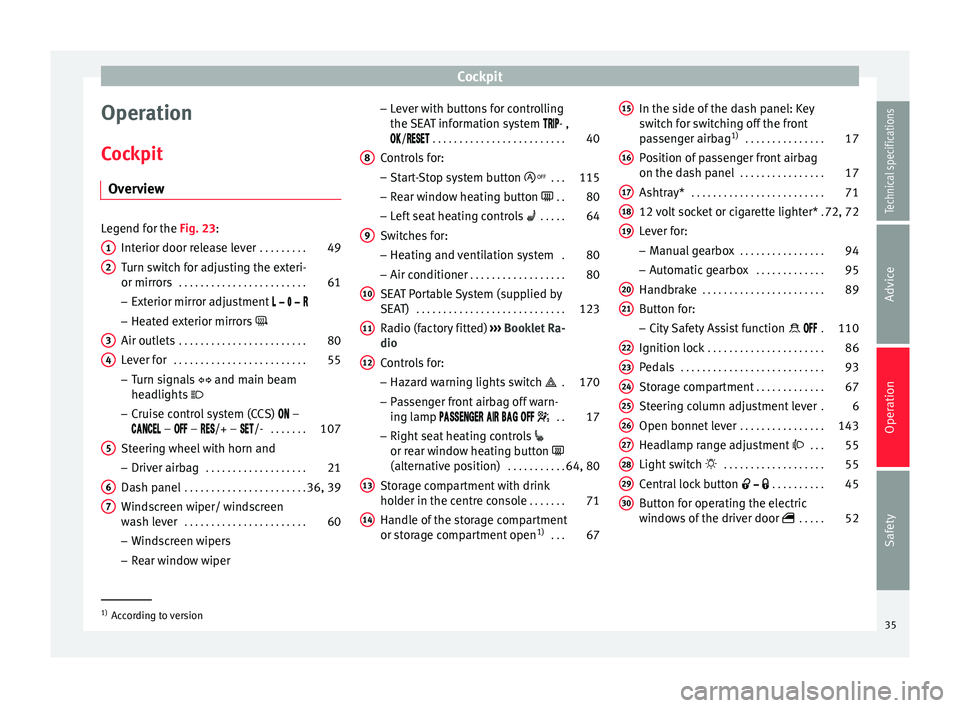
Cockpit
Operation
Cockpit Overview Legend for the Fig. 23
:
Int
erior door release lever . . . . . . . . .49
Turn switch for adjusting the exteri-
or mirrors . . . . . . . . . . . . . . . . . . . . . . . . 61
– Exterior mirror adjustment
– Heated exterior mirrors
Air outlets . . . . . . . . . . . . . . . . . . . . . . . . 80
Lever for . . . . . . . . . . . . . . . . . . . . . . . . . 55
– Turn signals and main beam
headlights
– Cruise control system (CCS) –
– – /+ – /- . . . . . . .107
Steering wheel with horn and
– Driver airbag . . . . . . . . . . . . . . . . . . . 21
Dash panel . . . . . . . . . . . . . . . . . . . . . . . 36, 39
Windscreen wiper/ windscreen
wash lever . . . . . . . . . . . . . . . . . . . . . . . 60
– Windscreen wipers
– Rear window wiper
1 2
3
4
5
6
7 –
Lever with buttons for controlling
the SEAT information system - ,
/
. . . . . . . . . . . . . . . . . . . . . . . . . 40
C ontr
ols for:
– Start-Stop system button . . .115
– Rear window heating button . .80
– Left seat heating controls . . . . . 64
Switches for: – Heating and ventilation system .80
– Air conditioner . . . . . . . . . . . . . . . . . . 80
SEAT Portable System (supplied by
SEAT) . . . . . . . . . . . . . . . . . . . . . . . . . . . . 123
Radio (factory fitted) ››› Booklet Ra-
dio
Controls for:
– Hazard warning lights switch . 170
– Passenger front airbag off warn-
ing lamp . .17
– Right seat heating controls
or rear window heating button
(alternative position) . . . . . . . . . . .64, 80
Storage compartment with drink
holder in the centre console . . . . . . .71
Handle of the storage compartment
or storage compartment open 1)
. . . 67
8 9
10
11
12
13
14 In the side of the dash panel: Key
switch for switching off the front
passenger airbag
1)
. . . . . . . . . . . . . . . 17
Position of passenger front airbag
on the dash panel . . . . . . . . . . . . . . . . 17
Ashtray* . . . . . . . . . . . . . . . . . . . . . . . . . 71
12 volt socket or cigarette lighter* .72, 72
Lever for:
– Manual gearbox . . . . . . . . . . . . . . . . 94
– Automatic gearbox . . . . . . . . . . . . .95
Handbrake . . . . . . . . . . . . . . . . . . . . . . . 89
Button for:
– City Safety Assist function . 110
Ignition lock . . . . . . . . . . . . . . . . . . . . . . 86
Pedals . . . . . . . . . . . . . . . . . . . . . . . . . . . 93
Storage compartment . . . . . . . . . . . . .67
Steering column adjustment lever .6
Open bonnet lever . . . . . . . . . . . . . . . . 143
Headlamp range adjustment . . . 55
Light switch . . . . . . . . . . . . . . . . . . . 55
Central lock button . . . . . . . . . .45
Button for operating the electric
windows of the driver door . . . . .52
15 16
17
18
19
20
21
22
23
24
25
26
27
28
29
30
1)
According to version
35
Technical specifications
Advice
Operation
Safety
Page 42 of 219

OperationSymbolMeaning
››› See
lights up or flashes:
fault in cata-
lytic converter.››› page
101
Fault in engine management.
lights up or flashes:
fault in the
steering system.››› page
84
Fuel tank almost empty.›››
page
139
Fault in airbag system and seat
belt tensioners.›››
page
17
it lights up:
the Start-Stop sys-
tem is enabled. ALTERNATIVELY:
flashes: the Start-Stop system is
not available.
››› page
115
The Start-Stop system is enabled
but the engine cannot be auto-
matically stopped.
Tyre pressure* too low›››
page
164
Left or right turn signal.›››
page
55
Hazard warning lights on.››› page
170
Cruise control operating.›››
page
107
Main beam on or flasher on.›››
page
55
The natural gas engine coolant
temperature is too low. WARNING
If the warning lamps are ignored, the vehicle
may stall in traffic, or may cause accidents
and severe injuries.
● Never ignore the warning lamps.
● Stop the vehicle safely as soon as possible.
● Park the vehicle away from traffic and en-
sure that there are no highly flammable ma-
terials under the vehicle that could come into
contact with the exhaust system (e.g. dry
grass, fuel).
● A faulty vehicle represents a risk of acci-
dent for the driver and for other road users. If
necessary, switch on the hazard warning
lamps and put out the warning triangle to ad-
vise other drivers.
● Before opening the bonnet, switch off the
engine and allow it to cool.
● In any vehicle, the engine compartment is a
hazardous area and could cause severe inju-
ries ››› page 143. CAUTION
Failure to heed the warning lamps when they
appear may result in faults in the vehicle. SEAT information system
Introduction With the ignition switched on it is possible to
access different messages via the display on
the instrument panel display.
The number of messages displayed on the in-
strument panel display will vary according to
the vehicle electronics and equipment.
A specialised workshop will be able to pro-
gramme or modify additional functions, ac-
cording to the vehicle equipment. SEAT rec-
ommends taking your car in for technical
service.
WARNING
Any distraction may lead to an accident, with
the risk of injury.
● Do not consult the messages on the instru-
ment panel screen when driving. Note
On the screen of the SEAT Portable System
(supplied by SEAT) ››› page 123 other func-
tion s
of the vehicle can be seen. 40
Page 48 of 219

Operation
Description of the central locking
system The central locking system allows all doors
and the rear lid to be locked and unlocked
centrally.
● From outside, using the vehicle key.
● From inside, by pushing the central locking
button ››› page 48.
The c entr
al locking system can be activated
or deactivated at a specialised workshop.
In case of a vehicle key fault or central lock-
ing system fault, all doors can be locked or
unlocked manually.
Locking the vehicle after the airbags have
been deployed
If the airbags are deployed due to an acci-
dent, the vehicle will be automatically and
completely unlocked. Depending on the
amount of damage, it can be locked follow-
ing an accident in the following ways:
FunctionNecessary operations
Lock the vehicle,
by pushing the
central locking
button:– Turn off the ignition and turn it on
again.
– Push the central locking button
.
FunctionNecessary operations
Use the key to lock the vehicle:– Turn off the ignition and turn it on
again.
OR: Remove the key from the igni-
tion.
– Open any door just once.
– Lock the vehicle with the key. Note
If the buttons of the vehicle key are pressed
››› page 43 or one of the central locking but-
t on
s ››› Fig. 34 is pressed repeatedly in short
suc
cession, the central locking briefly discon-
nects as protection against overloading. In
this case, the vehicle remains unlocked for
about 30 seconds. If neither the door or the
boot is opened during this time, the vehicle
will then automatically lock. Locking and unlocking the vehicle
from the exterior
Fig. 32
Buttons on the vehicle key Fig. 33
Vehicle mechanical key46
Page 67 of 219

Transport and practical equipment
WARNING
People whose pain and temperature thresh-
old has been affected by some kind of medi-
cine, paraplegia or chronic illness (e.g. diabe-
tes) may sustain burns to the back, buttocks
and legs from using the seat heaters that
may lead to a long healing process or that
may never completely heal. Seek medical ad-
vice if you have doubts regarding your health.
● People with limited pain and temperature
thresholds must never use seat heating. WARNING
Inappropriate use of the seat functions can
cause severe injuries.
● Assume the proper sitting position before
your trip and remain in it throughout. This al-
so applies to the other occupants.
● Keep hands, fingers, feet and other limbs
away from the seat operating and adjustment
radius. CAUTION
● To avoid damaging the heating elements of
the seat heaters, please do not kneel on the
seat or apply sharp pressure to a single point
on the seat cushion or backrest.
● Liquids, sharp objects and insulating mate-
rials on the seat could damage the seat heat-
ing. ●
In the event of smells, switch off the seat
heating immediately and have the unit in-
spected by a specialised workshop. For the sake of the environment
The seat heating should remain on only when
needed. Otherwise, it is an unnecessary fuel
waste. Transport and practical
equipment
Transporting objects Introduction Always transport heavy loads in the luggage
compartment and place the seat backs in a
vertical position. Never overload the vehicle.
Both the carrying capacity as well as the dis-
tribution of the load in the vehicle affect driv-
ing behaviour and braking ability
››› .
WARNING
Unsecured or incorrectly secured objects can
cause serious injury in case of a sudden ma-
noeuvring or breaking or in case of an acci-
dent. This is especially true when objects are
struck by a detonating airbag and fired
through the vehicle interior. To reduce the
risks, please note the following:
● Secure all objects in the vehicle. Always
keep equipment and heavy objects in the lug-
gage compartment.
● Always secure objects with suitable rope or
slings so that they cannot enter the deploy-
ment areas around the frontal or side airbags
in case of sudden braking or an accident.
● Always ensure that objects inside the vehi-
cle cannot move into the deployment area of
the bags while driving. » 65Technical specifications
Advice
Operation
Safety
Page 68 of 219

Operation
●
While driving, always keep object compart-
ments closed.
● Remove all objects from the front passen-
ger seat when it is folded down. When the
seat backrest is folded down, it presses on
small and light objects and these are detec-
ted by the weight sensor on the seat; this
sends false information to the airbag control
unit.
● While the backrest of the front passenger
seat is folded, the frontal airbag must remain
disconnected and the PASSENGER AIRBAG
OFF light on.
● Ob
jects secured in the vehicle should never
be placed in such a way as to make passen-
gers sit in an incorrect position.
● If secured objects occupy a seat, this seat
should not be occupied or used by anyone. WARNING
The driving behaviour and braking ability
change when transporting heavy and large
objects.
● Adjust your speed and driving style to visi-
bility, road, traffic and weather conditions.
● Accelerate gently and carefully.
● Avoid sudden braking and manoeuvres.
● Brake early. Transporting a load
Secure all objects in the vehicle
● Distribute the load throughout the vehicle
and on the roof as uniformly as possible.
● Transport heavy objects as far forward as
possible in the luggage compartment and
lock the seat backs in the vertical position.
● Check the headlight adjustment
››› page 55.
● Use the s
uitable tyre pressure according to
the load being transported. Read the tire in-
flation information label ›››
page 158. CAUTION
Objects on the shelf could chafe against the
wires of the heating element in the heated
rear window and cause damage. Note
Please refer to the notes on loading the roof
carrier ››› page 77. Driving with the rear lid open
Driving with the rear lid open creates an addi-
tional risk. Secure all objects and secure the
rear lid correctly and take all measures possi-
ble to reduce toxic gases from entering the
vehicle. WARNING
Driving with the rear lid unlocked or open
could cause serious injuries.
● Always drive with the rear lid closed.
● Secure all objects in the vehicle. Loose
items could fall out of the vehicle and injure
other road users or damage other vehicles.
● Drive particularly carefully and think
ahead.
● Avoid sudden manoeuvres and braking giv-
en that this could cause an uncontrolled
movement of the open rear lid.
● When transporting objects that protrude
out of the luggage compartment, indicate
them suitably. Observe legal requirements.
● If objects must project out of the luggage
compartment, the rear lid must never be used
to “secure” or “attach” objects.
● If a baggage rack is fitted on the rear lid, it
should be removed before travelling with the
rear lid open. WARNING
Toxic gases may enter the vehicle interior
when the rear lid is open. This could cause
loss of consciousness, carbon monoxide poi-
soning, serious injury and accidents.
● To avoid toxic gases entering the vehicle al-
ways drive with the rear lid closed. 66
Page 88 of 219

Operation
steering only works when the engine is run-
ning.
You should remember that you will need con-
siderably more power than normal to steer
the vehicle if the power steering is not work-
ing correctly or not at all.
Stopping and starting the
engine
Introduction Immobiliser display
When an invalid key is used or in the event of
a system fault, is displayed on the instru-
ment panel. The engine cannot be started.
Pushing or towing
For technical reasons, the vehicle must
not
be push- or tow-started. Jump starting is pref-
erable. WARNING
Switching off the engine while driving makes
stopping the vehicle difficult. As a conse-
quence you may lose control of the vehicle
and there is a risk of serious accident.
● The assisted braking and steering systems,
the airbag system, seat belts and certain safety equipment are only active while the
engine is running.
●
The engine should only be switched off
when the vehicle is at a standstill. WARNING
While the engine is running or starting it
could help reduce the risk of serious injury.
● Never start or leave the engine running in
poorly ventilated or closed spaces. Exhaust
gas contains carbon monoxide, a toxic, col-
ourless and odourless gas. Carbon monoxide
can cause people to lose consciousness. It
can also cause death.
● Never leave the vehicle unattended if the
engine is running. The vehicle could move off
suddenly or something unexpected could
happen resulting in damage and serious in-
jury.
● Never use start boosters. Cold start sprays
could explode or increase the engine speed
unexpectedly. WARNING
The components of the exhaust system reach
very high temperatures. This could cause a
fire and considerable damage.
● Always park your vehicle so that no part of
the exhaust system can come in contact with
flammable materials (such as wood, leaves,
spilled fuel, dried grass, etc). ●
Never apply additional underseal or anti-
corrosion coatings to the exhaust pipes, cata-
lytic converter or the heat shields on the ex-
haust system. Ignition lock
Fig. 79
Vehicle key positions Car keys ››› Fig. 79
No key in the ignition lock: The steering lock may
be activated.
0Ignition switched off. Key can be removed from
the vehicle.
1Ignition is switched on. The steering lock can be
unlocked.
2Switch on the engine. Release the key when the
engine has started. When it is released, the key
returns to position 1
.86
Page 90 of 219

Operation
Note
● Electrical devices with a high power con-
sumption are switched off temporarily when
the engine starts.
● When the engine is started cold, there may
be strong vibrations for a few moments for
technical reasons. This is quite normal, and
no cause for concern.
● Natural gas engines always start up with
petrol, as a certain operating temperature is
required for running with gas. Once the re-
quired operating temperature is reached, the
engine will change to operate with natural
gas. Stopping the engineComplete operations only in the sequence giv-
en.
1.Stopping the vehicle completely
››› .
2.Press the brake pedal and keep pressed until
step 4 has been completed.
3.In automatic gearboxes, put the selector lever in position D or R.
4.Apply the handbrake firmly ››› page 89.
5.Turn the key in the ignition lock to position
››› Fig. 79 0.
6.With a manual gearbox, put the vehicle in first
or reverse gear. WARNING
Never switch off the engine while the vehicle
is moving. You may lose control of the vehicle
and there is a risk of serious accident.
● The airbags and belt tensioners do not
work when the ignition is switched off.
● The brake servo does not work with the en-
gine off. To stop, the brake pedal must be
pressed with more force.
● As the power steering does not work if the
engine is not running, you will need more
strength to steer than normally.
● If the key is removed from the ignition, the
steering may lock and it will not be possible
to steer the vehicle. CAUTION
If the engine has been driven at high speed
for a prolonged period of time, it may over-
heat when turned off. To avoid engine dam-
age, allow the engine to run for approximate-
ly 2 minutes in neutral before switching it off. Note
After stopping the engine, the engine com-
partment fan may continue running for a few
minutes, even when the ignition has been
switched off or the key removed. The radiator
fan is automatically switched off. Electronic immobiliser
The gear lock prevents the engine from being
started with an unauthorised key and the ve-
hicle being moved.
The vehicle key has a built-in chip. It auto-
matically deactivates the electronic immobil-
iser when the key is inserted into the ignition
lock.
The electronic immobilizer will be activated
again automatically as soon as you remove
the key from the ignition lock.
For this reason, the vehicle can only be used
with a genuine SEAT key with the correct
code. Coded keys can be obtained from SEAT
dealerships
›››
page 43 .
If an u
nauthorised key is used, the signal
appears on the instrument panel display. The
vehicle cannot be started in this case Note
The correct operation of the vehicle is only
guaranteed when original SEAT keys are
used. 88
Page 112 of 219

OperationFunctionControl position, control operations
››› Fig. 87Action
Reducing the stored speed (dur-
ing CCS setting)
Press the button A in the area briefly to reduce the stored speed in shot
measures of about. 1 km/h (1 mph) and store.
Reduce speed without braking, by interrupting the accelerator
until reaching the new stored speed.
Keep button A pressed in the area for a long time
to continually decrease
stored speed until releasing and storing.
Switch off the CCS.Control B in the position .The system is switched off. The stored speed is deleted. Travelling down hills with the CCS
When travelling down hills the CCS cannot
maintain a constant speed. Slow the vehicle
down using the brake pedal and reduce
gears if required.
Automatic off
The cruise control system (CCS) is switched
off automatically or temporarily:
● If the system detects a fault that could af-
fect the working order of the CCS.
● If you increase the stored speed by press-
ing the accelerator pedal for a certain time.
● if the brake or clutch pedal is depressed.
● If the gear is changed with the manual
gearbox.
● If the airbag is triggered. Safety Assist* (City Safety
Assist function)
Introduction The City Safety Assist function covers driving
situations at a distance of about 10 metres in
front of the vehicle, in a speed range of ap-
proximately 5-30 km/h (3-19 mph).
When the system detects a possible collision
with a vehicle in front, the vehicle prepares
for a possible emergency braking
››› .
If the driver does not react to an imminent
collision, the system can automatically brake
the vehicle in order to reduce speed faced
with a possible collision. The system can
help to reduce the consequences of an acci-
dent.
If the City Safety Assist function determines
that the driver has braked insufficiently when
faced with an imminent collision, the system
can increase the brake force in order to re- duce speed. The system can help to reduce
the consequences of an accident. WARNING
The smart technology in the City Safety As-
sist system cannot change the limits imposed
by the laws of physics and by the system it-
self. The increased convenience offered by
the City Safety Assist system should never
prompt you to take risks. The driver always
assumes the responsibility of braking in
time.
● The City Safety Assist function cannot pre-
vent accidents or serious injury by itself.
● The City Safety Assist system may carry out
unwanted brake interventions in complex
driving situations e.g. when a vehicle crosses
at a short distance. WARNING
Relying on the City Safety Assist system in
city driving as part of one's driving behaviour
may cause accidents and serious injury. The 110