Page 403 of 546

The user interface consists of the following:
Manual Brake Control Lever
Slide the manual brake control lever to the right to
activate power to the trailer’s electric brakes independent
of the tow vehicle’s brakes. If the manual brake control
lever is activated while the brake is also applied, the
greater of the two inputs determines the power sent to
the trailer brakes.
The trailer and the vehicle’s brake lamps will come on
when either vehicle braking or manual trailer brakes are
applied.
Trailer Brake Status Indicator Light
This light indicates the trailer electrical connection status.
If no electrical connection is detected after the ignition is
turned on, pressing the GAIN adjustment button orsliding the manual brake control lever will display the
GAIN setting for 10 seconds and the “Trailer Brake Status
Indicator Light” will not be displayed.
If a fault is detected in the trailer wiring or the Integrated
Trailer Brake Module (ITBM), the “Trailer Brake Status
Indicator Light” will flash.
GAIN Adjustment Buttons (+/-)
Pressing these buttons will adjust the brake control
power output to the trailer brakes in 0.5 increments. The
GAIN setting can be increased to a maximum of 10 or
decreased to a minimum of 0 (no trailer braking).
GAIN
The GAIN setting is used to set the trailer brake control
for the specific towing condition and should be changed
as towing conditions change. Changes to towing condi-
tions include trailer load, vehicle load, road conditions
and weather.
5
STARTING AND OPERATING 401
Page 405 of 546
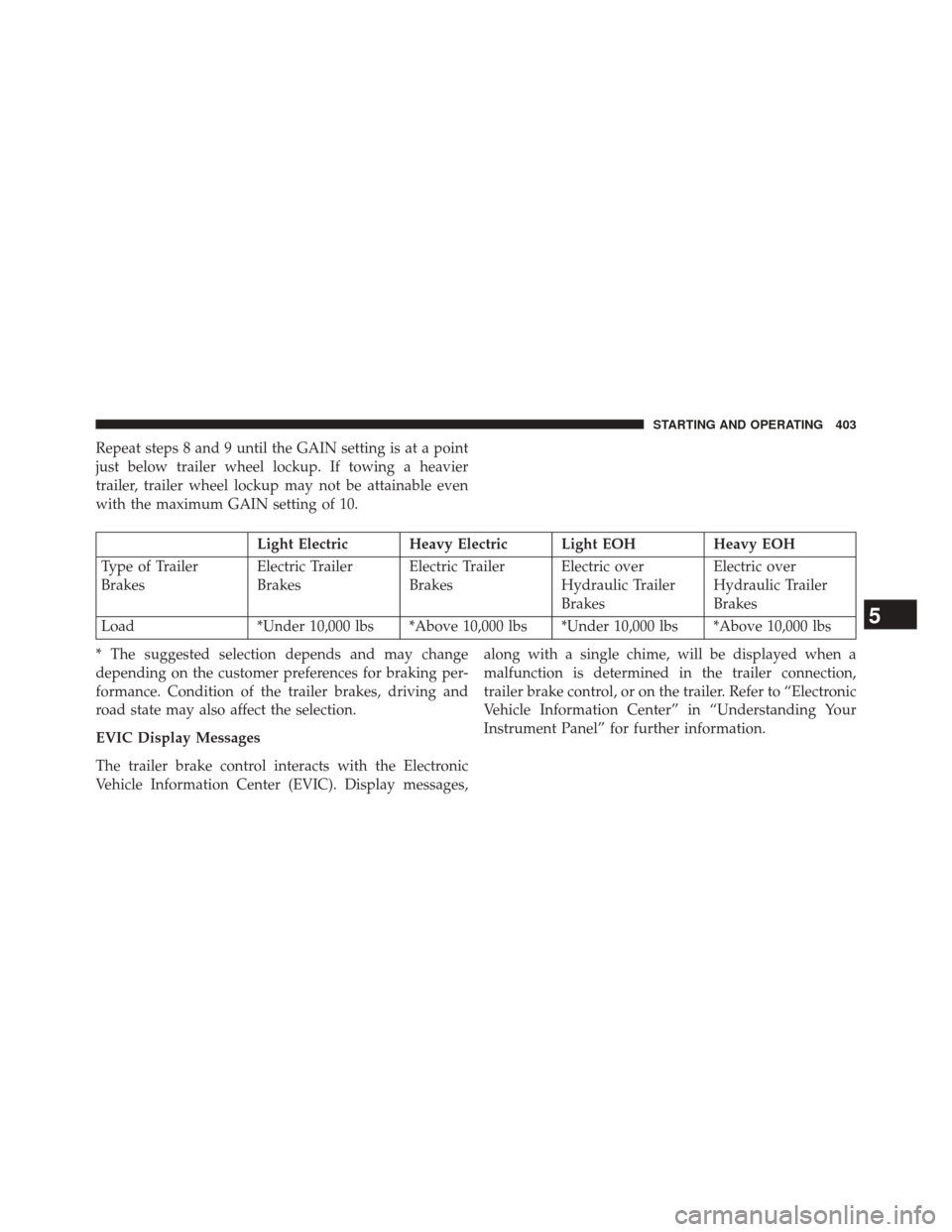
Repeat steps 8 and 9 until the GAIN setting is at a point
just below trailer wheel lockup. If towing a heavier
trailer, trailer wheel lockup may not be attainable even
with the maximum GAIN setting of 10.
Light Electric Heavy Electric Light EOHHeavy EOH
Type of Trailer
Brakes Electric Trailer
BrakesElectric Trailer
BrakesElectric over
Hydraulic Trailer
BrakesElectric over
Hydraulic Trailer
Brakes
Load *Under 10,000 lbs *Above 10,000 lbs *Under 10,000 lbs *Above 10,000 lbs
* The suggested selection depends and may change
depending on the customer preferences for braking per-
formance. Condition of the trailer brakes, driving and
road state may also affect the selection.
EVIC Display Messages
The trailer brake control interacts with the Electronic
Vehicle Information Center (EVIC). Display messages, along with a single chime, will be displayed when a
malfunction is determined in the trailer connection,
trailer brake control, or on the trailer. Refer to “Electronic
Vehicle Information Center” in “Understanding Your
Instrument Panel” for further information.
5
STARTING AND OPERATING 403
Page 406 of 546

CAUTION!
Connecting a trailer that is not compatible with the
ITBM system may result in reduced or complete loss
of trailer braking. There may be a increase in stop-
ping distance or trailer instability which could result
in damage to your vehicle, trailer, or other property.
WARNING!
Connecting a trailer that is not compatible with the
ITBM system may result in reduced or complete loss
of trailer braking. There may be a increase in stop-
ping distance or trailer instability which could result
in personal injury.NOTE:
•
An aftermarket controller may be available for use
with trailers with air or electric-over-hydraulic trailer
brake systems. To determine the type of brakes on
your trailer and the availability of controllers, check
with your trailer manufacturer or dealer.
• Removal of the ITBM will cause errors and it may
cause damage to the electrical system and electronic
modules of the vehicle. See your authorized dealer if
an aftermarket module is to be installed.
Towing Requirements – Trailer Lights And Wiring
Whenever you pull a trailer, regardless of the trailer size,
stop lights and turn signals on the trailer are required for
motoring safety.
NOTE: Do not cut or splice wiring into the vehicle’s
wiring harness.
404 STARTING AND OPERATING
Page 416 of 546
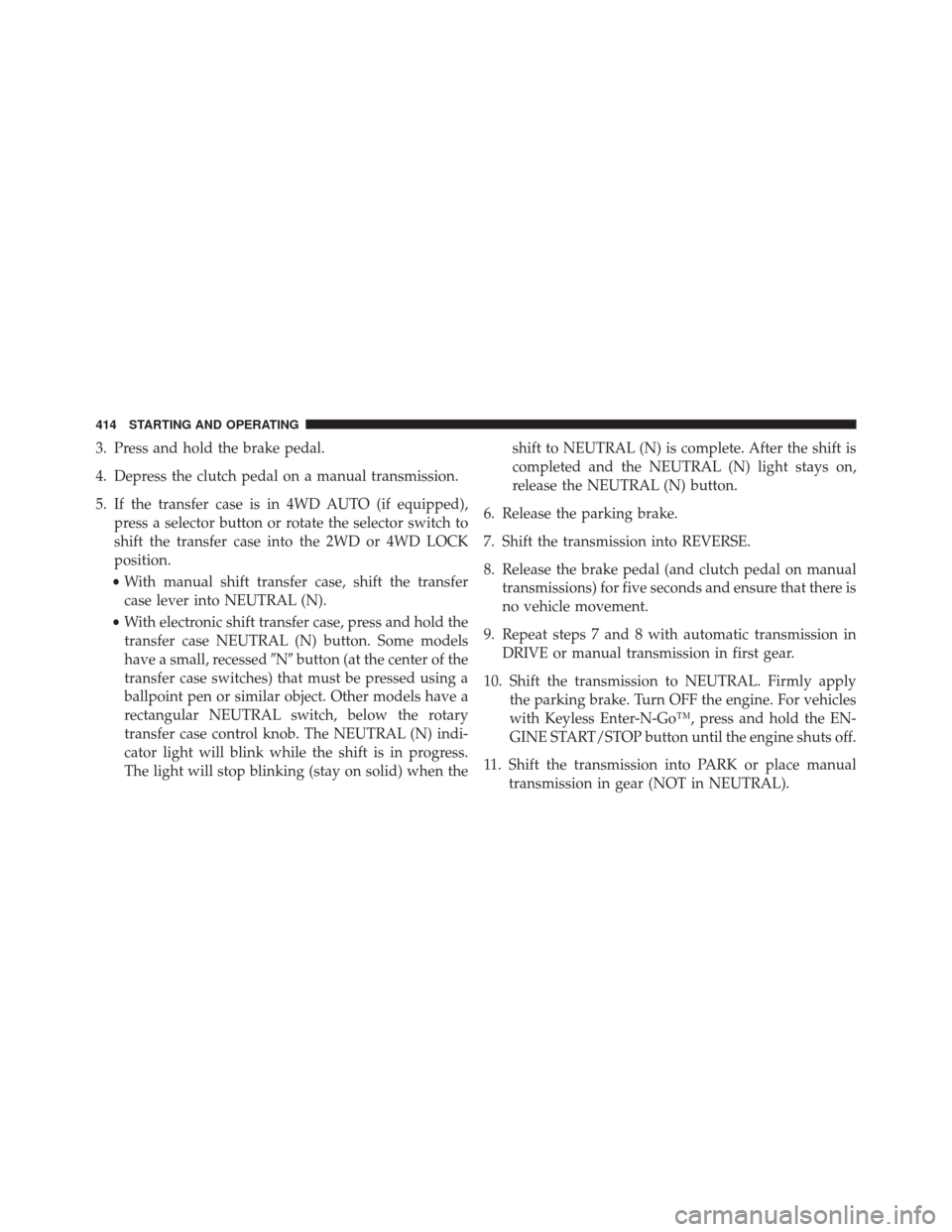
3. Press and hold the brake pedal.
4. Depress the clutch pedal on a manual transmission.
5. If the transfer case is in 4WD AUTO (if equipped),press a selector button or rotate the selector switch to
shift the transfer case into the 2WD or 4WD LOCK
position.
• With manual shift transfer case, shift the transfer
case lever into NEUTRAL (N).
• With electronic shift transfer case, press and hold the
transfer case NEUTRAL (N) button. Some models
have a small, recessed �N�button (at the center of the
transfer case switches) that must be pressed using a
ballpoint pen or similar object. Other models have a
rectangular NEUTRAL switch, below the rotary
transfer case control knob. The NEUTRAL (N) indi-
cator light will blink while the shift is in progress.
The light will stop blinking (stay on solid) when the shift to NEUTRAL (N) is complete. After the shift is
completed and the NEUTRAL (N) light stays on,
release the NEUTRAL (N) button.
6. Release the parking brake.
7. Shift the transmission into REVERSE.
8. Release the brake pedal (and clutch pedal on manual transmissions) for five seconds and ensure that there is
no vehicle movement.
9. Repeat steps 7 and 8 with automatic transmission in DRIVE or manual transmission in first gear.
10. Shift the transmission to NEUTRAL. Firmly apply the parking brake. Turn OFF the engine. For vehicles
with Keyless Enter-N-Go™, press and hold the EN-
GINE START/STOP button until the engine shuts off.
11. Shift the transmission into PARK or place manual transmission in gear (NOT in NEUTRAL).
414 STARTING AND OPERATING
Page 417 of 546

12. Turn the ignition switch to the OFF position, andremove the Key Fob.
13. Attach the vehicle to the tow vehicle using a suitable tow bar.
14. Release the parking brake.
NOTE: With electronic shift transfer case:
• The transfer case cannot be shifted into NEUTRAL (N)
from the 4WD AUTO position (if equipped).
• Steps 2 through 5 are requirements that must be met
prior to pressing the NEUTRAL (N) button, and must
continue to be met until the shift has been completed.
If any of these requirements are not met prior to
pressing the NEUTRAL (N) button or are no longer
met during the shift, the NEUTRAL (N) indicator light
will flash continuously until all requirements are met
or until the NEUTRAL (N) button is released. •
The ignition switch must be in the ON/RUN position
for a shift to take place and for the position indicator
lights to be operable. If the ignition switch is not in the
ON/RUN position, the shift will not take place and no
position indicator lights will be on or flashing.
• A flashing NEUTRAL (N) position indicator light
indicates that shift requirements have not been met.
Shifting Out Of NEUTRAL (N)
Use the following procedure to prepare your vehicle for
normal usage.
1. Bring the vehicle to a complete stop, leaving it con- nected to the tow vehicle.
2. Turn the ignition switch to the ON/RUN position, but do not start the engine.
3. Firmly apply the parking brake.
4. Press and hold the brake pedal.5
STARTING AND OPERATING 415
Page 418 of 546
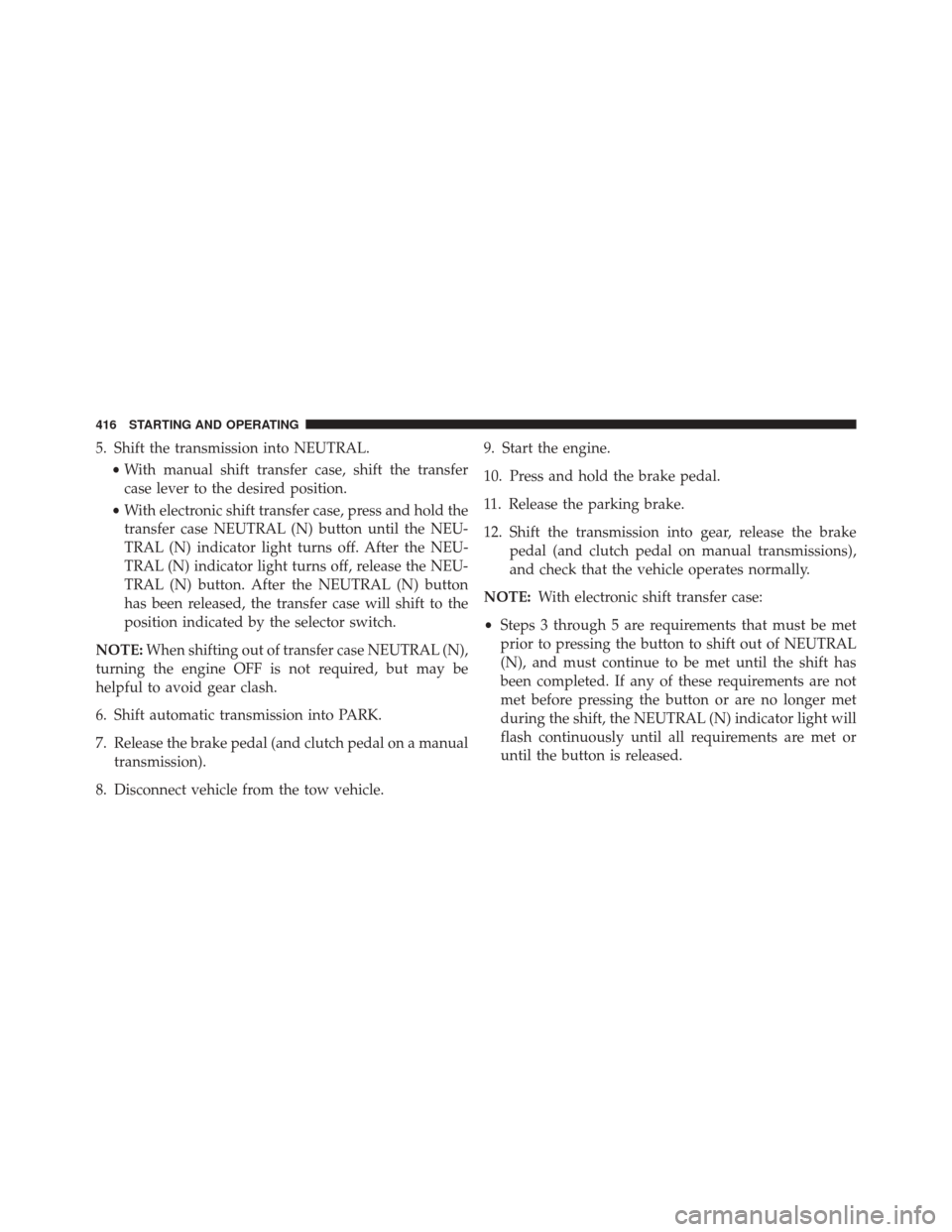
5. Shift the transmission into NEUTRAL.•With manual shift transfer case, shift the transfer
case lever to the desired position.
• With electronic shift transfer case, press and hold the
transfer case NEUTRAL (N) button until the NEU-
TRAL (N) indicator light turns off. After the NEU-
TRAL (N) indicator light turns off, release the NEU-
TRAL (N) button. After the NEUTRAL (N) button
has been released, the transfer case will shift to the
position indicated by the selector switch.
NOTE: When shifting out of transfer case NEUTRAL (N),
turning the engine OFF is not required, but may be
helpful to avoid gear clash.
6. Shift automatic transmission into PARK.
7. Release the brake pedal (and clutch pedal on a manual transmission).
8. Disconnect vehicle from the tow vehicle. 9. Start the engine.
10. Press and hold the brake pedal.
11. Release the parking brake.
12. Shift the transmission into gear, release the brake
pedal (and clutch pedal on manual transmissions),
and check that the vehicle operates normally.
NOTE: With electronic shift transfer case:
• Steps 3 through 5 are requirements that must be met
prior to pressing the button to shift out of NEUTRAL
(N), and must continue to be met until the shift has
been completed. If any of these requirements are not
met before pressing the button or are no longer met
during the shift, the NEUTRAL (N) indicator light will
flash continuously until all requirements are met or
until the button is released.
416 STARTING AND OPERATING
Page 479 of 546

CAUTION!
If the fluid temperature is below 50°F (10°C) it may
not register on the dipstick. Do not add fluid until
the temperature is elevated enough to produce an
accurate reading. Run the engine at idle, in PARK, to
warm the fluid.
9. Check for leaks. Release the parking brake.
NOTE: To prevent dirt and water from entering the
transmission after checking or replenishing fluid, make
sure that the dipstick cap is properly reseated. It is
normal for the dipstick cap to spring back slightly from
its fully seated position, as long as its seal remains
engaged in the dipstick tube.
Fluid And Filter Changes — Six-Speed
Transmission
Refer to the “Maintenance Schedule” for the proper
maintenance intervals.
In addition, change the fluid and filter(s) if the fluid
becomes contaminated (with water, etc.), or if the trans-
mission is disassembled for any reason.
Appearance Care And Protection From Corrosion
Protection Of Body And Paint From Corrosion
Vehicle body care requirements vary according to geo-
graphic locations and usage. Chemicals that make roads
passable in snow and ice, and chemicals that are sprayed
on trees and road surfaces during other seasons, are
highly corrosive to the metal in your vehicle. Outside
parking, which exposes your vehicle to airborne contami-
nants, road surfaces on which the vehicle is operated,
7
MAINTAINING YOUR VEHICLE 477
Page 488 of 546
Cavity Cartridge Fuse Micro FuseDescription
F06 40 Amp Green Antilock Brakes/Electronic Stability Control
Pump
F07 40 Amp Green Starter Solenoid
F08 20 Amp Yellow Emissions Diesel – If Equipped
F09 40 Amp Green
(Cummins Diesel)
30 Amp Pink (1500 LD Diesel) Diesel Fuel Heater – If Equipped
F10 40 Amp Green Body Controller / Exterior Lighting #2
F10 50 Amp Red Body Controller / Exterior Lighting #2 – If
Equipped with Stop/Start
F11 30 Amp Pink Integrated Trailer Brake Module – If
Equipped
F12 40 Amp Green Body Controller #3 / Interior Lights
F13 40 Amp Green Blower Motor
F14 40 Amp Green Body Controller #4 / Power Locks
486 MAINTAINING YOUR VEHICLE
