2014 PORSCHE 911 TURBO warning lights
[x] Cancel search: warning lightsPage 51 of 300

Seats, Mirrors and Steering Wheel 49
Exterior Mirrors
The convex mirror on the passenger’s side and the aspherical mirror on the driver’s side provide a larger field of view.
Vehicles or objects appear smaller in convex mirrors and further away than they are in reality.fBear this distortion in mind when estimating the distance of vehicles behind you and when reversing into a parking space.fAlso make use of the interior mirror for judging distance.
Risk of damage to the exterior mirrors when washing the vehicle in a car wash.fFold in exterior mirrors before using the car wash.
A - Exterior mirror selection – driver’s side B - Exterior mirror selection – passenger's side C - Adjusting exterior mirrors D - Folding in exterior mirrors electrically (where equipped)
Adjusting exterior mirrors
The electrical exterior mirror adjuster is ready for operation:– With ignition switched on.– After the ignition is switched off and before the driver’s or passenger’s door is first opened, but for a maximum of 10 minutes.
1. Press selection button A for the driver’s side and selection button B for the passenger’s side.The indicator light on the pressed button lights up.2. Move the exterior mirrors to the correct position by pressing the adjustment button C.
If the electrical adjustment facility fails
fAdjust the mirror by pressing on the mirror face.
Folding in exterior mirrors manually
fSwivel the mirror housing inwards by hand as far as it will go.
Folding out exterior mirrors manually
fSwivel the mirror housing outwards by hand as far as it will go.
Judging Distance in Convex Side Mirror
WARNINGh
NOTICE
14_991_Turbo_21.book Seite 49 Mittwoch, 9. April 2014 2:19 14
Page 53 of 300

Seats, Mirrors and Steering Wheel 51
Information
The anti-dazzle function switches off automatically if:– Reverse gear is engaged or– Interior lighting is switched on.
Switching on automatic anti-dazzle function
fPress button B. The indicator light A lights up.
Electrolyte fluid may escape from broken mirror glass. This fluid irritates the skin and eyes.fIf the electrolyte fluid should come into contact with the skin or eyes, rinse it off immediately with clean water.Seek medical attention if necessary.
Risk of damage to paintwork, leather, plastic parts and clothing.
Electrolyte fluid can be removed only while it is still wet.fClean the affected parts with water.
Automatic anti-dazzle exterior mirror
The exterior mirrors change to anti-dazzle position automatically in synchronization with the interior mirror.
Steering Wheel Heating
The steering wheel heating can be switched on and off using the button on the rear of the steering wheel when the ignition is switched on.
Switching steering wheel heating on/off
fPress button.The message “ Steering wheel heating switched on ” or “Steering wheel heating switched off ” appears on the multi-function display for 2 seconds.
Steering Wheel Adjustment
The steering wheel can be adjusted electrically in four directions depending on the vehicle equipment.
The steering wheel may move further than desired if you attempt to adjust it when driving.You may lose control of the vehicle.fDo not adjust the steering wheel when driving.
If persons or animals are in the movement range of the steering wheel during adjustment or if the person buttons are pressed unintentionally when the vehicle is at a standstill, parts of the body could get trapped or crushed.fDo not leave children in the vehicle unattended.
Electrolyte fluid may escape if the mirror glass is broken
CAUTIONh
NOTICE
Steering Wheel Adjustment While Driving
Memory Steering Wheel Movement
WARNINGh
CAUTIONh
14_991_Turbo_21.book Seite 51 Mittwoch, 9. April 2014 2:19 14
Page 60 of 300

58 Air Conditioning
A- Set temperature left/right B - Set air quantity
Setting temperature
For personal comfort, the interior temperature can be adjusted individually for the driver’s and passenger’s side between 61 °F (16 °C) and 85 °F (29.5 °C). Recommendation: 72 °F (22 °C).
The selected temperature is shown on the display.
Increasing temperature
fPress button TEMP upwards. The preset temperature value is shown on the air-conditioning display.
Information
Pressing button AUTO/SYNC selects the preset temperature.
Information
The air-conditioning system always cools and heats the passenger compartment to the preset temperature at maximum cooling or heating temperature.Setting the temperature temporarily to a lower or higher value does not cool or heat the passenger compartment to the desired temperature more quickly.
Set air quantity
The selected air quantity is shown in a bar display above the button . The more bars that are displayed, the more air flows into the passenger compartment.
Increasing air quantity
fPress button upwards.
Reducing air quantity
fPress button downwards.
Pressing button AUTO/SYNC switches back to automatic mode.
If the air quantity was reduced so much that OFF appears on the air-conditioning display, the outside-air supply is interrupted and the air-conditioning compressor is switched off.
The windows can mist up if the air quantity setting is OFF.fOnly select air quantity setting OFF for short periods.fPress button upwards (increase air quantity).
Setting air distribution manually
fPress button . The air flows to the windshield and the side windows.fPress button .The air flows from the central and side vents. The air vents must be open.fPress button .The air flows to the footwell.
The indicator light on the button lights up.
Cancelling manual air distribution
fPress the relevant air distribution button again. The indicator light on the button goes out.orPress button AUTO/SYNC. Air quantity and distribution are controlled automatically and variations are compensated.
Air Shut-off Impairing VisionWARNINGh
14_991_Turbo_21.book Seite 58 Mittwoch, 9. April 2014 2:19 14
Page 82 of 300

80 Lights, Turn Signals and Windshield Wipers
If you drive without lights, this may significantly restrict your visibility and also the ability of other road users to see your vehicle.fAlways carefully monitor the automatic driving light control.
Information
In the event of a fault in the automatic driving light assistant/Porsche Dynamic Light System (PDLS), the PDLS warning light in the instrument panel flashes.
For information on indicator lights and warning lights on the instrument panel:fPlease see the chapter “INSTRUMENT PANEL USA MODELS” on page 90.fPlease see the chapter “OVERVIEW OF WARNING AND INFORMATION MESSAGES” on page 129.
Rain function
The driving light is switched on automatically after five seconds of continuous wiper operation.
If the wipers have not been used for approx. 4 minutes, the driving light is switched off.
Automatic Coming Home lights (Welcome Home function/Entry function)
Switching on Automatic Coming Home lights
fSet light switch to .
The following lights remain switched on for a certain period to allow you to get in and out of your vehicle safely and with improved visibility in darkness:– Daytime driving lights,– Courtesy lights in the folded out exterior mirrors (on vehicles with electrically foldable mirrors),– Rear side marker lights,– License plate lights.
Welcome Home function (off delay)
When the vehicle is locked, the lights remain switched on for the duration of the off delay preset on the multi-function display.
For information on adjusting the off delay of the external lights on the multi-function display:fPlease see the chapter “ADJUSTING EXTERIOR LIGHTS” on page 120.
Entry function/Exit function
When the vehicle is unlocked, the area around the vehicle is illuminated for the duration of the off delay preset on the multi-function display.
The lights are switched off when the ignition is switched on or the light switch is set to a position other than .
For information on adjusting the off delay of the external lights on the multi-function display:fPLEASE SEE THE CHAPTER “ADJUSTING EXTERIOR LIGHTS” on page 120.
Porsche Dynamic Light System (PDLS)
Dynamic cornering light
Above a speed of approx. 5 mph (8 km/h), the low beam light is swiveled in the direction of the curve to illuminate the road more clearly, depending on the speed of the vehicle and the extent to which the steering wheel is turned.
In the event of a fault in the dynamic cornering light, the PDLS warning light in the instrument panel flashes.
Highway function in darkness
The distribution characteristics of the driving light change when driving in darkness at vehicle speeds above approx. 80 mph (130 km/h).The light beam becomes longer and the field of vision increases.
Fog lights
The distribution characteristics of the driving light change when the rear fog light is switched on at vehicle speeds below approx. 43 mph (70 km/h).The light beam becomes wider and reduces glare.
Driving without lightsWARNINGh
14_991_Turbo_21.book Seite 80 Mittwoch, 9. April 2014 2:19 14
Page 83 of 300
Lights, Turn Signals and Windshield Wipers 81
Porsche Dynamic Light System Plus (PDLS Plus)
High Beam Assistant
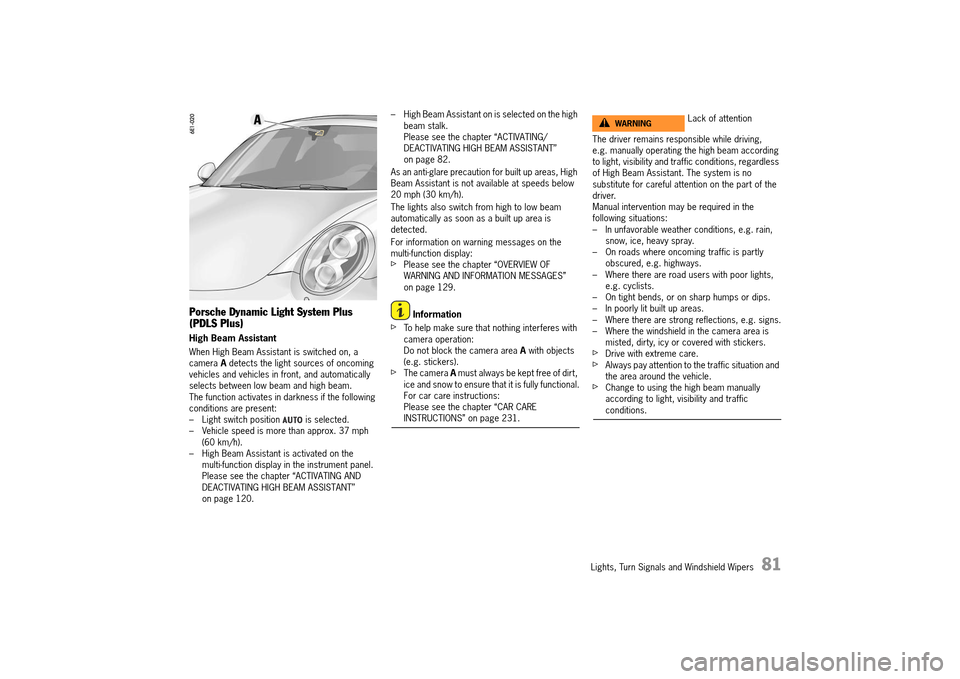
When High Beam Assistant is switched on, a camera A detects the light sources of oncoming vehicles and vehicles in front, and automatically selects between low beam and high beam.The function activates in darkness if the following conditions are present:– Light switch position is selected.– Vehicle speed is more than approx. 37 mph (60 km/h).– High Beam Assistant is activated on the multi-function display in the instrument panel.Please see the chapter “ACTIVATING AND DEACTIVATING HIGH BEAM ASSISTANT” on page 120.
– High Beam Assistant on is selected on the high beam stalk.Please see the chapter “ACTIVATING/DEACTIVATING HIGH BEAM ASSISTANT” on page 82.
As an anti-glare precaution for built up areas, High Beam Assistant is not available at speeds below 20 mph (30 km/h).
The lights also switch from high to low beam automatically as soon as a built up area is detected.
For information on warning messages on the multi-function display:fPlease see the chapter “OVERVIEW OF WARNING AND INFORMATION MESSAGES” on page 129.
Information
fTo help make sure that nothing interferes with camera operation:Do not block the camera area A with objects (e.g. stickers).fThe camera A must always be kept free of dirt, ice and snow to ensure that it is fully functional.For car care instructions: Please see the chapter “CAR CARE INSTRUCTIONS” on page 231.
The driver remains responsible while driving, e.g. manually operating the high beam according to light, visibility and traffic conditions, regardless of High Beam Assistant. The system is no substitute for careful attention on the part of the driver.Manual intervention may be required in the following situations:– In unfavorable weather conditions, e.g. rain, snow, ice, heavy spray.– On roads where oncoming traffic is partly obscured, e.g. highways.– Where there are road users with poor lights, e.g. cyclists.– On tight bends, or on sharp humps or dips.– In poorly lit built up areas.– Where there are strong reflections, e.g. signs.– Where the windshield in the camera area is misted, dirty, icy or covered with stickers.fDrive with extreme care.fAlways pay attention to the traffic situation and the area around the vehicle.fChange to using the high beam manually according to light, visibility and traffic conditions.
Lack of attentionWARNINGh
14_991_Turbo_21.book Seite 81 Mittwoch, 9. April 2014 2:19 14
Page 84 of 300

82 Lights, Turn Signals and Windshield Wipers
Instrument Lighting
The lighting is automatically adjusted to the ambient brightness via light sensors.In addition, when the vehicle lighting is switched on, the instrument and switch brightness can be adjusted manually.fTurn adjustment button A in the appropriate direction and hold until the desired brightness has been reached.
Adjusting the brightness while driving may cause you to lose control of the vehicle.fDo not reach through the steering-wheel spokes when driving.
Turn Signal/High Beam/Headlight
Flasher Stalk/Parking Light Switch
Turn signal, low beam and high beam are ready for operation when the ignition is on.1 – Turn signal light, left2 – Turn signal light, right3 – High beam, High Beam Assistant4 – Headlight flasher (also with the ignition switched off)
Stalk in center position – dipped beam
Turn signal lights
fPush the stalk once to the lower or upper pressure point 1 or 2. The turn signal lights flash three times.
High-beam headlight
Switching on and off (on vehicles WITHOUT High Beam Assistant)
fSwitching on : Push the stalk once to the front pressure point 3. The indicator light lights up on the tachometer.fSwitching off : Push the stalk once to the rear pressure point 4.
Activating/deactivating High Beam Assistant
The following conditions must be met before High Beam Assistant is activated:– Darkness– Light switch position is selected.– Vehicle speed is more than approx. 37 mph (60 km/h).– High Beam Assistant is activated on the multi-function display in the instrument panel.Please see the chapter “ACTIVATING AND DEACTIVATING HIGH BEAM ASSISTANT” on page 120.fActivating : Push the stalk once to the front pressure point 3. The indicator light in the speedometer lights up. The vehicle automatically selects between low beam and high beam.If the high beam is switched on, the indicator light on the tachometer lights up.fDeactivating : Push the stalk once to the rear pressure point 4. The High Beam Assistant can only be deactivated if the indicator light on the tachometer is lit.
Adjusting the brightness while drivingWARNINGh
14_991_Turbo_21.book Seite 82 Mittwoch, 9. April 2014 2:19 14
Page 85 of 300
Lights, Turn Signals and Windshield Wipers 83
Switching on and off (on vehicles WITH High Beam Assistant)
If the High Beam Assistant was deactivated or if the requirements are not met, high beam can be switched on and off manually.
The following conditions must be met: – Darkness– The light switch position is selected.fSwitching on : Push the stalk twice to the front pressure point 3. The indicator light on the tachometer lights up.fSwitching off : Push the stalk once to the rear pressure point 4.
Operating the headlight flasher
fPush the stalk once to the rear pressure point 4. The indicator light on the tachometer lights up briefly.
For information on High Beam Assistant: fPlease see the chapter “HIGH BEAM ASSISTANT” on page 81.
Parking light
The parking light can only be switched on when the ignition is switched off.fMove the stalk up 2 or down 1 to switch on the right or left parking light.
If the parking light is switched on, the message “ Parking light on” will appear on the multi- function display in the instrument panel after the ignition is switched off.
For information on warning messages on the multi- function display:fPlease see the chapter “OVERVIEW OF WARNING AND INFORMATION MESSAGES” on page 129.
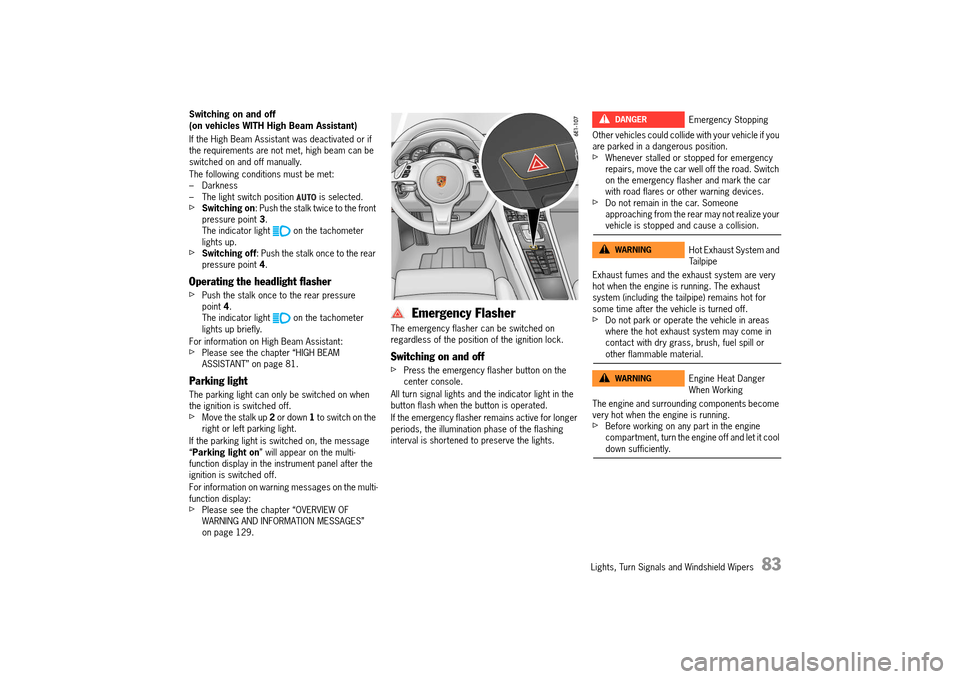
Emergency Flasher
The emergency flasher can be switched on regardless of the position of the ignition lock.
Switching on and off
fPress the emergency flasher button on the center console.
All turn signal lights and the indicator light in the button flash when the button is operated.
If the emergency flasher remains active for longer periods, the illumination phase of the flashing interval is shortened to preserve the lights.
Other vehicles could collide with your vehicle if you are parked in a dangerous position.fWhenever stalled or stopped for emergency repairs, move the car well off the road. Switch on the emergency flasher and mark the car with road flares or other warning devices.fDo not remain in the car. Someone approaching from the rear may not realize your vehicle is stopped and cause a collision.
Exhaust fumes and the exhaust system are very hot when the engine is running. The exhaust system (including the tailpipe) remains hot for some time after the vehicle is turned off.fDo not park or operate the vehicle in areas where the hot exhaust system may come in contact with dry grass, brush, fuel spill or other flammable material.
The engine and surrounding components become very hot when the engine is running.fBefore working on any part in the engine compartment, turn the engine off and let it cool down sufficiently.
Emergency Stopping
Hot Exhaust System and Tailpipe
Engine Heat Danger When Working
DANGERh
WARNINGh
WARNINGh
14_991_Turbo_21.book Seite 83 Mittwoch, 9. April 2014 2:19 14
Page 87 of 300

Lights, Turn Signals and Windshield Wipers 85
Brief Overview – Windshield wipers
This brief overview does not replace the information provided under “WINDSHIELD WIPER/WASHER STALK”.
Warnings, in particular, are not replaced by this brief overview.
Windshield wiper stalk Switch for rain sensor sensitivity ( A) and rear wiper (B)
What do I want to do?What do I have to do?
Wipe automatically at front (rain sensor operation) Press the stalk to detent position 1.
Adjusting the rain sensor operation sensitivityAdjust switch A on the right of the stalk upwards (wipe more often) or downwards (wipe less often).
Wipe at front Slow: Press the stalk to detent position 2. Fast: Press the stalk to detent position 3. Once: Briefly move stalk to position 4 (holding stalk in position 4 accelerates wiping action).
Spray and wipe at frontPull stalk towards the steering wheel at position 5 and hold.
Wipe at rear (intermittent wiping) Push switch B upwards to detent position INT.
Wipe at rear (wipe once)Push switch B all the way up or down.
14_991_Turbo_21.book Seite 85 Mittwoch, 9. April 2014 2:19 14