2014 Peugeot 508 RXH navigation system
[x] Cancel search: navigation systemPage 250 of 338

248
02
508RXH_en_Chap11c_SMegplus-i_ed01-2014
With the engine running, press to
mute the sound.
With the ignition off, press to switch
the system off.
Volume (each source is
independent, including "Traffic
announcements (t
A)" and
navigation instructions).
Selecting the audio source (depending on version):
-
"FM" radio stations.
-
"
u SB" memory stick.
-
CD player in the control panel.
-
Jukebox*, after having first copied audio files to the internal memory of the system.
-
t
elephone connected by Bluetooth* and using Bluetooth* streaming.
-
Media player connected by the auxiliary socket (jack, cable not supplie\
d).
The screen is of the "resistive" type, it is necessary to press firmly , particularly for "flick" gestures (scrolling through a list, moving the map...).
A
simple wipe will not be enough. Pressing with more than one finger is not recognised.
t
he screen can be used when wearing gloves.
t
his technology allows use at all temperatures.
FIRST STEPS
* Depending on equipment.
to clean the screen, use a soft non-abrasive cloth (spectacles cloth) w\
ithout any additional product.
Do not use pointed objects on the screen.
Do not touch the screen with wet hands. After prolonged exposure
to the sun, the volume
may be limited to protect
the system. Normal
operation is restored when
the temperature in the
passenger compartment
drops.
Short cuts: using the virtual buttons
in the upper bar of the touch
screen, it is possible to go to the list
of stations (or titles depending on
the source).
Page 274 of 338

272
05
508RXH_en_Chap11c_SMegplus-i_ed01-2014
Towards a new destination
Choosing a new destination
Select "Enter destination".
Select "Save" to save the address entered as a
contact entry.
t
he system allows up to 200 entries. Select "Confirm" or press "Show route on
map" to start navigation guidance.
Select "Address".
Select the "Country:" from the list offered then
in the same way:
the "City:" or its post code, the "Road:",
the
"N°:". Confirm each time. Select "Navigate to".
Choose the restriction criteria: "
Include
tollroads", "Include ferries", "Traffic", "Strict",
"Close". Choose the navigation criteria: " Fastest" or
"Shortest" or "Time/distance" or "Ecological ".
to delete navigation information, press on
"
Settings" then "Stop navigation".
to restore the navigation information press on
"
Settings" then "Resume navigation".
Press on Navigation to display the primary
page then go to the secondary page.
NAVIGATION - GUIDANCE
Page 275 of 338

273
05
508RXH_en_Chap11c_SMegplus-i_ed01-2014
Towards a recent destinationTowards a contact
Navigation towards a contact imported from a telephone is only
possible if the address entered is compatible with the system.
Select "Enter destination".
Select an address from the list offered. Select "Enter destination".
Select "Contacts".
Select a destination from the contacts in the list
offered.
Select "Navigate to".
Select the criteria then "Confirm" to start
guidance.
Select "Navigate to".
Select the criteria then "Confirm" or press
"Show route on map
" to start guidance.
Press on Navigation to display the primary
page then go to the secondary page.
Press on Navigation to display the primary
page then go to the secondary page.
NAVIGATION - GUIDANCE
Page 279 of 338
277
05
508RXH_en_Chap11c_SMegplus-i_ed01-2014
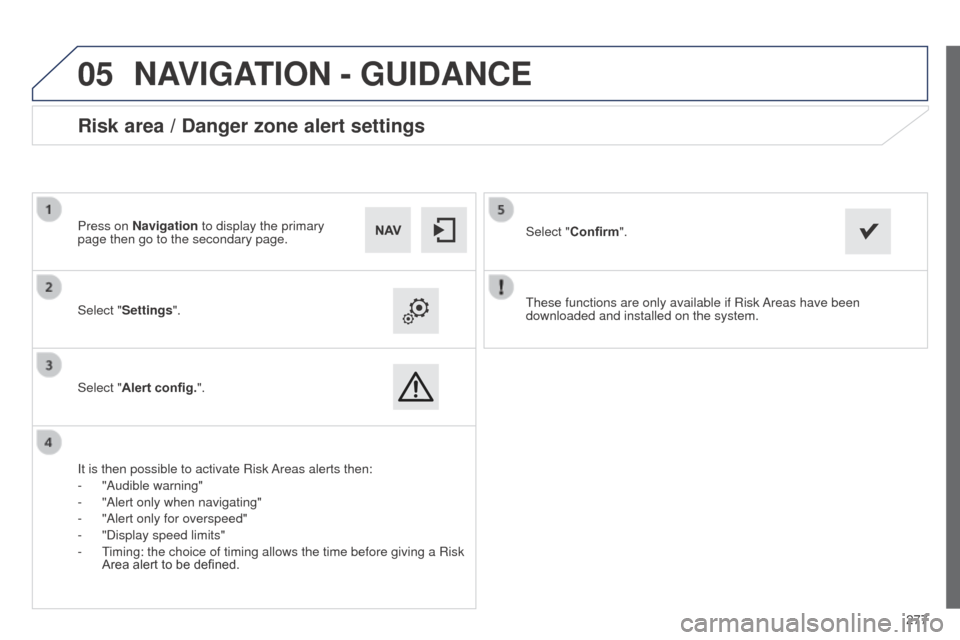
these functions are only available if Risk Areas have been
downloaded and installed on the system.
Select "
Settings".
Select "Alert config.".
Risk area / Danger zone alert settings
It is then possible to activate Risk Areas alerts then:
-
"Audible warning"
-
"Alert only when navigating"
-
"Alert only for overspeed"
-
"Display speed limits"
-
t
iming: the choice of timing allows the time before giving a Risk
Area alert to be defined. Select "
Confirm".
Press on Navigation to display the primary
page then go to the secondary page.
NAVIGATION - GUIDANCE
Page 310 of 338

308
508RXH_en_Chap11c_SMegplus-i_ed01-2014
the following table groups together the answers to the most frequently as\
ked questions concerning your audio system.
FREQUENTLY ASKED QUESTIONS
QUESTION ANSWER SOLUTION
Navigation, guidance
t
he route calculation is
not successful. The guidance criteria may conflict with the current location (exclusion of
toll roads on a toll motorway). Check the guidance criteria on the Navigation
Menu, "Guidance options"\ "Define calculation
criteria".
I am unable to enter my
post code.
t
he system only accepts post codes of up to 5 characters.
t
he POIs do not appear.
t
he POIs have not been selected. Select the POIs in the list of POIs.
t
he risk areas audible
warning does not work.
t
he audible warning is not active. Activate audible warnings in the
g uidance options
menu, "Navigation - guidance", "Set parameters
for risk areas".
t
he system does not
suggest a detour around
an incident on the route.
t
he guidance criteria do not take account of
t
MC messages.Select the "Traffic info" function in the list of
guidance criteria.
I receive a Risk area alert
which is not on my route. Other than guidance, the system announces all Risk areas positioned in a\
cone located in front of the vehicle. It may provide an alert for a Risk\
area
located on nearby or parallel roads. Zoom in on the map to view the exact position of
the Risk area. Select "On the route" to no longer
receive alerts other than guidance or to reduce the
time for the announcement.
Page 324 of 338

322
508RXH_en_Chap13_index-alpha_ed01-2014
Main beam .............................. 42, 142, 199 -201
Maintenance ................................................... 30
Map reading lamps
....................................... 15 6
Markings, identification
.................................240
Massage function
........................................... 90
Mat
.................................................................. 97
Menu
................... 244, 250, 252, 254, 266, 268,
270, 286, 298, 300
Mirror, rear view
.............................................. 95
Mirrors, door ...................................... 93, 94, 131
Motorised tailgate
..................................... 80, 81
Mountings for ISOFIX seats
.........................166
Navigation
..................................................... 266
Number plate lamps
...................................... 20
4
M
N
Oil change ..................................................... 230
Oil consumption ............................................ 230
Oil filter
...............
........................................... 233
Oil level ................................................... 56, 230
Opening the boot
..............................
........68, 79
Opening the doors
...............................
...........65
Opening the panoramic sunroof blind
............83
Operation indicator lamps
.........................41- 51Radio
.............................................................
256
RDS
...............................................................
259
Ready
...............
...............................................
19
Ready lamp
...............................................
19, 8 4
Rear foglamp ......................................... 14 4, 202
Rear screen (demisting) ..........................
9 3 , 114
Recharging the battery ................................. 2 11
Reduction of electrical load ..........................216
Regeneration of the particle filter
.................23
4
Reinitialising the remote control
............... 7
2, 73
Remote control
..................................... 6
5 -7 0 , 74
Removable screen (snow shield)......... 220, 223
Removing a wheel
........................................19 4
Removing the battery .................................... 212
Paint colour code
..........................................
240
Panoramic glass sunroof
................................
83
Parking brake, electric
....................
48, 117, 235
Parking lamps
...............................................
146
Parking sensors, front
...................................
140
Parking sensors, rear .................................... 13 9
Particle emission filter
.........................
232, 234
Passenger compartment filter
......................
233
P
e
uge
Ot C
ONN
eCt A
PPS
.......................
2
97
Peuge
O
t
Connect Assistance
...........
173 , 242
Peuge
O
t Connect SOS
.....................
17
3 , 242
Port, u
S
B
........................................................
98
Po
wer
..............................................................
22
Priming the fuel system ................................
228
Programmable heating (Webasto) ................115
Protecting children
.................
15 8 -171, 182, 18 4
Puncture
........................................................
187
O
R
P
Keeping children safe ............1 5 8 -171, 182, 18 4
Key ........................................... 18, 65 -70, 72-74
Keyless
e
n
try and Starting .................66, 70, 74
Key not recognised
......................................... 18
Key with remote control
..................................17
Labels, identification
..................................... 24
0
Lamps, warning and indicator
...................41- 51
L
e
D
daytime running lamps
.........................145
L
eD
s - light-emitting diodes
.................19 9, 202
Level, brake fluid
........................................... 2
31
Level, headlamp wash
..........................153, 232
Level, power steering fluid
............................2
31
Levels and checks
................................ 229-232
Light-emitting diodes - L
eD
s
................19 9, 202
Lighting bulbs (replacement)
................ 19
9 -20 4
Lighting control stalk
.............................142, 146
Lighting, guide-me home
......................146, 147
Lighting, interior
.................................... 15 6, 157
Lighting on reminder
..................................... 14 4
Loading
.................................................. 30, 222
Load reduction mode
.................................... 216
Load space cover
...............................
...........101
Locating your vehicle
...................................... 71
L
ong objects, transporting
.............................. 98
L
ow fuel level .................................................. 84
K
L
Alphabetical index