Page 266 of 338
04
264
508RXH_en_Chap11c_SMegplus-i_ed01-2014
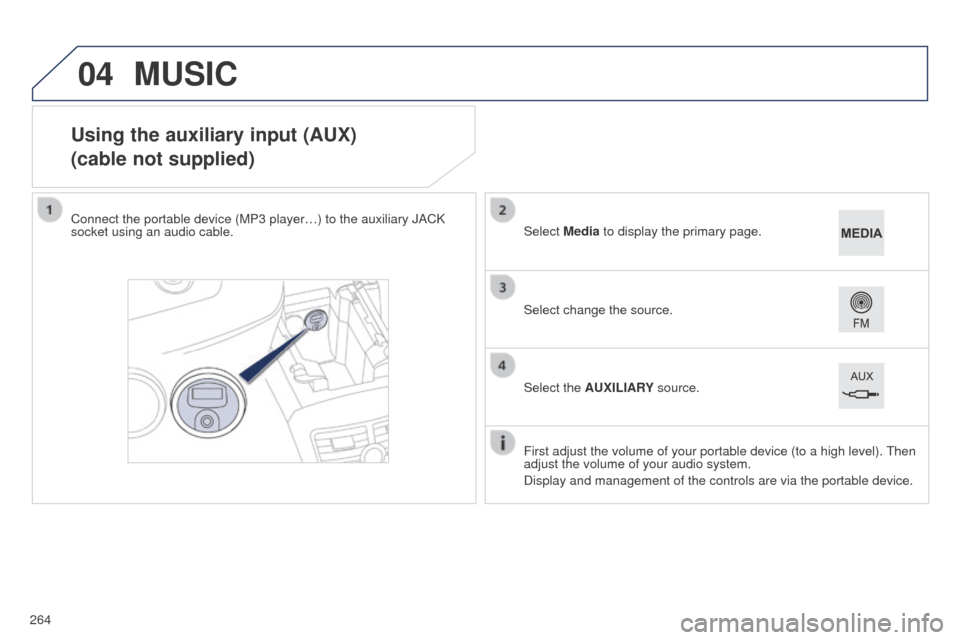
Using the auxiliary input (AUX)
(cable not supplied)
Connect the portable device (MP3 player…) to the auxiliary JACK
socket using an audio cable.First adjust the volume of your portable device (to a high level).
t
hen
adjust the volume of your audio system.
Display and management of the controls are via the portable device. Select change the source. Select Media to display the primary page.
Select the AUXILIARY source.
MUSIC
Page 267 of 338
265
04
508RXH_en_Chap11c_SMegplus-i_ed01-2014
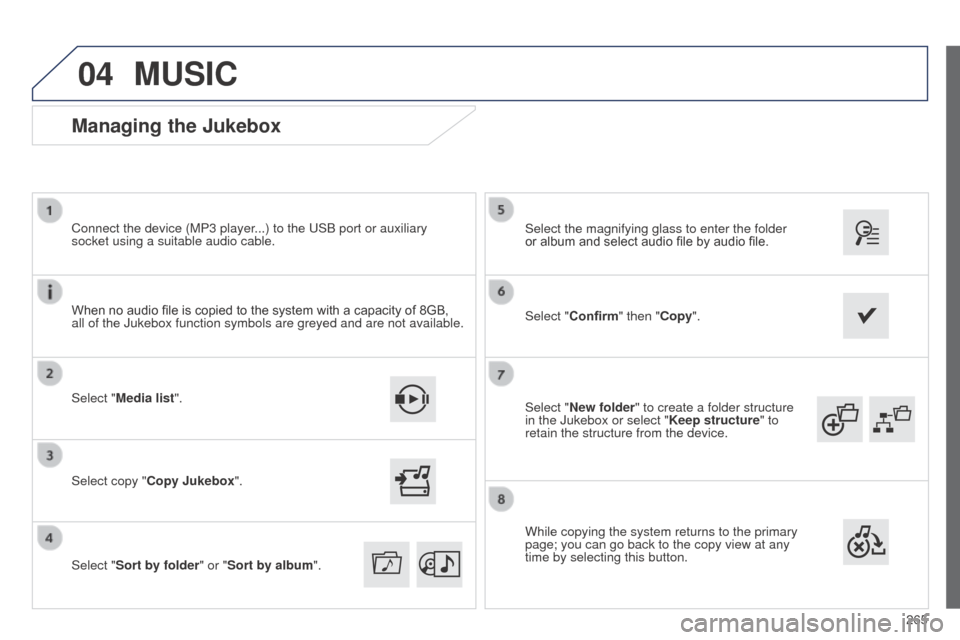
Select "New folder" to create a folder structure
in the Jukebox or select "Keep structure" to
retain the structure from the device. Select the magnifying glass to enter the folder
or album and select audio file by audio file.
Managing the Jukebox
Select "Media list". Connect the device (MP3 player...) to the u SB port or auxiliary
socket using a suitable audio cable.
Select copy "Copy Jukebox".
MUSIC
When no audio file is copied to the system with a capacity of 8GB,
all of the Jukebox function symbols are greyed and are not available.
Select "Sort by folder" or "Sort by album ".Select "Confirm" then "Copy".
While copying the system returns to the primary
page; you can go back to the copy view at any
time by selecting this button.
Page 294 of 338

06
292
508RXH_en_Chap11c_SMegplus-i_ed01-2014
CONFIGURATION
- "Ambience" (choice of 6 musical ambiences)
- "Bass "
-
"Treble"
-
"Loudness" (Activate/Deactivate)
-
"Balance", "Driver ", "All passengers", "Front only "
-
"Audio setting on touch screen "
-
"Volume linked to vehicle speed: " (Activate/Deactivate)
t
he audio settings ( Ambience, Bass, Treble and Loudness) are
different and independent for each sound source.
t
he settings for distribution and balance are common to all
sources.
t
he distribution (or spatialisation using the Arkamys
© system)
of sound is an audio process that allows the audio quality to be
adapted to the number of listeners in the vehicle.
Available only with the 6-speaker configuration. On-board audio: Arkamys
© Sound Staging.
With Sound Staging, the driver and passengers are immersed in an
"audio scene" recreating the natural atmosphere of an auditorium:
truly a part of the scene and its surroundings.
t
his new sensation is made possible by software in the audio
system which processes the digital signals from the media players
(radio, CD, MP3…) without changing the audio settings.
t
his
processing takes account of the characteristics of the passenger
compartment to produce optimum results.
t
he Arkamys
© software installed in your audio system processes
the digital signal from the media players (radio, CD, MP3, ...) and
recreates a natural musical scene, with harmonious placement of
instruments and voices in the space in front of passengers, level with
the windscreen.
Audio settings
Select "Audio settings ".
Press on Configuration
to display the primary
page.
Select "Ambience" or "Balance" or "Sound
effects " or "Ringtones" or "Voice".
Page 312 of 338

310
508RXH_en_Chap11c_SMegplus-i_ed01-2014
FREQUENTLY ASKED QUESTIONS
QUESTION ANSWER SOLUTION
Some contacts are
duplicated in the list.
t
he options for synchronizing contacts are synchronizing the contacts
on the SIM card, the contacts on the telephone, or both . When both
synchronizations are selected, some contacts may be duplicated. Select "Display SIM card contacts" or "Display
telephone contacts".
Contacts are not shown
in alphabetical order. Some telephones offer display options. Depending on the settings
chosen, contacts can be transferred in a specific order. Modify the display setting in the telephone
directory.
the system does not
receive SMS text messages.the Bluetooth mode does not permit sending SMS text messages to the
system.
CD, MP3
t
he CD is ejected
automatically or is not
played by the player.
t
he CD is inserted upside down, is unplayable, does not contain any
audio data or contains an audio format which the player cannot play. -
Check that the CD is inserted in the player the
right way up.
-
Check the condition of the CD: the CD cannot
be played if it is too damaged.
-
Check the content in the case of a recorded
CD: refer to the advice in the "A
u DIO" section.
-
the audio system's CD player does not play DVDs.
- Some recorded CDs will not be played by the audio
system because they are not of the correct quality.
the CD has been recorded in a format that is not compatible with the
player (udf, ...).
t
he CD is protected by an anti-pirating protection system which is not
recognised by the audio system.
there is a long waiting
period following the insertion
of a CD or connection of a
u
SB memory stick.When a new medium is inserted, the system reads a certain amount of
data (directory, title, artist, etc.). t his may take from a few seconds to a
few minutes.t his phenomenon is normal.
t
he CD player sound is
poor.
t
he CD used is scratched or of poor quality. Insert good quality CDs and store them in suitable
conditions.
t
he audio equipment settings (bass, treble, ambiences) are unsuitable. Set the treble or bass level to 0, without selecting an ambience.
Page 315 of 338
313
508RXH_en_Chap11c_SMegplus-i_ed01-2014
FREQUENTLY ASKED QUESTIONS
QUESTION ANSWER SOLUTION
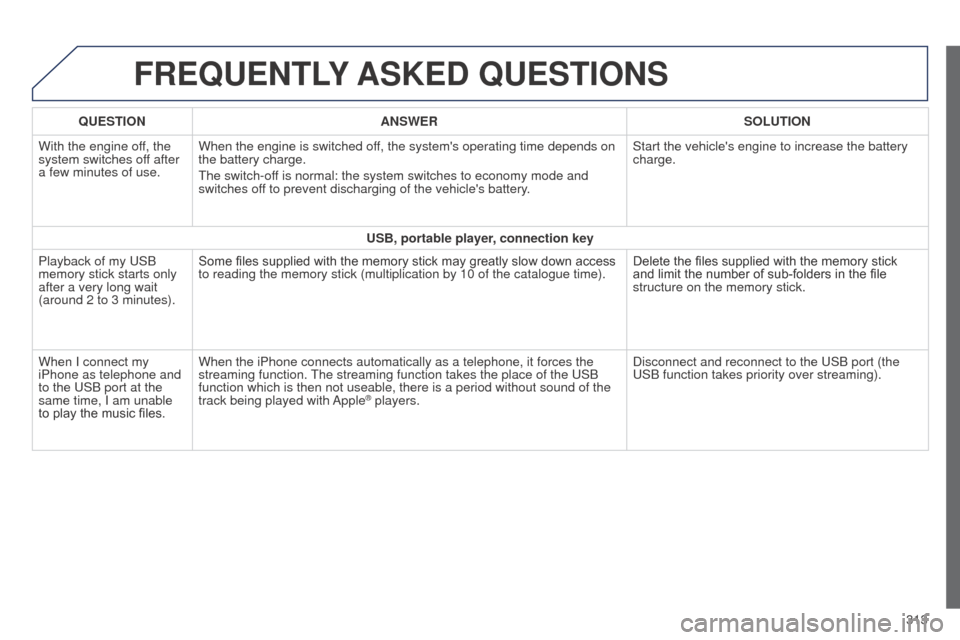
With the engine off, the
system switches off after
a few minutes of use. When the engine is switched off, the system's operating time depends on
the battery charge.
t
he switch-off is normal: the system switches to economy mode and
switches off to prevent discharging of the vehicle's battery. Start the vehicle's engine to increase the battery
charge.
USB, portable player, connection key
Playback of my
u SB
memory stick starts only
after a very long wait
(around 2 to 3 minutes). Some files supplied with the memory stick may greatly slow down access
to reading the memory stick (multiplication by 10 of the catalogue time\
).
Delete the files supplied with the memory stick
and limit the number of sub-folders in the file
structure on the memory stick.
When I connect my
iPhone as telephone and
to the
u SB port at the
same time, I am unable
to play the music files. When the iPhone connects automatically as a telephone, it forces the
streaming function.
t
he streaming function takes the place of the u SB
function which is then not useable, there is a period without sound of t\
he
track being played with Apple
® players. Disconnect and reconnect to the u SB port (the
u
SB function takes priority over streaming).