Page 139 of 400
137
4
Driving
308_EN_CHAP04_CONDUITE_ED02-2013
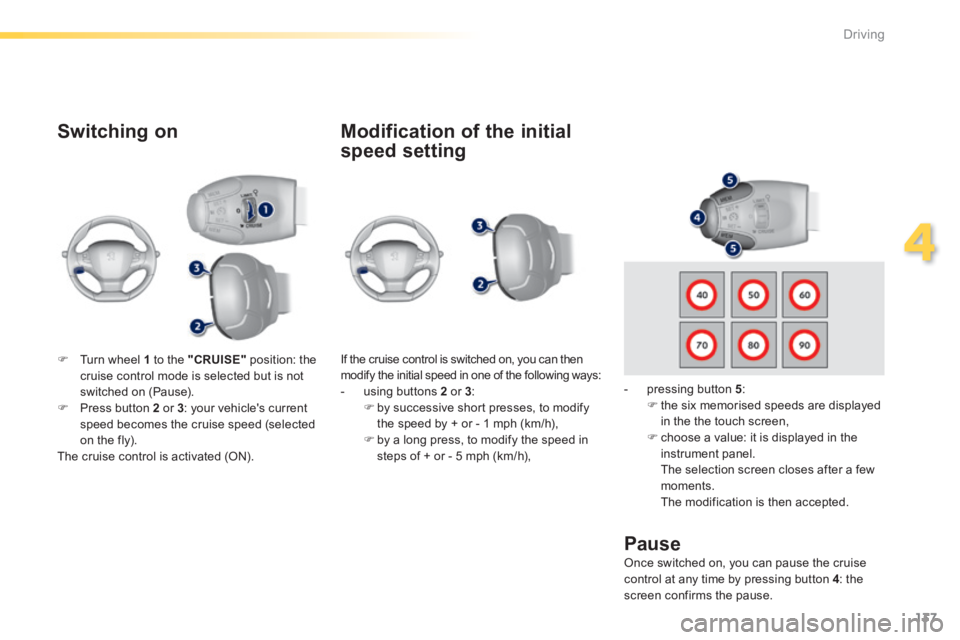
Switching on
If the cruise control is switched on, you can then modify the initial speed in one of the following ways: - using buttons 2 or 3 : by successive short presses, to modify the speed by + or - 1 mph (km/h), by a long press, to modify the speed in steps of + or - 5 mph (km/h),
Pause
Turn wheel 1 to the "CRUISE" position: the cruise control mode is selected but is not switched on (Pause). Press button 2 or 3 : your vehicle's current speed becomes the cruise speed (selected on the fly). The cruise control is activated (ON).
Modification of the initial
speed setting
- pressing button 5 : the six memorised speeds are displayed in the the touch screen,
choose a value: it is displayed in the instrument panel. The selection screen closes after a few moments. The modification is then accepted.
Once switched on, you can pause the cruise control at any time by pressing button 4 : the screen confirms the pause.
Page 140 of 400
138
Driving
308_EN_CHAP04_CONDUITE_ED02-2013
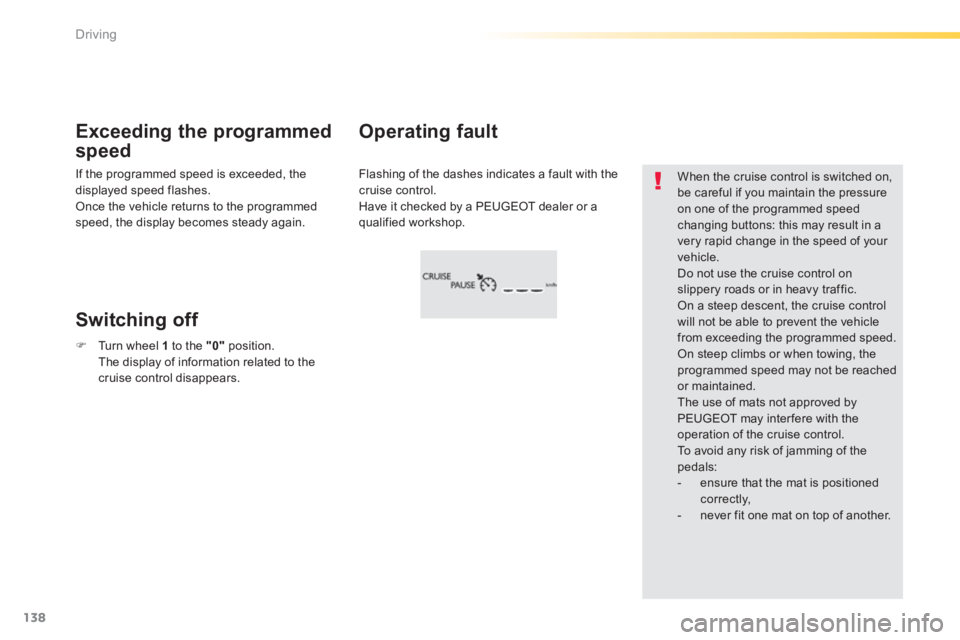
Flashing of the dashes indicates a fault with the cruise control. Have it checked by a PEUGEOT dealer or a qualified workshop.
Operating fault Exceeding the programmed
speed
Switching off
When the cruise control is switched on, be careful if you maintain the pressure on one of the programmed speed
changing buttons: this may result in a very rapid change in the speed of your vehicle. Do not use the cruise control on slippery roads or in heavy traffic. On a steep descent, the cruise control will not be able to prevent the vehicle from exceeding the programmed speed. On steep climbs or when towing, the programmed speed may not be reached or maintained. The use of mats not approved by PEUGEOT may inter fere with the operation of the cruise control. To avoid any risk of jamming of the pedals: - ensure that the mat is positioned c o r r e c t l y, - never fit one mat on top of another.
If the programmed speed is exceeded, the displayed speed flashes. Once the vehicle returns to the programmed speed, the display becomes steady again.
Turn wheel 1 to the "0" position. The display of information related to the cruise control disappears.
Page 141 of 400
139
4
Driving
308_EN_CHAP04_CONDUITE_ED02-2013
Active cruise control
This systems allows the vehicle's speed to be maintained at a value set by the driver. In addition it allows (when circumstances permit) an inter-vehicle time that you have selected (around 2 seconds by default and at each activation of the system) to be maintained.
Principles of operation
Using a radar with a range of about 100 metres, located at the front of the vehicle, this system detects a vehicle running in front of your vehicle. It automatically adapts the speed of your
vehicle to that of the vehicle in front. If the vehicle in front is running more slowly, the system progressively reduces the speed of your vehicle using just engine braking (as if the driver had pressed the " - " button). If your vehicle is too close to, or approaching too quickly the vehicle in front, the cruise control is automatically deactivated. The driver is then alerted by an audible signal, accompanied by a message. If the vehicle in front accelerates or changes lane, the active cruise control progressively accelerates your vehicle to return to the programmed speed. If the driver operates a direction indicator to overtake a slower vehicle, the active cruise control allows your vehicle to temporarily approach the vehicle in front to assist the overtaking manoeuvre, though never exceeding
the programmed speed.
The active cruise control operates by day and at night, in fog or moderate rainfall.
The system does not act on the braking system, but works only with engine braking. The regulation range is limited: there will no longer be any adjustment of speed if the difference between the programmed speed setting and the speed of the vehicle in front becomes too high.
The activation of this system deactivates the display of inter-vehicle time.
If the difference between the programmed speed setting and the speed of the vehicle in front is too great, the speed cannot be adjusted:
the cruise control is automatically deactivated.
Page 143 of 400
141
4
Driving
308_EN_CHAP04_CONDUITE_ED02-2013
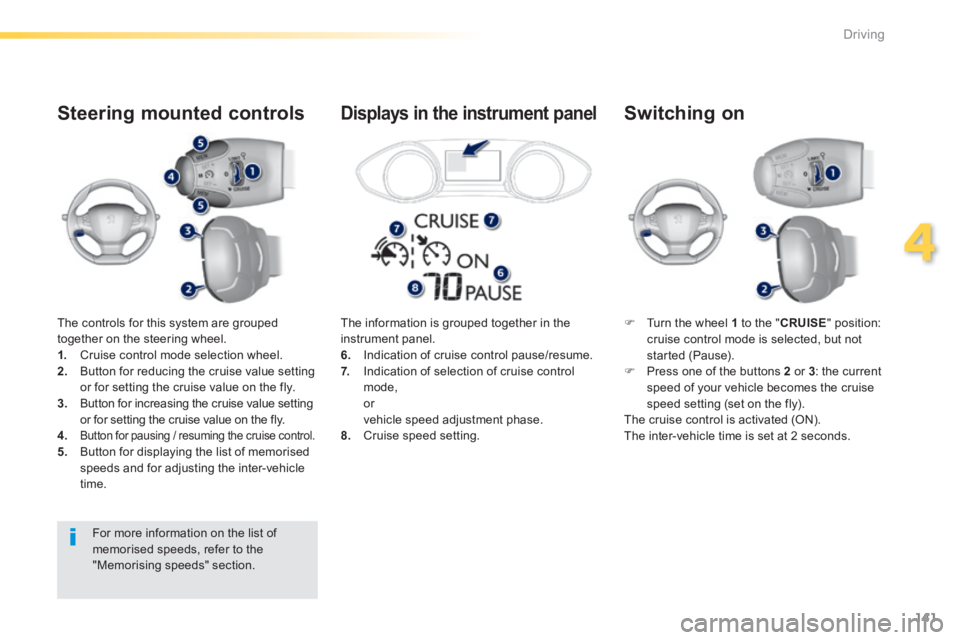
The controls for this system are grouped together on the steering wheel. 1. Cruise control mode selection wheel. 2. Button for reducing the cruise value setting or for setting the cruise value on the fly. 3. Button for increasing the cruise value setting or for setting the cruise value on the fly.
4.Button for pausing / resuming the cruise control. 5. Button for displaying the list of memorised speeds and for adjusting the inter-vehicle time.
Steering mounted controls
Turn the wheel 1 to the " CRUISE " position: cruise control mode is selected, but not started (Pause). Press one of the buttons 2 or 3 : the current speed of your vehicle becomes the cruise speed setting (set on the fly). The cruise control is activated (ON). The inter-vehicle time is set at 2 seconds.
Switching on
The information is grouped together in the instrument panel. 6. Indication of cruise control pause/resume. 7. Indication of selection of cruise control mode, or vehicle speed adjustment phase. 8. Cruise speed setting.
Displays in the instrument panel
For more information on the list of memorised speeds, refer to the "Memorising speeds" section.
Page 144 of 400
142
Driving
308_EN_CHAP04_CONDUITE_ED02-2013
Modification of the cruise
control speed and/or the
inter-vehicle time
Modification of the cruise
control speed only
Buttons 2 (SET+) and 3 (SET-)
If the cruise control is on, you can modify the speed: by successive short presses, to modify by steps of + or - 1 mph (km/h), by a maintained press, to modify in steps of + or - 5 mph (km/h).
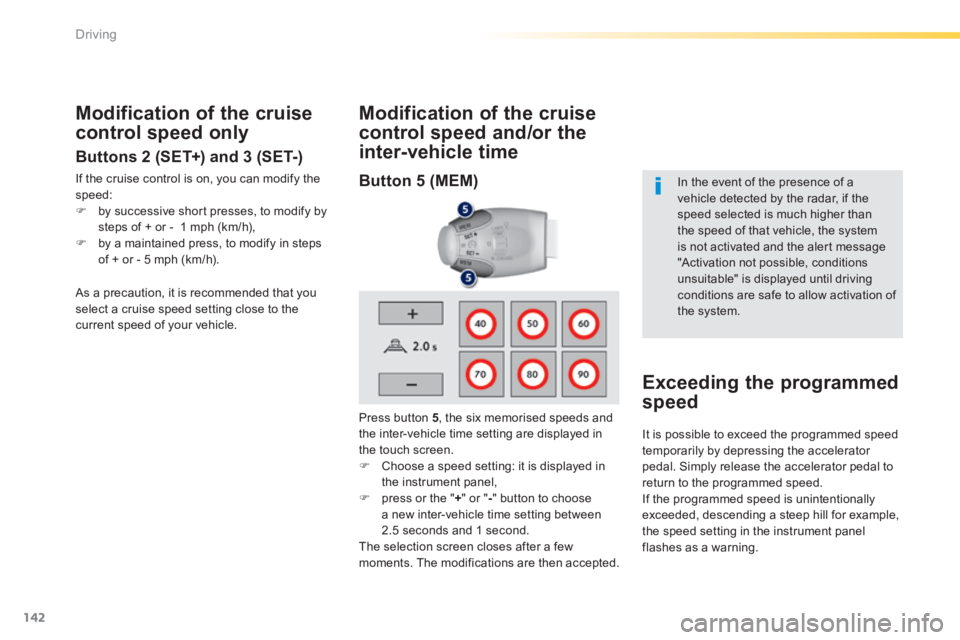
Press button 5 , the six memorised speeds and the inter-vehicle time setting are displayed in the touch screen. Choose a speed setting: it is displayed in the instrument panel, press or the " + " or " - " button to choose a new inter-vehicle time setting between 2.5 seconds and 1 second. The selection screen closes after a few moments. The modifications are then accepted.
In the event of the presence of a vehicle detected by the radar, if the speed selected is much higher than
the speed of that vehicle, the system is not activated and the alert message "Activation not possible, conditions unsuitable" is displayed until driving conditions are safe to allow activation of the system.
Exceeding the programmed
speed
As a precaution, it is recommended that you select a cruise speed setting close to the current speed of your vehicle.
It is possible to exceed the programmed speed temporarily by depressing the accelerator pedal. Simply release the accelerator pedal to return to the programmed speed. If the programmed speed is unintentionally exceeded, descending a steep hill for example, the speed setting in the instrument panel flashes as a warning.
Button 5 (MEM)
Page 145 of 400
143
4
Driving
308_EN_CHAP04_CONDUITE_ED02-2013
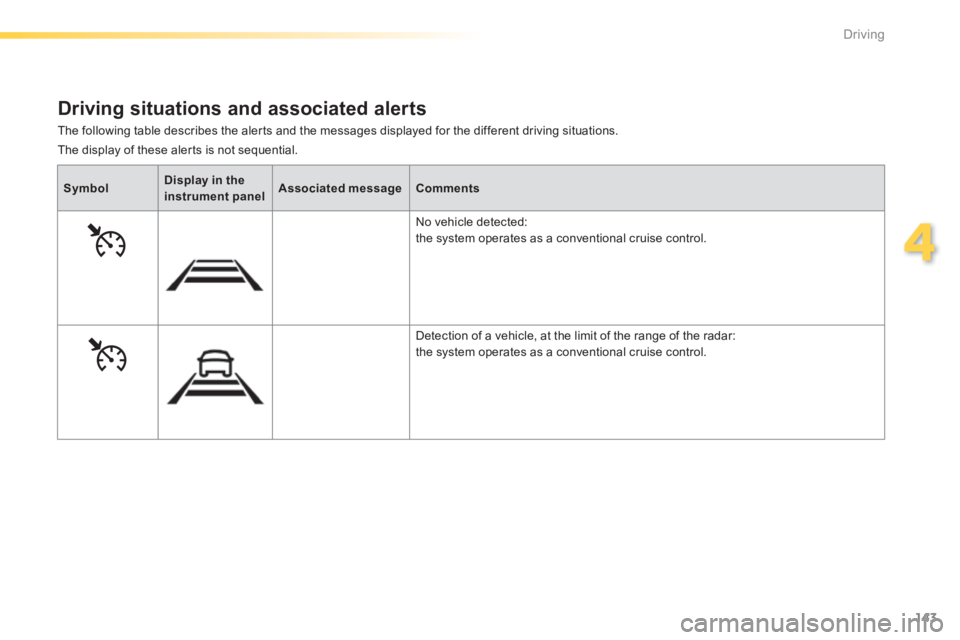
The following table describes the alerts and the messages displayed for the different driving situations.
Driving situations and associated alerts
SymbolDisplay in the instrument panelAssociated messageComments
No vehicle detected:
the system operates as a conventional cruise control.
Detection of a vehicle, at the limit of the range of the radar: the system operates as a conventional cruise control.
The display of these alerts is not sequential.
Page 146 of 400
144
Driving
308_EN_CHAP04_CONDUITE_ED02-2013
When the active cruise control is automatically paused, it can only be reactivated when safe conditions are restored. The message "Activation not possible, conditions unsuitable" is displayed while reactivation is not possible. When the conditions allow, it is recommended that the function be reactivated by pressing button 2 (SET+) or 3 (SET-), which will make the current speed of your vehicle the new cruise speed setting, rather than by pressing button 4 (on/pause) which reactivates the cruise control using the old cruise speed setting, which may be very different from the current speed of your vehicle.
SymbolDisplay in the instrument panelAssociated messageComments
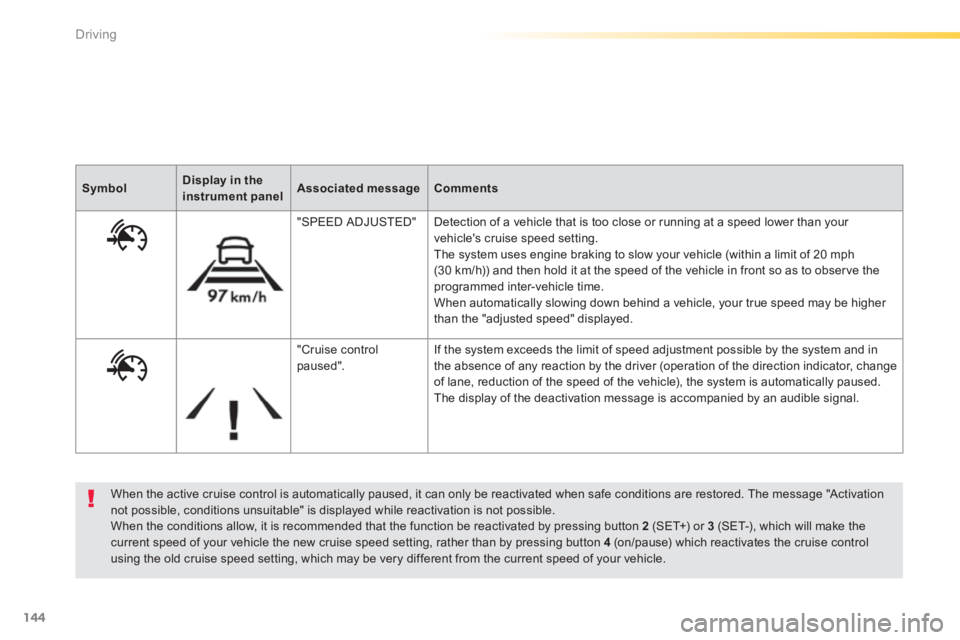
"SPEED ADJUSTED" Detection of a vehicle that is too close or running at a speed lower than your vehicle's cruise speed setting. The system uses engine braking to slow your vehicle (within a limit of 20 mph (30 km/h)) and then hold it at the speed of the vehicle in front so as to observe the programmed inter-vehicle time. When automatically slowing down behind a vehicle, your true speed may be higher than the "adjusted speed" displayed.
"Cruise control paused". If the system exceeds the limit of speed adjustment possible by the system and in the absence of any reaction by the driver (operation of the direction indicator, change of lane, reduction of the speed of the vehicle), the system is automatically paused. The display of the deactivation message is accompanied by an audible signal.
Page 148 of 400
146
Driving
308_EN_CHAP04_CONDUITE_ED02-2013
In the event of a fault with the active cruise control, you are alerted by an audible signal and display of the message message "Driving aid functions fault". Have the system checked by a PEUGEOT dealer or a qualified workshop.
When the cruise control is working, take care if making a maintained press on one of the cruise control programmed speed modification buttons: this can lead to a very quick change in the speed of your vehicle. Do not use the active cruise control on slippery sur faces or in heavy traffic. When descending a steep hill, the cruise control may not be able to prevent the vehicle from exceeding the programmed speed. When ascending a steep hill or when towing, it might not be possible to attain or maintain the programmed speed.
Operating fault
The operation of the radar, located in the front bumper, may be disturbed in certain weather conditions, for example: with accumulations of snow, ice, mud, ... Clean the front bumper, removing the snow, mud, ...
The use of mats not approved by PEUGEOT may inter fere with the operation of the active cruise control. To avoid any risk of jamming the pedals: - ensure that mats are positioned correctly, - never fit one mat on top of another.