2014 Peugeot 308 ESP
[x] Cancel search: ESPPage 135 of 400
133
4
Driving
308_EN_CHAP04_CONDUITE_ED02-2013
Steering mounted controls
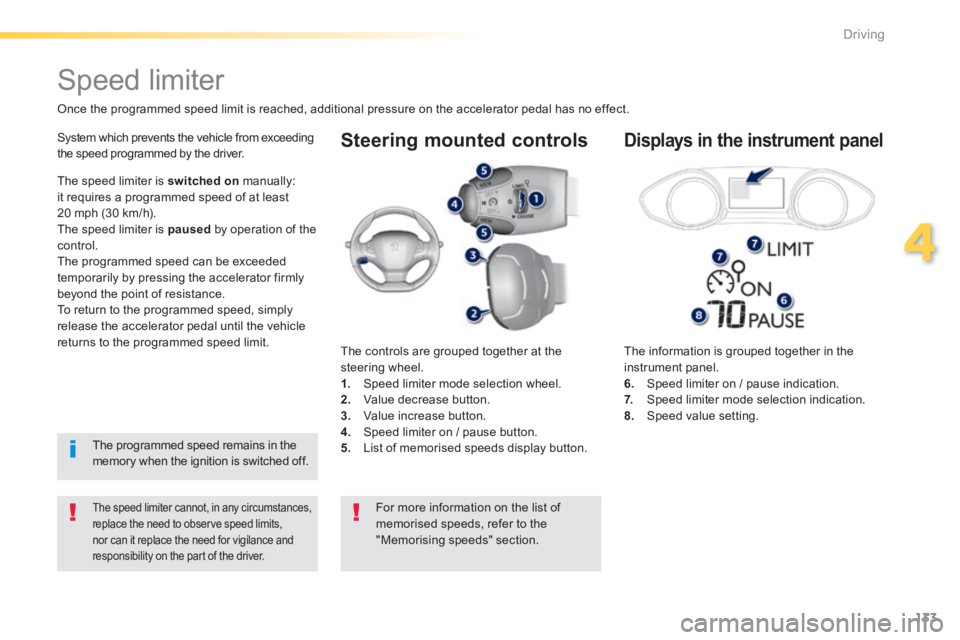
The information is grouped together in the instrument panel. 6. Speed limiter on / pause indication. 7. Speed limiter mode selection indication. 8. Speed value setting.
Speed limiter
Once the programmed speed limit is reached, additional pressure on the accelerator pedal has no effect.
The speed limiter cannot, in any circumstances, replace the need to observe speed limits, nor can it replace the need for vigilance and responsibility on the part of the driver.
System which prevents the vehicle from exceeding the speed programmed by the driver.
The controls are grouped together at the steering wheel. 1. Speed limiter mode selection wheel. 2. Value decrease button. 3. Value increase button. 4. Speed limiter on / pause button. 5. List of memorised speeds display button.
Displays in the instrument panel
The speed limiter is switched on manually: it requires a programmed speed of at least 20 mph (30 km/h). The speed limiter is paused by operation of the control. The programmed speed can be exceeded temporarily by pressing the accelerator firmly beyond the point of resistance. To return to the programmed speed, simply release the accelerator pedal until the vehicle returns to the programmed speed limit.
The programmed speed remains in the memory when the ignition is switched off.
For more information on the list of memorised speeds, refer to the "Memorising speeds" section.
Page 138 of 400
136
Driving
308_EN_CHAP04_CONDUITE_ED02-2013
Steering mounted controls
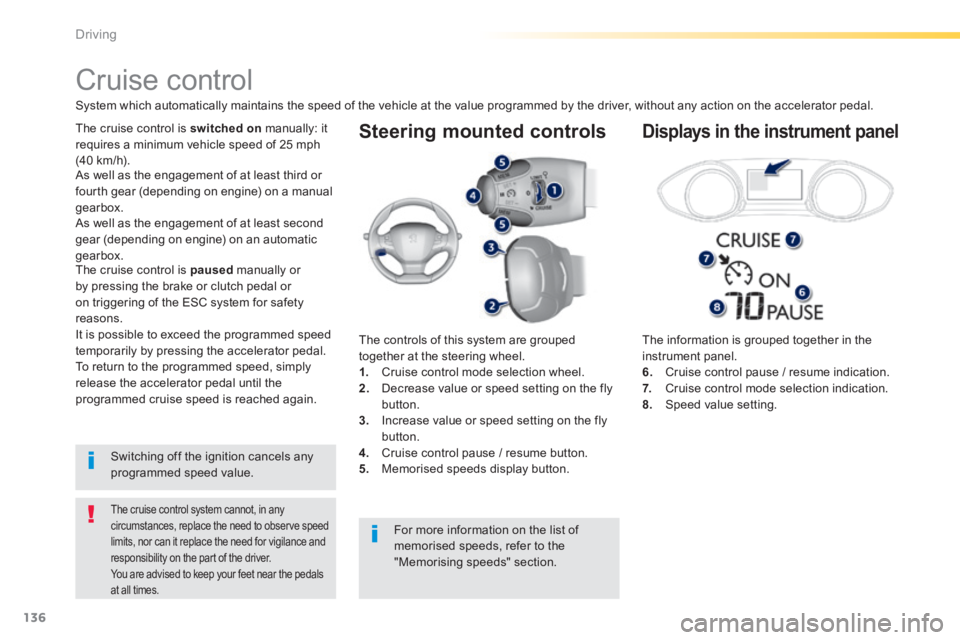
The information is grouped together in the instrument panel. 6. Cruise control pause / resume indication. 7. Cruise control mode selection indication. 8. Speed value setting.
Cruise control
System which automatically maintains the speed of the vehicle at the value programmed by the driver, without any action on the accelerator pedal.
The cruise control system cannot, in any circumstances, replace the need to observe speed limits, nor can it replace the need for vigilance and responsibility on the part of the driver. You are advised to keep your feet near the pedals
at all times.
The cruise control is switched on manually: it requires a minimum vehicle speed of 25 mph (40 km/h).
The controls of this system are grouped together at the steering wheel. 1. Cruise control mode selection wheel. 2. Decrease value or speed setting on the fly button. 3. Increase value or speed setting on the fly
button. 4. Cruise control pause / resume button. 5. Memorised speeds display button.
Displays in the instrument panel
Switching off the ignition cancels any programmed speed value.
The cruise control is paused manually or by pressing the brake or clutch pedal or on triggering of the ESC system for safety reasons. It is possible to exceed the programmed speed temporarily by pressing the accelerator pedal. To return to the programmed speed, simply release the accelerator pedal until the programmed cruise speed is reached again.
As well as the engagement of at least third or fourth gear (depending on engine) on a manual gearbox.
For more information on the list of
memorised speeds, refer to the "Memorising speeds" section.
As well as the engagement of at least second
gear (depending on engine) on an automatic gearbox.
Page 142 of 400
140
Driving
308_EN_CHAP04_CONDUITE_ED02-2013
The active cruise control is switched on manually, it requires that the speed of the vehicle be between 25 mph (40 km/h) and 90 mph (150 km/h).
General points
The active cruise control can be pausedmanually with the control, or automatically: - by pressing the brake or clutch pedal, - in the event of operation of the ESP, for safety reasons, - in the event of an action of the electric parking brake control, - when an inter-vehicle time threshold is reached (calculated according to the relative speeds of your vehicle and the vehicle in front and the inter-vehicle time setting chosen), - when the distance between your vehicle and the one in front becomes to small, - when the speed of the vehicle in front is to low, - when the speed of your vehicle becomes too low.
The active cruise control cannot in any circumstances replace the observation of speed limits, nor the the vigilance and responsibility of the driver. It is recommended that you always keep your feet close to the pedals.
Switching off the ignition cancels any programmed value, and the inter-vehicle time is reset to 2 seconds.
As well as the engagement of at least third or fourth gear (depending on engine) on a manual gearbox.
As well as the engagement of at least second gear (depending on engine) on an automatic gearbox.
If the cruise speed setting is above 90 mph (150 km/h), the active cruise control switches to normal cruise control mode (without automatic adjustment of the safety inter-vehicle distance).
Page 149 of 400
147
4
Driving
308_EN_CHAP04_CONDUITE_ED02-2013
Display of inter-vehicle time
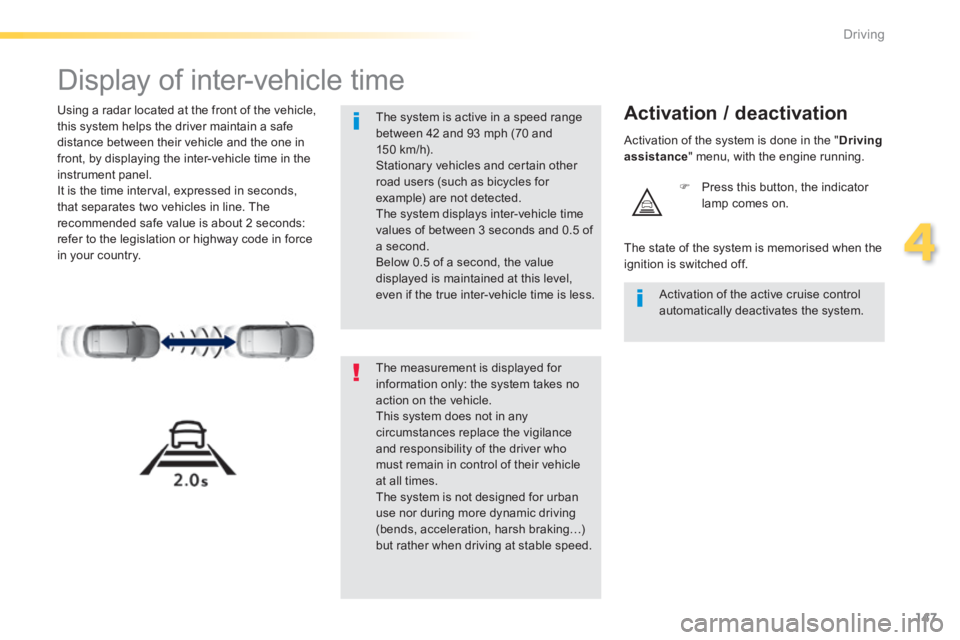
Using a radar located at the front of the vehicle, this system helps the driver maintain a safe distance between their vehicle and the one in front, by displaying the inter-vehicle time in the instrument panel. It is the time interval, expressed in seconds, that separates two vehicles in line. The recommended safe value is about 2 seconds: refer to the legislation or highway code in force in your country.
Activation / deactivation
Press this button, the indicator lamp comes on.
The measurement is displayed for information only: the system takes no action on the vehicle. This system does not in any circumstances replace the vigilance and responsibility of the driver who must remain in control of their vehicle at all times. The system is not designed for urban use nor during more dynamic driving (bends, acceleration, harsh braking…)
but rather when driving at stable speed.
The system is active in a speed range between 42 and 93 mph (70 and 150 km/h). Stationary vehicles and certain other road users (such as bicycles for example) are not detected. The system displays inter-vehicle time values of between 3 seconds and 0.5 of a second. Below 0.5 of a second, the value displayed is maintained at this level, even if the true inter-vehicle time is less. Activation of the active cruise control automatically deactivates the system.
The state of the system is memorised when the ignition is switched off.
Activation of the system is done in the " Driving assistance " menu, with the engine running.
Page 153 of 400
151
4
Driving
308_EN_CHAP04_CONDUITE_ED02-2013
Emergency collision alert system and emergency collision braking system
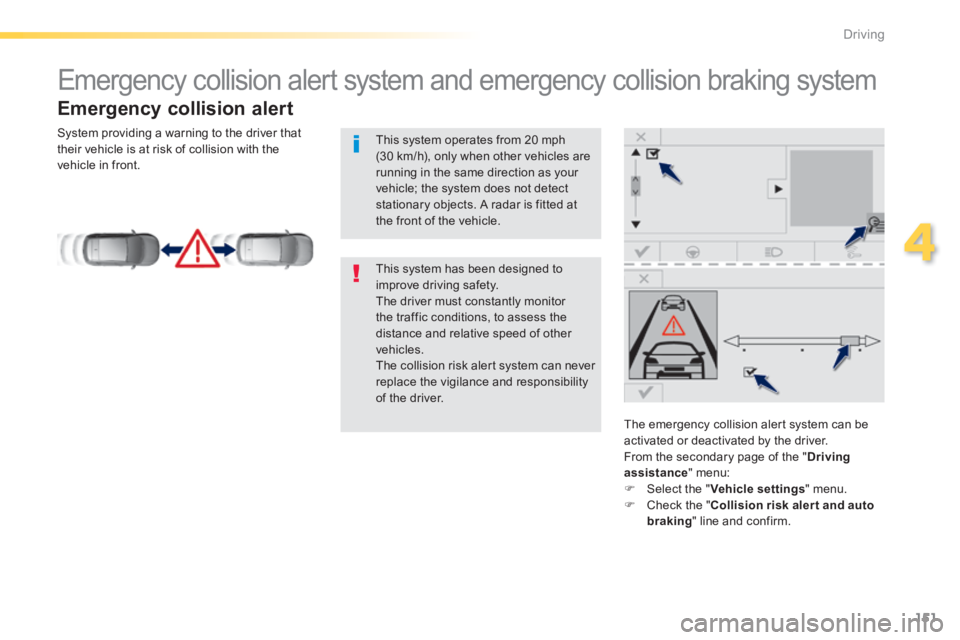
Emergency collision alert
The emergency collision alert system can be
activated or deactivated by the driver. From the secondary page of the " Driving assistance " menu: Select the " Vehicle settings " menu. Check the " Collision risk alert and auto braking " line and confirm.
This system has been designed to improve driving safety. The driver must constantly monitor the traffic conditions, to assess the distance and relative speed of other vehicles. The collision risk alert system can never replace the vigilance and responsibility of the driver.
This system operates from 20 mph (30 km/h), only when other vehicles are running in the same direction as your vehicle; the system does not detect stationary objects. A radar is fitted at the front of the vehicle.
System providing a warning to the driver that their vehicle is at risk of collision with the vehicle in front.
Page 155 of 400
153
4
Driving
308_EN_CHAP04_CONDUITE_ED02-2013
The change from one level of alert to the next takes place if the driving conditions do not change (speed unchanged, no change of lane...)
If the speed of your vehicle is too high when approaching another vehicle, the first level of alert may not be displayed: the level 2 alert may be displayed di r e c t l y. On the other hand, the level 1 alert is never displayed with the "close" triggering threshold 3. Severe weather conditions (very heavy rain, accumulations of snow in front of the radar) may inter fere with the operation of the system, resulting in the display of this message " SYSTEM INACTIVE: Reduced visibility ". The system will remain unavailable until the message disappears.
The emergency collision alert system does not replace the vigilance and responsibility of the driver.
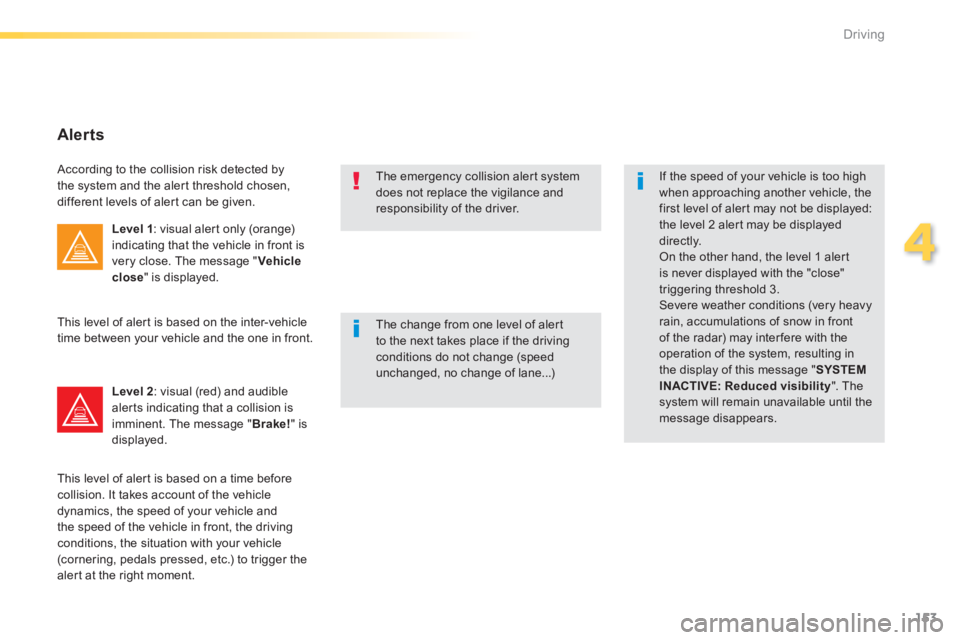
Alerts
According to the collision risk detected by the system and the alert threshold chosen, different levels of alert can be given.
Level 1 : visual alert only (orange) indicating that the vehicle in front is very close. The message " Vehicle close " is displayed.
Level 2 : visual (red) and audible alerts indicating that a collision is imminent. The message " Brake! " is displayed.
This level of alert is based on the inter-vehicle time between your vehicle and the one in front.
This level of alert is based on a time before collision. It takes account of the vehicle dynamics, the speed of your vehicle and the speed of the vehicle in front, the driving conditions, the situation with your vehicle (cornering, pedals pressed, etc.) to trigger the alert at the right moment.
Page 158 of 400
156
Driving
308_EN_CHAP04_CONDUITE_ED02-2013
Blind spot sensors
Operation
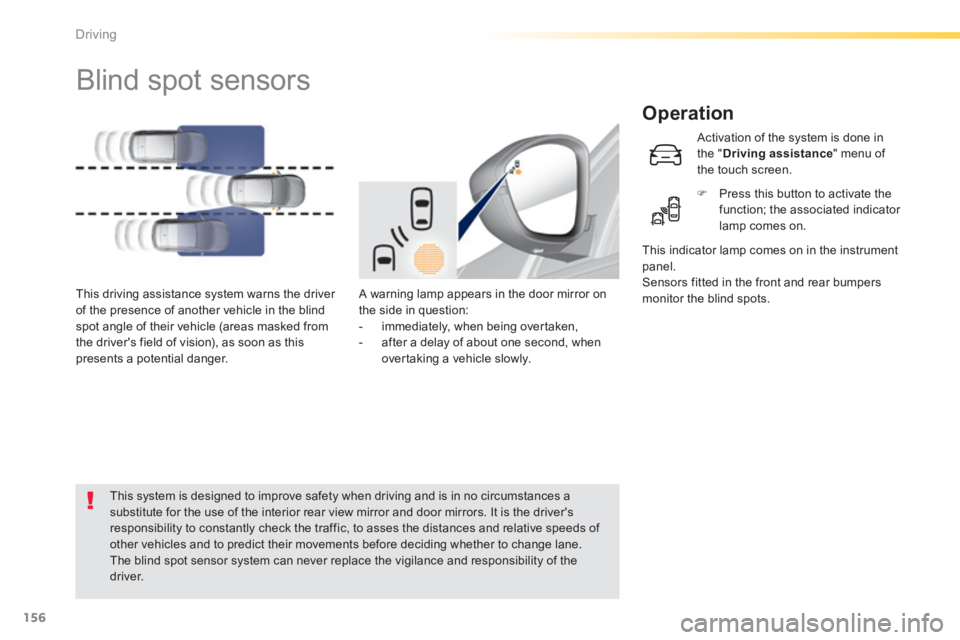
A warning lamp appears in the door mirror on the side in question: - immediately, when being overtaken, - after a delay of about one second, when overtaking a vehicle slowly.
This driving assistance system warns the driver of the presence of another vehicle in the blind spot angle of their vehicle (areas masked from the driver's field of vision), as soon as this presents a potential danger.
This indicator lamp comes on in the instrument panel. Sensors fitted in the front and rear bumpers monitor the blind spots.
This system is designed to improve safety when driving and is in no circumstances a substitute for the use of the interior rear view mirror and door mirrors. It is the driver's responsibility to constantly check the traffic, to asses the distances and relative speeds of other vehicles and to predict their movements before deciding whether to change lane. The blind spot sensor system can never replace the vigilance and responsibility of the driver.
Activation of the system is done in the " Driving assistance " menu of the touch screen.
Press this button to activate the function; the associated indicator lamp comes on.
Page 161 of 400
159
4
Driving
308_EN_CHAP04_CONDUITE_ED02-2013
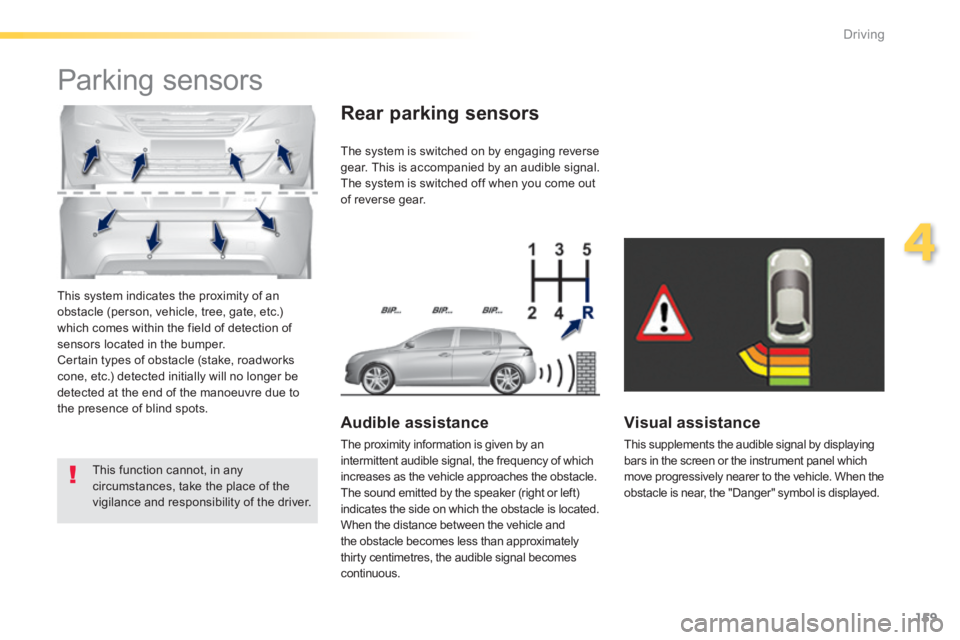
This system indicates the proximity of an obstacle (person, vehicle, tree, gate, etc.) which comes within the field of detection of sensors located in the bumper. Certain types of obstacle (stake, roadworks cone, etc.) detected initially will no longer be detected at the end of the manoeuvre due to the presence of blind spots.
Parking sensors
This function cannot, in any circumstances, take the place of the vigilance and responsibility of the driver.
The system is switched on by engaging reverse gear. This is accompanied by an audible signal. The system is switched off when you come out of reverse gear.
Audible assistance
The proximity information is given by an intermittent audible signal, the frequency of which increases as the vehicle approaches the obstacle. The sound emitted by the speaker (right or left) indicates the side on which the obstacle is located. When the distance between the vehicle and the obstacle becomes less than approximately thirty centimetres, the audible signal becomes continuous.
Rear parking sensors
Visual assistance
This supplements the audible signal by displaying bars in the screen or the instrument panel which move progressively nearer to the vehicle. When the obstacle is near, the "Danger" symbol is displayed.