2014 PEUGEOT 3008 warning
[x] Cancel search: warningPage 253 of 389
2ABC3DEF5JKL4GHI6MNO8TUV7PQR S9WXYZ0*#
1RADIO MEDIA NA
V TRAFFIC
SETUPADDR
BOOK
2ABC3DEF5JKL4GHI6MNO8TUV7PQR S9WXYZ0*#
1RADIO MEDIA NA
V TRAFFIC
SETUPADDR
BOOK
EMERGENCY OR ASSISTANCE CALL USING
PEUGEOT Connect Media Navigation (NG4 3D)
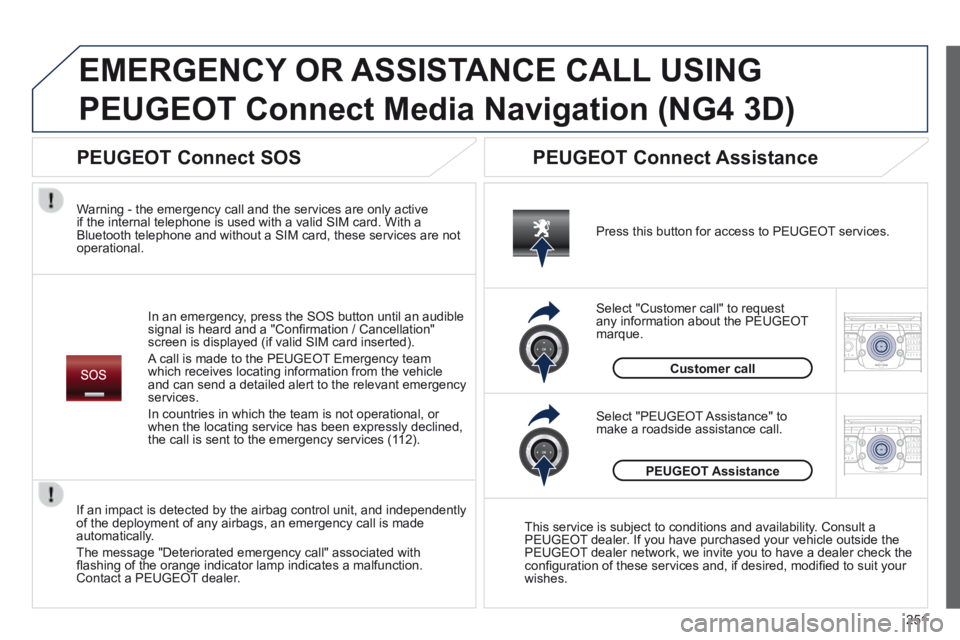
In an emergency, press the SOS button until an audible signal is heard and a "Confi rmation / Cancellation" screen is displayed (if valid SIM card inserted).
A call is made to the PEUGEOT Emergency team which receives locating information from the vehicle and can send a detailed alert to the relevant emergency services.
In countries in which the team is not operational, or when the locating service has been expressly declined, the call is sent to the emergency services (112).
Warning - the emergency call and the services are only active if the internal telephone is used with a valid SIM card. With a Bluetooth telephone and without a SIM card, these services are not operational.
Press this button for access to PEUGEOT services.
Customer call
Select "Customer call" to request any information about the PEUGEOT marque.
Select "PEUGEOT Assistance" to make a roadside assistance call.
PEUGEOT Assistance
This service is subject to conditions and availability. Consult a PEUGEOT dealer. If you have purchased your vehicle outside the PEUGEOT dealer network, we invite you to have a dealer check the confi guration of these services and, if desired, modifi ed to suit your wishes.
If an impact is detected by the airbag control unit, and independently of the deployment of any airbags, an emergency call is made automatically.
The message "Deteriorated emergency call" associated with fl ashing of the orange indicator lamp indicates a malfunction. Contact a PEUGEOT dealer.
PEUGEOT Connect SOS PEUGEOT Connect Assistance
251
Page 275 of 389
273
05
TRAFFIC
2ABC3DEF5JKL4GHI6MNO8TUV7PQR S9WXYZ0*#
1RADIO MEDIA NA
V TRAFFIC
SETUPADDR
BOOK
2ABC3DEF5JKL4GHI6MNO8TUV7PQR S9WXYZ0*#
1RADIO MEDIA NA
V TRAFFIC
SETUPADDR
BOOK
2ABC3DEF5JKL4GHI6MNO8TUV7PQR S9WXYZ0*#
1RADIO MEDIA NA
V TRAFFIC
SETUPADDR
BOOK
2ABC3DEF5JKL4GHI6MNO8TUV7PQR S9WXYZ0*#
1RADIO MEDIA NA
V TRAFFIC
SETUPADDR
BOOK
2ABC3DEF5JKL4GHI6MNO8TUV7PQR S9WXYZ0*#
1RADIO MEDIA NA
V TRAFFIC
SETUPADDR
BOOK
TRAFFIC INFORMATION
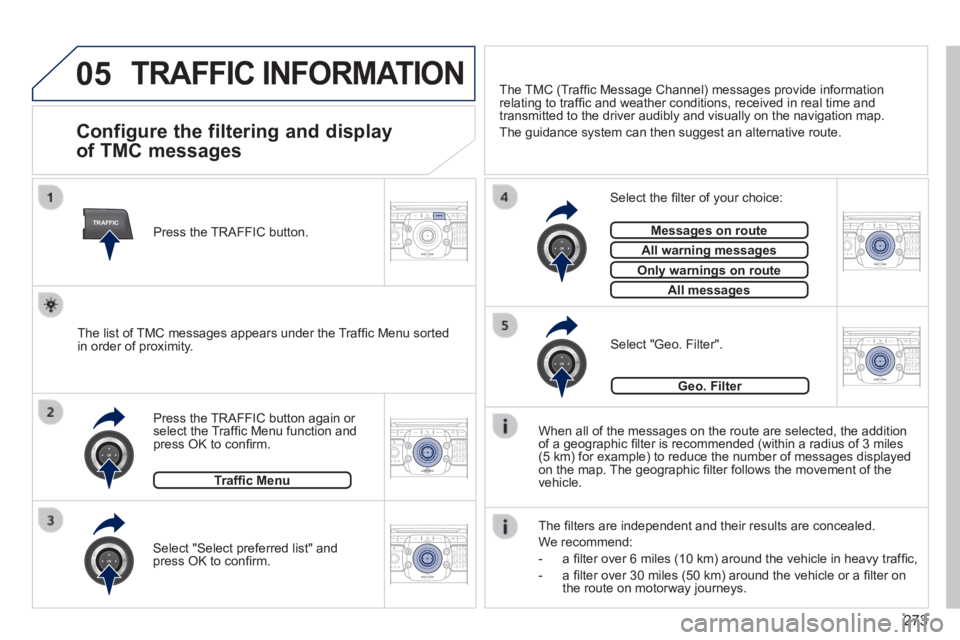
Configure the filtering and display
of TMC messages
When all of the messages on the route are selected, the addition of a geographic fi lter is recommended (within a radius of 3 miles (5 km) for example) to reduce the number of messages displayed on the map. The geographic fi lter follows the movement of the vehicle.
The fi lters are independent and their results are concealed.
We recommend:
- a fi lter over 6 miles (10 km) around the vehicle in heavy traffi c,
- a fi lter over 30 miles (50 km) around the vehicle or a fi lter on the route on motorway journeys.
Press the TRAFFIC button again or select the Traffi c Menu function and press OK to confi rm.
Select "Geo. Filter". The list of TMC messages appears under the Traffi c Menu sorted in order of proximity.
Select the fi lter of your choice:
Messages on routeMessages on route
All warning messagesAll warning messages
Only warnings on routeOnly warnings on route
All messagesAll messages
Traffi c Menu
Select "Select preferred list" and press OK to confi rm.
The TMC (Traffi c Message Channel) messages provide information relating to traffi c and weather conditions, received in real time and transmitted to the driver audibly and visually on the navigation map.
The guidance system can then suggest an alternative route.
Press the TRAFFIC button.
Geo. Filter
Page 280 of 389
278
07
MEDIA
2ABC3DEF5JKL4GHI6MNO8TU V7PQRS9WXYZ0*#
1RADIOM EDIA NA
V ESC TRAFFIC
SETUPADDR
BOOK
2AB C3DEF5JKL4GHI6MNO8TUV7PQR S9WXYZ0*#
1RADIO MEDIA NA
V TRAFFIC
SETUPADDR
BOOK
2ABC3DEF5JKL4GHI6MNO8TUV7PQR S9WXYZ0*#
1RADIO MEDIA NA
V TRAFFIC
SETUPADDR
BOOK
2ABC3DEF5JKL4GHI6MNO8TUV7PQR S9WXYZ0*#
1RADIO MEDIA NA
V TRAFFIC
SETUPADDR
BOOK
2ABC3DEF5JKL4GHI6MNO8TUV7PQR S9WXYZ0*#
1RADIO MEDIA NA
V TRAFFIC
SETUPADDR
BOOK
2ABC3DEF5JKL4GHI6MNO8TUV7PQR S9WXYZ0*#
1RADIO MEDIA NA
V TRAFFIC
SETUPADDR
BOOK
2ABC3DEF5JKL4GHI6MNO8TUV7PQR S9WXYZ0*#
1RADIO MEDIA NA
V TRAFFIC
SETUPADDR
BOOK
2ABC3DEF5JKL4GHI6MNO8TUV7PQR S9WXYZ0*#
1RADIO MEDIA NA
V TRAFFIC
SETUPADDR
BOOK
RADIO NA
V TRAFFICMEDIA
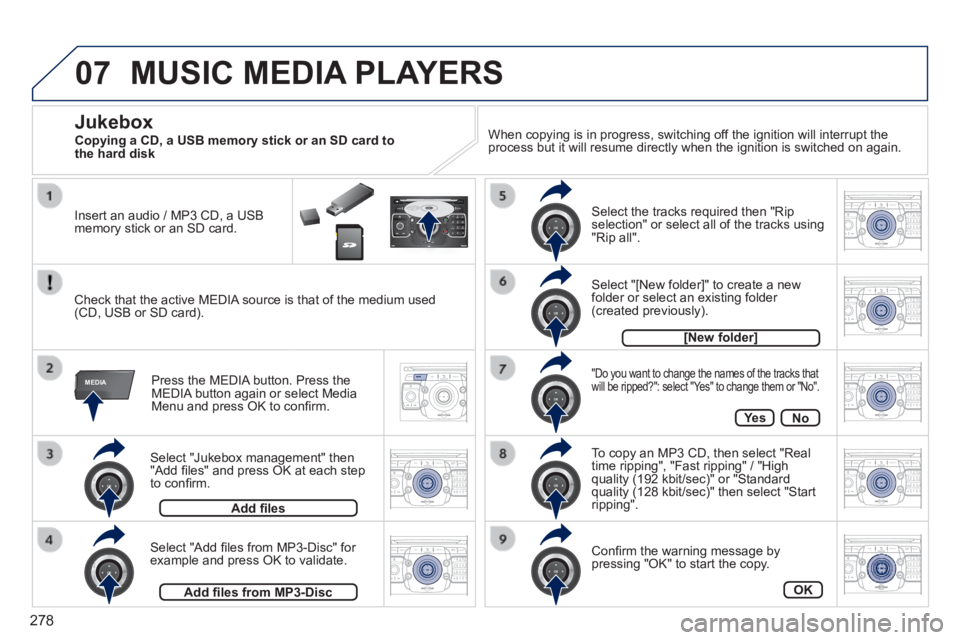
Select "Jukebox management" then "Add fi les" and press OK at each step to confi rm.
Press the MEDIA button. Press the MEDIA button again or select Media Menu and press OK to confi rm.
Insert an audio / MP3 CD, a USB memory stick or an SD card.
Jukebox
Add fi les
Check that the active MEDIA source is that of the medium used (CD, USB or SD card).
Select "Add fi les from MP3-Disc" for example and press OK to validate.
Select the tracks required then "Rip selection" or select all of the tracks using "Rip all".
Select "[New folder]" to create a new folder or select an existing folder (created previously).
Add fi les from MP3-Disc
[New folder]
"Do you want to change the names of the tracks that will be ripped?": select "Yes" to change them or "No".
To copy an MP3 CD, then select "Real time ripping", "Fast ripping" / "High quality (192 kbit/sec)" or "Standard quality (128 kbit/sec)" then select "Start ripping".
Confi rm the warning message by pressing "OK" to start the copy.
OK
Ye sNo
When copying is in progress, switching off the ignition will interrupt the process but it will resume directly when the ignition is switched on aga\
in.
MUSIC MEDIA PLAYERS
Copying a CD, a USB memory stick or an SD card to the hard disk
Page 288 of 389
286
09
MEDIA
TRAFFIC
SCREEN MENU MAP(S)
MAIN FUNCTION
OPTION A
OPTION B...
option A1
option A2
1
2
3
2
3
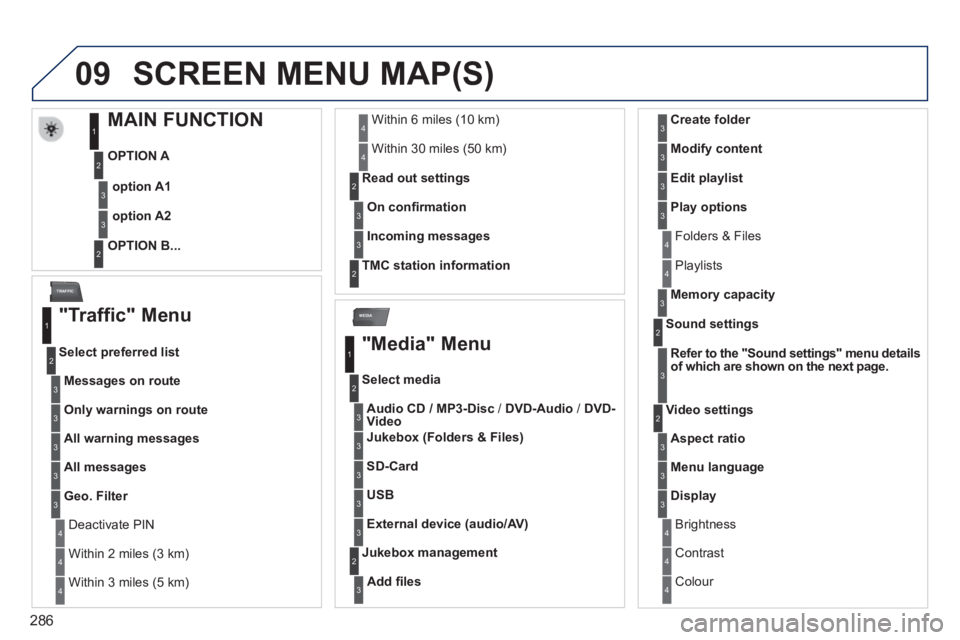
"Traffic" Menu
Messages on route
Select preferred list
1
2
3
Deactivate PIN 4
Only warnings on route3
All warning messages3
All messages3
Geo. Filter3
Within 2 miles (3 km) 4
Within 3 miles (5 km) 4
Within 6 miles (10 km) 4
Within 30 miles (50 km) 4
On confi rmation
Read out settings 2
3
Incoming messages3
TMC station information 2
"Media" Menu
Audio CD / MP3-Disc / DVD-Audio / DVD-Video
Select media
1
2
3
Jukebox (Folders & Files)3
SD-Card3
USB3
External device (audio/AV)3
Add fi les
Jukebox management 2
3
Folders & Files 4
Create folder3
Modify content3
Edit playlist3
Play options3
Playlists 4
Memory capacity3
Refer to the "Sound settings" menu details of which are shown on the next page.
Sound settings 2
3
Aspect ratio
Video settings 2
3
Menu language3
Display3
Brightness 4
Contrast 4
Colour 4
Page 295 of 389
293
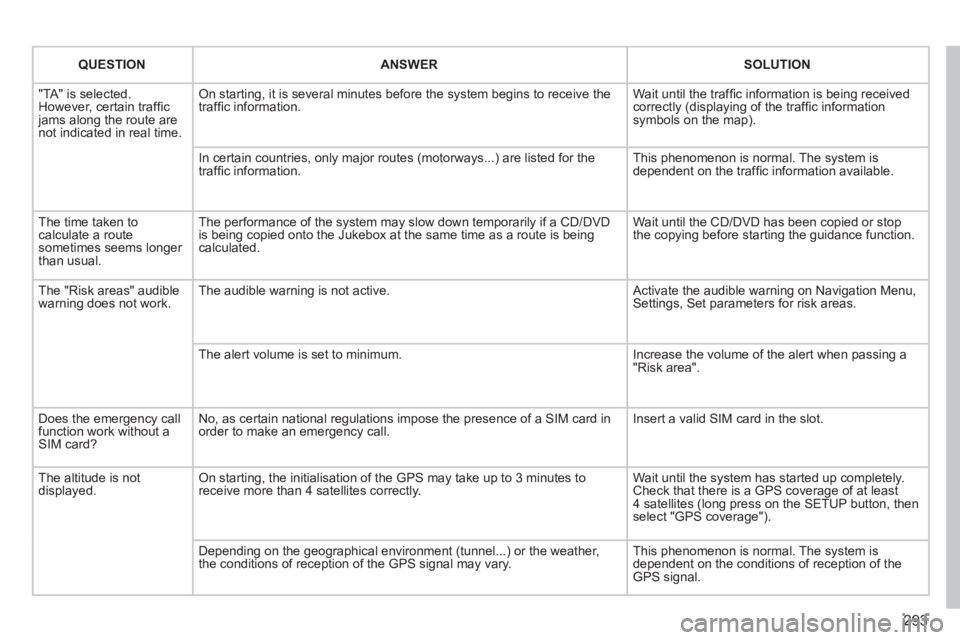
QUESTIONANSWERSOLUTION
"TA" is selected. However, certain traffi c jams along the route are not indicated in real time.
On starting, it is several minutes before the system begins to receive t\
he traffi c information. Wait until the traffi c information is being received correctly (displaying of the traffi c information symbols on the map).
In certain countries, only major routes (motorways...) are listed for \
the traffi c information. This phenomenon is normal. The system is dependent on the traffi c information available.
The time taken to calculate a route sometimes seems longer than usual.
The performance of the system may slow down temporarily if a CD/DVD is being copied onto the Jukebox at the same time as a route is being calculated.
Wait until the CD/DVD has been copied or stop the copying before starting the guidance function.
The "Risk areas" audible warning does not work. The audible warning is not active. Activate the audible warning on Navigation Menu, Settings, Set parameters for risk areas.
The alert volume is set to minimum. Increase the volume of the alert when passing a "Risk area".
Does the emergency call function work without a SIM card?
No, as certain national regulations impose the presence of a SIM card in\
order to make an emergency call. Insert a valid SIM card in the slot.
The altitude is not displayed. On starting, the initialisation of the GPS may take up to 3 minutes to receive more than 4 satellites correctly. Wait until the system has started up completely. Check that there is a GPS coverage of at least 4 satellites (long press on the SETUP button, then select "GPS coverage").
Depending on the geographical environment (tunnel...) or the weather, the conditions of reception of the GPS signal may vary. This phenomenon is normal. The system is dependent on the conditions of reception of the GPS signal.
Page 311 of 389
04
309
NAVIGATION - GUIDANCE
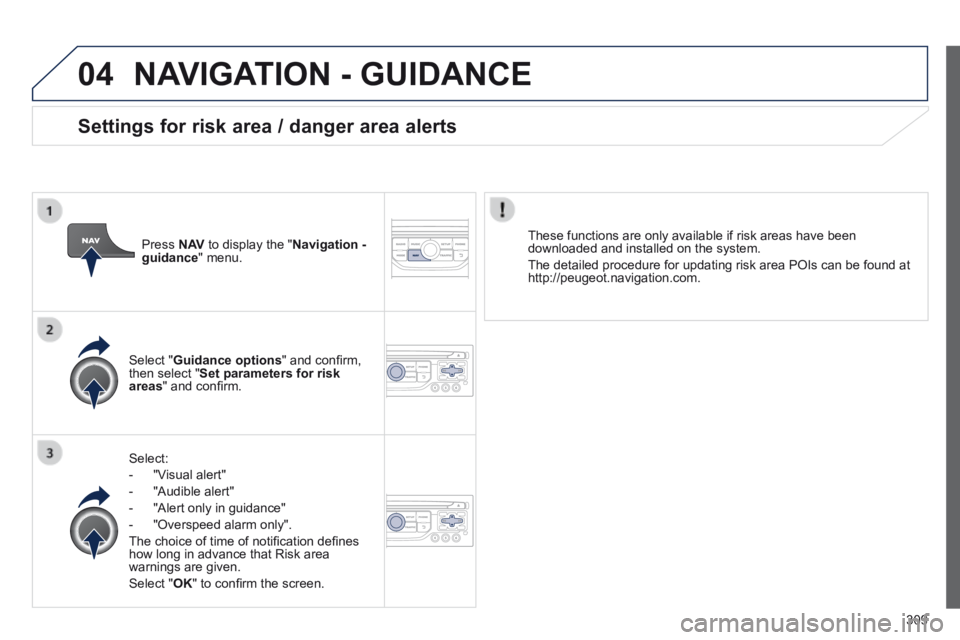
Select:
- "Visual alert"
- "Audible alert"
- "Alert only in guidance"
- "Overspeed alarm only".
The choice of time of notifi cation defi nes how long in advance that Risk area warnings are given.
Select " OK " to confi rm the screen.
Select " Guidance options " and confi rm, then select " Set parameters for risk areas " and confi rm.
These functions are only available if risk areas have been downloaded and installed on the system.
The detailed procedure for updating risk area POIs can be found at http://peugeot.navigation.com.
Press N AV to display the " Navigation - guidance " menu.
Settings for risk area / danger area alerts
Page 346 of 389

344
The following table groups together the answers to the most frequently a\
sked questions concerning your audio system.
FREQUENTLY ASKED QUESTIONS
QUESTIONANSWERSOLUTION
The route calculation is not successful. The guidance criteria may confl ict with the current location (exclusion of toll roads on a toll motorway). Check the guidance criteria on the Navigation Menu, "Guidance options"\ "Defi ne calculation criteria".
I am unable to enter my post code. The system only accepts post codes of up to 5 characters.
The POIs do not appear. The POIs have not been selected. Select the POIs in the list of POIs.
The risk areas audible warning does not work. The audible warning is not active. Activate audible warnings in the Guidance options menu, "Navigation - guidance", "Set parameters for risk areas".
The system does not suggest a detour around an incident on the route.
The guidance criteria do not take account of TMC messages. Select the "Traffi c info" function in the list of guidance criteria.
I receive a Risk area alert which is not on my route. Other than guidance, the system announces all Risk areas positioned in a\
cone located in front of the vehicle. It may provide an alert for a Risk\
area located on nearby or parallel roads.
Zoom in on the map to view the exact position of the Risk area. Select "On the route" to no longer receive alerts other than guidance or to reduce the time for the announcement.
Page 374 of 389
Alphabetical index
372
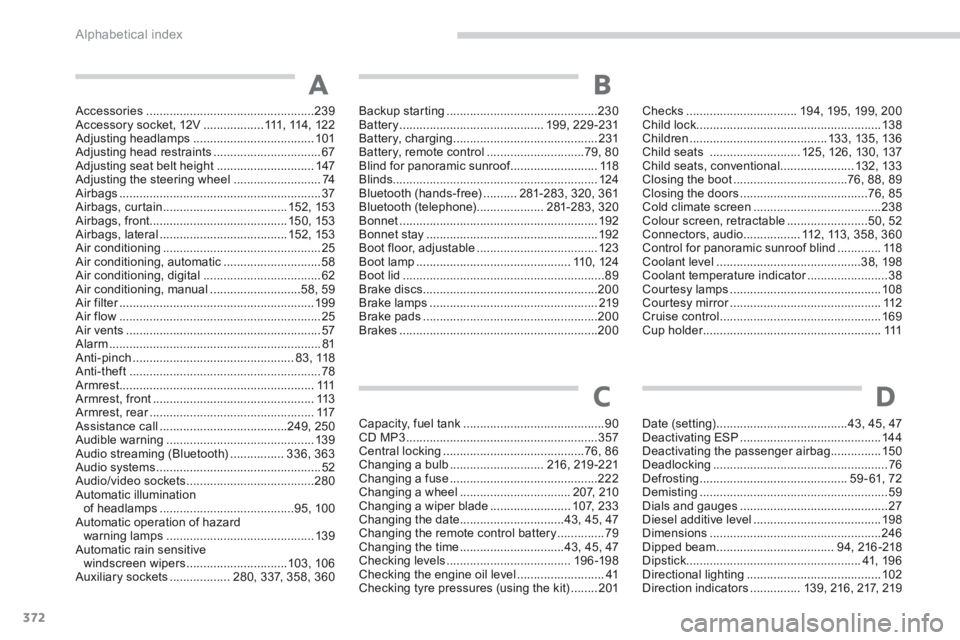
Accessories ..................................................239Accessory socket, 12V ..................111, 114 , 12 2Adjusting headlamps ....................................101Adjusting head restraints ................................67Adjusting seat belt height .............................147Adjusting the steering wheel ..........................74Airbags ............................................................37Airbags, curtain .....................................152, 153Airbags, front.........................................150, 153Airbags, lateral ......................................152, 153Air conditioning ...............................................25Air conditioning, automatic .............................58Air conditioning, digital ...................................62Air conditioning, manual ...........................58, 59Air filter ..........................................................Air filter ..........................................................Air filter19 9Air flow ............................................................25Air vents ..........................................................57Alarm ...............................................................81Anti-pinch ................................................8 3 , 118Anti-theft .........................................................78Armrest ..........................................................111Armrest, front ................................................113Armrest, rear .................................................Armrest, rear .................................................Armrest, rear117Assistance call ......................................249, 250Audible warning ............................................13 9Audio streaming (Bluetooth) ................336, 363Audio systems .................................................52Audio/video sockets ......................................280Automatic illumination of headlamps ........................................95, 100Automatic operation of hazard warning lamps ............................................13 9Automatic rain sensitive windscreen wipers ..............................103, 10 6Auxiliary sockets ..................280, 337, 358, 360
Backup starting .............................................230Battery ...........................................199, 229 -231Battery, charging ...........................................231Battery, remote control .............................79, 80Blind for panoramic sunroof ..........................Blind for panoramic sunroof ..........................Blind for panoramic sunroof118Blinds.............................................................124Bluetooth (hands-free) ..........281-283, 320, 361Bluetooth (telephone) ....................281-283, 320Bonnet ...........................................................192Bonnet stay ...................................................192Boot floor, adjustable ....................................123Boot lamp ..............................................11 0 , 12 4Boot lid ............................................................89Brake discs ....................................................200Brake lamps ..................................................219Brake pads ....................................................200Brakes ...........................................................200
A
Checks .................................194, 195, 199, 200Child lock .......................................................13 8Children .........................................13 3, 13 5, 13 6Child seats ...........................125, 126, 130, 137Child seats, conventional ......................132, 13 3Closing the boot ..................................76, 88, 89Closing the doors ......................................76, 85Cold climate screen ......................................238Colour screen, retractable ........................50, 52Connectors, audio .................112, 113, 358, 360Control for panoramic sunroof blind .............118Coolant level ...........................................38, 198Coolant temperature indicator ........................Coolant temperature indicator ........................Coolant temperature indicator38Courtesy lamps .............................................108Courtesy mirror .............................................Courtesy mirror .............................................Courtesy mirror112Cruise control ................................................169Cup holder .....................................................Cup holder .....................................................Cup holder111
Capacity, fuel tank ..........................................90CD MP3 .........................................................357Central locking ..........................................76, 86Changing a bulb ............................216, 219 -221Changing a fuse ............................................222Changing a wheel .................................2 0 7, 2 1 0Changing a wiper blade ........................1 0 7, 2 3 3Changing the date ...............................43, 45, 47Changing the remote control battery ..............79Changing the time ...............................43, 45, 47Checking levels .....................................19 6 -198Checking the engine oil level ..........................41Checking tyre pressures (using the kit) ........201
Date (setting) .......................................43, 45, 47Deactivating ESP ..........................................14 4Deactivating the passenger airbag ...............150Deadlocking ....................................................76Defrosting ............................................59 - 61, 72Demisting ........................................................59Dials and gauges ............................................27Diesel additive level ......................................198Dimensions ...................................................246Dipped beam ...................................94, 216 -218Dipstick ....................................................41, 196Directional lighting ........................................102Direction indicators ...............139, 216, 217, 219
CD
B