Page 2 of 256
On-line handbook
Select one of the following means of access to view your
handbook on-line...
Referring to the handbook on-line also gives you access to the latest information available, easily identified by the bookmark, associated with
this symbol:If the "My
Peuge
Ot" f
unction is not available on the Peuge
Ot
p
ublic website for your country, you can find your handbook at the
following address:
http://public.servicebox.peugeot.com/ddb/
the language,
the vehicle, its body style,
the print edition of your handbook appropriate for the date of registration of
your vehicle.
Select:
Find your handbook on the Peuge
Ot
w
ebsite, under
"My Peuge
Ot". S
can this code for direct access to your handbook.
Page 3 of 256
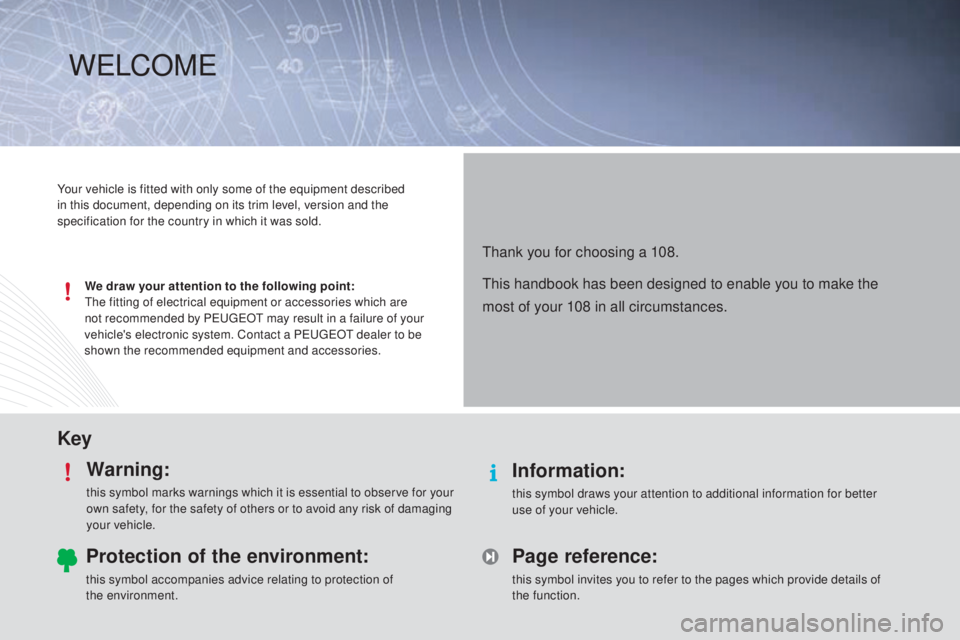
KeyWarning:
this symbol marks warnings which it is essential to observe for your
own safety, for the safety of others or to avoid any risk of damaging
your vehicle.
Information:
this symbol draws your attention to additional information for better
use of your vehicle.
Protection of the environment:
this symbol accompanies advice relating to protection of
the environment.
Page reference:
this symbol invites you to refer to the pages which provide details of
the function.
Your vehicle is fitted with only some of the equipment described
in this document, depending on its trim level, version and the
specification for the country in which it was sold.
We draw your attention to the following point:
th
e fitting of electrical equipment or accessories which are
not recommended by P
e
uge
Ot
may result in a failure of your
vehicle's electronic system. Contact a P
e
uge
Ot
dealer to be
shown the recommended equipment and accessories.
thank you for choosing a 108.
th
is handbook has been designed to enable you to make the
most of your 108 in all circumstances.
WeLCOM e
Page 5 of 256
.
.
B3_en_Chap00a_sommaire_ed01-2014
Direction indicators 102
Horn
10
2
Hazard warning lamps
1
03
Under-inflation detection
1
03
e
SC system
1
07
Seat belts
1
10
Airbags
113
Safety
Child seats 1 18
Deactivating the passenger's front airbag
1
21
ISOFIX child seats
1
27
Child lock
1
33
Child safety Checks
Fuel tank 1
34
te
mporary puncture repair kit
1
36
Changing a wheel
1
41
Snow chains
1
46
Changing a bulb
1
47
Changing a fuse
1
52
12 V battery
1
61
el
ectrical energy economy mode
1
64
Changing a wiper blade
1
64
to
wing the vehicle
1
65
Fitting roof bars
1
66
Accessories
167
Practical informationte chnical data
7-inch touch screen 181
Radio
2
21
Audio equipment and telematics
Visual search
Alphabetical index
B o n n et 170
Petrol engines
1
71
Checking levels
1
72
C h e c ks
175
en
gines
177
We i g ht s
178
Dimensions
179
Identification markings
1
80
Contents
Page 15 of 256
13
Indicator and warning lamps
Certain warning lamps may come on in
one of two modes: fixed (continuous) or
flashing.
Only by relating the type of illumination
to the operation of the vehicle can it
be determined whether the situation is
normal or a fault has occurred.
Refer to the tables in the following
pages for more information.
Visual indicators informing the driver that a system is in operation or is switched off (indicator lamp) or has a fault (warning lamp).
When the ignition is switched on
Certain warning lamps come on for a few
seconds in the instrument panel when the
vehicle's ignition is switched on.
When the engine is star ted, these same
warning lamps should go off.
If they remain on, before moving off, refer to the
information on the warning lamp concerned.
Associated warnings
the switching on of certain warning lamps may
be accompanied by an audible signal.
th
e warning lamps may come on continuously
(fixed) or flash.
1
Monitoring
Page 16 of 256

14
Operation indicator lamps
Left-hand direction
indicatorflashing with buzzer.th e lighting stalk is pushed down.
Right-hand
direction indicator flashing with buzzer.
th
e lighting stalk is pushed up.
Sidelamps or
dipped beam
headlamps fixed.
th
e sidelamps or dipped beam
headlamps are on.
Main beam
headlamps fixed.
th
e lighting stalk is pulled towards
you. Pull the stalk to return to dipped beam headlamps.
Warning / indicator lamp
StateCause Action / Observations
Illumination of one of the following indicator lamps confirms that the corresponding system has been switched on.
It may be accompanied by an audible signal.
Rear foglamp fixed.
th
e rear foglamp is switched on
using the ring on the lighting control
stalk.
tu
rn the ring on the lighting control stalk to the rear to
switch off the rear foglamp.
Front foglamps
fixed.
th
e front foglamps (if your vehicle
has them) are switched on.
tu
rn the ring on the stalk rear wards twice to switch off
the front foglamps.
Please note : if front foglamps have been fitted as an
accessory, the control may be different.
Monitoring
Page 19 of 256
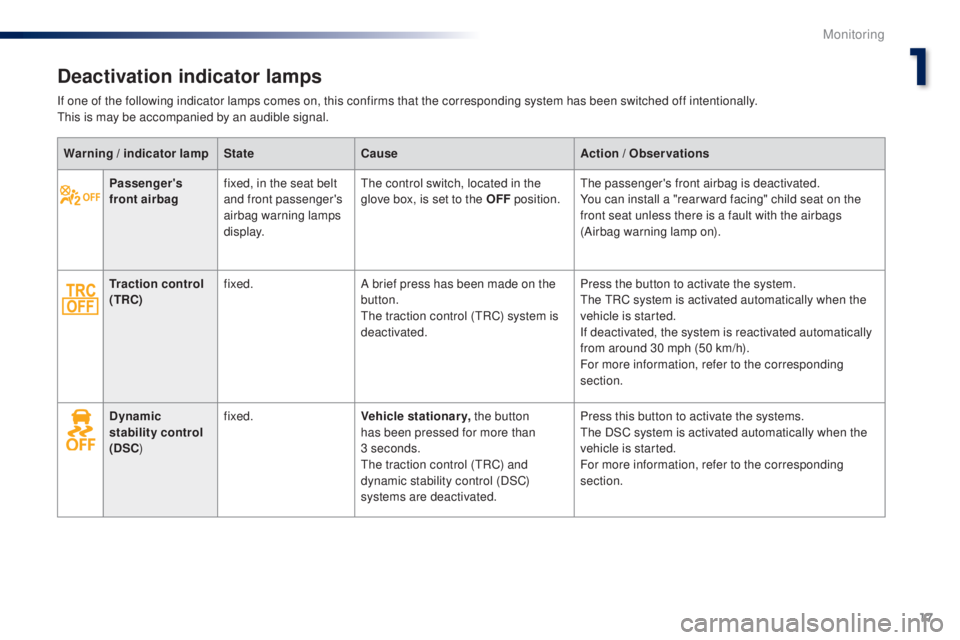
17
Passenger's
front airbagfixed, in the seat belt
and front passenger's
airbag warning lamps
display.th
e control switch, located in the
glove box, is set to the OFF position.the passenger's front airbag is deactivated.
You can install a "rear ward facing" child seat on the
front seat unless there is a fault with the airbags
(Airbag warning lamp on).
Traction control
(TRC) fixed.
A brief press has been made on the
button.
th
e traction control (
tR
C) system is
deactivated. Press the button to activate the system.
th
e t
R
C system is activated automatically when the
vehicle is started.
If deactivated, the system is reactivated automatically
from around 30 mph (50 km/h).
For more information, refer to the corresponding
section.
Dynamic
stability control
(DSC ) fixed.
Vehicle stationary, the button
has been pressed for more than
3
seconds.
th
e traction control (
tR
C) and
dynamic stability control (DSC)
systems are deactivated. Press this button to activate the systems.
th
e DSC system is activated automatically when the
vehicle is started.
For more information, refer to the corresponding
section.
Warning / indicator lamp
StateCause Action / Observations
Deactivation indicator lamps
If one of the following indicator lamps comes on, this confirms that the corresponding system has been switched off intentionally.th
is is may be accompanied by an audible signal.
1
Monitoring
Page 21 of 256

19
Brakingfixed.th e braking system fluid level has
dropped significantly.to p up with brake fluid recommended by Pe ugeOt.
I f the problem persists, have the system checked by a
P
e
uge
Ot
dealer or a qualified workshop.
th
e braking system has a fault. Stop as soon as it is safe to do so.Park, switch off the ignition and contact a P
e
uge
Ot
dealer or a qualified workshop.
Warning / indicator lamp
StateCause Action / Observations
Warning lamps
STOPflashing, associated
with another warning
lamp. It is associated with the engine
oil pressure or the engine coolant
temperature. Stop as soon as it is safe to do so.
Park, switch off the ignition and call a Pe
ugeOt
dealer or qualified workshop.
When the engine is running or the vehicle is being driven, illumination of one of the following warning lamps indicates a fault which requires action on
the part of the driver.
Any fault resulting in the illumination of a warning lamp must be investigated further.
If you encounter any problems, do not hesitate to contact a P
e
uge
Ot
dealer or a qualified workshop.
Engine oil
pressure fixed, associated with
the S
tO
P warning
lamp.
th
e engine oil pressure is too low. Stop as soon it is safe to do so.Park, switch off the ignition and contact a P
e
uge
Ot
dealer or a qualified workshop.
1
Monitoring
Page 29 of 256

27
With the touch screen
From the Menu page in the touch screen :
F Sel ect the " Vehicle information " tab.
th
e " Trip information " window is displayed
with the following information:
-
"Average speed ",
-
"Elapsed time ",
-
"Range ",
-
t
he current fuel consumption, presented in
graphical form.
th
e " Erase " button resets the fuel consumption
data in the touch screen and the instrument
panel. If your vehicle has a touch screen, you can
view information on the current journey.
Trip computer, a few definitions
Range
(miles or km)th e distance which can still be travelled with
the fuel remaining in the tank (related to the
average fuel consumption over the last few
miles (kilometres) travelled).
th
is value may vary following a change
in the style of driving or the relief,
resulting in a significant change in the
current fuel consumption.
When the fuel level is low, the message "Lo
F
u
e
L
" is displayed.
If only a small amount of fuel is added, the
range may not be recalculated.
Current fuel consumption
(mpg or l/100 km or km/l)
Calculated over the last few seconds.
Stop & Start time counter
(minutes / seconds or hours / minutes)
If your vehicle is fitted with Stop & Start, a time
counter calculates the time spent in S
tO
P
mode during a journey.
It resets to zero every time the ignition is
switched on.
Average fuel consumption
(mpg or l/100 km or km/l)
Calculated since the last trip computer reset.
Average speed
(mph or km/h)
Calculated since the last trip computer reset.
1
Monitoring


