2014 PEUGEOT 108 Wing
[x] Cancel search: WingPage 221 of 256

FREQUENTLY ASKED QUESTIONS
219
QUESTION
ANSWER SOLUTION
USB, portable player
t
here is a long waiting
period following the
connection of a
u
SB
memory stick. When a new medium is inserted, the system reads a certain amount of
data (directory, title, artist, etc.).
t
his may take from a few seconds to a
few minutes.
t
his phenomenon is normal.
Some characters in the
media information are not
displayed correctly while
playing.
t
he audio system does not display some types of characters.
u
se standard characters to name tracks and
folders.
Playing of streaming files
does not start.
t
he peripheral device connected does not support automatic play. Start the playback from the device.
t
he names of tracks and
the track length are not
displayed on the screen
when streaming audio. The Bluetooth profile does not allow the transfer of this information.
Radio
t
he quality of reception
of the radio station
listened to gradually
deteriorates or the stored
stations do not function
(no sound, 87.5
Mhz is
displayed...).
t
he vehicle is too far from the transmitter used by the station listened \
to or there is no transmitter in the geographical area through which the\
vehicle is travelling. Activate the "RDS" function to enable the system
to check whether there is a more powerful
transmitter in the geographical area.
t
he environment (hills, buildings, tunnels, basement car parks...) bloc\
k
reception, including in RDS mode.
t
his phenomenon is normal and does not indicate
a fault with the audio system.
t
he aerial is absent or has been damaged (for example when going
through a car wash or into an underground car park). Have the aerial checked by a P
euge
O
t
dealer
.
B3_en_Chap12a_Autoradio-t
oyota-tactile-1_ed01-2014
Page 223 of 256
MODE
221
RADIO
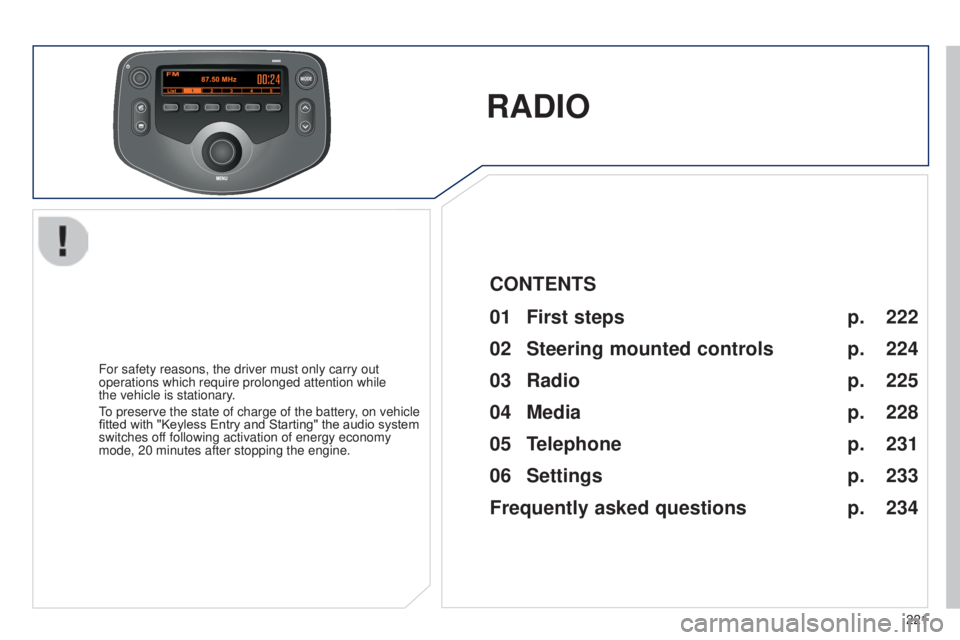
For safety reasons, the driver must only carry out
operations which require prolonged attention while
the vehicle is stationary.
to preserve the state of charge of the battery
, on vehicle
fitted with "Keyless Entry and Starting" the audio system
switches off following activation of energy economy
mode, 20 minutes after stopping the engine.
222
224
225
228
231
233
234
CONTENTS
01
First steps p.
02
Steering mounted
controls p.
05
Telephone p.
04
Media p.
06
Settings p.
p.
03
Radio p.
Frequently asked questions
B3_en_Chap12b_Autoradio-t oyota-2_ed01-2014
Page 236 of 256

the following table groups together the answers to the most frequently as\
ked questions concerning your audio system.
FREQUENTLY ASKED QUESTIONS
234QUESTION
ANSWER SOLUTION
Telephone, Bluetooth
I cannot connect my
Bluetooth telephone.
t
he telephone's Bluetooth function may be switched off or the telephone
may not be visible. -
Check that your telephone's Bluetooth
function is switched on.
-
Check in the telephone settings that it is
"visible to all".
t
he Bluetooth telephone is not compatible with the system.
You can check the compatibility of your telephone
at www.peugeot.co.uk (services).
t
he volume of the
telephone connected
in Bluetooth mode is
inaudible.
t
he volume depends both on the system and on the telephone.
Increase the volume of the audio system, to
maximum if required, and increase the volume of
the telephone if necessary.
The ambient noise level has an influence on the quality of telephone
communication. Reduce the ambient noise level (close the
windows, reduce the booster fan speed, slow
down, ...).
Contacts are not shown
in alphabetical order. Some telephones offer display options. Depending on the settings
chosen, contacts can be transferred in a specific order. Modify the display setting in the telephone
directory.
t
he system does
not receive SMS text
messages.
t
he Bluetooth mode on your telephone does not permit sending SMS text
messages to the system.
Page 237 of 256
FREQUENTLY ASKED QUESTIONS
235
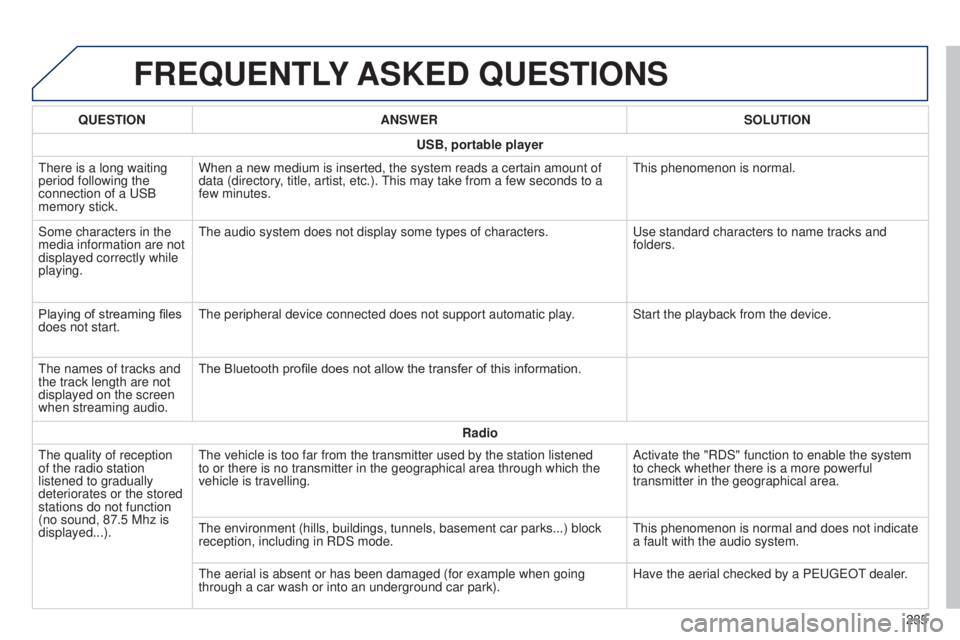
QUESTION
ANSWER SOLUTION
USB, portable player
t
here is a long waiting
period following the
connection of a
u
SB
memory stick. When a new medium is inserted, the system reads a certain amount of
data (directory, title, artist, etc.).
t
his may take from a few seconds to a
few minutes.
t
his phenomenon is normal.
Some characters in the
media information are not
displayed correctly while
playing.
t
he audio system does not display some types of characters.
u
se standard characters to name tracks and
folders.
Playing of streaming files
does not start.
t
he peripheral device connected does not support automatic play. Start the playback from the device.
t
he names of tracks and
the track length are not
displayed on the screen
when streaming audio. The Bluetooth profile does not allow the transfer of this information.
Radio
t
he quality of reception
of the radio station
listened to gradually
deteriorates or the stored
stations do not function
(no sound, 87.5
Mhz is
displayed...).
t
he vehicle is too far from the transmitter used by the station listened \
to or there is no transmitter in the geographical area through which the\
vehicle is travelling. Activate the "RDS" function to enable the system
to check whether there is a more powerful
transmitter in the geographical area.
t
he environment (hills, buildings, tunnels, basement car parks...) bloc\
k
reception, including in RDS mode.
t
his phenomenon is normal and does not indicate
a fault with the audio system.
t
he aerial is absent or has been damaged (for example when going
through a car wash or into an underground car park). Have the aerial checked by a P
euge
O
t
dealer
.
B3_en_Chap12b_Autoradio-t
oyota-2_ed01-2014
Page 246 of 256

244
Parcel shelf, rear .............................................68
P arking brake .......................................... 76, 176
Passenger compartment filter
......................175
Pedal, clutch.................................................. 175
Port,
u
S
B
................................. 6
4, 66, 194, 228
Power steering
................................................ 22
Protecting children
..................112 , 114 , 118 -13 3
Puncture
................................................ 13 6 , 141
Radio
...................................... 19 0 -193, 225 -227
RDS
....................................................... 191, 2 26
Rear demisting
................................................ 63
R
ear foglamp ........................................... 9 5, 150
Rear quarter panel windows
...........................41
Rear screen (demisting)
..................................63
Recharging the battery
................................. 16
3
Remote control
.......................................... 3
1, 37
Removing and fitting a fuse
...................152-16 0
Removing a wheel
........................................ 143
Removing the mat
........................................... 67
Replacing bulbs
..................................... 147-151
Replacing the air filter
...................................175
Replacing the oil filter
................................... 17
5Screen menu
.................186, 188, 198, 214, 216
Screenwash
..................................................10 0
Screenwash fluid level
..................................174
Screen-wash reservoir
.................................174
Seat adjustment
...............................
.........4 7, 4 9
Seat belts
................................. 4
9 , 11 0 -112 , 12 4
Seat, rear, folding backrest
.............................49
Seats, rear
.................................................48, 49
Servicing
...............................
............................8
Setting the clock
.......................................28, 29
Sidelamps
.........................................93, 94, 148
Side repeater
..............................
..................151
Snow chains
.................................................. 14
6
Spare wheel
...............................
...................142
Speed limiter
.............................................86, 89
Speedometer
..................................................24
Starting using another battery
...................... 16
2
Starting the vehicle
.......................71, 72, 74, 77
Steering mounted controls, audio
........185, 224
Steering wheel adjustment
............................. 52
S
topping the vehicle
.....................71, 72, 74, 77
Stop Start
............................................27, 83, 85
Storage
......................................................64, 65
Sun visor
...................................................64, 65
P
R
S
Oil filter .......................................................... 175
Oil level .......................................................... 172
Opening the bonnet
...................................... 17
0
Opening the boot
..............................
........33, 39
Opening the doors
...............................
...........33
Operation indicator lamps
........................13 -23Replacing the passenger
compartment filter ......................................175
Replacing wiper blades .................................16 4
Rev counter
.....................................................10
Reversing camera
...........................................92
Reversing lamps
...........................................150
Roof bars
....................................................... 16
6
Roof, electric fabric
.........................................42
Routine checks
.....................................175 , 176
O
tables of fuses .............................................. 152te
lephone ............................................. 200, 231
te
mperature adjustment
.................... 5
5, 56, 59
te
mporary puncture repair kit
................70, 13 6
thr
ee flashes function
(direction indicators)
...................................102
th
ird brake lamp
........................................... 151
tim
e
.......................................................... 28, 29
to
o l s
.............................................................. 142
to
uch screen ................................................. 181
tou
ch screen (Menus)
..................................182
to
wing another vehicle
................................. 16
5
to
wing eye .............................................. 70, 165
tr
affic information (
tA
)
.................................226
tR
C (traction control)
................ 1
7, 20, 107-109
tr
ip computer
............................................ 26, 27
tr
ip distance recorder
..................................... 24
ty
re pressures
...................................... 140, 18 0
ty
r e s
.................................................................. 8
ty
r e
under-inflation detection
.......22, 103 -10 6, 140
un
der floor storage
......................................... 70
un
der-inflation (detection)
............................ 10
3
unl
ocking
..............................
....................31, 3 3
u
SB
.................................. 64, 66, 194, 195, 228
U
T
Vanity mirror .................................................... 65
V entilation .............................. ............53, 56, 59
Visibility
........................................................... 53
V
Alphabetical index